Grammarly Plagiarism Checker Review (2026): 5 Accuracy Tests, Pricing and Limits
17 min read
Grammarly's plagiarism checker works, but how well depends entirely on what you're checking for. For a clean copy-paste, it's fast and accurate. For anything disguised, the picture changes.
That gap is the whole question. If you already use Grammarly and you're wondering if the Grammarly plagiarism checker is accurate enough to trust before you submit or publish, the honest answer is: it depends.
Below is exactly what it caught, what it missed, and where that leaves you if originality actually matters for your work.
⚡ Quick verdict: Grammarly's plagiarism checker flagged 99% of a directly copied sample. Paraphrased, patchwork, translated, and AI-written text all came back under 10%. It scans 16 billion web pages plus ProQuest academic sources, and the full checker sits behind a paid Grammarly plan.
Grammarly plagiarism checker at a glance
Question | Short answer |
|---|---|
Is it accurate? | Strong on word-for-word copying, weak on reworded text |
Is it free? | No. Paid plans only |
What database? | 16B+ web pages plus ProQuest academic papers |
Does it detect AI writing? | No. Grammarly runs a separate AI detector |
Does it show sources? | Yes, matched passages plus citation data |
Originality score? | Yes |
Does it replace Turnitin? | No |
Last tested | August 2026 |
🙋 Does using Grammarly count as plagiarism?
No. Grammarly checks and improves writing you already wrote. Text isn't flagged as plagiarized simply because Grammarly processed it. The plagiarism checker compares your document against outside sources and returns an originality score, not a record of your own edits.
A second scan on a different engine is the cheapest way to catch what one tool misses. Phrasly's plagiarism checker is one option, and we put it head to head with Grammarly further down.
Is Grammarly Plagiarism Checker Accurate? 🎯
Grammarly's plagiarism checker is accurate on text copied word for word and unreliable on reworded text. In our August tests it flagged 99% of a directly pasted article. The same content survived paraphrasing at 5%, patchwork mixing at 2%, and a round-trip translation at 9%. Accuracy depends entirely on how much the wording changed.
So how accurate is it in practice?
It runs at two speeds. Word-for-word copying gets caught almost every time, with the matching URL attached. Anything reworded lands in single digits, even when every idea came from someone else.
An independent review points the same way. AcademicHelp's evaluation found the checker caught 100% of verbatim text and only 3% of internet-sourced material once that material was reworked.
📌 A clean Grammarly score proves your sentences don't match public sources. It doesn't prove your ideas are original.
The five tests below show exactly where that line sits.
What Database Does Grammarly's Plagiarism Checker Use? 🗄️
The checker cross-references your text against more than 16 billion web pages and academic papers in ProQuest's databases, according to Grammarly's checker page. It then flags matched passages, shows source references, and returns an originality score.
That's a large public net. It is a different net from the one your school casts.
How Grammarly's database differs from your university's system
Grammarly checks public web content plus ProQuest academic sources. It does not check your institution's private repository of past student submissions.
🌐 Public web pages: covered by both Grammarly and school systems
📚 Published academic work: covered through ProQuest
🔒 Your school's own archive of submitted papers: not covered by Grammarly
That last line matters most for students. A classmate's essay from two semesters ago sits in your university's system, and Grammarly can't see it.
How Does Grammarly's Plagiarism Checker Work?
Grammarly's plagiarism checker compares your text against outside sources, then flags passages that may need a citation. When it finds a match, it highlights the passage and shows you a source link so you can review, rewrite, or cite it.
We Tested It: 5 Real Tests, Honest Results 🧪
We ran Grammarly's plagiarism checker through five tests that cover the real scenarios bloggers, students, and SEO professionals actually face. Each test used a different type of content, from straight copy-paste to deliberately disguised text.
All scans were run with neutral formality on a general domain, against a knowledgeable-audience setting. Here's what passed and what slipped straight through.
Method: every scan ran in August 2026 through the Plagiarism Checker agent in Grammarly docs on a paid Grammarly Pro account. Each sample ran once, unedited. Tests 1, 3, and 5 all use the same source, Turnitin's Plagiarism checkers: How to pick the best plagiarism checker by Christine Lee, at 942 words, so only the disguise changes between them.
Test | What We Did | June 2026 | August 2026 | Verdict |
|---|---|---|---|---|
1. Verbatim | Pasted a published article unchanged | 80% | 99% | Pass |
2. Patchwork | Mixed 4 lightly reworded sources | 0% | 2% | Fail |
3. Spun (QuillBot) | Ran the article through QuillBot Standard | 0% | 5% | Fail |
4. AI text (ChatGPT) | Scanned a fully AI-written article | 0% | 1% | Fail |
5. Translation laundering | English to Spanish to English round-trip | 8% | 9% | Fail |
Every score rose between June and August, and the gap between copying and disguising it got wider, not narrower.
Test 1: Verbatim Copy-Paste
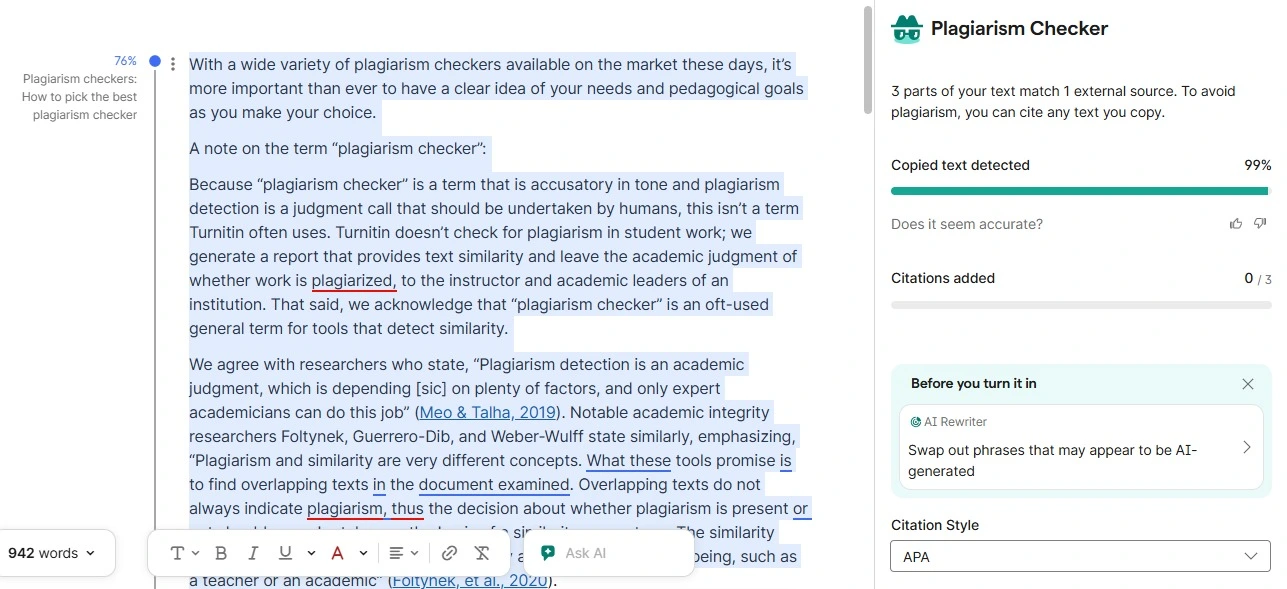
We took around 1,000 words of a published article and pasted them directly into Grammarly with no edits.
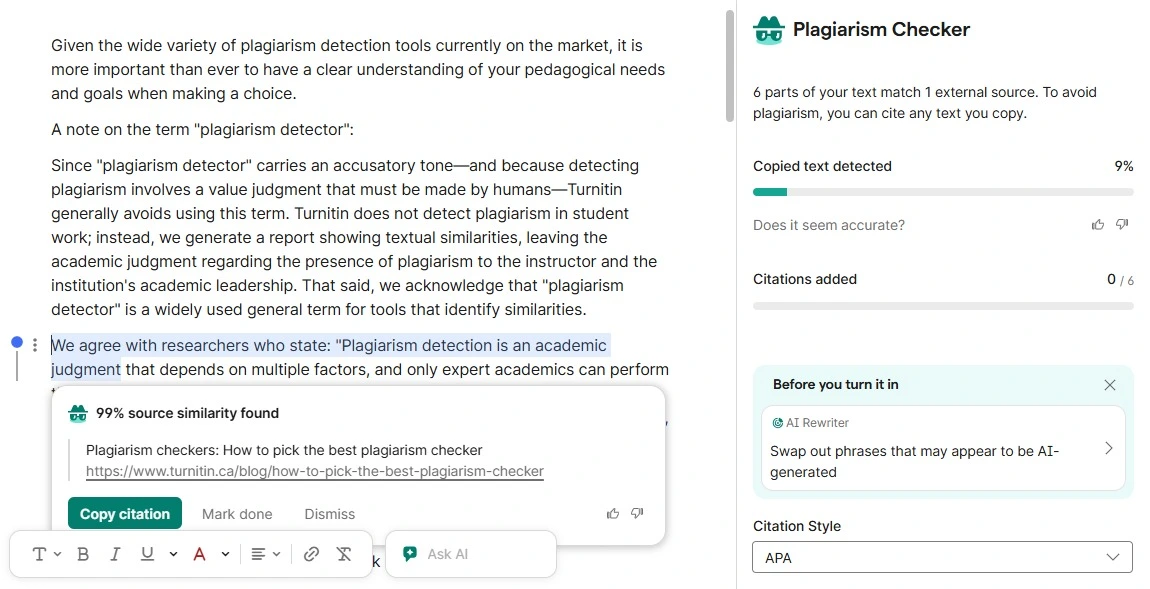
The result: 99% copied text detected, with three matched passages traced back to the original URL.
This is Grammarly at its best. For clean verbatim copying, the checker does its job quickly and accurately. June's run on the same test returned 80%, so detection on straight copying has improved.
Verdict: Pass.
Test 2: Patchwork / Mosaic Plagiarism
The next three tests are where things unravel. We disguised copied content three different ways, and Grammarly missed all three.
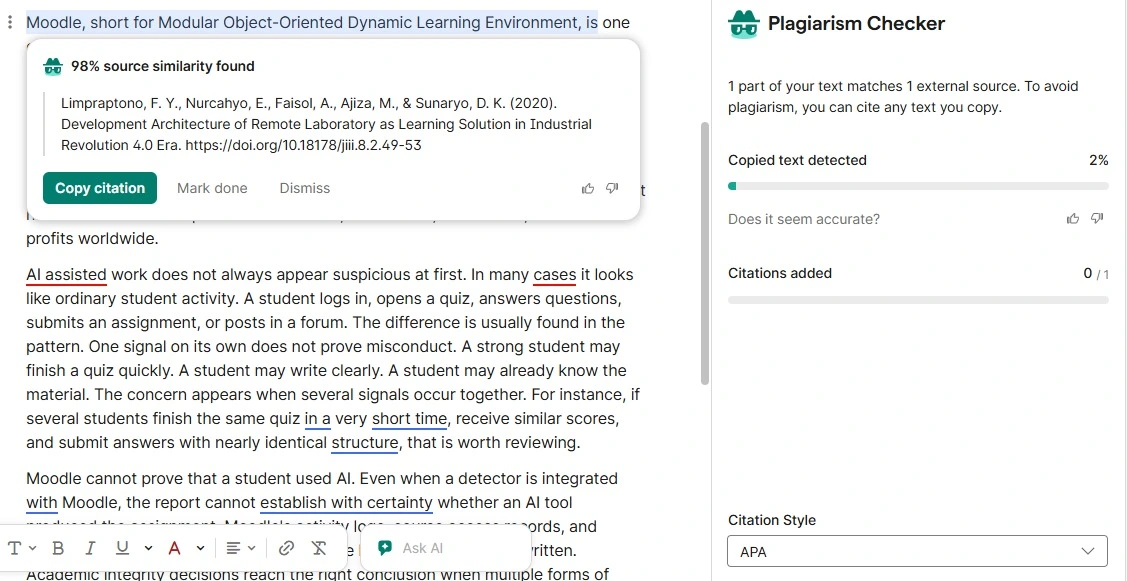
First, patchwork plagiarism: four paragraphs from four different blogs, each lightly paraphrased and stitched together.
Grammarly's response: "1 part of your text matches 1 external source." The score came back at 2%.
Look at what it caught. The single match was a generic definition sentence, traced to an unrelated 2020 academic paper, not to any of the four articles we actually borrowed from. It flagged boilerplate and missed the borrowing.
Verdict: Fail.
Test 3: Spun / Paraphrased Content (QuillBot)
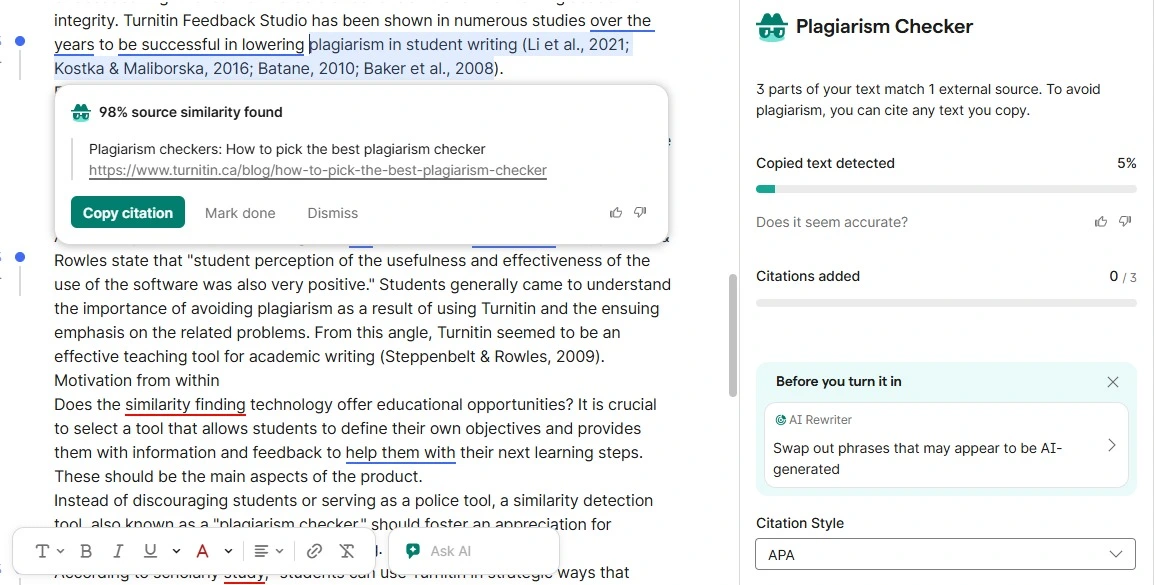
This is the test SEO professionals care about most. We ran the same article through QuillBot's paraphraser on Standard mode with a Premium account, in one pass, then scanned the output.
The result: 5% copied text detected, three matched parts, correctly traced back to the original article.
Grammarly caught a fraction and missed the rest. Reworded text read as original even though every idea was lifted, and a 5% score on a fully copied document reads as clean to anyone glancing at the number. That's a real risk for anyone publishing paraphrased content at scale.
Verdict: Fail.
Test 4: AI-Generated Text (ChatGPT)
We generated a 1,000-word article titled "What Makes a Good Online Plagiarism Checker" using ChatGPT's free tier, then ran it through the checker.
The plagiarism scan returned 1%, and the single match was a stock phrase found on an unrelated food blog. Then we pasted the identical text into Grammarly's own free AI detector. It came back at 73%, flagging 20 separate passages.
A plagiarism result doesn't tell you whether text was AI-generated. Plagiarism detection looks for overlap with existing sources. AI detection estimates machine authorship. AI-written text can score low or high on plagiarism depending on whether it repeats material already published.
Verdict: Fail.
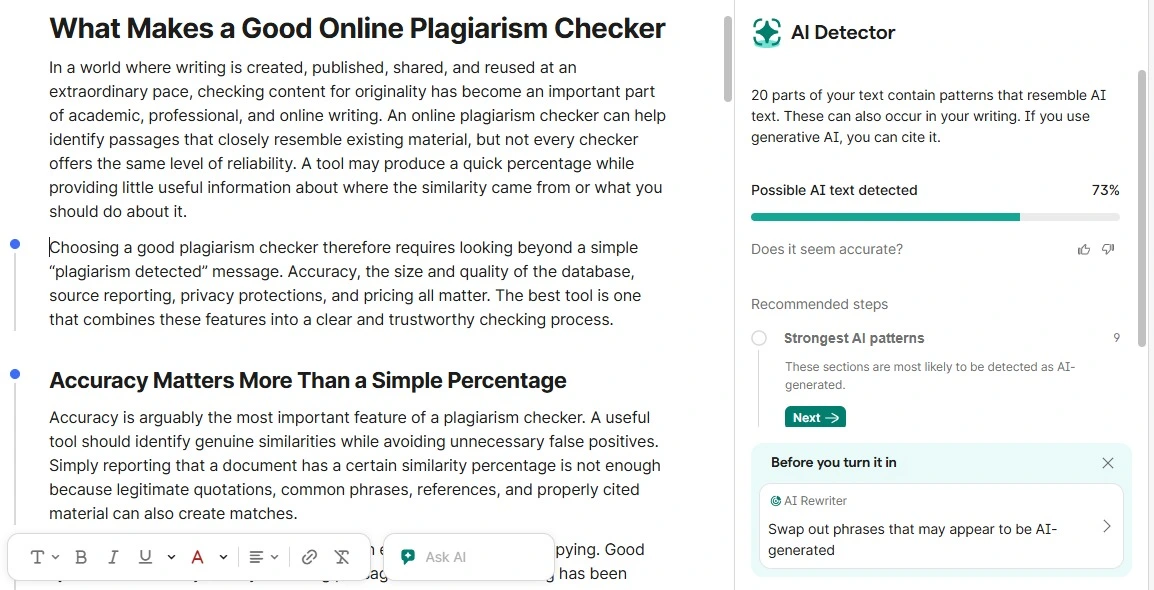
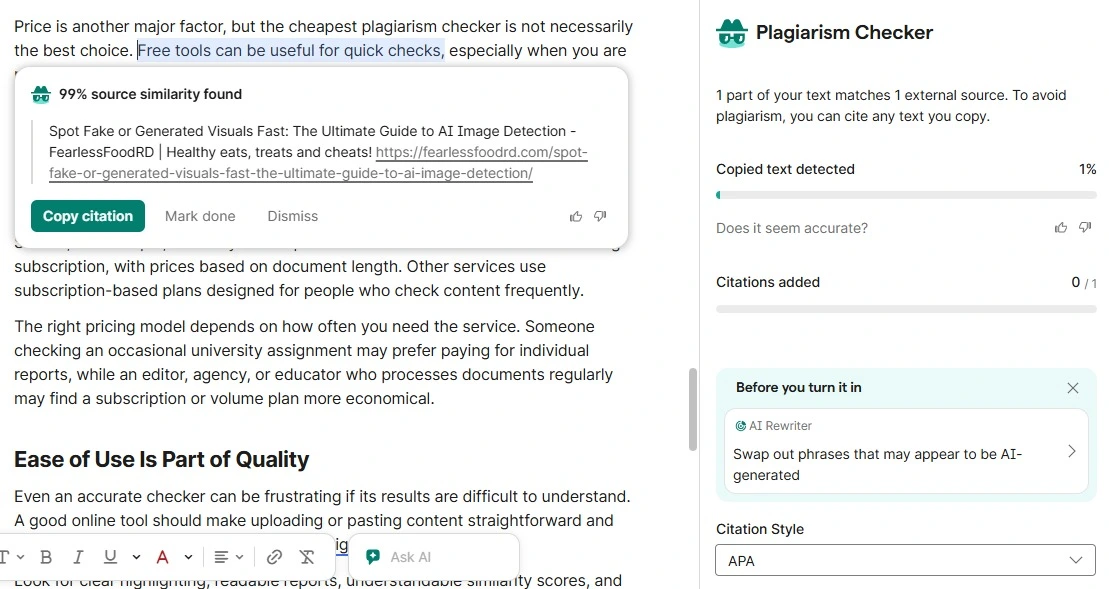
💡 One document, two Grammarly tools, two answers: 1% and 73%. A low plagiarism score and "a human wrote this" are different claims. For the second one you need an AI detector, which is a separate tool from any plagiarism scan.
Worth noting for anyone treating detector scores as proof: Grammarly's own detector rated a 100% AI-written article at 73%, not 100%.
Test 5: Translation-Laundered Content
For our final test we took the same 942 words from Test 1 and ran them through Google Translate into Spanish, then back into English, split into three sections at section breaks rather than mid-sentence. Then we scanned the result.
Grammarly flagged 9%, across six matched parts.
The same article it caught at 99% verbatim dropped to 9% after one round trip through another language. Roughly nine tenths of the detection vanished while the content stayed the original author's. That gap matters most for multilingual content teams and international SEO, where source material routinely crosses languages before publishing.
Verdict: Fail.
Is Grammarly Plagiarism Checker Free in 2026? 💳
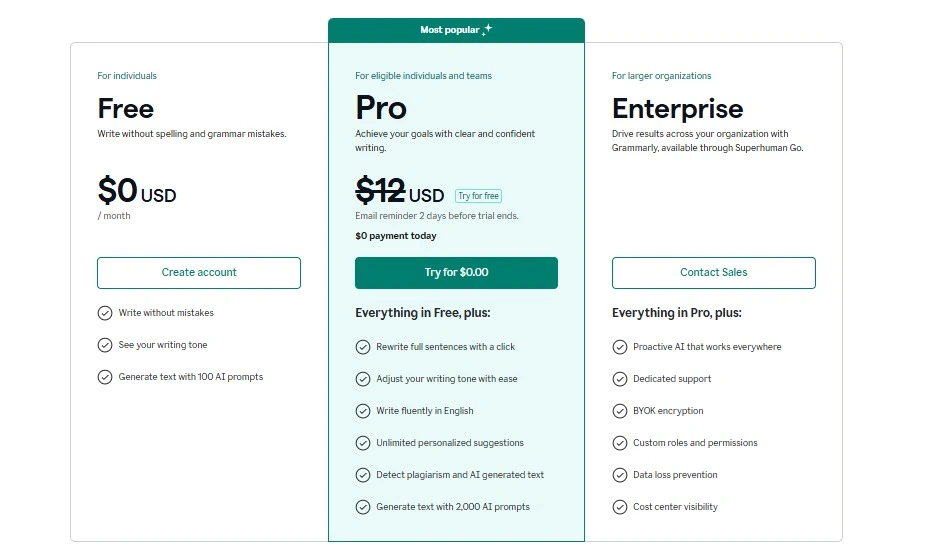
No. Grammarly Free doesn't include the full plagiarism checker. The Plagiarism Checker agent runs on Grammarly Pro in docs and Superhuman Go, and Enterprise, Business, and Education accounts reach it from inside a document. Pro offers a 7-day free trial, so you can run a scan before paying, but the free plan on its own won't do it.
Here's how free and paid access actually compare:
Feature | Grammarly Free | Grammarly Pro |
|---|---|---|
Grammar and spelling checks | Yes | Yes |
Plagiarism checker Grammarly access | No full report | Yes |
Highlighted matched text | No | Yes |
Source links | No | Yes |
ProQuest database scan | No | Yes |
Plan | Price | Plagiarism checker |
|---|---|---|
Free | $0 per month | Not included |
Pro | $12 per member per month, billed annually | Included |
Pro (month to month) | $30 per member per month | Included |
Enterprise / Business / Education | Contact sales | Included |
Pricing reflects Grammarly's live pricing page as of August 2026 and can change. Check before buying.
What if you subscribed through the App Store or Google Play?
You may still be on Grammarly Premium. Grammarly began its Premium to Pro migration in March 2025 at no extra cost, and App Store and Google Play subscribers stayed on Premium. Plagiarism detection comes with that plan too.
How to Check Plagiarism in Grammarly (2026) 📝
Where you click depends on your plan and which Grammarly surface you're in. There's no single universal button any more.
If you're on Grammarly Pro:
📄 Open your document in Grammarly docs
🧩 Click the Plagiarism Checker agent icon in the right-side agent panel
⏳ Let the scan finish
🔍 Review the bars marking matched passages, then cite or rewrite
If you're on Enterprise, Business, or Education:
📄 Open any document in Grammarly docs
🖱️ Click Check for AI text & plagiarism in the upper-right corner
🔍 Review the flagged passages and source references
Button labels and availability differ by surface, so the panel you see may not match a screenshot taken on another plan.
What Does a Grammarly Plagiarism Report Show? 📊
The report marks which parts of your document match outside sources, then hands you the citation data to fix them.
📌 Matched passages: bars down the left margin mark the sections that hit a source
🔗 Source references: the outside material each flagged passage matched
💯 Originality score: how unique the document reads overall
📎 Citation data: MLA, APA, or Chicago, ready to copy
Read the score as a starting point for edits. Every flagged passage still needs a human decision: quote it, cite it, or rewrite it in your own words.
One limit worth knowing before you rely on it: the report doesn't leave the document. We exported the same file to PDF and to Word, and opened the share link in a private browser. All three carried the text and none carried the report.
Is Grammarly Plagiarism Checker Safe? 🔐
Grammarly says the text you check isn't exposed to other users. Its privacy documentation states that writing you review with Grammarly "will never appear in another customer's writing suggestions," and that documents you create in the Grammarly Editor stay until you delete them.
Text you wrote inside Grammarly doesn't resurface later as someone else's plagiarism match.
Does Grammarly train its models on your writing?
That depends on your account type. Grammarly's Product Improvement and Training control is on by default for Free, Premium, and single-user Pro accounts, and users can switch it off in their account privacy settings.
For Education, Business, Enterprise, and multi-user Pro accounts bought through Grammarly's sales team, it's off by default and only admins can change it.
Grammarly vs Turnitin ⚖️
Grammarly doesn't detect plagiarism the way Turnitin does, and the difference is the archive. Turnitin reports to your institution and holds a private collection of past student submissions. Grammarly reports to you and checks public sources plus ProQuest.
Grammarly | Turnitin | |
|---|---|---|
Public web scan | Yes | Yes |
Academic sources | ProQuest databases | Its own academic content |
Past student papers | No | Yes, institutional archive |
AI writing detection | Separate tool | Included in its reporting |
Who sees the report | You | You and your institution |
Access | Paid Grammarly plan | Through your school |
Universities may require Turnitin or another institution-approved system, so a Grammarly result shouldn't be assumed to match an institution's official similarity report. Our roundup of Turnitin alternatives covers the paid and free options side by side.
What Grammarly's Plagiarism Checker Does Well
Test 1 proved the point: when copied text still exists online or in an academic database, Grammarly catches it fast. For surface-level originality checks, it's a genuinely useful tool, and that's worth saying plainly before we get into where it falls short.
Here's where it earns its keep:
Web scanning: For verbatim text, the similarity score is quick and accurate. Our copy-paste sample came back at 99%.
Citation flagging: Highlights the exact sentences that match, so problems are easy to find and fix.
Source attribution: Gives you direct URLs to matched sources, so you can verify each flag and decide whether to cite, quote, or rewrite.
Convenience: Grammar, clarity, style, and plagiarism all live in one editor. No switching between tools for a first-pass review.
Speed: Scans roughly 2,000 words in under five seconds.
Grammarly's plagiarism checker is reliable for students doing basic verbatim checks in casual academic work. The trouble starts when the copying isn't obvious.
Where Grammarly's Plagiarism Checker Falls Short
Grammarly's plagiarism checker is not reliable enough for university assignments on its own. It works as a first-pass self-check, but universities may require Turnitin or another institution-approved system, and it can't scan against the institutional databases of past student papers that schools actually use.
Here's where it fails, backed by what we saw:
It misses paraphrased and spun content. Test 3 proved it. QuillBot-spun text scored 5%, and most reworded ideas went unflagged. Independent testing found the same gap: Grammarly flagged only a fraction of paraphrased copying that stricter tools caught.
It can't detect patchwork plagiarism. Test 2 returned 2%, and the one match was boilerplate rather than the borrowed material. Stitching lightly reworded sentences from multiple sources falls below Grammarly's detection threshold. This kind of incremental plagiarism, built up piece by piece from several sources, is exactly what it misses. Turnitin defines this mosaic plagiarism as weaving phrases from several sources into your own work, and our test confirms Grammarly doesn't catch it.
It does not detect AI content. Test 4 came back at 1% while Grammarly's own AI detector rated the same text 73%. A plagiarism scan measures source overlap, not authorship, so AI-written text passes it. Grammarly does offer a separate AI detector, but that's a different tool with its own accuracy limits.
Translation laundering slips through. Test 5 dropped from 99% to 9% after one round-trip translation. Content copied, translated, and back-translated keeps its meaning but change surface wording, and Grammarly misses the semantic match almost entirely.
Three structural limits round it out:
It can't see your school's repository. Grammarly checks public web pages plus ProQuest academic sources, and does not check your school's private archive of submitted papers. A paper can score clean on Grammarly and still match a classmate's submission in Turnitin. The same blind spots show up in LMS tools too, as we found when testing whether SafeAssign checks for plagiarism.
Multilingual coverage is unclear. Grammarly supports multiple languages across its products, but its documentation doesn't establish equal plagiarism coverage outside English. Treat non-English results as unproven until tested.
Paid plans only. Plagiarism checking requires Grammarly Pro.
Grammarly's plagiarism checker is only suitable for initial self-checks, not formal academic submissions. It's useful for a draft pass, but no university or journal accepts it as proof of originality.
Publish spun or patchwork content on the back of a clean Grammarly scan and the real risks are copyright exposure, attribution problems, weak editorial quality, and Google choosing someone else's page as the canonical source. Google Search Central says duplicate content generally isn't grounds for action unless it's deceptive.
Who Should (and Shouldn't) Use Grammarly for Plagiarism
Grammarly fits people who need a fast first-pass check, not a final originality audit. It does the job for spotting obvious source matches before you hit publish.
Good fit for:
Bloggers and content writers running a quick duplicate-content check before publishing. If you draft in Docs, here's how to check for plagiarism in Google Docs step by step.
Students reviewing an essay for obvious source matches before submission.
Freelancers who want grammar, style, and plagiarism feedback in one editor.
Anyone who needs source links to clean up missing citations fast.
As a plagiarism checker for bloggers doing routine spot-checks, that all-in-one workflow is genuinely convenient.
Not ideal for:
Students submitting formal academic, legal, or journal work, where institutional tools are often required.
SEO professionals checking spun, AI-assisted, or heavily paraphrased content.
Content agencies reviewing outsourced drafts for patchwork or mosaic plagiarism.
Teams that need multilingual or cross-language originality review.
The pattern is simple. Grammarly protects content originality against careless copying, but not against deliberate disguise.
For anyone whose writing integrity depends on catching reworded, AI-generated, or translated content, it leaves real gaps. If you're comparing tools, read our Prepostseo Plagiarism Checker Review.
If you fall in the second group, here is what a more complete check looks like.
A More Complete Alternative: Phrasly's Plagiarism Checker
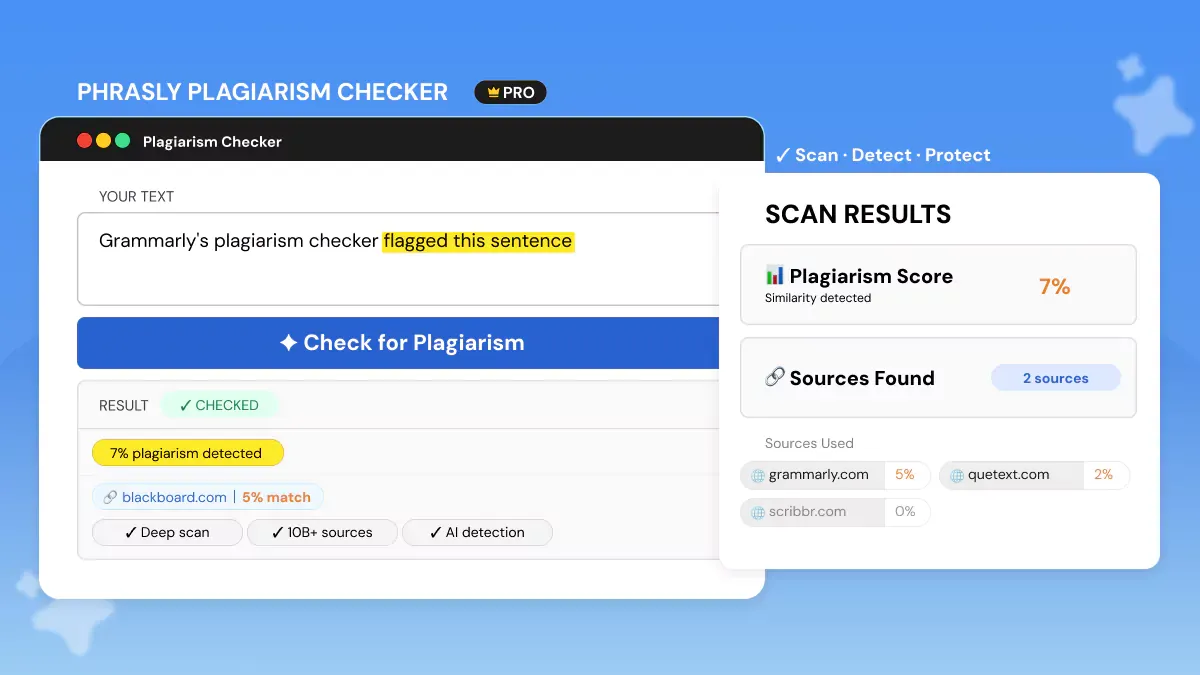
Four of our five tests exposed specific gaps in Grammarly's detection. Here is what a tool built specifically for plagiarism catches differently.
Phrasly works for the jobs Grammarly's similarity score can't handle. Its plagiarism checker scans against "10B+ web pages," academic papers, and research databases, then returns matched sources, direct links, highlighted passages, and a similarity score.
It targets the exact content types Grammarly missed. Phrasly says its checker detects copied, paraphrased, and restructured content, including the mosaic plagiarism that slipped through our Test 2.
AI detection stays a separate tool. Instead of burying it inside a plagiarism scan, Phrasly runs a standalone AI Detector on the same platform, so you can check plagiarism risk and AI-generated content without switching tools or trusting a grammar app to flag AI writing.
On the practical side:
Supports PDF, DOCX, and TXT uploads, plus direct text pasting.
Documents are never stored, indexed, or shared, and content is deleted immediately after scanning.
No ads, clean interface.
On pricing: Non-customers pay $5 per scan, or $20/month for 20,000 words per month. Existing customers get plagiarism checking inside the full $20/month package, which bundles the Humanizer and other tools, with the same 20,000 words per month.
For students, agencies, and SEO teams checking content integrity, that buys stronger plagiarism review, real source matching, file uploads, and a separate AI Detector from one plagiarism detection tool.
Check Your Work for Plagiarism Before You Submit or Publish 👇
Scan the draft before you submit it, not after the report comes back 👇
Grammarly vs Phrasly: Side-by-Side
Grammarly is stronger as a writing assistant. Phrasly is stronger at originality review.
Feature | Grammarly Plagiarism Checker | Phrasly Plagiarism Checker |
|---|---|---|
Main use case | Grammar, writing feedback, citation help, plus plagiarism checks | Plagiarism checking, source matching, content integrity review, originality support |
Source database | Grammarly says 16B+ web pages and ProQuest academic databases | Phrasly says 10B+ web pages, academic papers, and research databases |
Similarity score | Yes | Yes |
Matched source links | Yes | Yes |
Highlighted passages | Yes | Yes |
File uploads | .doc, .docx, .odt, .txt and .rtf | PDF, DOCX, and TXT supported |
Privacy | Text is not publicly searchable or stored for others to access | Says documents are not stored, indexed, or shared after scanning |
Pricing | $12 per member per month billed annually, or $30 month-to-month, on Pro | $5 per scan or $20/month for 20,000 words, bundled with other tools for customers |
Figures come from each provider's own live pages as of August 2026 and can change. Check before buying.
Final Verdict
Grammarly's plagiarism checker is great for one job: catching obvious, copied-and-pasted text. Our Test 1 caught it at 99%. For a quick check before you publish a blog post or hand in an essay, it works.
But it misses almost everything else. Paraphrased, AI-generated, patchwork, and translated content all came back under 10% in our tests, and independent third-party reviews found the same gaps.
So treat it as a quick safety net, not your final check. For anything that really matters, use a tool built for the job.
Last tested: August 2026.
Take five minutes to scan the draft on a second engine before it goes anywhere 👇
FAQs
What is the word limit on Grammarly's plagiarism checker?
Grammarly's documented limits cap one document at 100,000 characters, roughly 20,000 words. Across 24 hours you get up to 100 documents or 50,000 words, and across 30 days up to 300 documents or 150,000 words.
Can Grammarly detect paraphrased or QuillBot content?
Barely. Our QuillBot-paraphrased sample returned 5% on a document copied end to end. Reworded text is the checker's weakest area. Our Quetext plagiarism checker review runs a similar paraphrase test on another tool.
Can you download a Grammarly plagiarism report?
No. We tested all three routes: PDF export, Word export, and the share link. Each one carries the text only. The report exists solely inside the live Grammarly document, so it can't be handed to anyone as proof.
Why can't I find Grammarly's plagiarism checker?
You're probably on the free plan or the wrong surface. It runs as an agent in Grammarly docs and Superhuman Go for Grammarly Pro, and as Check for AI text & plagiarism for Enterprise, Business, and Education accounts.
Is Grammarly's plagiarism checker the same as its AI detector?
No. Plagiarism detection and AI detection aren't the same, as Grammarly states plainly. Its plagiarism checker looks for source overlap, its AI detector estimates machine authorship, and Authorship labels where text came from. Our best AI checker tools roundup ranks five.
Will work I edited in Grammarly get flagged by my school?
Not for that reason alone. Grammarly edits don't add your text to a database your school scans against. A school report can still flag genuine overlap with sources you quoted or paraphrased without citation.

Written by
Obaid Ahsan
Content Lead · Pakistan
Obaid Ahsan is a Content Lead with 5+ years of experience in SEO, content strategy, and AI-focused publishing. At Phrasly, he leads content development with a focus on accurate research, search performance, and useful, trustworthy information for readers.