
Does SafeAssign Check for Plagiarism? Honest Review + 3 Things It Misses
SafeAssign checks for plagiarism, but three big things still slip past it: heavy paraphrasing, mosaic copying, and AI-written text. Learn what your similarity score actually means, and how to catch the gaps before you hit submit.
Yes, SafeAssign checks for plagiarism, but what it misses matters just as much.
If you're about to run a safe assignment plagiarism check through Blackboard, you need to know two things: what this tool flags, and what it lets slip through.
SafeAssign is text-matching software built into the Blackboard LMS. It scans your submission against student papers, institutional archives, and internet sources, then hands your instructor a similarity report.
Learn how the SafeAssign check for plagiarism actually works, what your score really means, and how to catch what it misses before you submit.
Check your Assignment with Phrasly Before you Submit 👇
How Does SafeAssign Check for Plagiarism?
SafeAssign checks for plagiarism by scanning your Blackboard submission and comparing it against existing text from student papers, institutional archives, and the open internet.
In short, the plagiarism checker SafeAssign is text matching software that hunts for overlap between your assignment and content that already exists somewhere else.
When you hit submit, SafeAssign runs your assignment through three main sources:
- Global Reference Database: holds more than 15 million papers voluntarily submitted by students across Blackboard client institutions
- Institutional Archive: your own school's collection of past student submissions
- The Open Internet: scanned through SafeAssign's built-in search service
If a sentence, phrase, or paragraph in your work overlaps with anything in those places, it gets flagged.
Once the scan finishes, SafeAssign generates a SafeAssign similarity report. The report highlights the matched text inside your assignment, links each match to its original source, and gives you a similarity score as a percentage. Blackboard's documentation breaks the report into three parts:
- Overall Risk: a quick read on how much of your writing matches outside sources
- Overall Text Matching: the cumulative percentage of overlap detected
- Originality Reports: the section-by-section breakdown your instructor reviews
SafeAssign checks for matching language, not whether your paper is "good" or "bad." The percentage tells you how much of your writing overlaps with existing sources. Nothing more.
A high score can come from properly cited quotes, your reference list, assignment templates, or common academic phrases. A low score doesn't automatically prove originality either, especially if ideas have been heavily paraphrased.
One thing worth knowing: instructors set the threshold.
- One professor might be fine with a 30% similarity score because most of it is properly cited.
- Another might flag anything over 15% for review. They check the sources, read the flagged sections, and make the final call. SafeAssign just hands them the evidence.
How to Read Your SafeAssign Score
Your SafeAssign plagiarism score is a similarity index, not a final plagiarism grade. It shows how much of your assignment overlaps with existing sources, but your instructor decides whether those matches are acceptable or a problem.
Here's the official Blackboard breakdown:
So, what percentage is bad on SafeAssign? Official Blackboard guidance treats anything over 40% as high risk, but there's no universal "bad" number.
A 12% score can still get you in trouble if one full paragraph is copied.
A 35% score might be perfectly fine if it comes from your reference list, required templates, or properly cited quotes.
What is a safe SafeAssign score then? A score below 15% is usually considered safe or low risk, but there is no universal “safe” number.
SafeAssign is only a similarity check, so the smartest move is to open your report, review every highlighted match, check the source, and fix any citation errors before final submission.
3 Things SafeAssign Won't Catch (And Why They Matter)
SafeAssign is solid at catching verbatim copying, repeated wording, and obvious source overlap. But because it works through text matching, three types of academic dishonesty consistently slip through the cracks.
1. Heavily Paraphrased Content
SafeAssign catches close paraphrasing when enough wording still overlaps, but it consistently misses heavily reworded content. True paraphrased content detection needs semantic understanding, the ability to recognise that two differently worded sentences express the same borrowed idea.
SafeAssign isn't built for that. It's strongest at spotting verbatim copying and visible text overlap, weakest at judging whether the underlying argument was lifted without credit.
2. Mosaic and Patchwork Plagiarism
Mosaic plagiarism means stitching phrases, sentences, or ideas from multiple sources into one paper with small wording changes in between. It is closely related to incremental plagiarism, where small uncited pieces build into a larger originality problem.
This is exactly the kind of thing source matching tools miss. Picture a student pulling one sentence from Source A, the next from Source B, and a phrase from Source C.
Each individual match is too short to cross the plagiarism percentage threshold, so the report comes back clean. But the assignment still has zero original thinking, which is why academic integrity can never be judged on the score alone.
3. AI-Generated Content
SafeAssign cannot reliably detect AI-written content as of 2026. SafeAssign is a text-matching tool, not an AI detector. AI-generated essays produce fresh phrasing every time, so there's often no existing source for SafeAssign to match against.
This is the core gap between plagiarism detection and AI detection. If you copy from a blog post, SafeAssign will likely flag it.
If you ask ChatGPT or Gemini to write a fresh essay, the output is brand new text that doesn't live in any database, so the SafeAssign AI detection report can come back at 0% similarity.
In Anthology’s white paper, the company states that AI detection is not currently fit for purpose in education and cites concerns about detector accuracy, bias, and the speed of generative AI development.
Some institutions are bolting on separate AI detectors, but that's a different system entirely, sitting outside SafeAssign's standard similarity report.
SafeAssign vs Phrasly: Which Catches More?
SafeAssign is reliable at source matching when copied text already exists in its databases or on the open web.
The main difference between SafeAssign and Turnitin is scope: Turnitin includes AI writing detection and a larger reference database, while SafeAssign is text-matching only inside Blackboard.
Phrasly works differently from both as a pre-submission check you run before your assignment reaches any institutional plagiarism checker. SafeAssign reports are warning indicators, and your instructor decides whether each match is acceptable.
It also includes a built-in AI detector alongside the plagiarism scan, so students can check their work for source overlap and AI-generated phrasing in one place, closing the exact gap SafeAssign leaves open.
SafeAssign and Phrasly both help students spot copied or uncited text, but they work at completely different moments. SafeAssign is the institutional plagiarism checker built into Blackboard.
Phrasly is a student-controlled pre-submission check you can run before you turn anything in.
Here's how the two tools handle the same scenarios:
The real difference is timing. SafeAssign tells you after the fact, through Blackboard. Phrasly shows you what's flagged before you submit, so you can fix citations, rework weak paraphrasing, and avoid surprises in your final SafeAssign similarity score.
How to Check Your Work With Phrasly Before Submitting
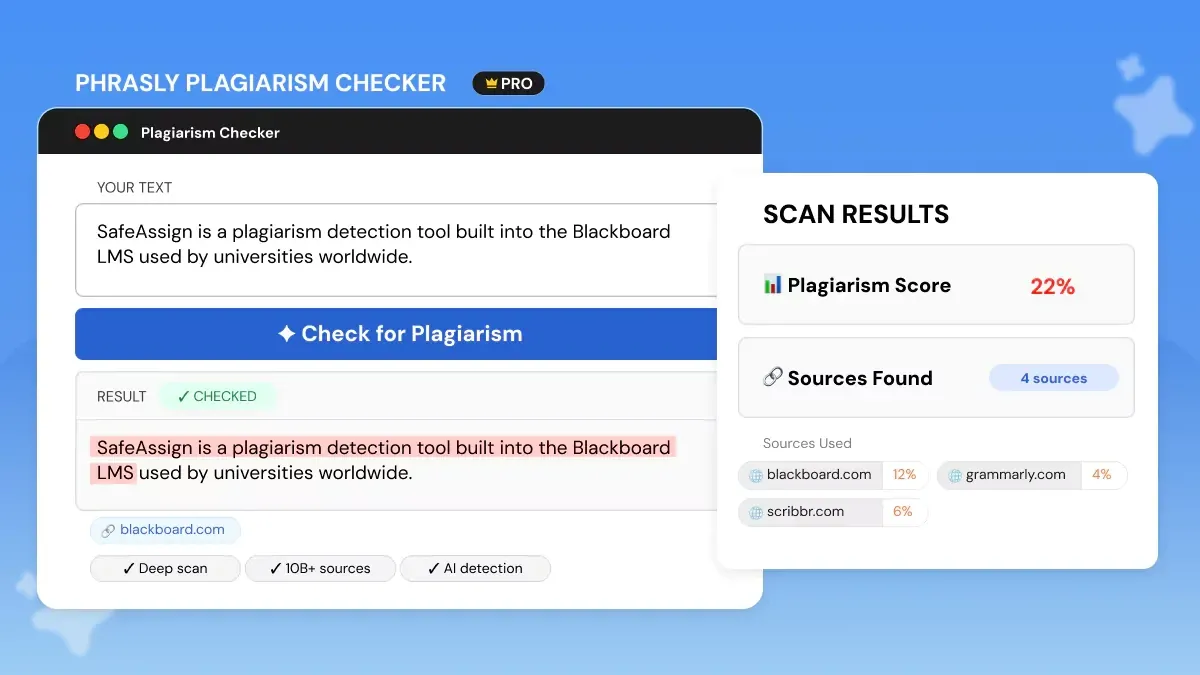
There is no built-in way to check your similarity score before submitting to SafeAssign. SafeAssign only runs after you hit submit in Blackboard, and whether you can see the originality report at all depends on your instructor's settings.
The fix is using a third-party tool like Phrasly to run a pre-submission check, so you see your similarity score before your assignment becomes your official submission.
Here's how to use it in three minutes:
1. Paste or upload your assignment into Phrasly's plagiarism checker. Run it before you submit through Blackboard, especially if your class uses a plagiarism checker SafeAssign setup. Phrasly handles essays, research papers, dissertations, and longer academic work, so you can review the full draft before it becomes your official submission.
2. Review the similarity report. Phrasly shows you a similarity score, highlighted matches, and a source-by-source breakdown. You get a pre-submission originality report that shows exactly which passages need quotes, citations, or a rewrite before your instructor lays eyes on them.
3. Fix flagged sections before submitting. Use the report to protect your writing integrity. Open each highlighted passage, check the matched source, add missing citations, rewrite anything that's too close to the original, and make sure your own ideas stand clearly apart from borrowed material.
FAQs
Does SafeAssign Check for Plagiarism Automatically?
Yes, SafeAssign checks for plagiarism automatically when your instructor enables SafeAssign for a Blackboard assignment. After you submit, SafeAssign compares your paper against other submissions, institutional sources, and internet sources. Not every Blackboard assignment uses SafeAssign because instructors can choose whether to turn it on.
What Percentage Is Bad on SafeAssign?
A SafeAssign score over 40% is considered high risk in Blackboard's official guidance and should be reviewed carefully. Scores below 15% are usually low, while 15%–40% means the paper may contain extensive quoted, paraphrased, or copied material. There is no universal pass/fail score because instructors decide whether matches are properly cited.
How Accurate Is SafeAssign at Detecting Plagiarism?
SafeAssign is around 92–97% accurate at detecting direct copying and verbatim plagiarism, based on independent testing. Its accuracy drops sharply for heavily paraphrased content and AI-generated text, which it cannot reliably catch. SafeAssign works best as a similarity indicator, not a final originality verdict.
Does SafeAssign Detect AI-Generated Content?
No, SafeAssign cannot reliably detect AI-generated content as of 2026. SafeAssign is an anti-plagiarism/text-matching tool, while AI writing detection requires a separate type of detector. AI-generated text often has no existing source for SafeAssign to match. For a full breakdown of what SafeAssign does and doesn't catch on AI text, read Does SafeAssign Detect AI? Honest Answer for 2026.
How Do I Check My Similarity Score Before Submitting?
SafeAssign only runs inside Blackboard when your instructor enables it, and students can see the Originality Report only if the instructor allows access. To check before final submission, use a third-party plagiarism checker like Phrasly to review your similarity score, highlighted matches, and source links first. This helps you fix citation errors before your Blackboard submission. If you're curious which schools and tools are actively scanning student work, here's our guide on Do Colleges Check for AI? What Students Must Know (2026).


Keep reading

12 Types of Plagiarism Explained (With Real Examples)
Learn the 12 types of plagiarism with real examples, understand the consequences, and discover practical ways to avoid academic mistakes before you submit your work.
How Can You Prevent Plagiarism? 10 Proven Strategies for Students (2026)
Learn how to prevent plagiarism with 10 practical strategies, including proper citation, paraphrasing, note-taking, and plagiarism checking, to submit original work with confidence.