Type Like a Human, Not a Bot
The Human Auto Typer for Google Docs
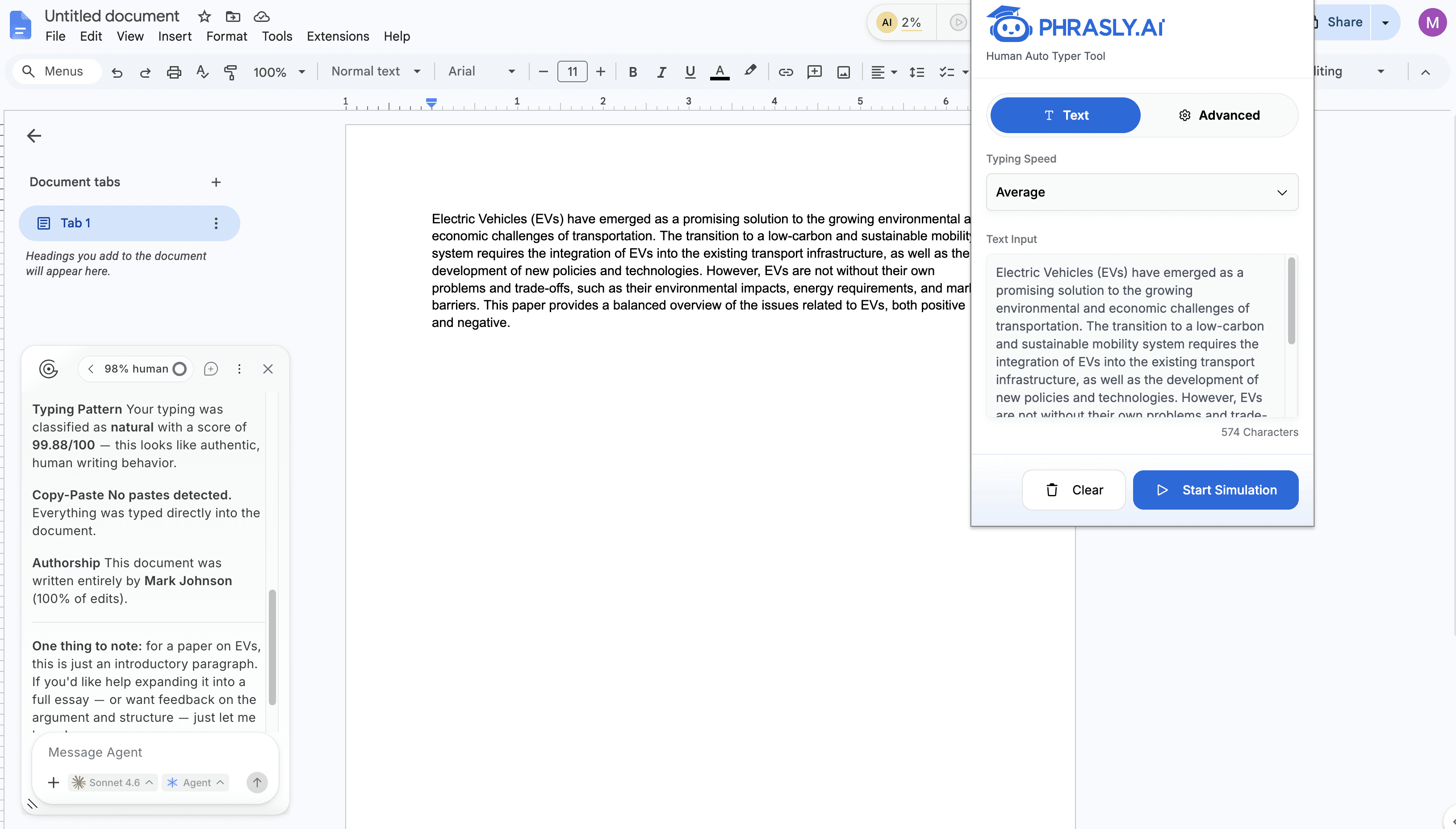
Paste your text. Watch it type itself naturally and realistically. Phrasly's Human Auto Typer Chrome extension simulates real human typing patterns, errors and timing directly into Google Docs.


Join 5,000,000+ users
Used by Students & Writers Around the World














Used by Students & Writers Worldwide
Phrasly's Human Auto Typer is trusted by students and writers around the world who need their documents to reflect a natural, authentic writing process.
- Users using Phrasly
- 5,000,000+
- Projects completed
- 40,000,000+
- Hours saved typing
- 6,000,000+
Join more than two million users who rely on Phrasly to type smarter, write authentically, and stay one step ahead.
Powerful Features, Simple to Use
Built to mimic every nuance of real human typing, right inside your browser.
Variable Typing Speed
Type at slow, average, or fast human speeds. Fully adjustable from 30 WPM to 240 WPM, so it matches your natural writing pace.
Smart Breaks & Pauses
Realistic pauses between sentences, after punctuation, and mid-word, just like a real person thinking while they write.
Natural Error Simulation
Occasional typos and instant corrections. The error rate and correction speed are configurable so your document looks authentically imperfect.
Consistent Typing Patterns
Maintains a realistic revision history in Google Docs that reflects how a human actually drafts, not a paste event.
Why Choose Phrasly'sHuman Auto Typer?
Save Time and Effort
Paste your content once and let Phrasly do the typing. Our Human Auto Typer automatically types out your text character by character. No manual re-entry, no wasted time.
Protect Your Work
Keep your original work exactly as you wrote it. Phrasly ensures your documents reflect a natural writing process, protecting you from false AI detection flags - a key concern for students and writers.
Precision and Accuracy
Every keystroke is deliberate. Our extension replicates the exact nuances of human typing in Google Docs and other text fields including variable speed, realistic pauses, and natural error correction.
Simple to Use
Paste your text, set your speed, and click Start. No setup, no coding, no learning curve. Phrasly's Human Auto Typer works instantly inside your browser.
How It Works
Our plagiarism detection process is simple, fast, and accurate. Get results in seconds.
Paste Your Content
Copy your text, whether you wrote it yourself or used Phrasly's AI tools - and paste it into the extension.
Configure Your Settings
Set your typing speed, error rate, pause frequency, and break duration.
Start Simulation
Click Start. The extension types your text into Google Docs character by character. Watch your document come to life.
Everything included
Eight tools. One platform.
Every tool below comes with every Phrasly plan. Move between them without leaving your workspace, and drop the separate subscriptions you no longer need.
Support
Frequently Asked Questions
Instead of a bulk paste that shows up in one timestamp, your document builds character by character, the way a real person writes.
Type Like a Human, Not a Bot
Phrasly's Human Auto Typer Chrome extension turns your copy-paste into a natural writing session. Start free in under 60 seconds.