Chegg Plagiarism Checker Review (2026): Accuracy, Pricing & Verdict
19 min read
The Chegg plagiarism checker gives you a similarity score before your professor ever sees your paper, but that number only helps if you know what the tool can and cannot catch. Most students want three answers before they trust it: is it accurate, is it free, and does it detect AI writing?
We ran four test samples through Chegg to answer the accuracy question with our own results. The short version: Chegg flagged most of a copied web passage but found nothing in a reworded copy of it. It showed no AI score at all, and it needs a paid Chegg Writing subscription.
Below, you'll find how the tool works, what your score means, how Chegg compares with Grammarly and Turnitin, and our verdict.
Check your work for plagiarism before you submit 👇
Chegg Plagiarism Checker: Quick Verdict
Chegg's plagiarism checker is a useful first-pass check if you already pay for Chegg Writing. In our test, it flagged 76% of a copied Wikipedia passage and 0% of a reworded copy of that passage. It also offers no purpose-built AI detection, and it comes only with a paid subscription.
Question | Short answer |
|---|---|
Best for | Students already paying for Chegg Writing who want a quick check before they submit |
Main limitation | Misses reworded text and paywalled journal text, and one report shows three different scores |
Accurate? | ⚠️ Flagged 76% of copied web text and 0% of reworded text in our test |
Detects AI? | ❌ No dedicated or reliable AI detector, and no AI score in our test |
Free? | ❌ No. $9.95/month after the 3-day free trial Chegg advertises, which needs a payment method |
Replaces Turnitin? | ❌ No. Chegg checks a different database, and your school still runs its own check |
Chegg pricing checked on chegg.com/writing in September 2026. Pricing is accurate as of the date this article was written and is subject to change. Confirm the current price on the tool's official pricing page before purchasing.
What Is Chegg Writing's Plagiarism Checker?
Chegg's plagiarism checker is one of the tools in Chegg Writing, the paid writing suite at chegg.com/writing. You paste or upload a paper, and the checker returns a similarity score with the passages that match other sources. That score shows overlap with those sources, and each match still needs a human to judge whether it counts as plagiarism.
Chegg Writing groups the plagiarism checker with a grammar checker, a citation generator, and expert proofreading on one dashboard, all under one subscription. Chegg advertises that its scan checks your work against billions of web pages with technology it describes as similar to Turnitin's. The upload box also states that the checker only supports papers written in English.
📊 Chegg's own usage numbers
Chegg's Chegg Writing page reports 7+ million assignments checked and 4+ million plagiarism scans. These are Chegg's figures, and the company updates them over time.
How to Use the Chegg Plagiarism Checker (Step-by-Step)
The Chegg plagiarism checker is a pre-submission check that comes with Chegg Writing.
You upload or paste your paper, run the scan, then review the report for a similarity score, matched sources, and highlighted passages before turning your work in.
Here's the exact workflow:
Sign in to Chegg Writing. Go to chegg.com/writing and log in to your Chegg account. If you don't have a subscription yet, you'll be prompted to start the 3-day free trial or subscribe before the plagiarism tool unlocks.
Start a new assignment. In the Writing Center, click Start new assignment. The page that opens has a Plagiarism panel along with the grammar and citation panels.
Upload your file or paste the text. Paste your essay into the text box, or click upload a file to import one from your computer or Google Drive. Use the final version with citations and references included, so the originality report reflects what you'll actually submit.
Click "Check my assignment." Chegg's public page labels the same button "Check my paper." Each of our test papers had about 270 words and took about 1 minute to scan. If the Plagiarism panel still shows a Check for plagiarism button after the scan, click it to run the plagiarism check. Longer papers can take more time: when GPTZero reviewed the tool, Chegg's own screen warned that a scan could take up to 10 minutes.
Review the originality report. Don't just stare at the final similarity percentage. Open the matched sources, read every highlighted passage, and separate real problems (uncited paraphrasing, copied phrases) from normal matches like properly cited quotes, bibliography entries, and common phrases.
Step 5 is where most students go wrong. A 22% score isn't automatically a fail. It depends on what's being matched and whether your citations are doing their job.
This is also where incremental plagiarism can creep in: small copied phrases, weak paraphrases, or missing citations that look minor alone but add up across the paper.
What Files Does Chegg Plagiarism Checker Accept?
The Chegg paper checker accepts pasted text or a file you import from your computer or Google Drive. When we opened Chegg's file picker in October 2026, it allowed only DOCX and TXT files.
There's no direct URL submission and no bulk scanning in the current workflow, so you upload or paste one paper at a time for each submission check.
If your assignment is in a different format (PDF, Pages, RTF, ODT), convert it to DOCX or TXT before uploading, otherwise Chegg's file picker won't list it.
How Does Chegg Handle Google Docs?
Chegg reads Google Docs through Google Drive. The upload menu has a Google Drive option, and Chegg asks you to sign in to your Google account before you can pick a Doc. Other checkers handle a Google Doc in different ways, and our guide to checking for plagiarism in Google Docs compares the options that work without leaving the Doc.
How to Read Your Chegg Plagiarism Score
Your Chegg plagiarism score is a similarity score, not an automatic plagiarism verdict. It shows how much of your paper matches other sources, but your university decides what plagiarism percentage is actually acceptable before submission. No fixed percentage counts as safe at every school.
The most important rule: Chegg does not set your school's pass/fail threshold, your institution does.
A 20% similarity score may be fine in one class if most matches are quotes and references, but risky in another if the matches come from uncited paragraphs.
Always check your course syllabus or university academic integrity policy for the actual cutoff.
💡 A match can be completely correct
Turnitin's student guide explains that correctly quoted and referenced text still shows up as a match. The same logic applies to Chegg: citations and a reference list raise your score without meaning anything went wrong.
The number can mislead in both directions. A low score doesn't prove your work is original, because Chegg can miss paraphrased text and sources outside its database. A high score doesn't prove plagiarism either, since long quotes and a reference list push the percentage up. In our test, Chegg returned a 69% match on a passage we had put in quotation marks and cited.
When reading your Chegg plagiarism report, start with the highlighted text, not the overall percentage. Then work through each matched source in three steps:
Open the match. Compare your sentence with the source text Chegg shows next to it.
Name the match type. Decide whether it is a properly cited quote, a bibliography or reference entry, or wording, structure, or an idea you copied too closely without credit.
Fix only the real problems. Add quotation marks and a citation, or rewrite the passage in your own words. Leave cited quotes and reference entries as they are.
If your class uses Blackboard, our guide on Does SafeAssign Check for Plagiarism? explains how SafeAssign similarity scores work and why the percentage still needs human review.
What Counts as Plagiarism in the Report?
A plagiarism report typically flags direct quotes without citation, close paraphrasing, copied sentence structure, missing source credit, and repeated wording from online or academic sources.
Plagiarism is generally defined as using someone else's words, ideas, language, or structure without proper acknowledgment, though exact rules vary by institution.
Properly cited quotations, reference lists, assignment titles, and common phrases can still show up in your similarity percentage, and that's completely normal. The goal isn't always to hit 0%.
The goal is to make sure every meaningful match is quoted, cited, paraphrased correctly, or rewritten in your own original wording.
How Accurate Is the Chegg Plagiarism Checker?
The Chegg plagiarism checker is reasonably accurate for catching word-for-word copying from public web sources, but it has clear blind spots with heavy paraphrasing, academic journals, and AI-generated text. Treat it as a useful first-pass tool, not the final word on whether your paper will pass at your institution.
If your bigger concern is AI-written text, read Does Turnitin Detect ChatGPT? for a closer look at how institutional tools handle ChatGPT-style writing.
How We Tested Chegg
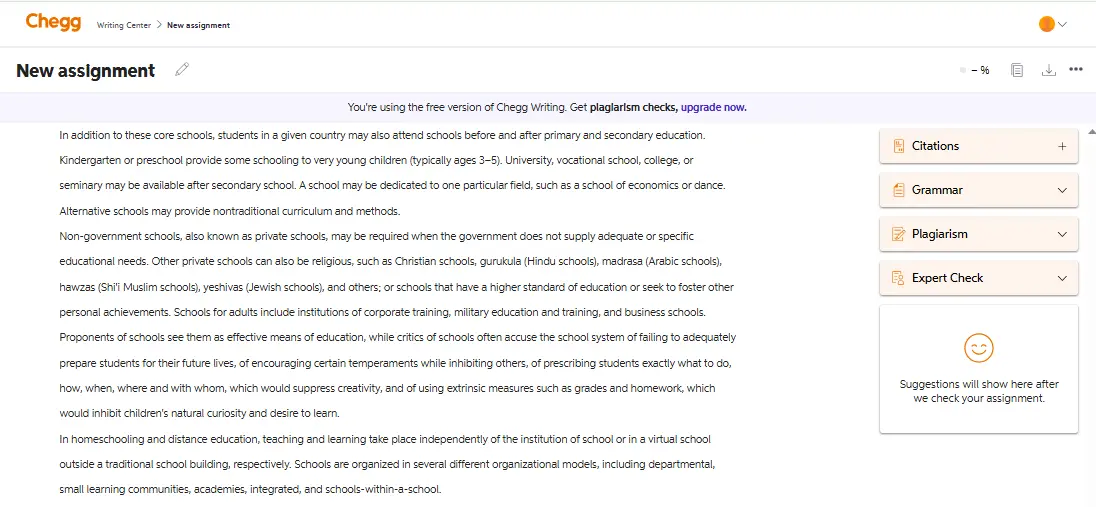
We ran four samples through Chegg's plagiarism checker in October 2026, one scan per sample, with no edits between pasting and scanning. Each sample tests a situation students worry about:
📄 Verbatim web text: a 267-word passage copied word for word from Wikipedia's "School" article.
🔖 Quoted and cited text: the same passage in quotation marks, with an in-text citation and a reference entry.
🔁 Closely paraphrased text: the same passage rewritten sentence by sentence with swapped words and the original structure, with no citation.
🤖 AI-generated text: a 269-word essay written by ChatGPT (Plus plan) from the prompt "Write a 250 to 300 word student essay on any school topic.", with no copied passages.
The results table below records each scan's similarity score, the sources Chegg found, and what it missed.
Chegg Accuracy Test Results
Test sample | Expected | Chegg result | Correct sources | Key misses |
|---|---|---|---|---|
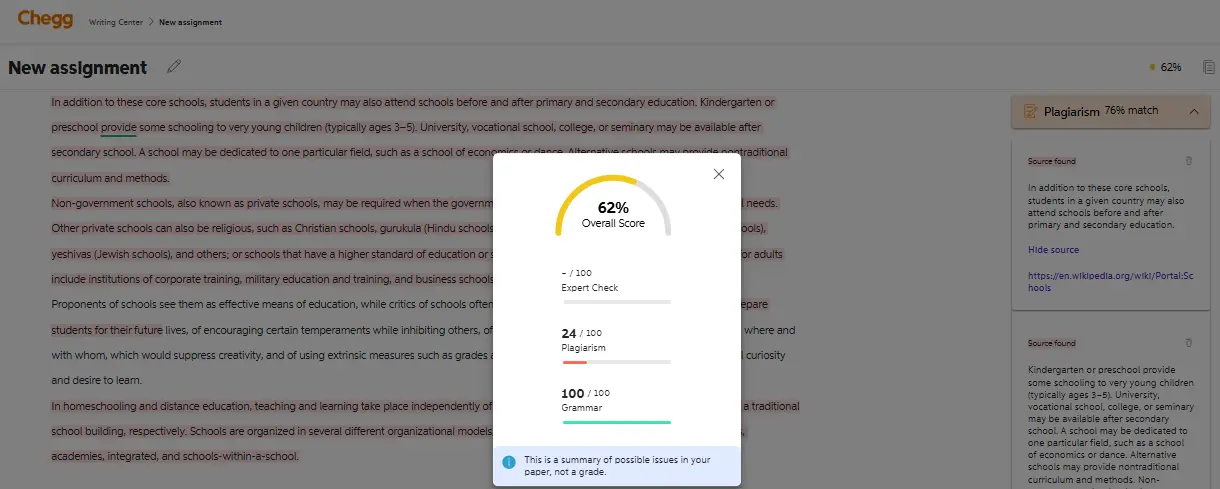
Verbatim public web text | ✅ High match | 76% match | Partly. 1 of 4 matched passages linked to Wikipedia's "School" page | 24% of the copied text, mostly the third paragraph |
Quoted + cited text | ✅ Match shown, but cited | 69% match | Partly. 1 of 4 matched passages linked to Wikipedia's "School" page | Flagged the passage despite the quotation marks and citation |
Closely paraphrased source | ⚠️ Should flag | 0% match ("No plagiarism found!") | None | The whole reworded passage |
AI-generated (no copying) | Close-to-zero match | 4% match | One common sentence matched a LinkedIn post | No AI score or AI message shown |
Tested on a Chegg Writing account in October 2026. Each scan took about 1 minute. Results can change as Chegg updates its database.
Chegg handled the copied passage best and the reworded passage worst. It also credited the same copied text to different sites in two scans: the 69% scan named Bharatpedia and a LinkedIn post for passages that the 76% scan had linked to kamus.net and a Wikipedia portal page.
📊 What outside tests found
In GPTZero's Chegg review, a ChatGPT essay on Amazon deforestation scored only a 4% plagiarism match in Chegg, while GPTZero's own AI detector labeled it 100% likely AI-generated. The same Chegg report showed an 89% Overall Score next to the plagiarism result, which made the plagiarism number hard to spot.
Originality.ai's review reached a similar view, concluding that Chegg struggles to judge plagiarism beyond a direct text match.
Where Chegg Performs Well
Chegg's text-matching engine is strongest on internet content. It flags:
✅ Verbatim copying from blogs, Wikipedia, and popular news sites
✅ Uncited direct quotes
In our verbatim test, Chegg matched 76% of the copied passage and linked one of the four matched passages to Wikipedia's "School" page. OriginalityReport.com's test found that Chegg caught roughly 90% of overlaps in a blog article copied from a popular website. For everyday assignments where students borrow from public web content, accuracy holds up well.
Where It Falls Short
Chegg did not detect paraphrased plagiarism in our test. We rewrote the Wikipedia passage sentence by sentence with swapped words and the same structure, and Chegg returned "No plagiarism found!" with a 0% match. When a writer swaps synonyms and keeps the original argument, the text no longer matches word for word.
⚠️ Journal content is the weak spot
In OriginalityReport.com's test, a 1,500-word essay with 20% copied content from journal databases was scanned, and Chegg only flagged around half of the copied material.
The score interface adds friction too. A single scan can display an Overall Score, Plagiarism Score, and Grammar Score together on different scales, which makes it easy to misread your actual similarity result. In our verbatim test, one report showed a 76% match and a Plagiarism score of 24/100 for the same text, plus an Overall Score of 62%.
Is Chegg Reliable for Research Papers?
Chegg is less reliable for research papers than for everyday essays built on web sources. The tool has limited reach into paywalled academic journals and niche scholarly sources, so research papers carry a higher risk of false negatives, meaning copied text the scan never flags. For a thesis or a journal-heavy paper, check every quote and paraphrase against your citations by hand before you submit.
Not sure one report caught every match? Run a second, free scan and compare the highlighted passages before you submit 👇
Does Chegg Check for AI-Generated Writing?
Chegg does not have a dedicated or reliable AI detector, and its report gives no AI score. When we scanned a ChatGPT essay in October 2026, Chegg showed a 4% plagiarism match and no AI message.
Chegg is a text-matching software, not an AI detector. AI-generated text has no source to match against, so it typically scores near zero. A clean Chegg report does not mean you are in the clear if you used ChatGPT, Claude, or Gemini anywhere in your draft. Does SafeAssign Have an AI Detector? explains why plagiarism detection and AI detection are not the same thing.
Chegg Grammar Checker vs Grammarly
Grammarly is the stronger tool for grammar and style feedback, while Chegg Writing is the simpler bundle for students who also need plagiarism checks and citations. The Chegg grammar checker works on a paper you paste or upload. Grammarly gives suggestions as you type through its browser extension and desktop app, and its free plan leaves out plagiarism checks.
Feature | Chegg Writing | Grammarly |
|---|---|---|
Primary use | Plagiarism, grammar, and citation bundle for students | Grammar and style writing assistant |
Grammar and style depth | 200+ types of grammar mistakes plus writing suggestions (Chegg's claim) | Real-time suggestions; tone adjustments and full-sentence rewrites on Pro |
Plagiarism checking | ✅ Included in the subscription | ✅ Pro plan only (❌ on the Free plan) |
Citation support | ✅ Citation generator with 7,000+ styles | ✅ Auto-citations on Free; citation-consistency checks on Pro |
Where it works | Web app: paste or import from your computer or Google Drive | Browser extension, desktop, Microsoft Word, Google Docs, mobile |
Free access | ❌ 3-day free trial, then paid | ✅ Free plan; Pro has a 7-day free trial |
Best for | Students who want one bundle for a busy semester | Writers who want the deepest grammar feedback |
Features checked on Chegg's and Grammarly's official pages in September 2026. Plans and features can change, so confirm on each tool's site before you subscribe.
📊 Grammarly vs Chegg on plagiarism databases
Grammarly says its checker compares your text with 16 billion+ web pages and academic papers in ProQuest's databases, per its plagiarism checker page. Chegg advertises "billions of web pages" without a firmer number. On Grammarly's Free plan, plagiarism detection is locked, according to Grammarly's plans page.
In the Chegg Writing vs Grammarly choice, Grammarly suits writers who want feedback everywhere they type, and Chegg Writing suits students who want plagiarism checks and citations for one monthly price. Our Grammarly plagiarism checker test found it catches copied-and-pasted text fast but missed AI-written text and text run through a translation round trip.
Chegg Plagiarism Checker vs. Turnitin: What Students Actually Need to Know
Chegg's current pages give no sign that a Chegg check causes Turnitin to flag your paper later. Chegg is a student-facing tool and not your school's submission system, and its Chegg Writing pages say nothing about sending uploads to Turnitin or your institution. Chegg's Terms of Use set out how Chegg handles what you upload.
Turnitin works differently. It's an institutional plagiarism checker that schools and universities pay for, used to grade official submissions. It compares your work against web sources, published research, and a massive student-paper repository that your professor actually reviews after you submit.
Here's how the two stack up side by side:
Feature | Chegg Plagiarism Checker | Turnitin |
|---|---|---|
Main user | Students checking work before submission | Schools, instructors, institutions |
Who pays | Student (Chegg Writing subscription, $9.95/mo) | The institution |
Database | Web sources + Chegg matching index | Web, publications, student-paper repository |
Shared with your school? | ❌ No | ✅ Yes |
AI detection | Not reliable | Dedicated AI writing layer (accuracy debated) |
Who sees the result? | You | Your professor or institution |
Best use | Pre-submission self-check | Official assignment grading |
Chegg pricing checked on chegg.com/writing in September 2026. Pricing is accurate as of the date this article was written and is subject to change. Confirm the current price on the tool's official pricing page before purchasing.
The simple way to think about Chegg plagiarism checker vs turnitin is this: Chegg tells you what looks similar. Turnitin tells your professor what looks similar.
This matters for self-plagiarism too. If you recycle your own old essay or reuse paragraphs from a previous course, Turnitin may match it against past submissions already stored in its repository, while Chegg has no access to your school's past submissions.
💡 The smart workflow is simple: run a clean pre-submission scan with Chegg or another plagiarism checker, fix the real matches, then submit your cleanest version to your school.
If your course uses Gradescope, read Does Gradescope Check for Plagiarism? to understand when Turnitin checks may or may not run on your submission.
Why Is My Chegg Score Different From Turnitin?
Your Chegg and Turnitin scores differ because the two tools compare your paper against different collections of text. Turnitin also checks past student submissions that Chegg can't reach, and settings can exclude quotes or the bibliography from Turnitin's score. Treat the two numbers as separate readings, and fix the passages each report highlights.
Is Chegg Plagiarism Checker Free? (Pricing Breakdown)
No, the Chegg plagiarism checker is not free as a standalone tool. It comes with the Chegg Writing subscription at $9.95/month. Chegg advertises a 3-day free trial that needs a payment method, and it charges $9.95 (plus tax where it applies) every month after the trial until you cancel. Its terms say subscription fees are not refundable.
Chegg pricing checked on chegg.com/writing in September 2026. Pricing is accurate as of the date this article was written and is subject to change. Confirm the current price on the tool's official pricing page before purchasing.
Chegg doesn't sell the plagiarism tool separately, so even a one-time scan means starting the subscription. The Chegg Writing subscription includes:
🔍 Unlimited plagiarism scans for any number of papers
✍️ Grammar checks covering 200+ types of common errors
📚 Citation generator with 7,000+ styles, including APA, MLA, Chicago, and Harvard
👩🏫 Expert proofreading, with feedback in 48 hours or less, per Chegg
If you need that full writing bundle, the subscription can be worth it. But if your only goal is a plagiarism checker before submitting one assignment, paying for a recurring subscription is overkill.
Phrasly is the cleaner option for a single check, because your first plagiarism scan is free and needs no card or subscription.
If you're comparing paid academic writing tools before choosing one, our Paperpal Plagiarism Checker Review gives another useful benchmark.
Is Chegg Plagiarism Checker Safe & Legit?
Chegg Writing is a legitimate product from Chegg Inc., but it keeps what you upload. Chegg's own upload page states that uploaded papers are added to Chegg's plagiarism database and used internally to improve plagiarism results.
Chegg's legal pages add three points worth knowing before you upload:
🔓 Uploads aren't treated as confidential. Chegg's Terms of Use say your content is treated as non-confidential and non-proprietary, and it will not be returned.
🧠 Uploads can train AI models. Chegg's Privacy Policy covers all Chegg products, and it says Chegg uses uploaded files to improve its products, including training AI and machine learning models.
🙅 Personal details should stay out. The same terms tell users not to enter their own or other people's personal information.
⚠️ Before you upload
Leave names, student ID numbers, and unpublished research out of any paper you check on Chegg, since the copy stays in Chegg's database.
Chegg vs. Phrasly: Side-by-Side Comparison
Here's how the two checkers stack up on the dimensions students actually care about: plagiarism types, AI detection, free access, privacy, and price.
Feature | Chegg Plagiarism Checker | Phrasly Plagiarism Checker |
|---|---|---|
Plagiarism types caught | Verbatim copying, close source overlap | Exact and partial matches with source links (Phrasly's claim) |
AI detection | ❌ No dedicated AI detector | Separate AI Detector tool on the same platform |
Free access | ❌ None (3-day trial, then paid) | ✅ One free scan: score without signup, full report with a free account |
Accepted input | English papers, pasted or imported | Paste, or upload PDF, DOCX, TXT, PPTX; 50 to 5,000 words per scan |
Privacy | Uploads added to Chegg's plagiarism database | Scans saved to your account; you can delete them |
Pricing | $9.95/month Chegg Writing subscription | $5 per scan or $20/month for 20,000 words; included with AI Humanizer subscriptions |
Best for | Students already paying for Chegg Writing | Students who want a quick check without a subscription |
Chegg pricing checked on chegg.com/writing and Phrasly pricing checked against Phrasly's internal pricing map in September 2026. Pricing is accurate as of the date this article was written and is subject to change. Confirm the current price on the tool's official pricing page before purchasing.
Chegg is enough if you already have a Chegg Writing subscription and just need a quick similarity report before turning your paper in. The integrated grammar and citation tools justify the cost if you'll actually use the full bundle.
Phrasly is the stronger call if you're checking an assignment from scratch and don't want to commit to a recurring subscription. Its report links each highlighted passage to its source, and Phrasly's separate AI Detector covers the AI question on the same platform.
Check your final draft for copied passages and missing citations before you hand it in 👇
Final Verdict: Is Chegg Worth Using?
Chegg is worth it for existing Chegg Writing subscribers who will use its grammar and citation tools through the semester. For a single paper, a monthly subscription is more than you need, and no Chegg score replaces the check your school runs. Whichever tool you pick, open every matched source and fix the passages that need a citation or a rewrite.
FAQs
Is Chegg Plagiarism Checker Accurate?
Chegg catches exact copies of public web text well, but heavy paraphrasing and paywalled journal articles slip through more often. In our tests, it matched 76% of copied web text and 0% of paraphrased text.
Is Chegg Plagiarism Checker Free?
Chegg's plagiarism checker isn't free. You get it through a $9.95/month Chegg Writing plan, and the 3-day trial Chegg advertises needs a payment method. For a single check, Phrasly lets you run your first plagiarism scan at no cost, and later scans cost $5 each or $20/month.
Pricing checked in September 2026. Pricing is accurate as of the date this article was written and is subject to change. Confirm the current price on the tool's official pricing page before purchasing.
Does Chegg Plagiarism Checker Detect AI Writing?
Chegg has no dedicated or reliable AI detector. It is mainly a text-matching plagiarism checker, and AI-generated writing often has no original source to match. In our test, a ChatGPT essay got a 4% match and no AI score. Do Colleges Check for AI? explains how schools run AI checks.
How Do I Use the Chegg Plagiarism Checker?
Log in to Chegg Writing, start a new assignment with your paper, and click Check my assignment. Review the Chegg plagiarism report, and fix uncited matches, close paraphrasing, or highlighted passages before submitting.
What Is a Good Plagiarism Score on Chegg?
No single score counts as good everywhere, because your university or instructor sets the threshold. Check your syllabus for the cutoff, then review each highlighted match. A few uncited copied sentences can cause more trouble than a higher score made up of cited quotes and references.
Will My School See My Paper if I Check It on Chegg?
Your school doesn't receive your Chegg report, because Chegg is a self-check tool your school doesn't run. Chegg does keep a copy of your upload, so review Chegg's current terms before you check sensitive academic work.
Is Chegg Writing Better Than Grammarly for Plagiarism Checking?
Grammarly lists the larger database: 16 billion+ web pages plus ProQuest's academic papers on its Pro plan, while Chegg gives no exact figure. Grammarly also has a free plan for grammar checks, but Chegg Writing is paid once its trial ends.
Does Chegg Save Uploaded Papers?
Chegg keeps the papers you upload in its own plagiarism database, and its terms treat uploads as non-confidential. Remove personal details before you scan a paper.

Written by
Obaid Ahsan
Content Lead · Pakistan
Obaid Ahsan is a Content Lead with 5+ years of experience in SEO, content strategy, and AI-focused publishing. At Phrasly, he leads content development with a focus on accurate research, search performance, and useful, trustworthy information for readers.