
How Reliable is Grammarly’s Plagiarism Checker? (We Ran 5 Tests to Find Out)
We put Grammarly's plagiarism checker through 5 real tests: verbatim, patchwork, QuillBot-spun, AI-generated, and translated content. It caught one and missed four. Here's exactly where it works and where it fails.
Grammarly's plagiarism checker works, but how well depends entirely on what you're checking for. For a clean copy-paste, it's fast and accurate. For anything disguised, the picture changes.
That gap is the whole question. If you already use Grammarly and you're wondering if the Grammarly plagiarism checker is accurate enough to trust before you submit or publish, the honest answer is: it depends.
We ran the Grammarly plagiarism checker through five real scenarios that bloggers, students, and SEO professionals hit every day.
Below is exactly what it caught, what it missed, and where that leaves you if originality actually matters for your work.
Check Your Work for Plagiarism before Your Submit/ Publish 👇
How Does Grammarly's Plagiarism Checker Work?
Grammarly's plagiarism checker compares your text against billions of web pages and ProQuest's academic databases, then flags passages that may need a citation. When it finds a match, it highlights the passage and shows you a source link so you can review, rewrite, or cite it.
That part is genuinely useful. The catch is access.
Grammarly's plagiarism checker is not available in the free version. The free plan covers grammar, spelling, and basic writing suggestions, but the full plagiarism report, highlighted matches, and source links are locked behind Premium.
So if you're relying on the free tier to catch copied text before you publish, you don't have a real plagiarism checker. Grammarly may hint that something looks unoriginal, but it won't show you what or where.
Here's how free and paid access actually compare:
How to Use Grammarly's Plagiarism Checker (Step-by-Step)
If you have Premium or Pro, here's how to check plagiarism in Grammarly:
- Log in and open the Grammarly Editor.
- Paste your text into a new document, or upload a supported file. Grammarly accepts .doc, .docx, .odt, .txt, and .rtf in the Editor, not PDF.
- Click the Plagiarism button inside the editor.
- Wait while Grammarly scans your text against web pages and academic sources.
- Review the highlighted passages, similarity signals, and source links.
- Rewrite, quote, or cite the flagged sections before you submit or publish.
For quick spot-checks, this is fast and simple. For serious academic or SEO originality work, the limits matter more than convenience, which is exactly what our tests exposed next.
We Tested It: 5 Real Tests, Honest Results
We ran Grammarly's plagiarism checker through five tests that cover the real scenarios bloggers, students, and SEO professionals actually face. Each test used a different type of content, from straight copy-paste to deliberately disguised text.
All scans were run with neutral formality on a general domain, against a knowledgeable-audience setting. Here's what passed and what slipped straight through.
Test 1: Verbatim Copy-Paste
We took a published web blog, "Plagiarism checkers: How to pick the best plagiarism checker," and pasted it directly into Grammarly with no edits.
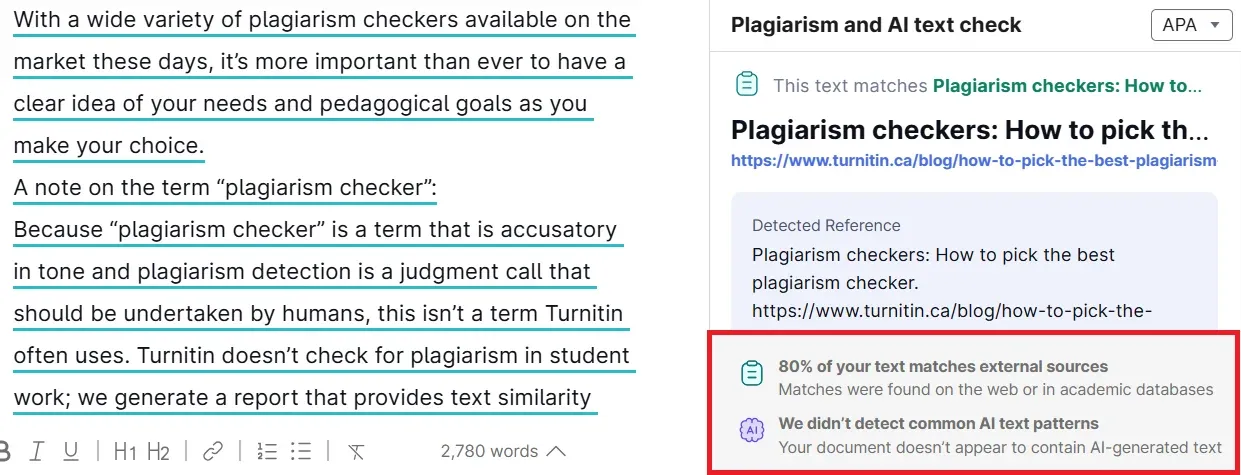
This is Grammarly at its best. For clean verbatim copying, the checker does its job quickly and accurately.
Test 2: Patchwork / Mosaic Plagiarism
The next three tests are where things unravel. We disguised copied content three different ways, and Grammarly missed all three.
First, patchwork plagiarism: four paragraphs pulled from four different published blogs, each lightly paraphrased and stitched together.
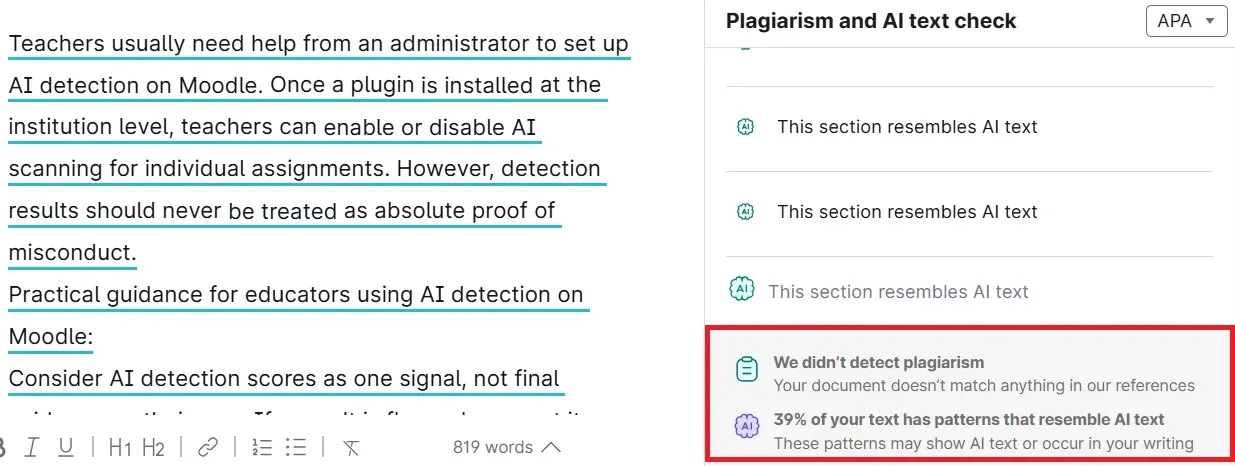
Zero detection. This is the classic mosaic plagiarism blind spot, and it lines up with independent testing. In AcademicHelp's evaluation, Grammarly caught 100% of verbatim text but only 3% of internet-sourced plagiarism once it was reworked.
Test 3: Spun / Paraphrased Content (QuillBot)
This is the test SEO professionals care about most. We ran a 1,000-word blog through QuillBot's paraphraser on standard mode, then scanned it.
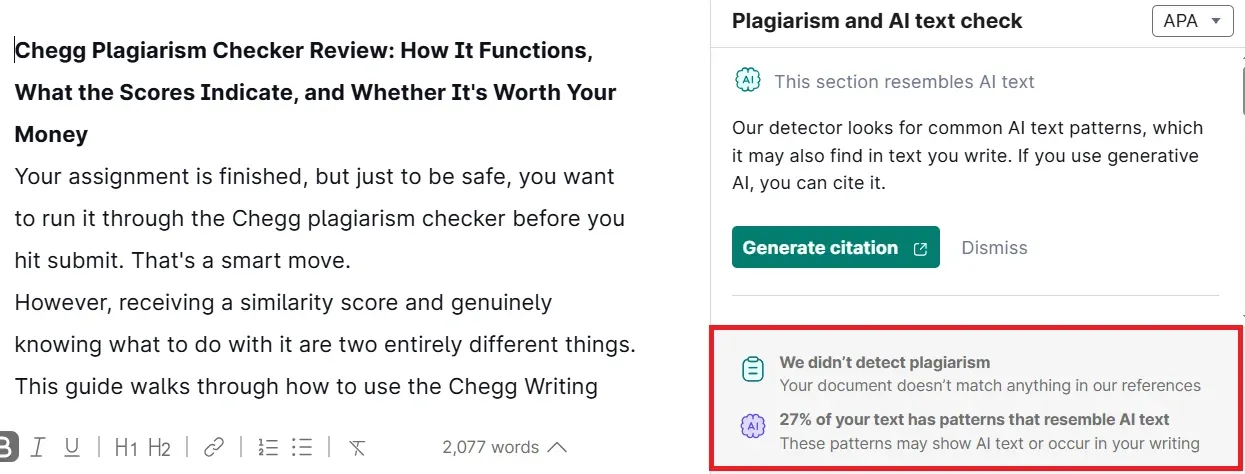
Because Grammarly relies on string matching, reworded text reads as original even when every idea is lifted. That's the core weakness in paraphrased content detection, and a real content originality risk for anyone publishing spun content at scale.
Test 4: AI-Generated Text (ChatGPT)
We generated a 1,000-word blog ("What Makes a Good Online Plagiarism Checker") with ChatGPT and ran it through the checker.
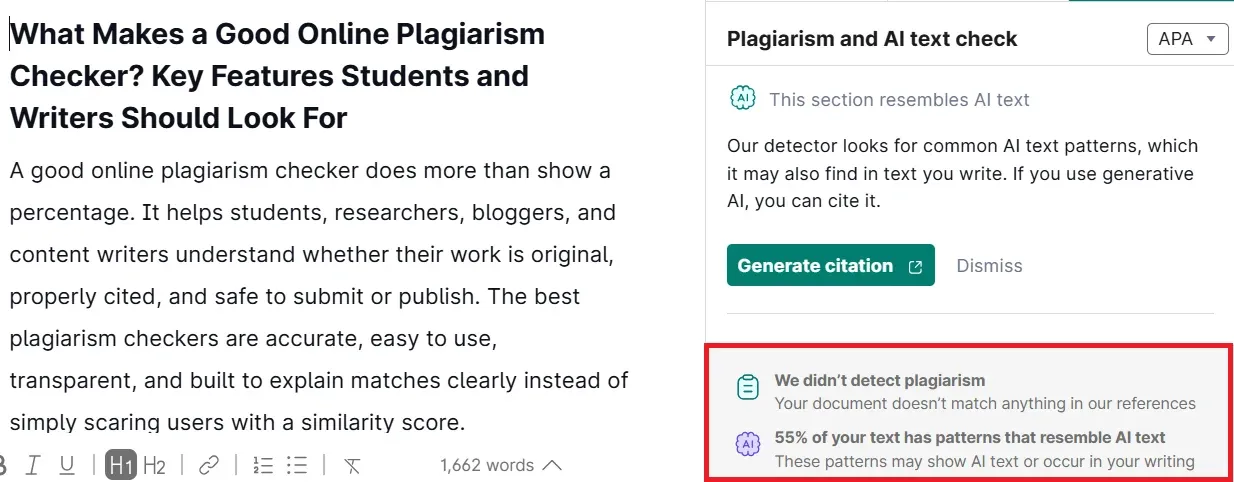
AI text has no existing web source to match against, so it scores 0% similarity by default.
Test 5: Translation-Laundered Content
For our final test, we took the same article from Test 1, ran it through Google Translate into Spanish, then back into English, and scanned the result.
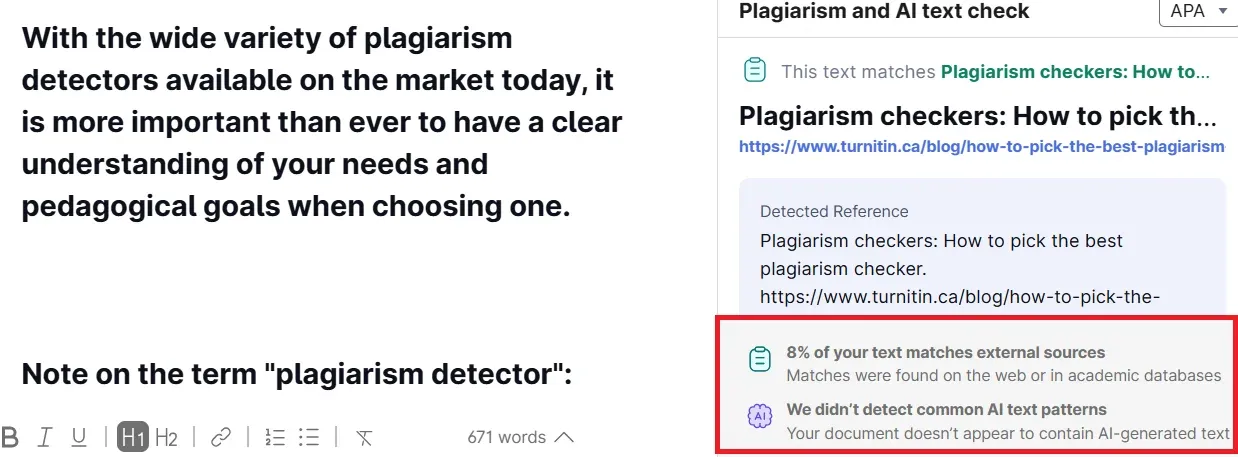
The same article, it caught at 80% verbatim, dropped to near-clean after one round-trip translation. This translation-laundered content gap matters most for multilingual content teams and international SEO, where source material routinely crosses languages before publishing.
What Grammarly's Plagiarism Checker Does Well
Test 1 proved the point: when copied text still exists online or in an academic database, Grammarly catches it fast. For surface-level originality checks, it's a genuinely useful tool, and that's worth saying plainly before we get into where it falls short.
Here's where it earns its keep:
- Web scanning: Compares your text against billions of web pages and ProQuest's academic databases. For verbatim text, the similarity score is quick and accurate.
- Citation flagging: Highlights the exact sentences that match, so problems are easy to find and fix.
- Source attribution: Gives you direct URLs to matched sources, so you can verify each flag and decide whether to cite, quote, or rewrite.
- Convenience: Grammar, clarity, style, and plagiarism all live in one editor. No switching between tools for a first-pass review.
- Speed: Scans roughly 2,000 words in under five seconds.
That all-in-one workflow is its biggest strength. For students and writers who just want a quick check before submitting, it removes friction.
Grammarly's plagiarism checker is reliable for students doing basic verbatim checks in casual academic work.
As a content originality checker for obvious matches, quick citation flagging, and simple similarity review, it does the job well.
The trouble starts when the copying isn't obvious.
Where Grammarly's Plagiarism Checker Falls Short
Grammarly's plagiarism checker is not reliable enough for university assignments on its own. It works as a first-pass self-check, but no university accepts its report as proof of originality, and it can't scan against the institutional databases of past student papers that schools actually use.
Publish spun or patchwork content on the back of a clean Grammarly scan and you're still exposed to a duplicate content SEO penalty, or worse.
Here's where it fails, backed by what we saw:
- It misses paraphrased and spun content. Test 3 proved it. QuillBot-spun text scored near 0% because Grammarly relies on string-matching, not the semantic NLP that would catch reworded ideas. Independent testing found the same gap: Grammarly flagged only a fraction of paraphrased copying that stricter tools caught.
- It can't detect patchwork plagiarism. Test 2 returned zero. Stitching lightly reworded sentences from multiple sources falls below Grammarly's detection threshold. This kind of incremental plagiarism, built up piece by piece from several sources, is exactly what string-matching misses. Turnitin defines this mosaic plagiarism as weaving phrases from several sources into your own work, and our test confirms Grammarly doesn't catch it.
- It does not detect AI content. Test 4 came back clean. Text written by large language models (LLMs) like ChatGPT has no existing web source to match against, so it scores 0% similarity by default. Grammarly does offer a separate AI detector, but that's a different tool with its own accuracy limits..
- Translation laundering slips through. Test 5 dropped from 80% to 8% after one round-trip translation. Content copied, translated, and back-translated keeps its meaning while changing surface wording, and Grammarly misses the semantic match almost entirely.
Three structural limits round it out:
- No private academic database. Unlike Turnitin, Grammarly can't check against institutional repositories of previously submitted student papers. Grammarly only checks public web pages and ProQuest academic sources. A paper can score clean on Grammarly and still match a classmate's submission in Turnitin. The same blind spots show up in LMS tools too, as we found when testing whether SafeAssign checks for plagiarism.
- English only. No multilingual support.
- Premium-only. Plagiarism checking requires a paid plan.
Grammarly's plagiarism checker is only suitable for initial self-checks, not formal academic submissions. It's useful for a draft pass, but no university or journal accepts it as proof of originality.
Publish spun or patchwork content on the back of a clean Grammarly scan, and you're still exposed to a duplicate content SEO penalty, or worse.
Who Should (and Shouldn't) Use Grammarly for Plagiarism
Grammarly fits people who need a fast first-pass check, not a final originality audit. For spotting obvious source matches before you hit publish, it does the job.
Good fit for:
- Bloggers and content writers running a quick duplicate-content check before publishing. If you draft in Docs, here's how to check for plagiarism in Google Docs step by step.
- Students reviewing an essay for obvious source matches before submission.
- Freelancers who want grammar, style, and plagiarism feedback in one editor.
- Anyone who needs source links to clean up missing citations fast.
As a plagiarism checker for bloggers doing routine spot-checks, that all-in-one workflow is genuinely convenient.
Not ideal for:
- Students submitting formal academic, legal, or journal work, where institutional tools are often required.
- SEO professionals checking spun, AI-assisted, or heavily paraphrased content.
- Content agencies reviewing outsourced drafts for patchwork or mosaic plagiarism.
- Teams that need multilingual or cross-language originality review.
The pattern is simple. Grammarly protects content originality against careless copying, but not against deliberate disguise.
For anyone whose writing integrity depends on catching reworded, AI-generated, or translated content, it leaves real gaps. If you're comparing tools, read our Prepostseo Plagiarism Checker Review.
If you fall in the second group, here is what a more complete check looks like.
A More Complete Alternative: Phrasly's Plagiarism Checker
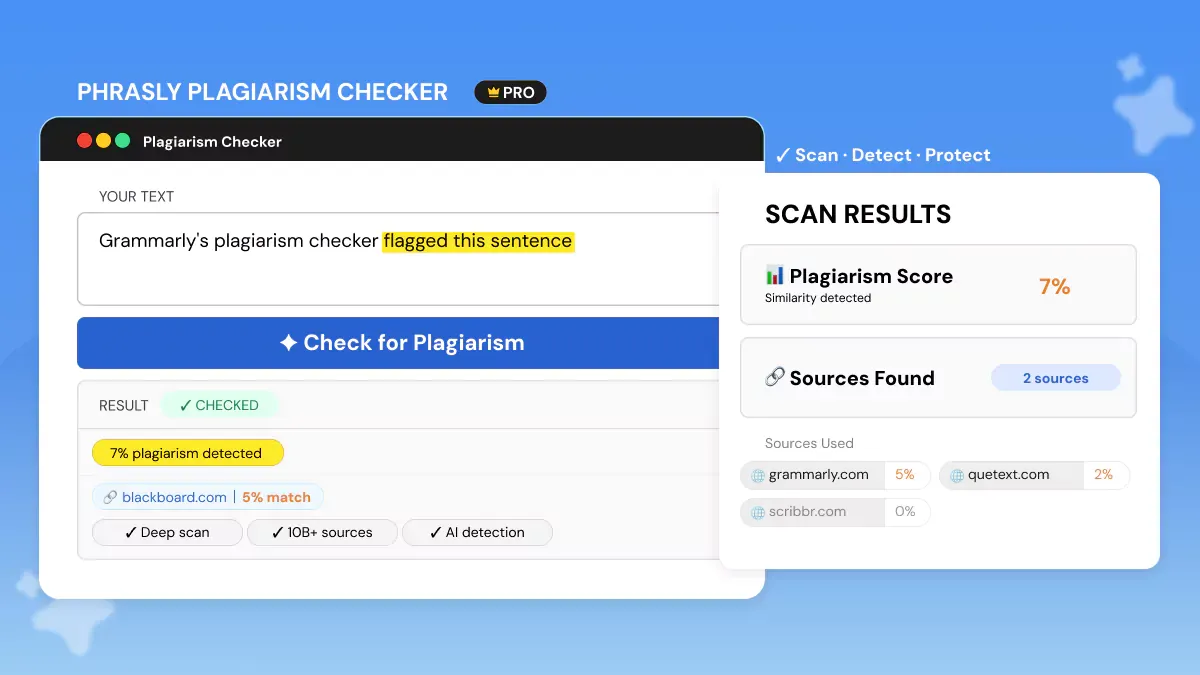
Four of our five tests exposed specific gaps in Grammarly's detection. Here is what a tool built specifically for plagiarism catches differently.
Phrasly works for the jobs Grammarly's basic similarity score can't handle. Its plagiarism checker scans against 10B+ web pages, academic papers, and research databases, then returns matched sources, direct links, highlighted passages, and a similarity score.
It targets the exact content types Grammarly missed. Phrasly says its checker detects copied, paraphrased, and restructured content, including the mosaic plagiarism that slipped through our Test 2.
AI detection stays a separate tool. Instead of burying it inside a plagiarism scan, Phrasly runs a standalone AI Detector on the same platform, so you can check plagiarism risk and AI-generated content without switching tools or trusting a grammar app to flag AI writing.
On the practical side:
- Supports PDF, DOCX, and TXT uploads, plus direct text pasting.
- Documents are never stored, indexed, or shared, and content is deleted immediately after scanning.
- No ads, clean interface.
On pricing: Non-customers pay $5 per scan, or $20/month for 20,000 words per month. Existing customers get plagiarism checking inside the full $20/month package, which bundles the Humanizer and other tools, with the same 20,000 words per month.
For students, agencies, and SEO teams checking content integrity, that buys stronger plagiarism review, real source matching, file uploads, and a separate AI Detector from one plagiarism detection tool.
Grammarly vs Phrasly: Side-by-Side
Grammarly is stronger as a writing assistant with plagiarism checking bolted on.
Phrasly is stronger when the main job is originality review: plagiarism, paraphrasing risk, mosaic plagiarism, file uploads, and separate AI detection from the same platform.
Grammarly's plagiarism checker is great for one job: catching obvious, copied-and-pasted text. Our Test 1 proved it does that fast. For a quick check before you publish a blog post or hand in an essay, it works.
But it misses almost everything else. Paraphrased, AI-generated, patchwork, and translated content all slipped past it in our tests, and independent third-party reviews found the same gaps.
So treat it as a quick safety net, not your final check. For anything that really matters, use a tool built for the job.
FAQs
Is Grammarly Plagiarism Checker Accurate?
It depends entirely on the type of plagiarism. For direct copy-paste, it's accurate. Our Test 1 returned an 80% match against its database of 16B+ web pages and ProQuest academic sources.
But accuracy drops sharply with patchwork (Test 2), spun (Test 3), AI-generated (Test 4), and translation-laundered content (Test 5), because those evade the exact source-matching it relies on.
If you're looking for a no-cost starting point, see our test of PapersOwl's plagiarism checker before trusting any free score.
Is Grammarly Plagiarism Checker Free?
No. Full plagiarism checking is a Premium-only feature.
The free version may hint that plagiarism is present, but it won't show which sentences are flagged or give you source links. Matched-text highlights, source references, and the originality report all require a paid plan.
How to Check Plagiarism in Grammarly?
Paste your text or upload a supported file into the Grammarly Editor, then select the Plagiarism tab in the right-hand panel.
Grammarly scans the document, highlights matching sentences, and provides source links. Click each flag to see the matched source and decide whether to rephrase, quote, or cite.
Does Grammarly Plagiarism Checker Detect AI-Written Content?
No, not through the plagiarism checker. AI-generated text has no web source to match against, so it typically scores 0% similarity, which our Test 4 confirmed.
Grammarly runs a separate AI detector, but it's a different tool, and Grammarly itself warns that no AI detector is 100% accurate, so it shouldn't be your only check for formal submissions. For AI detection, compare the Best AI Checker Tools 2026.
Is Grammarly Plagiarism Checker Good for Academic Submissions?
Only as a first-pass self-check. Grammarly's reports are not accepted by universities or academic journals as proof of originality, and it can't check against private institutional databases of previously submitted papers.
For formal submissions, Turnitin through your institution or Scribbr remains the standard. It's worth knowing whether Scribbr is reliable if you're weighing alternatives.
What Is the Word Limit on Grammarly's Plagiarism Checker?
On the paid plan, one document can hold up to 100,000 characters, roughly 20,000 words depending on spacing.
Daily and monthly caps also apply: up to 100 documents or 50,000 words per 24 hours, and 300 documents or 150,000 words per 30 days. For most bloggers and students, that's plenty for regular use.


Keep reading

Copyleaks Plagiarism Checker: Tested, Rated & Compared
Copyleaks Plagiarism Checker review: we tested verbatim, minor-change, and paraphrased content to see how its 3-layer detection performs. See pricing, AI-detection accuracy (77%-96%), free plan limits, and how it compares to Phrasly in a head-to-head scan before you subscribe.
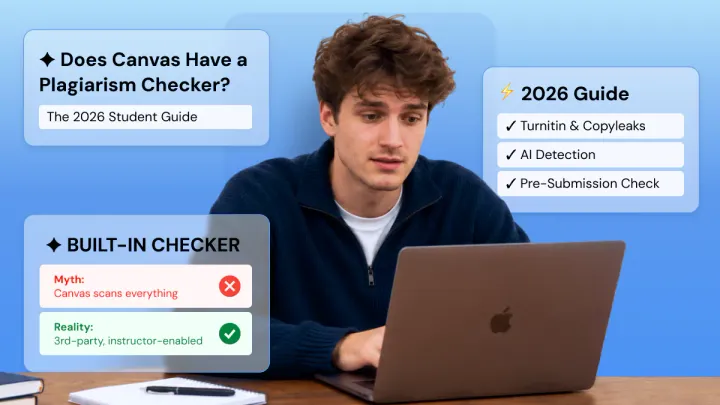
Does Canvas Have a Plagiarism Checker? What It Uses, How It Works & What Students Should Do
Canvas has no built-in plagiarism checker. It relies on instructor-enabled tools like Turnitin or Copyleaks. Learn how scanning actually works, whether Canvas detects AI writing (ChatGPT, Claude, Gemini), and how to check your paper for plagiarism and AI content before you submit.