Gemini AI Prompts: 100+ Copy-and-Paste Examples for Photos, Trends, and Text (2026)
43 min read
Looking for prompts for Gemini AI you can copy and paste? A good Gemini prompt names the task. Adds the context, sets the format, and gives one clear limit. If you just need one now ("give me a prompt for Gemini"), paste this into the Gemini app:
Summarize this report for my manager in five bullets, flag the risks, and keep it under 150 words.
Editing a photo instead? This is a Gemini AI prompt copy-paste example. Upload a clear photo and paste this:
Make this look like a 1990s film photo with soft grain and a warm light leak. Keep my face and pose exactly the same.
Below you will find 100+ copy-and-paste Gemini prompts for trending photo edits, realistic portraits, writing, study, and work. Plus, the template behind them and a free generator that builds one around your own task.
Build a Custom Gemini Prompt With Phrasly's AI Prompt Generator
Describe your task or the photo look you want and mention Gemini. You get a structured prompt to paste. Build one with Phrasly's AI Prompt Generator.
Best Gemini AI Prompts to Copy and Paste (10 Quick Picks)
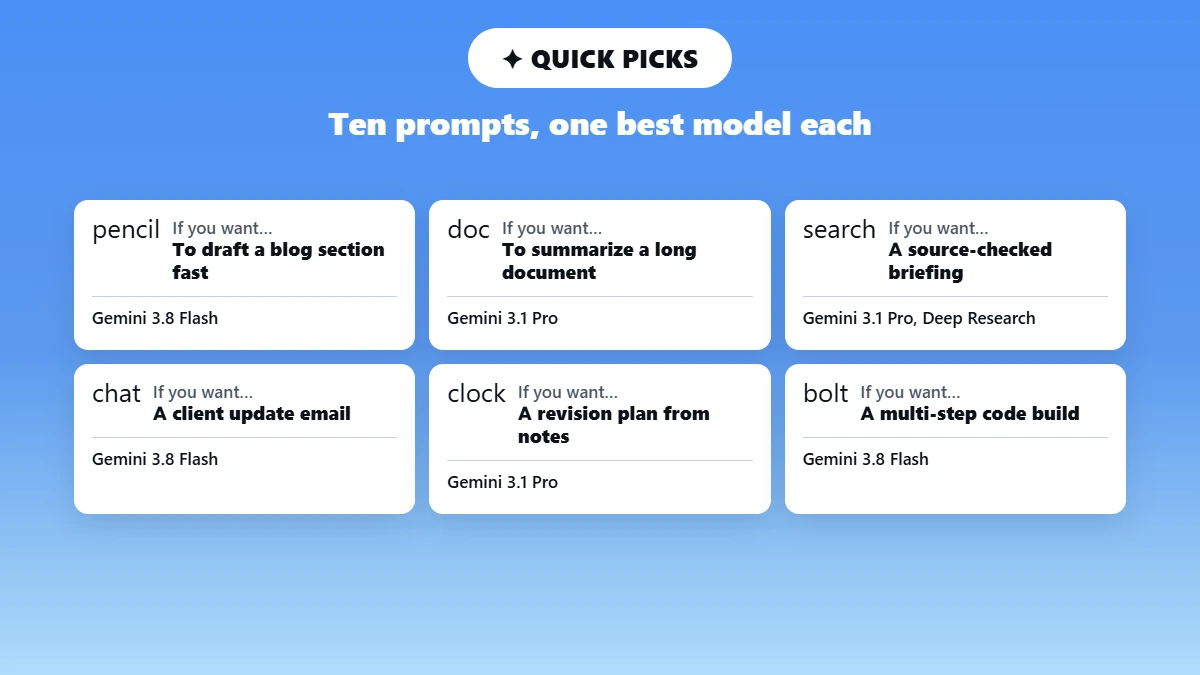
These ten Gemini prompt copy-paste cards cover the tasks people bring to Gemini most often. Copy any one. Swap the text inside the square brackets for your own details and paste it into Gemini.
Each card names the job it does. The part you should change is the model that handles it best.
Tip: The bracket rule. Everything inside [square brackets] is a blank you fill in. Everything outside the brackets is the instruction Gemini follows. So leave it alone the first time you run a prompt.
Writing: Blog section drafting
Best for: Turning an outline point into publishable copy
Write a 300-word section for a blog post about [topic]. Audience: [describe your reader]. Open with the direct answer in the first sentence. Use short paragraphs and one bulleted list. Avoid filler phrases and marketing language.
What to customize: The topic, the reader, and the word count
Recommended model: Gemini 3.1 Pro for research-heavy topics. Gemini 3.8 Flash for speed.
Summarize: Long document to five bullets.
Best for: Reports, contracts, and meeting transcripts you have no time to read
Summarize the attached [document type] into five bullets for a [job title]. Cover the decisions made, the money involved, and anything that needs my approval. Keep the whole summary under 150 words. Flag anything ambiguous instead of guessing.
What to customize: The document type and the job title of the person reading it
Recommended model: Gemini 3.1 Pro, because long uploads reward careful reading.
Research: Source-checked briefing
Best for: Getting up to speed on a topic before a meeting
Research [topic] and give me a briefing with four sections: what is settled, what is disputed, what changed in the last six months, and what I should ask about. Cite a source for every claim. Separate verified facts from your own inference.
What to customize: The topic and the four section names
Recommended model: Gemini 3.1 Pro with Deep Research turned on.
Email: Client update that lands
Best for: The weekly status email you keep putting off
Write a client update email for [project name]. Status: [where things stand]. Next step: [what happens next]. Blocker: [what you need from them]. Warm but brief tone, under 150 words, subject line included. End with one yes-or-no question.
What to customize: The three bracketed lines. Fill them with rough notes. Not polished sentences
Recommended model: Gemini 3.8 Flash.
Studying: Revision plan from your own notes
Best for: Exam week, when you have material but no plan
Here are my notes for [subject]: [paste notes]. Identify the five highest-priority topics. Then build a 7-day revision schedule with daily study blocks, three active-recall questions per block, and one short quiz per day. Output as a table.
What to customize: The subject and the number of days you actually have
Recommended model: Gemini 3.1 Pro.
Data analysis: Trends and outliers
Best for: A spreadsheet you need to explain to someone else
Analyze this dataset: [paste or upload]. Identify the three clearest trends, any figure that looks wrong, and what the numbers suggest for [the decision you face]. Give the answer first, then the working. Say so plainly if the data cannot support a conclusion.
What to customize: The decision at the end. That line does most of the work.
Recommended model: Gemini 3.8 Flash for speed. Gemini 3.1 Pro for large files.
Coding: Multi-step build
Best for: work that needs planning before any code gets written
Step 1: Read the code I am pasting and describe what it does. Step 2: list the bugs and the risky assumptions. Step 3: rewrite it with the fixes applied. Step 4: Explain each change in one line. Finish each step before starting the next and label every step.
What to customize: The four steps. Add or remove steps to match the job.
Recommended model: Gemini 3.8 Flash, which Google built for long-horizon coding.
Image: Gemini AI photo prompt
Best for: A specific picture rather than a lucky one
Create a [shot type] of [subject]. Setting: [where]. Lighting: [natural window light/studio softbox/golden hour]. Composition: [close-up/wide/overhead]. Style: [editorial photography/2D illustration/product render]. Keep skin tones natural and the text legible.
What to customize: All five labels. Naming lighting and composition changes the result more than any adjective.
Recommended model: Nano Banana 2 for speed, Nano Banana Pro for final assets.
Video: Short clip brief
Best for: Social clips, product shots, and explainer scenes
Create an 8-second video of [scene]. Motion: [slow push-in/fast cuts/static]. Camera angle: [low 45-degree/handheld close-up/wide]. Duration: 8 seconds. Style: [cinematic commercial/clean 2D animation/documentary]. Mood: [calm/energetic/dramatic].
What to customize: The scene and the mood. Keep the duration short.
Recommended model: In the Gemini app, use Create video (powered by Gemini Omni). Needs a Google AI plan.
Planning: 90-day plan with owners
Best for: Launches, migrations, and anything with a deadline
Build a 90-day plan for [project]. Break it into three 30-day phases with weekly milestones. For each milestone, give the owner role, one risk, and one success measure. Format as a table. Flag any milestone that depends on something outside my control.
What to customize: the project and the phase length
Recommended model: Gemini 3.1 Pro.
Tip: Want the rest? The full 100+ library further down covers trending photos, realistic portraits, writing, research, work, students, video, and music, grouped by what you want to produce.
Trending Gemini AI Photo Prompts
The best prompt for Gemini photo work right now is a style edit on your own photo. Popular Gemini AI photo prompt copy-paste looks include a 1990s film look. Y2K flash photos, 3D collectible figures, cinematic time travel, and movie posters.
These are the trending prompts for Gemini. Upload a clear photo. Paste a prompt below and keep the preserve line so Gemini does not change your face.
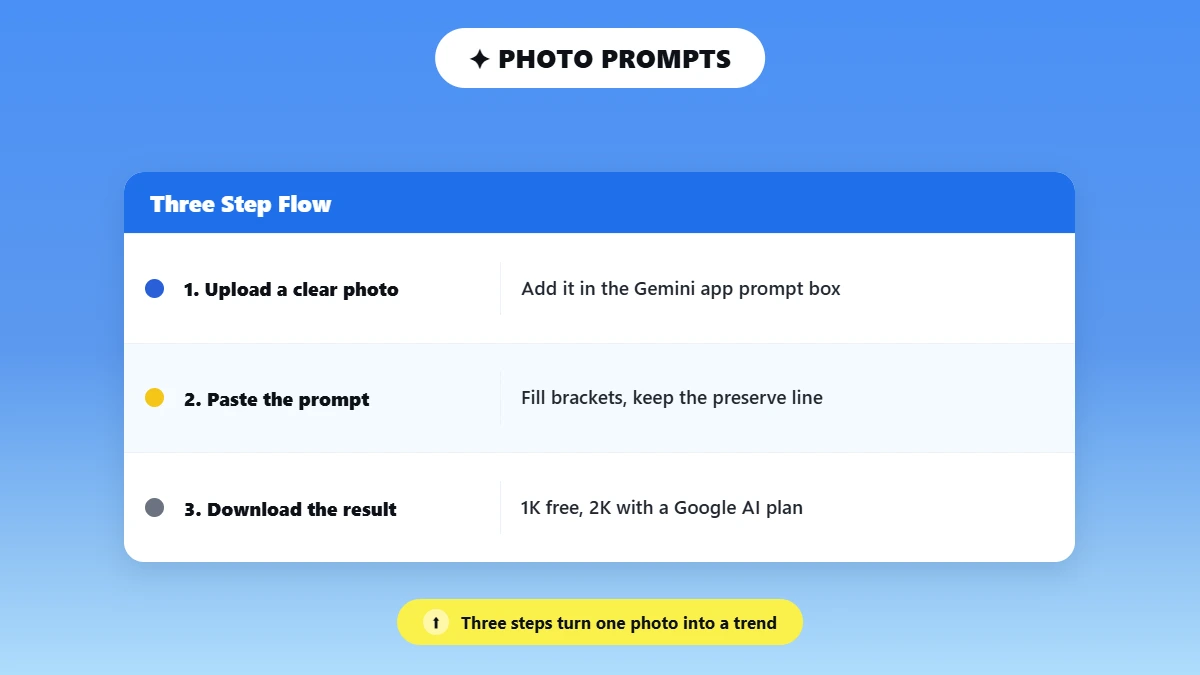
How to Use a Photo Prompt in Gemini (3 Steps)?
Open the Gemini app or gemini.google.com. Upload a clear, well-lit photo using the add or upload control in the prompt box.
Paste the prompt. Fill in the [brackets] and keep the preserve line. Change one thing per follow-up message.
Download the result. Per Gemini Help, full-size downloads are 1K without a Google AI plan and 2K with one. Editing uploaded photos requires age 18 and over. Daily image limits apply.
Tip: The preserve line. End every edit of a person with: "Keep my face, expression, hairline, and pose exactly the same. Do not add text or extra people." This is a request. Not a guarantee. Check the result and ask again for one fix at a time.
90s disposable camera look
Best for: The film-photo trend on Instagram and TikTok
Edit my uploaded photo to look like it was shot on a 1990s disposable film camera. Add soft film grain, a warm light leak on one edge, slight flash glare, and faded colors. Keep my face, expression, pose, and outfit exactly the same. Do not add text or new people.
What to customize: The decade, the light-leak color
Y2K night flash photo
Best for: The "flash filter" and Y2K camcorder look
Turn my uploaded photo into a 2003 point-and-shoot flash photo taken at night: harsh direct flash, slightly overexposed skin, dark background, and a small orange date stamp reading [date] in the corner. Keep my face and pose unchanged.
What to customize: The date stamp, the setting
3D collectible figure in a box
Best for: The action-figure and chibi toy trend
Turn the person in my uploaded photo into a 3D collectible figure on a round display base, next to a retail box printed with [name]. Studio product lighting, soft shadows, desk setting. Keep the face recognizable, and the outfit colors the same.
What to customize: The name on the box, chibi or realistic style
Cinematic time travel
Best for: Putting yourself in another city and era
Place me in [city] in [year] on a [rainy night / foggy morning]. Match my clothing and the lighting to that era, use cinematic 35mm film color, and keep my face, expression, and pose unchanged.
What to customize: City, year, weather
Indie movie poster
Best for: A shareable poster from a portrait
Create an indie movie poster from my uploaded portrait. Title: [title]. Tagline: [tagline]. Moody cinematic lighting, strong color grade, clean title typography at the top, small credits block at the bottom. Keep my face unchanged.
What to customize: Title, tagline, genre mood
Scrapbook collage page
Best for: Turning several photos into one post
Arrange my uploaded photos into a handmade scrapbook page: torn paper edges, washi tape, small handwritten notes that say [text], pastel paper texture, 3 to 4 photos placed naturally. Keep every face unchanged.
What to customize: The notes, the color theme
Motion effect on a still photo
Best for: Sports and action shots that feel alive
Keep me sharp and add motion blur and light streaks to the background so the photo feels like it is moving. Add a subtle camera-shake feel. Do not change my face or body.
What to customize: Streak color, blur strength
Seasonal color analysis
Best for: The color-analysis trend (text plus image answer)
Look at my uploaded photo taken in natural daylight. Tell me which seasonal color palette suits me (spring, summer, autumn, or winter) and why, based on skin undertone, hair, and eye color. Then make a palette card with 12 swatches and 3 outfit color combinations.
What to customize: Outfit occasion
Traditional outfit portrait
Best for: Festive and saree-style portraits
Restyle my uploaded photo into a portrait wearing a [color] silk saree with a [gold] border, soft golden-hour light, and a [temple courtyard / plain wall] background with a warm vintage tone. Keep my face, hairline, and expression unchanged.
What to customize: Outfit, color, background
Group or couple photo
Best for: Putting friends or a couple in one shot (with their permission)
Using the uploaded photos of [names], create one natural photo of us together at [place], everyone smiling, with matching light and skin tones. Keep each person's face and features true to their photo.
What to customize: Place, pose, number of people
2026 photo calendar
Best for: The calendar trend
Create a 2026 wall calendar cover using my uploaded photo, with clean modern typography, a [color] theme, and a readable month grid for [month]. Keep the photo unchanged.
What to customize: Month, color. Check every date, since AI text in images can be wrong.
Clean profile picture (DP)
Best for: WhatsApp, Instagram, or LinkedIn photos
Turn my uploaded selfie into a clean profile picture: head and shoulders centered, soft studio light, plain [color] background, natural skin texture, square crop. Keep my face and expression unchanged.
What to customize: Background color, crop
Safety: Use your own photos. Or photos of people who have agreed. Do not upload IDs, documents, or photos of children. Do not ask Gemini to make you look like a real celebrity. Or to put real people in scenes they never agreed to.
Gemini may refuse or remove images that break Google's rules. Per Gemini Help, photo editing is for users aged 18 and over.
Want a prompt for your exact photo idea? Describe the look and what must stay the same. Phrasly's prompt generator writes a Gemini-ready image prompt you can paste.
Realistic Photo, Portrait, and Background Prompts for Gemini
For a realistic Gemini photo, name six things. Subject, setting, one light source, framing, natural texture, and what to avoid. When you edit your own photo, say exactly what changes. And what must stay the same.
Nano Banana 2 handles everyday edits. Nano Banana Pro is the paid redo for extra detail.
Gemini has two image lanes.
In the app, Nano Banana 2 runs when the model is set to Flash or Pro. Nano Banana 2 Lite runs with Flash-Lite.
Nano Banana Pro is a paid redo on a Google AI plan for extra detail.
Nano Banana 2 is the faster choice for quick creation and everyday edits. Nano Banana Pro is for polished, higher-control output.
Tip: Name five things in every image prompt. Subject, setting, lighting, composition, and style. Prompts that name all five beat long adjective lists almost every time.
Realistic and Template Prompts
Realistic headshot
Best for: An everyday professional photo
Create a photorealistic headshot of [subject] against a neutral background. Soft natural window light, sharp focus on the eyes, realistic skin texture, shoulders-up framing, editorial style.
What to customize: The subject and the background color
Realistic photo template (text to image)
Best for: Any photo you want to look real
Create a photorealistic [shot type] of [subject] in [setting]. Use [one light source and direction], [framing], and a [lens look, if useful]. Show natural texture in [skin/fabric/product surface]. Use a [portrait/square/landscape] layout. Avoid [unwanted elements].
What to customize: Every bracket
Edit-my-photo template (uploaded photo)
Best for: Changing one thing without changing you
Edit the uploaded photo. Change only [what changes]. Keep my face, expression, pose, clothing, and the original crop exactly the same. Match the original light direction and shadows. Do not add accessories, text, or people.
What to customize: The one change
Cinematic and Portrait Prompts
Moody noir
Best for: Dramatic, high-contrast character shots
Create a cinematic noir portrait of a detective standing under a streetlight at night. High contrast lighting, deep shadows, rain-soaked pavement reflections, 50mm lens style, dramatic film lighting.
What to customize: The character and the lens style
Golden hour backlit
Best for: Warm outdoor portraits
Generate a portrait of a traveler on a cliff during golden hour. Warm backlighting, soft lens flare, shallow depth of field, natural skin tones, DSLR photography style.
What to customize: The subject and the location
High-detail studio portrait
Best for: Clean, detailed headshots on a plain background
Create an ultra-detailed studio portrait of a professional speaker against a neutral background. Softbox lighting, crisp facial details, high dynamic range, high-resolution detail.
What to customize: The profession and the background color
Vintage film grain
Best for: An analog look without a filter
Generate a portrait with vintage film grain texture, muted color palette, analog camera feels, and subtle imperfections similar to 1970s film photography.
What to customize: The decade and the color palette
Cyberpunk neon
Best for: Stylized night scenes
Create a cyberpunk city portrait with neon lights reflecting on wet streets, futuristic clothing, holographic signage, and cinematic color grading.
What to customize: The city details and the color grading
Natural-light realistic portrait (no retouch look)
Best for: Readers searching "natural" or "real" prompts
Create a candid, natural-light portrait of [subject] near a window in the late afternoon. Keep real skin texture and small imperfections, no heavy smoothing, true-to-life colors, shallow depth of field.
What to customize: Subject, time of day
Professional and LinkedIn Headshot Prompts
Corporate headshot
Best for: A LinkedIn profile photo
Generate a professional LinkedIn headshot of a business consultant in formal attire. Neutral studio background, soft lighting, natural skin tones, sharp focus.
What to customize: The job title and the attire
Creative industry headshot
Best for: Designers, writers, and founders
Create a modern headshot for a creative professional. Bright studio lighting, minimalist background, casual professional clothing, editorial photography style.
What to customize: The clothing and the lighting
Outdoor natural light
Best for: A warmer, less formal profile photo
Create a professional outdoor headshot in natural daylight. Soft background blur, warm natural tones, relaxed but professional expression, high resolution
What to customize: The setting and the expression
Professional portrait for men
Best for: Professional headshot-style images for men
Generate a professional portrait of a male business professional for LinkedIn. Outfit: tailored navy blazer, white shirt, no tie. Background: clean modern office with soft blur. Lighting: natural window light, realistic skin texture, confident but approachable expression, sharp focus, high-resolution editorial style.
What to customize: The outfit and the background
Professional portrait for women
Best for: LinkedIn and work profiles
Generate a professional portrait of a woman for LinkedIn. Outfit: [tailored blazer, color]. Background: softly blurred modern office. Lighting: natural window light. Realistic skin texture, confident and approachable expression, sharp focus, editorial style.
What to customize: Outfit, background
Image Quality and Restoration Prompts
Image quality enhancement
Best for: Improving a photo without changing the picture
Enhance this image while keeping the original subject, pose, and composition unchanged. Improve sharpness, lighting balance, skin texture, color accuracy, and background clarity. Remove minor noise or blur, but do not make the image look artificial or over-edited. Keep it realistic and high-resolution.
What to customize: Nothing. Upload the image and run it as written.
Old photo restoration
Best for: "Make image high quality" searches
Restore this old uploaded photo. Remove scratches, dust, and fading, gently sharpen details, and correct color without making it look new or artificial. Keep every face, the pose, and the composition unchanged.
What to customize: Colorize or keep black and white.
Background Replacement Prompts for Gemini
The best background prompt for Gemini keeps the subject unchanged. And swaps only the scene. Each background prompt for Gemini below does exactly that.
Misty forest
Best for: A soft, atmospheric backdrop
Keep the subject unchanged but replace the background with a misty pine forest at sunrise. Soft atmospheric lighting, cinematic mood.
What to customize: The location and the time of day
Urban rooftop
Best for: A city skyline backdrop
Keep the subject centered and place them on a modern city rooftop at sunset with skyline and warm cinematic lighting.
What to customize: The city and the light
Minimalist studio
Best for: Product shots and clean profile photos
Replace the background with a clean white studio backdrop, soft shadow lighting, editorial photography style.
What to customize: The backdrop color
Remove an object or person from the background.
Best for: Cleaning up a travel or event photo
Remove the [object/person] from the background of my uploaded photo and fill the space so it matches the surroundings. Keep me and everything else unchanged.
What to customize: What to remove
Design, Layout, and Mockup Prompts
A layout prompt for Gemini arranges your photos. Or turns a sketch into a render. Use these when you need structure. Not a single image.
2x2 photo grid layout
Best for: A clean multi-photo post
Arrange my four uploaded photos into a clean 2x2 grid with equal white borders, matching color tone across all four, and a small caption bar at the bottom that says [caption]. Keep every photo unchanged.
What to customize: Caption, border color
Interior or architecture render from a sketch
Best for: Turning a sketch into a render
Turn my uploaded floor-plan sketch into a realistic 3D interior render of a [room type]. Style: [modern/minimal/warm wood]. Daylight from the windows shown in the sketch. Keep the wall layout and window positions exactly as drawn.
What to customize: Room, style
Product mockup
Best for: Putting a logo on a product
Place my uploaded logo on a [white t-shirt/coffee bag/phone case] in a realistic product mockup on a light studio surface with soft shadows. Keep the logo's colors and proportions unchanged.
What to customize: Product, surface
Process flowchart
Best for: Explaining a sequence in one image
Create a clean infographic showing a 5-step marketing funnel. Flat design, labeled steps, connecting arrows, modern color palette.
What to customize: The number of steps and the labels
Flat-lay diagram
Best for: Workflow slides and internal decks
Generate a flat-lay product development workflow diagram. Minimalist icons, labeled stages, white background, modern corporate design.
What to customize: The stages
Dashboard mockup
Best for: Showing a product Idea before it is built
Design a digital marketing dashboard mockup with analytics charts, labeled metrics, and a clean modern UI style.
What to customize: The metrics on screen
Fix an Image that Looks Fake
Problem | Follow-up to send |
Plastic, over-smoothed skin | Restore natural skin texture and pores. Reduce smoothing. Keep the face and pose. |
Face changed | Go back to my original face from the uploaded photo. Change only the background. |
Shadows do not match | Use one light source from [left]. Make all shadows match it. |
Wrong text in the image | Rewrite only the text to say [text]. Keep everything else. |
How to Write a Good Prompt for Gemini (Formula + Template)
Here is how to write prompts for Gemini. The right one depends on what you want back. But the shape stays the same. Say the task. Give the context and audience, set the format, and add one or two limits. Add a role only when it helps.
Fill the template below once. And you can reuse it for any task.
The framework is Task + Context + Format + Limits (+ optional Role). You will also see it written as Intent + Context + Constraints, which is the same idea in three words.
So readers who saw that image are not confused. Google's own Gem guidance uses persona, task, context, and format.
Here is the same request, before and after.
Weak: "Write something about our new pricing."
Strong: "Write a 120-word announcement about our new pricing for existing customers who are on the old plan. Explain what changes, what stays the same, and what they need to do. Plain language, no marketing adjectives, one bulleted list".
The strong version took twenty extra seconds to type. It removes every decision Gemini would otherwise make for you.
Part | What it means | Example |
Intent / Task | The exact output you want | "Write a 5-bullet summary" |
Context | Your role, situation, audience | "I'm a PM presenting to a non-technical board" |
Constraints / Limits | Format, length, tone, exclusions | "Max 120 words, no jargon" |
Tip: The step rule. When one prompt carries two unrelated jobs, output quality drops on both. Write "Step 1... Step 2..." and tell Gemini to finish each step before starting the next.
Three habits change your results more than anything else:
Give context before instructions when you upload a document or paste background; Gemini weights that material heavily. Clean, relevant, well-ordered source text produces better output than a longer command.
Set limits as numbers. Not adjectives. "Keep it short" leaves room for interpretation. "Maximum 150 words" does not.
Ask for depth when you want depth. Gemini defaults to a compact answer. If you want a step-by-step breakdown, say so. Or you will get a summary.
Reusable Gemini Prompt Template
The reusable Gemini prompt template
Best for: Any task, on any Gemini model
[What you want Gemini to produce]. I am [your role/situation], and this is for [audience/purpose]. Output should be [bullet points/table/paragraph/numbered list]. Keep it [length + tone]. Do not include [specific exclusions].
What to customize: All five brackets. The last one matters most. Exclusions are what most people forget.
A filled-in example: "Write a project status update. I am a marketing manager, and this is for a weekly client report. Output should be bullet points. Keep it under 100 words and professional in tone. Do not include internal team names or budget figures".
In the Gemini app, you can also switch to Thinking or Pro mode for deeper reasoning on complex research or multi-step tasks.
Google's own prompt engineering guide covers the same ground for developers.
This guide on how to write good AI prompts walks through the four-part build with before-and-after examples.
Prefer to describe your task in a sentence? Use the generator at the top of this page.
Instructions for Gemini: Copy-Paste Templates and Gems
A Gemini instructions prompt is a saved preference. Like "start with a short summary" or "use plain English", that Gemini applies to your chats. Add the best instructions for Gemini under Settings and help. Then Personal Intelligence, then Instructions for Gemini.
For a repeat task with its own rules, build a Gem instead and reuse the Gemini Gem prompts below. Paste-ready templates follow.
Where the instruction lives | Best for | Example |
A normal chat prompt | One request | Summarize this report in five bullets. |
Instructions for Gemini (saved) | How you want every chat to sound | Start with the answer, then the detail. Use plain English. |
A Gem | A repeat task with its own rules and files | A content editor that checks drafts against my style guide. |
How to Set Them Up
Web: Menu, then Settings and help. Then Personal Intelligence, then Instructions for Gemini, then Add +, type, Submit. See Gemini Help.
Mobile app: Menu, then your profile picture, then Personal Intelligence. Then Instructions for Gemini, then Add +, Submit.
Use the toggle at the top to turn them off. Personal Google accounts only. Saved instructions do not apply inside Gems. Gems use their own instructions.
Gem: Explore Gems, then New Gem, add a name and instructions. Preview on the right, then Save (preview alone does not save). "Use Gemini to rewrite instructions" can tidy a rough draft.
Professional writer persona
Best for: Emails, blogs, reports, rewrites, and professional communication
Act as a clear, practical professional writer. Write in short paragraphs, avoid generic AI phrases, and lead with the most useful answer first. Keep the tone confident, simple, and human. When editing text, improve clarity without changing the original meaning. Avoid overexplaining unless I ask for detail.
What to customize: The tone words at the end
Research assistant
Best for: Research summaries, academic work, competitor research, and source-based writing
Act as a careful research assistant. When I ask about a topic, separate verified facts from assumptions. Prefer official sources, academic sources, and primary documentation where possible. Summarize findings in a structured format with headings, bullets, and clear next steps. If information is uncertain or outdated, say so directly.
What to customize: The source types you trust
Meeting summarizer
Best for: Google Docs notes, Gmail threads, project updates, and team meetings
Act as my meeting summarizer. Turn messy notes, transcripts, or email threads into a clean summary with four sections: Key Decisions, Action Items, Owners, and Open Questions. Keep action items specific and deadline-focused. Use a concise, professional tone.
What to customize: The four section names
Student study coach
Best for: A saved instruction for studying
Act as my study coach. Explain new ideas in plain language with one everyday example, then ask me one question to check I understood. Do not write my assignments for me; help me outline and review my own work.
What to customize: Subject level
Brand voice for creators
Best for: A saved instruction for social posts
Write in a friendly, direct voice for [audience]. Short sentences, no hype words, one clear call to action per post. Avoid these words: [list]. Always suggest two headline options.
What to customize: Audience, banned words.
Plain-English explainer
Best for: A saved instruction for clear answers
Assume I am not technical. Lead with the answer in one sentence, then explain in up to five bullets. Define any technical term the first time you use it. Say clearly when you are unsure.
What to customize: Reading level
Gem example: content editor
Best for: A Gem's Instructions box
You are my content editor. Review the draft I give you for clarity, structure, and claims that need a source, using [style guide] as the reference. Return a table with Issue, why it matters, and Suggested edit. Keep my meaning. Ask for the draft or style guide if either is missing.
What to customize: Style guide, columns
Want a custom instruction set? Describe how you want Gemini to respond in the generator at the top of this page.
Gemini Prompts by Task: Writing, Research, Work, and Study
This section is grouped by what you want to produce rather than by who you are. Jump to writing, research, work, or study. Copy the prompt, swap the [brackets], and you are done. Every prompt below is formatted for direct copy-paste.
Writing and Content
Gemini also embeds an invisible SynthID watermark in its text output.
This guide on how to remove the Gemini text watermark explains what that watermark is and how it affects your drafts.
SEO article
Best for: A full draft you will edit rather than publish raw.
Write a 1,500-word SEO article targeting the keyword [keyword]. Audience: [describe your reader]. Structure it with an intro, 4 H2 sections, and a conclusion. Each section should be 250-300 words. Use a conversational but authoritative tone. Avoid filler phrases.
What to customize: The keyword, the reader, and the word count
Thought leadership LinkedIn article
Best for: Posts written to start a conversation
Write a 700-word LinkedIn article from the perspective of a [your role] sharing an unpopular opinion about [industry topic]. Open with a bold statement, support it with 3 arguments, and end with a question to drive comments. Professional but direct tone.
What to customize: The role and the opinion
Blog outline with stat placeholders
Best for: Planning before you write
Create a detailed blog outline for an article titled '[your title]'. Include an H1, 5 H2s with 2-3 H3s each, and note where statistics or data points should be added. Target audience: [describe reader]. Focus keyword: [keyword].
What to customize: The title and the heading counts
150-word LinkedIn bio
Best for: A LinkedIn About section or a company website page
Write a 150-word professional bio for [name], a [job title] at [company]. Highlight [2-3 key achievements or specialties]. Tone should be confident but approachable. Written in third person. Suitable for a LinkedIn About section or company website.
What to customize: The achievements. Those carry the bio.
LinkedIn headline variations
Best for: Testing five angles before you commit to one
Write 5 LinkedIn headline variations for a [job title] who specializes in [niche]. Each should be under 220 characters. Mix formats: one achievement-based, one keyword-heavy, one value proposition, one personality-led, one role + result.
What to customize: The job title and the niche
Client progress update
Best for: The recurring status email
Write a professional client update email for [project name]. Current status: [brief update]. Next steps: [what's happening next]. Tone: warm but concise. No more than 150 words. Subject line included.
What to customize: The status and next steps
Polite follow-up on unanswered proposal
Best for: Chasing without sounding like chasing
Write a polite follow-up email for a proposal sent [X days] ago to [client type]. Keep it short, 3 sentences max. Don't sound pushy. End with a low-friction call to action like a yes/no question.
What to customize: The number of days and the client type
Internal team update (Slack-style)
Best for: Stand-up notes and channel updates
Write a Slack-style internal update for the [team name] team about [project/topic]. Keep it under 80 words. Use short sentences, no corporate jargon. Include: what's done, what's in progress, and any blockers. Casual but professional tone.
What to customize: The team and the topic
If your Gemini output still sounds machine-written, this guide on how to humanize AI text covers what to change to make the final draft read naturally.
Research and Summarization
Executive summary
Best for: Briefing leadership in under a page
Summarize this [document/report] into a 150-word executive summary for senior leadership. Focus on key decisions, business impact, and recommended next steps. Avoid technical language. Use clear, direct sentences.
What to customize: The document type and the audience
Key insight extraction
Best for: Pulling the five things that matter out of fifty pages
Read this report and extract the 5 most important insights. For each one, explain what it means in plain language and why it matters to [your industry/role]. Output as a numbered list.
What to customize: The industry or role
Literature review structure
Best for: Planning a review before you read everything
Help me structure a literature review on [topic]. Identify the major themes, key debates, and gaps in existing research. Output as an outline with subheadings I can write to. Academic tone, suitable for a [undergraduate/postgraduate] level paper.
What to customize: The topic and the academic level
Research question formulation
Best for: Narrowing a topic that is still too broad
I'm researching [broad topic]. Help me narrow this into 3 focused research questions that are specific, measurable, and suitable for a [dissertation/journal article/report]. Explain why each question is worth pursuing.
What to customize: The broad topic and the output type
Citation integration and evidence mapping
Best for: Matching evidence to the argument it supports
I have the following evidence points: [paste your notes]. Help me map them to the argument I'm building about [topic]. Suggest where each piece of evidence fits best and flag any gaps I still need to fill.
What to customize: Your notes and the argument
Literature synthesis
Best for: Turning several uploaded sources into one structured report
I am a [researcher/student] studying [topic]. Analyze the following sources I've uploaded and produce a structured literature synthesis covering key arguments, areas of consensus, and unresolved debates. Output as a formatted report with sections and bullet points.
What to Customize: Your role and the topic
Raw notes to structured summary
Best for: Meeting notes you typed too fast to read back
Here are my raw meeting notes: [paste notes]. Convert them into a structured summary with three sections: Key Decisions, Action Items, and Open Questions. Assign an owner and deadline to each action item where mentioned. Keep the total under 200 words.
What to customize: The three section names
Long-Document and Multi-Step (Agentic) Prompts
Long document analysis
Best for: Finding every mention of one theme across a long report
I'm uploading a 150-page industry report. Find every mention of [topic]. For each one, tell me where it appears, why it matters in context, and give me a timeline of key developments. Output as a structured list.
What to customize: The topic and the page count
Competitor analysis
Best for: A side-by-side view you can take into a strategy meeting.
Act as a market strategist. Analyze the positioning, pricing model, and key weaknesses of [Company A, B, C] in [industry]. Output as a side-by-side comparison table with one row of strategic recommendations at the bottom.
What to customize: The company names and the industry
Complex decision-making
Best for: Choices with more than two variables
Help me evaluate these 3 business options using a decision matrix. Criteria: cost, impact, risk, and 12-month scalability. Think through each criterion before scoring. Present the final matrix as a table with a summary recommendation.
What to customize: The criteria. Swap in whatever your decision actually turns on
Multi-step project planning
Best for: Turning an uploaded brief into a dated plan
You are managing a product launch. Using the document I've uploaded as your source, build a 90-day plan broken into weekly milestones. For each milestone, include: owner role, risk flags, and success metric. Format as a structured table.
What to customize: The project type and the plan length
Agentic workflow prompt
Best for: A sequence of related pieces written in one pass
I need to build an onboarding email sequence for a SaaS product. Step 1: Write a welcome email. Step 2: Write a Day 3 check-in. Step 3: Write a Day 7 feature highlight. Use a friendly but professional tone. Max 150 words per email.
What to customize: The product and the number of steps
Content refresh audit
Best for: Deciding what to update on a page that has gone stale
Review this blog post: [paste or upload content]. Step 1: Identify outdated sections. Step 2: List missing 2026 information. Step 3: Suggest SEO updates for headings and keywords. Step 4: Rewrite the intro in a clearer, more current style. Output as a table plus final revised intro.
What to customize: The year and the four steps
Decision matrix
Best for: Choosing between three options you keep going back and forth on.
Help me choose between [Option A], [Option B], and [Option C]. Score each option from 1 to 5 on cost, speed, risk, effort, and long-term value. Explain each score briefly, then recommend the best option.
What to customize: The options and the scoring criteria
Work and Productivity
SWOT analysis
Best for: A first pass on a product or market position
Run a SWOT analysis for [company/product/idea]. Research the current market context where relevant. Output as a clean 2x2 table with 3-4 bullet points in each quadrant. Keep each point specific and actionable, not generic.
What to customize: The company or product
90-day launch plan
Best for: Anything with a deadline and more than one owner
Create a 90-day launch plan for [product/project]. Break it into three 30-day phases with weekly milestones, key risks per phase, and one success metric per milestone. Format as a structured table.
What to customize: The project and the phase length
Customer personas
Best for: Messaging work that needs a reader in mind
Create 3 customer personas for [product/service]. For each persona, include: demographics, primary pain points, buying motivations, and 2 messaging angles we could use to reach them. Output each persona as a separate labeled section.
What to customize: The product and the number of personas
Data analysis and trend extraction
Best for: A dataset you need to explain, not just read
Analyze this dataset: [paste data or upload file]. Identify the top 3 trends, any anomalies worth flagging, and what the data suggests for [business decision]. Output as a short report with a summary at the top.
What to customize: The business decision at the end
Report-to-presentation conversion
Best for: Turning a document into a deck outline
Convert this report into a 10-slide presentation structure. For each slide, include: a title, 3 bullet points max, and a suggested visual or chart type. Audience: [describe]. Tone: [professional/executive/client-facing].
What to customize: The slide count and the audience
Google Workspace Prompts
These work when Gemini is connected to your Gmail and Drive. Or when you upload the file yourself.
Email thread follow-up
Best for: Picking up a conversation you have lost track of
Look at my last 5 emails to [client name]. Draft a follow-up email summarizing our open action items and next steps. Professional tone, under 150 words.
What to customize: The client name and the email count
Google Doc to task list
Best for: Converting a decision document into work
Summarize the key decisions from this Google Doc and create a task list with owners, deadlines, and priority levels. Format as a table.
What to customize: The columns you want in the table
Gemini Prompts for Students and Studying
These Gemini prompts for studying turn Gemini into a study partner. Use them to structure essays. Prepare for exams, simplify difficult concepts, and organize ideas before you start writing.
Compare/contrast outline.
Best for: When you know your topic but need a clean essay structure
Create a compare/contrast essay outline on [Topic A] vs [Topic B]. Include an intro with a clear thesis, 3 body sections each covering a distinct point of comparison, and a conclusion. Academic tone, suitable for a [high school/university] level assignment.
What to customize: The two topics and the level
Argumentative essay thesis and structure
Best for: Persuasive essays and debate assignments
Help me build an argumentative essay on [topic]. Start by suggesting 3 possible thesis statements: one moderate, one bold, and one nuanced. Then outline the strongest one with 4 supporting arguments and a counterargument I should address. Target length: [word count].
What to customize: The topic and the target length
Exam revision plan
Best for: When finals are close and you need a realistic plan
Create a study plan for my [exam name/subject] using the notes I provide. First, identify the highest-priority topics. Then create a 7-day revision schedule with daily study blocks, active recall questions, flashcard topics, and one short practice quiz per day. Output as a table.
What to customize: The subject and the number of days
Concept-to-analogy for difficult subjects
Best for: Any subject that feels abstract
Explain [difficult concept] using a simple real-world analogy. Then explain where the analogy works and where it breaks down. After that, give me 3 practice questions to check whether I actually understand it.
What to customize: The concept
Research citation mapping
Best for: Assignments where your evidence needs to match your claims
I am writing a research paper on [topic]. Here are my sources and notes: [paste notes]. Map each source to the part of my argument where it fits best. For each source, explain what claim it supports, what evidence it provides, and whether I need more recent or stronger support.
What to customize: The topic and your notes
College application essay outline
Best for: Structure and brainstorming help in your own voice
Help me outline a college application essay about [personal experience/theme]. Do not write the essay for me. Instead, create 3 possible essay angles, a clear opening hook for each, the main lesson or growth arc, and a closing idea that feels personal rather than generic.
What to customize: The experience or theme
For more study-specific prompts, see this ChatGPT Prompts for Students guide.
Gemini Video and Music Prompts
A good Gemini video prompt names five things. Scene, motion, camera angle, length, and style. The best video prompts for Gemini run inside the app with Create video. Google's help page runs on Gemini Omni and is available with a Google AI plan.
You can also start from your own photo.
In the Gemini app, open the sidebar and choose Create video.
You can upload up to 5 images. And 1 video as a reference. It requires a Google AI plan and is for users 18 and over.
Gemini Omni launched at Google I/O on May 19, 2026. Developers can still reach Veo 3.1 through the Gemini API.
Product video
Best for: A premium product shot for a landing page
Create an 8-second cinematic product video for [product]. Scene: product on a premium studio surface. Motion: slow push-in. Camera angle: low 45-degree angle. Duration: 8 seconds. Style: realistic commercial lighting, soft shadows, premium brand feel.
What to customize: The product and the surface
Social short
Best for: Vertical clips for Reels, Shorts, and TikTok
Generate a 7-second vertical video for [topic]. Scene: fast opening hook, product or idea shown in action, quick final payoff. Motion: fast cuts and smooth transitions. Camera angle: handheld close-ups. Style: energetic, modern, mobile-first.
What to customize: The topic and the pacing
Photo to video
Best for: Animating a still photo you uploaded
Animate my uploaded photo: slow push-in, light wind in the hair, a natural blink, 8 seconds. Keep my face unchanged.
What to customize: Motion, length
Trending reel
Best for: A Y2K camcorder-style vertical clip
Create a 6-second vertical 9:16 video in a Y2K camcorder style from my uploaded photo: slight VHS grain, a timestamp in the corner, gentle handheld motion. Keep my face and outfit the same.
What to customize: Style era, timestamp
10-second explainer scene
Best for: A simple talking-point clip
Create a 10-second explainer video showing [one idea]. One clean scene, a slow camera move, on-screen text that reads [text], calm background music feel. Landscape 16:9.
What to customize: Idea, on-screen text
Gemini Music Prompts with Lyria 3.5
Lyria 3.5 is Google's current music generation model.
In the Gemini app on web and mobile for all users globally. It builds complete tracks with verses, choruses, and bridges. Every track carries a SynthID watermark.
A strong Lyria prompt names five things. Genre, tempo, mood, instrumentation, and length.
Product jingle
Best for: Short brand audio and ad beds
Create a 30-second upbeat product launch jingle for [product]. Genre: bright pop-commercial. Tempo: 128 BPM. Mood: optimistic and energetic. Instrumentation: drums, synth bass, hand claps, clean guitar, and short vocal hook. Duration: 30 seconds.
What to customize: The product, the tempo, and the instruments
Study music
Best for: Background loops with no vocal distraction
Generate a 30-second lo-fi study loop. Genre: lo-fi hip-hop. Tempo: 78 BPM. Mood: calm, focused, and warm. Instrumentation: mellow piano, soft vinyl crackle, brushed drums, warm bass, and ambient texture. Duration: 30 seconds.
What to customize: The tempo and the mood
Which Gemini Model or Mode to Use?
Readers usually want "what do I pick in the app for this job". Not a release log.
Here is the short version.
Gemini 3 processes text, images, audio, and video natively.
It supports up to 1 million tokens of context.
It can work through hundreds of pages, whole codebases, or long video transcripts in one pass.
Your job | What to pick in the Gemini app | Source to confirm |
Everyday writing, email, study | Fast or Flash mode | App model picker |
Hard reasoning, long uploads | Thinking or Pro mode; Gemini 3.8 Flash for Pro and Ultra (Sep 2, 2026) | Google blog, app picker |
Photo creation and editing | Nano Banana 2 (Flash/Pro), Nano Banana 2 Lite (Flash-Lite), Nano Banana Pro redo on a Google AI plan | Gemini Help: generate and edit images |
Video | Create video (Gemini Omni), Google AI plan | Gemini Help: create videos |
Music | Lyria 3.5, all users | Google blog, Sep 4, 2026 |
Research reports | Deep Research: Thinking for all users, Pro and higher limits for Pro and Ultra | Gemini Help: Deep Research |
Developers only | Gemini API and AI Studio: 3.8 Flash, Nano Banana 2.1 (Oct 6, 2026), Gemma 4; Gemini 4 Argon is a limited rollout | Gemini API changelog |
Safety: Availability is not the same everywhere. The same model name behaves differently depending on your account, plan, country, and interface. Check what your own account actually shows before you plan a workflow around a model. Google ships new Gemini models every few weeks. Confirm the current lineup on Google's model pages.
Prompting Gemini With Workspace and Deep Research
Prompting Gemini with Google Workspace context
Gemini can pull live data directly from your Gmail, Google Docs, Drive, Sheets, and Calendar. You can reference material instead of pasting it. Three habits work well inside Workspace:
Reference documents by name or project context rather than describing them from scratch.
Ask Gemini to cross-reference more than one source in a single prompt.
Name the output you need from that material. A summary, a task list, an email draft.
A practical example: "Using the Q3 report in my Drive and the client email thread in Gmail, draft a status update for the exec team. Keep it under 200 words, professional tone, focus on progress and next steps."
Prompting Gemini's Deep Research Mode
Deep Research compiles a structured, sourced report instead of answering in a few seconds.
All users can run reports with Thinking. Google AI Pro and Ultra add Pro and higher limits.
The flow is: Add Files, then Deep Research, then (optional) Sources, then Submit, then Edit plan, then Start research. Reports take about 5 to 10 minutes. And export to Docs from Canvas. Gmail and Drive can be added as sources when Workspace is connected.
Deep Research report template
Best for: A structured, sourced report rather than a short answer
Research [topic]. I need a [word count] report structured as: Executive Summary, Key Findings, Sector Analysis, Risks, Recommendations. Cite all sources. Target audience: [role]. Show me the research plan before you start.
What to customize: The five section names and the audience
How Long Should a Gemini Prompt Be?
A Gemini prompt should be as long as the task needs and no longer. Structure beats length every time. Gemini supports up to 1 million tokens of context. But that capacity is there for your source material rather than your instructions.
Simple tasks need 1 to 3 sentences. Professional outputs need 4 to 7 sentences with explicit format instructions. Complex tasks work best with the section headers you want included.
5 Gemini Prompt Mistakes That Kill Your Output
Most weak Gemini answers trace back to a missing instruction rather than a weak model. Adding an explicit format and a length floor fixes a surprising share of them.
No intent clarity. Without a stated output, you get a generic overview. "Give me 5 content marketing tactics a B2B SaaS company can run this quarter" returns something you can act on.
Missing format instruction. Gemini writes prose by default. If you want bullets, a table, or a numbered list, say so.
Bundling unrelated tasks. Two or three different jobs in one prompt dilutes the output on all of them. A separate prompt per task returns noticeably better work.
No audience. Without one, Gemini writes for everyone. Audience shapes tone, vocabulary, and depth.
Vague limits. "Keep it short" gives the model room to interpret. "Maximum 150 words" does not.
When an answer comes back wrong, the fix is usually one line. Use this table to find it.
Problem | Why it happens | Better instruction |
Answer is generic | No audience or purpose given | Add "for [audience], who needs to [do what]" |
Wrong format | Format was never requested | Add "output as a table / bullets / JSON" |
Too much detail | Several jobs in one prompt | Split into separate prompts, one job each |
Tone keeps drifting | No example to match | Paste one sample and say "match this style" |
Facts look invented | No source attached | Upload or quote the source and add "use only this" |
Answer is too short | No length floor set | Add "at least [N] words" and name the sections |
Gemini changed my face | No preserve line on a photo edit | Add "Keep my face, expression, hairline, and pose exactly the same," and change one thing per turn |
Image looks plastic or fake | No texture or light direction named | Ask for natural skin texture and one named light source; reduce smoothing |
The fix for most mistakes is the same. Go back to the Intent + Context + Constraints formula.
For deeper prompting strategy, see this guide on prompt optimization techniques.
Zero-Shot Vs Few-Shot Prompting in Gemini
Zero-shot prompting gives Gemini a task with no examples.
This suits brainstorming, first drafts, and research summaries.
Few-shot prompting includes one or two examples of the output style you want.
This works best when tone consistency or formatting matters, such as client deliverables and branded content.
Tip: Placement tip. Put your examples before the task instruction. Gemini identifies the pattern first. Then generates the response using the same structure.
Where to Get More Gemini Prompts (Including a Free Generator)
Where can I get prompts for Gemini? From this page, from Google's own prompt guides, or from a prompt generator. If you want a single prompt website for Gemini, a generator is faster when your task does not match a template.
You describe what you need in a sentence. And it returns a structured prompt with the audience, format, and limits already filled in.
What you type: "I need to tell my client the project will be two weeks late."
What comes back: "Write a client email explaining a two-week delay on [project name]. Explain the cause in one sentence, give the new delivery date, and state what you are doing to prevent further slippage. Warm and accountable tone, under 150 words, subject line included. Do not apologize more than once."
What the structure added: An audience, a format, a word limit, a tone, and one exclusion.
A photo example. What you type: "Gemini prompt to turn my selfie into a 90s film photo."
What comes back: "Edit my uploaded selfie to look like a 1990s film photo: soft grain, a warm light leak, faded colors. Keep my face, expression, and pose exactly the same. Do not add text or extra people."
No prompt engineering experience needed.
Works across the current Gemini models. Plus, ChatGPT, Claude, and other AI tools.
Free to use, no credit card. Your first prompt needs no account. A free account unlocks unlimited prompts.
If you want the mechanics rather than the tool itself, this guide on how the Gemini prompt generator works walks through it with examples.
These AI prompt examples for other tools cover the same idea elsewhere.
Start with one prompt from the quick-pick block above. And change only the brackets. Run it, look at what came back, and add the single instruction that was missing. An audience, a format, or a number.
That one edit is what separates the prompts people give up on from the ones they keep.
Can't find the prompt you need? Type your task in one sentence and Phrasly turns it into a structured Gemini prompt. Your first one is free. And a free account unlocks unlimited prompts.
FAQs
What prompt should I use for Gemini?
It depends on the output. For text: "Summarize this in five bullets for my manager, under 150 words." For a photo: upload it and say "Make this a 90s film photo; keep my face and pose the same." Name the task, the format, and one limit.
What are the trending Gemini AI photo prompts right now?
Right now, the popular ones are the 90s film look, Y2K flash photos, and 3D collectible figures. See the trending photo section above for copy-paste versions. Always keep the preserve line. So Gemini does not change your face.
How do I edit my own photo with a Gemini prompt?
Upload a clear photo in the Gemini app. Paste a prompt and add the preserve line: "Keep my face and pose the same." Refine one change at a time. Photo editing is for users aged 18 and over.
How do I stop Gemini from changing my face?
End the prompt with: "Keep my face, expression, hairline, and pose exactly the same." Change one thing per message. It is a request. Not a guarantee. Check the result and ask again for a single fix if needed.
Is Gemini photo editing free?
It works on free accounts with daily limits. Downloads are 1K without a Google AI plan. And 2K with one. The Nano Banana Pro redo needs a plan. Editing uploaded photos requires age 18 and over.
Which Gemini model should I use?
Flash or Fast for everyday tasks. Thinking or Pro for hard reasoning and long uploads. Nano Banana 2 for images. Create video for video and Lyria 3.5 for music. Pick the mode in the app for the job in front of you.
Can I copy and paste prompts into Gemini?
Yes! Every prompt here is written for it. Replace whatever appears in [square brackets] with your own details. Then paste the whole thing into the Gemini chat box. Leave the wording outside the brackets alone on your first run.
How do I add permanent instructions to Gemini?
Go to Settings and help, then Personal Intelligence, then Instructions for Gemini, then Add. Type how you want Gemini to respond and Submit. They apply to your chats. But not inside Gems. Personal Google accounts only.
What is the difference between instructions for Gemini and a Gem?
Instructions are a saved style Gemini uses across all your chats. A Gem is a separate assistant you build for one repeat task. It has its own instructions and files. Use instructions for tone. A Gem for a workflow.
Can I use the same prompts for Gemini and ChatGPT?
Mostly, yes! Basic prompts transfer well. Though Gemini responds better to the Intent + Context + Constraints structure. Workspace access, Deep Research, and image generation need Gemini-specific wording.
For ChatGPT, see this ChatGPT prompts for professionals guide.
Can Gemini make videos from a prompt?
Yes! Use Create video in the Gemini app. Powered by Gemini Omni, with a Google AI plan. Name the scene, motion, camera angle, length, and style. You can also start from an uploaded photo. Editing is 18+.
Can Gemini AI generate music with Lyria?
Yes! Lyria 3.5 is in the Gemini app on web and mobile for all users. It also runs through Google AI Studio, Google Flow Music, and Google Vids. It generates full tracks with verses and choruses. Each carries a SynthID watermark.
Is it safe to upload photos to Gemini AI?
Upload only your own photos or photos of people who agreed. Do not upload IDs, documents, or photos of children. Photo editing is for users aged 18 and over. Gemini may refuse images that break Google's rules.
Where can I get free prompts for Gemini?
From this page's 100+ copy-paste prompts. From Google's own prompt guides. Or from Phrasly's free prompt generator at the top. This Claude prompting guide covers other tools.
Is there a free Gemini prompt generator?
Yes! Phrasly's AI Prompt Generator is free. No credit card. A free account unlocks unlimited prompts.

Written by
Obaid Ahsan
Content Lead · Pakistan
Obaid Ahsan is a Content Lead with 5+ years of experience in SEO, content strategy, and AI-focused publishing. At Phrasly, he leads content development with a focus on accurate research, search performance, and useful, trustworthy information for readers.