
Gemini Prompt Generator: Write Better Prompts for Gemini AI (Free Tool)
A free Gemini prompt generator that turns your one-line idea into a structured prompt that actually works across every Gemini version.
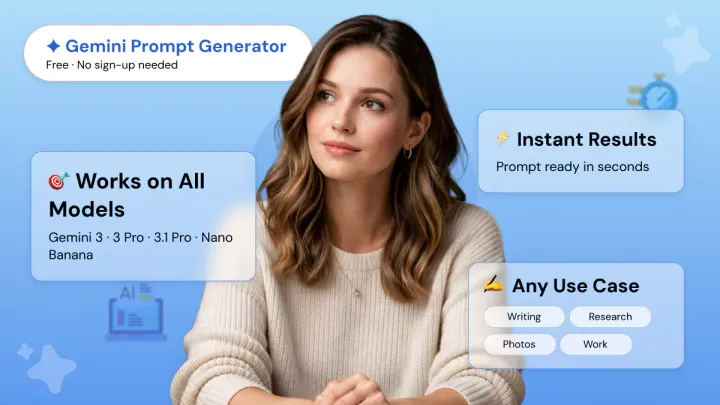
You typed a prompt into Gemini, and the answer came back generic. Sound familiar? The problem isn't Gemini, it's the prompt.
Phrasly's free Gemini prompt generator turns your one-line idea into a clear, structured prompt for Gemini AI that actually gets you the answer you wanted.
Works with Gemini 3.1 Pro, Nano Banana, Workspace, or any other version. No signup needed.
Free Gemini Prompt Generator - Try it Yourself 👇
Why Your Gemini Prompts Aren't Working
If your Gemini output keeps coming back generic, the prompt is usually too vague, not too short. That's a different problem, and it's fixable in seconds.
For a full breakdown of what works, see our guide to the best prompts for Gemini AI across every major use case.
Google's own guidance is clear on what an effective prompt for Gemini needs:
- Role: who Gemini should act as
- Task: what you want it to do
- Context: the background that needs to shape the answer
Workspace guidance adds two more rules. Write instructions in plain, natural language and break complex tasks into smaller prompts instead of trying to fit everything into one.
Most prompts miss all of this. Gemini is a large language model with a generous context window, but without a role assignment, format instruction, or any real context, it has nothing to anchor the response to.
Ask Gemini to "write something about AI in healthcare," and you'll get a textbook paragraph that reads like every other AI output on the internet.
Now rewrite that same request with the three ingredients above, plus your Gemini instructions and constraints:
Same topic. Different output. One is publishable, the other isn't.
That's the gap this tool closes. If you want to go deeper on the fundamentals, our guide on how to write good AI prompts walks you through the structure in detail.
If you'd rather skip the theory, the generator above generates a ready-to-paste prompt from a single line of input.
How to Use the Gemini Prompt Generator
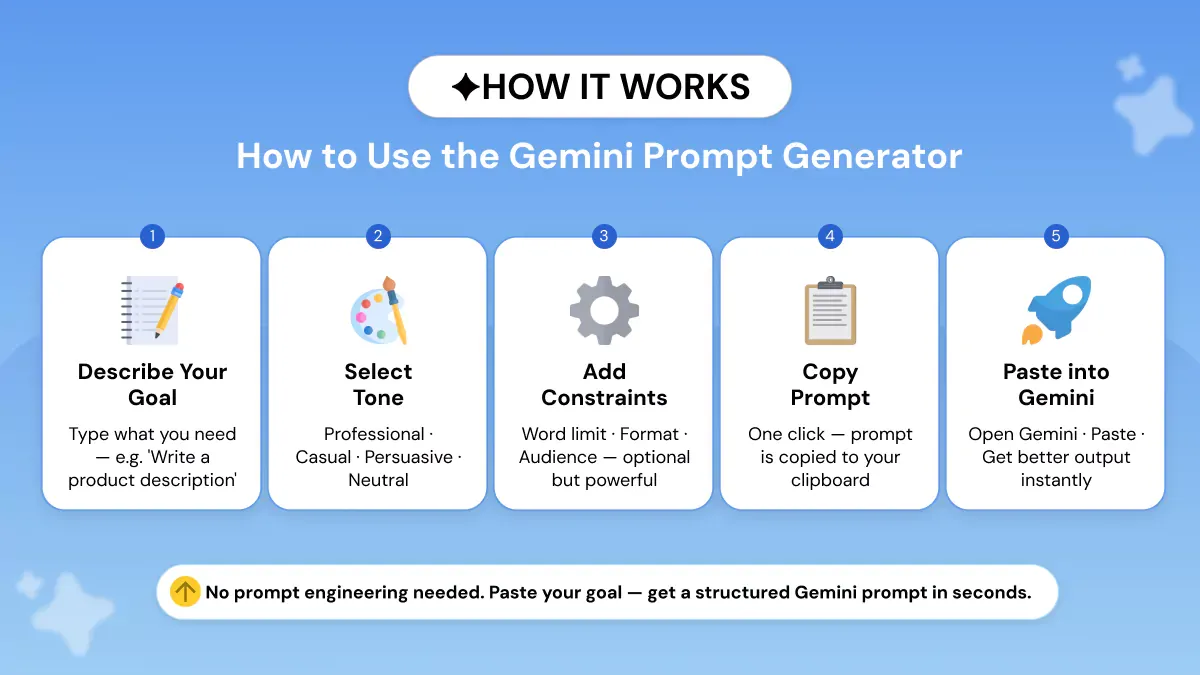
Using this AI prompt generator for Gemini takes under a minute.
1. Enter your goal. Tell the generator what you want Gemini to do, who it's for, and what outcome you need. Google's own guidance backs this up: Gemini works best with clear instructions and enough context.
2. Choose the tone. Pick the style you want, whether that's professional, friendly, persuasive, or academic. Gemini responds better when the voice is spelled out.
3. Add constraints. Set length limits, output format constraints, and any rules like bullet points or a section structure. Google's Gemini docs recommend precise instructions when you want predictable outputs.
4. Copy the generated prompt. Phrasly turns your rough idea into a polished, ready-to-use prompt in seconds. No manual rewriting needed. That's what makes it a genuinely free prompt generator for Gemini.
5. Paste it into Gemini. Drop it in, run it, and refine if needed. Google notes prompt design is iterative, so small tweaks lift output quality fast.
Which Gemini Model Are You Using? Prompts by Version
Different Gemini versions respond best to slightly different prompt structures, whether you're writing text, building multimodal prompts with images, or running deep research.
Google now splits them into Fast, Thinking, and Pro tiers inside the Gemini app, with a separate image model family under the Nano Banana name, and each one rewards a slightly different prompt style.
Google also notes that prompting is iterative, so the best version-specific prompt is usually the one you refine after the first run.
Gemini 3.1 Pro Prompting Strategies
Gemini 3.1 Pro rewards disciplined prompting. It supports structured outputs and adjustable thinking levels, so the cleaner your input, the sharper the response.
These five Gemini 3.1 Pro prompting strategies cover most professional use cases:
- Lead with context. Tell Gemini who it should act as, what the task is, and what a good result looks like before you make the actual request.
- State the output format explicitly. Ask for headings, bullets, tables, or JSON when you need consistent results. Gemini 3.1 Pro handles structured outputs natively.
- Layer your constraints. Stack word limit, tone, audience, and depth into the same prompt. Gemini narrows the response instead of guessing.
- Break complex work into numbered steps. Break complex work into numbered steps. This is essentially chain-of-thought prompting. Gemini 3 was built for multi-step planning, so sequential instructions give you more reliable output on bigger tasks.
- Include one example output. Include one example output. A short sample acts as a style reference and cuts the back-and-forth on formatting, improving token efficiency on long tasks.
Prompt design is step-by-step. Run it once, check what's missing, then refine.
Best Prompts for Gemini AI by Use Case
The best prompts for Gemini AI follow the same four-part structure: role, task, audience, and format. The templates below are copy-paste ready. Just fill in the brackets with your own details.
Blog Writing
Weak prompt: Write a blog intro about [topic].
Optimized template:
Filled example:
Summarization
Weak prompt: Summarize this article.
Optimized template:
Filled example:
Study and Learning
Weak prompt: Help me study [subject].
Optimized template:
Filled example:
Brainstorming
Weak prompt: Give me ideas for [project].
Optimized template:
Filled example:
Coding Help
Weak prompt: Fix this code.
Optimized template:
Filled example:
These Google Gemini best prompts work across every Gemini version. The generator above customises them to your exact goal in seconds.
Photo and Cinematic Portrait Prompts for Gemini
The best photo prompts for Gemini AI specify four things clearly: subject, lighting style, lens or composition, and mood. Gemini's image models, Nano Banana, Nano Banana 2, and Nano Banana Pro, all reward that level of detail.
Short prompts produce generic images, while structured prompts give you consistent, publishable results. Use the templates below for any image task.
Product Photo
Plain Prompt:
A photo of [product].
Template Prompt:
Filled Prompt:
Cinematic Portrait
Plain Prompt:
A portrait of a woman.
Template Prompt:
Filled Prompt:
Cinematic Environment Portrait
Plain Prompt:
A man in a city.
Template Prompt:
Filled Prompt:
Lifestyle Scene
Plain Prompt:
People are having coffee.
Template Prompt:
Filled Prompt:
These photo prompts for Gemini AI and cinematic portrait prompts give the model enough direction to skip the guesswork.
Gemini Prompts for Professionals
The best Gemini prompts for professionals cover four core use cases: marketing, legal and research, developer workflows, and content creation. Each one works best when you assign a role, specify the output format, and add one hard constraint. Fill in the bracketed fields below with your own details.
Marketing
Plain Prompt:
Write an ad for our product.
Template Prompt:
Filled Prompt:
Legal and Research
Plain Prompt:
Review this contract.
Template Prompt:
Filled Prompt:
Developer
Plain Prompt:
Fix this function.
Template Prompt:
Filled Prompt:
Content Creator
Plain Prompt:
Give me content ideas.
Template Prompt:
Filled Prompt:
Gemini for Google Workspace users: Preload the doc, sheet, or email thread first, then paste the template. Context-aware results get much sharper.
Gemini Deep Research Prompts
Gemini deep research prompts need three things: a source-type preference, an output structure, and a depth level. The templates below cover common research workflows.
Literature Review
Plain Prompt:
Do a literature review on [topic].
Template Prompt:
Filled Prompt:
Market Research
Plain Prompt:
Research the [X] market.
Template Prompt:
Filled Prompt:
Competitive Analysis
Plain Prompt:
Compare [Company A] vs [Company B].
Template Prompt:
Filled Prompt:
Topic Deep Dive
Plain Prompt:
Write a report on [topic].
Template Prompt:
Filled Prompt:
Gemini vs ChatGPT: Does Prompting Style Matter?
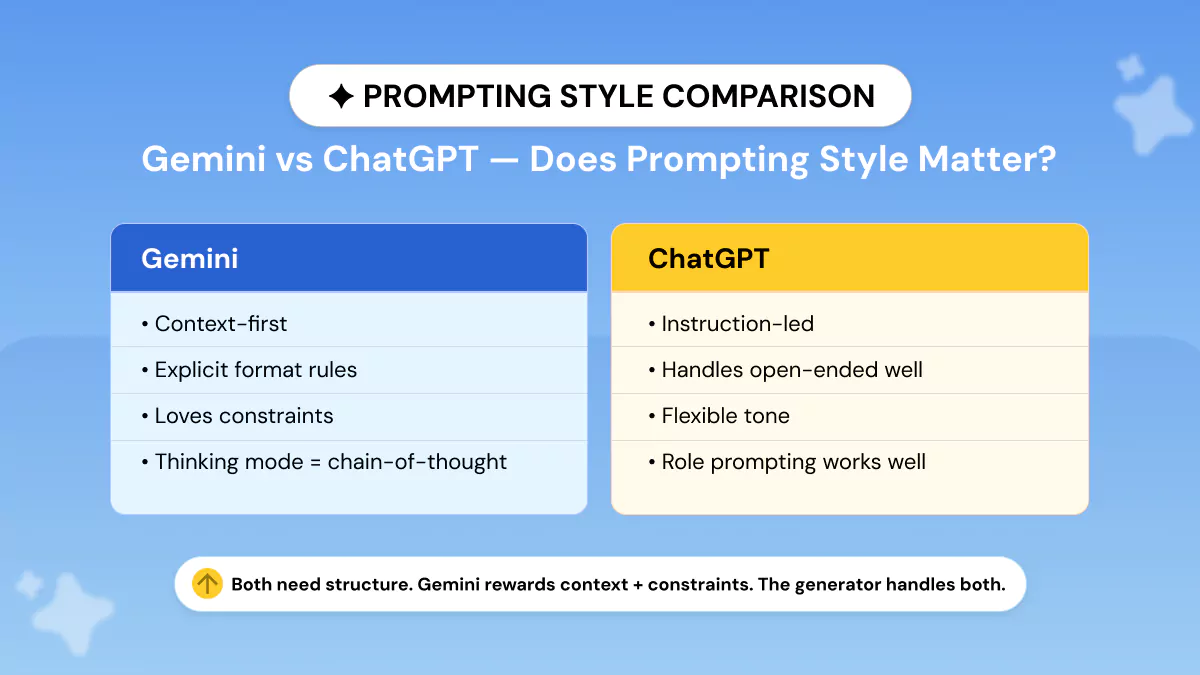
Both models work best when your prompt is clear, specific, and loaded with enough context to remove the guesswork. But they reward slightly different structures.
What they agree on: OpenAI's guidance says to put instructions first, separate context cleanly, and be specific about context, outcome, length, format, and style.
Google's Gemini docs say to use natural-language prompts, lead with context, and break complex tasks into smaller steps. Both want clear instructions, relevant context, and a defined output.
Where they differ:
Treat these as practical guidance, not hard rules. The real point of a "ChatGPT and Gemini prompt generator" is not one prompt style for both.
It’s more about using the right structure for the tool you’re working with, then tweaking it after you see the first result.
Tips for Writing Better Gemini Prompts
The best prompt for Gemini layers six ingredients into one request. You don't need prompt engineering expertise to use them; just follow these tips, and your output will need far fewer rewrites.
- Assign a role. Google's Gemini guide treats role definition as a critical instruction. Start with a persona: "You are a senior solution architect," or "Act as a fintech journalist."
- Specify the output format. Ask for headings, bullets, tables, or JSON when you want a predictable result. Gemini also supports structured outputs with JSON Schema for cleaner data extraction.
- Add instructions and constraints. Be specific about context, audience, tone, and scope. Clear Gemini instructions and constraints stop the model from guessing and keep it in your lane.
- Set a length limit. Tell Gemini the word count or verbosity level you want. Gemini 3 responds to explicit verbosity steering, so "keep it under 200 words" works better than hoping for brevity.
- Give one example output. A short sample is the fastest way to lock in the style you want and cuts the back-and-forth on formatting.
- Use Gemini Thinking for complex tasks. Gemini uses dynamic thinking by default, but heavier reasoning benefits from explicit thinking guidance or a higher thinking level.
Stack these six, and you rarely need to prompt twice.
No signup. No credit card. Works with every Gemini version from Gemini 3 Flash to Gemini 3.1 Pro, plus Nano Banana for image prompts.
Frequently Asked Questions
What is a Gemini prompt generator?
A Gemini prompt generator is a free tool that turns your rough idea into a structured, ready-to-use prompt you can paste into any version of Google Gemini, including Gemini 3.1 Pro, Gemini 3 Flash, Nano Banana, and Gemini for Workspace.
Phrasly's generator is free and needs no account. New to prompting in general? Start with our guide on what is a prompt in writing.
Is this Gemini prompt generator free?
Yes, it's completely free. No signup, no credit card, no account required to try it. The free tier covers basic prompt generation for writing, research, images, coding, and more, which is enough for most everyday Gemini users.
What is the best way to write a prompt for Gemini AI?
The best way to write a prompt for Gemini AI is to layer four ingredients into one request: a role for Gemini to play, the task you want done, the context it needs, and the format you want the answer in.
Google's own Workspace guidance recommends using natural language, leading with context, and breaking complex tasks into smaller prompts. Add one constraint (like a word limit or tone rule) and you'll remove almost all the guesswork from the response.
What prompt should I use for Gemini?
The right prompt depends on your task. Writing prompts need a role, tone, and format. Research prompts need a source-type preference and a depth level. Image prompts need subject, lighting, and composition details. The generator customises all of this based on the task type you select.
How do I add instructions and constraints to a Gemini prompt?
Constraints are the rules you give Gemini to shape or limit its response. Common examples are "Write in 150 words," "Use bullet points only," and "Avoid technical jargon." Stack two or three constraints in the same prompt for tighter output.
For a deeper dive, our prompt optimization techniques guide walks through advanced techniques. The generator builds these in automatically.
How is prompting in Gemini 3 Pro different from the base model?
Prompting Gemini 3 Pro (and the current Gemini 3.1 Pro) rewards much more detail than the base Gemini 3 Flash.
The Pro tier handles long context, structured outputs, and multi-step reasoning, so you get better results when you lead with context, specify output format explicitly, and layer constraints.
Gemini 3.1 Pro also adds adjustable thinking levels (Low, Medium, High), letting you trade speed for reasoning depth, which the base Flash model doesn't offer.
What is Nano Banana in Gemini?
Nano Banana is Google's codename for Gemini 2.5 Flash Image, Google's native image generation and editing model inside Gemini.
Nano Banana Pro (Gemini 3 Pro Image) is the studio-grade version for detailed, text-accurate images. Nano Banana 2 (Gemini 3.1 Flash Image) is the fast, high-volume version and is the default for free Gemini users.


Keep reading

Claude Prompt Generator: Build Better Prompts for Claude AI (Free Tool)
Learn how a Claude prompt generator builds better prompts for every Claude model, from Sonnet 4.6 to Fable 5. Includes ready-to-use XML templates, effort levels, and a free tool.


50 Highest-Engagement AI Prompts for LinkedIn, Instagram, and X for marketers
Learn the prompt frameworks behind top-performing social posts, avoid common AI prompting mistakes, and use proven templates to scale your content creation across every platform.