
Zero-Shot Prompting: What It Is, How It Works & When to Use It
Zero-shot prompting is the fastest way to get useful AI output. Here's what it actually means, how to write it well, and when to switch techniques.
You open ChatGPT, type a request, and get a useful answer with no examples needed. That's zero-shot prompting in action.
Zero-shot prompting is a technique where you give an AI model a task with no prior examples or demonstrations. The model uses its pre-trained knowledge to respond directly based on your instruction alone.
In this guide, you'll learn: what zero-shot prompting is and how it's defined, exactly what happens when you submit a zero-shot prompt, when to use it (and when not to), real examples for ChatGPT, Claude, and Gemini, and how to write better zero-shot prompts with a 4-part formula.
What Is Zero-Shot Prompting? (Definition)
Zero-shot prompting is a technique where you give an AI model a task with no prior examples or demonstrations. The model uses its pre-trained knowledge to respond directly based on your instruction alone.
Large language models like ChatGPT, Claude, and Gemini are foundation models that are trained on large amounts of data.
In training and then instruction tuning, they learn about language patterns, reasoning, and how to do tasks.
When we provide a zero shot prompt to the model, it accesses that past learning during inference time to interpret our prompt and generate a response.
The term 'zero-shot' means zero examples provided. You give the model no demonstrations, no sample outputs, and no formatting guides just the task itself.
Think of it like asking a new employee to write a report on their first day with no sample to follow. They use their existing knowledge and experience to complete the task just as the AI uses its pre-training.
In practice this is also how you'll get the most useful answers from the AI.
Rather than creating training examples, you just write a clear description of the task you want to perform and the format you want it to return.
Since the model already knows how to do so many tasks, good instructions by themselves can elicit high quality answers. This approach is very common.
What Happens in Zero-Shot Prompting?
In zero-shot prompting, the AI responds to your request without any example or format to follow. It relies entirely on its pre-training.
Here is what happens step by step:
- You write a prompt containing only your instruction: no examples, no sample outputs
- The model reads your input and maps it to patterns learned during pre-training
- It generates a response based on the instruction alone
- No examples, no formatting guide, and no prior context are used
For exam and quiz contexts: The correct MCQ answer is: 'AI responds without any example or format to follow.' It does not wait for human approval, ignore the prompt, or require multiple training examples.
How Does Zero Shot Prompting Work?
- AI models are trained on massive datasets: books, articles, websites, and conversations
- During training, models learn language patterns, instruction-following, and response generation
- When you enter a prompt, the model reads your input and infers the task you want done
- It then generates an appropriate response based entirely on its training: no examples needed
- This process relies on in-context learning: using your prompt to understand the desired output
- Most modern models (GPT-4, Claude, Gemini) are instruction-tuned to follow user commands effectively
- A clear task description alone is often enough to get a high-quality response
- To improve accuracy, ask the model to think step by step within your prompt
- Step-by-step reasoning breaks the task into logical parts, leading to more precise answers
This concept generalizes into a more complex technique called Zero-Shot Chain-of-Thought prompting.
This is precisely why modern models like GPT-4, Claude, and Gemini handle zero-shot prompts so reliably today.
Try a Zero-Shot Prompt for Your Own Task 👇
Zero-Shot Chain-of-Thought (CoT) Prompting
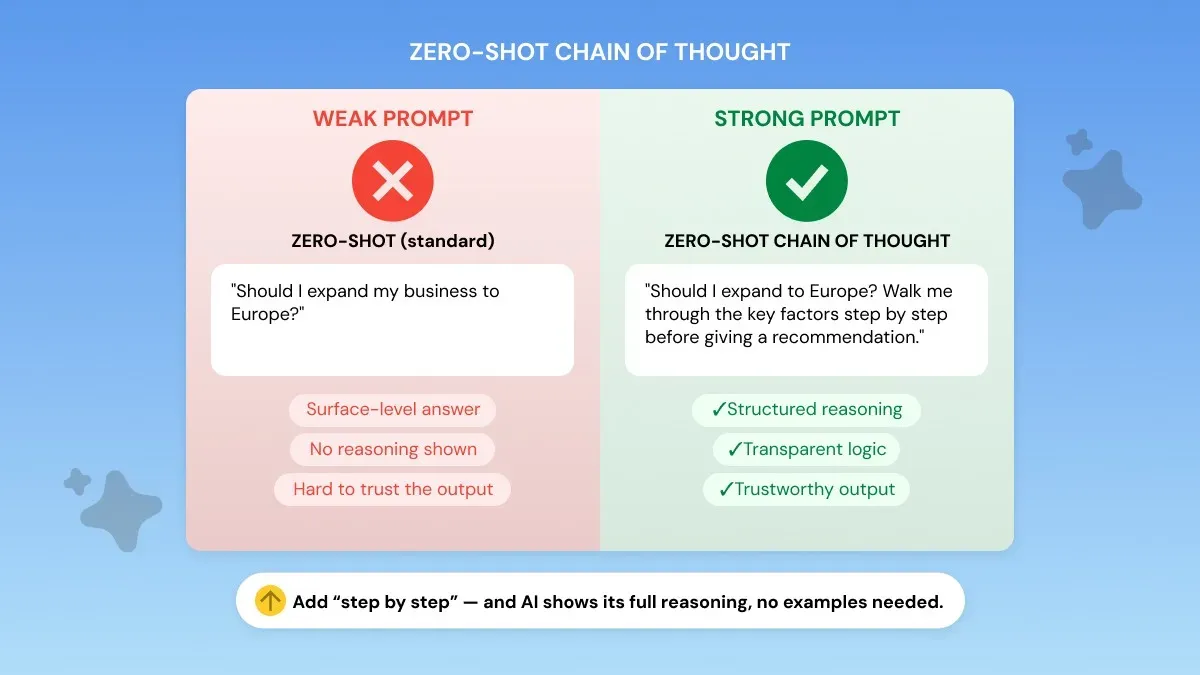
Zero-shot CoT prompting does not always produce short answers. In fact, it often produces longer, more detailed reasoning chains than a standard zero-shot prompt.
Rather than posing a question with the expectation of a direct answer, you append a brief directive to the input that encourages the model to reason about the problem.
Phrases such as "Let's think step by step" or "Walk me through your reasoning" cause the model to first generate a reasoning path, and then deliver an answer. This process is known as chain of thought prompting.
When performed without examples, it is called zero-shot CoT.
Example:
Regular zero-shot: 'What is 15% of 240?' → Model gives '36'
Zero-shot CoT: 'What is 15% of 240? Let's think step by step.' → Model explains: 10% = 24, 5% = 12, total = 36
Use zero-shot CoT for: math problems, logical reasoning, multi-step decisions, and analytical comparisons. For simple tasks, standard zero-shot is faster and sufficient.
A regular zero-shot prompt might generate a fast and surface-level response. However, if you add chain-of-thought instructions, the model will answer with more thought and logic.
Example:
Zero-Shot Prompting Vs. Few-Shot Prompting
The key difference between zero-shot and few-shot prompting is simple: whether you include examples in your prompt.
Note: 'Zero-shot prompting' and 'zero-shot learning' are related but different.
Zero-shot prompting means giving no examples in a prompt.
You describe the task and allow the model to perform it using whatever knowledge it has been trained on. This approach is the quickest and easiest to use.
It works great for crisp tasks with a well-defined output such as summarization, idea generation, question answering.
Few-shot prompting does the opposite: it provides several examples in the prompt of what the desired response should look like.
Few-shot takes more time to construct, but allows more control over tone/format/style - which is useful if your zero-shot results are erratic/un-brandable.
There's also something in between known as one-shot prompting. With this technique you give the model one example of the desired format and nothing else.
A practical rule many professionals follow is simple: start with zero-shot. If you get the right answer but the format is off, try one example. If you still don't get consistent results, try few-shot prompting.
Real-world rule of thumb: The best time to just ask AI directly is when the task is clear and doesn’t require a specific format. If response style is important, one example is typically enough to correct the issue.
Two or more examples are only needed if you need highly-consistent output over bulk requests.
Zero-Shot Prompting Examples (Real Use Cases)
The true magic of zero shot prompting happens when we start applying it to real world professional tasks. Write a good zero shot prompt and you can generate publishable quality outputs within seconds.
Here are several real world copy/paste examples that work with all major AI models (ChatGPT, Claude, Gemini).
Example 1: Content & Marketing
Situation: A marketer needs engaging social media copy that feels authentic rather than AI-generated.
What changed: Added audience (marketing teams), length (120 words), voice (first-person founder), engagement hook (question), and constraint (no hashtags).
Outcome: The result is on-brief marketing copy with a clear voice and engagement hook. It is usually ready to publish.
Example 2: Student / Academic
Situation: A student wants to organize an essay argument before starting to write.
What changed: Defined output type (outline), length (1,500 words), structure elements, and tone (academic).
Outcome: A clear essay framework that makes the writing process significantly faster. For more ready-to-use examples like this, the best ChatGPT prompts for professionals covers a wide range of workplace scenarios.
Example 3: Professional Summary
Situation: A professional needs to quickly extract insights from a long document.
What changed: Defined output format (3 bullets), audience (CFO), constraint (cost focus only), and length (80 words).
Outcome: An executive-ready summary that highlights what decision-makers care about most.
Example 4: Developer / Technical
What changed: Added audience (junior dev), background context (no ML knowledge), tone (plain language), and length constraint.
Zero-shot prompting can substitute for highly complex AI systems for tasks like these. Fine-tuning and other methods require technical skill, time investment, and monetary expense.
A properly-written zero-shot prompt works out-of-the-box on all modern models and can often create publishable results by itself.
How to Write a Better Zero-Shot Prompt (4-Part Formula)
Many people ask what makes a good zero shot prompt. The answer is surprisingly simple. Effective prompts have a clear structure that specifies to the AI what to generate and how to generate it.
When it comes to practical prompt engineering, most effective prompts consist of four main elements.
- Define the output type. Don’t just state the topic. Specify what you want the model to generate. Specifying the format helps the model understand your natural language input and generate what you need.
- Specify the audience. Who is this content for? When you know your audience, the model tailors tone, complexity and explanations to suit that reader.
- Set the constraints. Constraints control the final output quality. You can define things like length, tone, format, or exclusions. For example: “Under 100 words. No bullet points. Avoid technical jargon.”
- Add the context. Just one sentence of background can make a big difference. It explains to the model why you're asking it to do the task and how to format the output.
A common question is whether there is some magical template for zero-shot prompts that work well. Yes, this 4-part structure above provides a loose framework that often works in practice.
Reusable Zero-Shot Prompt Template
How Zero-Shot Prompting Works IN LLMs (ChatGPT, Claude, Gemini)
Large language models can respond without examples because of how they are trained. Pre-training on massive datasets: books, articles, code, and conversations gives them implicit knowledge of thousands of task patterns.
When you submit a zero-shot prompt, the model draws on this pre-training to understand your instruction and generate a response through text generation and instruction-following.
Professionals often find that the same zero shot prompt will yield different results from tool to tool.
This occurs because each system is fine-tuned differently with respect to how it understands instructions and generates AI-generated responses in a conversational AI setting.
ChatGPT Zero Prompting
ChatGPT has a tendency to "elaborate" on prompts by providing additional useful context not specified by the instruction itself.
While that's great for brainstorming / explanation type tasks, if you're looking for a literal output you will have to explicitly specify the format + "strictly" limit the scope in your zero shot prompt.
Zero Prompting in Claude
Claude will typically take instructions very literally which means writing better prompts for Claude AI comes down to being clear and very specific from the start.
Claude typically will not extrapolate missing information or guess your intentions, so adding clear format and expectations will typically enhance your results.
Gemini Zero Prompting
Gemini tends to answer questions in a more straightforward manner. It usually provides answers faster, without additional fluff. This makes Gemini great for when you need an answer right away, like a summary.
If you want to get more out of it, knowing the best prompts for Gemini AI will help you ask the right follow-up questions for elaboration or step-by-step responses.
The practical takeaway is simple. The same zero-shot prompt can behave very differently across models. As you switch between tools, calibrate your constraints and instructions to how each model responds to prompts.
When to Use Zero-Shot Prompting (and When Not to)
Zero-shot prompting works best for simple, direct tasks where you don't need a specific format or consistent style.
Each example you add to your prompt adds more tokens the model must process. Zero-shot is the most token-efficient approach. Start here and only add examples if needed.
Limitations of Zero-Shot Prompting
Zero-shot prompting is quite effective, however knowing its limitations will help you decide when to use a different approach.
- Tasks requiring a very specific tone or writing style the model can't easily deduce from the prompt alone
- Odd or highly formatted instructions where output must adhere to strict formatting rules
- Consistency suffers when generating tens/hundreds of responses that need identical structure or "voice"
- Complex multi-step reasoning tasks may only get superficial responses from a simple prompt
- Use Zero-Shot Chain-of-Thought prompting to induce the model to reason step-by-step
The simplest fix is to switch to few-shot prompting. Providing the model with two or three examples of the output you desire explicitly establishes the pattern you want, leading to better performance.
If you have a task where zero-shot prompting isn’t working well for you, check out our few-shot prompting guide to see precisely how to improve your prompts.
Generate Zero-Shot Prompts with Phrasly
The four steps for crafting an effective zero shot prompt are dependable, but they can be tedious if you need to adapt them properly for each new task.
You must specify your output, define the audience, provide context, and constrain correctly every time.
This can decrease your productivity when switching between tasks and tools.
You can have Phrasly's AI Prompt Generator do the work for you.
Enter what you want to accomplish with your prompt and it will generate a complete zero-shot prompt with the role, context, format, and constraints built in for you.
Since they are instruction based, these prompts function with all the major models (ChatGPT, Claude, Gemini). This allows you to have more standardized AI responses and save time/increase productivity.
FAQs
What happens in zero-shot prompting?
In zero-shot prompting, the AI responds to your request without any example or format to follow. It relies entirely on its pre-training to understand and complete the task.
What is a zero-shot prompt?
A zero-shot prompt is an instruction given to an AI model with no examples, demonstrations, or context provided just the task itself.
When is zero-shot prompting best to use?
Zero-shot prompting is best for simple, direct tasks where you don't need a specific output format or consistent style. It's fast and requires minimal prompt engineering.
Try the Phrasly AI Prompt Generator to build effective prompts effortlessly.
Does zero-shot prompting work without any prior training?
Yes! That's the defining feature. The model uses its existing pre-training knowledge rather than task-specific examples you provide in the prompt.
What are the limitations of zero-shot prompting?
Zero-shot prompting struggles with tasks requiring a very specific tone, highly structured outputs, or multi-step reasoning. For those, few-shot prompting with examples works better.


Keep reading

Claude Prompt Generator: Build Better Prompts for Claude AI (Free Tool)
Learn how a Claude prompt generator builds better prompts for every Claude model, from Sonnet 4.6 to Fable 5. Includes ready-to-use XML templates, effort levels, and a free tool.

50 Highest-Engagement AI Prompts for LinkedIn, Instagram, and X for marketers
Learn the prompt frameworks behind top-performing social posts, avoid common AI prompting mistakes, and use proven templates to scale your content creation across every platform.