
The Complete Guide to Prompt Optimization Techniques for LLMs (2026)
Bad prompts waste more time than no AI at all. Here are 7 techniques that fix your output before you even hit send.
The prompts that worked on GPT-4 or Gemini 3 don't behave the same on GPT-5.5, Claude Fable 5, or Gemini 3.5 Flash. The models have changed. Your prompt optimization techniques need to catch up.
Prompt optimization techniques are the structured methods you apply to an existing prompt to produce more accurate, consistent, and usable AI outputs without touching the model itself.
These AI prompt optimization techniques help users improve output quality, increase consistency, and reduce the amount of manual editing required across modern language models.
This guide covers 7 core techniques with before/after examples, plus model-specific tips for every 2026 flagship LLM.
Generate an Already-Optimized Prompt for Your Task for Free 👇
What Is Prompt Optimization?
Prompt optimization is the process of refining an existing prompt to produce more accurate, consistent, and useful AI outputs without changing the model itself. Prompt engineering designs prompts from scratch.
Effective prompt optimization is one of the fastest ways to improve AI output quality without retraining a model, making it a core skill for anyone working with large language models.
Prompt optimization improves what you already have through specificity, structure, and iteration. Such as few-shot examples, chain-of-thought, etc. This is the core of AI prompt optimization.
Refining the input, not the model, to get consistent, usable results every time.
Fine-tuning retrains a model's internal weights using datasets and machine learning workflows. Fine-tuning requires significant compute and technical expertise. Prompt optimization requires none of that.
You improve the input, not the model.
Prompt optimization, however, is about improving an existing prompt.
Say you want to learn how to get the highest quality output from AI quickly. You want a shortcut. That shortcut is prompt optimization.
You don't need to know how AI works. You just need to provide better instructions.
If you're new to the concept entirely, start with understanding what is a prompt in writing: once that clicks, optimization becomes much easier.
It's also distinct from fine-tuning an AI model. Fine-tuning requires datasets and technical workflows to retrain a model. Prompt optimization simply modifies the input prompt.
The Choi (2025) framework further shows that optimizing prompt structure improves output relevance while reducing unnecessary token usage meaning better prompts don't just improve quality, they improve efficiency too.
7 Prompt Optimization Techniques That Actually Work
Want to know how to improve AI output quality without having to guess?
The best techniques for improving AI output quality focus on clarity, context, structure, and iteration.
Let's study the 7 prompt optimization techniques that will make your prompt effective in seconds.
1. Specificity Prompting
Specificity Prompting involves removing open-ended topic descriptions and replacing them with clear deliverables.
Deliverables should include your audience, length, tone, format, and purpose.
The more explicit you are with your instructions, the less likely the AI will generate something generic.
If you're wondering how to improve AI prompt quality, Specificity Prompting is your solution. Most generality is caused by underspecified prompts, not by the inability of the AI.
Let's take this example:
🏆 Outcome: AI sticks to the specification instead of guessing. Content is accurate and actionable.
2. Role Prompting
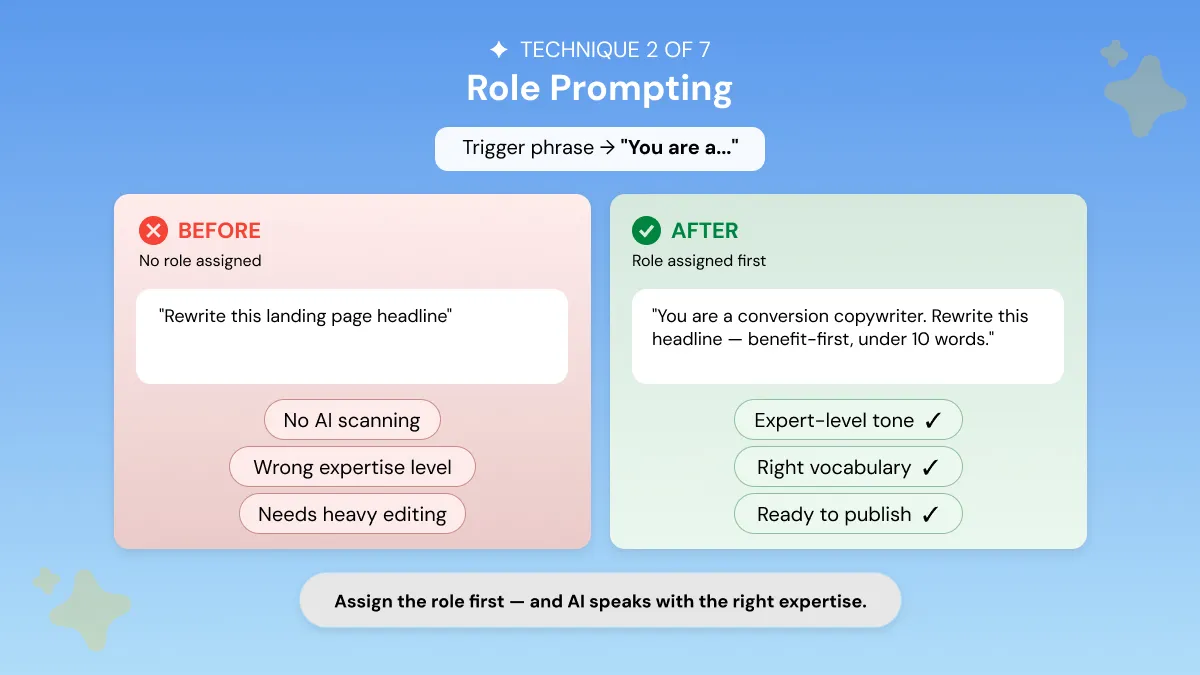
Role Prompting involves explicitly stating the role you want the AI to take on before your instructions.
This defines the scope of your model's vocabulary, tone, logic, and expertise. The outputs are aligned with the intended context. By explicitly defining the AI’s role, you apply one of the most effective AI assistant prompt optimization techniques.
Role Prompting is supported by every major AI model. It's an advanced prompt optimization technique that works because LLMs were trained on role-specific data.
Activating the appropriate “role” causes the AI to respond using the most relevant knowledge from its training, producing structured, context-aware, AI-generated responses.
3. Few-Shot Prompting
Few-shot prompting includes 1–3 examples of the target output prior to asking the AI to generate content. This technique ensures boosted consistency in tone, format, and style across multiple outputs.
It is one of the most reliable iterative prompt refinement strategies.
Ever asked yourself, " How do I get ChatGPT or Claude to write in my exact tone and format consistently? " The answer is a few-shot prompting.
It tells the model explicitly what "your voice" is by example, reducing ambiguity and forming a powerful feedback loop so the model can learn to imitate your style for any task.
It is best for brand voice matching, format replication, client-facing content or anywhere output consistency matters across multiple pieces.
🏆 Outcome: This framework consistently improves output quality over baseline prompts.
For a full guide on few-shot prompting with examples, see our few-shot prompting guide.
4. Chain-of-Thought (CoT) Prompting
Chain-of-thought prompting instructs the model to think through steps before producing an answer.
This powerful approach can vastly increase response quality when generating analyses, strategies, or any other types of output where simple answers are inadequate.
It is one of the most advanced prompt optimization techniques for professionals.
- Employ CoT when prompting for complex work, such as research, or recommendations.
- Omit for straightforward or single-step answers.
This prompting technique nudges the AI to answer in a more intelligent way than it would otherwise.
When Chain-of-Thought Works Best and When to Skip It
- Use for: complex analysis, multi-step decisions, research synthesis, strategic recommendations, math and reasoning problems
- Skip for: simple tasks, short outputs, single-step instructions
- Claude tip: Claude Fable 5 uses adaptive thinking automatically. Chain-of-thought reasoning is always on with no toggle needed. For older Claude models, add 'Use extended thinking' to trigger deeper reasoning.
5. Constrained Output Prompting
By default, AI uses its preferred formatting when provided with ambiguous prompts. Ambiguity causes a loss of specificity and professionalism.
Constrained Output Prompting ensures outputs meet your exact specifications by defining length, structure, tone, and format.
A simple framework to follow is the RTCFC Framework: Role + Task + Context + Format + Constraints. This is your repeatable formula for structured prompt optimization. Apply it to any prompt across any LLM.
The RTCFC Framework (Role + Task + Context + Format + Constraints) is a proven prompt optimization framework. It's one of several reliable prompt optimization frameworks professionals use today.
You can apply it to any LLM task. It ensures every prompt covers the five dimensions that drive consistent output quality.
Many professionals skip specifying format. Format is critical for efficiency and quality.
🏆 Outcome: By using clear and specific instructions and natural language input, your AI outputs become precise, actionable, and consistent.
6. Meta-Prompting (Letting AI Improve the Prompt)
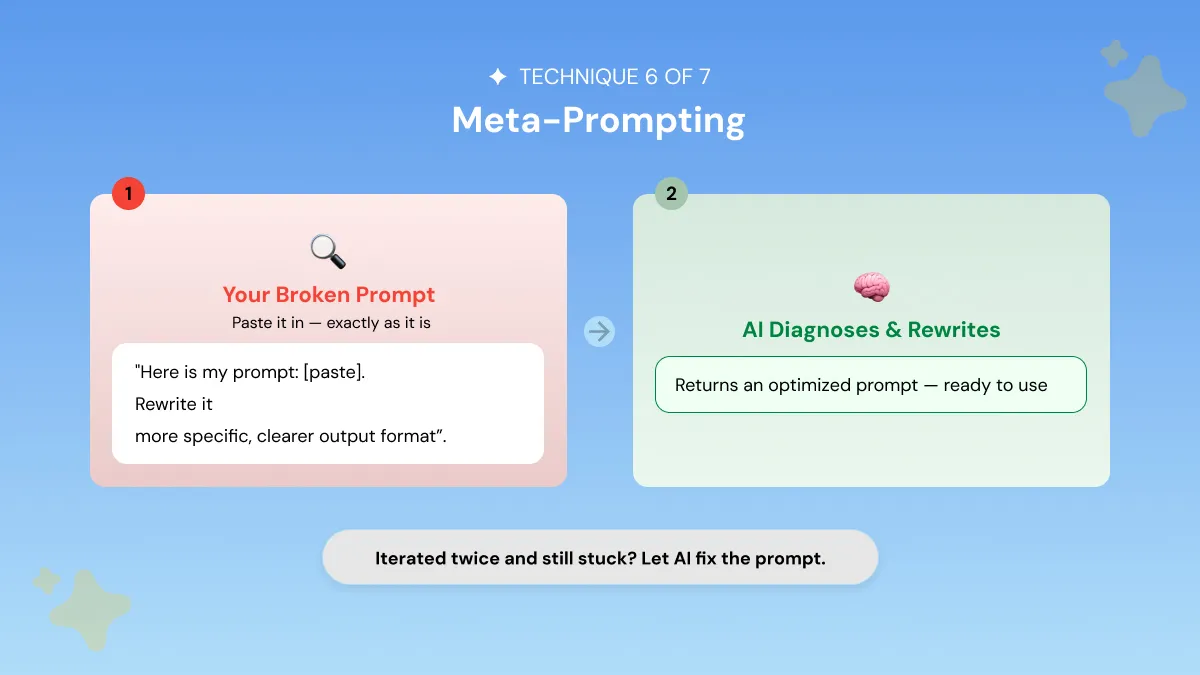
Meta-prompting involves using AI technology to optimize your prompt automatically. Rather than guessing how to improve your prompt, you can ask the model to find flaws then rewrite it clearly, specifically, and in the format you want.
It's a quicker way to build your prompt-fixing toolkit.
Meta-prompting uses a second AI call that evaluates and enhances your existing prompt. It is bridging the gap between manual iteration and expert-level LLM prompt optimization techniques.
You can use Meta-prompting when the prompt isn’t working and you can’t identify why. Let a more capable model diagnose it.
This is especially useful for complex or failing prompts.
The optimizers consistently improved over baseline prompts, with gradient and evolutionary approaches delivering the most reliable gains.
Meta-Prompting Vs Manual Iteration: When Is Each Worth It?
- Manual iteration: effective but slow; best when you can pinpoint the problem
- Meta-prompting: faster for complex or failing prompts; useful if you lack the vocabulary or domain knowledge
- Rule: after two unsuccessful manual iterations, switch to meta-prompting
7. Iterative Prompt Refinement
Iterative prompt refinement is the concept of prompt optimization being an ongoing activity, instead of a one-time process.
Consider the first output from your AI to be a rough draft. Editing it allows you to increase clarity, accuracy, and style.
It's one of the best prompt optimization strategies.
It involves using a second prompt to tweak specific elements of the first output rather than rewriting everything from scratch.
LLMs are probabilistic. Outputs can vary. Iteration anchors quality by targeting issues precisely and creating a strong feedback loop.
Example two-step flow:
Iterative refinement consistently improves quality over single-pass prompting.
Prompt Optimization Techniques Comparison Table
Prompt Optimization Techniques For LLMs
The 7 techniques above work universally. But LLMs don't process prompts identically. How you apply them changes depending on the model's architecture, training, and reasoning behavior.
Here's how each 2026 flagship model handles prompt optimization differently. More broadly, prompt optimization in large language models depends on how each pre-trained model was trained and instruction-tuned.
This is why the same prompt can drive very different text generation behavior from one model to the next.
Different models are trained on different data with different architectures and instruction-tuning approaches. So the same natural language input triggers different token generation behavior.
Token efficiency, instruction-following sensitivity, and in-context learning all vary by model.
Prompt Optimization for ChatGPT (GPT-5 / GPT-5.5)
Current flagship: GPT-5.5 (ChatGPT's default as of May 2026).
Other Models: GPT-5 Mini, GPT-5 Nano, GPT-4.1, GPT-4o
Key behavior: GPT-5.5 responds better to outcome-first prompts. OpenAI recommends the 'context sandwich': context → goal → constraints.
Optimization tips:
- State the desired outcome first, not the process.
- Use reasoning_effort=high for complex analysis.
- GPT-5.5 fills context gaps freely. Use Constrained Output Prompting to prevent over-elaboration.
- Use OpenAI Prompt Optimizer in Playground to migrate old prompts.
For additional examples and ready-to-use prompt frameworks, see this guide to the ChatGPT Prompt Generator, which shows how to structure prompts for better results across different ChatGPT use cases.
Best for: brainstorming, creative ideation, flexible writing, agentic coding tasks. For a deeper look at how to structure prompts for this model, see OpenAI's GPT-5 prompting guide.
When crafting prompts for GPT-5.5, the new default model, move away from "process-orientation" (i.e. step-by-step instructions) and towards "outcome-first" prompting.
Clearly define where you want to go, any constraints, and how success is measured. Let the model determine how to get there most effectively.
Prompt Optimization for Claude (Fable 5)
Current flagship: Claude Fable 5 (released June 9, 2026).
Other Models: Claude Sonnet 5, Claude Opus 5, Claude Haiku 5, Claude Sonnet 4.5 (legacy users)
Key behavior: Uses adaptive thinking. Always on, no toggle. Relentlessly proactive, multi-step reasoning by default. Take instructions literally.
These Claude AI prompt optimization techniques differ from how you'd prompt ChatGPT or Gemini. Claude rewards explicit, literal instructions over inferred intent.
Optimization tips:
- Data-first format. Provide all context before the instruction.
- Adaptive thinking is always on. No need to trigger chain-of-thought explicitly.
- Be very explicit about output format and length. Claude Fable 5 follows constraints literally.
- For professional writing: apply Role Prompting + Constrained Output Prompting together.
Best for: precise professional writing, structured analysis, long-horizon agentic work, complex reasoning.
The most effective way to ask Claude Fable 5 to write professionally is with a work order, which assigns Claude a role, identifies your primary objective, and clearly states constraints (tone, word count, etc. ).
For more examples specific to Claude, see our Claude prompts guide.
Prompt Optimization for Gemini (3.5 Flash)
Current flagship: Gemini 3.5 Flash (released Google I/O, May 19, 2026. Fastest model for agentic work).
Other Models: Gemini 3.5 Pro, Gemini 3.5 Nano, Gemini 3.0 Flash, Gemini 3.0 Pro
Key behavior: Built for agentic, multi-step execution at high speed. 1M token context window. Configurable thinking levels. Processes text, images, audio, and video natively.
Optimization tips:
- Use precision and brevity. Verbose prompts add latency.
- Structure as task chains: Context → Plan → Execute → Verify.
- Set thinking levels explicitly (none / low / medium / high).
- Always add format constraints alongside few-shot examples.
Best for: agentic tasks, research, multimodal workflows, Workspace integration, and high-throughput content.
Gemini 3.5 Flash is a reasoning model. So please keep your instructions succinct and to the point. No need for lengthy prompt engineering techniques as you would with previous versions.
If you want ready-made Gemini prompt frameworks and examples, see this guide to the Gemini Prompt Generator. It covers practical prompt structures, optimization techniques, and templates designed to help you get more consistent outputs from Gemini across a variety of use cases.
For full technical specifications and evaluation details, see Google DeepMind's Gemini 3.5 Flash model card. For ready-to-use examples, check out this guide to the Best Prompts for Gemini AI, which includes prompt templates for research, writing, productivity, and agentic tasks.
Cross-Model Prompt Optimization: Quick Comparison Table
Prompt Optimization for AI Readability
Prompt optimization for AI readability refers to structuring your prompts so the output is not only accurate but also clear, scannable, and easy to use without heavy editing.
This is a distinct quality axis from accuracy. an AI response can be factually correct and still be obtuse, overly verbose, or unreadable.
That gap is important because most users don't want merely a correct answer, they want one they can readily use. Even a lengthy block of precise but disorganized text will still demand your editing attention.
Readability-focused prompting narrows that gap at the source so that you aren't formatting every output manually.
Three techniques have the biggest impact on AI readability:
- Constrained Output Prompting: define the structure upfront (bullet points, headers, max sentence length) so the AI doesn't default to dense paragraphs
- Few-Shot Prompting: show the AI 1–2 examples of clean, readable output so it mirrors that structure instead of guessing
- Role Prompting: assign a role like "clear communicator" or "technical writer who simplifies complex topics" to shift tone and structure toward clarity
Before: "Explain how blockchain works"
After: "Explain how blockchain works to a non-technical reader. Use short paragraphs (2–3 sentences max), bold key terms on first use, and end with a 1-sentence summary."
The first prompt can produce a technically correct but dense, jargon-heavy paragraph. The second produces something scannable on the first read. No follow-up edit required.
Apply These Techniques Automatically
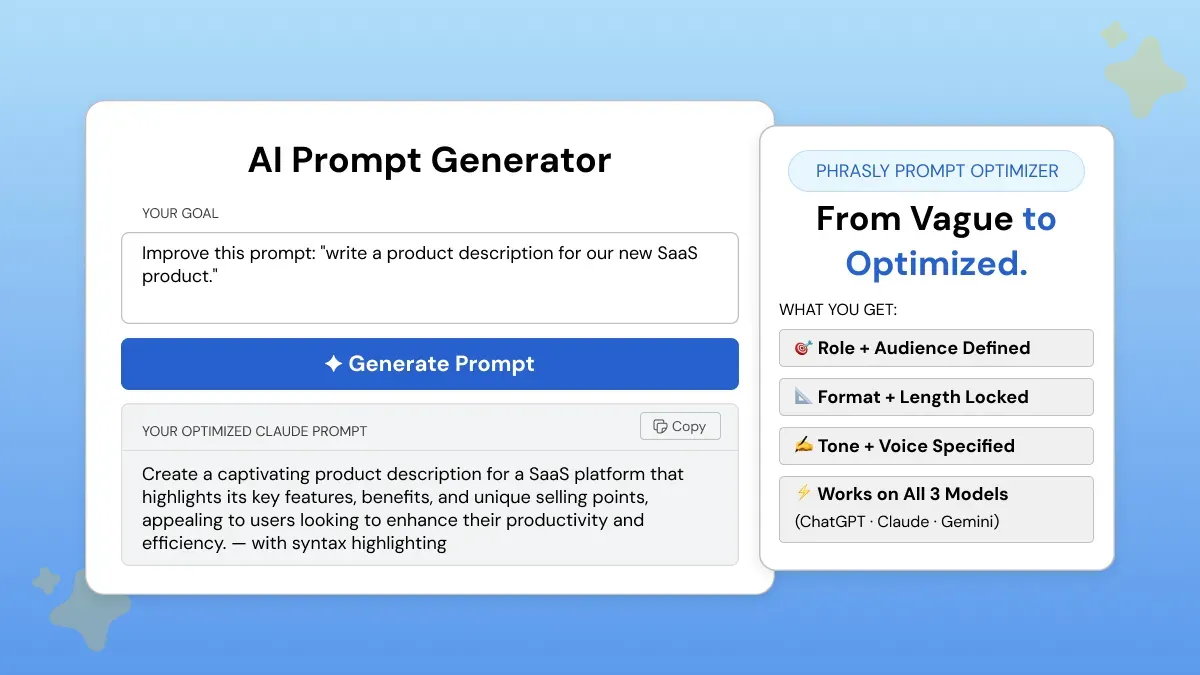
It takes time and practice to manually optimize every prompt with all 7 of these prompt optimization techniques. Plus, most professionals work quickly and don't have hours to iterate on a prompt multiple times before sending.
If you’ve ever asked yourself, “Is there a tool that automatically optimizes my prompts for me?” Yes! Phrasly’s AI Prompt Generator auto-builds a fully optimized, task-specific prompt in seconds.
One of the few dedicated prompt optimization tools for AI readability and overall output quality available today.
Role is assigned, format is defined, constraints are set, and specificity is built in to create AI outputs that are consistent and professional.
It works seamlessly with ChatGPT (GPT-5.5), Claude Fable 5, Gemini 3.5 Flash, and even AI image generation tools.
FAQs
What are the best LLM prompt optimization techniques?
The most effective LLM prompt optimization techniques are specificity prompting, role prompting, few-shot prompting, chain-of-thought prompting, and constrained output prompting.
Applied consistently across any large language model including GPT-5.5, Claude Fable 5, and Gemini 3.5 Flash. To understand the baseline these techniques improve on, see our zero-shot prompting guide.
What is prompt optimization for AI readability?
Prompt optimization for AI readability is the practice of structuring prompts so the AI output is not only accurate, but also clear, scannable, and usable without heavy editing.
Using techniques like constrained output prompting and few-shot examples of readable responses.
Is prompt optimization the same as fine-tuning an AI model?
No! Prompt optimization improves the input you send to an existing model. No technical expertise or datasets required.
Fine-tuning changes the model's internal weights through retraining. Fine-tuning requires significant compute resources and machine learning expertise.
Does prompt optimization work the same on GPT-5.5, Claude Fable 5, and Gemini 3.5 Flash?
The core 7 techniques apply to all three, but each model processes them differently. GPT-5.5 favors outcome-first prompts. Claude Fable 5 benefits from data-first verbose instructions.
Gemini 3.5 Flash performs best with task-chain prompts and explicit thinking level settings.
What is the fastest way to improve AI output quality without learning prompt engineering?
Apply three changes to every prompt: assign a specific role, define the output format and length, and add one or two examples of what good output looks like. Or use Phrasly's AI Prompt Generator to build a fully optimized prompt in seconds.


Keep reading


Claude Prompt Generator: Build Better Prompts for Claude AI (Free Tool)
Learn how a Claude prompt generator builds better prompts for every Claude model, from Sonnet 4.6 to Fable 5. Includes ready-to-use XML templates, effort levels, and a free tool.


50 Highest-Engagement AI Prompts for LinkedIn, Instagram, and X for marketers
Learn the prompt frameworks behind top-performing social posts, avoid common AI prompting mistakes, and use proven templates to scale your content creation across every platform.