
How to Write Better Prompts for Claude AI (And Actually Get the Output You Want)
Claude keeps giving you generic output and it's not the tool's fault. Here's the exact prompt framework professionals use to get results every time.

In 2026, learning how to write better prompts for Claude AI matters more than ever: Anthropic’s January 2026 Economic Index classified 46% of sampled Claude.ai conversations as work-related.
Yet even a capable model can return generic, robotic output when the prompt leaves the audience, goal, or format unclear.
If Claude’s response is too generic, add a specific role, audience, context, constraints, tone, length, and output format before trying again. Claude also responds differently from ChatGPT and Gemini, so prompts copied from another platform may not produce the same result.
This Claude prompt writing guide gives you a practical four-part framework, seven proven techniques, and ready-to-use professional templates for clearer, more useful outputs.
Short on time? Use Phrasly’s AI Prompt Generator to turn a rough request into an optimized Claude prompt in seconds.
Why Claude Responds Differently Than ChatGPT and Gemini
Claude, ChatGPT, and Gemini respond differently because each model family uses a different combination of training, post-training alignment, system instructions, and connected tools. These choices affect how each model interprets ambiguity, follows constraints, uses context, and formats an answer.
Same prompt, three completely different AI-generated responses.
Here's why.
ChatGPT uses Reinforcement Learning from Human Feedback (RLHF), where human reviewers shape how it responds.
Gemini is a multimodal model family closely connected to Google’s ecosystem, including Search grounding and code execution in supported experiences. Google’s current Gemini prompting guidance says its latest models work best with direct, consistently structured prompts that clearly define the task, constraints, and output requirements..
Claude, on the other hand, is shaped by Anthropic’s Constitutional AI principles, which emphasize safety, honesty, helpfulness, and adherence to clearly defined instructions. "That often produces careful, analytical responses that remain closely tied to the context and constraints provided.
With Claude Sonnet 4.6, now the default Claude model for Free and Pro users, Anthropic reports stronger consistency and instruction following, making clear roles, context, constraints, and output formats especially valuable.
To make this tangible, here's the same prompt run through all three models:
Here's a comparison table between these three LLM models and how they work with your prompts:
If you work across multiple AI models, this Gemini prompt generator guide explains how to adapt your role, context, task, and output instructions for Gemini.
Try the Claude AI Prompt Generator - for Free 👇
What Makes an Effective Claude Prompt: The 4-Part Structure
Most people treat Claude like a search engine, they type a quick request and hope for the best.
That's where things go wrong!
Claude responds best to clear, structured natural language input that tells it exactly what to do.
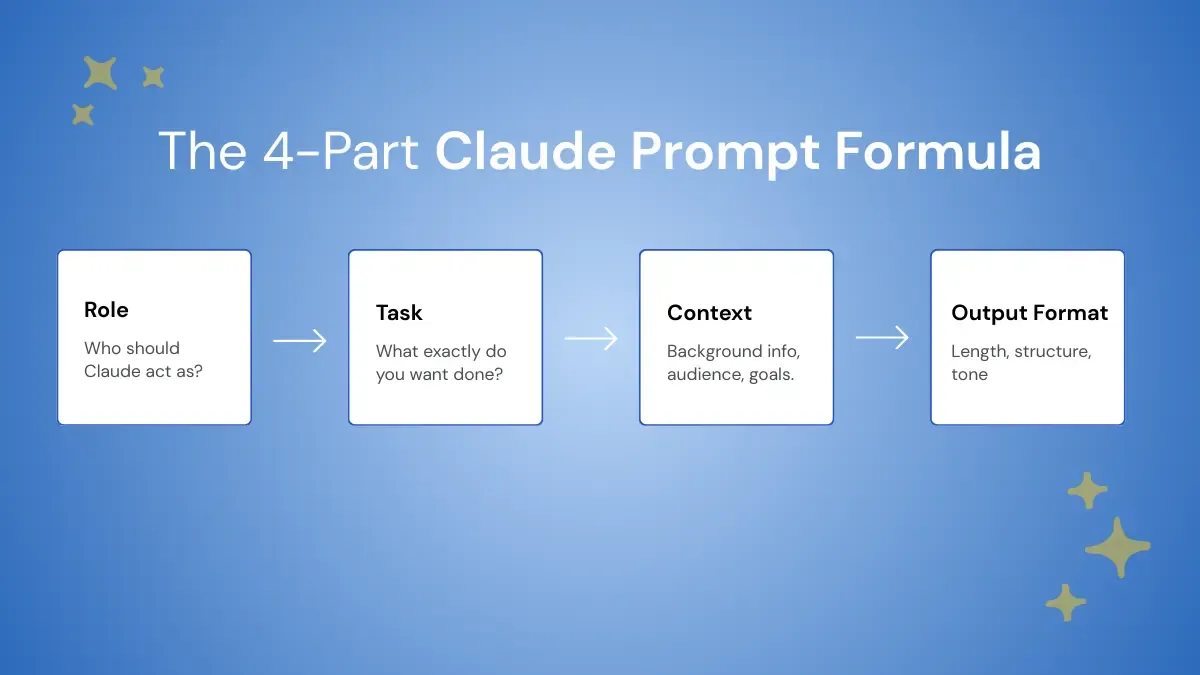
There's a simple four-part formula you can use every single time:
- Role — Who should Claude act as? ("Act as a senior content strategist")
- Task — One specific action per prompt. Not three tasks, not two. One.
- Context — Audience, goal, constraints, and any background information Claude needs
- Output Format — Length, tone, structure, headers or no headers
According to Anthropic, this is the foundation of solid prompt engineering. Internalize this structure once and your outputs will reflect it every time.
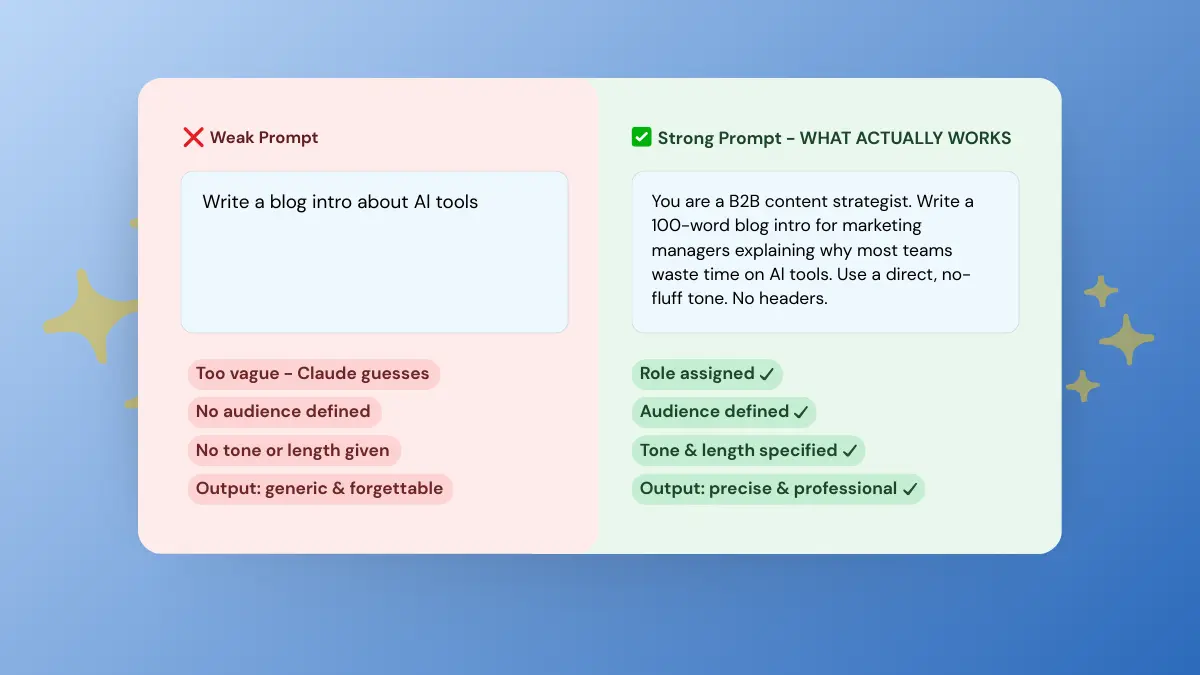
Here's what the difference looks like in practice:
The second prompt gives Claude a role, a single task, audience context, and a defined output format.
Use this as your go-to template for prompt writing for Claude every time you sit down:
A 2025 study hosted by Cornell University's research platform, surveying 243 users across academic and professional backgrounds, found that clear, structured, and context-aware prompts lead to higher task efficiency and better outcomes.
How to Write Better Prompts for Claude AI (7 Proven Techniques)
If Claude keeps giving you generic, boring responses no matter what you ask, the problem isn't Claude. It's the prompt.
Think of it this way: Claude isn't a mind reader. It's a precision tool.
And like any precision tool, the quality of what you get out depends entirely on how well you use it going in.
Claude is only as good as the instruction it receives, and without structure, it defaults to the safest, most average interpretation of your request every single time.
These seven Claude Prompt tips will change how you write prompts, starting today.
Each one directly addresses a specific failure mode that causes Claude to underdeliver. Master these and you'll spend less time re-prompting, less time editing, and more time using the output that comes back.
Each one uses the same running example so you can see exactly what shifts:
1. Be Specific — Claude Takes You Literally
Claude won't read between the lines! If your prompt is vague, the output will be too.
Clear, specific prompts are the single fastest way to improve output quality.
The more specific your input, the less back-and-forth you need.
2. Use Role Assignment
Assigning Claude a role is one of the most underused techniques in prompt engineering.
It shapes vocabulary, tone, and how Claude frames its AI-generated responses.
This works especially well for legal, finance, marketing, and technical writing.
If you're using Claude for content work specifically, these AI writing tips for copywriters will help you get even more out of role-based prompting.
3. Put Your Data First, Instructions Last
This is a Claude-specific technique most people skip.
Most professionals write prompts the way they'd brief a colleague. That works fine for humans.
Claude processes information differently.
When facts and instructions arrive mixed together, Claude has to parse both simultaneously, and that's where accuracy starts to slip. Separating your data from your task removes that ambiguity entirely.
Leading with your data before your instructions improves token efficiency and reduces the chance of Claude drifting away from your source material..
Why This Works Differently Than ChatGPT
ChatGPT handles instructions at the top just fine.
Claude's large context window is built to carefully synthesize structured input before acting on it. It is designed to be literal and precise.
That means structure isn't optional with Claude, it's load-bearing.
When your data arrives cleanly separated from your task, Claude can anchor its output to your facts rather than drifting toward a generic interpretation.
4. Use Few-Shot Examples
If you've ever wondered "what's the easiest way to get Claude to write in my tone and style?", this is your answer.
Give Claude 1–3 few-shot examples of what good looks like before asking it to produce.
This technique is known as few-shot prompting, and it helps Claude match a specific tone, structure, or output pattern.
This is called Claude multi-shot prompting and it's one of the most reliable techniques for tone replication.
Zero-Shot vs Few-Shot — What's the Difference?
In zero-shot prompting, Claude works from the instruction alone, while few-shot prompting provides examples that demonstrate the expected response.
The more specific the output you need, the more examples you should provide.
5. Break Complex Tasks Into Single Prompts
Cramming multiple tasks into one prompt is one of the most common mistakes professionals make.
It kills output quality, increases errors, and actually wastes more time than it saves.
One prompt, one task.
This alone will save time, increase productivity, and make your whole workflow more efficient.
6. Use Chain of Thought for Complex Reasoning
Chain of thought prompting in Claude means asking it to think through a problem step by step before giving you a final answer.
It's the difference between getting a conclusion and getting a conclusion you can actually trust.
This technique is especially powerful for strategy, analysis, and any multi-step writing task and it's backed by Anthropic.
Research shows that structured prompting reduces output variability by about 35% and that few-shot prompting can boost performance accuracy by 25–40% compared with zero-shot prompting (SQ Magazine).
What to Do When Your Optimized Prompt Still Underdelivers
If an optimized prompt still underdelivers on a complex task, change the workflow rather than rewriting the same prompt. First, break the task into smaller single prompts so Claude can focus on one decision or output at a time. Second, enable Extended Thinking for work that requires deeper analysis, such as strategy, math, coding, or multi-source synthesis.
Third, when Extended Thinking is unavailable or disabled, add: ‘Think step by step before giving your final answer.’ Anthropic's current guidance treats manual chain-of-thought prompting as a fallback and recommends general reasoning instructions over rigid, human-written steps.
Writing Better Claude AI Prompts With Extended Thinking
Claude's Extended Thinking is the built-in deep reasoning feature that goes beyond the standard chain of thought.
When Claude uses Extended Thinking, the response is organized into two parts: a thinking block and the final text answer. The thinking block may show a summary or be omitted depending on the model and display settings, so it should not be treated as a complete record of Claude's internal reasoning.
It's best for complex analysis, competitive positioning, multi-source research, and long-horizon strategy tasks.
7. Always Define Your Output Format
If you don't tell Claude what format you want, it'll pick one for you.
Sometimes that works. Most of the time, it doesn't match what you had in mind.
Think of your format instructions as a mini system prompt, you're not just telling Claude what to write, you're telling it exactly how to present it.
Get Optimized Claude Prompts Instantly With Phrasly
Mastering these seven techniques takes time, and even then, building a strong prompt from scratch every single time isn't exactly efficient.
That's where Phrasly's AI Prompt Generator comes in. It saves time, increases productivity, and removes the guesswork entirely.
Whether you use Claude as a content writing assistant, data analyst, or research assistant, Phrasly builds a task-specific prompt for the job, including prompts that help Claude AI generate Cornell notes with separate notes, cues, and summary sections.
How to Write Better Claude AI Prompts With Phrasly
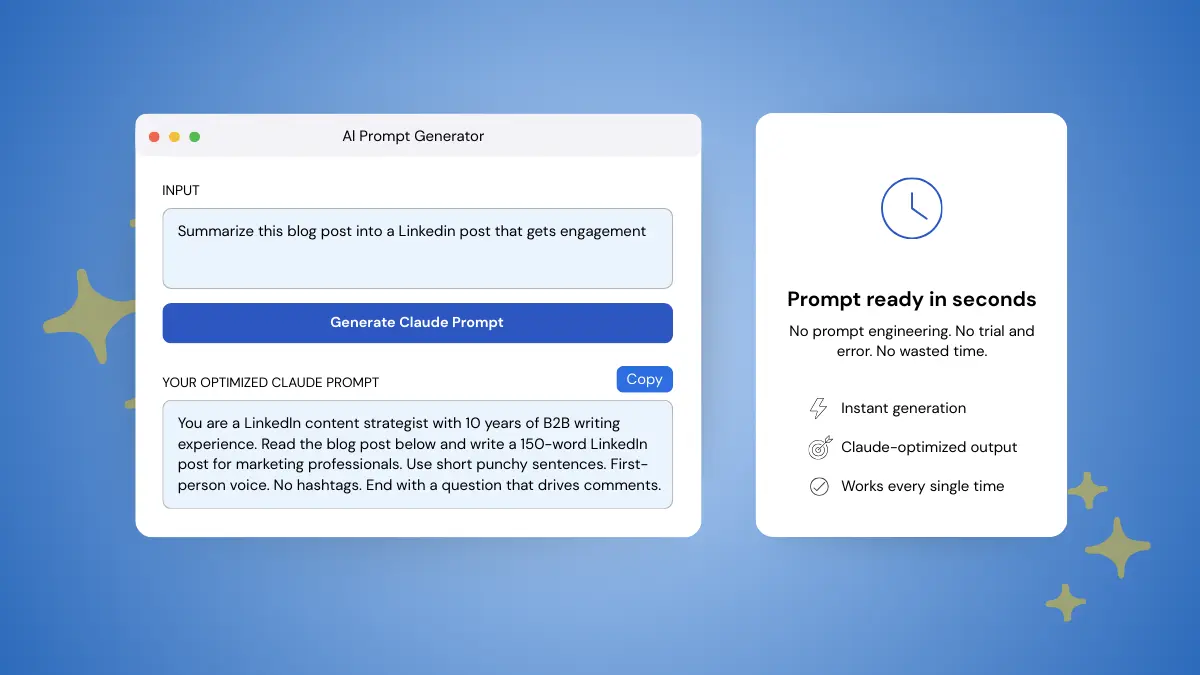
Type your rough idea into Phrasly, hit "Generate AI Prompt", and get a ready-to-paste, fully optimized Claude prompt in seconds.
Phrasly turned a rough idea into a prompt Claude can actually work with by adding structure, context, and intent.
That's the kind of efficiency that adds up fast when you're using Claude daily.
And if you want to go further, Phrasly's full suite of writing tools, from AI humanizer to content generator, helps you streamline your writing with AI at every stage, not just the prompting part.
● Works for content teams, marketers, and professionals
● Generates task-specific prompts, not generic ones
● Free to try
Claude Prompt Templates for Professionals
Every professional needs a go-to set of prompts. These templates cover your most common use cases, just swap in your details and go.
You can use the zero-shot prompt templates as starting points and also may pair them with few-shot examples for tone-specific tasks, it's the fastest way to improve output quality without rewriting from scratch every time.
Common Claude Prompting Mistakes to Avoid
If you gave Claude a detailed prompt but the output still isn't what you wanted, you're not alone. Most of the time it comes down to one of these mistakes:
- Being too vague — If Claude's response is too generic, the most common cause is a vague prompt. ‘Write something engaging’ tells Claude nothing. Following Anthropic's prompting guidance, define the role, audience, purpose, length, tone, constraints, and format instead of waiting for Claude to infer them.
- Overloading one prompt — Multiple tasks in one prompt kills output quality. Claude doesn't know what to prioritize.
- Dumping unstructured context — Pasting large unfiltered background content wastes token efficiency and confuses Claude. Label your context, keep it organized.
- Using only negative instructions — "Don't be too formal" isn't enough. Tell Claude what you do want, not just what you don't.
- Vague adjectives without examples — Words like "creative" or "engaging" mean nothing without context. Show Claude what good looks like!
Not a single one of these is a Claude problem.
They're all input problems, which means you can fix every one of them by removing ambiguity.
And once your prompts are solid, AI content humanization techniques are the natural next step to make outputs sound less robotic.
That's everything you need to get started!
Writing better Claude prompts isn't about memorizing formulas, it's about being clear, specific, and intentional with every instruction you give.
Claude is one of the most powerful AI tools available right now, but it's only as good as the input it receives.
You now have the framework, the techniques, and the templates. The only thing left is putting them to work.
Frequently Asked Questions
Which Three Elements Make Up an Effective Prompt in Claude?
Within this guide’s framework, the three core elements are Role (who Claude should act as), Task (the action it should perform), and Output Format (how it should present the result). Adding Context, including the audience, background, and constraints, usually produces more targeted results; Phrasly’s AI Prompt Generator can combine all four elements for you.
How to give system prompts to Claude?
Type your system instruction at the very top of your prompt before anything else. Start with "You are a [role]" or set the context directly.
Claude treats everything at the start as a behavioral directive and follows it throughout the conversation
How do I get Claude to stop adding things I didn't ask for?
Be explicit about what you don't want, but pair it with what you do want. Instead of "don't add examples," say "give me the definition only, no examples, under 50 words."
Claude follows positive instructions more reliably than negative ones.
Can I use an AI prompt generator instead of writing prompts manually?
Yes and it's faster. Phrasly's AI Prompt Generator takes your rough idea and builds a structured, ready-to-use Claude prompt in seconds. No prompt engineering experience needed.
If Claude’s Response Is Too Generic, What Should You Try?
Add specific details about the role, audience, goal, constraints, length, tone, and output format. Generic responses often come from underspecified instructions, so give Claude the information it would otherwise have to infer.
How to make Claude write better code?
Specify the language, version, and exact function you need.
Add project context and define the output format, commented or not, full file or functions only.
For complex logic, add "think step by step before writing the code" and the quality jumps noticeably.
What is few-shot prompting and does it work with Claude?
Few-shot prompting means giving Claude 1–3 examples before asking it to produce. It works very well with Claude, especially for tone, style, and formatting consistency.
The more specific the output you need, the more examples you provide.
Can I give Claude a large document and have it actually use all of it?
Yes, Claude's 200K token context window is built for exactly this. Paste your full document, structure it with labeled sections, and give your instruction at the end.
Claude will process the entire thing. The bigger the document, the more important data-first structure becomes.
How do I get consistent outputs from Claude every time?
Use the same prompt structure every time, role, task, context, output format. The more variables you lock down, the more predictable the output.
Save your best-performing prompts as templates and reuse them instead of starting fresh each time.
You’ve Optimized Your Prompt, but Claude Still Isn’t Accurate Enough on a Complex Task. What Should You Consider Next?
Break the task into smaller prompts, enable Adaptive or Extended Thinking, and ask Claude to verify its answer against explicit criteria.
If thinking is disabled, a manual instruction such as “Think step by step before giving your final answer” can help, although Anthropic treats manual chain-of-thought prompting as a fallback.
Should I use Claude Projects or start a new chat every time I prompt?
Use Claude Projects when you're working on an ongoing task that needs consistent context. Start a new chat when the task is one-off and unrelated to previous work.
Projects let Claude retain instructions and context across sessions so you don't have to repeat yourself every time.
When Claude Uses Extended Thinking, What Two Parts Do You Get in the Response?
You get two response components: a thinking block and the final text answer.
However, the thinking block may contain only a summary or may be omitted depending on the model and display settings, so it is not always a complete, visible record of Claude’s reasoning.


Keep reading

Claude Prompt Generator: Build Better Prompts for Claude AI (Free Tool)
Learn how a Claude prompt generator builds better prompts for every Claude model, from Sonnet 4.6 to Fable 5. Includes ready-to-use XML templates, effort levels, and a free tool.


50 Highest-Engagement AI Prompts for LinkedIn, Instagram, and X for marketers
Learn the prompt frameworks behind top-performing social posts, avoid common AI prompting mistakes, and use proven templates to scale your content creation across every platform.