AI Prompt Examples: 50+ Ready-to-Use Prompts (2026)
24 min read
Updated September 2026
You typed a question into ChatGPT, Gemini, or Claude and got a wall of generic text you still had to rewrite from scratch. This often happens when your prompt is too vague. Below are 50+ ready-to-use AI prompt examples for writing, work, marketing, research, and study.
Each prompt is copy-paste ready, with simple placeholders and weak-vs-strong examples to show why it works.
Besides the ready-to-use prompts, if you have something specific in mind, you can add your own requirements and specifications and create a customized prompt with Phrasly’s AI Prompt Generator.
AI Prompt Generator It’s Free to Use
Quick AI Prompt Generator Example
Rough request:
“Write an email about a delayed project.”
Generated prompt:
“Write a professional email to a client about a delay to [PROJECT NAME]. Explain the reason for the delay clearly, provide the updated timeline, and keep the tone polite and transparent. Keep the email under 150 words and end with a clear next step for the client.”
💡 Why this works: The generated prompt adds the recipient, purpose, tone, key details, length, and desired next step, giving the AI clearer instructions and reducing ambiguity.
10 Quick AI Prompt Examples to Copy and Paste
An AI prompt is an instruction you give an AI model to get a specific result. Here are 10 simple AI prompt examples you can copy and use right now.
1. Summarize text
Summarize the text below in 5 bullet points. Focus on the main ideas, important facts, and key takeaways. Keep the language simple.
Text: [PASTE TEXT]
2. Rewrite text
Rewrite the text below to make it clearer, more professional, and easier to read. Keep the original meaning and remove unnecessary repetition.
Text: [PASTE TEXT]
3. Compare options
Compare [OPTION A] and [OPTION B] based on cost, benefits, drawbacks, ease of use, and suitability for [GOAL]. Present the comparison in a simple table and give a brief recommendation.
4. Brainstorm ideas
Give me 10 ideas for [PROJECT, TOPIC, OR GOAL]. Make each idea practical and different from the others. Include a one-sentence explanation for each.
5. Create a plan
Create a step-by-step plan to achieve [GOAL] within [TIMEFRAME]. Break it into clear tasks, priorities, and deadlines. Present the plan in a table.
6. Extract information
Extract the key information from the text below, including names, dates, figures, deadlines, and action items. Present the results as a clear bullet list.
Text: [PASTE TEXT]
7. Create a table
Turn the information below into a clear table with columns for [COLUMN 1], [COLUMN 2], [COLUMN 3], and [COLUMN 4]. Keep the wording concise and preserve the original information.
Information: [PASTE TEXT]
8. Critique a draft
Review the draft below for clarity, structure, tone, and unnecessary repetition. Identify the three most important improvements and explain how to make each one better.
Draft: [PASTE DRAFT]
9. Explain a concept
Explain [CONCEPT] in simple language for someone who is new to the topic. Use one practical example and avoid unnecessary technical terms.
10. Ask clarifying questions
Before completing this task, ask me up to 5 important questions that would help you understand my goal, audience, requirements, and preferred output. Do not start the task until I answer.
Weak vs. Strong AI Prompt Examples
A strong AI prompt typically gives the model a clear task, relevant context, useful input, appropriate constraints, and a defined output.
A weak prompt leaves important details unstated, which can lead to vague or inconsistent results. The examples below show the difference between a basic instruction and a more structured prompt.
Beyond these examples, if you want to learn the full process and write better AI prompts on your own, see our guide on how to write good AI prompts
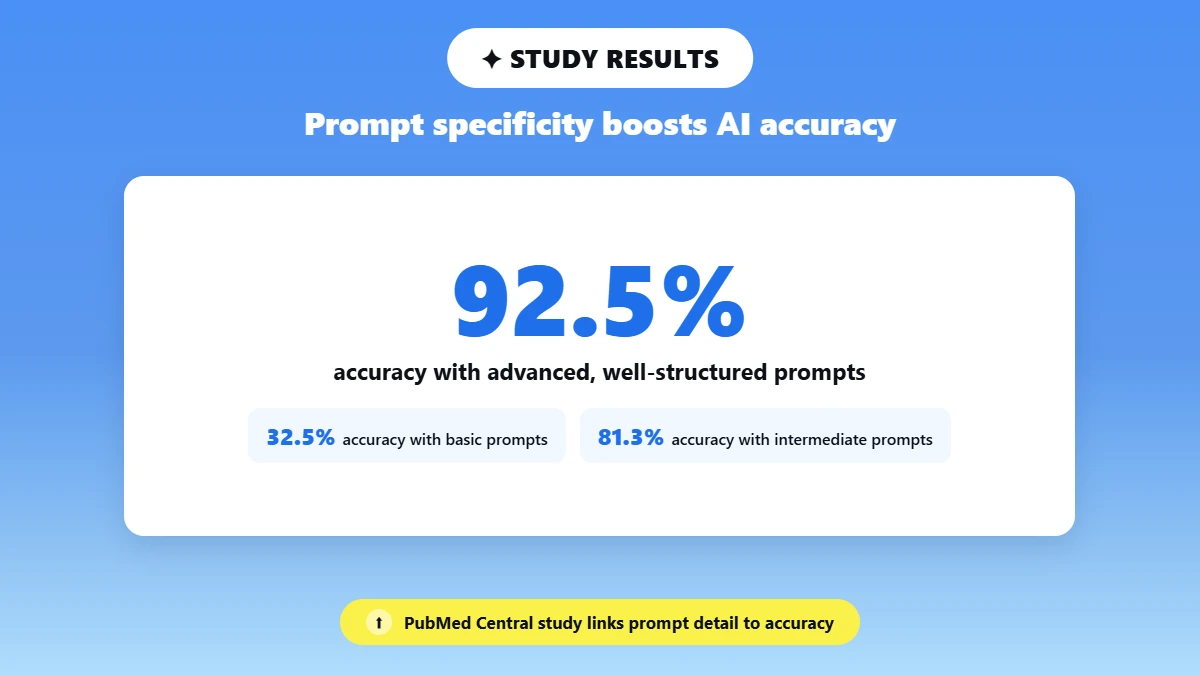
💡 A peer-reviewed study published on PubMed Central found that performance on inferential statistics tasks varied with prompt specificity. Accuracy increased from 32.5% with basic prompts to 81.3% with intermediate prompts and 92.5% with advanced, well-structured prompts.
A practical framework for better prompts
A useful prompt can include six elements:
Task: Clearly state what you want the AI to do.
Context: Explain the background, audience, goal, or situation.
Input: Provide the text, data, examples, or information the AI should work with.
Constraints: Set relevant requirements such as length, tone, format, scope, or things to avoid.
Output: Describe how you want the result presented, such as bullets, a table, an email, or a numbered list.
Examples or success criteria: Show an example of the desired result or explain what a successful answer should include.
Role can also be useful when it gives the model relevant context, such as asking it to respond as a UX researcher, teacher, or marketing strategist. However, a role is optional, not something every prompt needs.
Weak vs. Strong Prompt
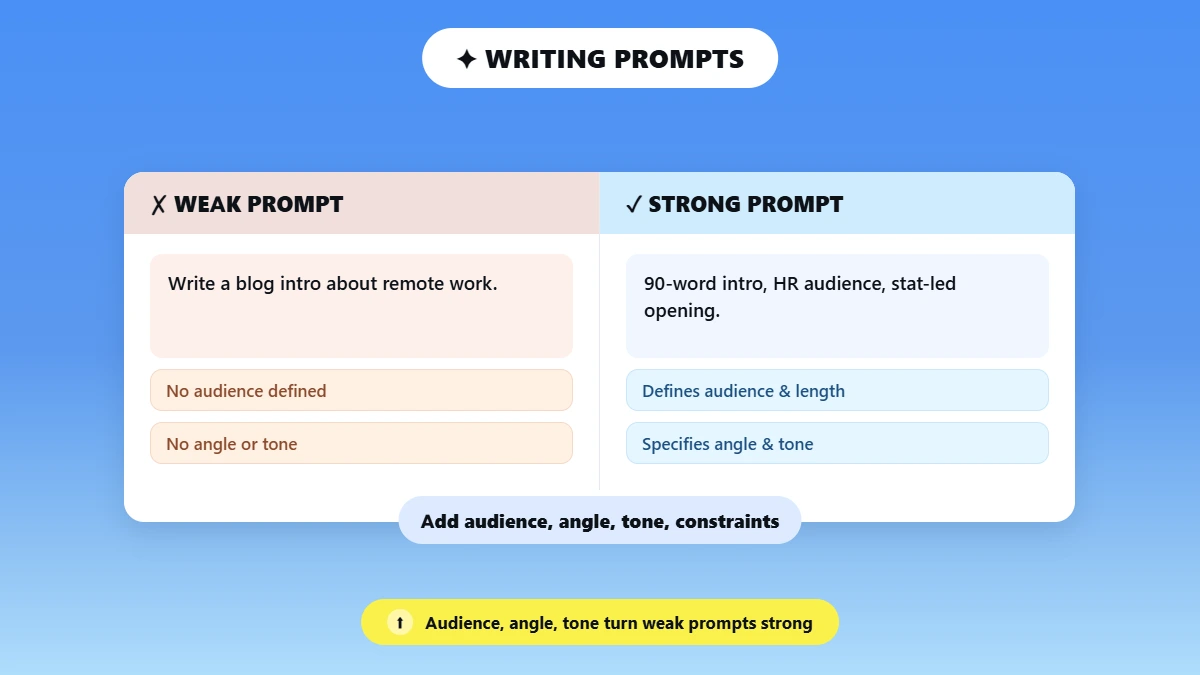
❌ Weak:
Write a blog intro about AI tools.
✅ Strong:
Write an 80-word blog introduction for marketing managers explaining why AI writing tools can produce generic content. Open with a counterintuitive claim. Use a direct, punchy tone and do not use headers.
💡 Why it works: The stronger version defines the task, audience, context, length, angle, tone, and output requirements. These details give the model useful boundaries instead of leaving the intended result open to interpretation.
Goal | Weak prompt | Strong prompt | Why it works |
Write an email | Write an email about a delay. | Write a professional 120-word email to a client explaining a two-week project delay. Give the reason, updated timeline, and next step. | Defines audience, length, purpose, and required details. |
Summarize text | Summarize this. | Summarize this report in 5 bullet points, focusing on findings, risks, and recommended actions. | Specifies format and what matters most. |
Brainstorm ideas | Give me content ideas. | Give me 10 LinkedIn post ideas for B2B marketers targeting small business owners. | Defines audience, quantity, and topic. |
Compare options | Compare these products. | Compare these two products based on price, features, ease of use, and suitability for a small business. Present the result in a table. | Gives clear criteria and output format. |
What About Reasoning Models?
For tasks that require comparison or evaluation, clear instructions and explicit criteria can be more useful than simply asking an AI model to “think step by step.”
For example: Compare the options against these criteria: cost, implementation time, reliability, and scalability. State your key assumptions and give a recommendation with a concise rationale.
This tells the model how the result should be evaluated without requiring a specific internal reasoning process.
The goal is not to make every prompt longer. It is to give the AI the right information and clear success criteria for the task.
A short prompt can work well when the task is simple, while a more detailed prompt can be useful when the task has multiple requirements.
AI Prompt Examples for Writing & Content Creation
Because content creation is where generic AI output can do the most obvious harm, AI prompt examples for writing can help you give a model clearer direction from the start.
The examples below include copy-paste-ready prompts for blog writing, social media, email, editing, rewriting, and content repurposing. You can customize the placeholders to match your topic, audience, and preferred style.
Blog Writing Prompts
A well-written AI prompt works more like a content brief than a search query. For blog content, that means specifying the reader, topic, angle, tone, structure, and length you need.
If you want to go beyond blog writing, these 100+ AI creative writing prompts cover everything from fiction to storytelling.
❌ Weak:
Write a blog intro about remote work productivity.
✅ Strong:
You are a workplace productivity consultant. Write a 90-word blog intro for HR managers about why remote workers plateau after 6 months. Open with a surprising statistic framing. Tone: authoritative but approachable. No questions in the opening line.
💡 Why it works: Audience specificity, angle specificity, and a clear writing constraint give the model a more focused direction instead of leaving it to choose from many possible approaches.
📋 Copy-paste prompt 1:
You are a tech journalist. Write a 120-word introduction for a how-to article aimed at small business owners explaining how to use AI tools to reduce content production time. Tone: practical and action-oriented. Start with a pain point, not a definition.
📋 Copy-paste prompt 2:
You are a lifestyle blogger. Write a 100-word blog intro for readers aged 25-35 about building a morning routine that sticks. Begin with a relatable failure scenario. Tone: warm, honest, and conversational. No bullet points.
📋 Copy-paste prompt 3: Blog outline
Create a detailed outline for a 1, 500-word blog post about [TOPIC] for [AUDIENCE]. Include an introduction, 5-7 main sections, relevant subheadings, key points to cover, and a conclusion. Keep the structure logical and avoid repeating the same ideas.
📋 Copy-paste prompt 4: Editing and tightening
Edit the text below to make it clearer, more concise, and easier to read. Remove unnecessary repetition and filler while preserving the original meaning, facts, and tone. Do not add new claims.
Text: [PASTE TEXT]
📋 Copy-paste prompt 5: Rewriting
Rewrite the text below for [AUDIENCE] in a professional but conversational tone. Keep the original meaning and key information, but improve the flow, clarity, and sentence structure.
Text: [PASTE TEXT]
📋 Copy-paste prompt 6: Brand voice matching
Rewrite the text below to match this brand voice: [DESCRIBE BRAND VOICE]. Keep the meaning and key facts unchanged. Use consistent terminology, sentence style, and tone throughout.
Text: [PASTE TEXT]
Social Media & Email Prompts
The ideal AI prompt for social media or email content gives the model enough information about the audience, purpose, tone, format, and key message.
❌ Weak:
Write a LinkedIn post about leadership.
✅ Strong:
You are a senior product manager at a SaaS company. Write a 150-word LinkedIn post for mid-level managers about one counterintuitive lesson you learned from a failed product launch. Lead with a bold claim. Use short paragraphs. End with a single reflective question. No hashtags.
💡 Why it works: The professional context, audience, word count, structure, ending, and restriction on hashtags turn a broad topic into a clearly defined post.
📋 Copy-paste prompt 7: Email subject lines
You are a conversion copywriter. Write 5 email subject lines for a SaaS product announcement targeting marketers. Keep each line under 50 characters. Use curiosity, urgency, or a direct benefit. Return them as a numbered list with no explanations.
📋 Copy-paste prompt 8: Social media hook
You are a growth marketer. Write a single LinkedIn post hook of no more than 25 words promoting [PRODUCT OR TOPIC]. Open with a surprising or useful insight that would interest [AUDIENCE]. Do not use emojis or hashtags.
📋 Copy-paste prompt 9: Repurpose content
Repurpose the article below into 3 LinkedIn posts, 5 short social media posts, and 1 email newsletter. Keep the core message and facts consistent across all formats. Adapt the tone and length to each format.
Article: [PASTE ARTICLE]
📋 Copy-paste prompt 10: Improve existing content
Review the content below and suggest 5 specific ways to make it more engaging for [AUDIENCE]. Focus on the opening, clarity, structure, examples, and call to action. Explain each recommendation briefly.
Content: [PASTE CONTENT]
📋 Copy-paste prompt 11: Create a content calendar
Create a 2-week content calendar for [BRAND OR BUSINESS] targeting [AUDIENCE]. Include 10 content ideas with the topic, format, key message, and suggested call to action. Make the ideas varied and practical.
📋 Copy-paste prompt 12: Convert content format
Turn the following blog section into a concise email for [AUDIENCE]. Keep the main insight and important facts, remove unnecessary detail, and end with one clear call to action. Keep the email under 180 words.
Content: [PASTE TEXT]
💡 Why these prompts work: Each prompt gives the AI a clear task while adding useful context, constraints, audience information, or output requirements. This makes the intended result easier for the model to interpret and gives you a stronger starting point for editing.
AI Prompt Examples for Work & Productivity
AI prompt examples for work can help professionals save time on repetitive tasks, communicate more clearly, organize information, and make better-informed decisions. The prompts below cover common workplace tasks including meetings, email, research, planning, analysis, and decision-making.
Meeting & Communication Prompts
Clear workplace prompts work best when they tell the AI what information to focus on and how the final result should be organized.
❌ Weak:
Summarize my meeting notes.
✅ Strong:
You are an executive assistant. Below are raw meeting notes from a 45-minute product strategy session with 5 stakeholders. Write a 150-word summary structured as: (1) Key decisions made, (2) Action items with owner and deadline, and (3) Open questions requiring follow-up. Use concise bullet points and a professional tone.
Notes: [PASTE NOTES HERE]
💡 Why it works: Assigning relevant context, setting a word limit, and specifying the three required sections gives the model a clear structure to follow instead of leaving the format open-ended.
📋 Copy-paste prompt 1: Email follow-up
You are a professional consultant. Write a 100-word follow-up email after a client discovery call. Summarize the three main pain points discussed, confirm the next step of sending a proposal by Friday, and maintain a warm but efficient tone. No unnecessary filler. Sign off as [YOUR NAME].
📋 Copy-paste prompt 2: Slack tone fixer
Rewrite the following Slack message to sound professional yet friendly. Keep it under 60 words, remove any passive-aggressive language, and preserve the original request and important details.
Message: [PASTE MESSAGE]
📋 Copy-paste prompt 3: Email triage
Review the emails below and group them into four categories: urgent, requires a response, informational, and can wait. For each email that needs a response, briefly explain what action is required. Do not draft replies.
Emails: [PASTE EMAILS]
📋 Copy-paste prompt 4: Status update
Turn the project notes below into a concise weekly status update for senior stakeholders. Include completed work, current priorities, risks or blockers, and next steps. Keep it under 200 words and use clear bullet points.
Notes: [PASTE NOTES]
Research & Summarization Prompts
AI can help organize large amounts of information, but your prompt should clearly define what information matters and who will use the final result.
❌ Weak:
Summarize this report for me.
✅ Strong:
You are a business analyst. Read the following 1,200-word market report on EV adoption in Europe. Write a 200-word executive summary covering: (1) the key trend, (2) the main risk factor, and (3) one strategic recommendation for a mid-size automotive supplier. Avoid jargon. Target reader: a non-technical VP.
Report: [PASTE REPORT]
💡 Why it works: Specifying the target reader, word limit, and exact information to extract helps the model focus on the most useful findings rather than simply paraphrasing the report.
📋 Copy-paste prompt 5: Competitor research
You are a market researcher. Analyze the following three competitor landing pages and identify each company's primary value proposition, target audience signals, and one potential gap or weakness. Present the findings in a comparison table.
Page copy: [PASTE PAGE COPY]
📋 Copy-paste prompt 6: Meeting preparation
You are a strategic advisor. I am meeting the Head of Procurement at a mid-size retailer in 30 minutes. Based on the context below, give me 5 useful discovery questions and 2 potential objections I should prepare to address. Keep the recommendations concise and practical.
Context: [PASTE BRIEF]
Strategy & Decision-Making Prompts
For decisions that require comparison or evaluation, give the model clear criteria and ask for a concise rationale rather than relying on a generic “think step by step” instruction.
📋 Copy-paste prompt 7: Decision framing
Compare whether we should launch [PRODUCT] in Q3 or delay the launch to Q1. Evaluate both options against these criteria: market opportunity, operational readiness, financial impact, customer demand, and key risks. State your assumptions, summarize the main trade-offs, and give a recommendation with a concise rationale.
📋 Copy-paste prompt 8: Prioritize tasks
Review the tasks below and rank them from highest to lowest priority. Evaluate each task based on urgency, business impact, effort, and dependencies. Present the result in a table with the priority, task, reason, and recommended next action.
Tasks: [PASTE TASK LIST]
📋 Copy-paste prompt 9: Simple data analysis
Analyze the data below and identify the three most important trends, any unusual changes, and two practical conclusions. Use only the information provided. Present the findings in a simple table followed by a short summary.
Data: [PASTE DATA]
📋 Copy-paste prompt 10: Project planning
Create a project plan for [PROJECT] that needs to be completed by [DEADLINE]. Break the work into phases, tasks, dependencies, owners, and milestones. Identify the three biggest risks and suggest one mitigation for each. Present the plan as a table.
📋 Copy-paste prompt 11: Improve a business process
Review the process below and identify up to 5 opportunities to make it faster, simpler, or less error-prone. For each opportunity, explain the current issue, suggested improvement, expected benefit, and any potential trade-off.
Process: [PASTE PROCESS]
📋 Copy-paste prompt 12: Prepare an executive brief
Turn the information below into a one-page executive brief for [AUDIENCE]. Include the situation, key findings, business impact, risks, and recommended next steps. Use concise language, clear headings, and bullet points where useful. Do not introduce information that is not supported by the source material.
Information: [PASTE INFORMATION]
Why These Work
The strongest workplace prompts do not need to be unnecessarily long. They work because they give the AI enough context, input, constraints, output requirements, and evaluation criteria to understand the intended task.
For complex decisions, you can also tell the model exactly what criteria to compare, what assumptions to state, and what type of recommendation you need. This makes the result easier to review and use in a real workplace setting.
We’ve covered many of the most common AI prompt needs, but everyone has different tasks, requirements, and specifications. If you need a prompt for something we haven’t covered, or want to create one for your specific needs, use Phrasly’s AI Prompt Generator.
AI Prompt Examples for Marketing
Most AI prompt examples for marketing stop at a flat list of templates. The prompts below show how to give AI enough context about your audience, campaign goal, message, and output so you can create more useful marketing content.
Ad Copy & Landing Page Prompts
Marketing prompts work better when they define the target audience, desired outcome, format, and relevant constraints.
❌ Weak:
Write an ad headline for a project management tool.
✅ Strong:
You are a direct-response copywriter. Write 5 Google ad headlines, with a maximum of 30 characters each, for a project management SaaS targeting operations managers at companies with 50-200 employees. Lead with an efficiency or time-saving angle. Avoid generic phrases such as “boost productivity.” Return the results as a numbered list.
💡 Why it works: Character limits, audience details, angle guidance, and a restriction on generic language give the model clear requirements to work with. You get multiple testable variations instead of one broad suggestion.
📋 Copy-paste prompt 1: Landing page CTA
You are a conversion copywriter. Write 3 CTA button variants for a B2B SaaS landing page targeting HR managers. Each CTA must be under 6 words, use action-oriented language, and communicate a specific benefit rather than simply saying “Sign Up.” Return each option with a one-line rationale.
📋 Copy-paste prompt 2: Landing page copy
Write the hero section for a landing page promoting [PRODUCT] to [TARGET AUDIENCE]. Include a clear headline, a 20-word supporting statement, and one CTA. Focus on the main customer problem and the practical benefit of the product. Keep the language specific and avoid unsupported claims.
📋 Copy-paste prompt 3: Ad variations
Create 5 variations of an ad for [PRODUCT] targeting [AUDIENCE]. Give each variation a different angle: pain point, benefit, curiosity, proof, and convenience. Keep each version concise and suitable for [PLATFORM]. Avoid exaggerated claims and generic marketing language.
Social & Campaign Prompts
AI can also help marketers turn campaign goals into structured briefs, content ideas, and measurable reporting.
📋 Copy-paste prompt 4: Campaign brief
You are a brand strategist. Write a one-page campaign brief for a product launch targeting millennial homeowners. Include the campaign goal, core message, key audience insight, 3 channel recommendations with a rationale for each, and one primary success metric. Keep the tone strategic and concise. Maximum 400 words.
📋 Copy-paste prompt 5: Campaign ideas
Generate 10 campaign ideas for [PRODUCT] targeting [AUDIENCE]. For each idea, include the central concept, suggested channel, key message, and intended customer action. Make the ideas distinct and practical rather than variations of the same concept.
📋 Copy-paste prompt 6: Audience research
Analyze the audience described below and identify their top 5 needs, 5 common pain points, likely objections, and factors that could influence their purchase decision. Separate confirmed information from reasonable assumptions.
Audience information: [PASTE RESEARCH OR NOTES]
📋 Copy-paste prompt 7: Customer persona
Create a practical marketing persona for [TARGET AUDIENCE] based only on the information below. Include their goals, challenges, buying motivations, objections, preferred communication style, and likely decision criteria. Clearly label any assumptions.
Research: [PASTE RESEARCH]
📋 Copy-paste prompt 8: SEO content brief
Create an SEO content brief for a blog post targeting the keyword [PRIMARY KEYWORD]. Include search intent, target audience, suggested title, H2 structure, key questions to answer, important subtopics, and a recommended word-count range. Do not invent search-volume or ranking data.
📋 Copy-paste prompt 9: Content distribution plan
Create a distribution plan for the following marketing article. Recommend how to repurpose it for LinkedIn, email, short-form social posts, and one additional relevant channel. For each format, provide the main angle, audience, and suggested call to action.
Article: [PASTE ARTICLE]
Campaign Reporting & Optimization Prompts
Marketing reports are easier to review when the prompt tells the AI which metrics to examine and what decisions the analysis should support.
📋 Copy-paste prompt 10: Campaign reporting
Analyze the campaign data below and summarize the results for a marketing manager. Identify the strongest-performing channel, weakest-performing channel, significant changes, and three practical recommendations. Present the findings in a table followed by a short summary. Use only the data provided.
Campaign data: [PASTE DATA]
📋 Copy-paste prompt 11: Campaign performance comparison
Compare the performance of these two marketing campaigns based on impressions, clicks, conversion rate, cost per acquisition, and total conversions. Identify the most important differences and explain which campaign performed better overall. State any limitations in the data before giving your conclusion.
Campaign data: [PASTE DATA]
📋 Copy-paste prompt 12: Marketing optimization
Review the campaign results below and identify up to 5 opportunities for improvement. Prioritize your recommendations by potential impact and effort. For each recommendation, explain what should change, why it may help, and which metric should be monitored.
Results: [PASTE RESULTS]
💡 For a deeper library covering ads, landing pages, product launches, and campaign reporting, see our collection of AI prompts for marketing.
AI Prompt Examples for Students & Academic Use
AI prompt examples for students can help with planning, research, revision, and understanding difficult topics without replacing the student's own work.
The prompts below are designed to support learning and preparation while keeping the student responsible for the final academic work.
Essay Planning & Research Prompts
For academic work, the most useful prompts help you plan ideas, evaluate information, and improve your understanding rather than simply asking AI to write the finished assignment.
❌ Weak:
Help me write an essay about climate change.
✅ Strong:
You are an academic writing coach. Help me plan a 1,500-word argumentative essay on the economic cost of inaction on climate change. My audience is undergraduate economics students. Provide: (1) a clear thesis statement, (2) three supporting arguments with a real-world example for each, (3) one counterargument and rebuttal, and (4) a concluding direction. Do not write the essay. Give me the structure only.
💡 Why it works: The strong prompt defines the word count, audience, essay type, topic angle, and desired output. Asking for a plan rather than a finished essay keeps the AI focused on supporting the student's thinking.
📋 Copy-paste prompt 1: Source summarizer
You are a research assistant. Read the following academic abstract and summarize it in 100 words for a student with no background in the subject. Highlight: (1) the main finding, (2) the methodology used, and (3) why the result matters. Use plain English.
Abstract: [PASTE ABSTRACT]
📋 Copy-paste prompt 2: Counterargument generator
You are a debate coach. I am arguing that [YOUR THESIS]. Generate 3 strong counterarguments an opponent could make. For each one, explain the reasoning behind the counterargument and suggest points I should consider when developing my response. Avoid generic objections.
📋 Copy-paste prompt 3: Thesis framing
Help me develop 3 possible thesis statements for an essay about [TOPIC]. The essay argues that [MAIN POSITION]. Make each thesis specific, debatable, and appropriate for [COURSE OR ACADEMIC LEVEL]. Briefly explain what argument each thesis would allow me to develop. Do not write the essay.
📋 Copy-paste prompt 4: Source evaluation
Help me evaluate the following source for an academic assignment. Identify the author or organization, publication date, main claim, evidence used, potential limitations, and questions I should investigate further. Do not assume information that is not provided.
Source: [PASTE SOURCE OR DETAILS]
Study & Revision Prompts
These prompts can turn an AI model into a study partner by helping you test your knowledge, explain difficult concepts, and organize revision.
📋 Copy-paste prompt 5: Flashcard generator
You are a study coach. Based on the following lecture notes, create 15 flashcards in Q&A format. Test understanding rather than simple recall. Include a mix of definition, application, and comparison questions.
Notes: [PASTE NOTES]
📋 Copy-paste prompt 6: Concept explainer
You are a teacher explaining a difficult concept to a beginner. Explain [CONCEPT] in under 150 words using one everyday analogy. Avoid unnecessary jargon and finish with one practical real-world example.
📋 Copy-paste prompt 7: Practice exam questions
You are a university professor. Based on the topic summary below, create 6 exam-style questions across three difficulty levels: recall, application, and analysis. Include the ideal answer length for each question, but do not provide the answers.
Topic summary: [PASTE TOPIC SUMMARY]
📋 Copy-paste prompt 8: Revision schedule
You are a study planner. I have 3 weeks before my [SUBJECT] exam. Based on the syllabus below, create a day-by-day revision plan with estimated study times, topic priorities, practice sessions, and a 2-day buffer before the exam.
Syllabus: [PASTE SYLLABUS]
📋 Copy-paste prompt 9: Self-testing
Test me on [TOPIC] using 10 questions, one at a time. Start with basic understanding and gradually increase the difficulty. Do not show the next question until I answer the current one. After each answer, tell me whether I am correct and briefly explain anything I misunderstood.
📋 Copy-paste prompt 10: Review my understanding
I am studying [TOPIC]. Ask me 5 questions that test whether I actually understand the key concepts rather than whether I can memorize definitions. After I answer, identify any gaps in my understanding and suggest what I should review next.
A Note on Academic Integrity
These prompts are intended to help you understand, plan, research, revise, and test your knowledge. They are not intended to create academic work that you submit as your own without following your institution's rules.
According to Yahoo! Finance, Coursera's AI in Higher Education Report from February 2026, based on a survey of more than 4,200 students and educators across five countries, found that four in five students said AI had improved their academic performance, while only 20% of universities had a formal AI policy in place.
Before using AI for coursework, check your school's or university's current rules. If AI-generated material is allowed, follow the required disclosure, citation, or attribution guidelines.
How to Customize and Reuse These Prompts
Copy-paste prompts are a useful starting point, but you will usually get better results when you adapt them to your specific task. Replace the placeholders with your own details, refine the prompt through follow-up instructions, and always review the AI's output before using it.
Customize Prompts With Placeholders
Use simple placeholders such as [AUDIENCE], [TOPIC], and [TONE] to adapt a prompt without rewriting it from scratch.
For example:
Write a 500-word article about [TOPIC] for [AUDIENCE]. Use a [TONE] tone and include three practical examples.
Replace each placeholder with specific information:
[TOPIC]: AI tools for small businesses
[AUDIENCE]: small business owners
[TONE]: practical and conversational
The more relevant information you provide, the easier it is for the AI to understand what you are trying to achieve.
Improve Prompts Through Iteration
You do not need to put every possible instruction into your first prompt. Start with the main task, review the response, and use follow-up prompts to refine it.
For example:
Make the introduction more concise and reduce it to 80 words.
Then:
Make the tone more conversational and add one practical example.
This approach can be easier than creating one very long prompt with every requirement at once.
Verify AI Output Before Using It
AI-generated content should always be reviewed before you publish, submit, or share it. Check important facts, figures, sources, names, dates, and claims against reliable sources.
If you are creating a draft with AI, label it clearly as an AI draft during your workflow so you know what still needs to be reviewed and edited.
How to Save and Organize AI Prompts
If you reuse prompts regularly, a simple prompt library can save time. Give each prompt a name based on the task and outcome, such as “Summarize Meeting Notes” or “Create LinkedIn Post.”
Use placeholders so the same prompt can be adapted to different situations. Tag prompts by use case and model, such as writing, marketing, work, ChatGPT, Claude, or Gemini. Save a tested output with each prompt and record the last-tested model and date. If you work with a team, keep shared prompts versioned so everyone uses the current version.
Generate Your Own AI Prompt
Writing a useful prompt from scratch can take time, especially when a task needs specific context, constraints, or output requirements. Phrasly’s AI Prompt Generator lets you describe what you want in plain language and turns that idea into a structured, ready-to-use prompt.
No prompt-writing experience needed.
Supports ChatGPT, Claude, Gemini, and more.
Built for professionals, marketers, students, and content creators.
Free to start.
Turn your rough idea into a ready-to-use prompt.
FAQs
What is an example of a prompt in AI?
An AI prompt is an instruction or request you give to an AI model to produce a specific result. For example, instead of saying “Write an email,” you could say, “Write a 120-word professional follow-up email to a client after a product demo.” The second prompt gives the model clearer context, requirements, and output expectations. For more information, see our guide on what is a prompt in writing.
What makes a good AI prompt?
A good AI prompt clearly explains the task and provides context, input, constraints, and desired output. For examples of effective prompts, see our guide to the best ChatGPT prompts for professionals. Examples or success criteria can also help when a specific result is needed. The goal is to give AI enough relevant information to understand your request.
How do I ask AI to write something for me?
Start by explaining what you want written, who it is for, and what the finished piece should achieve. Then add useful requirements such as tone, length, structure, and important points to include. For example, ask AI to “Write a 500-word professional article for small business owners using a practical and conversational tone.”
Are longer AI prompts always better?
No. A longer prompt is not automatically a better prompt. Simple tasks often need only a short, clear instruction, while complex tasks may benefit from additional context, constraints, or examples. Focus on including information that is relevant to the task rather than adding unnecessary instructions that could make the prompt harder to follow.
Do the same prompts work with ChatGPT, Claude, and Gemini?
Many general prompts can work across ChatGPT, Claude, Gemini, and other large language models because they use the same basic prompting principles. However, different models can respond differently to the same instructions. You may need to adjust the wording, context, output requirements, or formatting depending on the model and the task.
How should I organize prompts I want to reuse?
Create a simple AI prompt library organized by task and outcome, such as “Summarize Meeting Notes” or “Create LinkedIn Post.” Use placeholders for details that change, and tag prompts by use case or model. Save a tested output with each prompt and record the last-tested model and date so you can update prompts when needed.

Written by
Muhammad Usman Ali
Pakistan
Muhammad Usman Ali is an experienced SEO content writer with 3+ years of professional writing experience. He specializes in AI tools, AI detection technologies, and search engine optimized content.