
75+ Best ChatGPT Prompts for Professionals (That Actually Get Results)
Bad input = bad output. Here are 75+ ChatGPT prompts built specifically for professionals! Copy, paste, and actually get results.
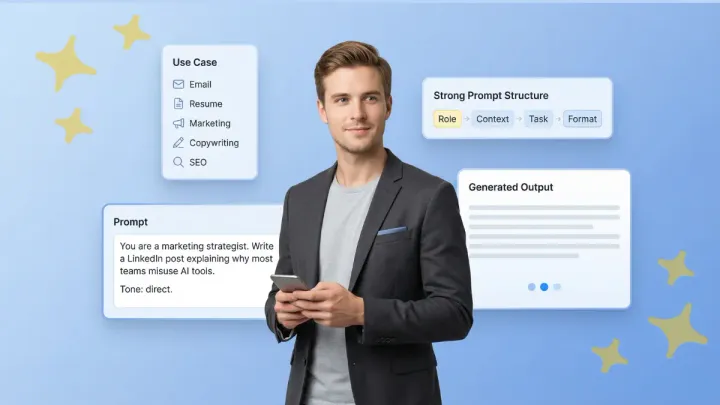
"How do I get better responses from ChatGPT?" is one of the most common questions among professionals and the answer is simpler than you think.
Bad input = bad output. Vague prompts yield generic results.
If you're tired of generic prompt lists and want ones that actually work for professionals, you're exactly where you need to be. Every prompt here is tailored for real tasks, to save your time and elevate your output.
What Makes a Great ChatGPT Prompt?
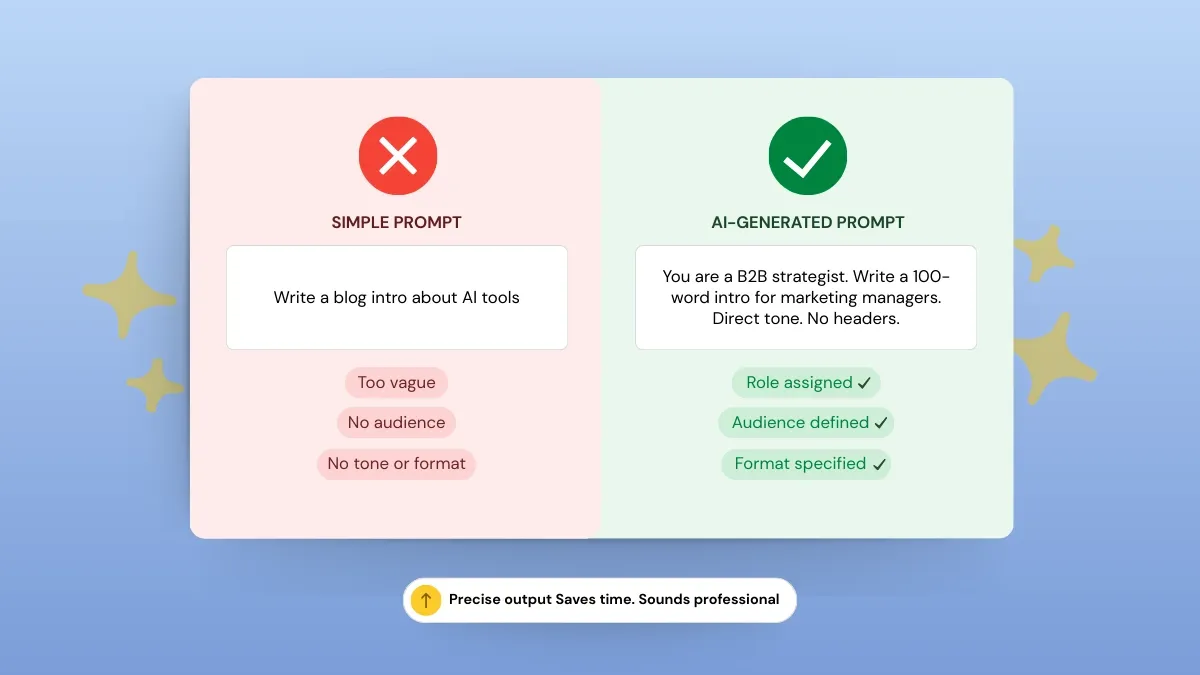
A good ChatGPT prompt is a combination of role, context, task, and format.
It provides AI with a clear understanding of what you want, why you want it, and how you want it presented.
You get professional-grade responses that save time, increase productivity, and reduce errors.
- Role - It tells ChatGPT who it should “be” for the task.
- Context - This gives ChatGPT background information about the situation, audience, or problem.
- Task - Here, you specify exactly what you want ChatGPT to do, and
- Format - Indicate how you want the results structured—bullet points, paragraphs, tables, or step-by-step instructions.
This comprehensive framework gives ChatGPT a clear picture of what you want, why you want it, and how you want it.
The result is professional-grade responses that save time, boost productivity, and reduce errors.
Types of Prompts in ChatGPT
Here are five types of prompts that you can use.
- Instructional - give direct commands.
- Zero-shot - rely only on your instructions with no examples.
- Few-shot - contain sample outputs, which guide the AI in staying consistent.
- Conversational - prompt the AI to provide iterative responses.
- System - establish the tone, role, or behavior of the AI at the beginning.
Tips for creating effective prompts
- Clearly describe the AI's role and target audience.
- Define the task and format.
- Provide examples when needed.
- Use specific, natural language input to improve output.
Generate a Custom ChatGPT Prompt for Your Task 👇
The 3-Word Rule in ChatGPT
ChatGPT's 3-Word Rule is a powerful prompt-engineering technique where you add a three-word persona/role to the end of your prompt (...like a lawyer" or "be a teacher").
It immediately elevates tone, depth, and relevance by constraining the AI to a specific professional or creative viewpoint, turning generic output into refined, tailored content.
Prompt With the 3-Word Rule
Prompt Without the 3-Word Rule
Zero-Shot Vs Few-Shot Prompting — What Professionals Should Know
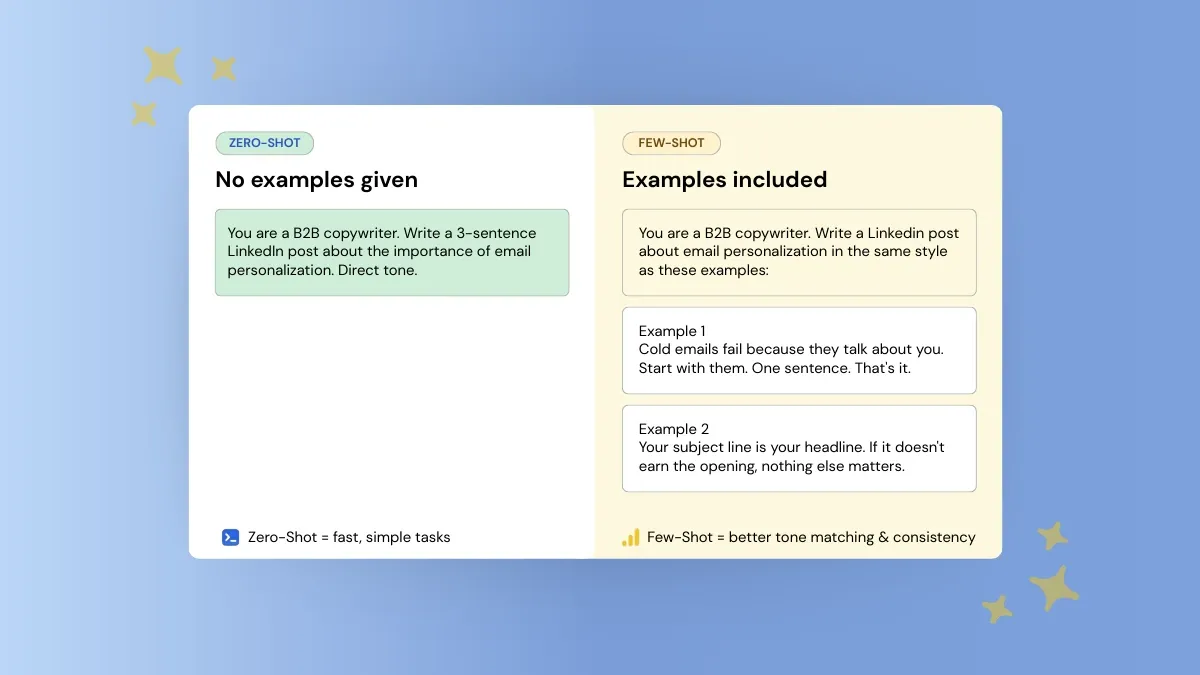
Zero-shot prompting has ChatGPT write output based purely on the instructions you provide - no examples.
This is best for exploratory or raw/creative output.
Few-shot prompting provides one or more examples for how you would like the AI to output data. This will encourage consistency, tone adherence and professional formatting.
Many professionals choose to mix-and-match these techniques based on the desired output, such as using zero-shot for brainstorming but few-shot for client-facing content to ensure accuracy.
Quick Tips for Using Zero Shot and Few Shot Prompts
- Use simple, direct language; don't be ambiguous.
- Combine zero-shot and few-shot examples together for optimal performance.
- Use system prompts to set the tone/style for consistent output.
- Experiment and iterate on your prompts to enhance productivity.
75+ Best ChatGPT Prompts for Professionals
The key to getting quality, actionable output from ChatGPT is the right prompt.
In this section, you'll find 75+ ChatGPT prompts organized by use case, copywriting, bios, emails, resumes, marketing, social media, business and strategy, research, and image generation, all tailored for professional use.
All the prompts are designed to help you save time, produce a better output and be more efficient at any task.
These are real, professional-use prompts - not lifestyle prompts.
This will help you to ensure that each prompt is customized to your specific needs and goals, including audience and professional tone.
Best ChatGPT Prompts for Writing
Clear, powerful writing shouldn't take hours.
These prompts are designed to help you create polished, professional content quickly, organized by use case so you can find exactly what you need.
Blog Posts and Articles
Short-Form Copy
Thought Leadership Content
How to Stop ChatGPT from Sounding Like a Bot?
Broad or vague instructions lead to bland, mechanical output.
You can prevent ChatGPT from sounding artificial by adding tone, style, and formatting constraints to the prompt.
Here are some steps you can take to make your writing sounds natural and professional:
Define your parameters upfront:
- Writing style and tone
- Sentence length and structure
- Target audience
- Voice (formal, conversational, authoritative, etc.)
Tell ChatGPT what to avoid:
- Typical AI phrasing
- Overused transition words
- Stiff, overly formal language
Use advanced techniques for better results:
- Insert examples of the style you want (few-shot prompting)
- Assign a role — like a senior editor or industry expert — to shape the output
- Iterate once or twice after the first draft to improve realism
This approach won't just improve quality, it'll make your output sound genuine and human.
Here’s what we changed:
- Define voice (expert, conversational, executive).
- Kept sentences short and simple.
- Requested real examples and specific insights.
- Include “avoid generic phrases” as an instruction.
With prompts that include specific style constraints, ChatGPT generates writing that sounds less like a bot and more like an expert professional.
Prompt for Writing a Professional Bio
Prompt for Writing a LinkedIn Article
Best ChatGPT Prompts for Email & Professional Communication
Effective communication is crucial for professionals, but writing emails each time can be a lengthy process.
Using structured prompts, you can enhance your output quality, ensure consistency, and save time for all kinds of client communication, follow-ups, and internal messages.
Here are some usable prompts you can copy and personalize:
Client Emails
Follow-Ups
Saying No Professionally
Internal Communication
Best ChatGPT Prompts for Resume & Career Growth
Writing a solid resume and career profile takes time. The best ChatGPT prompts for resumes help you save time, and make your output better.
As long as your resume is customized, error-free, and properly written, most recruiters will not notice it was written with AI assistance.
You just need to edit and customize every output before submitting it.
According to MCG Technologies, In 2026, 97.8% of Fortune 500 companies now depend on AI-powered Applicant Tracking Systems (ATS). However, candidates using AI to optimize their resumes see an 18% higher chance of moving from the screening stage to a job offer.
Resume Writing from Scratch
Tips for best results:
- Specify the job role and industry for tailored content.
- Include achievements with numbers wherever possible.
- Ask ChatGPT to format for ATS so your resume can pass the automated screening.
- Review and personalize the generated output to fit your personal style and experience.
Resume Tailoring for Specific Jobs
Cover Letter
LinkedIn Optimization
How to Make Your AI-Generated Resume Pass an ATS?
An AI generated resume can help you save time. However, to be noticed by recruiters, it's important to make sure the resume is ATS optimized.
ATS software scans resumes for keywords, formatting, and structure, so a high-quality AI generated resume isn't enough by itself.
Here’s how to optimize your resume for ATS effectively:
Include Relevant Keywords: Pull terms from the job description, including skills, certifications, and role-specific responsibilities. It'll help with ATS optimization and make your resume rank higher.
Use Clear Formatting: Use standard fonts, simple bullets, and clear headings. Don't use tables, graphics, or fancy formatting, as the ATS might not parse it.
Tailor Resumes for Each Job: ChatGPT is useful in tailoring resumes, as it can assist in customizing each resume to meet the specific requirements of the position you are applying for.
Use Standard Sections: Add section headings such as Experience, Education, Skills, Certifications, and Achievements. This helps the ATS parse and categorize your work experience.
Choose Compatible File Types: Save resumes as Word (.docx) or text-based PDFs. Do not use image PDFs, which are not readable by ATS.
Prompt for Entry-Level Resume with No Experience
Prompt for Tailoring Resume to a Job Description
Best ChatGPT Prompts for Marketing & SEO
Marketing professionals are often tasked with creating content under tight deadlines, analyzing keywords, and writing copy for multiple channels and audiences.
If you have ever searched “Show me some creative prompts I can use on ChatGPT for my business” this compilation of examples is for you.
These examples will guide you to get AI-generated responses that improve efficiency and increase productivity.
According to Typeface, 94% of marketers now use AI for content and blog creation.
Furthermore, investment in AI-driven SEO is surging, with 98% of marketing teams planning higher spends in 2026 to stay ahead of AI-driven search changes.
The appropriate prompts will make your marketing and SEO work faster, more accurate, and personalized for your target audience - a key part of developing a winning content writing strategy using AI.
SEO Blog Briefs
Keyword Clustering
Ad Copy
Email Subject Lines
Social Media Captions
Best ChatGPT Prompts for Content Creation & Social Media
One of the most common roadblocks to social content creation is consistency.
Good prompts can help you create platform-specific posts, maintain your brand’s voice, and get reliable AI-generated outputs without the need to retype from scratch.
Here are some realistic prompts grouped by content creation workflows:
Content Creation & Social Media Prompts:
Best ChatGPT Prompts for Business Strategy & Decision Making
A professional prompt should be specific about the role, business context, constraints, and format.
ChatGPT will write more formally and helpfully if you ask it to be a strategist, analyst, or consultant.
The result will be more structured, practical, and focused on decisions. Business professionals use prompts for thinking. Give ChatGPT instructions and it can help with planning, evaluation, and strategic thinking.
In addition, it can be used to improve the quality of output and reduce research time.
These are some practical prompts that fit real business decision workflows:
Business Strategy & Decision-Making Prompts:
Best ChatGPT Prompts for Research & Summarization
Research is often time-consuming.
Done right, with effective prompt engineering, ChatGPT or another language learning model can help you simplify the writing process, digest complex information, and transform raw data into actionable insights.
The secret: Get the model to extract exactly what you need: a summary, insights, action items, key patterns.
With well-designed prompts, research processes become faster, clearer, and more scalable.
Here are some practical prompts for research and summarization:
Research & Summarization Prompts:
Best ChatGPT Image Prompts for Professionals
Images are an essential aspect of many professional communication tasks, from presentations to social media campaigns.
With the best ChatGPT image prompts, you can create high-quality, relevant images quickly and efficiently, saving time and improving productivity.
Clear instructions allow AI-generated images to align with brand style and professional standards.
Here are some practical prompts for professional use:
Generate Your Own ChatGPT Prompts in Seconds
The prompts in this guide cover the most common professional use cases, writing, emails, resumes, marketing, strategy, and research.
Whether you're a marketer, consultant, developer, or executive, there's something here you can put to use right away.
That said, every role comes with its own specific needs.
If you need a prompt for a use case not covered here, you can build one yourself using the role-context-task-format structure outlined earlier.
Iterate once or twice and you'll have something that works consistently.
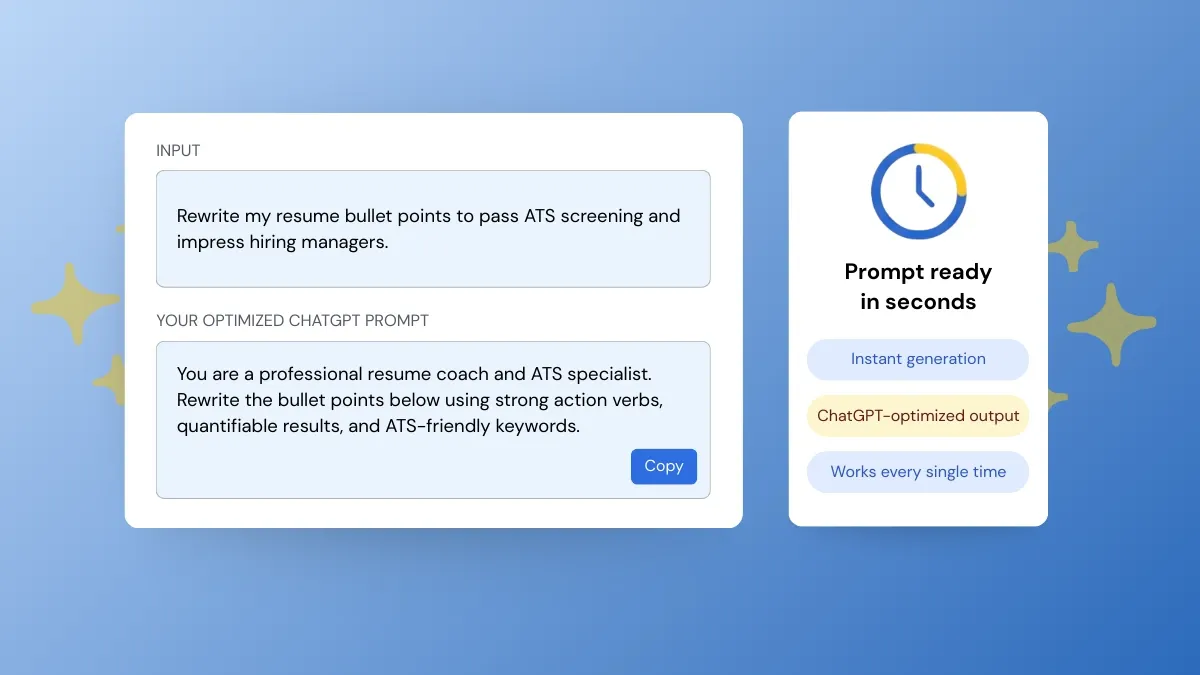
But if you'd rather skip the trial and error, just tell Phrasly's AI Prompt Generator what you need in plain language.
One line of instructions is all it takes, and within seconds you'll get a fully structured, optimized prompt ready to use in ChatGPT.
FAQs
Is my data safe if I use the ChatGPT prompts?
Yes. OpenAI has stringent privacy and security policies. ChatGPT processes the text you input to provide a response, but it does not share your information with others.
However, do not input sensitive personal or confidential information to be extra safe.
Why does ChatGPT sometimes provide incorrect information (hallucinations)?
ChatGPT provides responses based on patterns in data, not verified facts. It can sometimes generate information that sounds plausible but is incorrect.
Learn how strong AI-assisted writing works by checking out these top-notch copywriting examples and AI writing tips. Always verify important information, particularly for business, research, or legal purposes.
Can a recruiter know that I wrote my resume with ChatGPT?
Typically, not. If your resume is customized, accurate, and well-written, a recruiter probably won’t know it was AI-assisted. The most important step is to review the outputs and make sure your experiences and your voice come through.
Can ChatGPT remember my previous prompts?
ChatGPT doesn’t have any memory between sessions in most interfaces. It can only look back at prompts within the same conversation.
To track something over the long term, you can save your prompts externally or use a tool with prompt management capabilities.
Is there a free version of ChatGPT for professional users?
Yes, there is a free version of ChatGPT, but with usage limitations. Many professionals choose to subscribe to premium plans like ChatGPT Plus for more advanced features, faster responses, and priority access.
Can the same prompts work on other language models or platforms like Gemini or Claude?
Yes, most of these prompts should be compatible with other large language models like Gemini or Claude.
You may need to make minor adjustments for tone, response length, or formatting based on the platform's specific features and capabilities.
How frequently should I update my prompts?
Update prompts regularly, every few months or when goals, audience or industry trends shift. Optimizing ensures continued high-quality output, relevance, and efficiency for professional use.


Keep reading

Claude Prompt Generator: Build Better Prompts for Claude AI (Free Tool)
Learn how a Claude prompt generator builds better prompts for every Claude model, from Sonnet 4.6 to Fable 5. Includes ready-to-use XML templates, effort levels, and a free tool.

50 Highest-Engagement AI Prompts for LinkedIn, Instagram, and X for marketers
Learn the prompt frameworks behind top-performing social posts, avoid common AI prompting mistakes, and use proven templates to scale your content creation across every platform.