How to Humanize AI Text in 2026 [Complete Guide]
19 min read
AI writing tools make content creation faster than ever, but the output often sounds robotic and disconnected.
In 2026, readers and platforms alike have grown more sensitive to writing that feels unnatural. GPT-5, Claude, and Gemini produce smoother text than before, but the gap between AI writing and genuine human voice is still easy to notice.
Humanizing AI text means refining tone, flow, and structure so your content actually resonates with readers. Whether you're polishing your school essay or refining your professional content, the goal is simple: make it sound like a real person wrote it.
Want to do it in seconds? Try Phrasly's AI Humanizer and get better output in seconds 👇
What Does "Humanize AI" Really Mean?
When you humanize AI, you're making computer-generated text sound as if a real person wrote it. This means adding:
Natural voice and personal style
Different sentence patterns and rhythms
Real examples and specific details
A few small imperfections (like humans have)
You can do this in two ways:
Manual editing: You add your own voice, stories, and natural flow
AI humanizer tools: Software that removes robotic patterns from the text (if you're new to the concept, here's a solid explainer on what an AI humanizer is and how it works)
The goal is to create content that feels real and keeps readers engaged. Whether you need to humanize ChatGPT output or text from any AI tool, the methods are the same.
Humanize Your Text for Free 👇
The Two Signals AI Detectors Actually Measure
People think AI detectors look for “AI words.” They don’t.
They detect two statistical signals, and when you know what they are, you’ll approach humanization differently.
Perplexity measures how expected your word choices are. Language models always choose the statistically most likely word in each context. People choose more unexpected, varied words, and that's what detection systems want to see.
Burstiness refers to how much your sentence lengths fluctuate. Text written by an AI will bunch up in one range: neither too long nor too short, sentence after sentence, paragraph after paragraph.
Human writing varies from short to long. Short. Followed by a sentence that's much longer and takes its time building a point before it lands.
Studies and detector analyses suggest ChatGPT-4o produces text with an average burstiness score of 0.18–0.25. Human writing scores 0.65–0.85.
Good humanization, whether manual or tool-based, targets both of these signals. If you're weighing your options on the detection side, this comparison of Phrasly AI vs. Originality AI breaks down how the two stack up on exactly these metrics.
Why Do You Need to Humanize AI Text?
AI tools write fast, but that speed creates problems. The text has clear patterns that both people and detection software can spot:
Too formal and generic (sounds like a textbook).
Every sentence is about the same length.
Uses the same transitions over and over.
Avoids slang, idioms, and casual language.
Lacks specific details like names, dates, or real examples.
This creates real problems for both students and professionals.
Here are the issues each group faces and how AI Humanizer helps resolve them.
For Students and Academics
This is where AI detection hits hardest, and where its flaws do the most damage.
Turnitin's latest detector now identifies output from GPT-5, GPT-5-mini, Claude Sonnet 4.5, and Gemini 3 Flash Preview. But the real problem goes deeper than fully AI-generated papers.
Even AI-paraphrased writing gets flagged, which means students who write their work entirely from scratch but use AI tools to polish tone or improve flow can still be penalized.
Detectors measure patterns like perplexity and burstiness, and when your writing is too consistent or too polished, the algorithm treats it as suspicious, regardless of whether you actually wrote every word yourself.
This is particularly damaging for non-native English speakers. ESL students who write with formal, structured academic prose, or who rely on AI to refine grammar and readability are disproportionately flagged.
The detector can't distinguish between "written by AI" and "edited with AI assistance," and in many academic settings, the consequences are the same.
False positives are systemic issues, and they punish students for trying to improve the quality of their own work.
How AI Humanizer helps here?
If your school uses Turnitin, the Draft Coach plugin for Google Docs lets you run a self-check before your official submission so you can see exactly what's being flagged.
From there, an AI humanizer tool can help you improve your writing quality by reintroducing the natural variation including the uneven rhythm and the varied sentence structure.
These are small imperfections that detectors expect to see in human writing.
Thus the Humanizer makes sure that your original work actually reads the way detection systems recognize as human, reducing false positives and protecting work that was genuinely yours to begin with.
For Content Creators
Editors and publishers check for AI-written content and might reject it. When AI isn’t edited, it reads flat. Your readers sense something’s off even if they can’t name it.
There’s a human element you need to inject into your drafts prior to publishing if they’re going to attract and grow your audience. If you're not sure where to start, this guide on improving AI text readability and tone walks through the practical steps in detail.
This matters whether you're pitching to publications, posting on your blog, or building a newsletter. Content that feels AI-generated erodes trust and kills engagement over time.
How AI Humanizer helps here?
An AI humanizer takes your AI-assisted drafts and reshapes the tone, rhythm, and sentence structure to feel more natural and engaging. It helps you improve your writing to hold attention and build audience loyalty.
Thus, a Humanizer acts as a final quality layer between your draft and your publish button, ensuring your content connects the way it should.
For Marketers
AI-generated marketing copy carries real business risks.
Audiences disengage fast when content feels templated. Also, robotic messaging kills click-through rates, tanks email engagement, and erodes the brand voice you've spent years building.
The stakes are higher across every channel. Content that reads like it came off an assembly line doesn't convert.
People trust brands that sound human, and they scroll past ones that don't.
How AI Humanizer helps here?
An AI humanizer helps marketers scale content without sacrificing quality.
It reshapes your AI-assisted drafts to feel natural and on-brand, adding the conversational flow, and authentic tone that audiences actually respond to.
You keep the speed and efficiency of AI in your workflow while producing copy that connects, engages, and converts.
5 Easy Ways to Humanize AI Text Manually
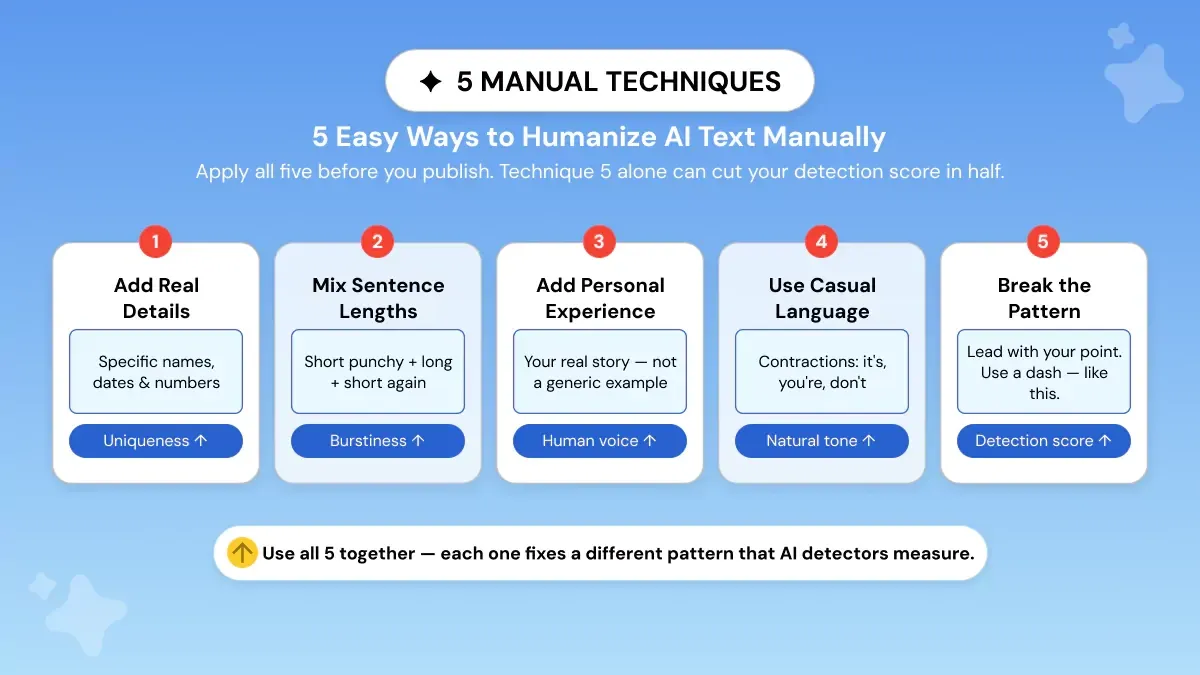
Before you try automated tools, these simple tricks can transform AI text into natural human writing. Each method fixes a specific problem that makes writing sound like a robot wrote it.
Technique 1: Add Real Details
Why it works: Real details make your writing unique. AI rarely creates specific names, dates, or numbers on its own.
How to do it: Add at least one real detail to each paragraph. Change vague words to specific ones. Use actual examples instead of general statements.
Before: "The meeting had a productive discussion."
After: "On Tuesday at 9:15 a.m., the design team at BlueOak debated three layout options and settled on the annotated grid."
See the difference? The second version tells a real story that readers can picture.
Technique 2: Mix Short and Long Sentences
Why it works: Real people write sentences in different lengths. AI usually sticks to medium-length sentences that all sound the same.
How to do it: After you write a paragraph, add one short sentence (6-8 words). Break long sentences into a short one and a long one.
Before: "The system evaluates responses using a set of metrics that include accuracy, fluency, and relevance, and it then returns a score to the user."
After: "The system evaluates accuracy, fluency, and relevance. Then it returns a single score."
Short sentences grab attention. They give readers a break.
For a deeper look at how to rewrite individual sentences for maximum clarity and impact, this guide on how an AI humanizer can help you rewrite sentences is worth a read.
Technique 3: Add Your Personal Experience
Why it works: Personal stories make your writing unique. AI can't copy your real experiences.
How to do it: Add a short personal sentence every few paragraphs. Share a quick example from your life. Tell readers what you've seen or done.
Before: "Employees prefer flexible schedules."
After: "When I switched to a four-day work week, I finished reports faster and felt less busy."
Personal stories make ideas real and easy to relate to.
Technique 4: Use Casual Language
Why it works: Casual words and contractions make text sound like real conversation. They also help dodge AI detectors.
How to do it: Use contractions naturally throughout your writing. Look for 3-5 opportunities per paragraph to turn formal phrases (like 'it is' or 'you are') into contractions ('it's' or 'you're').
Before: "It is important to update the software regularly because it will ensure security."
After: "It's important to update the software regularly. Why? Because it keeps your data secure."
The goal is to make your writing feel natural and easy to read for real people, so they can understand your ideas quickly and stay engaged.
Technique 5: Break the Pattern
Why it works: AI loves to follow the same structure every time (intro–list–conclusion). Breaking this pattern shows a human is in control.
How to do it: Start with your main point instead of building up to it. Open with a story before explaining. Put your best idea first.
Add small "mistakes": Real people pause and add extra thoughts. Use a dash—like this—or write a short fragment. Just for emphasis.
Want more ways to edit AI text manually? Here are 7 more humanization techniques you can apply right away.
How to Humanize AI Text for School and Academic Papers?
Most students don't think they'll get flagged. They started with AI, rewrote parts of it, added their own analysis, and got a detection warning.
Some didn't even use AI to write. They just used it to polish grammar or improve sentence flow, and that was enough to trigger a flag.
This is happening more often than most realize, because detectors now are flagging things they weren't built to catch just two years ago.
Even originally written content that's been lightly edited or refined through AI tools can get caught, leaving students penalized for work that was genuinely theirs.
Which AI Models Do Detectors Flag in 2026?
Academic AI detectors, including Turnitin, currently flag output from the most widely used models among students:
GPT-4o, GPT-5, and GPT-5-mini
Claude Sonnet 4.5
Gemini 2.5 Pro and Gemini 3 Flash Preview
These aren't the only ones. Most major LLMs share similar statistical patterns, which means output from other models can trigger detection as well.
If you want to explore what each model is capable of, Anthropic and OpenAI publish their own model pages for Claude Sonnet 4.6 and GPT-5, respectively.
Also, Turnitin updates their detection list as new models are released, their official guides page always has the current version.
Why Paraphrasing Alone Doesn't Work
Here's what catches most students off guard, AI detectors flag AI-paraphrased text too.
Running your draft through an online paraphrasing tool or swapping synonyms doesn't change the underlying statistical patterns. There's actually a meaningful difference between the two approaches.
This breakdown of AI humanizers vs. paraphrasing tools explains exactly why one works and the other falls short. Detectors analyze perplexity (how predictable your word choices are) and burstiness (how much your sentence length and structure varies).
Surface-level edits don't move those scores.
This is especially frustrating for students who genuinely wrote their own work but used AI to clean up grammar or improve readability. The detector doesn't care about intent, it only sees the patterns.
And for non-native English speakers, this creates a deeply unfair disadvantage.
Why Does My Own Writing Get Flagged? (False Positives)
A false positive doesn't mean you cheated. It means your writing patterns matched AI patterns by chance. It's unfair.
But once you realize what detectors are actually measuring, it makes sense. They're not evaluating meaning.
They measure variation in sentence length, predictable words, and structural repetitiveness.
Humans who write clean, formal, well-structured essays can appear deceptively risky on those parameters, particularly if English is your second language.
The writers most at risk of false positives are:
ESL students: grammatically careful, formally correct English compresses burstiness scores.
Students writing in academic style: hedging language, passive constructions, and discipline-specific terminology all look AI-like to detectors.
Anyone with a polished first draft: if you've been trained to write clean and structured, your natural style may score low on perplexity
The fix isn’t to write carelessly. It’s to inject variety: shorter sentences, personal thoughts, more of your real voice. Phrasly’s Easy mode was designed to solve this exact problem.
It infuses your writing with natural cadence while leaving your ideas intact.
Step-by-Step: Humanizing an Academic Essay Before Submission
Step 1: Run your draft through Phrasly on Easy/ Medium strength. It changes sentence patterns and burstiness without changing what you say.
Your points remain the same. The text just doesn’t sound like it was written by a bot.
Step 2: Add one personal example per major section.
One specific detail from a lecture, your interpretation of a source, or a real-world application of your argument. These are things AI can't fabricate, and detectors can't replicate.
Even a single original example per section significantly shifts your perplexity scores, because it introduces unpredictability that breaks the patterns detectors are looking for.
Bonus: it also strengthens your essay, which is an added advantage.
Step 3: Check with Turnitin Draft Coach if your institution provides access. With the Google Docs plugin, you can perform a pre-submission scan so you always know where you stand before anything is submitted.
Correct the highlighted areas, then submit with confidence.
Start with Phrasly free. It takes less time than a manual rewrite and won't touch your argument or citations 👇
How to Humanize AI content with Tools
Manual editing adds personality, but what if you need to fix a lot of content fast? That's where the AI humanizer tool helps.
What AI Humanizer Tools Do
AI humanizer tools are special programs trained on real human writing. They look at your content and rewrite it to:
Sounds more natural and easy to read
Add variety to your writing style
Remove patterns that AI detectors look for
Keep your original meaning
Most humanizers work in two ways:
Find and fix: The tool spots AI-like patterns and rewrites those parts
Learn from humans: The software studies lots of human writing to learn what sounds natural
What Makes a Good Humanizer?
The most effective tools employ semantic reconstruction (restoration of meaning with novel sentences) instead of synonym substitution.
Swapping synonyms won't affect the statistical signatures detectors look for: perplexity & burstiness.
You can swap every adjective in a paragraph, and the burstiness score will remain unchanged. The best tools don't just use a repackaged version of GPT-3 or GPT-4. They use AI models trained specifically on human writing.
Phrasly's AI model was trained on over 1 million pages of real human writing, not GPT. That's why Phrasly content can't be detected by tools that look for watermark tokens that OpenAI recently started adding to their outputs.
As soon as watermarks are added, tools using GPT under the hood are easily detectable.
The result? Your message stays the same, but obvious AI patterns disappear.
How to Use Phrasly AI Humanizer
Phrasly combines detection and rewriting in one easy tool.
Built with its own AI models trained on over a million pages of real human writing, it's designed to avoid detection even as AI detection technology evolves.
Here's how to use it:
Step 1: Paste Your Text
Go to Phrasly's AI Humanizer and paste your AI-written text into the box. The interface is simple and clean.
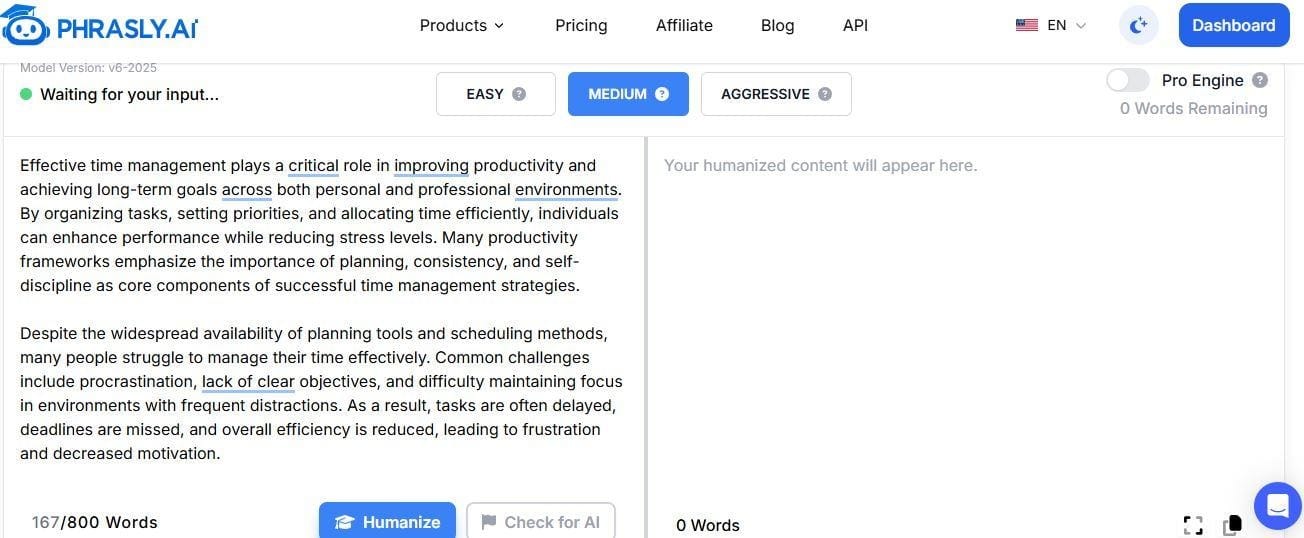
Step 2: Check for AI Patterns
Identify Problem Areas. Run Phrasly's built-in AI Checker to see exactly which sentences sound most AI-like. This helps you understand what needs the most work.
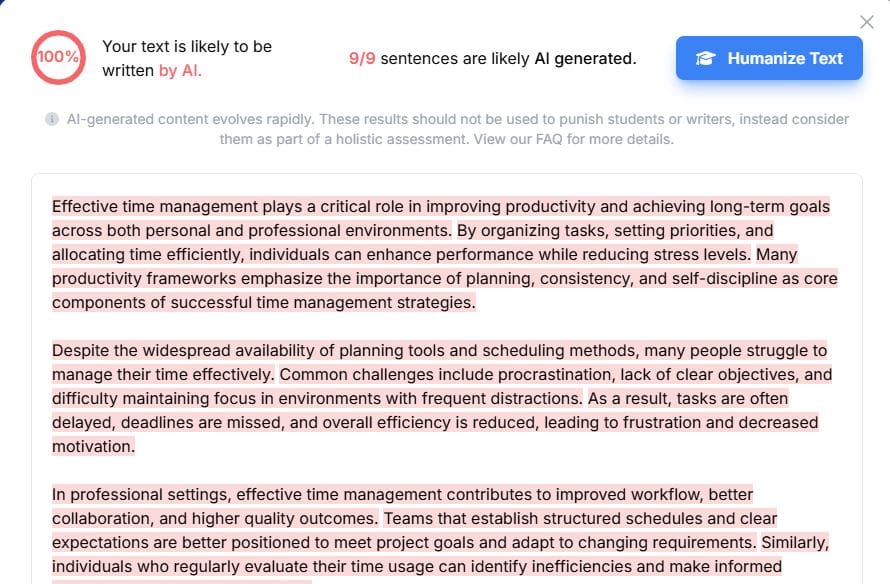
Phrasly AI Detector
Step 3: Pick Your Strength Level
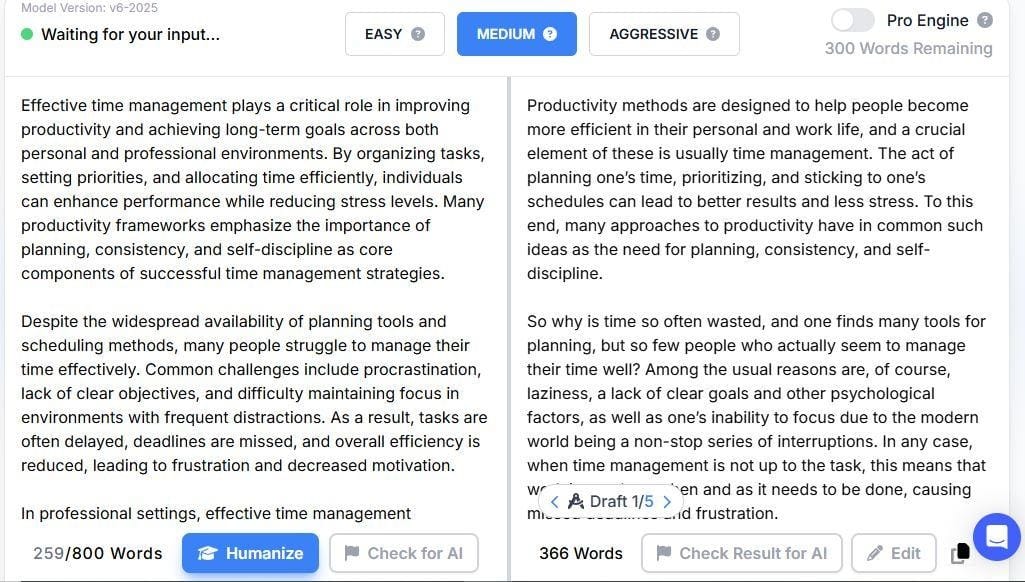
Phrasly AI Humanizer
Phrasly has three options:
Easy: Light changes that keep most of your original words
Medium: Balanced approach (start here)
Aggressive: Big rewrites for text that's heavily flagged
Step 4: Review the Changes
Don't just accept everything. Read each change. Keep what works, fix what doesn't, and reject anything that changes your meaning.
Step 5: Check Again (If Needed)
Run the detector on your edited text. If some parts still get flagged, use a stronger setting or add your own edits.
Pro Features:
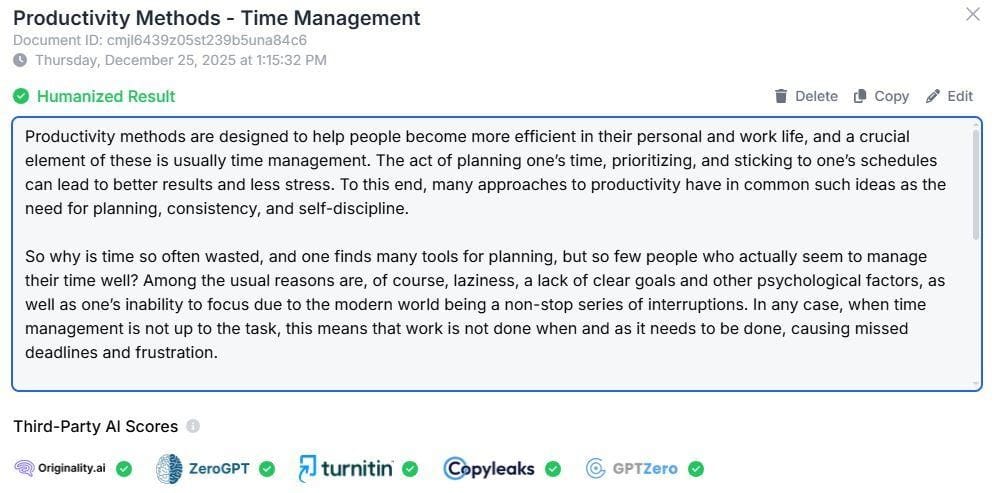
Phrasly Pro Features
Pro Engine: Gives you even better rewrites using advanced models
Unlimited humanization: Process as much content as you need with no word limits (unlike other tools with hidden caps)
Batch processing: Upload files to process many articles at once
Model version v6-2025: Always uses the latest humanization technology
Testing shows Phrasly achieves an average human score of 99.7% across major AI detectors, and it works with Turnitin and other academic detection systems.
Compare AI Humanizer Tools in 2026
Not all AI humanizers work the same way. If you want a deeper breakdown before committing to one, this rundown of the best AI humanizer tools in 2026 covers the field in more detail. Here's a quick comparison of the major options:
Tool | Best for | Free Tier | Unlimited | How It Works | Key Weakness |
Phrasly | All content types | Yes (300 words) | Yes — truly unlimited | Proprietary model trained on 1M+ pages of human writing | None for bulk users |
QuillBot | Grammar + paraphrasing | Limited | No | Synonym swapping + reordering — not true humanization | Doesn't fix burstiness patterns |
Stealth Writer | Specific content types | No | No | Rewriting model | No batch processing |
Undetectable AI | Content creators | Yes (250 words) | No | Detection checking + rewriting | Data retention concerns, expensive at scale |
Litero | Students (academic writing) | No | No | Academic-aware rewriting modes | Small scale, no API |
What sets Phrasly apart: Unlike most competitors that just repackage GPT-3 or GPT-4, Phrasly built its own AI from scratch. This means your content stays private on their servers, and you're not at risk when OpenAI adds watermarks to their models.
Plus, with true unlimited processing (no hidden caps), you can humanize millions of words at a flat monthly rate. Each tool works a bit differently.
If you're currently using QuillBot and finding it falls short on burstiness patterns, it's worth exploring QuillBot alternatives in 2026 before settling on your go-to tool. Test a few with your own content to see which one gives the most natural results.
When to Use AI Humanizer Tools vs Doing It Yourself
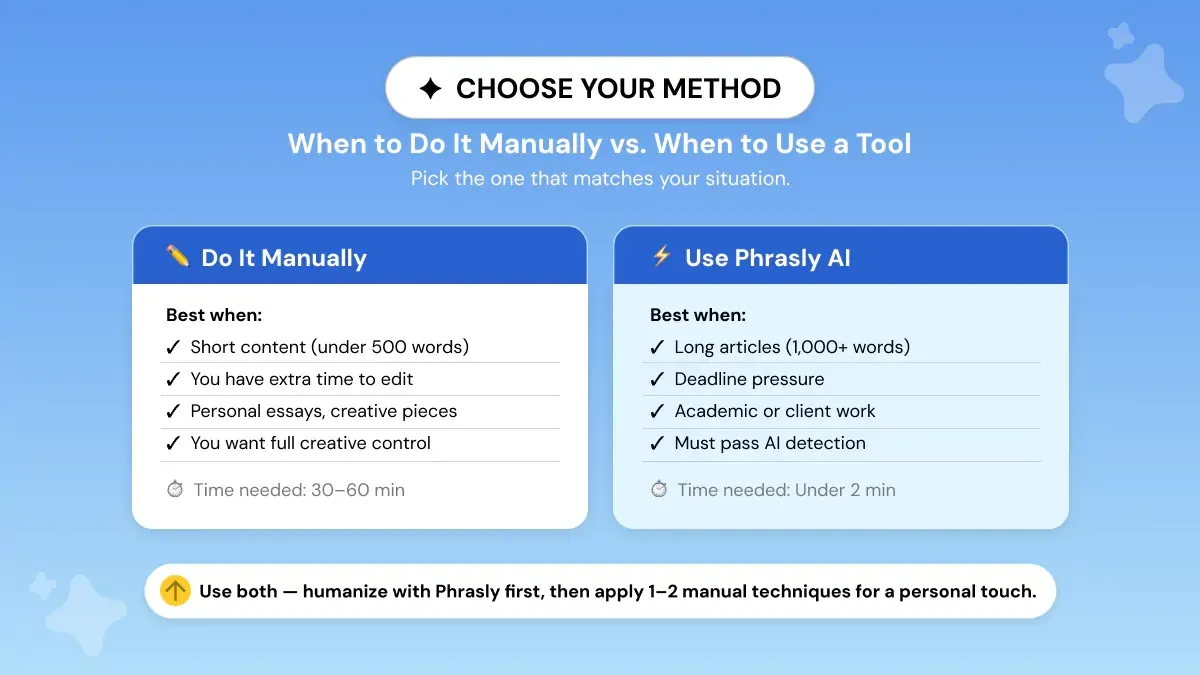
Use AI humanizer tools when:
You have lots of articles to fix
You need fast results
You want to remove basic AI patterns before adding your own touch
You're working on many pieces of content
You've generated content with GPT-5 or Claude Sonnet 4.6 and want to clean it up before publishing.
Do manual editing when:
Your brand voice really matters
You need to add personal stories or insider knowledge
The content needs careful human judgment
You're writing something important (legal, medical, academic)
Best approach: Use both. Run your text through a humanizer to fix obvious problems, then add your own voice and specific details by hand.
How to Combine Manual and Tool Methods
Want the best results? Use both approaches. Here's a simple plan:
Step 1: Write Your First Draft
Use ChatGPT, Claude Sonnet 4.6, or Gemini 3 to create your draft.
Step 2: Use a Humanizer Tool
Paste your draft into the Phrasly Humanizer tool and use Medium strength. This removes obvious AI patterns and gives you a cleaner starting point.
With Phrasly's unlimited processing, you can run multiple drafts without worrying about hitting word limits.
Step 3: Add Your Human Touch
Now add the things only you can provide:
Put in one real detail or example per section
Add a personal story or your own opinion
Mix up your sentence lengths on purpose
Include phrases that sound like you
Step 4: Final Check
Read your content out loud. Does it sound like something you'd actually say? Make final tweaks for clarity, then double-check your facts.
Optional Step 5: Test It
If you're worried about detection, run the final version through Phrasly's check one more time to make sure it scores well.
This approach is smart because tools do the heavy lifting while you add the personal touches that make content yours.
Common Mistakes to Avoid
Even with great tools and tricks, these mistakes can mess up your work:
Trying Too Hard to Beat Detectors
Putting too much emphasis on AI detection scores can hurt the overall quality of your writing. Focusing too much on avoiding AI detectors can make your writing stiff and unnatural. Share your ideas clearly first.
The priority should always be writing clear, readable text for real people, and AI detection tools should be used only as a final check.
Removing All Structure
Some writers try to sound casual by removing helpful headers and organization. Don't do this. Clear structure helps readers follow your ideas. You can be natural and well-organized.
Only Using Tools
Humanizer tools are great at removing AI patterns, but they can make everything sound bland and safe. Always add your own edits to bring in personality, your unique voice, and real expertise.
Using It the Wrong Way
Be transparent about your AI use. Many schools and publishers have specific policies:
Academia: Check your institution's AI policy. Some allow AI as a writing assistant, others don't.
Professional: Disclose AI use when required by clients or employers.
Publishing: Follow publication guidelines on AI-generated content.
Know your situation. Students should check their school's AI rules. Workers should understand their company's content policies. When you're not sure, tell people you used AI help.
Conclusion
Humanizing AI is about making your content feel natural and engaging for readers. The methods in this guide give you both simple manual tricks for adding real voice and tool-based options for fast, large-scale humanization.
Remember these key points:
Start with real details and mix up your sentence lengths
Use tools to remove basic AI patterns
Always add your own voice and style by hand
Keep things natural but clear
Follow the rules for your situation
Whether you're making marketing content, writing blog posts, or creating school materials, these tips will help you make AI text human while keeping the speed that AI tools give you.
Ready to get started?. Try Phrasly's AI Humanizer now - free tier available (no credit card required) 👇
Frequently Asked Questions
Will humanizing guarantee that detectors won't flag my text?
No! Humanizers reduce AI patterns significantly, but can't guarantee perfect results since both AI and detectors constantly evolve. Use best practices (mix manual edits with tools) and cite sources, but no method is 100% foolproof.
Is it ethical to run AI drafts through a humanizer?
It depends on context:
✅ Ethical uses: Editing AI-generated drafts for clarity (like using an editor) - Polishing AI brainstorming into your own voice - Creating marketing content where AI use is disclosed
❌ Unethical uses: Submitting academic work with strict no-AI policies - Misrepresenting AI content as entirely human-written - Bypassing detection to violate policies. Always check your school's/employer's AI policy first.
Which humanization strength should I use in Phrasly?
Start with Medium for balanced rewrites. Use Aggressive only if Medium doesn't work, then add your voice back. Easy works for content that's already natural and needs light polish.
Can I automate humanization for lots of content?
Yes! Phrasly and other tools support file uploads and API access for batch processing. Always spot check samples to verify tone and accuracy remain correct.
Will humanization change my facts?
Sometimes. Rewording can accidentally alter details. Always fact-check after humanization, especially numbers, names, dates, and technical information.
What quick edits most reduce AI signals?
Add one real detail (name, date, number) per section
Mix sentence lengths, short and long
Include one personal story every 300-400 words
Use contractions in 5-10% of opportunities
Does AI humanizing make content harder to read?
Not when done right. Good humanization tools like Phrasly add clarity and personality. Bad attempts (forced slang, complex sentences) hurt readability. Keep your message clear while making it conversational.
Which tool should I try first?
Try Phrasly AI Humanizer, it's an all-in-one detector + humanizer with a free plan (550 words). The unlimited plan has no hidden caps (some users process millions of words monthly at a flat rate). Also test QuillBot and others to compare.
Can humanization help with false positives?
Yes! AI detectors sometimes flag human writing, especially formal content. Light humanization (Easy or Medium) adds variety and natural rhythm without changing your message, reducing false-positive risk.
How often should I humanize my content?
For public content: humanize everything. For internal docs: optional. For school or work content under review: always humanize and add manual edits to ensure your voice comes through.
Does humanizing AI text work for Turnitin in 2026?
Yes, but how you humanize is important. Turnitin flags raw output from GPT-5, GPT-5-mini, Claude Sonnet 4.5, and Gemini 3 Flash Preview. Post-processing that changes up the sentence structure and adds variation will drastically lower your detection rates.
Merely swapping out synonyms isn't going to cut it. Detection tools look at perplexity and burstiness patterns, not just vocabulary. Nothing is foolproof, but tools like Phrasly that address those patterns perform best.
Why does my own writing get flagged as AI?
AI detectors aren’t 100% accurate. ESL writers and academic writers are most susceptible to false positives, not because their essays are AI-generated, but because their writing styles match up statistically with AI-writing.
A false positive doesn’t imply you cheated. It means your writing just didn’t test high enough in burstiness or perplexity. Phrasly’s Easy mode injects natural flow to your essay without changing your intended meaning.
For a full breakdown of why this happens, see this guide on why your essay gets flagged as AI.

Written by
Uzair Khan
Uzair Khan, Senior SEO Strategist at Phrasly AI, develops content and SEO strategies that make AI detection and humanization technology accessible to students, educators, and content creators.