
What Is Few-Shot Prompting? A Practical Guide With Real Examples
Most AI prompts fail because they describe the output instead of demonstrating it. Few-shot prompting fixes that with two examples and a clear instruction.
Most professionals using AI daily know the frustration. You ask for something, and what comes back sounds robotic, off-brand, or completely different from last time.
The real culprit? A vague prompt that gives the model nothing to work with.
Few-shot prompting fixes this. Instead of telling AI what to do, you show it. Add 1–3 examples of exactly what you want before your request, and the model picks up the pattern instantly.
Right tone, right format, every time.
Read on to learn what few-shot prompting is, how it compares to zero-shot, and see real examples for content, email, marketing copy, and other use cases.
What Is Few-Shot Prompting?
Few-shot prompting is when you give an AI model 2–3 examples of the exact output you want before asking it to do the real task.
It's one of the most practical prompt engineering techniques you can use. No technical setup, no retraining, just smarter prompting from the start.
The model reads your examples, picks up the pattern, and replicates it for your new input.
There's a simple way to understand the difference: instructions vs evidence. One gets you a guess. The other gets you exactly what you need.
- A standard prompt tells the AI what to do. You give it a task, and it figures out the tone, format, and style on its own, which means every output is a fresh guess based on whatever the model thinks "good" looks like. The result is unpredictable every single time. Same prompt, different day, different output. You spend more time editing than you saved by using AI in the first place.
- A few-shot prompt shows what "good" actually looks like. You put 2–3 real examples in front of the task, and the model locks into that exact pattern, same tone, same structure, same format, every single time. Once the model sees your examples, it stops guessing and starts replicating. Your voice, your format, your structure, on demand, every time.
This works through something called in-context learning. Your examples sit right inside the prompt itself, no retraining, no fine-tuning the base model.
The language model reads them in real time and adjusts its output on the fly.
Wondering how to give AI an example of what you want without writing the whole thing yourself?
Just paste 2–3 of your best existing outputs into the prompt before your instruction. The AI reads them and immediately adapts its tone, format, and structure to match.
Zero-Shot vs Few-Shot vs One-Shot Prompting
The core difference between few-shot and zero-shot prompting comes down to examples.
More examples mean more control. Less examples mean more speed.
The right choice depends on what your task actually needs.
Zero-shot gives the AI a task with no examples. Few-shot gives it 2–5. That small change makes a big difference in output quality.
Here's how each technique stacks up:
Zero-shot prompting is the default. Just give the AI an instruction and it figures it out. And for most quick tasks, that's genuinely enough.
The model's pre-training covers a wide range of everyday requests without needing any hand-holding.
It works fine for straightforward tasks like summarizing a paragraph or answering a factual question. But ask it to write in your brand voice? It'll guess, and usually guess wrong.
One-shot prompting is a solid middle ground. It's the spot when you want some control without the overhead of building out multiple examples. One clear, well-chosen example does more than most people expect.
One example gives the model a reference point, which helps when you're working with a tight context window or just need a quick nudge in the right direction.
Few-shot prompting is where consistency lives. If zero-shot is asking a colleague to figure it out, few-shot is handing them a style guide before they start. The output stops being a guess and starts being repeatable.
With 2–5 examples, the model locks into your format, tone, and structure, and holds it. It's the go-to technique when output quality actually matters.
It's worth mentioning chain of thought prompting here too, another core prompt engineering technique where you show the AI your reasoning steps, not just your outputs.
Instead of just giving examples of what the output looks like, you show the model how to think through the problem. That makes it especially useful for tasks that involve logic, analysis, or decisions with multiple moving parts.
It's one of the more advanced tools in prompt engineering, and powerful for logical or multi-step tasks. If you're curious how these techniques perform across different models, Google Gemini is worth exploring alongside ChatGPT and Claude.
Generate a Few-Shot Prompt for Your Task 👇
How Many Examples Do You Actually Need?
For most professional tasks, 2–3 examples is the sweet spot. That's enough for the model to pick up your pattern without overloading the prompt.
Here's a simple rule to follow:
- Start with 2 clear, high-quality examples
- If the output still drifts, add a third
- Beyond 5 examples, you hit diminishing returns, the model gets confused by variation rather than guided by it
This is also a token efficiency point. Every example you add takes up space in the context window. More tokens means higher cost and slower responses, without a meaningful bump in output quality.
For everyday tasks, that trade-off rarely pays off past the third example.
This is to say, 2 strong examples outperform 6 mediocre ones every time. The quality of your examples matters far more than the quantity.
Why Example Quality Beats Quantity Every Time
The model doesn't count your examples, it learns from them.
So if your examples are inconsistent, the model doesn't average them out and find a middle ground. It gets confused and produces something that doesn't quite match any of them.
Garbage in, garbage out applies here more than anywhere else in prompting.
Two sharp, well-formatted examples will always outperform five vague or inconsistent ones. Each example acts as a vote for the output style you want.
How Few-Shot Prompting Works
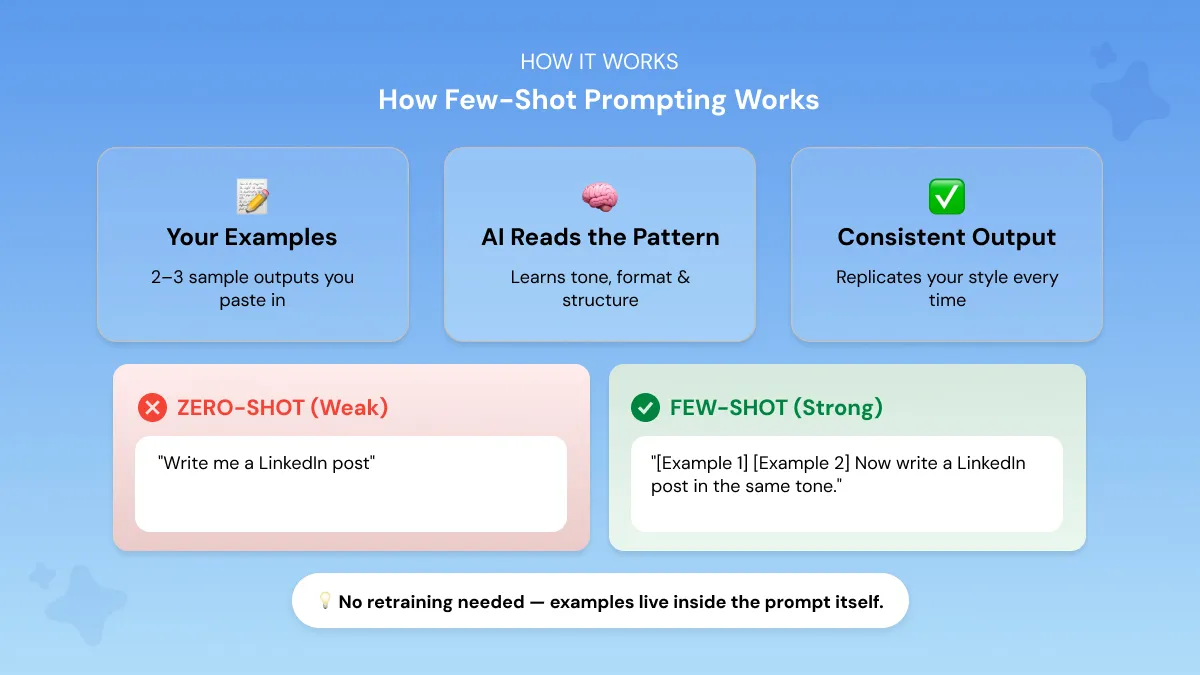
When you include examples in your prompt, the model reads them and picks up the pattern. It notices:
- The tone you're writing in
- The format you're using
- The structure you want followed
Then when you hand it the real task, it runs that same pattern through inference and produces a matching output. No retraining. No fine-tuning.
The examples live in the prompt template itself and disappear the moment the session ends.
This is in-context learning in action. Instead of updating the model's weights, you're steering its behavior through the prompt itself.
Hand someone a style guide right before they write, except the AI actually follows it.
Ever wonder why your AI output changes every time you ask the same question? Here's what's happening:
- No examples = the model operates with too much freedom
- Too much freedom = it guesses what "good" looks like each time
- Every guess = a different output, inconsistent and unpredictable
Few-shot prompting fixes this by locking the model into a specific pattern, so your AI-generated responses stay consistent run after run.
Does It Work the Same on ChatGPT, Claude, and Gemini?
Yes, few-shot prompting works across all three major AI tools.
The underlying mechanics are the same, give examples, and the model learns the pattern.
But the way each model processes and responds to those examples is different enough that the same prompt can produce noticeably different results depending on where you run it.
But each model has its own quirks, and knowing them gets you better results faster.
- ChatGPT (GPT-4/4o): Handles few-shot prompting really well. Place your examples at the very start of the prompt so the model reads and absorbs the pattern before hitting the actual task. Pair this with strong ChatGPT prompts and you'll get consistent, on-brief outputs every time.
- Claude: Also responds well to few-shot examples, but it processes context more heavily than ChatGPT. Stick to the "data first, instructions last" rule, drop your examples in before the final instruction. If you want to get the most out of Claude specifically, this guide on writing better prompts for Claude covers the exact techniques that work best.
- Gemini: Few-shot works, but Gemini tends to default back to its own style if you don't give it guardrails. Pair your examples with explicit format instructions, something like "respond in bullet points" or "output as JSON", to keep it on track.
The core principle is the same across all three conversational AI tools: show the model what good looks like, then ask it to do the same.
If you'd rather not think about any of this, Phrasly's AI Prompt Generator builds prompts that are already optimized for ChatGPT, Claude, and Gemini, structure included.
Few-Shot Prompt Examples (By Use Case)
Here's what few-shot prompting actually looks like in practice.
Each example below shows the weak prompt most people use, and the few-shot version that actually delivers.
Tone and Style Matching for Content
Getting AI to consistently write in your tone and style is simpler than most people think. You just show it instead of telling it.
Most people try to describe their tone in words. "Conversational but professional." "Friendly but authoritative."
The model reads that and still guesses. Two real examples from your own writing tell it more than any description ever could.
This is especially useful for content teams, founders, and marketers who have a recognizable voice and can't afford to spend 20 minutes editing every AI output back into something that sounds human.
Paste 2 real samples of your own writing before the instruction, and the model picks up your voice and mirrors it automatically.
The situation: You want AI to write in your brand voice, not that polished, slightly robotic tone it defaults to.
Weak prompt:
Few-shot prompt:
This sets the tone straight away. Professional but excited, written like a real team update, not a press release.
The second example reinforces the pattern. Same energy, same voice, consistent enough for the model to lock in the style with confidence.
The result: A LinkedIn post that sounds like your team wrote it, not an AI filling a template. Right voice, right energy, ready to publish without a single edit.
Email Communication
Client emails are one of those things that need to sound right every time.
One slightly off tone and a client reads it differently than you intended. Too formal and it feels cold. Too casual and it undermines your credibility.
Getting that balance consistently is where most professionals waste more time than they realize.
Few-shot makes that effortless by giving the model two of your best emails to learn from before it writes the next one.
The situation: You need professional client emails that sound like you, not a generic customer service template.
Weak prompt:
Few-shot prompt:
Clear, professional, warm without being overly friendly. The subject line is specific, the greeting is personal, and the tone hits exactly the right register for a client relationship.
The second example reinforces the structure. Same subject line format, same professional greeting, same concise closing. Two examples and the pattern is locked in.
The result: A complete, ready-to-send email. Right subject line, right tone, right sign-off, every time.
Marketing Copy and Ad Creative
Without a format to follow, AI just wings your ad copy. Give it two examples of your best-performing ads and it stops guessing, and starts delivering.
The situation: You need an ad copy that follows your exact structure, headline, sub headline and CTA.
Weak prompt:
Few-shot prompt:
Clean, structured, and instantly scannable. The model registers the format: three elements, short and punchy, no filler.
The second example locks the pattern in. Same structure, same energy level, same CTA style. Two examples and the format is non-negotiable.
The result: Headline. Sub headline. CTA. Exactly the structure you need, exactly the tone you wanted, ready to hand straight to your design team.
Research Summarization
When you're going through multiple reports a week, the last thing you want is a different summary format every time.
Inconsistent summaries slow everything down. One comes back as bullet points, the next as a wall of text, the one after that buries the most important finding in paragraph three.
Your team spends more time reformatting than actually reading.
Few-shot fixes that at the source. Instead of hoping the model picks the right structure, you show it exactly what the structure is before it touches your report.
Few-shot locks the structure in so every summary looks and reads exactly the same.
The situation: You need every report summary in the same 3-part format so your team can scan them instantly.
Few-shot prompt:
Three parts, clearly labeled, immediately scannable. The model sees the structure and knows exactly how to organize the output.
The second example removes any ambiguity. Same three-part format, same level of detail per section, same professional tone throughout.
The structure is set, the boundaries are clear, and the model has no room to improvise.
The result: Every summary looks like it came from the same person. Your team can scan it in seconds, and you never have to fix the format again.
Academic and Student Use
Most students don't struggle with ideas. They struggle with turning those ideas into a structure that actually holds together on paper.
AI tends to write in its own logical flow unless you show it exactly what yours looks like first.
The situation: You want AI to build essay arguments in a clear logical flow, not just dump information in paragraph form.
Weak prompt:
Few-shot prompt:
Three clear components, logically connected. The model sees the relationship between thesis, arguments, and conclusion before it writes a single word.
The second example confirms the pattern. Same structure, same depth per section, same logical progression from claim to conclusion.
The result: A clean, structured essay outline every single time. No rambling, no random format, just the logical flow you asked for.
This also answers a common question: is few-shot prompting better than fine-tuning for students and everyday users?
For most people, yes. Fine-tuning is built for teams with technical resources, large datasets, and a specific production use case. Students and everyday users don't need any of that.
Fine-tuning requires technical expertise, a curated dataset, and real cost. Few-shot works instantly, on any model, for free, with results that are just as consistent for everyday tasks.
How to Write a Few-Shot Prompt (Step by Step)
Once you understand how few-shot prompting works, the next question is: how do you actually write one? Here's a simple 4-step process you can apply to any task.
Step 1 — Define your output type: What exactly do you want the model to produce? An email, a summary, a caption, an analysis? Get specific before you write a single word. Vague goals lead to vague outputs.
Step 2 — Gather 2–3 strong examples: Pull from your existing work, past emails, posts, reports, whatever fits the task. These should be your best versions, not average ones. Remember, the model replicates what you give it.
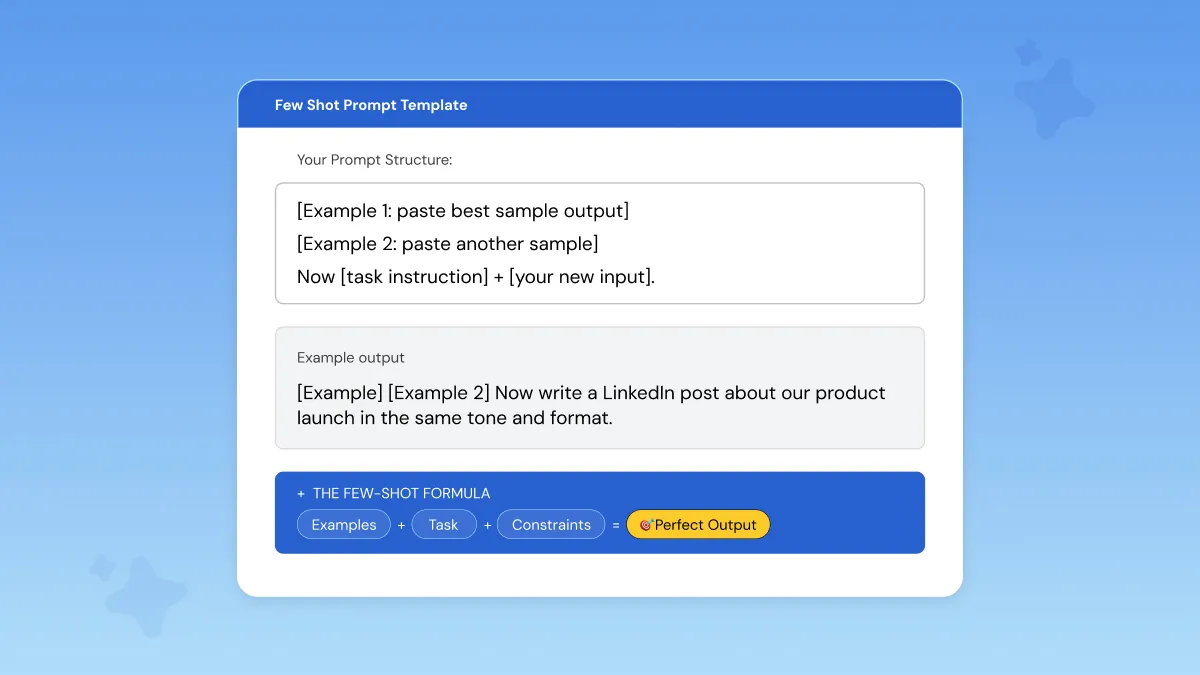
Step 3 — Structure the prompt: Always lead with your examples, then end with the instruction. Data first, instruction last. The natural language input your model receives should follow this exact order: [Example 1] [Example 2] [Task instruction + new input].
Step 4 — Add format constraints: Don't leave tone, length, or structure open-ended. Tell the model exactly what you expect, bullet points or prose, formal or casual, 100 words or 300. This is what separates a good few-shot prompt from a great one.
Here's a reusable prompt template you can copy for any task:
That's the full structure. Simple, repeatable, and it works across every use case covered above.
When to Use Few-Shot Prompting (And When Not To)
Few-shot prompting is powerful, but it's not always the right tool. Here's a quick way to decide.
Use few-shot when:
- You need consistent output across multiple pieces of content
- Tone-matching is critical and the model keeps drifting
- The task requires a specific format the model doesn't default to on its own
Skip few-shot when:
- You're brainstorming or ideating, zero-shot gives you more creative range
- The task is simple and generic, and any reasonable answer works
- You're working with limited context window space, examples eat tokens, so save them for when consistency actually matters
Token efficiency is worth thinking about here.
Few-shot prompting is a precision tool, not an all-purpose one. Use it when output quality and consistency matter.
Skip it when you just need a quick answer.
Common Few-Shot Prompting Mistakes
Few-shot prompting is straightforward, but a few easy mistakes can quietly ruin your results. Here's what to watch out for.
Contradictory examples. If one example is formal and another is casual, the model doesn't pick a side. It averages them into something incoherent. Keep your examples consistent in tone, format, and length.
Too many examples. More than 5 and you're working against yourself. It bloats the prompt, wastes tokens, and confuses the model's pattern recognition. Keep it lean, 2 to 3 is almost always enough.
Forgetting format constraints. Your examples show the pattern, but they don't automatically tell the model how long the output should be, whether to use bullet points or prose, or whether to include headers. Spell it out. Leave nothing open-ended.
Using your weakest work. The model replicates what you give it, so if your examples are sloppy, your output will be too. Only use your best, most polished examples.
So what does a good few-shot prompt actually look like? It starts with two or three of your strongest existing outputs, follows with a clear instruction that defines the task, and closes with explicit constraints on length, tone, and format.
No gaps, no assumptions, nothing left for the model to figure out on its own.
It looks exactly like the templates and use case examples in the section above, clear example-answer pairs, a specific instruction, and zero ambiguity about tone, format, or length.
And if you go back through the mistakes above, you'll notice they all come down to the same root cause: leaving the model too much room to guess. The more precise your prompt, the less room there is for the output to go sideways.
Generate Few-Shot Prompts Automatically with Phrasly.AI
Writing strong few-shot prompts takes practice, and not every professional has polished examples sitting ready to paste in.
Finding the right structure, picking the best examples, adding format constraints, it adds up quickly.
Here's what that looks like in practice. Take a simple goal like this:
You type:
Phrasly AI Prompt Generator Result:
The original prompt tells the AI what to write. Phrasly's version tells it how to write it, adding tone, purpose, and a clear direction for the closing. One line in, one structured prompt out.
Phrasly's AI Prompt Generator takes care of that for you. Describe what you're trying to do and it builds a fully structured, few-shot-optimized prompt around your task in seconds. It works across ChatGPT, Claude, and Gemini.
FAQs
What is few-shot learning in machine learning?
Few-shot learning is a technique where an AI model performs a task using only a small number of examples, rather than thousands of training samples.
It was originally developed to solve one of the biggest limitations of traditional machine learning, the need for massive labeled datasets just to get reliable results.
Few-shot learning changed that by teaching models to generalize from far less data.
In everyday prompting, it means placing 2 to 5 examples directly inside your prompt to guide the model's output with no retraining needed.
Can few-shot prompting reduce AI hallucinations?
Yes, to a degree. By anchoring the model to specific examples and format constraints, few-shot prompting narrows the model's creative freedom, which is where most hallucinations originate.
When the model has a clear pattern to follow, it spends less energy generating and more energy replicating.
That shift alone cuts down significantly on the kind of confident-sounding fabrications that catch people off guard. It won't eliminate them entirely, but it significantly reduces random, made-up outputs.
Does the order of examples matter in few-shot prompting?
It can. Models tend to weigh the most recent context more heavily, so placing your strongest example last is a smart move. Consistency in tone and format across all examples matters more than the order itself.
Does few-shot prompting work with advanced reasoning models like ChatGPT o1?
Not always. Advanced reasoning models with built-in chain-of-thought capabilities can actually perform worse with few-shot examples added.
For these models, a clear zero-shot instruction often works just as well or better.
The reason is straightforward.
These models are already trained to reason through problems step by step. Adding examples can actually interrupt that process rather than guide it, like giving directions to someone who already knows the route.
Can few-shot prompting be combined with chain-of-thought prompting?
Yes, and it's a powerful combination.
Instead of just showing the model what the output looks like, you show it how to think through the problem before reaching that output. It's the difference between handing someone an answer key and walking them through the reasoning behind it.
You provide examples that include reasoning steps, not just inputs and outputs. This helps the model tackle complex, multi-step tasks like analysis, debugging, or logical problem-solving more accurately.
What are the biggest limitations of few-shot prompting?
The two main ones are context window limits and example quality.
Too many examples eat up tokens and leave less room for your actual input. And if your examples are inconsistent or low quality, the model will replicate those flaws, not fix them.


Keep reading

Claude Prompt Generator: Build Better Prompts for Claude AI (Free Tool)
Learn how a Claude prompt generator builds better prompts for every Claude model, from Sonnet 4.6 to Fable 5. Includes ready-to-use XML templates, effort levels, and a free tool.

50 Highest-Engagement AI Prompts for LinkedIn, Instagram, and X for marketers
Learn the prompt frameworks behind top-performing social posts, avoid common AI prompting mistakes, and use proven templates to scale your content creation across every platform.