How to Humanize ChatGPT Text Without Leaving the Chat
11 min read
Can ChatGPT humanize text? Yes! And you have two ways to do it in the same chat. You can ask ChatGPT to revise its own draft with a clear reader, tone, and list of facts to keep.
Or you can connect Phrasly through MCP and have a dedicated humanizer rewrite it without switching tabs.
The second route needs a one-time Phrasly sign-in in your browser. After that, how to humanize ChatGPT text comes down to four moves. Select Phrasly and ask for the rewrite. Confirm the tool actually ran and review the result.
Below, this guide sets up and humanizes a real email step by step.
Humanize ChatGPT Drafts with the Phrasly MCP Server
Bring Phrasly's humanizer and AI detector into ChatGPT. Free and paid Phrasly accounts can connect.
Can ChatGPT Humanize Text on Its Own?
Yes! ChatGPT can revise its own writing for tone, rhythm, and clarity. When you tell it who the reader is. What voice to use and which facts must stay fixed.
For a repeatable rewrite, you can also connect a dedicated humanizer like Phrasly. And run it inside the same chat. Either way, you review the result yourself.
So, if you've typed "can ChatGPT humanize text" into a search bar. The real question is which route fits the job. Here is the honest comparison.
Method | Best for | What you must check |
Ask ChatGPT to revise | A quick tone, clarity, or voice edit | Meaning and facts in the returned draft |
Connect Phrasly through MCP | A repeatable rewrite with a dedicated humanizer, in the same chat | Your sign-in, that the Phrasly tool actually ran, the returned text |
Edit by hand | Personal experience, expert judgment, final voice | Accuracy, specifics, consistency |
👊 Quick edits suit the prompt route. Repeat work suits the connected route. Every route still ends with your own read-through.
Suppose you are not ready to connect anything. This short prompt shows how to get ChatGPT to humanize text on its own.
Revise the paragraph below for [reader] in a [tone] voice.
Keep [names, figures, citations, technical terms] exactly as written.
Cut repetition and vague wording. Do not add new details.
Return the revision and list anything I should double-check.
[Text]
For more variations, see these prompts to humanize AI text.
Wondering how to make ChatGPT sound more human? It's the same goal. Prompts help, while a connected humanizer makes it repeatable.
To compare standalone tools instead, browse these best AI humanizer tools.
What Do You Need Before Connecting Phrasly to ChatGPT?
You need two separate accounts to use a ChatGPT MCP humanizer. A ChatGPT account that lets you add a custom MCP server. And a free or paid Phrasly account.
Your ChatGPT plan decides whether the Phrasly ChatGPT integration is available at all. And your Phrasly plan decides how many words you can humanize through it.
On the ChatGPT side, OpenAI's Developer mode and MCP apps help page says full MCP support.
Including actions that change data is rolling out in beta to Business, Enterprise, and Edu plans, on ChatGPT web only.
OpenAI now uses "Business" for what used to be called Team. In a company workspace, an admin may need to turn on custom apps before you see the option.
We tested on: A personal ChatGPT Free account, ChatGPT web, Chrome on Windows, with a paid Phrasly account. Despite OpenAI's plan list, the “Add custom MCP server” option appeared on that Free account on October 14, 2026, and the connection worked.
Don't buy a ChatGPT plan just for this until you've confirmed the custom server option appears in your account.
How Do You Connect Phrasly MCP to ChatGPT?
Add Phrasly to ChatGPT as a custom MCP server using the server URL below. Choose OAuth for authentication. And approve the connection on Phrasly's sign-in screen.
Then open a new chat. Select Phrasly and ask it to humanize your text. Menu names differ by ChatGPT plan. So, follow the labels you actually see.
The Model Context Protocol (MCP) is an open standard that lets AI apps like ChatGPT connect to outside tools.
The official MCP introduction explains it in plain terms.
Here is how to use humanizer in ChatGPT through a ChatGPT custom MCP server. Following OpenAI's plugins quick start.
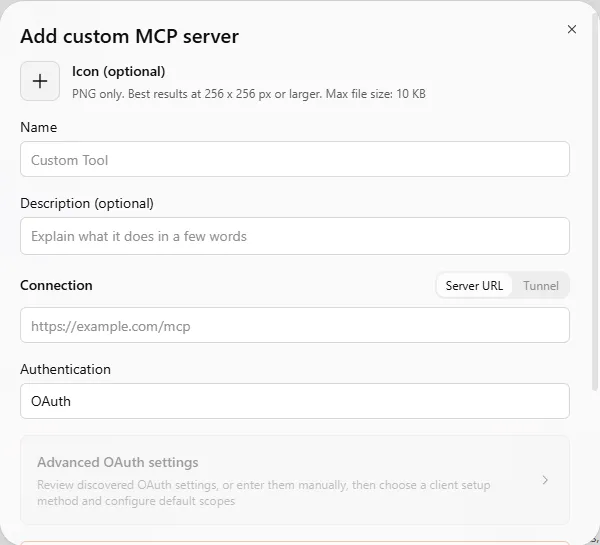
Open Plugins in the ChatGPT sidebar on the web. Click Add (top right) and choose Add custom MCP server.
Name it Phrasly and paste the server URL shown below. Set Authentication to OAuth. Keep Connection set to Server URL, not Tunnel, and leave Advanced OAuth settings untouched. If optional client ID and client secret fields appear, leave them blank. Per Phrasly's guide, it registers the client automatically.
Read the risk notice. Confirm and create the plugin. A Phrasly page opens in your browser. Sign in and approve access.
Check that Phrasly's three tools appear. humanize_text, detect_ai_text, and get_account_status.
Open a new chat and select Phrasly by typing @Phrasly in the message box, or click Try in chat on Phrasly's plugin page.
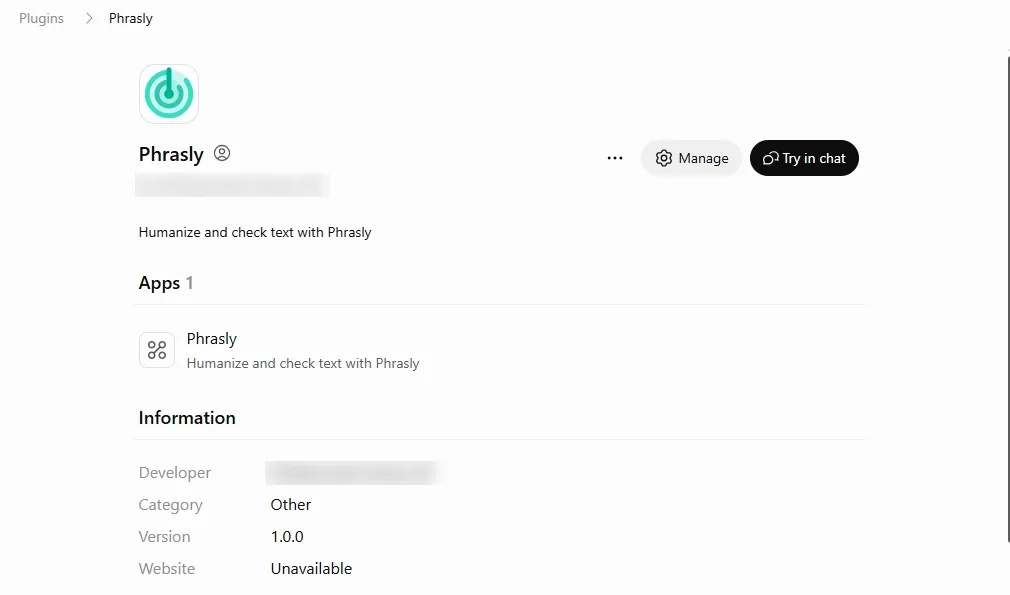
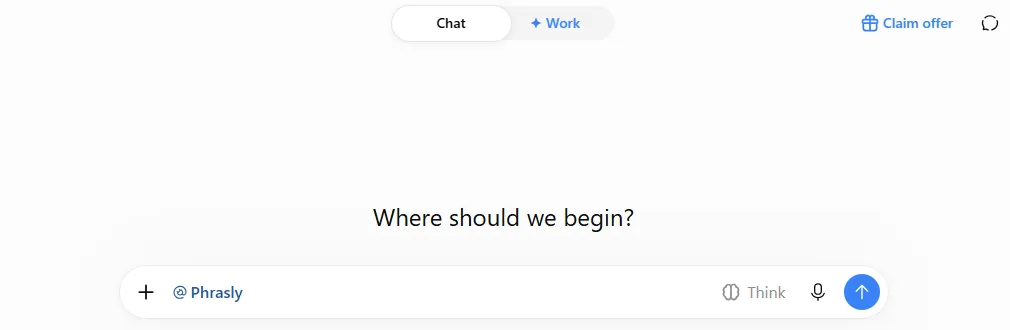
Have the server URL ready? The Phrasly MCP setup details for ChatGPT list the URL, the three tools, and what your plan includes. Test it with a short draft first.
Using Claude instead?
Follow the Phrasly setup for Claude and other MCP clients.
How to Humanize AI Content in ChatGPT in the Same Conversation?
Open a new chat with Phrasly selected, and put your draft between clear START and END markers. And ask ChatGPT to use the Phrasly tool while keeping names, figures, and the conclusion.
Then open the tool activity to confirm Phrasly ran. And compare the rewrite with your original before you use it.
Prepare a 150-to-250-word draft with a short list of facts that must survive. And keep an untouched copy. Need a better first draft?
Try this ChatGPT prompt generator.
Paste it into a new chat with Phrasly selected. Make it clear which text gets submitted.
Send the request below.
Open the tool activity and confirm a Phrasly call happened. A fluent rewrite, or ChatGPT saying it used Phrasly, is not proof on its own.
Save the raw returned text. And compare facts, citations, meaning, and tone with your original.
Make your own final edits. And keep them separate from the raw tool result.
Use the Phrasly tool to humanize the draft between the markers.
Keep a clear, professional tone. Do not change names, dates,
figures, links, or the conclusion. Show the returned text and
flag anything I should review.
START DRAFT
[draft]
END DRAFT
To check your Phrasly word balance in the same chat, ask: “Check my Phrasly account status.”
🧪 What Our Test Run Returned
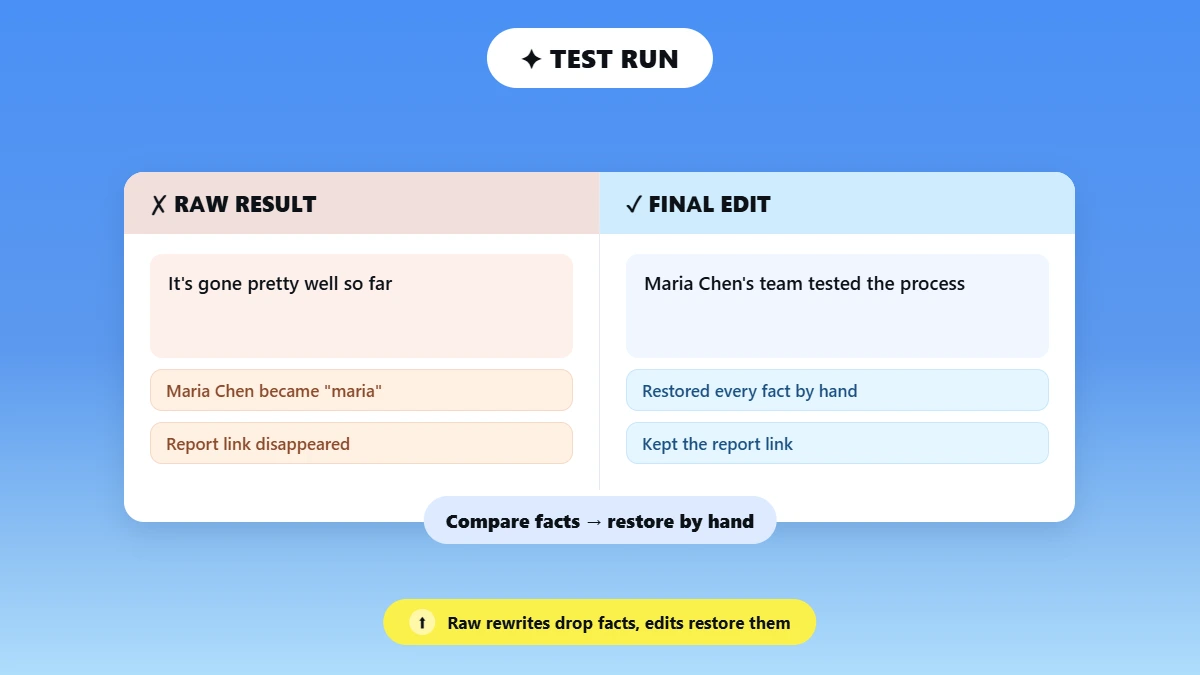
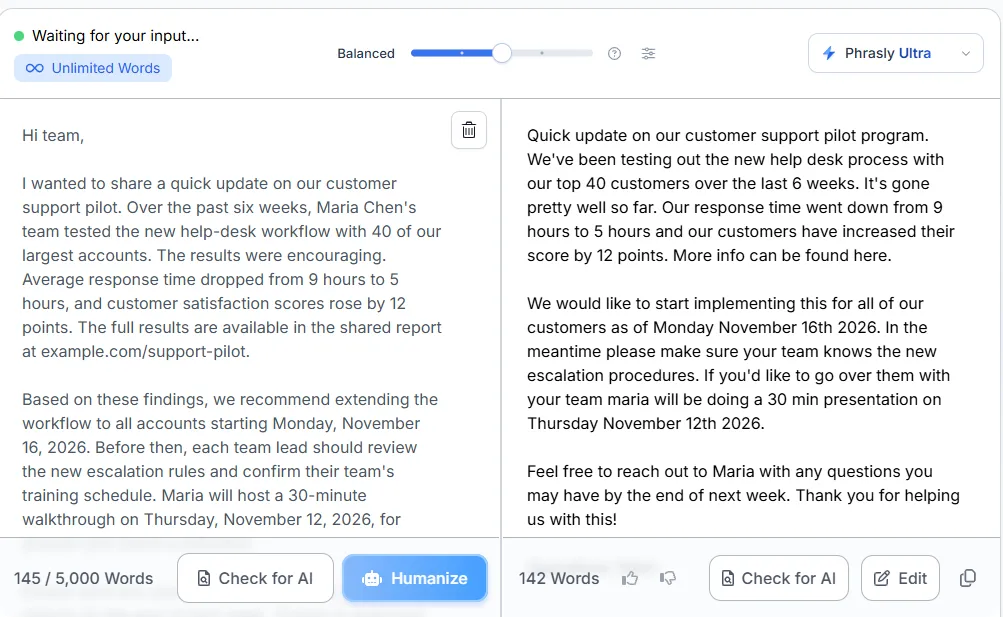
On October 14, 2026, we sent a 145-word sample email to Phrasly from ChatGPT. And got a 142-word rewrite back after “Worked for 9s”. ChatGPT showed it in an email card. And said some details “appear to have changed or been omitted.”
Clicking “Worked for 9s” showed no tool details. So we confirmed the call in Phrasly's own humanizer history, which listed the same input and output.
What survived: The six-week timeline, the 9-to-5-hour response time, both dates, and the 30-minute walkthrough.
What changed: “Maria Chen” became “maria”, “40 of our largest accounts” became “our top 40 customers”, “customer satisfaction scores” became “their score”, and the report link and the training-schedule step disappeared.
The tone also turned casual (“It's gone pretty well so far”) despite our request for a professional voice. Our final edit restored every fact by hand.
Original draft | Raw Phrasly result | Final edit |
“Over the past six weeks, Maria Chen's team tested the new help-desk workflow with 40 of our largest accounts... customer satisfaction scores rose by 12 points. The full results are available in the shared report at example.com/support-pilot.” | “We've been testing out the new help desk process with our top 40 customers over the last 6 weeks... our customers have increased their score by 12 points. More info can be found here.” | “Over the last six weeks, Maria Chen's team tested the new help-desk process with 40 of our largest accounts... customer satisfaction scores rose by 12 points. The full results are in the shared report at example.com/support-pilot.” |
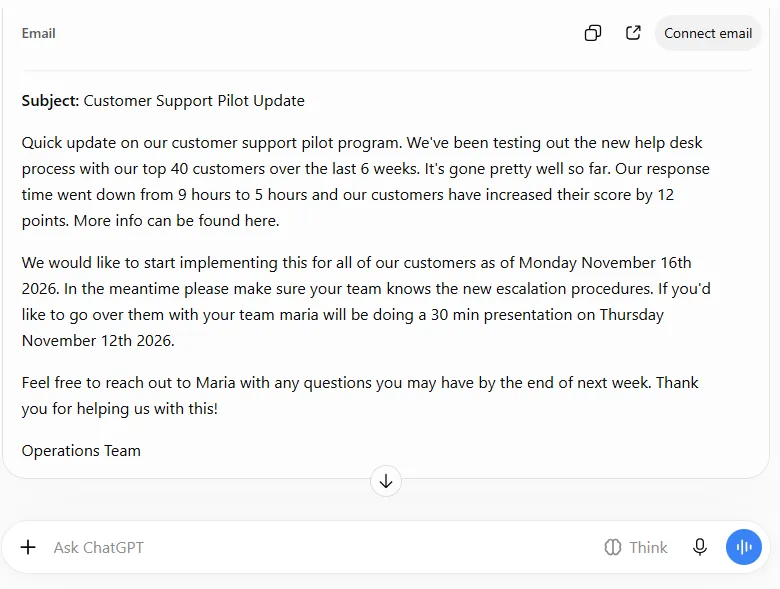
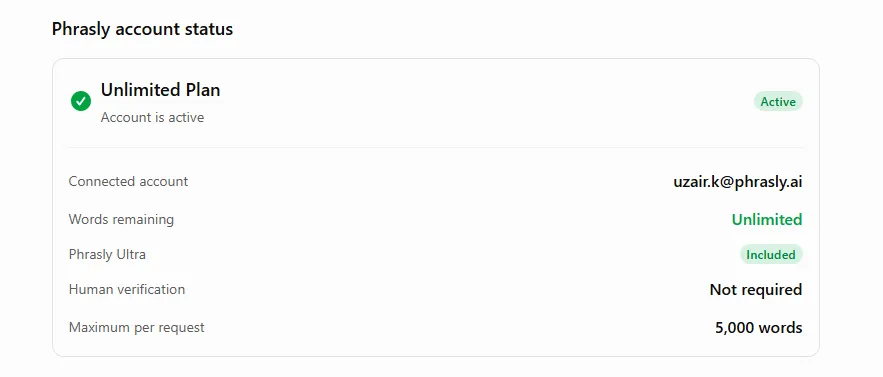
Whether you're humanizing ChatGPT emails or blog intros, this check is what separates a real tool call from ChatGPT simply rewriting on its own. It's also the safest way to humanize text from ChatGPT. And know exactly what changed.
How Much Does It Cost to Humanize ChatGPT Text with Phrasly?
Connecting Phrasly to ChatGPT costs nothing extra. Free and paid Phrasly accounts can both connect. And each rewrite uses your existing Phrasly word balance, the same as on the website.
Your ChatGPT plan is a separate question. Because it decides whether you can add the connection at all.
So yes, you can humanize ChatGPT text for free with a free Phrasly account, within its limits.
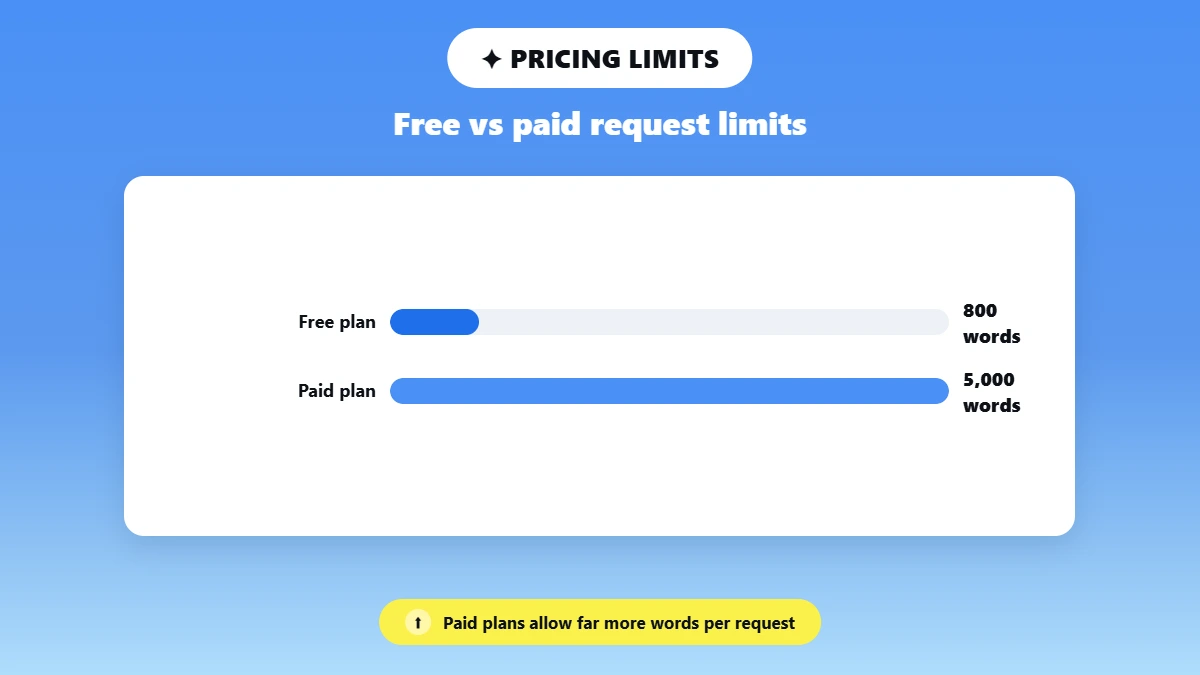
But that doesn't make the whole workflow free if your ChatGPT plan is the gatekeeper. Keep these four numbers apart (our account status on October 14, 2026 confirmed the 5,000-word paid ceiling):
Limit | Published Phrasly rule |
Minimum length | 30 words to humanize; 50 words for AI detection |
Per-request ceiling | 800 words on free and trial accounts; 5,000 words on paid plans |
Balance | Requests use the same word balance as the website; unlimited plans stay unlimited |
History | Humanizations are saved to your Phrasly document history unless your storage preference says otherwise |
For plan details, see Phrasly's pricing page. If Get Account Status shows different numbers in your account, trust what your account shows.
Why Is Phrasly Not Working in ChatGPT?
When Phrasly doesn't work in ChatGPT, the cause is usually one of four things:
Your plan doesn't offer custom MCP servers. The Phrasly sign-in didn't finish. Phrasly wasn't selected in the chat, or your text falls outside Phrasly's word limits. Check them in that order. Then retry in a fresh chat.
Use this table when the Phrasly tool is not working in ChatGPT. These are checks. Not one fixed cause per symptom.
Symptom | What to check | Fix |
❌ No custom MCP server or Developer mode option | ChatGPT plan, workspace admin settings, web vs app | Use ChatGPT web; on a workspace, ask your admin |
❌ Phrasly sign-in fails or loops | URL typed exactly, OAuth selected, signed in to Phrasly in the same browser | Retry; if it keeps failing, contact Phrasly support with the error |
❌ ChatGPT rewrote the text but Phrasly never ran | Is Phrasly selected? Are its tools listed? Did the request say "use the Phrasly tool"? | Select Phrasly, ask explicitly, check the tool activity |
"Too short" or text comes back unchanged | Minimum length: 30 words to humanize, 50 to detect | Add more text and retry |
Text too long | Your plan's per-request ceiling | Split by section and keep headings |
"Out of words" or an upgrade prompt | Ask for your account status | Check your balance; plan details are on Phrasly's pricing page |
Asked to verify you are human | Phrasly's guide says this happens occasionally | Complete the browser check, then retry |
Tools disappeared | The connection expired or was revoked | Reconnect, then start a new chat |
In our test, the connection itself worked the first time. The only snag was proof: “Worked for 9s” did not open any tool details. So check Phrasly's humanizer history to confirm a run.
How Should You Review the Rewrite Before Using It?
Compare the rewrite with your original line by line. Names, numbers, claims, citations, quotes, and your conclusion should survive unchanged.
Then read it aloud for tone. Remove anything that invents experience you don't have and make the final edits yourself. A humanizer improves flow. It does not check facts.
📋 Line-by-Line Review Checklist
Facts and figures: Every name, date, number, and link matches the original.
Claims and citations: Quoted text, sources, and specialist terms are intact. And no claim got stronger or weaker.
Conclusion and tone: Your main point survived. And the voice fits your reader when read aloud.
No invented experience: Delete anything that claims something you didn't do or see.
In our test, Phrasly kept the dates and the 9-to-5-hour figure but dropped a surname, a link, and one instruction. And turned a professional email casual, even though we asked it to keep names and links.
For hands-on technique, see how to humanize AI text manually.
And watch for common phrases AI uses.
Teams can also compare AI editing tools that keep brand voice.
Detector results are limited signals. Not proof of human authorship or quality. And a Phrasly detector check is Phrasly's own result. Not an independent benchmark.
If your own writing ever gets flagged, read why human writing gets flagged as AI.
The same review applies, however you humanize ChatGPT output. And it's the step that matters most in how to humanize ChatGPT writing.
Wondering what AI can humanize ChatGPT drafts in the same chat? If you already write in ChatGPT and want a repeatable rewrite step, connect Phrasly's humanizer to ChatGPT and keep your review where your draft lives.
Frequently Asked Questions
Do I Need an API Key to Connect Phrasly to ChatGPT?
No! Per Phrasly's documented flow. You sign in with your Phrasly account through OAuth. And Phrasly registers the connection itself.
So, leave any optional client ID and secret fields blank. Those fields are not an OpenAI API key. In our test, we left Advanced OAuth settings untouched, and the connection worked.
Can I Use Phrasly in the ChatGPT Mobile App?
Set it up and use it on ChatGPT web. OpenAI’s help center says MCP apps are available on ChatGPT web. And we tested on ChatGPT web in Chrome on Windows only.
Can I Humanize a Whole Document in One Request?
Only up to your per-request ceiling. 800 words on free and trial accounts. 5,000 on paid plans (our paid account status showed the 5,000-word maximum). Split longer work into sections. Keep the headings and check the transitions afterward.
Is My Text Sent to Phrasly When I Use It in ChatGPT?
Yes! Text you submit goes to Phrasly for processing. And it is saved in your Phrasly document history unless your storage preference says otherwise. Your ChatGPT settings don't change your Phrasly settings.
Does a Lower AI Score Prove a Person Wrote the Text?
No! A detector score is a probability from one tool. Not proof of authorship or quality. This guide to how AI detectors work explains why scores vary.
Does ChatGPT Watermark the Text It Writes?
Yes, in the EU. On October 5, 2026, OpenAI said it will add an invisible text watermark, called text Grain, to ChatGPT text in the EU. Its API watermark stays off by default. Learn more about AI text watermarks.
Can I Disconnect Phrasly from ChatGPT?
Yes! Open Plugins in ChatGPT, click the ⋯ menu next to Phrasly, and choose Uninstall. This stops ChatGPT from calling Phrasly. It does not, by itself, delete your Phrasly document history.

Written by
Muhammad Usman Ali
Pakistan
Muhammad Usman Ali is an experienced SEO content writer with 3+ years of professional writing experience. He specializes in AI tools, AI detection technologies, and search engine optimized content.