Why Claude's Writing Still Gets Flagged by AI Detectors
9 min read
Claude drafts clean. Too clean. And that's exactly what makes editors raise an eyebrow. And gives AI detectors something to score.
If you want to make Claude sound human, the fix isn't swapping a few giveaway words. It's addressing predictability. The even sentence rhythm. The tidy structure and the safe phrasing Claude defaults to.
This piece covers why Claude reads as AI-generated. What prompt and editing changes help without any tool. And where a connection like Phrasly MCP fits as one option among several.
We'll show a live Phrasly AI Detector test. And close with what no tool, including ours, can promise.
Edit Claude Drafts with Phrasly MCP
Connect Claude to Phrasly MCP. And edit for natural tone as you draft.
Why Claude's Writing Sounds Robotic by Default
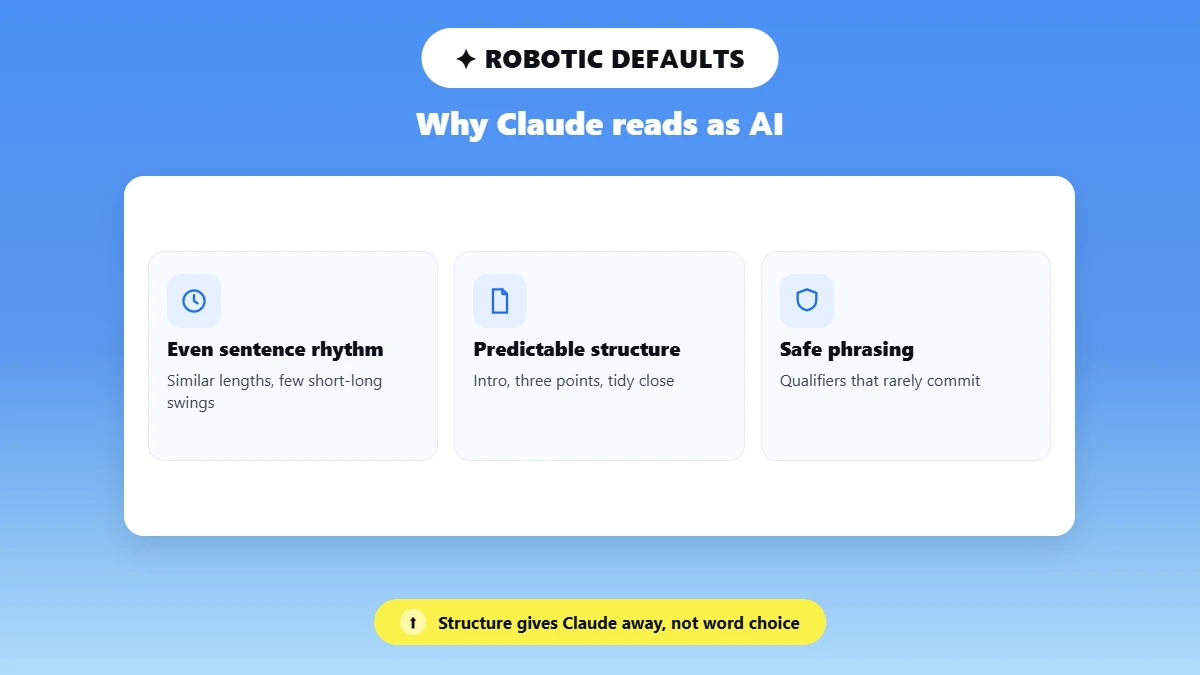
Claude is trained to produce balanced and safe phrasing. This flattens the quirks and asymmetries that mark human writing.
So, why does Claude's writing always sound so robotic? Mostly because of structure. Not word choice.
Even sentence rhythm: Similar lengths and similar openings. Few of the short-long-short swings people write naturally.
Predictable structure: An intro, three supporting points and a tidy conclusion. Repeated across almost any prompt.
Safe phrasing: Qualifiers and balanced clauses that rarely commit to a strong claim.
That's the root of how to stop Claude writing like an AI. Change the pattern. Not just the vocabulary.
See why AI text leans on em dashes for one habit detectors key on.
And whether Claude output gets flagged by detectors for more on detection behavior.
Detectors Score Patterns, Not Intent
Detectors don't read for authorship. They score statistical uniformity. So uniform rhythm and low burstiness raise AI-likelihood scores no matter who chose the topic.
Filler phrases, like stock transitions and hedged qualifiers, add to the pattern signal. Even when the content is accurate and useful.
The AI Tells Readers (and Detectors) Spot in Claude's Output
The most common Claude AI tells robotic phrases are stiff vocabulary. Constant hedging, reflexive three-item lists, and too many em dashes.
Those are also the phrases that make AI writing obvious to most readers.
The Usual Suspects
"Delve-style" vocabulary: Formal words that rarely appear in casual human writing.
Hedging: "it could be argued" or "some might say" softening every claim.
Reflexive three-item lists. Even when two points or five would fit better.
"Not X, but Y" framing used as a crutch rather than to clarify a real contrast.
Tidy summary endings that wrap every piece in a bow.
To remove AI tells from Claude text, cut these first. They're the punctuation patterns. And phrasing a human editor would loosen anyway.
Fixing Claude's Em Dash Habit
Em dash usage is the most visible tell. To stop Claude using em dashes, ask Claude directly to use commas or periods instead.
Then do a find-and-replace pass. Swapping each em dash for the punctuation that fits.
Vary punctuation deliberately. Mixing short sentences, semicolons, and parentheticals. So no single mark dominates.
We Ran Claude Text Through the Phrasly AI Detector
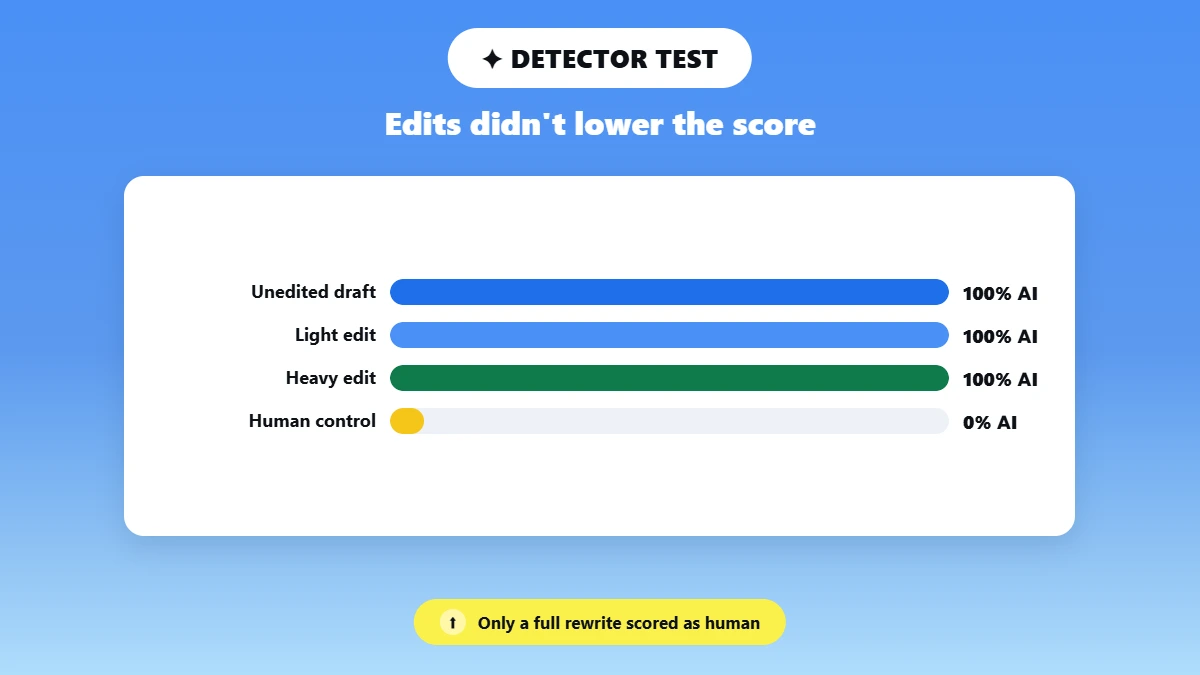
Editing alone didn't move the score. The unedited Claude draft, a light edit and a heavy edit all scored 100% AI. And only the human-written control came back human.
We tested Phrasly's own Claude writing style detector workflow on four versions of the same piece.
What We Tested
On November 3, 2026, we asked Claude (Claude Sonnet 5.5, medium effort) to write about 200 words with this prompt:
“Write a 200-word blog introduction about how remote work affects productivity. Use a professional tone”.
We then made a light edit and a heavy edit. And wrote a human control on the same topic.
One detail surprised us: The unedited draft contained no em dashes at all. So the light edit came down to splitting long sentences and varying their length.
What the Scores Showed
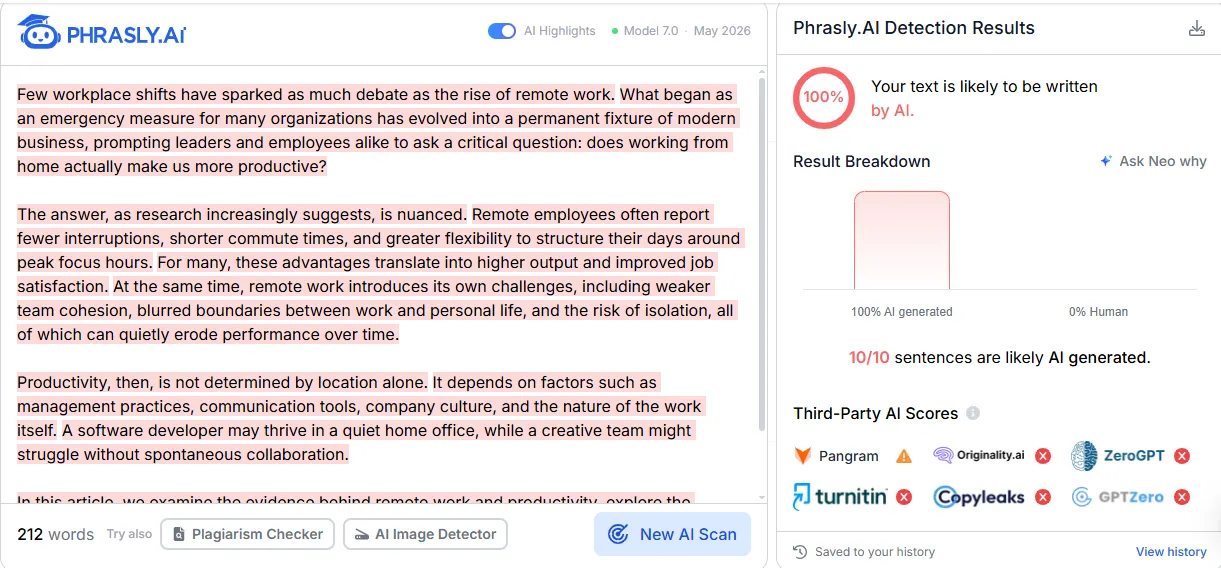
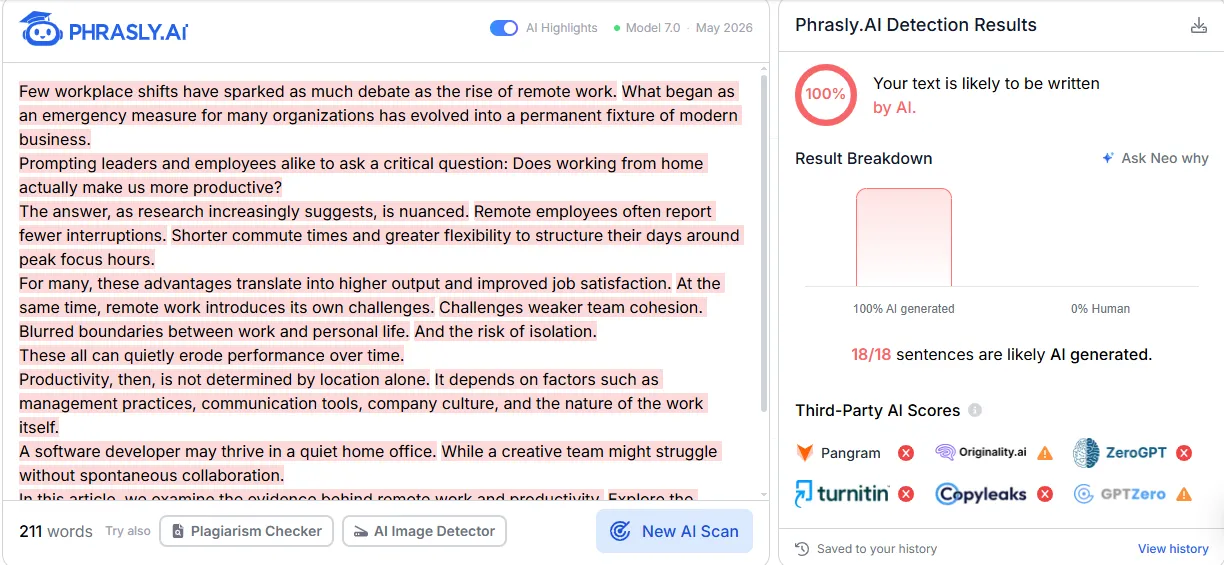
The unedited draft (212 words) scored 100% AI, with 10 of 10 sentences flagged. The light edit (211 words) also scored 100% AI. Now with 18 of 18 sentences flagged. Because splitting sentences created more of them.
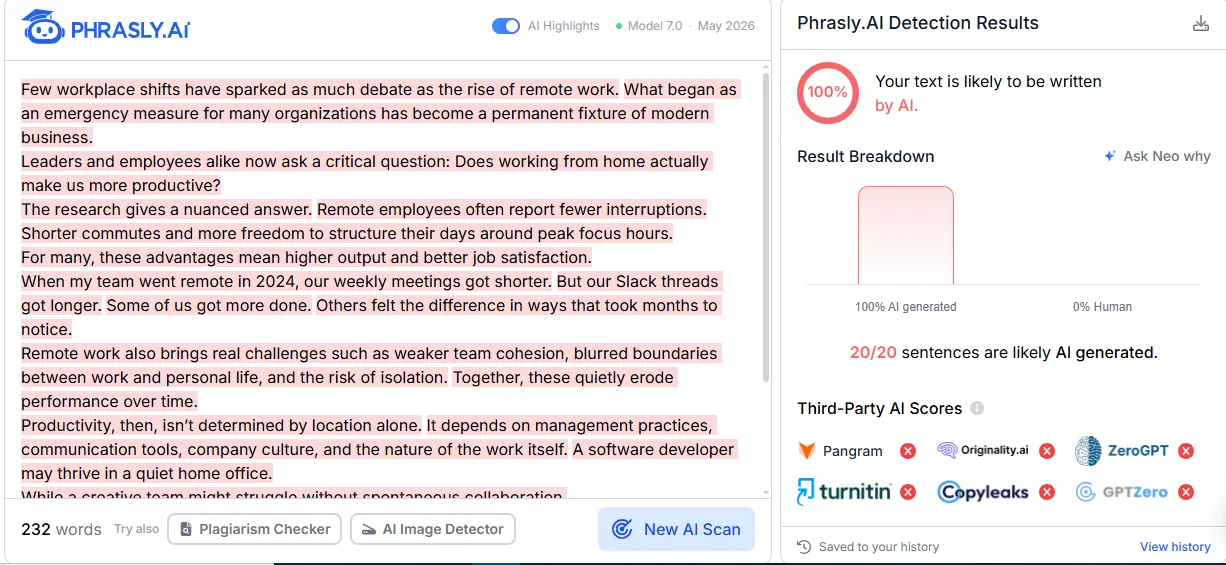
The heavy edit (232 words), with a personal anecdote about shorter meetings and longer Slack threads, still scored 100% AI, 20 of 20 sentences.
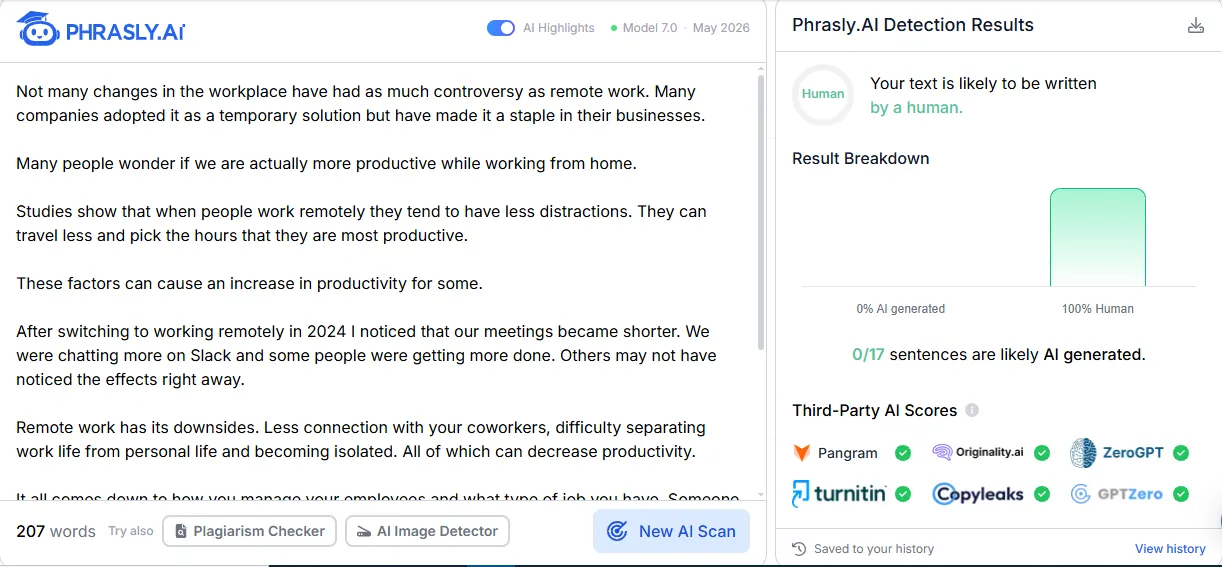
Our human-written control (207 words) scored 100% human, with 0 of 17 sentences flagged.
The takeaway: Surface edits to a Claude draft weren't enough here. Because the structure, argument order and phrasing stayed Claude's. Rewriting the piece in your own words changed the result.
Version | Edits made | Phrasly AI Detector result |
Unedited Claude draft | None | 100% AI (10/10 sentences) |
Light edit | Sentences split and length varied (the draft had no em dashes to remove) | 100% AI (18/18 sentences) |
Heavy edit | Added a personal anecdote, cut hedging phrases | 100% AI (20/20 sentences) |
Human-written control | N/A | Human, 0% AI (0/17 sentences) |
One run per version, tested November 3, 2026. Screenshots: below.
Unedited Claude draft: 100% AI. Tested November 3, 2026.
Light edit: 100% AI. Tested November 3, 2026.
Heavy edit: 100% AI. Tested November 3, 2026.
Human-written control: 100% human. Tested November 3, 2026.
Can AI detection catch Claude writing styles? Often, yes! Because an AI detector scores the patterns above. But other detectors can return different results on the same text.
In Ahrefs' test of eight free detectors, scores on the same articles ranged from 13 out of 18 down to 4.
That's part of the content authenticity question we return to in the limits section.
Prompts and Edits That Make Claude Sound More Human
The Claude prompts to write like a human that work best supply a voice sample. Demand varied sentence length, ban stock phrases, and ask for real specifics.
A good prompt gets you much of the way toward your own writing voice. But it doesn't replace an edit pass.
Prompt Moves That Work
Paste a voice sample. And ask for a voice profile match before drafting. That's the core of writing sample analysis.
Set a reading grade level. And ask Claude to check its draft against it.
Ask for a conversational tone. Claude defaults to formal unless told otherwise.
Ban stock phrases by name ("delve," hedges, summary closers) instead of editing them out later.
What's a good prompt to make Claude write in my own voice? Try this Claude sound more human prompt:
"Here are two samples of my writing. Match their sentence length, vocabulary and tone. Avoid em dashes, hedging and three-item lists. Use one specific example from my notes."
That's prompt engineering for make Claude write like me.
And this guide to Claude prompting techniques that actually work goes deeper.
Why a Human Edit Pass Still Matters
No prompt removes every tell. A final read-through catches rhythm. And phrasing a prompt can't anticipate. Your own ideas, specifics and opinions are what make text read as authored. Not just unpatterned.
Use Claude Projects, Memory, and Styles to Lock in Your Voice
Claude's own features save you from re-explaining tone in every chat.
So, can you train Claude to match your writing style? Yes, within Claude's interface. And most serious users already do some version of this.
Claude Projects: A container for persistent custom instructions, reference documents and a saved voice profile. That apply to every chat inside the project.
Memory: Where available on your plan. Claude carries context forward from past chats instead of starting cold.
Styles: Anthropic's Configure and use styles guide shows how to pick "Create & edit styles" from the style dropdown. Then upload writing samples or describe a style.
Tone calibration works best with real samples pasted in. Not adjectives like "friendly." A short style guide beats a vague request.
Setting Up a Voice Profile Once
Paste 2 to 3 samples of your own writing into a Project's custom instructions or a custom Style.
Add explicit rules: Average sentence length, punctuation habits and words to avoid.
Save it once. So new chats inherit the profile automatically.
Where Phrasly MCP Fits in Your Claude Workflow
MCP (Model Context Protocol) lets Claude call outside tools, like Phrasly, directly inside a conversation. So you can humanize Claude output without copying text between tabs.
It's one option among several. Plenty of writers stick with prompts and manual edits.
Phrasly MCP gives Claude three tools. A humanizer, its AI detector and an account check. It runs on your own Phrasly account and word balance. The same as the website.
Free accounts use their free balance. And Unlimited plans stay unlimited, with occasional human verification. Phrasly's 3-Day Access costs $2.00 and renews at $39.99 a month unless cancelled.
Phrasly's page lists custom connectors for Claude Pro and Max. On Team and Enterprise, an owner adds the connector once.
To compare options before choosing a text humanizer tool, see other MCP servers built for writers.
How the Connection Works
In Claude, open Settings. Then Connectors and click Add custom connector.
Paste https://phrasly.ai/api/mcp. Click Connect and approve access with your Phrasly account.
Draft or paste text in Claude. Then ask it to humanize the draft with Phrasly. The result appears in the chat. And is saved to your Phrasly document history.
A Short Walkthrough
Start a Claude chat. Draft the piece. Run it through Phrasly MCP. Then ask Claude to check it with Phrasly's AI detector before you publish.
How do I get Claude to stop sounding like an AI? Prompts and Styles first. An edit passes always. And a tool like this when you want help to make AI sound human at scale.
What No Humanizer or Detector Can Honestly Promise
No tool, including Phrasly, can guarantee text will pass every AI detector. Because detectors disagree and scoring isn't standardized.
So, how do you make Claude's text pass as human-written? By making it genuinely yours. Not by chasing a score.
Why Results Vary
Detectors are trained on different data and disagree on the same text.
Short and heavily edited texts produce less consistent scores.
Detectors misjudge some writers more than others.
A Stanford study, reported by Times Higher Education, found detectors labeled 61.3 percent of non-native English essays as AI.
A Note on Responsible Use
None of this is meant to help anyone break a school's academic integrity policy. Or an employer's disclosure rules. It's for marketers tightening brand voice. Bloggers smoothing drafts and non-native English writers making their own ideas read naturally.
A plagiarism checker answers a separate question. Originality isn't the same as sounding human. When in doubt, check your school or workplace policy first.
Frequently Asked Questions
How Do I Make Claude Sound Human and Stop Using AI Phrases?
Layer three things: A banned-phrase list in your prompt. A Claude Style or Project instructions for tone. And a final human read-through. Then test the result in an AI detector before publishing. So you know the fixes worked instead of assuming they did.
Can AI Detection Catch Claude Writing Styles?
Often, yes! Detectors flag uniform sentence length. Hedging and repeated structures that Claude defaults to. Accuracy varies by tool and text length. So check more than one detector before trusting a single score.
What Prompt Makes Claude Write Like a Human?
Give Claude a short sample of your own writing. Ask it to match the sentence length and tone. Ban stock phrases like "delve," and request one real specific. Then edit the draft yourself. Because no single prompt removes every tell.
Can Claude Humanize Text to Bypass AI Detectors?
Claude can rewrite for a more natural tone. But no prompt or tool guarantees passing every detector. Since detectors disagree with each other. Focus on clear and original writing in your own voice.
How Do I Stop Claude from Using Filler Phrases Like "I Hope This Message Finds You Well"?
Ban them by name in your prompt or in a saved Style. Ask Claude to open with the point instead. Claude follows explicit "avoid" lists well. So name the exact phrases you dislike. Then catch any stragglers in your edit pass.

Written by
Muhammad Usman Ali
Pakistan
Muhammad Usman Ali is an experienced SEO content writer with 3+ years of professional writing experience. He specializes in AI tools, AI detection technologies, and search engine optimized content.