How to Humanize AI Cold Emails: We Tested 10 in Claude
17 min read
To humanize AI cold emails, tell Claude two things before it writes: why you’re contacting this person and what you can do for them. With those two details, Claude writes an email that fits this prospect and no other company. Then you cut the generic phrases and check every fact before you send.
We tested this workflow on 10 cold emails in Claude and sent three of them through Phrasly MCP, Phrasly’s connector for Claude, without leaving the chat. Below are the steps we followed, the three prompts we used and what changed in each email.
Humanize Cold Emails Inside Claude With Phrasly MCP
Why Do AI Cold Emails Sound Like Templates?
AI cold emails sound like templates because the model fills each gap in your context with a safe default that suits any company. Adding a first name in the greeting won’t make the email personal. The prospect can still see it wasn’t written for them, so they have little reason to reply.
Humanizing your cold email starts with relevance: give the person one specific, verified reason why this email was sent to them.
Four habits make an AI draft read like a template:
🙌 Unearned praise: "I was impressed by your commitment to growth," with nothing to back it up.
🧱 Padded openers: "I hope this email finds you well" before the actual point.
🔁 Interchangeable benefits: "boost efficiency and drive results," which could describe any service.
📅 Oversized asks: "Do you have 15 minutes this week?" before the reader knows why you wrote.
✏️ One Line, Rewritten (fictional example)
❌ Generic: "I came across your company and was really impressed by your growth."
✅ Specific: "Your job post for a senior content editor says the team plans to publish twice as often."
Studies on AI-written and human-written outreach report different reply rates, and our analysis of AI vs human cold email reply rates explains why their numbers disagree.
How Do You Humanize an AI Cold Email? 6 Steps
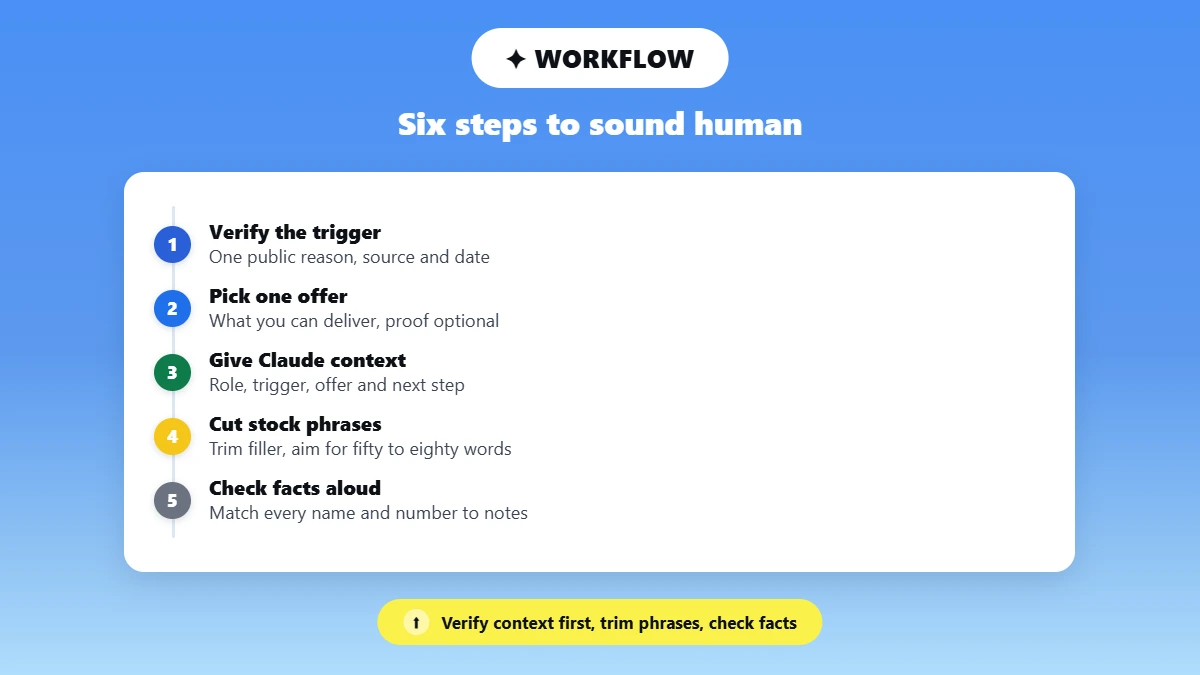
You humanize an AI cold email by giving the AI what a person would know before writing: why you're contacting this prospect, what you can offer and how you sound. Once the draft comes back, you shorten it, ask for one small step and check each fact against your notes. The six steps below work in Claude, ChatGPT or any other AI tool.
🔍 1. Verify One Reason to Contact This Person
Pick one public event, such as a funding announcement, a job post or a conference talk, and note its source and date. Describe what you observed, and don't claim to know the prospect's private priorities.
🎯 2. Choose One Offer That Fits That Reason
State in plain words what you can deliver for this prospect. Add a proof point only if you can back it up, and never invent a client result to make the offer sound stronger.
🧾 3. Give the AI Your Context Before It Drafts
A Claude cold email sounds like you when Claude gets a short sample of your own writing plus verified context, and you make the final edit yourself. Give the AI these details in one message:
the recipient's name and role
the trigger, with its source and date
your offer and any proof you can back up
the one thing you want the prospect to do next
two or three sentences you wrote yourself, as a voice sample
Tell the AI to ask you about missing details instead of filling the gaps. That rule stops it from inventing prospect facts, numbers or results.
✂️ 4. Cut Stock Language and Shorten
Delete generic compliments and phrases such as "explore synergies" or "circle back." Keep a first email to about 50 to 80 words by trimming anything that repeats the offer or explains your company at length.
📊 Length Check: Instantly's 2026 benchmark report found that its elite performers averaged fewer than 80 words per first-touch email, based on Instantly platform data from January to December 2025. Treat that figure as a starting point, because one platform's data can't set a rule for every prospect list.
🤝 5. Ask for One Small Next Step
A question such as "Would a sample audit help?" works only if you have a sample audit ready to send. Keep contractions and natural sentence lengths, and skip deliberate typos or fake familiarity. Our guide to editing AI email copy for tone covers tone edits for different email audiences.
✅ 6. Check the Facts and Read It Aloud
Compare every name, date, number, offer and CTA with your notes. Cut any line you wouldn't say out loud to the prospect, because a smoother rewrite still needs your judgment.
How Do You Humanize a Cold Email in Claude With Phrasly MCP?
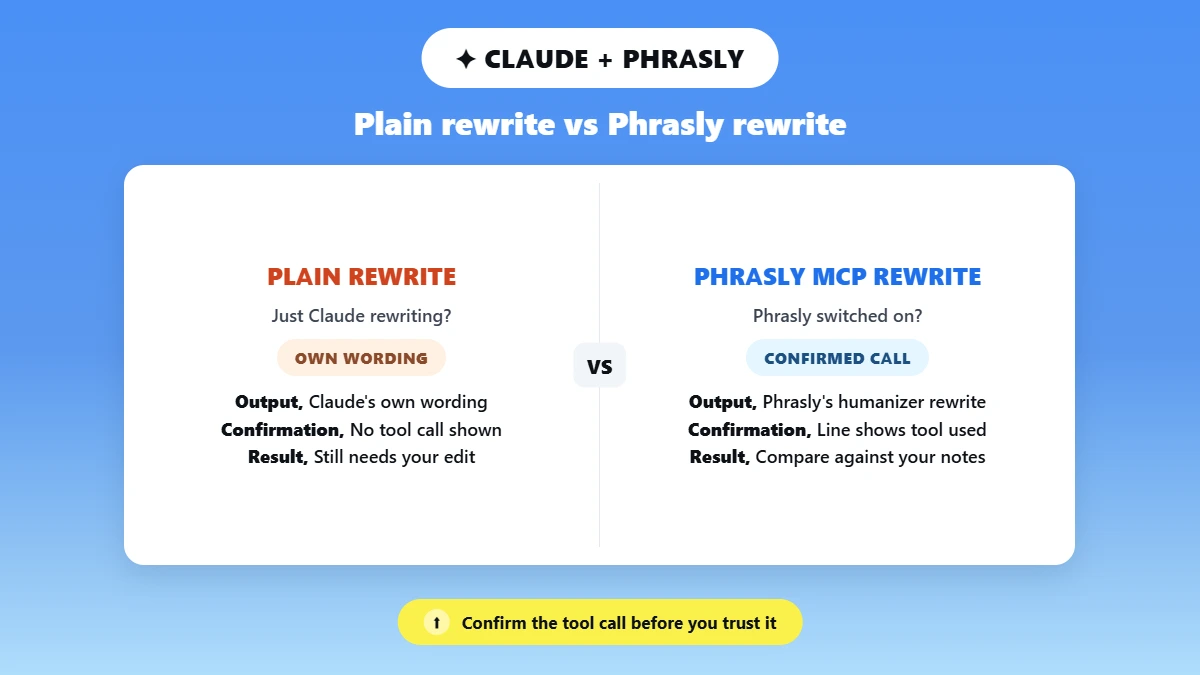
You can humanize a cold email without leaving Claude by connecting Phrasly MCP, switching it on in your chat and asking Claude to use Phrasly on the draft. The rewrite comes back in the same conversation. Then compare it with your notes, so the prospect's name, the trigger, the offer and the CTA all match what you wrote.
Phrasly MCP is Phrasly's server for the Model Context Protocol, an open-source standard that lets AI tools such as Claude connect to outside services. The server gives Claude three Phrasly tools:
✍️ humanize_text rewrites AI-sounding text, and this workflow uses it.
🔎 detect_ai_text scores text with Phrasly's AI detector. The score is optional here and tells you nothing about relevance or reply odds.
📊 get_account_status shows your remaining words, current plan and daily usage.
What Changes When Claude Uses Phrasly Instead of Its Own Rewrite?
A plain "rewrite this" request returns Claude's own wording. When Phrasly is switched on and named in your prompt, Claude sends the draft to Phrasly's humanizer and shows you the version Phrasly returns. A line such as "used Phrasly MCP integration" appears above the reply, so you can confirm the call ran and never mistake a normal Claude rewrite for Phrasly output.
💡 What You Get With Phrasly MCP
• Free and paid Phrasly accounts can connect, and a free account humanizes with its free word balance.
• A 3-day trial gives you 1,000 words to try it on real drafts.
• Paid plans and trials run Phrasly Ultra, Phrasly's newer humanizer model.
• The Unlimited plan covers up to 50,000 words a day through Claude.
• Every rewrite saves to your Phrasly document history, so you can reopen it in the editor.
How Do You Connect Phrasly MCP to Claude?
Phrasly MCP connects to Claude in four steps, and the full Phrasly Claude setup guide also covers Claude Code and ChatGPT.
In Claude, open Settings, choose Connectors under Customize, click + Add and select Add custom connector. On Team and Enterprise plans, this option asks an organization owner to add the connector, so the owner adds it once for the whole team.
Name the connector Phrasly and paste
https://phrasly.ai/api/mcp. Leave the OAuth Client ID and Secret blank and click Add. Then click Connect, sign in to Phrasly and approve access.In your chat, click the + button, open Connectors and switch Phrasly on.
Send Prompt B below. The first time, Claude asks permission to use Phrasly's Humanize text tool, and you can choose Allow once or Always allow.
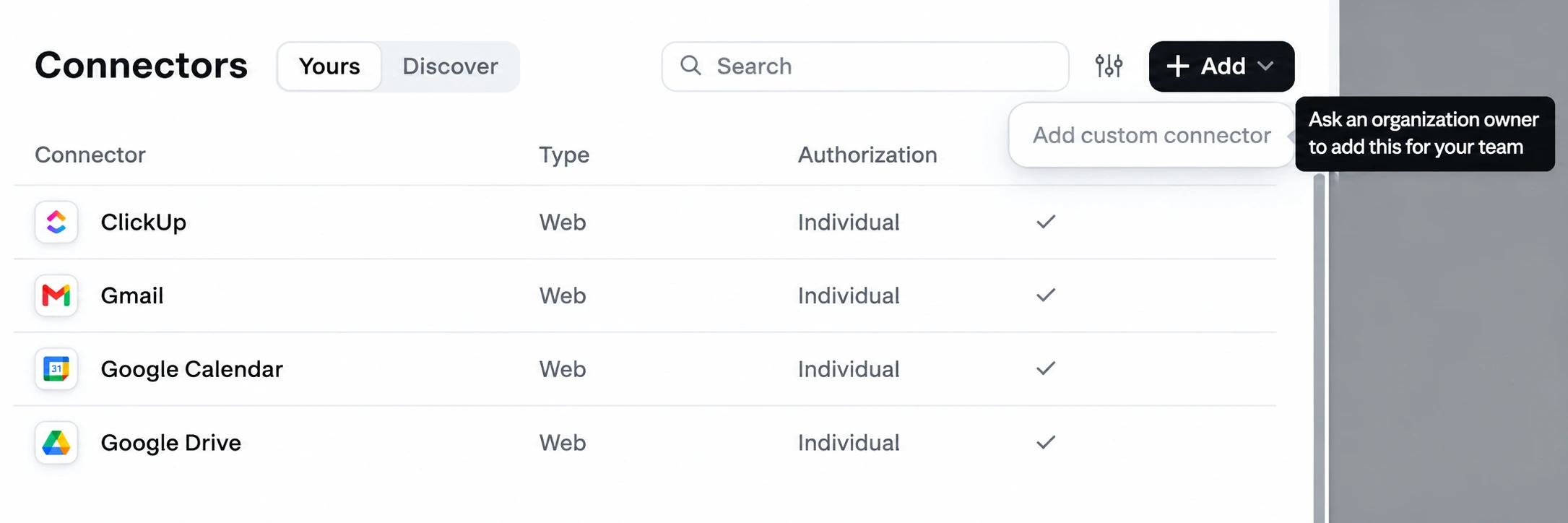
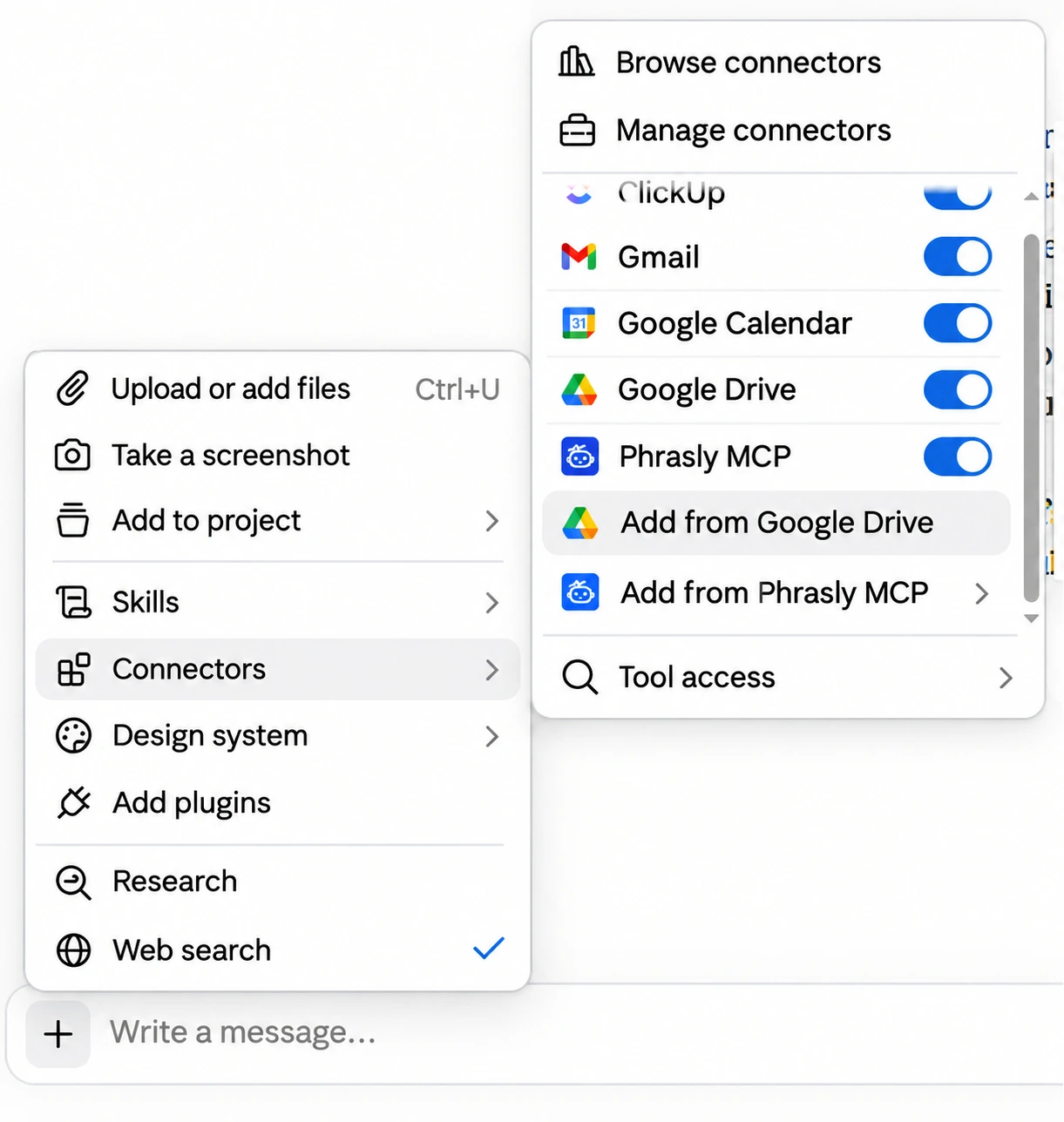
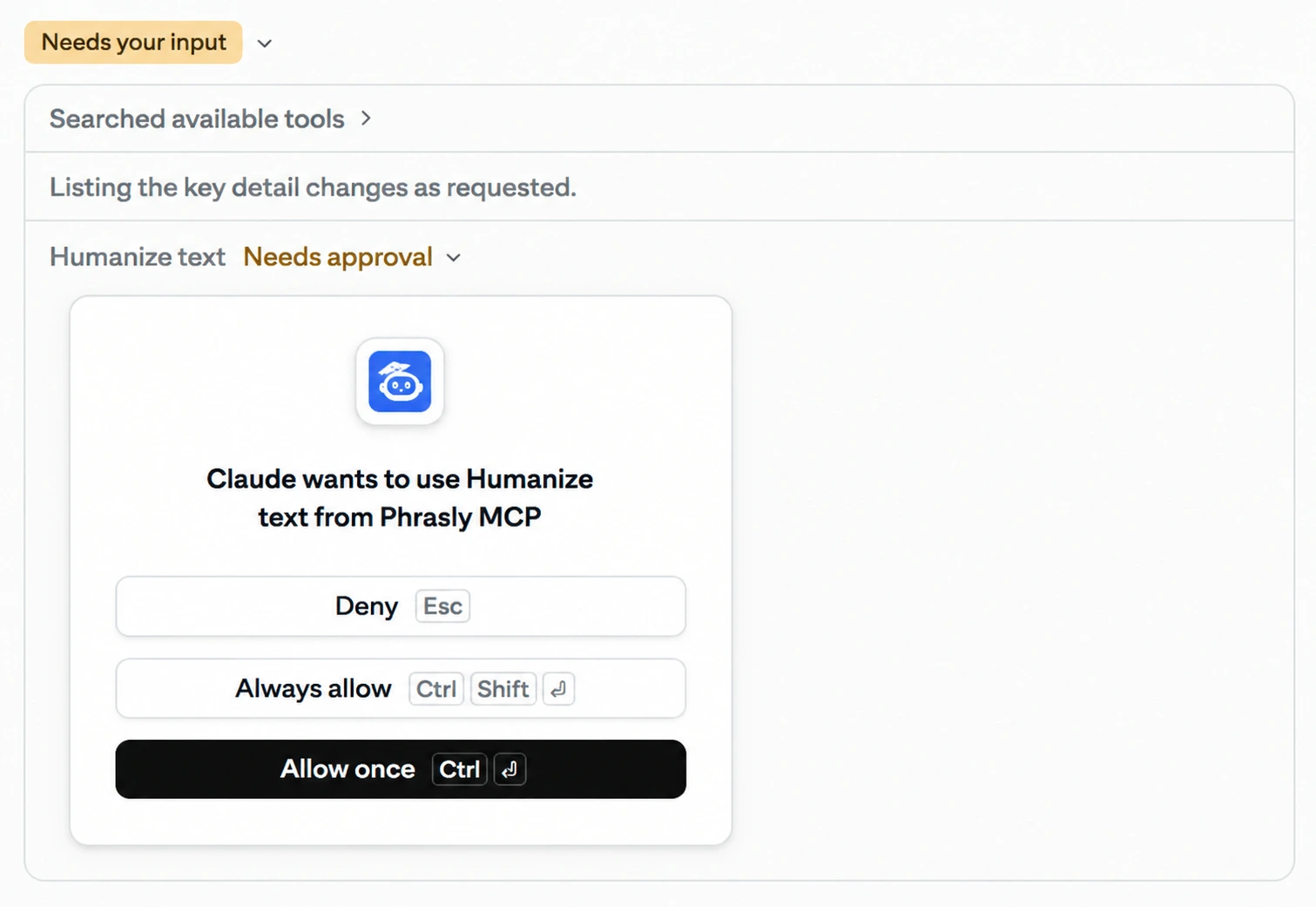
Phrasly needs at least 30 words to humanize a passage, so a 50 to 80 word cold email clears that minimum.
Which Claude Plans Can Add Custom Connectors?
As of October 2026, Anthropic's connectors help article lists custom connectors on Free, Pro, Max, Team and Enterprise plans, with Free plans limited to one custom connector. Check that article before you set up, because plan access can change.
💡 Keep Your Trigger Line and CTA as You Wrote Them
Phrasly's humanizer rewrites the whole text it receives, so a keep-unchanged line in your prompt can't lock a detail in place. Phrasly's own October 2026 test in best MCP servers for writers saw a quotation and a timeframe reworded this way. End every run with Prompt C, which puts your fixed lines back and keeps Phrasly's new wording everywhere else.
What Happened When We Ran Claude Cold Emails Through Phrasly MCP?
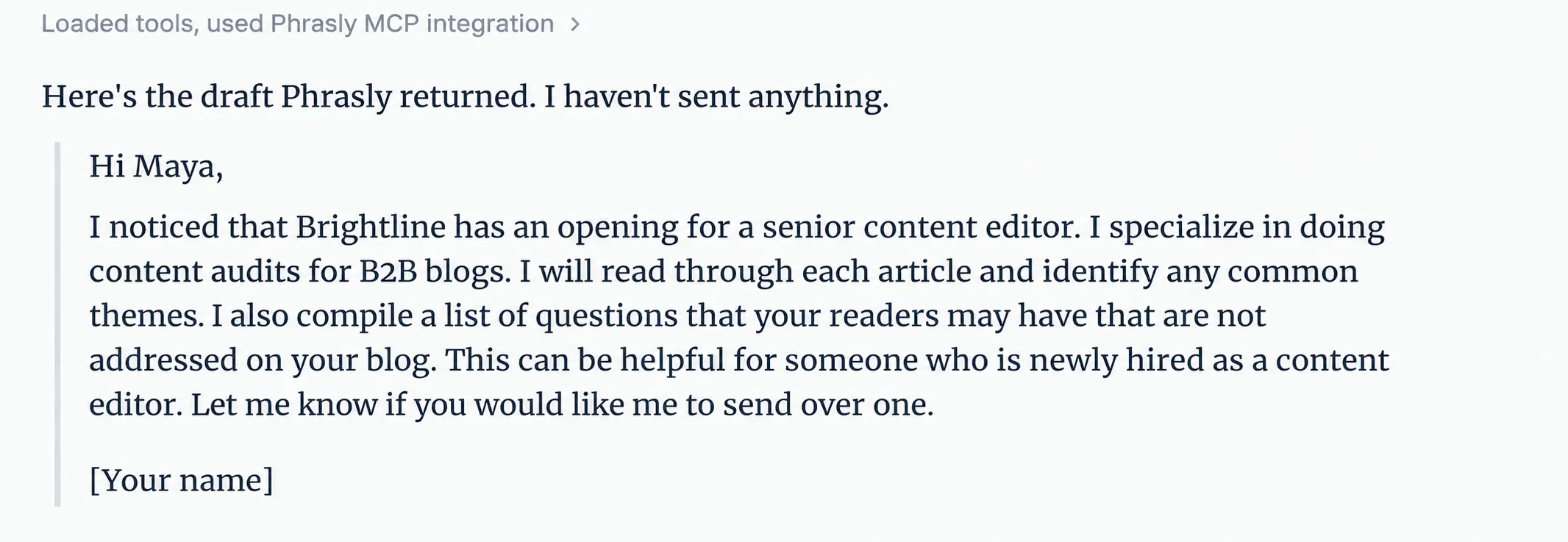
Claude wrote 10 accurate drafts, but most of them opened the same way and reused lines from our voice sample. Phrasly MCP gave three of them a more conversational tone and kept every prospect name and date. It also reworded each CTA, and one follow-up prompt in Claude put them back.
🧪 How We Ran the Test
• Claude: Claude.ai on a Team plan, Opus 5.5
• Phrasly: Unlimited plan, Phrasly Ultra on its default Balanced mode
• Date: October 2026
• Prospects: 10 fictional records with made-up names, companies and dates
• Prompts: Prompt A for all 10 drafts, Prompt B on three of them, then Prompt C
• Sending: none of the emails were sent, so the test says nothing about replies
The 10 drafts ran from 51 to 67 words, and Claude added no facts we hadn't given it. We ran three drafts through Phrasly: a typical one, the longest one and the one with the weakest trigger.
Claude's change list from Prompt B caught every detail Phrasly reworded, so we always knew what to restore.
📨 Sample 1: A Typical Draft With a Hiring Trigger
Version | |
|---|---|
Claude draft | Hi Maya, I saw on Brightline's careers page that you're hiring a senior content editor. I run content audits for B2B blogs. I read every post, note where topics overlap, and list the questions readers ask that the blog never answers. A map like that could give a new editor a clear starting point. Would you like to see a sample audit? [Your name] |
Phrasly MCP return | Hi Maya, I noticed that Brightline has an opening for a senior content editor. I specialize in doing content audits for B2B blogs. I will read through each article and identify any common themes. I also compile a list of questions that your readers may have that are not addressed on your blog. This can be helpful for someone who is newly hired as a content editor. Let me know if you would like me to send over one. [Your name] |
Final edit | Hi Maya, I saw on Brightline's careers page that you're hiring a senior content editor. I do content audits for B2B blogs. I can read through each article and identify any repeated topics. I also compile a list of questions that your readers may have that are not addressed on your blog. This can be helpful for someone who is newly hired as a content editor. Would you like to see a sample audit? [Your name] |
What changed | Phrasly kept Maya's name and the role and made the offer sound more conversational. It dropped the careers page and turned the CTA into a statement, so Prompt C restored both lines and changed "specialize in doing" back to "do." |
📨 Sample 2: The Longest Draft With a New-Guide Trigger
Version | |
|---|---|
Claude draft | Hi Omar, I saw Tidewell's 2026 guide to small-business loans on your blog, published October 8. When a big guide goes live, it's useful to see how it sits alongside the rest of the blog. I run content audits for B2B blogs: I read every post, note where topics overlap, and list the questions readers ask that the blog never answers. Would you like to see a sample audit? [Your name] |
Phrasly MCP return | Hi Omar I was on your blog today and came across Tidewells article about small business loans for 2026 which was posted on the 8th of Oct. Once you have a large article out it can be helpful to compare what your current blog has to offer. I do audits on b2b blogs i go through all the articles and find similar topics as well as what people want answered that you may not cover on your blog. Let me know if you would like an example. [Your Name] |
Final edit | Hi Omar, I saw Tidewell's 2026 guide to small-business loans on your blog, published October 8. Once you have a large article out, it can be helpful to compare what your current blog has to offer. I do content audits on B2B blogs. I go through all the articles and find similar topics, as well as what people want answered that you may not cover on your blog. Would you like to see a sample audit? [Your name] |
What changed | Phrasly kept Omar's name and the October 8 date and gave the email a casual tone. It added "I was on your blog today" and skipped a few commas and capitals, so Prompt C restored our trigger line and CTA and cleaned up the punctuation. |
📨 Sample 3: The Weakest Trigger, a LinkedIn Like
Version | |
|---|---|
Claude draft | Hi Sofia, Thanks for liking one of our LinkedIn posts on October 5. In case it's useful for Larkspur: I run content audits. I read every post on a company blog, note where topics overlap, and list the questions readers ask that the blog never answers. Would you like to see a sample audit? [Your name] |
Phrasly MCP return | Hi Sofia, I noticed that you liked our post on linkedin on October 5. Here is something you may find helpful for Larkspur. I do content audits for my clients. I will go through your entire blog and pick out where you are writing about similar topics and what your audience is asking questions that you are not answering on your blog. I can send you an example if you'd like. [Your name] |
Final edit | Hi Sofia, Thanks for liking one of our LinkedIn posts on October 5. Here is something you may find helpful for Larkspur. I do content audits. I can go through your entire blog and pick out where you are writing about similar topics and the questions your audience is asking that you are not answering on your blog. Would you like to see a sample audit? [Your name] |
What changed | Phrasly kept Sofia's name and the date and gave the offer a friendlier opening. It added "for my clients" and reworded the CTA, so Prompt C removed the added phrase, restored the thanks and the CTA, and fixed one sentence. |
Outputs captured in October 2026 with fictional prospect data. Claude and Phrasly can word things differently on each run, and plans and prices can change, so check the live pages before you rely on them.
Claude fixed the rest, and we made the last two word changes ourselves:
In Maya's email, "common themes" became "repeated topics," because the audit looks for topics the blog covers more than once.
In Omar's email, "audits" became "content audits," because the email should name the service in full.
All three final emails ran 64 to 74 words, still inside the 80-word guide from Step 4.
Want the same check on your own outreach? Humanize cold email drafts with Phrasly's Claude connector, then compare the return with your notes before you send. 👇
Which Prompts Keep a Cold Email Specific?
Three prompts keep a cold email specific: one drafts only from verified context, one sends the draft through Phrasly and lists what changed, and one restores the lines you need to keep. Each prompt names what must not change and tells the AI to ask, rather than guess, when a detail is missing. These are the prompts we used in the test.
📝 Prompt A: Draft in Claude From Verified Context
For each prospect below, draft one short cold email using only the context I give you. Each record includes the recipient and role, a verified trigger with its source and date, our offer, permitted proof and the next step. My voice sample: [two or three sentences of your own writing]. Keep each email between 50 and 80 words. Skip generic praise and jargon. Do not invent facts, numbers, familiarity or results. If a detail is missing, ask me before you write. Prospects: [paste records]
Prompt A puts the task, the context and the limits in one message, and our guide to writing better prompts for Claude explains how to adapt that structure for other tasks.
🔄 Prompt B: Run the Draft Through Phrasly
Prompt B sends the draft to Phrasly and asks Claude to list every change to your protected details, so you see at once what to restore.
Use the connected Phrasly humanize tool on the cold email below. Keep the names, trigger, numbers, offer and CTA unchanged. Show the returned draft separately, then list any changes to those details so I can review them. Do not send anything. Draft: [paste email]
🛠️ Prompt C: Fix What the Rewrite Changed
Go back to the Phrasly return in this chat. Make a final edit: restore my original trigger line and call to action, remove any detail that was not in my original draft, and fix any grammar slips. Keep the rest of Phrasly's wording. Show the final email, then list what you changed. Do not run Phrasly again and do not send anything.
Prompt C keeps Phrasly's new tone and returns only the lines you fixed in advance. For essays, articles and other non-sales writing, our collection of prompts to humanize AI text covers general rewriting prompts.
How Do You Keep 30 Cold Emails From Sounding Identical?
Thirty cold emails stay distinct when each one gets its own verified trigger and its own line on why the offer fits, while tone, length and sign-off stay the same. Review the batch in small groups and rewrite any opener that keeps repeating.
In our test, 7 of 10 Claude drafts opened with "I saw," and 8 of 10 reused a sentence from our voice sample almost word for word. A voice sample shows Claude your tone, and Claude may also copy its sentences, so ask for new wording on any email that repeats a line.
📬 Follow-Ups in a Sequence
• Refer back to the offer from your first email.
• Add one new piece of value, such as a relevant example or resource.
• Keep the ask as small as the first one.
Each Phrasly rewrite draws on your word balance, so ask Claude for your account status before you work through a long list. Teams that need one voice across several writers can compare editing options in our roundup of AI tools that keep brand voice.
Have a full prospect list to work through? Set up the Phrasly MCP server for sales outreach and keep every rewrite, and its history, in one place. 👇
What Should You Check Before Sending a Cold Email?
Before you send a cold email, confirm that the trigger is accurate and dated, every name and number matches your notes, and the email asks for one clear thing. Humanized wording can't fix sender reputation, email authentication or list quality.
📋 Pre-Send Checklist
• ✅ A verified trigger with its source
• ✅ Names, numbers and dates that match your notes
• ✅ An offer you can deliver and proof you can back up
• ✅ One small, clear request
• ✅ A voice that sounds like you, with no false familiarity
• ✅ A short body with no repeated points
• ✅ An honest subject line, accurate sender details and an opt-out where required
In the US, the FTC's CAN-SPAM compliance guide says the law "makes no exception for business-to-business email." Commercial emails need accurate header details, a subject line that matches the content, a valid physical postal address and a clear way to opt out. Rules differ by country, and this is general information, not legal advice.
Judge real outreach by relevant replies and qualified conversations, because a detector score can't show whether a prospect cares about your offer. Our self-editing workflow for copywriters adds a final read-through that suits outreach too.
Phrasly MCP removes the copying and pasting between Claude and a separate humanizer, and Prompt C turns its rewrite into an email you can stand behind. You still choose the reason to write and confirm every fact. Keep your prospect notes open while you edit, and send only what you can back up line by line.
FAQs
How Do I Humanize AI-Generated Cold Emails?
Start with the context a person would use: one verified reason to contact the prospect and one offer that fits it. Add a short sample of your writing so the tone matches yours. Then trim stock phrases, close with a single small request and verify each detail before you send.
Can I Humanize a Cold Email Without Leaving Claude?
Claude can send your draft to Phrasly's humanizer once you add Phrasly MCP as a custom connector and switch it on in the chat. Confirm that the tool call appears, then check the returned wording against your original notes before you send.
Can AI Personalize Cold Emails Better Than Humans?
AI can't personalize cold emails better than humans on its own. It organizes the context you give it and suggests wording quickly, but personalization depends on accurate research and a fitting offer. A person still decides whether a detail matters and whether each claim holds up.
How Long Should an AI Cold Email Be?
Aim for about 50 to 80 words in a first cold email, and adjust for clarity. Instantly reports that its top senders kept first-touch emails under 80 words on average in 2025, though one platform's data isn't a fixed rule.
Is Phrasly MCP Free to Use?
A free Phrasly account can connect to Claude and humanize drafts with its 300-word free balance. A 3-day trial adds 1,000 words, and the Unlimited plan covers a full prospect list. Your Claude plan separately decides whether you can add a custom connector.
Will Humanizing a Cold Email Improve Replies or Deliverability?
No rewrite can promise more replies or better inbox placement. Clearer, more relevant wording may help, but deliverability depends on sender reputation, authentication and list quality. Measure results with a real campaign test.
Should I Humanize the Subject Line Too?
The subject line needs the same edit as the body: short, specific and honest about what the email contains. Skip hype words and fake "Re:" prefixes. Our guide on how to make AI emails sound human covers subject lines in more depth.
What If I Don't Draft Cold Emails in Claude?
The six editing steps work in any AI tool. Phrasly MCP also connects to ChatGPT through Developer mode and to other MCP clients, or you can paste a draft into Phrasly's AI Humanizer. Our review of the best AI humanizer for email marketing compares tools side by side.

Written by
Alina Shah
SEO Content Specialist · Karachi, Pakistan
She writes about AI so you don't have to guess. 8+ years in content strategy and editing. Now she puts AI writing tools and detection systems through real tests and shares what actually works.