75+ Best ChatGPT Prompts for Professionals (That Actually Get Results)
25 min read
A great professional prompt for ChatGPT tells it five things. The task, the work context, who the output is for, any limits, and the format you want back. Miss those, and you get generic filler. Bad input, bad output.
Below are 80 copy-and-paste ChatGPT prompts for professionals. Prompts are grouped by the work you actually do. Writing, email, meetings and project updates, IT, resumes and career, marketing and SEO, content and social, business strategy, research, and images.
Every prompt has [bracketed] placeholders. Swap those for your own details before you run it. Most take under a minute to adapt.
Have a work task that is not on this list? Describe it in one sentence and get a ready-to-use ChatGPT prompt.
Find a Professional ChatGPT Prompt for Your Task
Jump straight to the professional ChatGPT prompts for the job in front of you.
I need to... | Jump to | You'll get |
Write a blog post, bio, or LinkedIn article | Writing | Drafts, outlines, bios |
Email a client, follow up, or say no politely | Ready-to-edit emails | |
Run a meeting or update my manager | Meetings and Project Updates | Agendas, decision memos, handovers |
Handle an outage or write a postmortem | IT Professionals | Incident summaries and updates |
Fix my resume or prep for an interview | Resume and Career | Resumes, cover letters, mock interviews |
Plan SEO, ads, or social posts | Marketing / Content and Social | Briefs, keyword groups, captions |
Make a business decision | Business Strategy | SWOT, personas, risk lists |
Summarize a long report | Research | Summaries and takeaways |
Make a slide visual or edit a product photo | Image Prompts | Visual and photo-edit prompts |
What Makes a Great ChatGPT Prompt?
A professional prompt is a clear work request. It gives ChatGPT a goal. The facts it needs and who the output is for. The limits to follow and the format you want back. Adding "flag anything missing instead of guessing" makes the answer easier to trust.
And faster to check.
A good ChatGPT prompt is a combination of role, context, task, and format. It provides AI with a clear understanding of what you want. It explains why you want it and how you want it presented.
Role: It tells ChatGPT who it should "be" for the task.
Context: This gives ChatGPT background information about the situation, audience, or problem.
Task: Here, you specify exactly what you want ChatGPT to do.
Format: Indicate how you want the results structured. Bullet points, paragraphs, tables, or step-by-step instructions.
Tip: Tell ChatGPT what to do when information is missing. A good prompt, professional or casual, starts with the goal.
OpenAI's own prompt engineering best practices make the same point. Be clear and specific. Give context, and say what you want back.
Here is the difference in practice.
Weak: Help me prepare for a client meeting.
Strong: I have a 45-minute renewal meeting with [client name] on [date]. They raised [issue] last quarter, and it is still open. Write me a one-page prep sheet with: their likely concerns, three questions I should ask, two objections and how to answer them, and the one outcome I should push for. Use only the details I gave you and mark anything missing as "not provided."
Types of Prompts in ChatGPT
Here are five types of prompts that you can use.
Instructional: Give direct commands.
Zero-shot: Rely only on your instructions with no examples.
Few-shot: Contain sample outputs. Guide the AI in staying consistent.
Conversational: Prompt the AI to provide iterative responses.
System: Establish the tone, role, or behavior of the AI at the beginning.
Tips for Creating Effective Prompts
Clearly describe the AI's role and target audience.
Define the task and format.
Provide examples when needed.
Use specific, natural language input to improve output.
Does the "3-Word Rule" Work? When Adding a Role Helps
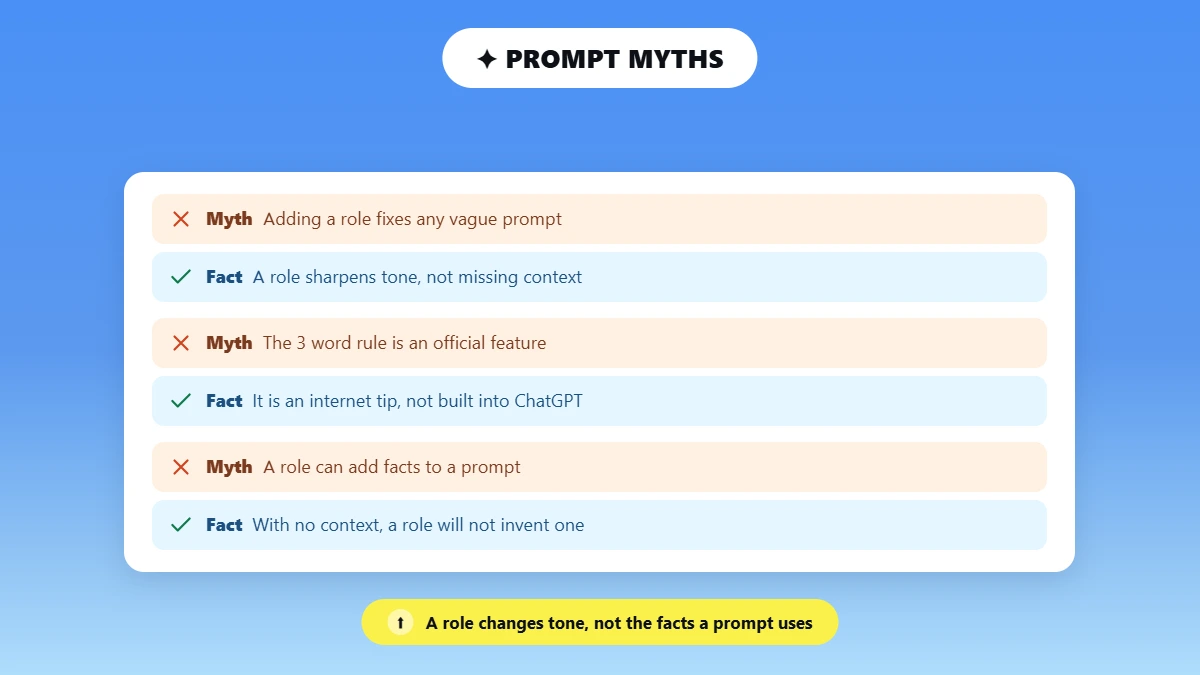
The "3-word rule" is an internet tip. Not an official ChatGPT feature. It means adding a short role like "act as an editor." A role can sharpen tone and vocabulary. But it works best alongside real context, the audience, and the format you want.
On its own, a role rarely fixes a vague prompt.
The demos below show the difference a role makes. Notice that in each one, the role is doing tone work. Not fact work. If the prompt has no context, a role will not invent it.
Prompt with the 3-Word Rule
Prompt: Write tips for improving a blog post; act like an SEO expert.
Output: ChatGPT provides more targeted advice such as optimizing title tags, improving keyword placement, adding internal links, writing meta descriptions, improving page structure with H2 and H3 headings, and optimizing for search intent.
Prompt Without the 3-Word Rule
Prompt: Write tips for improving a blog post.
Output: ChatGPT may give very general advice like improving readability, adding headings, using keywords, and writing clear sentences. The suggestions are helpful but somewhat generic.
Zero-Shot Vs. Few-Shot Prompting: What Professionals Should Know
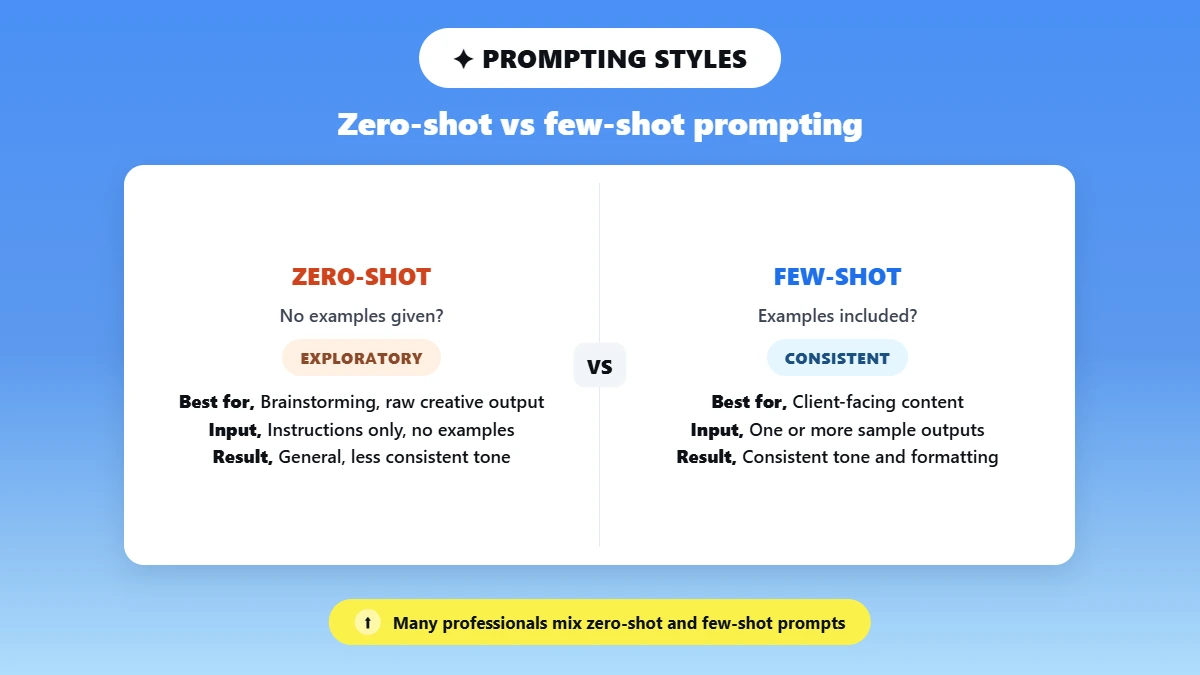
Zero-shot prompting has ChatGPT write output based purely on the instructions you provide. No examples. This is best for exploratory or raw creative output.
Few-shot prompting provides one or more examples. Examples of how you would like the AI to output data. This encourages consistency, tone adherence, and professional formatting.
Many professionals mix the two. Use zero-shot for brainstorming but few-shot for client-facing content.
Quick Tips for Using Zero-Shot and Few-Shot Prompts
Use simple, direct language. Don't be ambiguous.
Combine zero-shot and few-shot examples together for optimal performance.
Use system prompts to set the tone and style for consistent output.
Experiment and iterate on your prompts to improve results.
How to Prompt ChatGPT Like a Pro: 5 Quick Upgrades
To prompt ChatGPT like a pro, go past the basic request. Tell it what to do when information is missing. Show a sample of your style. Set the length and format, ask for a few versions, and let it ask you questions first. These upgrades work on every ChatGPT plan, free or paid.
Say what to do when facts are missing. Add: "If a deadline or owner is missing, write 'not provided' instead of guessing." This is the fastest way to make output safe to use at work.
Show your style. Paste two or three sentences you have already written and say: "Match this voice." Describing a tone is weaker than showing it.
Set length and format. "120 words, four labeled bullets" beats "keep it short" every time.
Ask for options. "Give me three versions: formal, friendly, and short." You pick rather than re-prompt.
Let it ask first. "Ask me up to three questions before you start." Useful when the task is fuzzy. And you would rather answer questions than rewrite a bad draft.
One more: Save your role, audience, and style once in Settings > Personalization (custom instructions). So you do not retype them in every chat.
For the deeper version of all this, see this guide to prompt optimization techniques.
These ChatGPT pro prompts are about technique. Not a paid plan: "pro" here means pro-level prompting. Every prompt on this page works on ChatGPT Free. Want these built in for you? Use the generator at the top.
75+ Best ChatGPT Prompts for Professionals
Below are 80 professional prompts across ten categories. Writing, email, meetings and project updates, IT, resume and career, marketing and SEO, content and social, business strategy, research, and images.
They also work as professional AI prompts in Claude and Gemini. With small tweaks.
These are real, professional-use prompts. Not lifestyle prompts.
For non-work tasks, see this wider set of AI prompt examples.
Best ChatGPT Prompts for Writing
Clear, powerful writing shouldn't take hours. These prompts help you create polished, professional content quickly. Organized by use case so you can find exactly what you need.
Blog Posts and Articles
Write a detailed 1,200-word SEO article discussing [Topic]. Focus on innovative and actionable insights. Use short paragraphs and provide real-world examples.
Generate a list of 5 engaging blog post ideas tailored for a [X]. Each idea should specify the search intent behind it, identify the target audience, and include varying headlines. Focus on topics that resonate well within the [industry].
Write a detailed blog outline on [Topic]. The outline should include H2 sections, key talking points under each section, and relevant statistics to reference throughout the blog.
Short-Form Copy
Short copy is where tone matters most. If you want to see it done well, these copywriting examples and AI writing tips are a good starting point.
Write 5 engaging LinkedIn captions, each under 150 characters, promoting the benefits of workflow automation tools for B2B teams. Highlight efficiency, collaboration, and results.
Customer Product Update Prompt: Write a 3-sentence product update for our customers about [new feature]. Lead with what it does for them, explain what changes in their day-to-day, and end with one clear next step. No hype words.
Generate 5 concise ad copy options for a consulting firm. Focus on highlighting the benefits of ROI and time savings in each option to attract potential clients effectively.
Thought Leadership Content
Draft a 1,000-word LinkedIn article exploring [Topic]. Discuss specific examples. Include actionable insights for professionals.
Write a 600-word opinion piece on the [Topic], adopting an authoritative and practical tone. Discuss the benefits and challenges, and provide actionable insights. Highlight the trends and innovations.
Generate a thought leadership outline on the [Topic]. Include key arguments. Support these arguments with points and real-world examples. Consider discussing potential challenges and ethical considerations as well.
How to Stop ChatGPT from Sounding Like a Bot?
ChatGPT sounds like a bot when the prompt gives it nothing human to work with. Name the voice you want. Show a sample of your own writing. Ban the words you hate and ask for one concrete example per section.
Then edit the output yourself.
This guide to prompts that make AI writing sound human goes further.
Define your parameters upfront:
Writing style and tone
Sentence length and structure
Target audience
Voice (formal, conversational, authoritative, and so on)
Tell ChatGPT what to avoid:
Typical AI phrasing
Overused transition words
Stiff, overly formal language
Use advanced techniques for better results:
Insert examples of the style you want (few-shot prompting)
Assign a role, like a senior editor or industry expert, to shape the output
Iterate once or twice after the first draft to improve realism
Natural-Sounding Article Prompt: Write a 1,200-word article on [topic] for [audience]. Use short, punchy sentences and a [conversational / expert] voice. Avoid words like "delve," "tapestry," and "in today's fast-paced world." Give one real example per section. Here is a paragraph in the style I want: [paste sample].
Here's what we changed:
Defined the voice (expert, conversational, executive).
Kept sentences short and simple.
Requested real examples and specific insights.
Included "avoid generic phrases" as an instruction.
Prompt for Writing a Professional Bio
Write a 150-word professional bio for a [job title] working in [industry]. Highlight key achievements, years of experience, core skills, and measurable results. Keep the tone confident, concise, and suitable for LinkedIn or company website use. Include one sentence about personal values or leadership style.
Prompt for Writing a LinkedIn Article
LinkedIn Article from Your Notes Prompt: Turn my notes below into a 1,000-word LinkedIn article for [industry] professionals. Keep my opinions and examples, add clear subheadings, open with a hook taken from my notes, and end with one question for readers. Don't add statistics I didn't give you. Notes: [paste notes].
Best ChatGPT Prompts for Email and Professional Communication
These ChatGPT email prompts cover the messages that take the longest to write. Client updates, follow-ups, saying no, and bad news. Using structured prompts, you can keep quality consistent. And save time across all your client communication.
Client Emails
Write a professional client email explaining project progress, key milestones completed, and next steps. Keep it concise and reassuring.
Draft a friendly and professional client onboarding email that clearly outlines expectations, establishes a timeline for the onboarding process, and specifies the communication channels we will use throughout our engagement.
Deadline Slip Email Prompt: Write a short email to [client name] explaining that [deliverable] will be [X days] late because [reason]. Take responsibility without over-apologizing, give the new date, say what we're doing to prevent more delays, and offer one option if the new date doesn't work. Under 150 words. Tone: calm and professional.
Follow-Ups
If you send a lot of these, these follow-up email templates cover the timing as well as the wording.
Write a polite follow-up email after a meeting, summarizing the key action items discussed and their respective deadlines. Ensure the message is clear, actionable, and fosters accountability among the recipients.
Write a follow-up email for an unanswered proposal, maintaining a professional tone while including a gentle call to action. The email should express appreciation for the recipient's time, briefly reiterate the proposal's key benefits, and encourage a response.
Saying No Professionally
Write a professional email to gracefully decline a project due to capacity constraints, ensuring the message maintains a positive tone and preserves the relationship for potential future collaborations.
Draft a professional response to a deadline extension request, clearly communicating the decision to deny the request while also providing an alternative solution that could help the requester meet the original deadline.
Internal Communication
Write an internal update email summarizing weekly team progress, identifying any blockers encountered, and outlining the priorities for the upcoming week. Include specific achievements, areas that need attention, and any resource requirements.
Create a Slack announcement message to inform the team about a change in process. Ensure the message is clear and concise, highlighting the key details of the change and the reasons behind it. Encourage team members to reach out with any questions.
Make Any Message Sound Professional
One prompt handles most of these. For the full treatment, see Make Any Message Sound Professional.
Make This Professional Prompt: Rewrite the message below so it sounds professional but still friendly. Keep my meaning and every fact the same, remove anything that sounds rude or emotional, and keep it about the same length. Then give me one shorter version. Message: [paste your message].
ChatGPT Prompts for Meetings and Project Updates
ChatGPT is most useful for meetings before and after the call. Building a tight agenda. Turning messy notes into a decision memo. Writing a kickoff brief and handing work over cleanly.
Paste your own notes. Tell ChatGPT to mark any missing owner or deadline instead of filling it in.
Meeting Agenda Prompt: Create a [30]-minute meeting agenda for [meeting purpose] with [attendees and roles]. Include time blocks, the decision we need to make, who leads each item, and 2 questions people should think about before the meeting. Format it as a short table.
Decision Memo Prompt: Turn the notes below into a one-page decision memo for [decision maker]. Include the decision needed, 2 to 3 options with pros and cons, my recommendation, the risks, and the deadline to decide. Use only the facts in my notes and mark anything missing as "not provided." Notes: [paste notes].
Project Kickoff Brief Prompt: Write a project kickoff brief for [project name]. Include the goal, what's in and out of scope, team roles, key milestones, known risks, and how we'll communicate. Keep it under 300 words so the team can read it in two minutes. Details: [paste details].
Handover Note Prompt: I'm handing over [project or task] to [colleague] while I'm away [dates]. From the notes below, write a handover note with current status, open tasks with owners and deadlines, key contacts, and anything that could go wrong. Flag any task that has no owner. Notes: [paste notes].
ChatGPT Prompts for IT Professionals
The most useful ChatGPT prompts for IT professionals turn raw technical notes into clear writing. Incident summaries, a stakeholder update for non-technical teams, runbook and help-desk notes, postmortems, script explanations, and help-desk articles.
Paste only cleaned and non-sensitive details. Ask ChatGPT to separate what you saw from what it suspects.
Before you paste anything: In a normal chat, ChatGPT only works with what you type or upload. So it has no access to your systems. Strip passwords, API keys, customer data, and internal IP addresses first.
Follow your company's AI policy.
OpenAI Academy has a useful set of IT use cases if you want more.
Incident Summary Prompt: Act as a senior [IT support / SRE] engineer. Using only the cleaned log excerpt and notes below, write an incident summary with: what users are seeing, when it started, systems affected, what we've ruled out, likely causes (labeled as hypotheses), and the next 3 checks to run. Don't invent details. Write "unknown" where the data doesn't say. Notes: [paste non-sensitive details].
Outage Update for Non-Technical Teams Prompt: Write a status update about [incident] for [leadership/customers/all staff]. Use plain language with no jargon. Include what's affected, who is impacted, what we're doing now, any workaround, and when the next update will come ([time]). Don't promise a fix time unless I give you one. Under 120 words.
Blameless Postmortem Prompt: Draft a blameless postmortem for [incident name] from the timeline and notes below. Sections: summary, impact, timeline, root cause and contributing factors, what went well, what didn't, and action items in a table with owner and due date. Mark any gaps in the evidence as "needs confirmation." Notes: [paste timeline].
Explain a Script Prompt: Explain what this [Bash / PowerShell / Python] script does, line by line, for a junior IT admin. Then list any risky actions (like deleting files or changing permissions), what could fail, and how to test it safely first. Script: [paste script with secrets removed].
Help-Desk Article Prompt: Write a help-desk article that shows non-technical staff how to [task, for example, connect to the VPN on a Windows laptop]. Use numbered steps with one action per step, a short "before you start" checklist, and an "if this doesn't work" section. Keep the language simple. Our internal steps: [paste steps].
Need a prompt for your exact stack? Describe it in the generator at the top.
Best ChatGPT Prompts for Resume and Career Growth
Writing a solid resume and career profile takes time. These prompts speed up the draft. So you can spend your time on the parts only you can write.
Recruiters care far more that a resume is accurate and specific than how it was drafted. Edit every output. So it reflects your real experience, in your own words, with numbers you can defend in an interview.
Interview Prep Prompt (ChatGPT Career Coach Prompt): Act as a hiring manager for a [job title] role at a [company type]. Ask me 8 interview questions one at a time, mixing behavioral and role-specific questions. After each answer, score it out of 10, explain what was missing, and show a stronger version that uses only my real experience.
Resume Writing from Scratch
Generate a professional resume for a mid-level marketing manager with 5 years of experience. The resume should highlight key achievements, core skills, and measurable results in a clear and concise manner. Ensure the format is compatible with ATS.
Tips for best results:
Specify the job role and industry for tailored content.
Include achievements with numbers wherever possible.
Ask ChatGPT to format for ATS so the ATS can read it easily.
Review and personalize the generated output to fit your personal style and experience.
Resume Tailoring for Specific Jobs
Generate a resume tailored for a Project Manager position that emphasizes leadership capabilities, successful project delivery, and relevant certifications. Ensure you incorporate key ATS keywords related to project management.
Rewrite a software engineer resume for a data analyst role. The resume should highlight relevant technical skills such as data visualization, statistical analysis, and knowledge of programming languages like Python and SQL.
Cover Letter
Worth reading first: whether hiring managers check for AI in cover letters.
Create a professional cover letter for a marketing role that highlights the candidate's strong fit for the position. Include specific examples of relevant achievements. Emphasize the candidate's enthusiasm for working with the company.
Create a concise cover letter for an IT support position, highlighting your problem-solving abilities, technical expertise, and focus on client satisfaction. Emphasize specific examples of how you've resolved technical issues and improved user experiences.
LinkedIn Optimization
Generate a LinkedIn summary for a senior consultant that highlights key achievements, showcases leadership experience, and emphasizes industry expertise. The summary should convey professionalism and the value brought to clients or organizations.
Generate 5 LinkedIn headline options for a software developer aiming to target AI and data science roles. Focus on showcasing expertise, skills, and passion for technology, while also highlighting the impact they wish to make in the field.
How to Make Your AI-Generated Resume Pass an ATS?
An ATS reads text. Not design. Use a single-column layout. Standard section headings like Experience and Education, a common font, and no text inside images, tables, or headers.
Mirror the exact job title and key terms from the posting. And save as .docx unless the employer asks for PDF.
Include Relevant Keywords: Pull terms from the job description. Including skills, certifications, and role-specific responsibilities. This helps the ATS match your resume to the job.
Use Clear Formatting: Use standard fonts. Simple bullets and clear headings. Don't use tables, graphics, or fancy formatting. The ATS might not parse it.
Tailor Resumes for Each Job: ChatGPT is useful here. It can customize each resume to the specific requirements of the position you are applying for.
Use Standard Sections: Add section headings such as Experience, Education, Skills, Certifications, and Achievements. This helps the ATS parse and categorize your work experience.
Choose Compatible File Types: Save resumes as Word (.docx) or text-based PDFs. Do not use image PDFs. These are not readable by ATS.
Prompt for Entry-Level Resume with No Experience
Create a compelling entry-level resume for a recent graduate with no professional experience. Highlight transferable skills, volunteer work, internships, and relevant coursework.
Prompt for Tailoring Resume to a Job Description
Generate a tailored resume that highlights relevant skills and experiences based on a specific job description. Focus on aligning accomplishments and qualifications with the requirements and responsibilities listed in the job posting.
Best ChatGPT Prompts for Marketing and SEO
Marketing professionals create content under tight deadlines. Analyze keywords and write copy for multiple channels and audiences. The right prompts make that work faster and more consistent.
They are a key part of developing a winning content writing strategy using AI. For a deeper set, see these tested marketing campaign prompts.
SEO Blog Briefs
Generate a detailed SEO blog brief on [topic]. Include H2/H3 headings, suggested keywords, meta description, and target audience.
Create a 5-topic content calendar for a SaaS company, including blog ideas, search intent, and recommended keywords.
Keyword Clustering
Cluster these 50 keywords into 5 groups based on search intent and difficulty. Suggest the main topic for each cluster.
Organize this list of long-tail keywords for [industry] into categories suitable for blog post planning.
Ad Copy
Write 5 ad copy variations for a professional services firm. Focus on benefits, ROI, and concise messaging that drives conversions.
Generate Google Ads headlines and descriptions for a new productivity tool targeting B2B professionals.
Email Subject Lines
Create 10 email subject lines for a product launch that increases open rates. The tone should be professional yet engaging.
Generate 5 follow-up email subject line options for leads who downloaded a whitepaper.
Social Media Captions
Write 5 LinkedIn post captions promoting a webinar on AI in business. Keep them professional and engaging.
Create Instagram captions for a marketing campaign highlighting efficiency tools for executives.
Best ChatGPT Prompts for Content Creation and Social Media
One of the most common roadblocks to social content creation is consistency. Good prompts help you create platform-specific posts. Maintain your brand's voice and get reliable outputs without retyping from scratch.
Instagram Caption Prompt: Write 5 Instagram captions for a [brand/niche] post about [topic]. Use a conversational tone, include hooks, relevant hashtags, and a soft CTA.
LinkedIn Caption Prompt: Create a LinkedIn caption sharing insights about [topic]. Make it professional, value-driven, and end with a question to encourage engagement.
Content Repurposing Prompt: Repurpose this article into 3 LinkedIn posts, 5 short captions, and 10 hook ideas while keeping the core message consistent.
Hook Writing Prompt: Generate 15 scroll-stopping hooks for content about [topic]. Use curiosity, bold statements, and problem-solution framing.
Content Calendar Creation Prompt: Build a 30-day social media content calendar for a [niche] brand. Include platform, topic, format, and objective.
Carousel Outline Prompt: Create a 7-slide carousel outline about [topic]. Each slide should contain a headline and one actionable takeaway.
Short Video Script Prompt: Write a 45-second social video script with a strong hook, clear value section, and CTA for [topic].
Best ChatGPT Prompts for Business Strategy and Decision Making
A professional prompt should be specific about the role, business context, constraints, and format. Ask ChatGPT to act as a strategist, analyst, or consultant. The output becomes more structured, practical, and focused on decisions.
Competitor Analysis Prompt: Act as a market analyst. Analyze the top 5 competitors in [industry]. Compare positioning, pricing, strengths, weaknesses, and opportunities in a table.
SWOT Analysis Prompt: Create a detailed SWOT analysis for a [business/product]. Include strategic recommendations for each quadrant.
Launch Planning Prompt: Develop a 90-day launch plan for [product/service]. Include milestones, channels, risks, and success metrics.
Market Research Prompt: Summarize current market trends, target audience segments, and buying triggers for [industry]. Provide actionable insights. Note which points need a current source to confirm.
Decision Framework Prompt: Help me evaluate these 3 business options using a decision matrix based on cost, impact, risk, and scalability.
Customer Persona Prompt: Create 3 detailed customer personas for [product]. Include demographics, pain points, goals, objections, and messaging angles.
Pricing Strategy Prompt: Suggest 3 pricing models for [product/service]. Explain pros, risks, and when each model works best.
Risk Analysis Prompt: Identify potential risks for launching [product/strategy] and recommend mitigation steps prioritized by impact.
Best ChatGPT Prompts for Research and Summarization
Research is time-consuming. Done right, ChatGPT or another large language model can help you simplify the writing process. Digest complex information and turn raw material into actionable insights.
The trick is to get the model to extract exactly what you need. A summary, insights, action items, or key patterns.
Long Document Summary Prompt: Summarize this document into key points, main arguments, and 5 actionable takeaways. Keep it concise and structured. Use only the text I paste. Mark anything you're unsure about.
Executive Summary Prompt: Create a 150-word executive summary of this report for senior leadership. Focus on insights, risks, and opportunities.
Insight Extraction Prompt: Analyze this report and extract trends, surprising insights, and strategic implications for [industry/business].
Meeting Notes Prompt: Turn these meeting notes into a structured summary with decisions, action items, owners, and deadlines.
Research Comparison Prompt: Compare these two research sources and highlight similarities, differences, and key conclusions in a table.
Simplification Prompt: Explain this complex topic in simple terms for a professional audience with limited technical background.
Best ChatGPT Image Prompts for Professionals
Images matter across professional work. From presentations to social campaigns. Clear instructions keep AI-generated images aligned with brand style. Image creation and editing depend on your ChatGPT plan. And which app you are using.
Product Mockup Prompt: Generate a realistic product mockup of [product name] on a clean, professional background. Include subtle shadows and brand colors.
Professional Headshot Prompt: Create a professional headshot of a [role/profession] with a neutral background, formal attire, and natural lighting suitable for LinkedIn or a company website.
Presentation Visual Prompt: Design a clean, minimalistic slide visual illustrating [topic]. Include charts, icons, and space for text while keeping a corporate look.
Social Media Graphic Prompt: Generate a professional Instagram graphic promoting [product/service]. Use brand colors, readable text, and engaging visuals.
Hero Section Prompt: Create a website hero section visual for [industry/company]. Include a modern design, professional tone, and attention-grabbing elements.
Infographic Prompt: Design an infographic summarizing [data/topic]. Highlight key points visually with charts, icons, and concise text blocks.
ChatGPT Prompt for Photo Editing: Edit the photo I uploaded of [product]. Keep the product, its shape, colors, and label exactly the same. Replace the background with [plain white/soft studio gray], add a soft natural shadow, and even out the lighting. Don't add text or extra objects.
How to Customize a ChatGPT Prompt for Your Job (Worked Example)
To customize a ChatGPT prompt for your job, start from a template and change four things. Who the output is for, how long it should be, the labels or sections you need, and the source notes.
Keep the "don't guess" line. A two-minute edit turns a generic prompt into a ChatGPT professional prompt you can reuse every week.
Before
Summarize my team updates professionally.
After
Weekly Status Update Prompt: You are preparing a weekly update for [director/team]. From the notes below, write a [120]-word summary with four labels: Completed, At risk, Decision needed, and Next step. Use only the notes provided. If an owner or deadline is missing, write "not provided" instead of guessing. Tone: clear and direct. Notes: [paste approved, non-confidential notes].
The second prompt works because it names the reader, sets a length, fixes the labels, and points to real source notes. Tells ChatGPT what to do when something is missing. Here is what to swap for other roles:
Field to swap | Project manager | Sales manager | HR lead |
Audience | Director | VP of Sales | Leadership team |
Labels | Completed / At risk / Decision / Next | Closed / Pipeline / Blockers / Next | Hires / Open roles / Risks / Next |
Length | 120 words | 100 words | 150 words |
Source notes | Sprint notes | CRM export summary | Hiring tracker notes |
If you would rather not build it by hand, type one plain sentence into the generator, something like: "Make a weekly status update prompt for a director using my project notes, and flag missing deadlines."
Want a prompt like this for your own task? Type what you need in plain words, and Phrasly builds the full prompt for you.
Generate Your Own ChatGPT Prompts in Seconds
These 80 templates cover the work most professionals repeat every week. For everything else, describe your task, your audience, and the format you want in the Phrasly AI Prompt Generator.
And it writes the prompt for you. It also builds prompts for Gemini and Claude. Read the prompt before you paste it into ChatGPT. And swap in your own details. That is ChatGPT for professionals in practice. Templates you adapt, not output you paste.
Your first prompt is free. Create a free account to make as many as you need.
FAQs
What is a professional prompt for ChatGPT?
A clear work request that gives ChatGPT five things. The task, the context it needs, who the output is for, the limits to follow, and the format you want back.
Adding a line like "write 'not provided' if something is missing" makes the answer safer to use. See the formula section above.
How do I make ChatGPT sound more professional?
Name the tone, name the reader, and say what to avoid. Then paste two or three sentences of your own writing. Ask ChatGPT to match that voice. Showing a sample beats describing one. This guide on how to rewrite an email professionally has worked examples.
What should I not paste into ChatGPT at work?
Passwords, API keys, client or patient data, unreleased financials, internal IP addresses, and anything your company policy restricts. Strip identifying details before you paste. When in doubt, follow your employer's AI policy rather than your own judgement.
Is my data safe if I use these ChatGPT prompts?
It depends on your plan and settings. You can control whether your chats help improve OpenAI's models in data controls. And work plans add admin controls. Temporary Chat does not use memory or train models.
Check OpenAI's Data Controls FAQ. And follow your employer's policy.
Can ChatGPT remember my work context?
Yes! ChatGPT can save memories. And reference past chats, controlled under Settings > Personalization. You can turn either off. Delete individual memories or use Temporary Chat for a session that creates no memory. Availability varies by plan and workspace.
See OpenAI's Memory FAQ.
Do these prompts work on ChatGPT Free, Plus, and Pro?
Yes! Every prompt here works on any ChatGPT plan. OpenAI currently lists Free, Go, Plus, Pro, Business, and Enterprise. Paid plans mainly add usage limits. Longer context and extra features rather than better prompting. Check ChatGPT pricing for what is current.
Why does ChatGPT sometimes provide incorrect information?
ChatGPT responds based on patterns in data. Not verified facts. It can produce something that sounds plausible but is wrong. Give it the source material rather than relying on recall.
And ask it to write "not provided" or "unknown" instead of guessing. Verify anything that matters.
Can a recruiter know that I wrote my resume with ChatGPT?
There is no reliable way for a recruiter to confirm it. But generic wording stands out to anyone who reads a lot of resumes. What matters more is accuracy and specifics. Real numbers, real projects, and your own voice. Edit every AI draft before you send it.
Can the same prompts work on Gemini or Claude?
Yes, with small tweaks. These work as professional AI prompts in both. Though each model wants a slightly different level of detail. See these guides to Claude prompting techniques and the best prompts for Gemini.
How frequently should I update my prompts?
Update prompts regularly. Every few months or when goals, audience, or industry trends shift. Optimizing ensures continued high-quality output, relevance, and efficiency for professional use.

Written by
Muhammad Usman Ali
Pakistan
Muhammad Usman Ali is an experienced SEO content writer with 3+ years of professional writing experience. He specializes in AI tools, AI detection technologies, and search engine optimized content.