What Is an AI Detection API and How Does It Work?
16 min read
An AI detection API is a developer-facing service that checks text and returns a probability score estimating whether a person or AI wrote it. Your app sends the text, a trained model analyzes patterns like word predictability and sentence variation, and the API returns a score, often for each sentence too.
To explain what an AI detection API is in simple terms, this guide walks through a real request and response, sentence-level scoring, confidence thresholds, and accuracy and false positive tradeoffs with cited data. It also separates an AI content detector API from a plagiarism checker API, which most comparison pages skip.
By the end, you will know how to read a JSON response, set a threshold, and decide where detection fits in an LMS, hiring pipeline or publishing workflow.
Add an AI Detection API to Your App
What an AI Detection API Actually Does
An AI detection API takes text from your software and sends back structured results: an AI probability score, a label and, often, flags for individual sentences.
That score comes from a statistical classifier, so it is an estimate, not a yes or no verdict. A result like 0.87 means the model sees strong signs of AI writing, not proof of who wrote it.
Results come back as JSON, but field names vary. Walter Writes uses an ai_score from 0.0 to 1.0, while Phrasly uses a 0 to 100 percentage.
A One Sentence Definition
An AI detection API is a service, accessed through code, that returns a probability score for whether text was generated by AI.
Consumer AI checkers are websites built on this engine. An AI content detector API gives you the engine itself, so your software gets the result as data.
Why It Is Built for Developers, Not Just End Users
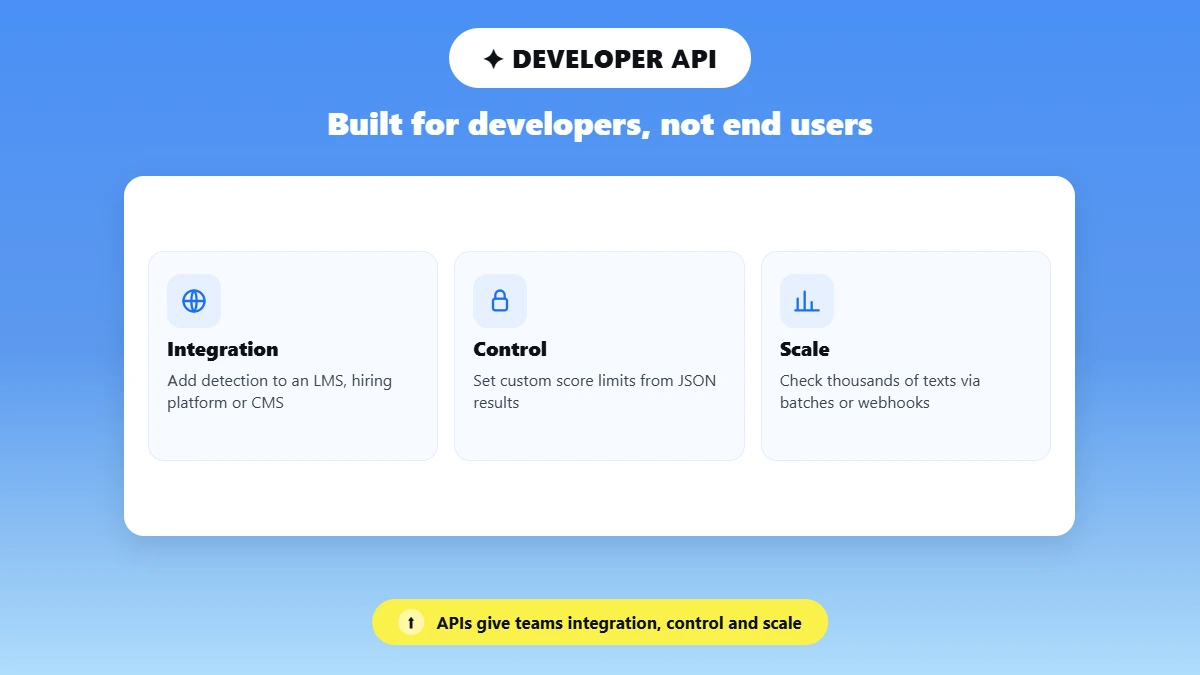
This kind of tool only works through code, and most end users cannot code. End users still benefit, but through the products developers build on top of the API.
Developers connect the API to their apps and design a better experience around it. They can even add features the original detector lacks, like auto-checking every submission or showing flagged sentences inside their own editor. The API gives them:
Integration: a way to add AI detection to an LMS, hiring platform or CMS.
Control: JSON results they can use to set custom score limits and next steps.
Scale: automatic checks for thousands of texts, in batches or through webhooks.
How Does an AI Detection API Work?
In simple terms, your app sends text to the API in a POST request with an API key, and the API returns a JSON object with scores. Behind the scenes, the model splits the text into sentences, scores each one and combines them into one document score. Phrasly returns results in under 2 seconds, which matters when you check thousands of texts at scale.
Sample Request Payload
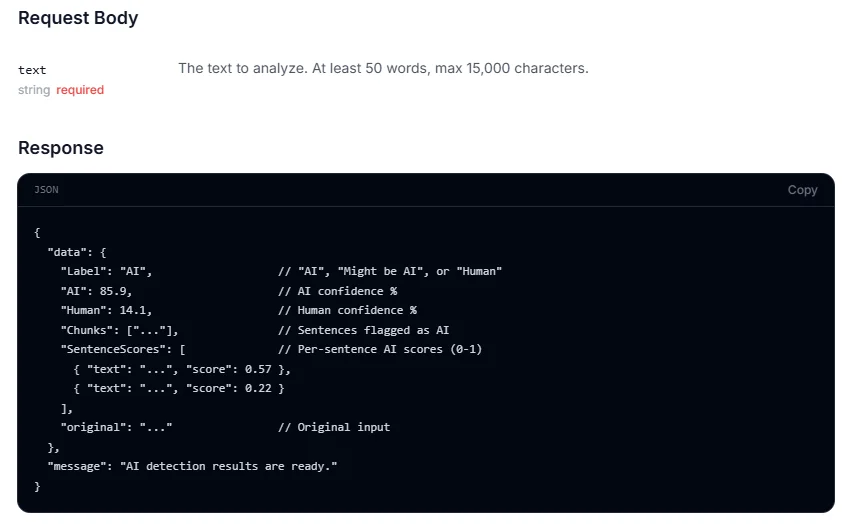
Phrasly’s AI detector API uses POST https://business.phrasly.ai/api/v1/detect, with your key in an x-api-key header and one required field, text. Each request can be 50 words to 15,000 characters long.
curl -X POST https://business.phrasly.ai/api/v1/detect \
-H "x-api-key: YOUR_API_KEY" \
-H "Content-Type: application/json" \
-d '{"text": "Text you want to check for AI..."}'
Sample Response Payload
A successful request returns a label, two confidence percentages and a score for every sentence, as in this example from Phrasly’s documentation:
{
"data": {
"Label": "AI",
"AI": 85.9,
"Human": 14.1,
"Chunks": ["..."],
"SentenceScores": [
{ "text": "...", "score": 0.57 },
{ "text": "...", "score": 0.22 }
],
"original": "..."
},
"message": "AI detection results are ready."
}
Here is what each field means:
Field | Type | Example value | Meaning |
|---|---|---|---|
text (request) | string | "Text you want to check..." | Input text submitted for scoring |
Label | string | "AI" | Summary label: "AI", "Might be AI" or "Human" |
AI | number | 85.9 | AI confidence percentage, from 0 to 100 |
Human | number | 14.1 | Human confidence percentage, from 0 to 100 |
Chunks | array of strings | ["..."] | Sentences the model flagged as AI |
SentenceScores | array of {text, score} | {"text": "...", "score": 0.57} | AI score from 0 to 1 for every sentence |
original | string | "..." | The original input text |
Source: Phrasly AI Detection API docs, checked November 3, 2026.
What the Model Is Classifying
The model does not look for a ChatGPT signature. It looks for statistical patterns learned from training on large sets of human and AI writing:
Word predictability: AI text often picks the most likely next word.
Sentence variation: Human writing mixes short and long sentences more than AI output.
Repetition: AI writing often repeats phrases and keeps the same tone throughout.
Phrasly runs this on an in-house, sentence-level model and caches repeated sentences, so rescanning an edited draft is faster and cheaper.
Reading Sentence-Level Scores and Confidence Thresholds
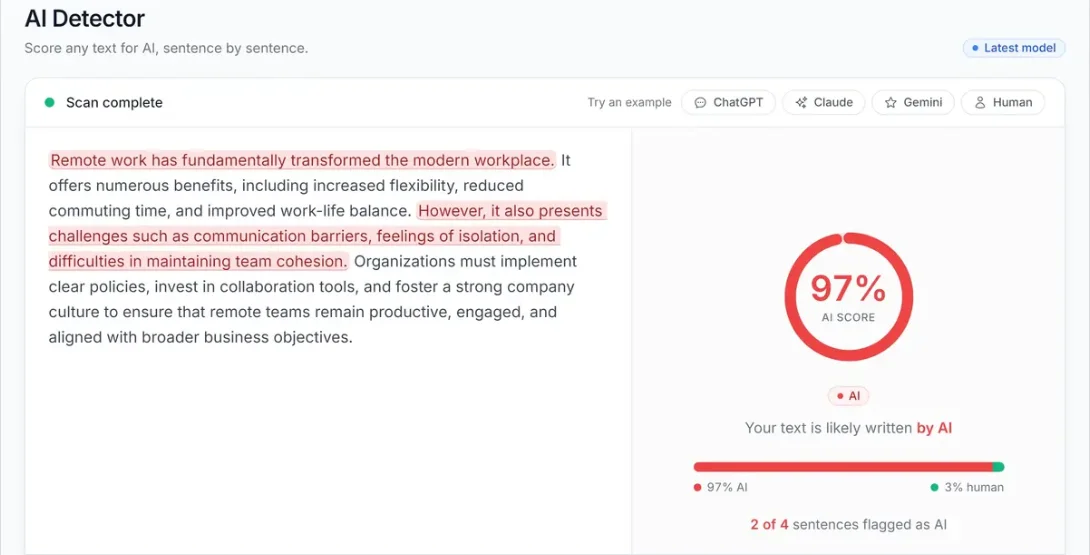
A document score is a roll-up of many sentence scores, not one single decision, so it can hide a lot of variation. Phrasly, for example, scores each sentence on its own and combines the results into one document-level percentage.
Sentence-level analysis shows where the AI signals sit. An editor or instructor can then review the flagged passages instead of judging the whole text by one number.
Document Level vs Sentence Level Scoring
Document score: One number for the whole text, like the 97% AI score above. It works well for triage and dashboards.
Sentence scores: A 0 to 1 score for every sentence, used to highlight specific flagged passages.
Mixed authorship: Sentence data separates a mostly human document with one AI-edited sentence from a fully AI-generated one.
Setting a Confidence Threshold for Your Product
A confidence threshold is the score at which your product takes an action, such as flagging any sentence above 0.80 as “likely AI.” There is no universal safe threshold, because the right cutoff depends on the use case.
This choice shapes AI detector API accuracy in practice. A lower threshold catches more AI text but raises false positives, while a higher one reduces false accusations but misses some AI text. A hiring screen and a classroom feedback tool should not share the same cutoff.
Scores also shift between tools and model versions, which explains why AI detectors give different results. Recheck your threshold whenever a vendor updates its model.
💡 Quick Rule: Use the score to decide what a person reviews, not what happens to the writer.
Are AI Detection APIs Accurate?
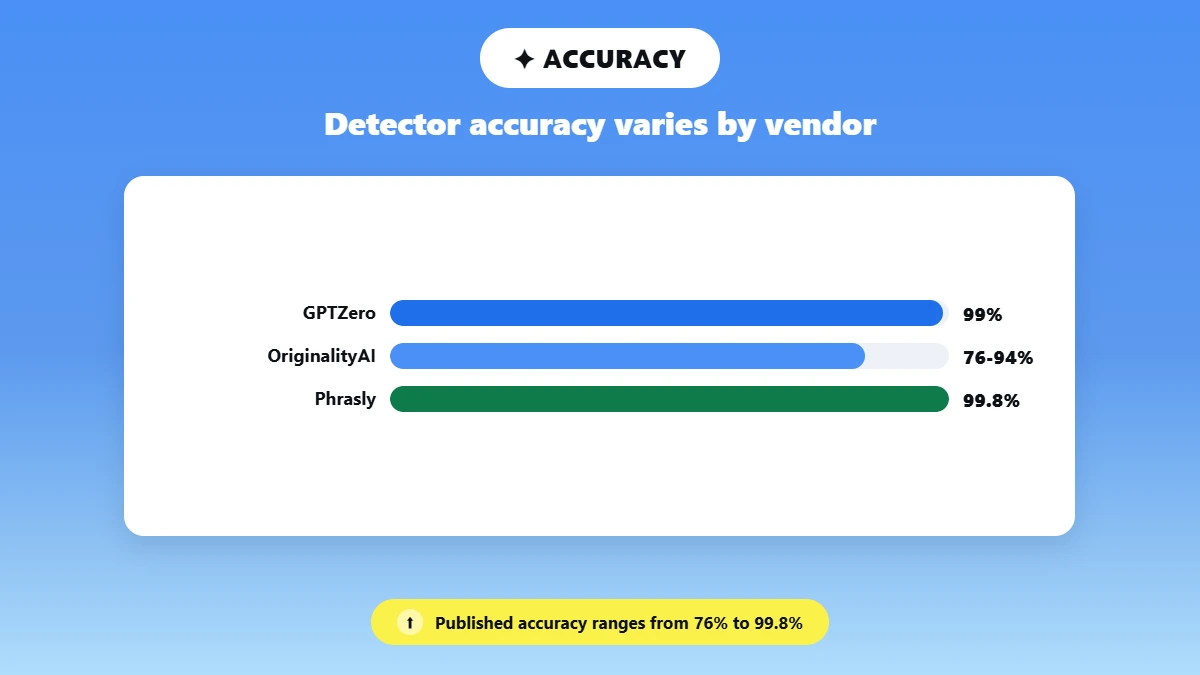
AI detection APIs are accurate enough to flag text for review, but not to act on alone. AI detector API accuracy depends on who ran the test, and an AI detection API for ChatGPT content becomes less reliable once a person edits the text.
In its May 2026 comparison, Eden AI rated GPTZero at about 99%, while other comparisons put OriginalityAI at 76% to 94%. Hive scores above 99%, but for images and media, not text.
Vendors publish their own figures too. Proofademic says it wrongly flagged only 0.2% of 4,200 human-written academic texts in March 2026, and Phrasly reports 99.8% accuracy for the same model that powers its API.
In January 2026, GPTZero disputed a University of Chicago Booth study, and its re-test showed 0.05% of human texts wrongly flagged and 99.3% of AI texts caught.
False Positive Rate and What It Means for Users
Every AI detection API has a false positive rate: the share of human-written texts it wrongly flags as AI. The threshold you set raises or lowers that rate.
For your users, even a small rate adds up. At 1%, an LMS checking 10,000 human-written essays would wrongly flag 100 students.
The rate can also be much higher for some writers. A 2023 Stanford study in Patterns found seven detectors flagged TOEFL essays by Chinese students as AI 61.3% of the time on average.
If your users get wrongly flagged, share our guide on how to protect yourself from false positives.
Can Paraphrasing Tools Fool a Detector?
Paraphrasing and humanizer tools rewrite the patterns detectors look for, so results vary widely by tool.
Test your API on paraphrased samples before launch, and read whether AI detectors can spot paraphrased text.
Where Teams Use AI Detection APIs
Teams use an AI content detection API to screen large volumes of text quickly and send only risky submissions to a person. The API is one input in a moderation pipeline, not a yes or no gate: it returns a score, and your system decides whether to flag the text, route it to human review or reject it.
The same API call can serve very different risk levels. That is why teams pair the score with their own confidence threshold for each use case.
Education and LMS Platforms
In education, the API sits inside an LMS such as Canvas, Moodle or a custom portal. When a student submits an assignment, a webhook sends it to the API and the score returns before grading starts. Phrasly’s API docs also list essay checking for schools as one of its main uses.
🚨 Because detectors can wrongly flag honest students, especially non-native English writers, human review should be required before any academic penalty.
Hiring and Applicant Screening
In hiring, the API runs inside the applicant tracking system. Take-home tasks, cover letters and timed writing tests are scored on arrival, so the result is ready before a recruiter opens the profile.
Since any score can be wrong, recruiters should use it to pick which responses get a closer read, never to disqualify someone.
Publishing and Content Marketplaces
In publishing, the API runs at the submission step of a CMS or content marketplace. Freelance and user-submitted pieces are scored before an editor accepts them into the editorial calendar. Editors should treat a high score as a reason to look closer, not as an automatic rejection.
For a deeper workflow breakdown, see how publishers check submissions fairly.
AI Detector API vs Plagiarism Checker API Explained
An AI detector API takes text from your app and returns a probability score for whether a language model wrote it. A plagiarism checker API takes the same text, searches it against indexed web pages and documents, and returns matches with links to the sources.
📍 That is the core of AI detector vs plagiarism checker API: one returns a likelihood, the other returns evidence of copying.
This changes how each API behaves. A detector only analyzes the text itself, using classifiers trained on perplexity, burstiness and token probability, so it usually responds in seconds.
A plagiarism API has to fingerprint the text and search large databases, so a single check can take up to 60 seconds, and many APIs send results to a webhook when they finish.
What Each Tool Is Actually Measuring
Feature | AI detector API | Plagiarism checker API |
|---|---|---|
What it measures | How likely AI wrote the text | How much text matches existing sources |
What comes back | Probability score, label and sentence scores | Similarity percentage, matched passages and source URLs |
How it works | Classifier trained on human and AI writing | Text matching and fingerprinting against indexed sources |
Typical response | A few seconds | Up to about 60 seconds, depending on text length |
📌 The results can also disagree. An original, human-written sentence with simple structure can score high on an AI detector yet return zero plagiarism matches, while a copied paragraph run through paraphrasing software can lower its match score and read as either human or AI.
When You Need Both
Academic integrity and publishing workflows often call both APIs in sequence, because neither answers the other’s question.
Phrasly offers both checks: an AI detection API for your app, and a plagiarism checker on the web with highlighted passages and source links.
Free, Open Source, and Paid AI Detection APIs Compared
AI detection API pricing falls into three groups: open source models you host yourself, commercial APIs with free tiers or trials, and fully paid commercial APIs. The best AI detection API for developers depends on your volume, your accuracy needs and how much infrastructure you want to run.
Open Source and Research Models
Most open source AI detection API options are older models. The roberta-base-openai-detector on Hugging Face is a RoBERTa classifier fine-tuned on GPT-2 output, and the GLTR tool shows how predictable each word is to a GPT-2-era model.
Both are free to run and useful for research, but they were trained on GPT-2-era text and are not built for current AI models unless retrained. The RoBERTa model card itself warns against using it for high-stakes decisions.
Commercial APIs With Free Tiers
Is there a good free AI content detection API? Mostly for testing. Winston AI gives new API accounts 2,500 free credits, and Proofademic offers a 2,000-credit trial for 5 days. GPTZero’s 10,000 free words a month cover its web app, not its API, which starts at $45 a month for 300,000 words.
Choosing Based on Budget and Volume
Cost per 1,000 words: High-volume teams should model what their real monthly volume costs, not just headline accuracy.
Prototype first: Low-volume teams can test on a free tier with their own content before committing to a plan.
Self-hosting costs: Open source is free to download, but hosting, monitoring and retraining are not.
Tool | Access tier | Price or limit | Reported accuracy |
|---|---|---|---|
GPTZero | Paid API (free web plan only) | From $45/month for 300,000 words; $150 per extra 1M words | About 99% (Eden AI estimate) |
Winston AI | Free credits, then paid | 2,500 free API credits; then $35 for 500,000 credits ($0.07 per 1,000 words), credits never expire | About 95% (Eden AI estimate) |
OriginalityAI | Paid (API on Enterprise plan only) | From $136.58/month billed annually, for 1.5M words | 76% to 94% (third-party comparisons) |
Hive Moderation | Enterprise | On request | Above 99% for AI media detection (as cited by Eden AI) |
Proofademic | Free trial, then paid | 2,000-credit trial for 5 days; from $49/month for 300,000 words | 0.2% false positive rate (vendor evaluation) |
roberta-base-openai-detector | Self-hosted, open source | Free, plus hosting costs | Variable; trained on GPT-2 output |
Phrasly | Paid (Business plan) | $100/month including $100 in credits; $0.02 per 1,000 words scanned | 99.8% (vendor-reported) |
Source: GPTZero API pricing, Winston AI developer dashboard, OriginalityAI pricing, Proofademic API docs, Phrasly Business pricing and Eden AI’s AI content detection API comparison (May 2026), checked November 2026.
🔍 How We Compared: Prices come from each vendor’s official API pricing page, docs or developer dashboard, checked in November 2026. Accuracy figures are Eden AI’s directional estimates or vendor-published evaluations, labeled as such, not our own benchmark. Language support varies widely, so check each API’s docs for non-English text. Phrasly publishes this article and appears in the table.
⚠️ Pricing is accurate as of the date this article was written and is subject to change. Confirm the current price on the tool’s official pricing page before purchasing.
For quick manual checks, Phrasly’s web AI detector is free to use. The detection API is part of the paid Business plan and is built for integration into your own product.
Integrate an AI Detector API Into Your App
To integrate an AI detector API into an app, create a key, call the endpoint from your server and parse the JSON response. Single requests usually return in a couple of seconds, so you can score text as users submit it. Read the sentence-level scores from the response body, not just the document score.
Which AI detection API should you use for your app? Pick the AI detector API for developers whose docs, limits, languages and pricing match your workload, then test it on your own content. Set thresholds for production decisions with false positives in mind, as covered above.
Python Code Example
This AI text detector API Python example calls Phrasly’s endpoint with the requests library, handles auth and credit errors, retries temporary failures and prints sentences that need review:
import os
import time
import requests
API_URL = "https://business.phrasly.ai/api/v1/detect"
HEADERS = {
"x-api-key": os.environ["PHRASLY_API_KEY"],
"Content-Type": "application/json",
}
def detect_ai(text, max_retries=3):
delay = 2
for attempt in range(max_retries + 1):
response = requests.post(API_URL, headers=HEADERS, json={"text": text}, timeout=30)
if response.status_code == 401:
raise RuntimeError("Invalid or missing API key")
if response.status_code == 429:
raise RuntimeError("Credits exhausted: top up before retrying")
if response.status_code == 503 and attempt < max_retries:
time.sleep(delay) # waits 2, 4, then 8 seconds
delay *= 2
continue
if response.status_code != 200:
error = response.json().get("error", "Unknown error")
raise RuntimeError(f"Phrasly error {response.status_code}: {error}")
return response.json()["data"]
result = detect_ai("Paste at least 50 words of text here...")
print(result["Label"], result["AI"])
for sentence in result["SentenceScores"]:
if sentence["score"] >= 0.80: # example threshold, set your own
print("Review:", sentence["text"])
Authentication and Rate Limiting
Phrasly uses an API key in the x-api-key header. Store it in an environment variable or a secrets manager, and never ship it in front-end code.
Other vendors handle auth differently. Copyleaks’ API, for example, has you exchange your key for a Bearer token that lasts 48 hours before you call its detection endpoint.
Every error returns JSON with an error field:
Status | What it means | What to do |
|---|---|---|
400 Bad Request | Missing or invalid input, such as text that is too short or too long | Keep each request between 50 words and 15,000 characters, then resend |
401 Unauthorized | Missing or invalid API key | Check the key, the x-api-key header name and that the key has not been revoked |
403 Forbidden | No active subscription | Activate or renew the Business plan |
429 Credits Exhausted | Your credits are used up | Turn on autopay or wait for the next billing period; retrying will not help |
503 Service Unavailable | Temporary failure | Retry after 2, 4 and 8 seconds, up to 3 times, then log and alert |
Source: Phrasly API error codes, checked November 3, 2026.
Many APIs use 429 for rate limits, so back off exponentially and batch requests where the API supports it. On Phrasly, 429 means your credits are exhausted, so queue bulk jobs in your own worker to control the request rate.
Webhook Integration Pattern
For high volumes, an async pattern keeps your app responsive: submit the text, store a job ID, then receive the score through a webhook callback. Check whether your vendor supports callbacks before you design around them.
Repeated calls on similar text can return slightly different scores, so do not treat small score changes as meaningful. Before launch, also test your integration with paraphrased samples and mixed-authorship drafts.
🚀 Add AI Detection to Your Product: Score text and get the flagged sentences back in one API call, billed at $0.02 per 1,000 words from your Business plan credits.
⚠️ Pricing is accurate as of the date this article was written and is subject to change. Confirm the current price on the tool’s official pricing page before purchasing.
Frequently Asked Questions
Why Use an AI Detection API?
Teams use an AI detection API to flag likely AI-generated text before it reaches publishing, grading or hiring decisions. It saves manual review time, supports academic integrity and editorial trust, and lets compliance teams screen submissions at scale, far faster than reading every piece by hand. A person still makes the final call.
Can AI Detection APIs Be Fooled by Paraphrasing Tools?
Paraphrasing and humanizer tools can lower a detector’s confidence score because they disrupt the perplexity and burstiness patterns models rely on. Heavily reworded text is harder to detect, though not impossible, and accuracy still varies by vendor. For how detectors perform overall, see our current AI detection accuracy statistics.
Is There a Free AI Content Detection API?
Some vendors offer free credits or trials, such as Winston AI’s 2,500 free API credits, and RoBERTa-based open source detectors are free to host yourself. Free options usually trade away accuracy, limits or fresh training data. Phrasly’s detection API is paid, but its web detector is free, and our tested list of the best AI detectors compares free limits.
How Do You Integrate an AI Detector API Into an App?
Get an API key, store it on your server and send text in a POST request to the detection endpoint. Check the status code, then parse the JSON response for the overall score, label and sentence scores. Exact steps and field names vary by vendor, so see the integration section above for a full Python example.
What’s the Difference Between an AI Detector and a Plagiarism Checker API?
An AI detector estimates whether a language model wrote a text, using stylistic and statistical writing patterns. A plagiarism checker matches text against existing published sources to find copying. They solve different problems, so academic and publishing teams often use them together, not interchangeably. A high result on one says nothing about the other.

Written by
Hasnain
Karachi, Pakistan
I help businesses grow with SEO-friendly blog posts, landing pages, and long-form content. With 3+ years of experience, I deliver clear, original, and well-researched writing that drives results.