Why Do AI Detectors Give Different Results? How to Read Conflicting Scores
14 min read
Different AI detectors give different results because each tool learns from its own training data and sets its own cutoff for an AI label. The tools also define their scores differently. One percentage can mean confidence about the whole document, while another means the share of text flagged, so the numbers may not measure the same thing. None of them proves authorship by itself.
When tools disagree, inspect each report before you trust any single number. We checked how Turnitin, GPTZero, and Phrasly define their scores, and we ran one essay through four AI detectors in September 2026. Below, you'll learn what each score type measures and get a five-step method for comparing reports fairly.
See How the Unchanged Text Is Classified 👇
Paste your draft exactly as it stands. Phrasly's AI Detector gives you three free checks before you need a free account, and signed-in users also see which sentences were flagged.
First, Check What Each AI Score Actually Means
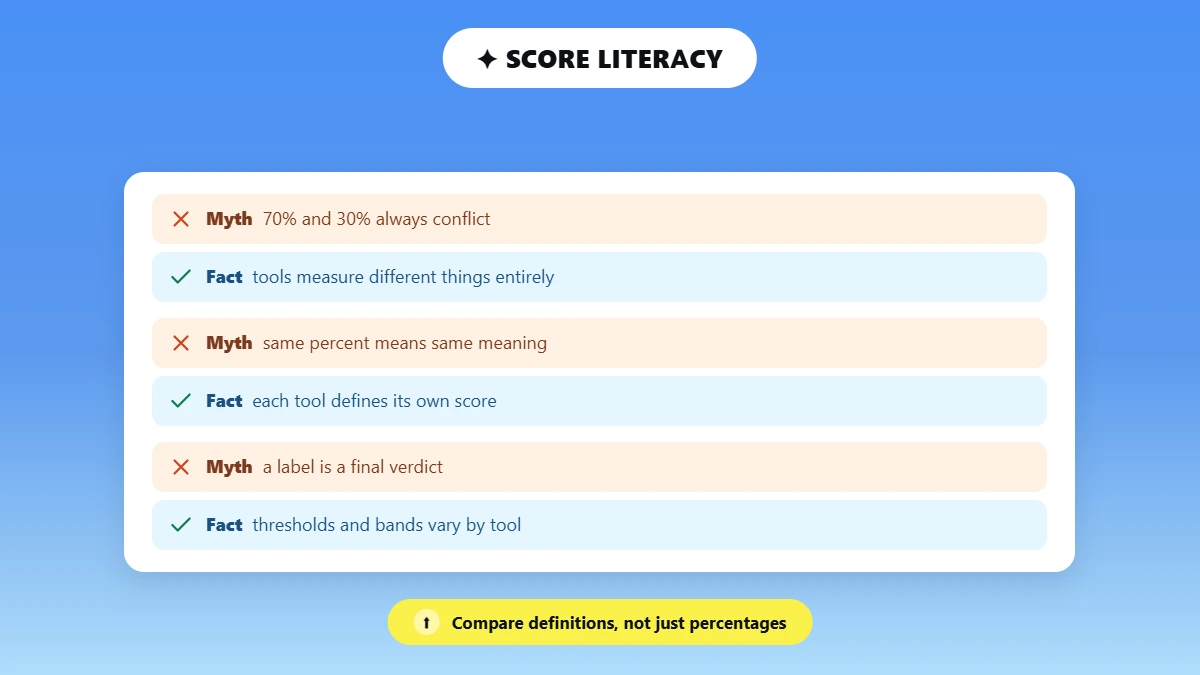
Every AI detector defines its own score, so the same percentage can measure different things on different tools. Read each definition first, because two numbers only compare fairly when they count the same thing.
Here is how three tools describe their own numbers:
📄 Turnitin: The percentage shows how much of the qualifying text its model flagged as likely AI-generated or AI-paraphrased. Turnitin's AI Writing Report guide (no follow) defines qualifying text as prose sentences inside long-form writing, such as essay paragraphs.
📊 GPTZero: The percentage is a probability for the whole document. GPTZero's support docs (no follow) explain a 6% AI result as the model expecting AI authorship in about 6 of every 100 similar documents.
🖍️ Phrasly: The tool shows an overall AI percentage and, separately, highlights the sentences that read as AI.
Some other tools return only a broad label, such as Human, Mixed, or AI, or a proprietary score they never explain.
💡 Key point: A 70% result on one tool may not contradict a 30% result on another, because the two tools can be measuring different quantities.
Translate the report before you compare it:
Output type | What it may mean | What it doesn't automatically mean | What to check |
|---|---|---|---|
📊 Document probability | Confidence that the whole document belongs to a class, such as AI or human | ❌ The percentage of words an AI wrote | The provider's definition and how it calibrates the score |
📄 Share of qualifying text | The portion of analyzed prose the tool classified as AI-like | ❌ The probability that the writer cheated | The eligible word count and any excluded material |
🖍️ Sentence highlights | Passages that contributed to the overall result | ❌ Proof that those sentences came from AI | Context, possible false positives, and draft history |
🏷️ Human / Mixed / AI label | A category the tool assigns after applying its own thresholds | ❌ A verdict every tool would share | The tool's thresholds and any uncertainty band |
Score definitions come from each provider's own help pages, checked in September 2026. Providers can change how they calculate and label scores, so confirm the current definition on the tool's help pages before you compare reports.
Different AI Scores for the Same Text: Our Four-Detector Test
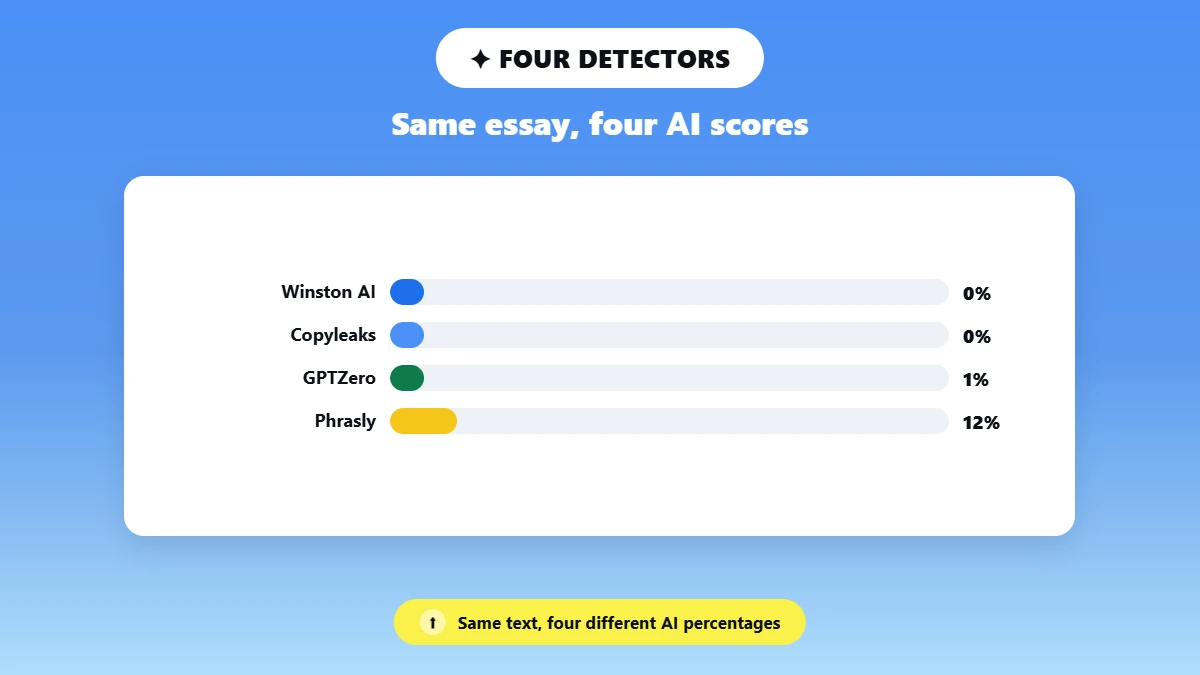
Four AI detectors gave four different scores for the same essay in our test, even though all four tools called the text human.
We ran one controlled test under these conditions:
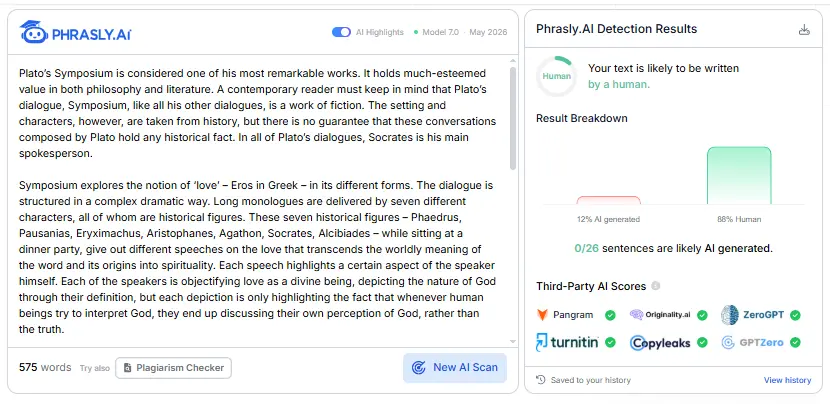
📄 Sample: A 575-word essay on Plato's Symposium. A person wrote it, Claude (an AI model) made small grammar fixes, and Claude also rewrote one paragraph for clarity.
🛠️ Tools: Winston AI, GPTZero, Copyleaks, and Phrasly.
⚙️ Method: We pasted the same text into each tool on the same day, kept the default settings, and scanned once per tool.
🔎 Disclosure: Phrasly publishes this article and was one of the four tools tested.
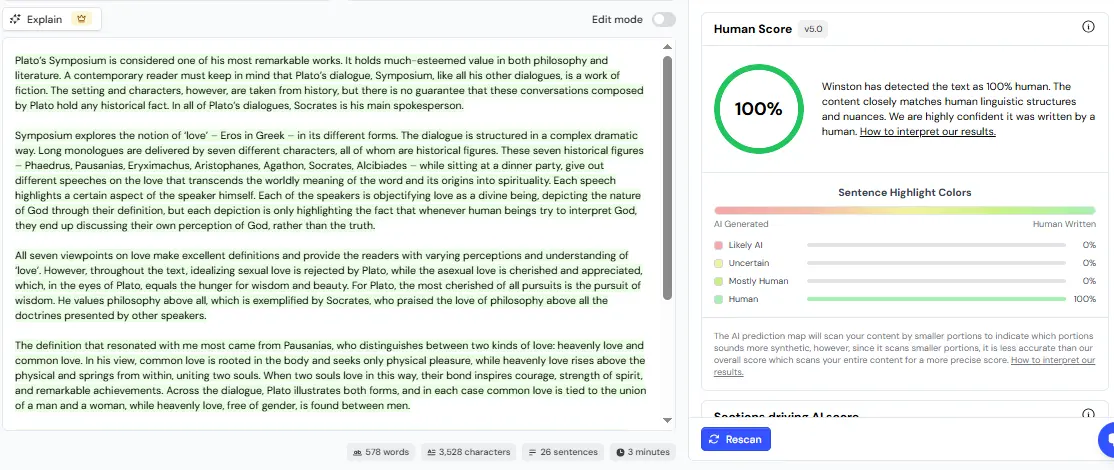
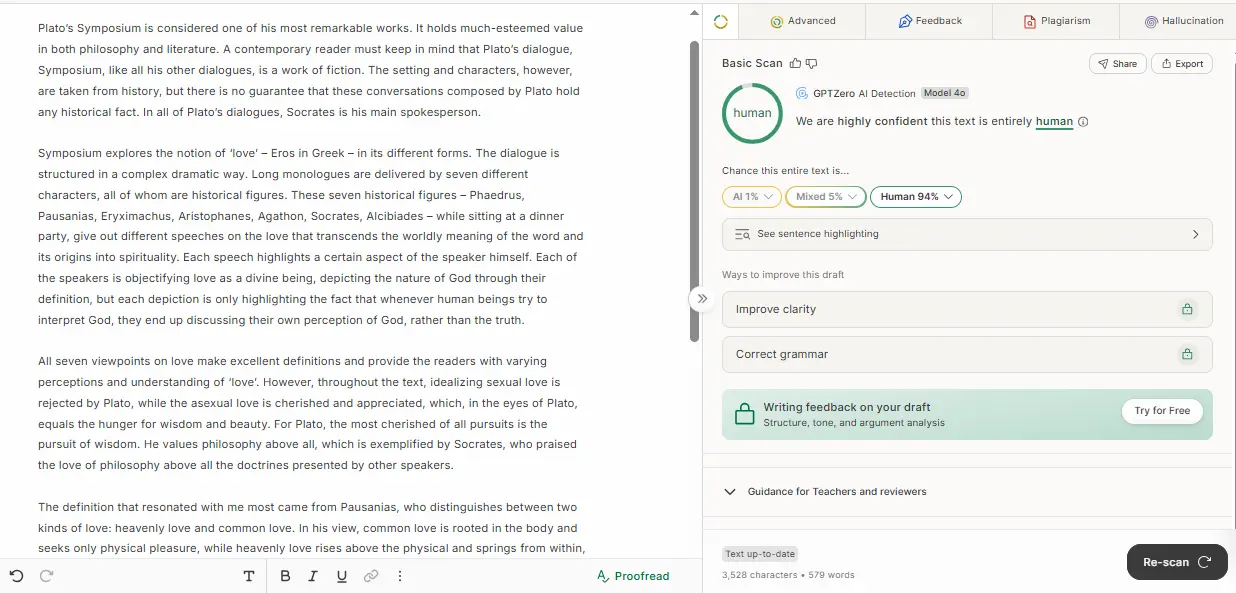
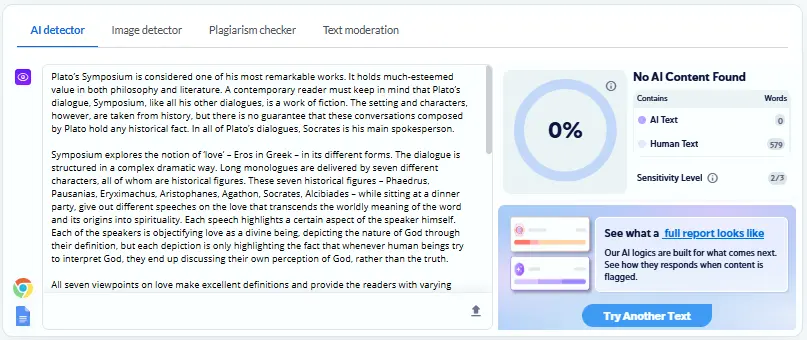
Same text, different reports: what each result actually means
Tool | What the number measures | Result | Words counted | Model shown |
|---|---|---|---|---|
Winston AI | A human score, where 100% means human | 100% human | 578 | v5.0 |
GPTZero | The chance that the whole text is AI, mixed, or human | AI 1%, Mixed 5%, Human 94% | 579 | Model 4o |
Copyleaks | The share of the text classified as AI | 0% AI | 579 | Not shown |
Phrasly | An AI and human split, plus sentence highlights | 12% AI, 88% human, 0 of 26 sentences flagged | 575 | Model 7.0 (May 2026) |
Results come from one scan per tool in September 2026, using default settings. Tools update their models, so the same text can score differently later.
The test results point to three things:
🔢 Winston's 100% and Copyleaks' 0% gave the same answer from opposite directions, because Winston reports a human score and Copyleaks reports an AI score.
🖍️ Phrasly's overall score showed 12% AI while none of its 26 sentences were flagged, so the document score and the sentence highlights measure different things.
📏 The tools counted 575, 578, or 579 words for the same text, which shows that each tool processes the input in its own way.
One sample can't show which tool is more accurate, so this test only shows how the reports differ.
Seven Reasons Different AI Detectors Disagree
Different AI detectors give different results for the same text because each tool is built and tuned separately, from the data it learns on to the way it reports a score.
1. They Learn From Different Training Data
Each detector learns from its own mix of human and AI writing, so it judges your text against the kinds of writing it has seen before. A 2026 study in the International Journal for Educational Integrity found that the two detectors it tested were less accurate on scientific writing than on humanities texts.
👀 What you see: One tool gives a confident result on a lab report while another returns a mixed or hedged result.
🔍 What to check: Look for an uncertainty or confidence note. GPTZero's help docs (no follow) say a low-certainty result means the text looks unlike the texts in its training set.
2. They Use Different Models and Weigh Signals Differently
Detectors run different detection models, so two tools can read the same sentence and weigh its signals differently. Some tools rely on a classifier, a model trained on labeled human and AI examples. Others combine several models or score each sentence before they score the whole document.
Word predictability is one common signal, explained in how AI detectors work, but vendors rarely publish how much weight each signal carries.
👀 What you see: Two tools highlight different sentences in the same paragraph.
🔍 What to check: Whether each report shows which passages drove its score.
3. They Set Different Decision Thresholds
Each detector picks its own threshold, the cutoff score at which it labels text as AI, so the same evidence can read as Human on one tool and AI on another.
A sensitive tool catches more AI text but also flags more human writing by mistake, which is a false positive. A cautious tool wrongly flags less human writing but misses more AI text, which is a false negative.
👀 What you see: One tool shows a low number while another shows no number at all.
🔍 What to check: The tool's cutoff and whether it hides low scores.
What Does Turnitin's Asterisk Mean?
Turnitin's asterisk means the model found some AI-like text but scored it between 1% and 19%, so the report shows *% instead of a number. Turnitin's guide (no follow) says its testing found more false positives in that range, so the report also drops the highlights.
4. Their Percentages and Labels Are Calculated Differently
Detectors calculate their headline number in different ways, so two similar percentages can describe different measurements. Some tools score the whole document at once. Others score passages first and then report what portion of the eligible text looks AI-like.
👀 What you see: Two tools show similar numbers but highlight very different amounts of text.
🔍 What to check: Compare only numbers that share the same definition.
5. They Clean, Split, and Exclude Text Differently
Detectors prepare your text before they score it, so each tool may analyze a slightly different version of your document. These parts often get handled differently:
📚 Citations, quotations, and reference lists
📝 Headings, bullet lists, and very short sections
✂️ Long documents that a tool splits into chunks before scoring
Turnitin, for example, scores only prose sentences and leaves out formats such as tables and annotated bibliographies.
👀 What you see: The word count on one report is lower than the word count of your document.
🔍 What to check: Which sections each report counted and which it skipped.
Does Pasting Text or Uploading a File Change the Score?
Your score can change between a pasted version and an uploaded file, because an upload adds a text-extraction step that can drop or merge formatting. Use the same input method on every tool you compare.
6. Text Length, Genre, Language, and Editing History Change the Evidence
Some texts give detectors weaker or mixed evidence, and the scores spread further apart as a result:
📏 Short inputs: Turnitin's detection model notes (no follow) say submissions under 300 words may get a less accurate score.
🌍 Second-language writing and translations: These drafts can differ from the samples a tool learned from.
✏️ Edited and hybrid drafts: Hybrid text means a person and an AI tool both shaped the writing, through grammar editing, paraphrasing, or drafting.
Polished human writing isn't automatically AI-like. Still, some habits, such as very even sentence lengths, are among the patterns that can trigger an AI detector on fully human writing.
📊 2026 research: The same peer-reviewed study by Hadra, Cambridge, and Mesbah tested Turnitin and Originality on 192 texts. Originality reached an overall accuracy of 0.69 and Turnitin reached 0.61, and both tools performed poorly on hybrid texts. The study covers two tools on one academic dataset, so its figures don't describe every detector or version.
👀 What you see: One tool calls a short or edited text Human while another calls it Mixed.
🔍 What to check: The length of the text and whether any part went through an editing tool.
7. Models, Settings, and Software Versions Change
Detectors update their models and settings over time, so a report from one month may not match a later one. Turnitin's guide notes that reports created before July 8, 2024 can still show a number below 20%, while newer reports show an asterisk.
Phrasly names its current detector version on the tool itself, which showed Model 7.0 from May 2026 when we checked in September 2026. A new report shows the tool as it works on that date, and it doesn't change how the document was written.
👀 What you see: A score changes even though you didn't edit the text.
🔍 What to check: The date, model or version label, selected language, and any sensitivity setting on each report.
Can the Same AI Detector Give Different Results Each Time?
The same AI detector usually returns the same or a very similar score when nothing about the text or the tool has changed. A later scan can still differ, usually because the tool was updated or the input changed in a small way, such as a new upload method or an edit that pushes the text across a cutoff.
If your AI score changed on the same detector, compare these details before you call the two runs a conflict:
🧾 The exact saved text, or a checksum of the file, which is a short code that changes when even one character changes
📋 Whether you pasted the text or uploaded a file
⚙️ The selected language, model, or sensitivity
📅 The date and product version, if the report shows them
🔢 The number of words each report analyzed and any sections it left out
Vendors rarely disclose their full scoring pipeline, so nobody outside a company can confirm that its tool returns identical results on every run.
How to Compare Conflicting AI Detector Results Fairly
A fair comparison of AI detector results tests the same frozen text in the same format on every tool, then checks what each number means before comparing the numbers themselves.
Freeze the text. Save one final version and make no edits between scans.
Use the same input and format. Give every tool the same complete passage, rather than the full essay to one tool and the conclusion to another.
Write down what each number means. Label each result as a probability, a share of qualifying text, a share of highlighted sentences, or a label.
Record the date, settings, word count, and exclusions. A screenshot alone doesn't show which input the tool actually tested.
Inspect passages and process evidence. Read the highlighted sentences, then review your drafts, sources, version history, and the AI-use policy that applies.
🚫 Comparison mistakes to avoid
❌ Don't average percentages unless the providers define and calibrate them the same way, because the average can land on a number no tool produced.
❌ Don't treat a two-out-of-three vote as proof, because detectors can make the same mistake on the same text.
❌ Don't keep rescanning until one result supports the answer you want.
❌ Don't add mistakes or awkward wording just to chase a lower number.
🔍 Run one documented second-opinion check: keep the draft unchanged, scan it with Phrasly, and save the overall score plus the highlighted passages to guide your review. 👇
Which AI Detector Result Should You Trust?
The AI detector result most worth trusting is the one that explains what its score measures and shows which passages drove it. It should also analyze enough text and come from a tool tested on writing like yours. Even then, treat the report as one signal that tells you where to look closer.
When several tools agree, that agreement can justify a closer review, but it still can't prove who wrote the text. Disagreement usually means the text scores close to a tool's cutoff or each tool processed it differently.
What to do when scores conflict, by reader:
Reader | Best next step when scores conflict | Evidence that matters more than one score |
|---|---|---|
🎓 Student | Check your institution's written AI policy and ask which tool or report your instructor actually uses | Drafts, notes, sources, version history, and a calm explanation of how you wrote the work |
🍎 Educator | Review the flagged passages and talk with the student before taking any adverse action | Knowledge of the assignment, the student's earlier work, an oral follow-up, and documented process evidence |
📰 Editor or publisher | Use one consistent internal tool and a documented quality-check routine | Source files, the revision trail, fact checks, disclosure notes, and editorial review |
📊 Why benchmark scores don't always transfer: A 2026 preprint by Pudasaini and colleagues reported that its detector reached an F1 score of 97.34 out of 100 on benchmark data. F1 balances how much AI text a detector catches against how often it wrongly flags human text. When the researchers tested one model on a different dataset, its F1 fell from 96.94 to 67.23.
Researchers call this distribution shift, which means a detector performs worse on writing unlike the data it learned from. The paper hasn't been peer reviewed yet, and it tests research models, not commercial detectors.
The Phrasly guide on how AI-detector accuracy is tested explains why a strong benchmark score doesn't guarantee the same result on your essay. If your real task is picking one tool for regular use, the best AI checker tools in 2026 roundup compares nine detectors on the same samples.
What to Do After an Unexpected AI Score
The right response to a surprising AI score depends on one question: did you write the text yourself, or does it include AI help that your policy allows?
If You Wrote the Text Yourself ✍️
✅ Keep your wording unless a flagged sentence is actually unclear, because rewriting only to satisfy an opaque score can weaken good writing.
✅ Save the report together with your drafts, notes, citations, and version history.
✅ Check whether formatting, quotations, or a short sample changed what the tool analyzed, and compare the flagged lines with the common reasons why a human-written essay can be flagged.
✅ Ask for a human review if the score affects a grade, a job, or a publication decision.
If the flag turns into a formal concern, the guide on what to do after a false positive explains how to present your evidence.
If the Text Includes Permitted AI Assistance 🤖
✅ Review the school, client, or publisher policy that applies to the work.
✅ Disclose the AI assistance whenever the policy requires it.
✅ Verify every fact, quotation, citation, and inference in the draft.
✅ Rewrite for clarity, specific detail, and your own point of view, rather than for a detector score.
✍️ If your policy allows AI-assisted editing and the draft still sounds flat, use Phrasly's AI Humanizer as an editing aid, then review the result in your own voice and recheck every fact and citation. 👇
AI detectors run as separate systems with separate definitions, so compare what each report measured and what input it received before you compare percentages. Use any score as a prompt to review specific passages, then let your drafts, sources, and version history show how the writing came together. Those records explain your process in a way no percentage can.
Frequently Asked Questions
Why does one AI detector say 0% and another say 100%?
Two detectors can land at 0% and 100% because they use different score definitions, training data, and cutoffs, and they may even analyze different parts of the text. Before you treat the numbers as opposites, confirm that both tools received the same complete passage in the same format and that you know what each percentage measures.
Should I average the scores from several AI detectors?
An average of AI scores mixes numbers that may measure different things, such as a document probability and a share of flagged sentences. The result describes nothing any single tool found. A better comparison looks at each tool's definition and at the passages that more than one report highlighted.
Is a 20% AI score the same on every detector?
A 20% score means different things on different detectors. On Turnitin, it describes the share of qualifying prose flagged as AI, while on GPTZero, a percentage reflects a document-level probability. Every tool sets its own scale, whether it's sold as an AI checker or an AI detector, and no universal acceptable AI percentage exists, so your policy and the provider's definition decide what a score means.
Can citations and reference lists change an AI score?
Citations and reference lists can shift an AI score, because some tools skip them while others scan every line. Two reports can differ simply because one tool counted a bibliography that the other ignored. Compare the same body text, pasted the same way, and note any sections a report left out.
Why did my AI score change on the same detector?
A later scan from the same detector can come back different after a model update, a settings change, a different file upload, or a small edit that tips the score over a threshold. Save the date, settings, exact input, and original report each time, so you can show which version of the text and the tool produced each score.
Are AI detector results proof that someone used AI?
AI detector results are probability-based signals drawn from text patterns, so they can't prove on their own that someone used AI. The Phrasly guide on whether AI detectors can be wrong covers the main error types. For a high-stakes decision, weigh the report together with drafts, version history, source notes, the writer's explanation, and the policy that applies.

Written by
Alina Shah
SEO Content Specialist · Karachi, Pakistan
She writes about AI so you don't have to guess. 8+ years in content strategy and editing. Now she puts AI writing tools and detection systems through real tests and shares what actually works.