Best AI Chatbot for Work Emails and Professional Writing
34 min read
The best AI assistant for professional emails depends on where you write. General chatbots such as Neo, ChatGPT and Claude rewrite rough drafts in a professional tone, while Microsoft Copilot and Gemini for Gmail work inside Outlook and Gmail. Either way, every AI draft needs a human edit before it goes out.
We ran every prompt on November 11, 2026 in Phrasly Neo and ChatGPT (free web version) for 8 real work emails (rough draft, prompt, polished version) across 3 use cases, plus copy-paste templates, a privacy checklist and a fair table of chatbots and inbox tools. Phrasly makes Neo, one of the chatbots in this guide. Every prompt was also run in ChatGPT so you can compare the outputs yourself.
Turn Your Rough Draft into a Professional Email with Phrasly Neo 👇
Best AI Chatbots and Email Assistants for Work at a Glance
Chatbots such as Neo, ChatGPT and Claude handle the writing, while inbox tools such as Copilot, Gemini for Gmail and Superhuman handle the workflow inside your email client. So if you're hunting for the best AI email assistant 2026 has to offer, you're often choosing two things: an AI assistant for professional emails that fixes the words, and a tool that lives where your mail already is.
Want help inside Gmail or Outlook specifically? Gemini for Gmail and Copilot in Outlook work right in the inbox, while a chatbot needs a quick copy and paste. The table compares each option as an AI email assistant for business use, from the free tiers up.
Tool | Best for | Works in (chat, Gmail, Outlook) | Remember your tone or thread? | Price from (as of Nov 11, 2026) |
|---|---|---|---|---|
ChatGPT | Drafting and rewriting from a pasted draft | Chat (web, desktop and mobile apps); Gmail and Outlook via connected apps in ChatGPT, not native add-ins | Memory (saved memories and chat history) on all plans, a lighter version on Free. Sees a thread only if you paste it. | Free plan; Go $8/month; Plus $20/month |
Claude | Long threads and careful tone rewrites | Chat | Memory across conversations on all plans, Free included. Sees a thread only if you paste it. | Free plan; Pro $20/month ($200/year billed annually) |
Neo (Phrasly) | Rewriting rough drafts in a chat window; reads PDFs, images and audio you attach | Chat | Keeps the whole conversation in mind, so follow-ups build on the last reply. | Available on every Phrasly plan, including the free account; daily limits apply |
Microsoft Copilot in Outlook | Microsoft 365 teams drafting inside Outlook | Outlook | Drafts, summarizes and coaches inside the open thread. Tone memory: can learn the style of your sent emails and follow your custom instructions (Microsoft Support) | Microsoft 365 Copilot Business $21/user/month list, annual, on top of a Microsoft 365 Business plan ($18 promo price through December 31, 2026) |
Gemini for Gmail | Google Workspace teams; the AI email writer for Gmail most teams already have | Gmail | Help me write, Proofread, suggested replies and thread summaries in Gmail. Tone memory: personalizes drafts using your previous emails and writing style (Google Workspace; features vary by region and language) | Included from Workspace Business Starter, $7/user/month (1-year plan) or $8.40 flexible |
Grammarly | Tone and grammar checks on any draft | Gmail and Outlook via browser extension, the Windows and Mac apps, or the Microsoft Office add-in | No personal tone memory; Pro adds style guides and brand tones (shared writing rules) | Free plan (100 AI prompts/month); Pro $12/member/month billed annually ($30 monthly) |
Superhuman | Fast triage and AI replies for heavy email users | Google and Microsoft 365-hosted accounts (not every Exchange server) | Auto Drafts and Ask AI on the Superhuman Mail Business plan (not Starter); Auto Drafts write replies in your style (Superhuman Help) | Mail Starter $25/member/month billed annually ($30 monthly); Business $33 ($40) |
Proton Scribe | Privacy-first drafting | Proton Mail, with an optional on-device mode | No tone memory described; server-side prompts are deleted immediately after use, and local mode keeps data on-device | Included in Duo, Family, Visionary, Lifetime and Workspace Premium; per-user add-on on Proton Business; 14-day trial on Mail Plus and Unlimited; not on Free |
Prices and features checked on November 11, 2026 from vendor pages and help centers. Phrasly makes Neo. Free tiers are listed only where the vendor confirms them.
Test log: All 8 prompts ran on November 11, 2026, each in a fresh chat, in Phrasly Neo (Phrasly dashboard, default Phrasly Neo mode) and in ChatGPT (free web version, logged out, default model). Neither interface showed a model version number. Neo outputs appear as generated; we only swapped name placeholders such as [Your name] for the fake sender names, added missing sign-offs where noted, and left out Neo's short notes after the emails.
The free stack people recommend most in Reddit threads is ChatGPT for drafting plus Grammarly for tone checks. Two examples: this r/artificial thread and this r/Grammarly thread. Both tools still offer a free plan, and Grammarly's free tier includes 100 AI prompts a month.
Two columns matter most for busy professionals. "Works in" tells you whether you'll be copying and pasting all day, and the memory column tells you how often you'll need to re-explain your tone.
Shortwave (AI search and triage on top of Gmail) and Missive (shared team inboxes) are covered in the routing section further down. They aren't in the table because their main job is managing the inbox, not rewriting a single email.
How an AI Assistant Rewrites a Professional Email
Pasting a draft into a chatbot feels a bit like magic the first time, but the process is simple once you see it. A large language model, software trained on huge amounts of text, predicts which words should come next. Natural language processing, the way a computer reads the meaning and tone of text, lets it see that "need this ASAP" is blunt.
So you paste your draft and say what you want, for example "polite but firm, under 100 words." The model reads your words, keeps the meaning it detects and writes a new version in that tone. The result is a prediction, not a fact check, and that's why your edit still matters.
Here's what an AI chatbot can't do on its own:
It doesn't know the email thread unless you paste it into the chat. Earlier replies, attachments and side agreements are invisible to it.
It won't reliably carry your tone from one chat to the next. Memory in ChatGPT and Claude stores facts and preferences, so paste a short sample of your own writing when tone matters.
It can invent details such as dates, amounts or promises you never made. Check every number before you send.
It can't judge office politics or your relationship with the reader. It doesn't know your client is already upset, or that your manager prefers one-line updates.
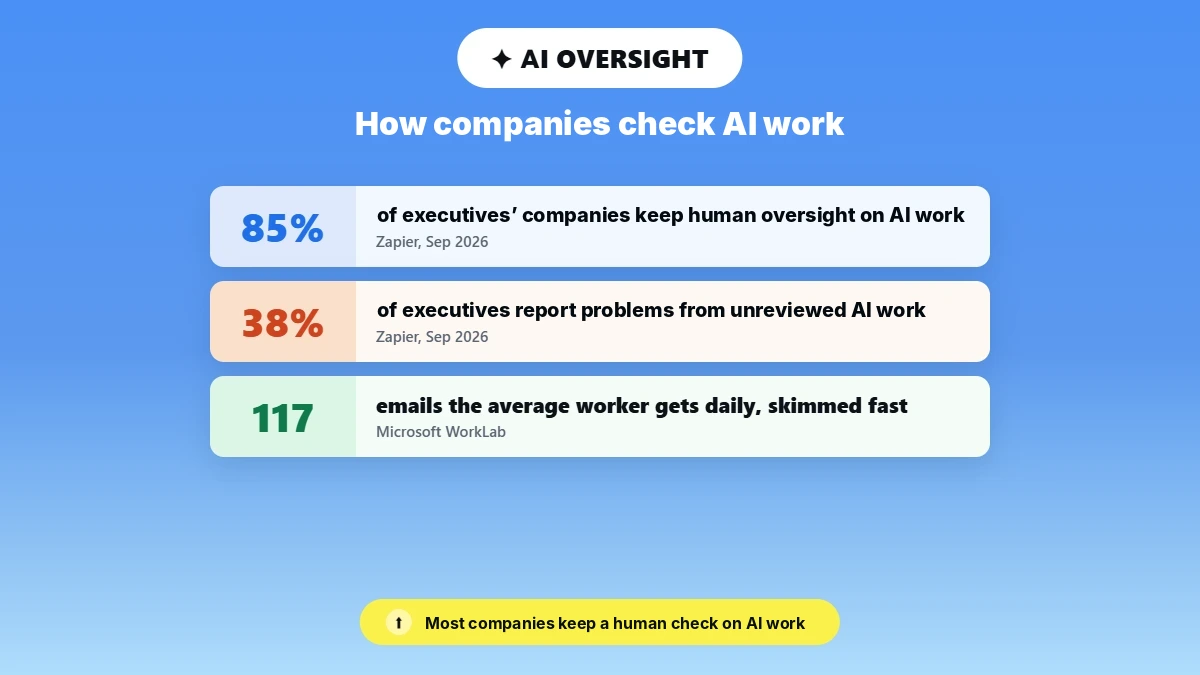
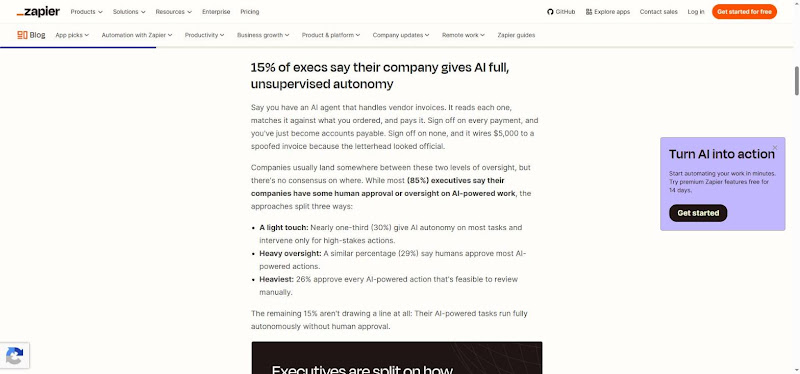
Human review is ordinary practice, not extra caution. In a Zapier survey of 518 executives at companies with an AI governance policy, 85% said their organizations have some human approval or oversight on AI-powered work.
How do you stop AI-written emails from sounding robotic or generic? Robotic output usually comes from a vague prompt. Give the model to the reader, the goal, a target length and a sample of how you normally write, then cut any line you'd never say out loud.
That also answers what is a professional email, and how to write good emails with or without AI in the loop.
A professional email makes one clear ask, uses the right register for the reader, gets every fact right and stays short. If a draft does all four, it is professional, whether a person or an AI chatbot wrote the first version.
Use Case 1: Rewrite Rough Drafts in a Professional Tone
Most work drafts miss the right tone in one of three ways: too blunt, too casual or too passive. Tone adjustment means keeping your ask and changing how it lands, and it's most of how to write a business professional email with an AI assistant for professional emails at your side.
Which AI tool should you use if you want emails that still sound like you? Any of the chatbots above works, as long as your prompt says "keep my wording where it already works" and you paste a sample of your own writing. For more ways to rewrite an email professionally, see our full guide.
Example 1: Asking Your Manager for a Deadline Extension
Deadline emails are hard because two needs collide: you want to protect the relationship, and you need a yes. Here the writer is behind because a vendor's data arrived late.
The draft over-apologizes and hides the new date at the very end, where a busy manager won't see it.
Rough draft (fake names and figures)
Hi Dana, so sorry, I know this is bad timing and I really hate asking but the data export from the vendor came in late so I'm behind on the Q3 churn report. I've been working on it nonstop. I know you needed it Friday the 14th but could I maybe send it Wednesday the 19th?? Again really sorry
Prompt (copyable block)
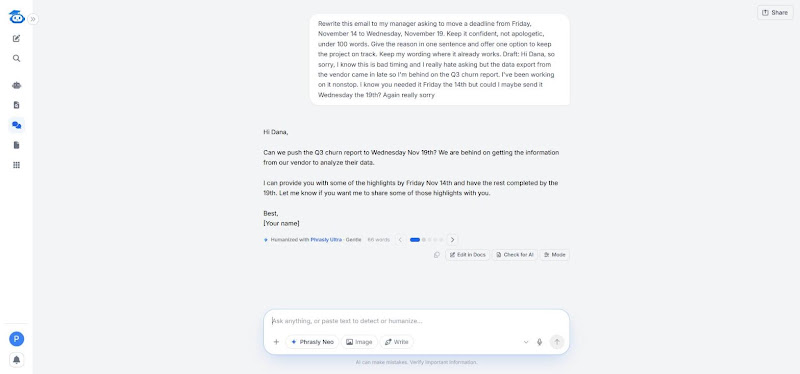
Rewrite this email to my manager asking to move a deadline from Friday, November 14 to Wednesday, November 19. Keep it confident, not apologetic, under 100 words. Give the reason in one sentence and offer one option to keep the project on track. Keep my wording where it already works.
[paste draft]
Polished version (Real Neo output from November 11, 2026. Lightly edited: we swapped [Your name] for Sam.)
Hi Dana,
Can we push the Q3 churn report to Wednesday Nov 19th? We are behind on getting the information from our vendor to analyze their data.
I can provide you with some of the highlights by Friday Nov 14th and have the rest completed by the 19th. Let me know if you want me to share some of those highlights with you.
Best,
Sam
Why it works
Clear ask: the new date moved from the last line to the first, so Dana can answer in one word.
Right register: all four apologies are gone and the request opens the email, which reads as confident without sounding careless.
Accurate and short: both dates stayed, the offer to share highlights by Friday keeps the project moving, and the reply runs 66 words. One slip to fix: Neo wrote that the team is "behind on getting the information from our vendor," while the draft says the export arrived late, so reread the reason line.
Adjust it for your own manager. If they like one-line updates, change the length to "under 50 words" and drop the offer. If the delay affects other people, add "mention who else needs the new date," because the AI can't see your project plan.
Send this kind of request as early as you can. An extension asked for on Monday reads as planning, while the same email late on Friday reads as a problem, however good the wording is.
Example 2: Turning a Chat-Style Project Update into a Client Email
Internal chat and client email are different registers, and mixing them up is one of the most common work slips. This is a Slack message pasted straight into an email, with no greeting, plenty of slang and a date nobody can plan around.
Rough draft (fake names and figures)
hey! quick one, design's mostly done, dev starts mon prob, lmk if q's. oh and still need the logo files
Prompt (copyable block)
Turn this internal chat update into a short client email. Use a friendly, professional tone, a clear status line, the next milestone with a date, and one question for the client. No buzzwords.
[paste draft]
Polished version (Real Neo output from November 11, 2026. Lightly edited: we swapped [Client name] and [Your name] for Priya and Alex.)
Subject: Project update: design nearly done
Hi Priya,
Quick update on where things stand.
Status: Design is nearly finished. We’re wrapping up the last details now.
Next milestone: Development kicks off on Monday, [date].
One thing we still need from your side: the logo files. Could you send those over when you get a chance?
Let me know if you have any questions.
Best,
Alex
Why it works
Right register: "hey! quick one" and "lmk if q's" became a status line a client can forward to their boss.
Accurate facts: "dev starts mon prob" became "Monday, [date]." Neo left a slot instead of inventing a date, so fill in the real one before sending.
Clear ask: the stray logo note became its own line and the one question, which is what actually blocks the project. Add a by-when date if you need the files before kickoff.
The biggest risk in this kind of rewrite is false precision. "Prob mon" was honest about the uncertainty, and a polished email can quietly turn a guess into a promise. If the date isn't firm, tell the AI to write "we expect to start on [date]" instead.
The prompt also works in reverse. Paste a long client email and ask for a three-line summary for your team's chat.
Example 3: A Payment Reminder That Doesn't Sound Passive-Aggressive
This is the email from the start of this guide. It's a second reminder, and phrases like "per my last email" read as sarcastic even when the writer means to be polite.
Rough draft (fake names and figures)
Hi Tom, Per my last email, invoice INV-2048 for $4,800 was due on October 31. As I already mentioned, we need this paid. I'm sure you're very busy but please sort this out asap.
Prompt (copyable block)
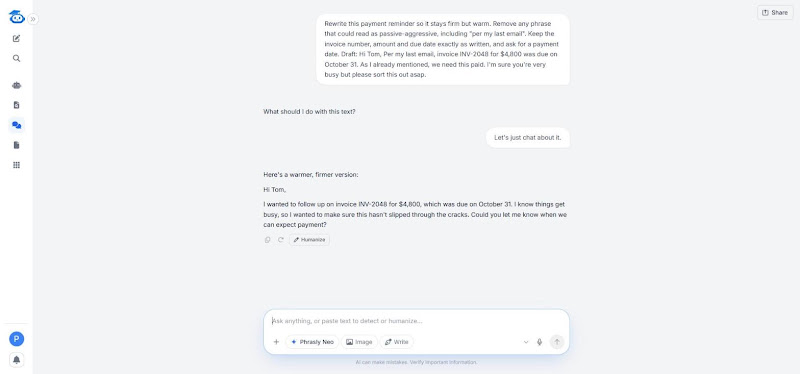
Rewrite this payment reminder so it stays firm but warm. Remove any phrase that could read as passive-aggressive, including "per my last email". Keep the invoice number, amount and due date exactly as written, and ask for a payment date.
[paste draft]
Polished version (Real Neo output from November 11, 2026. Lightly edited: Neo stopped after the question, so we added the sign-off “Thanks, Maria.”)
Hi Tom,
I wanted to follow up on invoice INV-2048 for $4,800, which was due on October 31. I know things get busy, so I wanted to make sure this hasn’t slipped through the cracks. Could you let me know when we can expect payment?
Thanks,
Maria
Why it works
Clear ask: the invoice and the request for a payment date sit in the first two lines, so the edge is gone but the ask isn't.
Accurate facts: INV-2048, $4,800 and October 31 match the draft. Always check this, because a chatbot will sometimes round an amount or reformat a number.
Right register: "per my last email," "as I already mentioned" and "I'm sure you're very busy" are gone, and nothing sarcastic replaced them.
Why does "per my last email" sting? It points at the reader's mistake before it asks for anything, so the request arrives already wrapped in blame. A good reminder assumes the invoice got lost in a busy inbox, which is usually what happened.
For a third reminder, keep the same prompt and add "mention that work will pause if payment isn't received by [date]," but only if that's your real policy. Firm is fine when it's honest.
We ran the same three prompts in ChatGPT. ChatGPT's versions were longer and more formal: it added subject lines and stock phrases such as "I hope you're doing well," and in Example 2 it filled in a kickoff date (November 16) that wasn't in the draft, while Neo left a [date] slot. ChatGPT did keep a sign-off in Example 3, which Neo dropped.
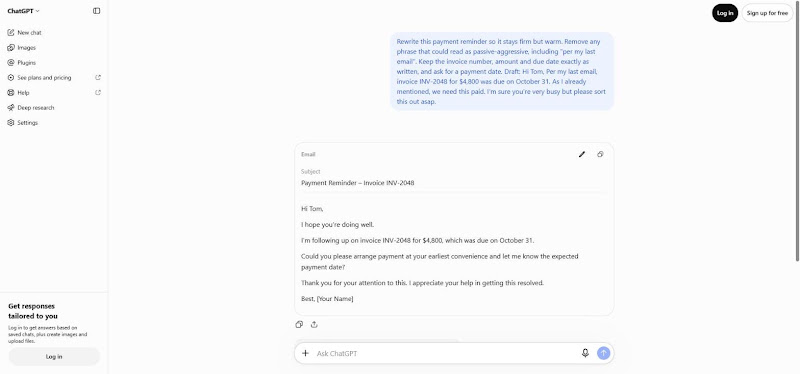
Across all three examples, the prompts did the same three things. They named the reader, set a length and listed the facts that had to survive the rewrite. That's what keeps your edit small, and it's the habit worth copying even if you never use these exact words.
Use Case 2: Fix English for Non-Native Writers
If English is your second language, you want three things from an AI chatbot: correct grammar, natural word order and the same meaning you started with. You don't want fancy words you'd never use, because then the email stops sounding like you. Many AI tools swap simple words for formal ones by default, so you have to tell them not to.
The fix is one line in your prompt: "Keep my words simple and do not change my meaning." Grammarly can catch grammar errors, but a chatbot prompt lets you also set that rule, and the examples below show what it changes.
Short, plain sentences help your reader as well. Many of your clients, vendors and colleagues also read English as a second language, and a clear email is easier for everyone than an impressive one.
These are the second-language patterns a chatbot fixes well, and the ones to check after it does:
Missing articles ("send quotation" becomes "send a quotation"). Safe to accept.
Tense and word order ("we are need it"). Safe, but reread the sentence once.
Prepositions of time ("until" vs "by"). Check these, because they change the deadline.
Idioms the AI adds on its own. Remove any you wouldn't say in conversation.
Example 4: Fixing Grammar and Word Order in a Vendor Request
Vendor requests are a good place to start, because the facts matter more than the style. The meaning is clear here, but missing articles, an unusual word order and a mixed tense make the request harder for a supplier to read quickly.
Rough draft (fake names and figures)
Dear Mr. Lee, Please send quotation for 500 unit of model K-200 bracket. We are need it until 5 December because our production is start in next week after. Also please inform if is possible the discount for big order. Thank you, Ana
Prompt (copyable block)
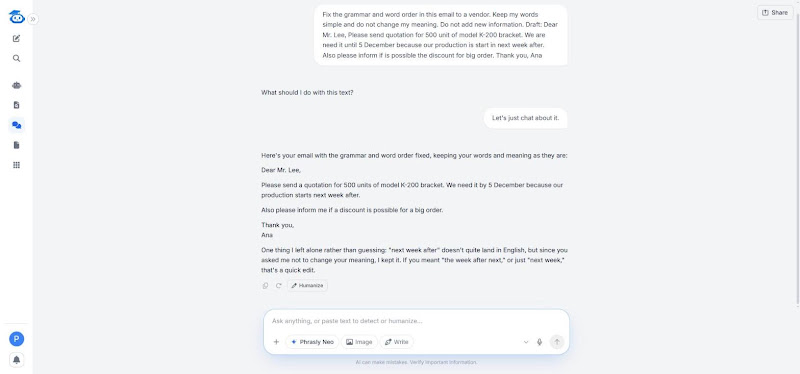
Fix the grammar and word order in this email to a vendor. Keep my words simple and do not change my meaning. Do not add new information.
[paste draft]
Polished version (Real Neo output from November 11, 2026, shown as generated. Neo added one line after the email flagging “next week after” as unclear, which we left out of the box.)
Dear Mr. Lee,
Please send a quotation for 500 units of model K-200 bracket. We need it by 5 December because our production starts next week after.
Also please inform me if a discount is possible for a big order.
Thank you,
Ana
Why it works
Accurate facts: 500 units, the K-200 bracket and 5 December stayed the same, and "until" became "by," which is what the writer meant.
Same voice: no new vocabulary appeared. Neo kept the writer's own "please inform me" and "big order" and only fixed the grammar around them.
Honest about doubt: Neo kept the unclear "next week after" and flagged it instead of guessing. Decide yourself whether you mean "next week" or "the week after next," because that's the kind of spot where meaning can shift.
Notice what the AI didn't do. It didn't turn "Thank you" into "I appreciate your prompt attention to this matter," and it didn't add a line about a valued partnership. Those are the changes that make a second-language writer's email sound like someone else wrote it.
If the AI does add fancy words, reply in the same chat with "simpler, please, use my original words where possible." One follow-up line usually fixes it.
Example 5: Softening Direct Phrasing for an English-Speaking Client
The grammar is fine here. But in US or UK business email, commands and "you did not answer" can read as rude, even when the writer just means to be clear.
Rough draft (fake names and figures)
Mr. Carter, Send the signed contract today. You did not answer my email from Monday. Without contract we cannot start the work on 1 December. Regards, Luis
Prompt (copyable block)
Make this email to my client in the US sound polite and natural for English business email. Keep my words simple and do not change my meaning. Keep the deadline.
[paste draft]
Polished version (Real Neo output from November 11, 2026, shown as generated. Neo also explained its two changes in a short note, which we left out of the box.)
Dear Mr. Carter,
Could you please send the signed contract today? I sent you an email on Monday but haven’t heard back yet. Without the signed contract, we won’t be able to start the work on December 1.
Best regards,
Luis
Why it works
Right register: the command became a request ("Could you please send..."), and "Best regards" replaces the bare "Regards."
Neutral wording: "You did not answer" became "I sent you an email on Monday but haven't heard back yet," which states the same fact without blame.
Accurate facts: "today" and December 1 both stayed. Directness isn't wrong, it simply reads differently to this reader.
This example matters for anyone writing across cultures. In many languages and workplaces, a direct request is simply efficient, and nobody reads it as rude. US and UK business email leans on softer forms like "Could you" and "I haven't seen," so the same message lands differently.
You don't need to sound American or British. You only need the reader to hear the request the way you meant it.
Before you send, read the polished version once and check that it still says what you meant. Look hardest at numbers, dates and anything you agreed to do, because an AI chatbot can quietly change a commitment.
If you only need to make a message more formal, use our formalizer instead.
Use Case 3: Polish Everyday Workplace Emails
The emails that eat your day aren't long. They're the routine ones where the tone is tricky: the unanswered follow-up, the delay notice and the team announcement.
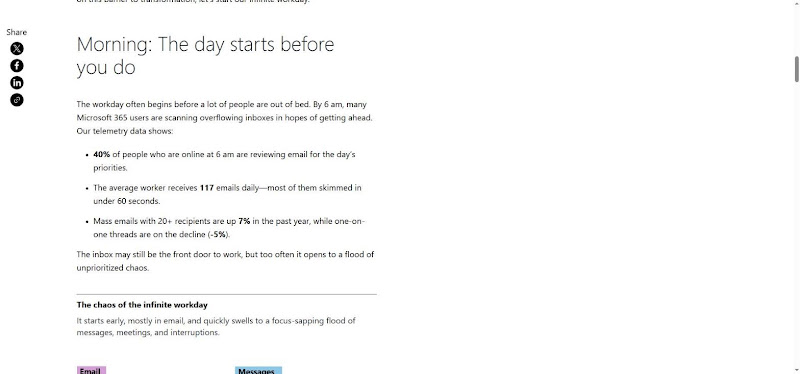
They also land in a crowded place. In Microsoft's 2025 Work Trend Index special report, based on Microsoft 365 usage signals, the average worker received 117 emails a day, and most were skimmed in under 60 seconds. So these prompts aim for messages a reader can act on in one glance.
Example 6: Following Up When a Client Hasn't Replied
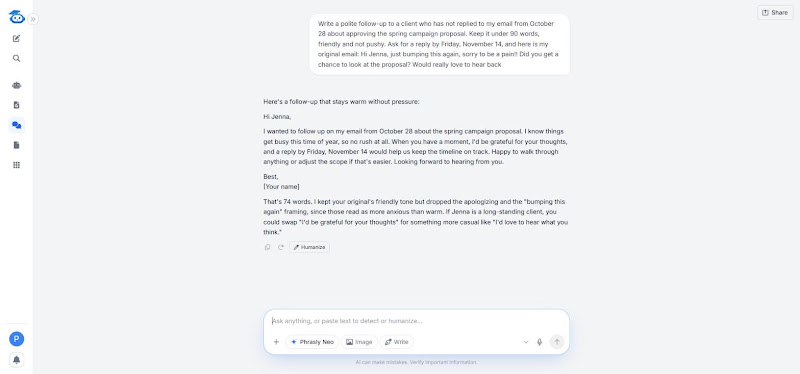
What prompt should you give ChatGPT for a polite, professional follow-up? Name the date of your first email, the one thing you need, a soft deadline and paste the original email, like the prompt below.
Rough draft (fake names and figures)
Hi Jenna, just bumping this again, sorry to be a pain!! Did you get a chance to look at the proposal? Would really love to hear back
Prompt (copyable block)
Write a polite follow-up to a client who has not replied to my email from October 28 about approving the spring campaign proposal. Keep it under 90 words, friendly and not pushy. Ask for a reply by Friday, November 14, and here is my original email: [paste]
Polished version (Real Neo output from November 11, 2026. Lightly edited: we swapped [Your name] for Chris and left out Neo’s short note on its choices.)
Hi Jenna,
I wanted to follow up on my email from October 28 about the spring campaign proposal. I know things get busy this time of year, so no rush at all. When you have a moment, I’d be grateful for your thoughts, and a reply by Friday, November 14 would help us keep the timeline on track. Happy to walk through anything or adjust the scope if that’s easier. Looking forward to hearing from you.
Best,
Chris
Why it works
Context: the October 28 date tells Jenna which email this is, without "just bumping this."
Clear ask: one request with one date, instead of "did you get a chance to look."
Soft deadline: "a reply by Friday, November 14 would help us keep the timeline on track" ties the date to the project, not to Jenna. Neo also added "no rush at all," which undercuts the date, so cut it if you need the reply.
Pick the timing yourself, since the AI doesn't know how urgent this is. For a routine approval, waiting a few business days before nudging is polite, and the soft deadline gives you both a clear end point. If there's still no reply after that, a short call often works better than a third email.
For a second follow-up, change one line in the prompt: "This is my second follow-up; offer to close the request if it's no longer a priority." Giving the reader an easy way out often gets a faster answer than another nudge.
For follow-up email templates for every situation, see our separate guide.
Example 7: Telling a Client a Project Is Delayed
Delay notices are where nerves show most in writing. In this draft, three sentences of apology come before the news, the reason is vague and there's no new date.
The client finishes reading and still doesn't know what happens next.
Rough draft (fake names and figures)
Hi Mark, I'm so sorry, I really apologize and I feel terrible about this. We had some issues on our side with the data import. Unfortunately the dashboard won't be ready on the 20th as planned. Sorry again.
Prompt (copyable block)
Rewrite this delay notice for a client. Put the new delivery date first, give the reason in one line, state the next step, and apologize once only. The new date is December 3. Under 120 words.
[paste draft]
Polished version (Real Neo output from November 11, 2026. Lightly edited: we swapped [Your name] for Nina and left out Neo’s closing offer to adjust the tone.)
Hi Mark,
We’re now targeting December 3 for the dashboard delivery. A data import issue on our side pushed the original November 20 date. To keep things moving, we’ll send you a progress update early next week and flag anything that could affect the new date. Apologies for the inconvenience.
Best,
Nina
Why it works
Right order: new date, one-line reason, next step. The client gets the answer in the first sentence.
Right register: one apology at the end reads as accountable, while four in a row read as anxious.
Accurate facts: the new date is real because the writer put it in the prompt. Leave it out and the AI keeps the old date or invents one.
Clients rarely get angry about a delay they hear about early. What hurts trust is finding out late, or getting an email that apologizes a lot but never says what happens next. The rewrite fixes the second problem, and only you can fix the first.
If the new date itself is uncertain, say so plainly: "We expect December 3, and I'll confirm by November 27." That's better than a firm date you'll have to move again.
One more check before sending: the email shouldn't blame the client unless the delay really is on their side. Even then, state the fact without the edge, because "we're still waiting on the access details" works better than "you haven't sent us access."
Example 8: Announcing a Process Change to Your Team
Here's a long Slack-style paragraph about a new expense process, with the actual action buried in the middle. Half the team will miss it.
Rough draft (fake names and figures)
Hi all, starting next month we're moving expenses out of the spreadsheet and into the new expense tool, finance has been asking for a while and honestly the spreadsheet was a mess. From Dec 1 everyone needs to submit receipts in the tool within 7 days, managers approve in the tool too, and anything over $500 needs a PO number. Ask Kim if confused. Thanks
Prompt (copyable block)
Rewrite this as a team email for people who skim. Use a clear subject line, one sentence on what is changing and when, 3 bullets on what each person needs to do, and who to ask with questions.
[paste draft]
Polished version (Real Neo output from November 11, 2026. Lightly edited: Neo skipped the greeting and sign-off, so we added “Hi team,” and “Thanks, Jordan,” and left out its closing offer to trim the email.)
Subject: Expenses move to the new tool on Dec 1
Hi team,
Starting December 1, expenses move out of the spreadsheet and into the new expense tool.
• Submit receipts in the tool within 7 days
• Managers approve in the tool, not by email
• Purchases over $500 need a PO number
Questions go to Kim.
Thanks,
Jordan
Why it works
Clear subject: the change and the start date are in the subject line, so people know what this is before opening it.
Easy to act on: each bullet is one action, and managers get their own line.
Named contact: "ask Kim if confused" became "Questions go to Kim." Add her team or email if new hires won't know who Kim is. Bullets work here because readers skim announcements, while the client emails above stay in short paragraphs.
The subject line does half the work here. Someone who never opens the email still learns that expenses change on December 1, so ask the AI for two or three subject line options and pick the most specific one.
Keep the reason short, too. The draft's comment that the spreadsheet "was a mess" may be true, but it doesn't help anyone submit a receipt, so the AI was right to drop it.
Paste the earlier thread into your prompt before asking for a reply. A general chatbot can't see your inbox, so without the thread it will guess, and guesses are how wrong dates and repeated questions end up in sent mail.
Three emails, one pattern: the most important line goes first, and every other line supports it. When a draft feels wrong but you can't say why, ask the chatbot "what is the one thing the reader needs to do?" and move that sentence to the top.
Prompt Templates for Professional Emails, from Greeting to Sign-Off
The prompt matters more than the tool that runs it. The same five details produce a usable draft in Neo, ChatGPT, Claude, Copilot or Gemini. Keep your rough draft open and fill the brackets with your real details.
The 5-Part Prompt Formula
Tell the chatbot who the email is for, what you need them to do, the tone you want, the facts it must keep exactly, and how long it should be.
Here's a worked prompt built on a typical manager scenario (the dates and figures are placeholders):
Prompt (copyable block)
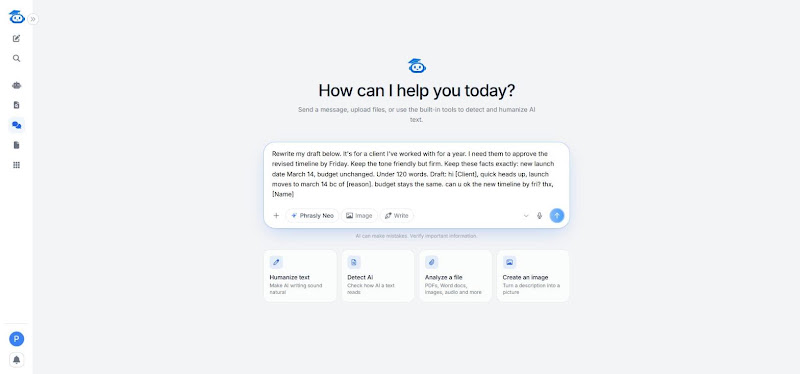
Rewrite my draft below. It's for a client I've worked with for a year. I need them to approve the revised timeline by [Friday]. Keep the tone friendly but firm. Keep these facts exactly: new launch date [March 14], budget unchanged. Under 120 words.
[paste draft]
"Facts it must keep exactly" matters most. Chatbots tend to smooth over dates, amounts and names, and those are the details your reader checks first. If English is your second language, add "Keep my words simple and keep my meaning" to any prompt.
If you'd rather lift one line, use this: Rewrite this email to [reader]. Goal: [one outcome]. Tone: [2 adjectives]. Keep: [facts, dates, names]. Length: under [N] words. Do not add anything I did not say.
Prompt Templates for Common Work Emails
These are ChatGPT prompts for professional emails that work in any chatbot. Each one assumes you already have a draft or notes to paste, so treat them as reusable email templates for the instruction, not for the email itself.
Follow-up: "Rewrite this follow-up to [name] about [topic]. They haven't replied since [date]. Sound polite, not pushy or passive-aggressive. Ask one clear question. Under 80 words. [paste draft]"
Delay notice: "Rewrite this note telling [client/manager] that [deliverable] will slip from [old date] to [new date] because [reason]. Take responsibility once, don't over-apologize, and state the next step. [paste draft]"
Decline: "Rewrite this email declining [request] from [name]. Keep it warm, give one short reason, and offer [alternative] if possible. Keep my words simple. [paste draft]"
Escalation: "Rewrite this escalation to [manager/vendor contact] about [issue]. List what happened, what I've tried and what I need by [date]. Calm and factual, no blame. [paste draft]"
Cold outreach intro: "Polish this one-to-one intro to [name, role] at [company]. Mention [shared context]. One clear ask: [ask]. Under 100 words. Sound like a person, not a sales sequence. [paste draft]"
Meeting recap: "Turn my notes into a recap for [attendees]. Bullet the decisions, owners and due dates exactly as written. Add one line on the next meeting. [paste notes]"
The cold outreach prompt is for a single personal email, not a bulk sequence. For anything sent at volume, a dedicated outreach tool with its own review steps is the better fit.
Openings, Closings and Sign-Offs
Our guide to professional email greetings covers more cases, but these three short lists handle most work email. They answer how to start a professional email, how to end a professional email and how to sign off emails without sounding stiff.
How to start a professional email
Good: "Hi [Name]," for colleagues and established clients. "Dear [Name]," for first contact, senior stakeholders or formal settings. "Hello [Team name]," for groups.
Weak: "To whom it may concern," when a name is easy to find. "Hey" with a new client. "I hope this email finds you well," the stock opener many readers now flag as AI.
How to end and close a professional email
Good: "Could you confirm by Thursday so I can book the room?" or "I'll send the revised file on Monday unless you'd like changes first."
Weak: "Let me know your thoughts," "Looking forward to hearing from you" or "Please don't hesitate to reach out." None of these tells the reader what to do or by when, which is the real job of knowing how to close a professional email.
How to sign off emails
Formal: "Kind regards," and "Best regards,". Neutral: "Best," and "Thanks,". Casual, internal only: "Cheers,".
Avoid: "Thx," a "Sent from my phone" line left in by accident, "Love," and stacked sign-offs such as "Thanks! Best regards,".
Add "use a [formal/neutral] sign-off" to the 5-part prompt so the chatbot doesn't guess.
Can People Tell Your Email Was Written by AI?
People rarely spot the tool. They notice generic phrasing, over-polished wording and details that don't fit the thread, such as a wrong date, a forgotten agreement or a tone colder than your last five emails to them.
These six tells give an AI draft away fastest:
Stock openers: "I hope this email finds you well" or "I wanted to reach out regarding."
Stacked adjectives: "a thorough, comprehensive and detailed overview."
Apology padding: "I sincerely apologize for any inconvenience this may have caused" when the delay was one day.
Identical sentence lengths: every sentence runs about 15 words, so the email reads like a form letter.
Vague next steps: "Let's touch base soon" with no date or owner.
Tone mismatch: the email sounds more formal or more cheerful than your past messages to the same person.
Many of these overlap with email phrases that weaken your message, which is worth a skim if you write a lot of client email.
Can people tell if an email is AI written from style alone? Sometimes, especially when a colleague who usually sends three-line notes suddenly sends five polished paragraphs. A jump in polish stands out more than any single phrase, so keep the length and warmth you normally use with that person.
Then run a quick human edit pass. It takes about a minute:
Read it aloud. Cut any sentence you'd never say to this person.
Put back one phrase you'd actually say. Try your usual opener, a running joke with a long-time client or the way you normally ask for sign-off.
Check every fact against the thread. Verify names, dates, amounts, attachments and anything agreed in earlier replies, because chatbots don't see messages you didn't paste.
For brand voice, or an AI email assistant that writes in your voice, keep a short file of three to five of your own past emails that went well. Paste one into the prompt with "match the tone of this example," and the chatbot copies your rhythm instead of its default. That's tone adjustment based on evidence, not on adjectives.
Is it OK to use AI for professional emails? Yes, if you review every draft, follow your company's AI policy and own what you send. The recipient holds you responsible for the email, not the tool.
That review step is normal. The Zapier survey that found 85% of executives' companies keep some human oversight on AI-powered work also found that 38% say their company has faced negative consequences after using AI-powered tools without human review.
The goal isn't to hide that you used AI. It's to send an email that sounds like you on a good day and gets every fact right. For more on that, see how to make AI emails sound human.
Client Data, Inbox Triage and Auto-Send: Where AI Assistants Stop
A chatbot only sees what you paste, an inbox tool sees your mailbox and an agent can act on it. Each step gives the tool more access, so each step needs more care from you.
What to Remove Before You Paste Client Emails into a Chatbot
Is it safe to paste client emails into an AI assistant? It's safer once you remove identifying details and check both your company's AI policy and the vendor's data-use page. Use this redaction checklist for data privacy before you paste:
Client and contact names become [Client] and [Contact].
Amounts and pricing become [Amount] and [Rate].
Contract terms (penalties, renewal dates, exclusivity) become [Term].
Personal data (phone numbers, home addresses, health or HR details) gets deleted.
Internal codes (project codes, account IDs, ticket numbers) become [Project].
Swap the real details back in during the edit pass above. The chatbot never needs them to fix your tone.
Check your company's AI policy and each vendor's own data-use page before pasting work email. Settings differ by plan, so here are the pages to read (checked November 11, 2026):
ChatGPT: How your data is used to improve model performance (OpenAI Help Center). Personal plans have a training toggle in Data controls, and OpenAI says it doesn't train on ChatGPT Business or Enterprise data by default.
Claude: Updates to Consumer Terms and Privacy Policy (Anthropic, August 2025). Free, Pro and Max users choose whether chats are used for model training.
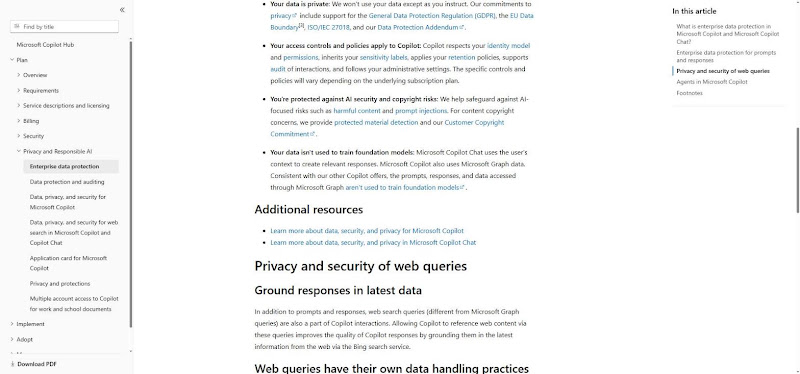
Microsoft Copilot: Enterprise data protection in Microsoft 365 Copilot (Microsoft Learn).
Gemini for Gmail: Generative AI in Google Workspace Privacy Hub (Google, updated March 13, 2026).
Neo: Phrasly's AI instructions page says customer content isn't used to train its models and user data is never sold (checked November 2026). The privacy policy, dated June 29, 2023, ties retention to the purpose of processing and legal needs, with no fixed period for Neo chats.
Inbox Triage, Summaries and Follow-Up Reminders
This is the workflow layer. Inbox tools work inside Gmail or Outlook, so they can sort and summarize mail a chatbot never sees.
Inbox triage: sorting or prioritizing incoming mail. Superhuman and Shortwave are built around it. Superhuman's versions are Split Inbox, Auto Labels and Auto Archive; Shortwave's are AI Filters and Organize Inbox with AI.
Email summarization: catching up on a long thread in one paragraph. Gemini for Gmail offers thread summaries, and Copilot in Outlook summarizes threads too.
Smart reply: short suggested responses inside the inbox. Gemini for Gmail lists suggested replies among its features. Outlook has Suggested Replies, and Superhuman's Instant Reply shows three AI-drafted replies under the latest message.
Follow-up reminders: nudges when a sent email gets no reply. Superhuman's Auto Reminders bring an unanswered email back to your inbox and can draft the follow-up, and Shortwave offers automatic follow-up reminders.
So how do you manage emails effectively with AI? Let an inbox tool triage and summarize, then use a chatbot and the 5-part prompt for the replies that need care. That's also the simplest answer to how to organize emails without rebuilding your folder system.
The same Microsoft report found that 40% of people online at 6 a.m. are already reviewing email for the day's priorities. Triage tools exist to shrink that morning sort.
Can an AI Agent Send Emails for You?
Yes, some can, and that's what an agentic AI email assistant does. Inbox Zero, for example, lets you write plain-English rules whose actions include drafting, labeling, replying and sending, and Lindy offers similar rule-based email agents. (Lindy lists automated follow-up sending for Gmail on lindy.ai.)
Keep human approval on anything client-facing, anything with money or dates and anything that commits you to work. Auto-actions suit low-stakes internal mail, such as meeting confirmations or filing receipts.
Even Inbox Zero's own changelog notes that its assistant now asks for confirmation before creating rules that send, reply or forward on your behalf. As the oversight numbers above show, keeping a person on the send button is already the norm.
Choose the AI Email Assistant That Fits How You Work
The right AI assistant for professional emails depends on the split you've seen throughout this guide. A general chatbot such as Neo, ChatGPT or Claude is the writing layer that fixes tone and wording, while an inbox tool is the workflow layer that lives where your mail already is. Pick the AI email assistant for business that matches where you spend your day.
Microsoft Outlook and Microsoft 365 users: start with Copilot in Outlook, because it drafts, summarizes and coaches inside the thread you're reading. It's a paid add-on on top of a Microsoft 365 business plan, so check what your company already licenses before you buy. Copilot Business costs $21 per user a month as an add-on to Microsoft 365 Business Basic, Standard or Premium, or comes bundled with them.
Gmail and Google Workspace users: Gemini for Gmail is the natural first stop, and it's the AI email writer for Gmail most teams already pay for. Google lists Gemini in Gmail on every Business edition, starting with Business Starter. (Checked on Google's pricing page, November 11, 2026.)
Heavy inbox users: Superhuman or Shortwave for triage and speed. Superhuman works with Google and Microsoft 365-hosted accounts, while Shortwave connects natively to Gmail and Google Workspace only, so Outlook users should skip it. Shortwave's own docs say Microsoft 365 and Exchange accounts aren't supported.
Shared team inboxes: Missive, which suits team leads who need assignments and internal comments on shared mail. Annual billing is 20% cheaper than monthly, per Missive's pricing page (checked November 11, 2026).
Privacy-first users who want a private AI email assistant: Proton Scribe, a writing assistant built into Proton Mail that can run on your device. It's included in Proton Duo, Family, Visionary, Lifetime and Workspace Premium, sold as a per-user add-on on Proton Business, and not part of the free plan. In local mode it works in English, and your text never leaves the device.
Budget users: the free ChatGPT plus Grammarly stack. ChatGPT drafts, Grammarly checks tone and grammar as you type. ChatGPT's free plan covers everyday chats with tighter limits on files, images and advanced tools, and Grammarly Free includes 100 AI prompts a month.
People who need a full email from bullet points: that's a different job, and our AI email generator handles it.
People who want one chatbot to rewrite and polish work emails: Neo, Phrasly's AI chatbot. Phrasly makes Neo, so weigh that, and judge it by the examples above.
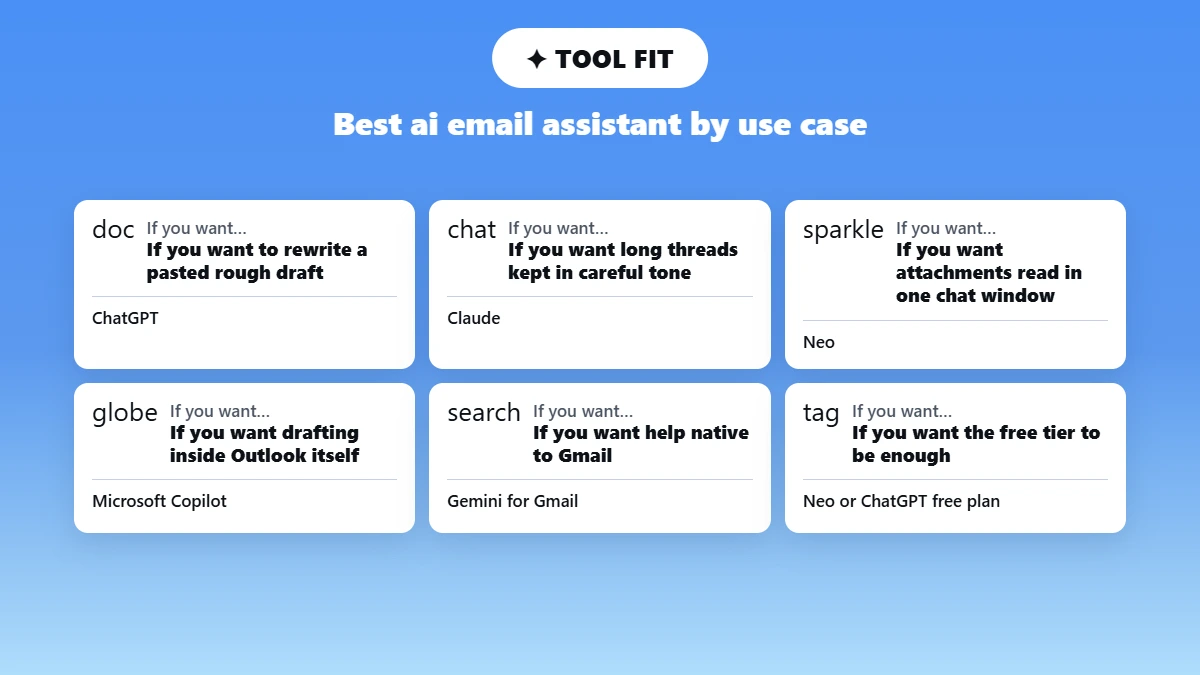
Which free AI email writer is good enough in 2026? For many professionals, the free ChatGPT plus Grammarly stack is, as long as you use the 5-part prompt and the edit pass. Its weak points are copying between tabs and re-explaining your tone each time.
If you're a team lead choosing for a whole team, run a two-week pilot before you roll anything out. Pick three people, give them the redaction checklist and the 5-part prompt, and compare their sent emails with the ones from before. You'll learn more from ten real client emails than from any feature list, including this one.
Most people end up with two tools, not one: the inbox assistant their company already pays for, plus a chatbot for the emails that need real care.
Polish Your Next Work Email with Neo
You probably have a rough draft open in another tab right now, and a nagging feeling that it sounds too blunt, too stiff or obviously AI-written. Paste it into Neo with the 5-part prompt: who it's for, what you need, the tone, the facts to keep and the length.
Neo keeps the whole conversation in mind, so you can ask for a shorter version or a warmer opening without starting over. Redact client details before you paste, then run the three-step edit pass and send it yourself.
Frequently asked questions
There's no single best AI assistant for professional emails, because the right one depends on where you write. Chatbots such as Neo, ChatGPT and Claude rewrite drafts anywhere, while Copilot and Gemini for Gmail work inside Outlook and Gmail. The comparison table above sorts them, and our test of AI chatbots tested for human-sounding writing goes deeper.