Do AI Chatbots Train on Your Uploads? ChatGPT, Claude, Gemini and Copilot Privacy
30 min read
Last checked against OpenAI, Anthropic, Google and Microsoft help pages on November 24, 2026, by Phrasly's SEO and content team.
Yes, ChatGPT uses your data for training on personal accounts (Free, Go, Plus, and Pro). OpenAI may train its models on your conversations by default. Turn off "Improve the model for everyone" in Data controls or file a "Do not train on my content" request in the Privacy Portal. Temporary Chat, Business, Enterprise, Edu and API data aren't trained on by default, and opting out doesn't delete stored chats or undo past training.
On a personal ChatGPT account, free or paid, OpenAI may use your conversations to train its models unless you turn off "Improve the model for everyone" in Data controls. The honest answer to "does ChatGPT use your data for training" also has exceptions: Temporary Chat, Business, Enterprise, Edu and API data aren't used for training by default.
The catch most pages skip is that training off doesn't mean storage off, and opting out today doesn't pull back chats that were already used.
Below, we test six common myths against OpenAI's own help pages, map every ChatGPT plan in one table, walk through the web and Privacy Portal opt-outs, and answer the wider question, do AI chatbots use your data for training, for Claude, Gemini, Copilot and the rest.
Try Neo, Phrasly's AI Chatbot for Drafting and Humanizing 👇
ChatGPT Uses Personal Chats for Training by Default, Unless You Opt Out
Does ChatGPT use your data for training? Yes: by default, conversations on personal Free, Go, Plus and Pro accounts may be used to train OpenAI's models. OpenAI's help page says it may use content from its services for individuals to train its models, and its ChatGPT Go page says the same for Go (OpenAI, ChatGPT Go).
So what does "Improve the model for everyone" mean in ChatGPT? It's the switch that lets OpenAI use your new conversations to help train future models, and it sits in your Data controls. If you've been wondering "does OpenAI use my data for training" because you never touched that switch, the answer on a personal account is yes, until you turn it off.
"How does ChatGPT use my data" is really three separate questions, and mixing them up causes most of the confusion:
Is it trained on? Can your chats feed future models?
Is it stored? How long does a copy sit on OpenAI's systems?
Can a person or a court see it? This covers human review, abuse monitoring and legal holds.
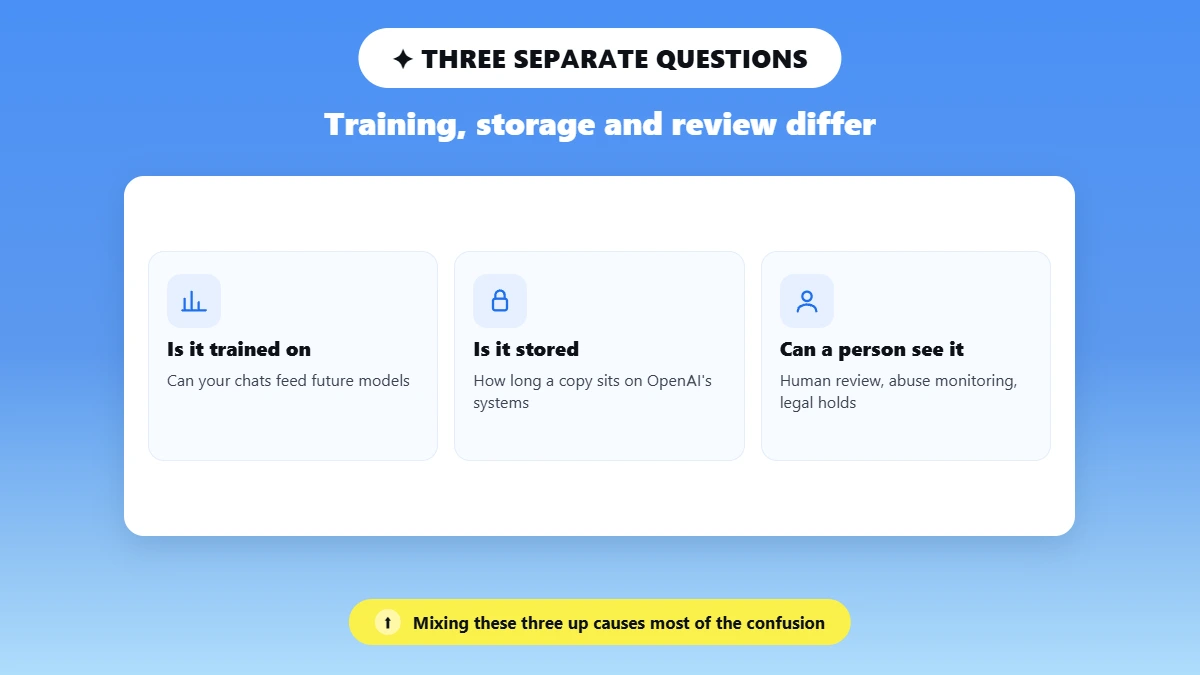
This page keeps those three apart. Myth 3 and Myth 4 return to storage and review, after the training question is settled.
Is ChatGPT using my conversations to train its models right now? If you've never opened Data controls on a personal account, assume yes, because the switch starts on. Checking takes less time than reading this paragraph: open Settings > Data controls and look at the toggle.
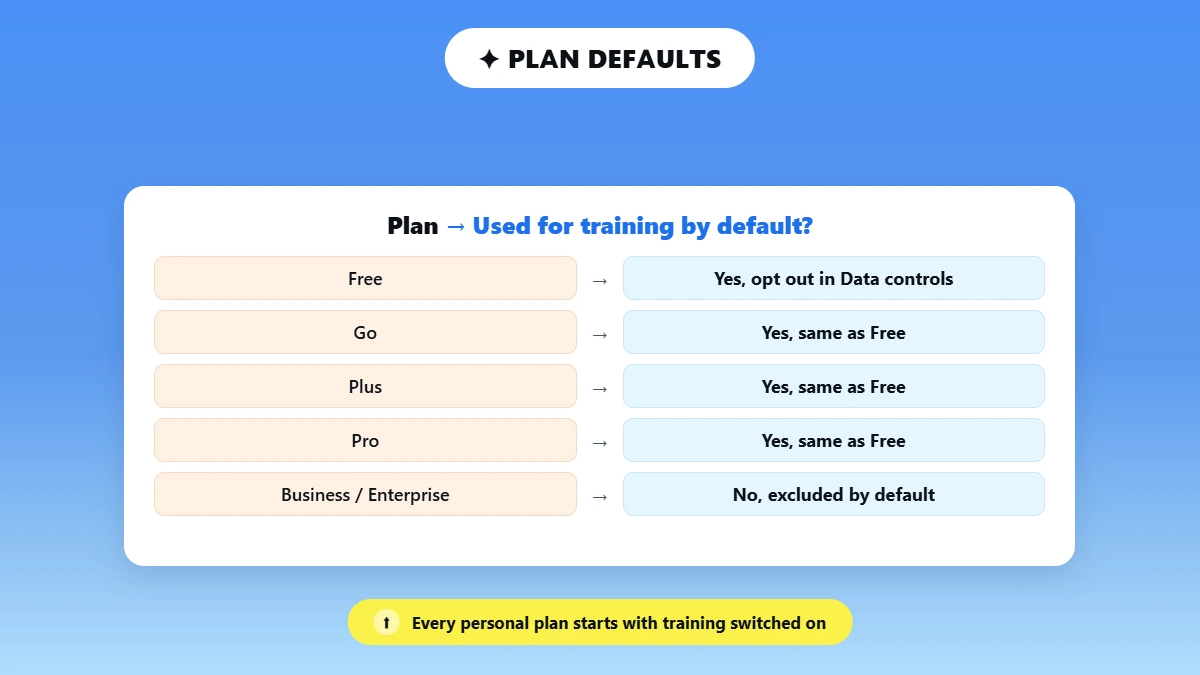
The plan you're on decides the default, so the table below answers the question for your own account. Personal plans start with training on, business plans and the API start with it off, and the opt-out is the same on every personal tier, so there's no paid route to privacy.
Plan | Used for training by default? | How to opt out | Temporary Chat available? | Source (checked Nov 24, 2026) |
|---|---|---|---|---|
Free | Yes | Turn off "Improve the model for everyone" in Data controls, or select "Do not train on my content" in the Privacy Portal | Yes | OpenAI, How your data is used to improve model performance |
Go | Yes | Same as Free | Yes | OpenAI, What is ChatGPT Go? |
Plus | Yes | Same as Free | Yes | OpenAI, How your data is used to improve model performance |
Pro | Yes | Same as Free | Yes | OpenAI, How your data is used to improve model performance |
Business | No | Not needed by default; organizations stay opted out unless they explicitly opt in | Yes, subject to workspace settings | OpenAI Business data privacy page |
Enterprise | No | Not needed by default; admins control retention | Yes, subject to workspace settings (also visible in the Compliance API for 30 days) | OpenAI Business data and Enterprise privacy pages; Temporary chat FAQ |
Edu | No | Not needed by default; admins control retention | Yes, subject to workspace settings | OpenAI Business data and Enterprise privacy pages |
API | No, unless your organization opts in | Not needed by default | Not applicable | OpenAI API, Your data |
Codex | Follows your plan: on a personal plan, "Improve the model for everyone" covers Codex tasks; a separate "Include environments" setting covers environment data | ChatGPT toggle or Privacy Portal for tasks; Codex settings for "Include environments" | Not applicable | OpenAI Data controls FAQ |
Logged-out use | On by default in our Nov 25, 2026 test; signed-out users can control training | Settings (left sidebar) > Data controls | Not stated by OpenAI | OpenAI Data controls FAQ |
Does ChatGPT use your data for training? Default by plan, checked against OpenAI's help pages on November 24, 2026.
If you're also choosing a chatbot, our Neo Chatbot hub collects every chatbot test we've run.
Is ChatGPT private, then? It keeps your chats away from other users, but not away from OpenAI itself, so the useful question is what you let it train on and what you leave in your history.
Myth 1: Paying for ChatGPT Plus Keeps Your Chats Out of Training
Does ChatGPT Plus use your data for training? Yes, paying doesn't change the default: Plus chats are used for training the same way Free chats are, unless you switch the setting off. For training alone, the toggle on a personal account works, and you don't need to pay for Business just to stop it.
Client data is a different story, because a workspace changes storage and admin rules as well as training.
ChatGPT Plus and Pro follow the same default as Free
A subscription buys model access, higher limits and extra features. OpenAI's help page lists Free, Plus and Pro together as services for individuals that may be used for training, so the default is the same on every personal tier.
The setting you're looking for is called "Improve the model for everyone," and the steps are in Myth 2. If you're on Pro and assumed the top tier is private by default, it isn't, and the same opt-out applies.
ChatGPT Business and Enterprise exclude your data by default
Does ChatGPT Enterprise train on your data? Not by default: OpenAI says it doesn't use data from ChatGPT Enterprise, Business, Edu, ChatGPT for Healthcare, ChatGPT for Teachers or the API platform for training (OpenAI business data). The same page says qualifying organizations can set how long OpenAI keeps business data.
What Business and Enterprise add: no training by default, admin controls, retention settings on Enterprise and Edu, and a Data Processing Addendum for contracts.
What they don't change: deleted conversations still take up to 30 days to leave OpenAI's systems, workspace admins can see and manage data, and legal holds can still apply (see Myth 4).
That makes Business worth it for team governance, such as admin control and contracts. It isn't the only way to stop training, because personal users already have a working opt-out. On a personal plan, the toggle is your whole training control.
OpenAI API and Codex
API data isn't used for training by default: OpenAI's developer docs say data sent to the API since March 1, 2023 isn't used to train its models unless you explicitly opt in (OpenAI API, Your data). By default, abuse monitoring logs are kept for up to 30 days.
Does Codex use my data for training? On a personal ChatGPT plan, "Improve the model for everyone" also applies to your Codex tasks, and a separate "Include environments" setting in Codex controls whether context from your environments can be used. Changing your ChatGPT setting or opting out through the Privacy Portal doesn't change that second setting.
If you use a third-party writing app built on the API, the API default covers the app's account with OpenAI, not you directly. Check that app's own privacy policy as well.
Myth 2: The Data Controls Toggle and the Privacy Portal Do the Same Job
How do I stop ChatGPT from training on my data? There are two routes: the "Improve the model for everyone" toggle in Data controls, and a "Do not train on my content" request in OpenAI's Privacy Portal. OpenAI says either one is enough for ChatGPT conversations and Codex tasks, so you don't need both (OpenAI).
They still aren't the same mechanism, and the differences matter if you use more than ChatGPT. The table below sets them side by side, and the steps follow.
A common question on our team is whether switching the toggle also means filling in a form on a website. For ChatGPT chats it doesn't, but the portal reaches parts of OpenAI's products that the toggle doesn't.
Question | "Improve the model for everyone" toggle | "Do not train on my content" request |
|---|---|---|
Where it lives | ChatGPT > Settings > Data controls (web) | privacy.openai.com |
What it covers | New ChatGPT conversations and, on personal plans, Codex tasks. Has a sub-switch for audio recordings. | ChatGPT conversations and Codex tasks; OpenAI says a portal opt-out also applies to Sora |
Can you reverse it? | Yes, flip it back at any time | Submit a new request |
Works when signed out? | Yes, signed-out users can control training in Settings | Tied to an account email |
Does it change Codex "Include environments"? | No | No |
Does it remove past training? | No | No |
If you want to know how to turn off ChatGPT data sharing for model training, the toggle is the quickest route, and it's the one we use on every team account. The portal is worth filing too if you also use Sora, or if you want a written record of your request.
Turn off Improve the model for everyone on the web
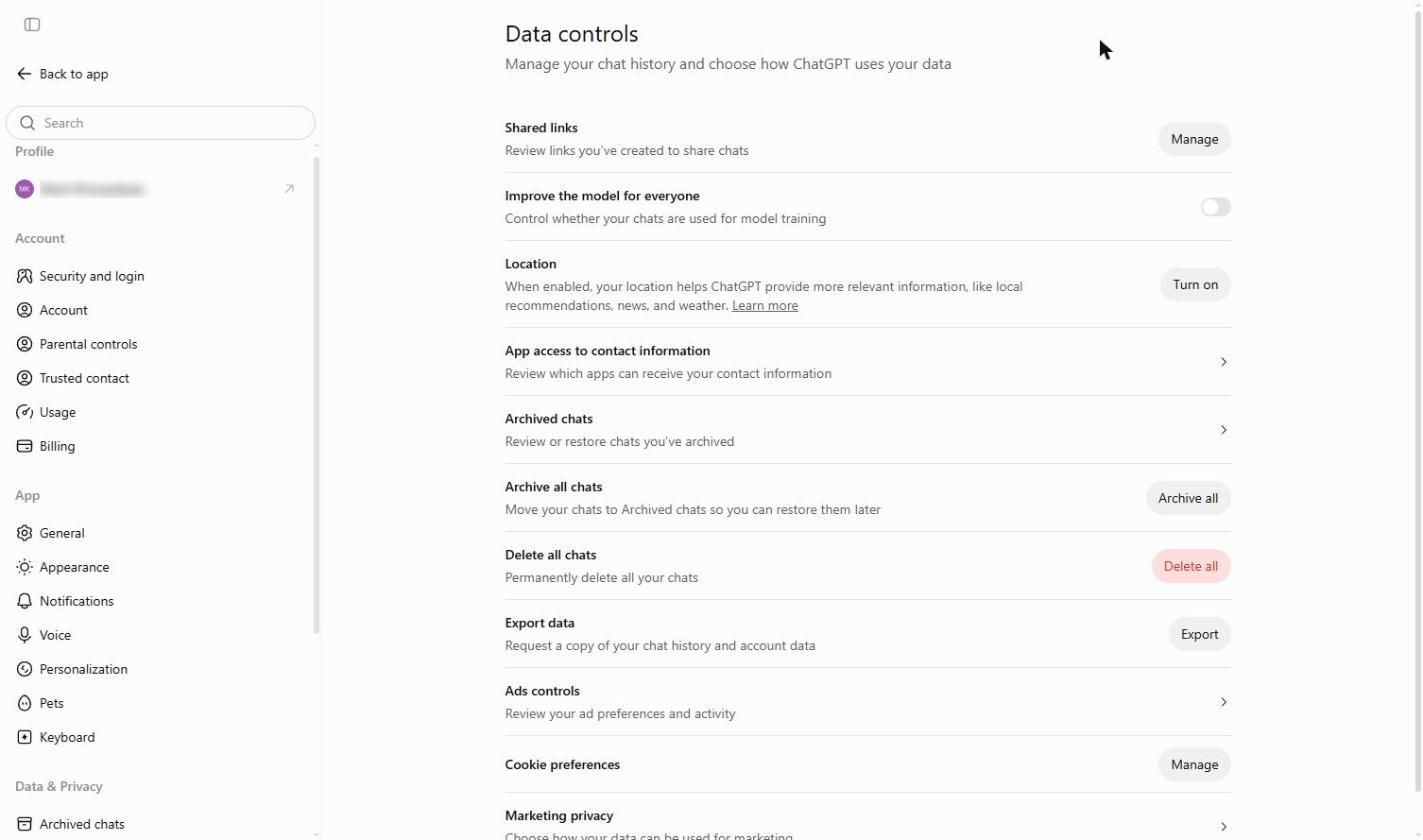
Here's where Data controls is in ChatGPT on the web, and the exact steps to turn it off:
Click your profile icon or name in the bottom-left corner to open the account menu.
Select Settings.
Select Data controls.
Switch "Improve the model for everyone" off. That's the whole job: "improve the model for everyone" in ChatGPT is now off for new chats.
Switching it on one account doesn't change your other accounts. If you use a work login and a personal login, switch the toggle on each, and do the same for any shared team login.
The change applies to new conversations from that moment, and your existing chats stay in your history. In the current web app, Data controls sits under Data & Privacy in the Settings sidebar, and the row reads "Control whether your chats are used for model training."
Submit a do not train on my content request in the OpenAI Privacy Portal
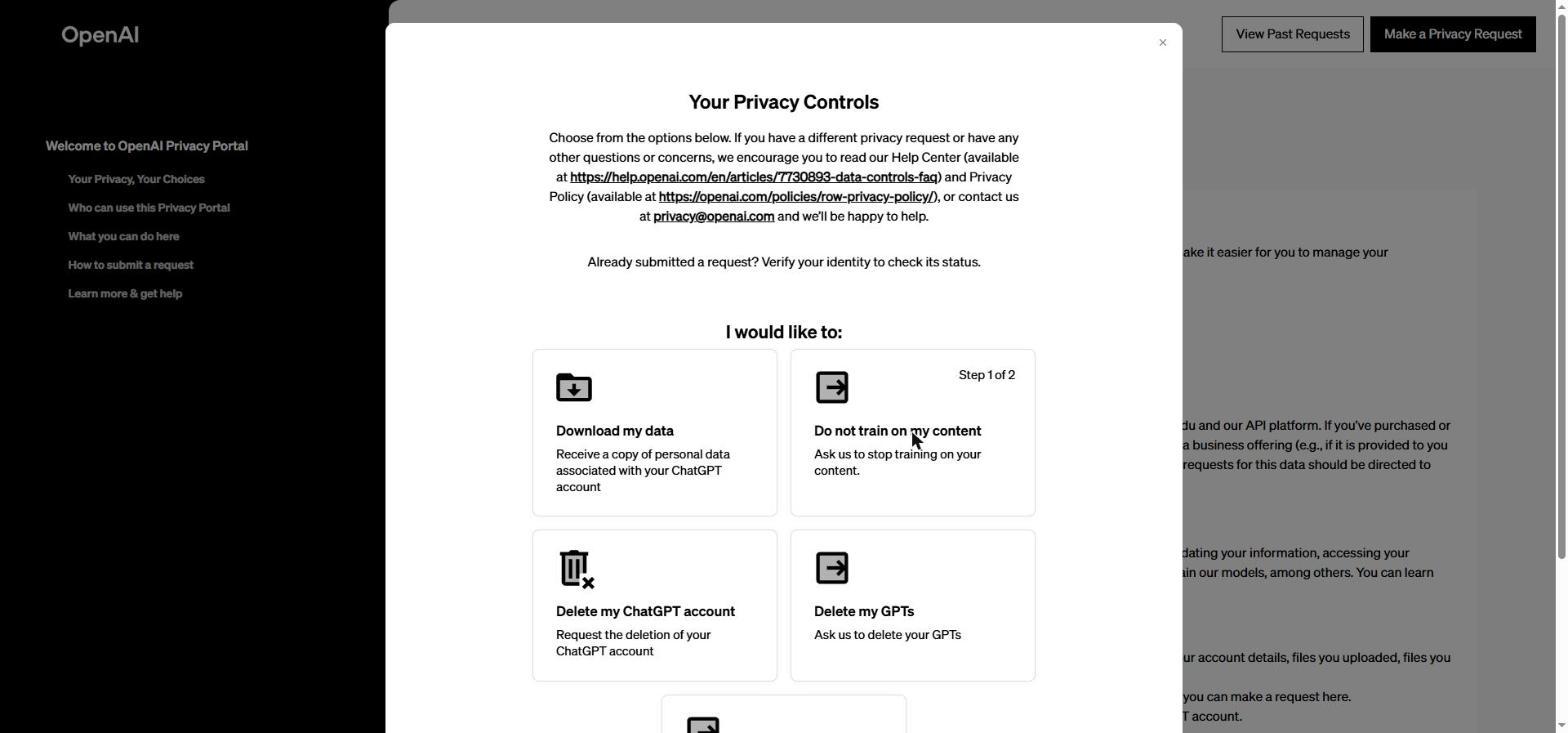
The ChatGPT privacy portal "do not train on my content" request takes a few minutes and works without opening the app:
Go to privacy.openai.com.
Click Make a Privacy Request, choose I have a consumer ChatGPT account, then select "Do not train on my content."
Sign in with your OpenAI account to complete step 2 of 2, then submit the request.
Keep the confirmation as your record of the request. View Past Requests on the portal home page lets you check its status.
The portal also handles OpenAI's other privacy requests, such as Download my data, Delete my ChatGPT account and Delete my GPTs, so it's worth bookmarking even when the toggle already covers training. The portal itself says it covers consumer ChatGPT and Sora accounts, not ChatGPT Business, Enterprise, Edu or the API platform.
If you use ChatGPT without logging in
Signed-out ChatGPT has its own Settings menu. On the web, select Settings in the left sidebar and turn off "Improve the model for everyone" under Data controls. In our signed-out test it was on by default, alongside three ad and marketing switches. OpenAI's help page says signed-out users have only the option to control training.
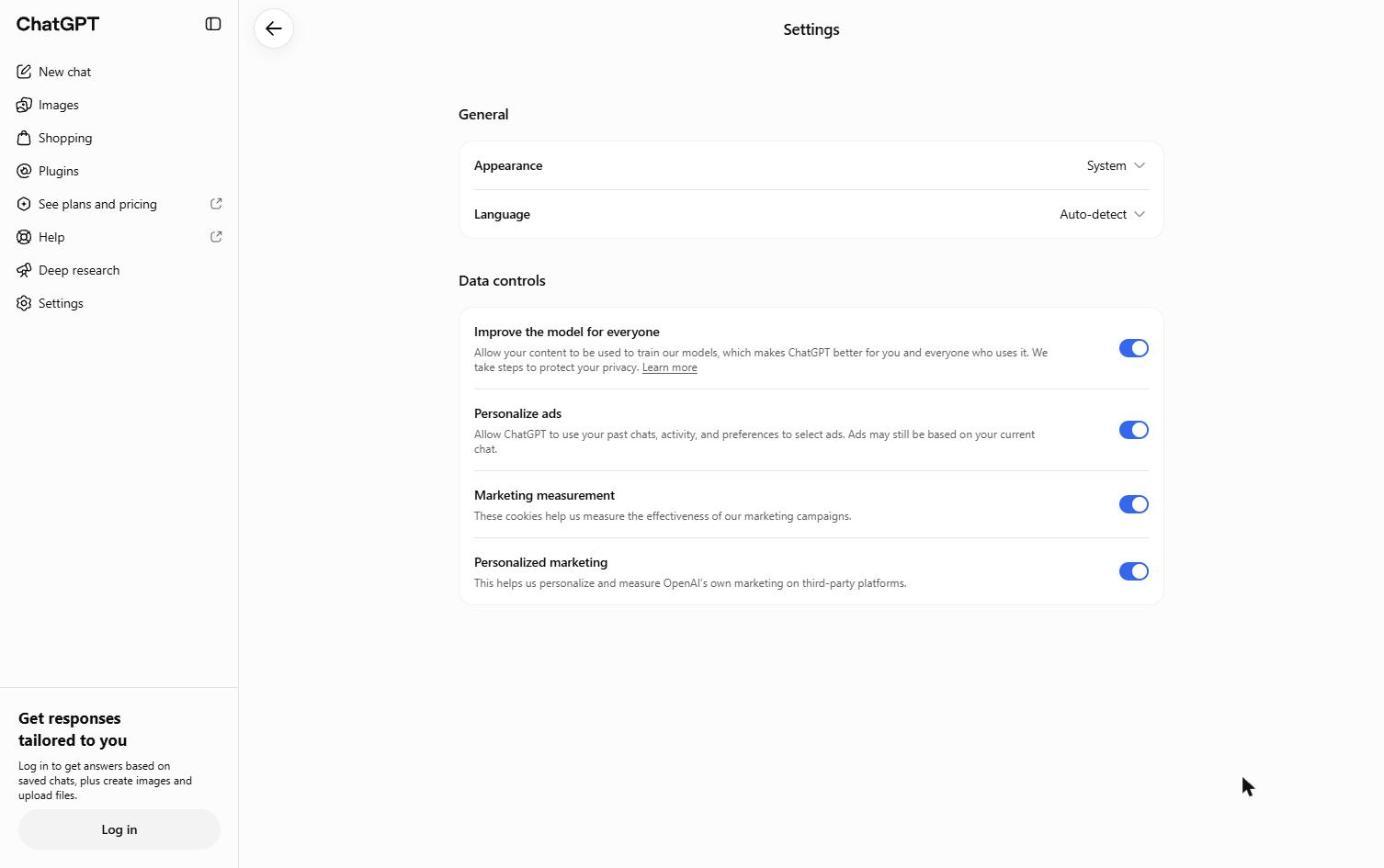
That control lives in your browser session, not an account, so it may not carry over to a new browser or device. If you care about training, sign in and use the account setting instead.
Guest modes on other chatbots often log more than you'd expect, as our list of free AI chatbots with no sign-up shows.
Where the old Chat History and Training setting went
If you're searching for how to turn off chat history and training in ChatGPT, that combined switch no longer exists. An older version of ChatGPT tied history and training together, so turning training off also hid your chats.
Today they're separate. OpenAI's Data controls page says that when "Improve the model for everyone" is off, new conversations won't be used for training but can still appear in your history, and Temporary Chat handles the "don't save this" case.
The split is good news for most people. You can keep a searchable history of your work and still keep it out of training, which wasn't possible when both lived on one switch.
Myth 3: Temporary Chat Keeps Nothing at All
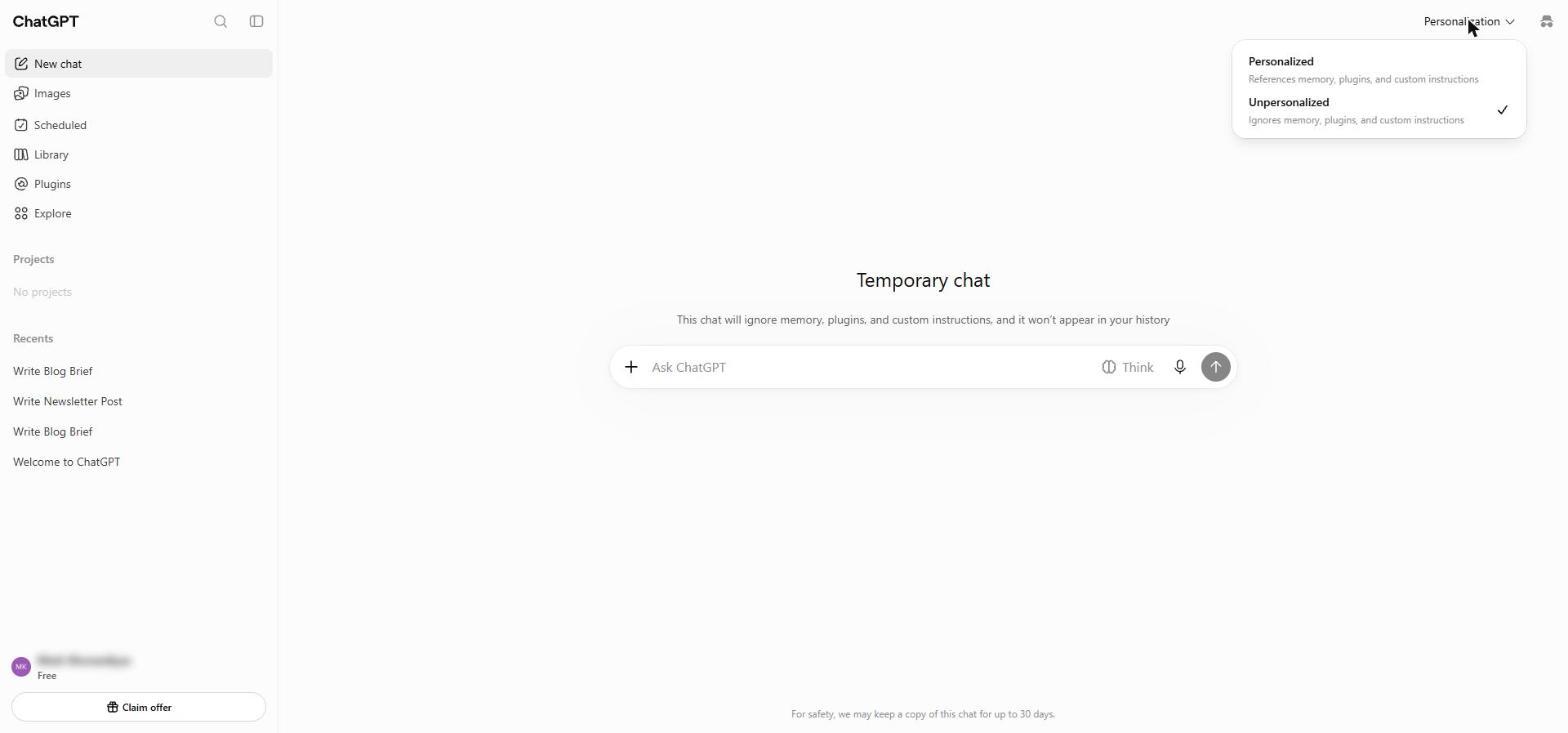
Does using Temporary Chat keep your conversations out of OpenAI's training data? Yes, while it stays temporary: OpenAI says a temporary chat isn't used to improve its models, whether or not you choose personalization. The ChatGPT Temporary Chat training rule has one big caveat, though, because OpenAI may keep a copy for up to 30 days for safety purposes (OpenAI Temporary chat FAQ).
So Temporary Chat is "not trained on," not "never stored." It's the right tool for a one-off sensitive question, and the wrong one if you assume nothing ever touches a server.
It's also the closest thing ChatGPT has to an incognito mode. Start one from a new chat with the Temporary chat icon in the top-right corner, then pick Personalized or Unpersonalized from the Personalization menu before you send the first message. In our test, Unpersonalized was the default.
What Temporary Chat skips
While a chat stays temporary, OpenAI's help pages say it:
doesn't appear in your chat history
doesn't create or update ChatGPT Memory
isn't used to improve OpenAI models
is removed from OpenAI's systems after the retention window
Those four points are why we use Temporary Chat for quick checks on client wording. The chat disappears from the sidebar, nothing goes into memory, and the training question doesn't arise.
What Temporary Chat still keeps or uses
The 2026 version of Temporary Chat added a choice you make before the first message: Personalized or Unpersonalized. A personalized temporary chat can use your existing memories, custom instructions and plugins, though it still won't create new memories, and you can't change the choice once the conversation starts.
If you want a temporary chat that knows nothing about you, pick Unpersonalized. It won't use memory, custom instructions or plugins, which makes it the safer choice for client material.
OpenAI may keep a copy for up to 30 days for safety, and it may still use information from prior conversations for limited safety and security purposes.
If you save a temporary chat, it becomes a regular chat and follows your normal training and retention settings. Eligible uploaded files may also be saved to Library.
On Enterprise, temporary chats are available through the Compliance API for 30 days, whatever custom retention period the workspace sets.
Memory deserves its own warning, because it outlives the chat it came from. OpenAI's Memory FAQ says saved memories are stored separately from chat history, so deleting a chat doesn't delete a memory built from it, and fully removing something means deleting every source, including past chats, files, the memory summary and any connected apps that hold it (OpenAI Memory FAQ).
Locked Chats, which OpenAI rolled out on October 20, 2026, solve a different problem. They hide a conversation behind a PIN or biometric lock on your device, but they don't change retention or training (TechCrunch). New messages in a locked chat also won't update the memory used in your regular chats.
Myth 4: Turning Training Off Means OpenAI Stops Storing Your Chats
Turning training off doesn't mean OpenAI stops storing your chats, and opting out doesn't remove data already used for training. Your regular chats stay saved to your account until you delete them, whatever your training setting says.
In practice, chat data on a personal account has three possible lives: your visible history, OpenAI's retention window after you delete it, and any copy a legal process requires. Training settings touch none of the three, and deleting a chat is still worth doing because it removes the copy from your account and starts the 30-day clock.
This is where "how does ChatGPT use my data" stops being a training question. OpenAI's retention page says a deleted chat leaves your account view at once and is scheduled for permanent deletion within 30 days, unless it was already de-identified and disassociated from your account, or OpenAI must keep it longer for security or legal reasons (OpenAI Chat and file retention).
Who can see a stored chat is a third question again. OpenAI says a limited number of authorized staff and trusted service providers may access content for abuse or security investigations, support requests, legal matters and, unless you opt out, model improvement.
Your action | Trained on? | Still stored? | Who can still see it |
|---|---|---|---|
Toggle off | No, new chats are excluded | Yes, in your history until you delete them | Authorized staff for abuse, security, support or legal reasons |
Delete a chat | No, deleted chats aren't used for future training | Up to 30 days, longer for legal or security holds | Same as above until deletion completes |
Temporary Chat | No, while it stays temporary | Up to 30 days for safety | Same as above |
Delete your account | No | Up to 30 days, except de-identified data and legal holds | Same as above until deletion completes |
Business or Enterprise workspace | No, by default | According to workspace retention settings | Workspace admins plus the cases above |
Court orders are the legal exception people worry about most. In the New York Times copyright case, a May 2025 order made OpenAI preserve consumer logs, and that order was lifted in September 2025 (Bloomberg Law). A magistrate judge then ordered OpenAI to hand over 20 million de-identified ChatGPT logs, and on January 5, 2026 District Judge Sidney Stein affirmed that order (Bloomberg Law).
OpenAI also notes on several help pages that data retention for certain services may be affected by recent legal developments, and points readers to its own post on the case. Nothing in that case suggests anyone is reading individual chats by name. It does show that "deleted within 30 days" has a legal exception, and that a sample of stored logs can end up in discovery.
If you live in the EEA, the UK or Switzerland, OpenAI publishes a separate version of its privacy policy for you, and data protection law gives you rights to access, correct, delete and object to processing of your personal data. You can send those requests through the Privacy Portal (OpenAI EEA privacy policy).
So, is it safe to paste work documents into ChatGPT if training is off? Training off removes one risk, model training, but the document still sits in your history and inside OpenAI's retention rules.
Myth 5: Uploads, Voice and Feedback Follow Your Opt-Out
Most uploads do follow your opt-out, but feedback doesn't, and voice has its own switch. That's the short answer to the H1 question of whether AI chatbots train on your uploads, and the details differ by chatbot.
Do AI chatbots use your data for training when you upload a file instead of typing? On ChatGPT, OpenAI's privacy policy treats files, images, audio and video you upload as content, the same category as your prompts. That means they sit under the same "Improve the model for everyone" setting, though Microsoft says file contents in its new Copilot app aren't used to train foundation models.
Thumbs up and thumbs down feedback
Does a thumbs up or down undo your opt-out? For that conversation, yes. OpenAI says that on Free, Plus and Pro, if you rate a response with thumbs up or thumbs down, it may use the entire conversation linked to that feedback to improve its models, even if you've opted out.
Thumbs up and thumbs down feedback is the most common way people undo their own opt-out without knowing it. On anything sensitive, skip the rating buttons and type your feedback into the chat instead.
PDFs, images and voice
Uploaded files have their own retention rules on top of your chat settings. Files in a project or custom GPT stay until you delete the project, GPT or file, and files saved to Library stay even after you delete the chat that used them, so delete them from Library too.
Voice has a separate switch. In Data controls, "Include your audio recordings" decides whether audio from dictation and voice chats can be used for training, and turning off "Improve the model for everyone" stops it as well (OpenAI Voice dictation FAQ). Dictation audio is kept as long as the chat stays in your history and is deleted within 30 days after you delete the chat, with the usual legal and security exceptions. On our Free test account, the web Data controls page showed no audio switch, so check the app you record in.
Shared links
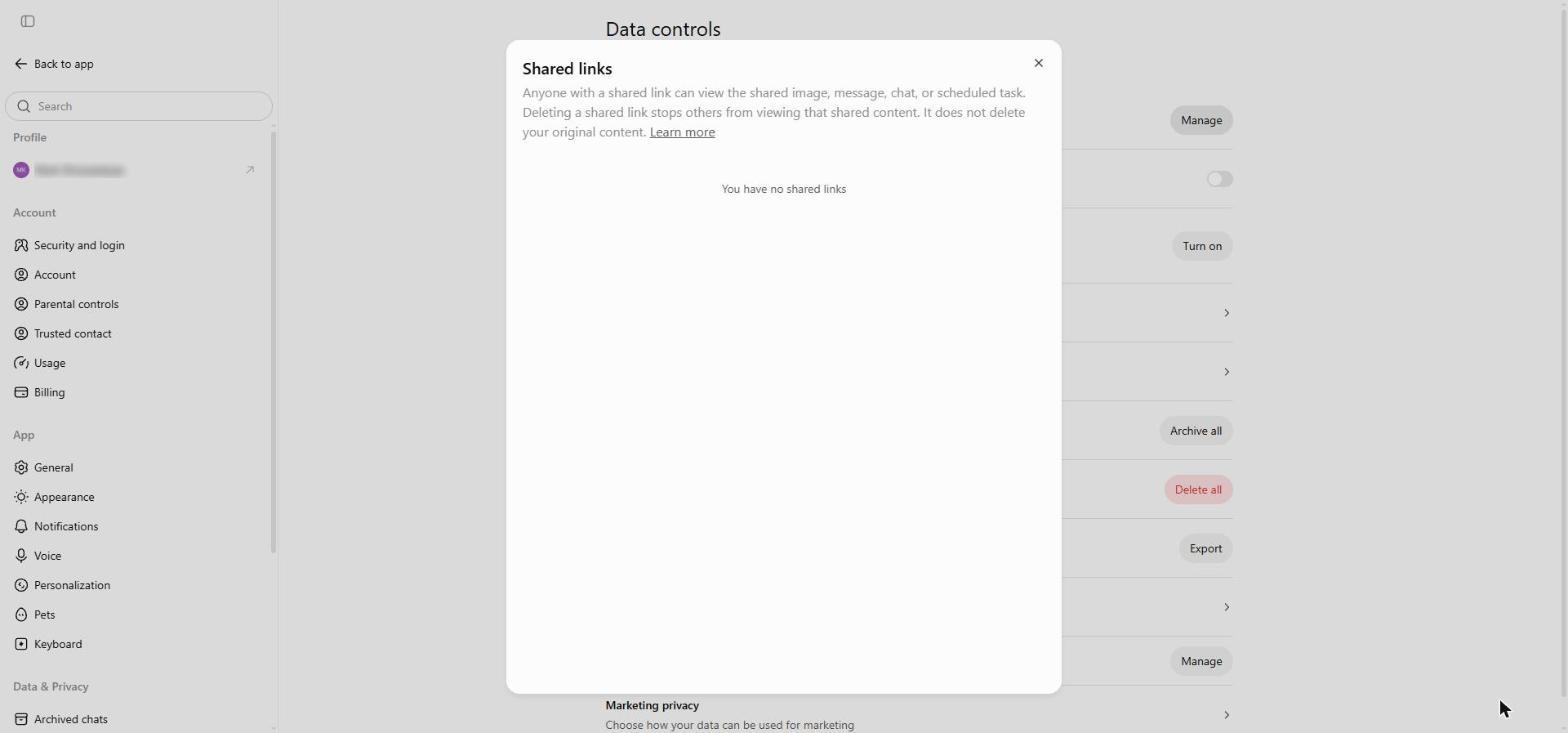
A shared link is a public copy, not a private one. OpenAI says anyone with the link can view the conversation, including supported images and files, and deleting the link stops future access but doesn't remove a copy someone already imported into their own history (OpenAI shared links).
You can review every link you've created in Settings > Data controls > Shared links > Manage. Locking a chat doesn't delete a link you already shared, so delete the link separately.
Myth 6: Opting Out Erases What ChatGPT Already Learned
Does OpenAI use my data for training after I opt out, if it was already trained on? Opting out isn't retroactive: OpenAI says that once you opt out, new conversations won't be used to train its models, and it makes no promise about training that already happened. Your old chats won't feed future training once the toggle is off, but anything already used stays inside the models trained on it.
Will my old chats stay in OpenAI's training data if I opt out today? Any chat already used in a training run stays part of what that model learned, and OpenAI doesn't describe a way to take it back out. What changes is the future: chats you keep after opting out won't be added to later training.
That's why the order of steps matters. Turn training off first, then decide what to export and delete, so nothing new gets used while you tidy up. Opting out on day one beats opting out later, because every week the switch stays on adds chats you can't take back.
Other vendors are blunter about this. Anthropic says chats already in a training run or a trained model stay there, and Perplexity says previously collected training data can't be deleted or removed. Microsoft's FAQ for its older Copilot app says the same: opting out excludes future conversations.
What you can control is what's still stored. Export first if you want a copy, then delete what you don't need.
Export your ChatGPT data
Open Settings > Data controls.
Select Export next to Export data and confirm.
Open the email from OpenAI and download the file, which includes your chat history and shared conversations.
The export doubles as an audit. Skim it for anything you wouldn't paste today, and delete those chats first.
Delete chats or your whole account
To delete one chat, open the three-dot menu next to it and select Delete.
To delete all chats, go to Settings > Data controls and select Delete all next to Delete all chats.
To delete your account, go to Settings > Account and select Delete next to Delete account, then confirm.
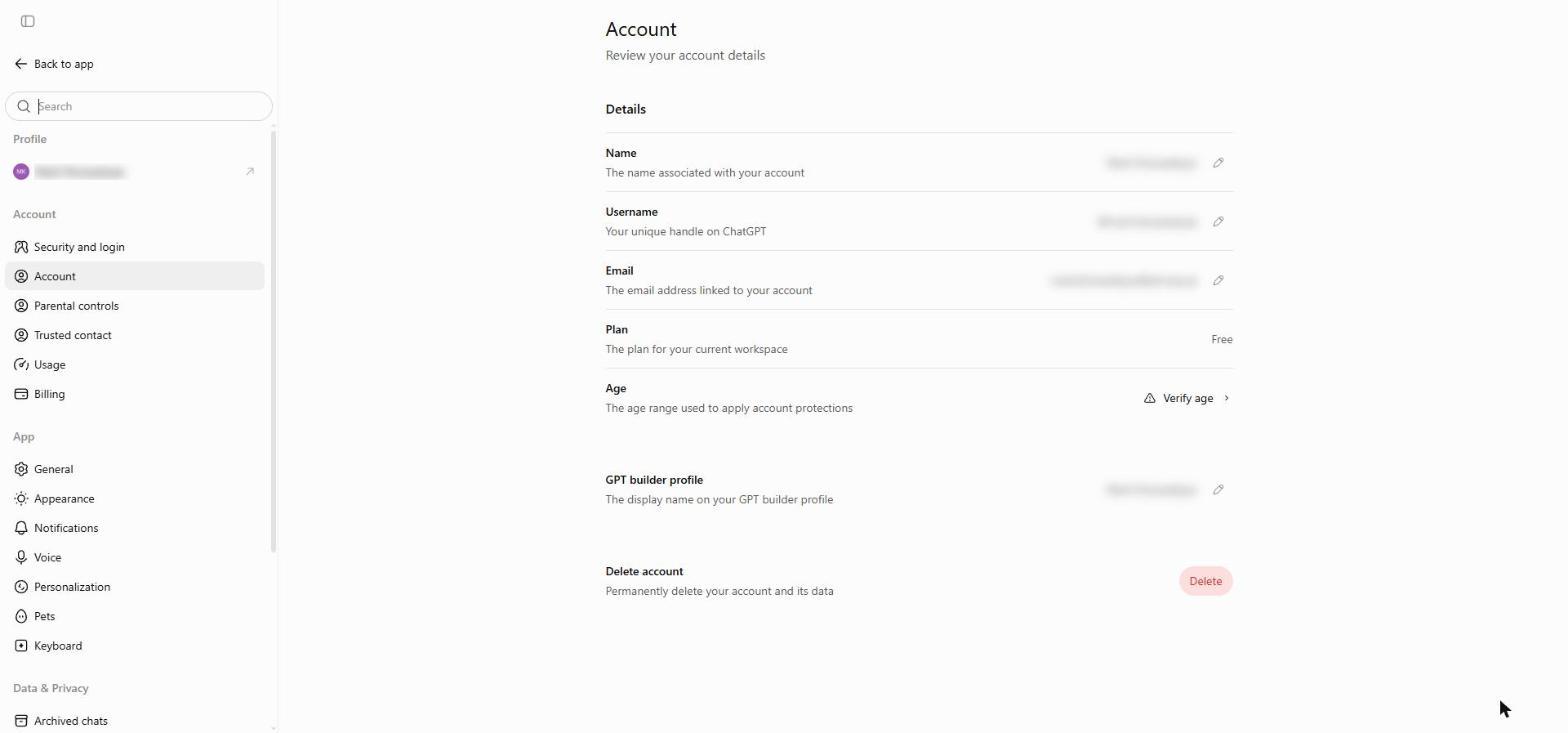
Account deletion is permanent and follows the same 30-day rule as chat deletion, with the same exceptions for de-identified data and legal holds. Delete saved memories and Library files too, because they're stored apart from your chats.
Shared links you made before opting out keep working until you delete them, and conversations you rated with the thumbs buttons may already have been used. If you're in the EEA, the UK or Switzerland, you can also ask through the Privacy Portal for personal data to be deleted, as covered in Myth 4.
Do AI Chatbots Use Your Data for Training? ChatGPT vs Claude, Gemini, Copilot and More
Yes, most of them do by default on personal accounts, and each one uses a different switch. A 2025 Stanford study of six major US AI developers found that all of them use user chats to train their models by default (Stanford HAI).
This AI chatbot privacy comparison uses the same five columns for every vendor and only facts from each vendor's own pages. Business and enterprise plans of every vendor here follow separate commercial terms, which are more restrictive.
For how the same chatbots compare on reasoning, writing and search, see our test of the smartest AI chatbot.
Chatbot (personal account) | Trains by default? | Where to switch it off | No-training mode | Retention |
|---|---|---|---|---|
ChatGPT (OpenAI) | Yes | Settings > Data controls > "Improve the model for everyone" | Temporary Chat | Saved until you delete; deleted chats and temporary chats up to 30 days |
Claude (Anthropic) | Yes if "Help improve our AI models" is on; users had to choose by October 8, 2025 | Settings > Privacy > "Help improve our AI models" | Incognito chat | 30 days after deletion; up to 5 years de-identified when training is on |
Gemini (Google) | Carries over your old Keep Activity choice, which was on by default for adults | Gemini History > "Help train generative AI models with" (separate checkboxes for chat content and for audio and Gemini Live) | Temporary chat | Auto-delete default 18 months; history-off and temporary chats about 2 months; reviewed chats up to 3 years |
Copilot (Microsoft) | New app (since Aug 18, 2026): prompts, responses and files aren't used to train foundation models. Older app: yes, with exclusions | New app: no training switch. Older app: Profile > Privacy > "Training on conversation activity" and "Training on voice conversations" | Not needed in the new app; older app: use Copilot signed out | New app: not stated. Older app: history 18 months; uploaded files up to 18 months |
Perplexity | Yes ("AI data retention" on for Free, Pro and Max) | Settings > Preferences > "AI data retention" | None for logged-out users, who can't opt out | Not stated as a fixed period |
Meta AI | Yes | No in-app switch; objection form in Meta's Privacy Center where local law allows | None | Not stated as a fixed period |
Grok (xAI) | Yes | Grok Settings > Data controls > "Improve the Model", or on X: Privacy and safety > Grok | Private Chat | Private Chats and deleted chats removed within 30 days |
DeepSeek | Yes | Settings > Data > "Improve the model for everyone" (web; Data controls in the app) | None found in its policy | "As long as necessary"; stored in the People's Republic of China per its policy |
Phrasly Neo | No: Phrasly doesn’t use chats, prompts or uploads to train its models | No switch, because training isn’t done | Not needed; Neo requires an account | Saved until you delete a chat; deleting it also removes its shared link (per Phrasly’s product team) |
AI chatbot privacy comparison, checked against each vendor's own help and policy pages on November 24, 2026. The Phrasly Neo row was confirmed with Phrasly's product team on November 26, 2026.
Claude
Does Claude train on my data? Since Anthropic's consumer terms update, yes if you allow it: Free, Pro and Max users had to choose by October 8, 2025, and the "Help improve Claude" switch was on by default in that pop-up. When it's on, Anthropic keeps de-identified chats for up to 5 years in its training pipelines; when it's off, deleted chats leave its systems within 30 days (Anthropic).
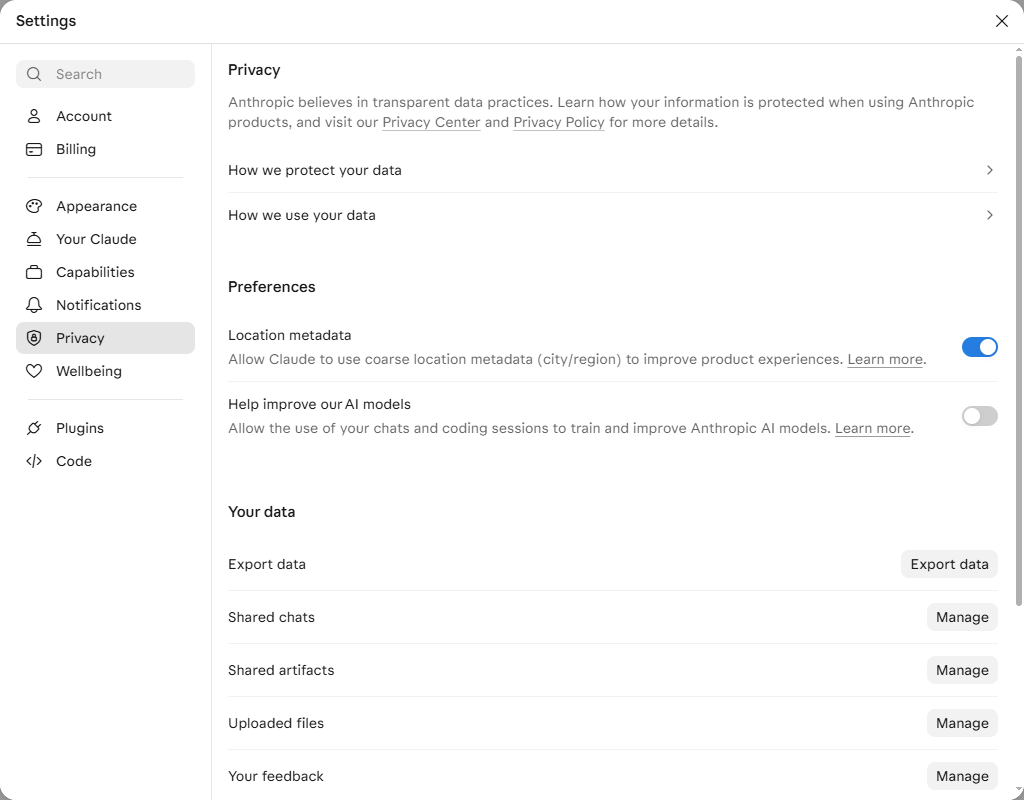
Turn it off in Settings > Privacy under "Help improve our AI models," and use incognito chats for one-off sensitive questions. If you're weighing a move to Claude after reviewing that setting, see our free-plan test of Claude vs ChatGPT vs Gemini for writing.
Gemini
Google changed Gemini's controls on November 16, 2026. A new "History" setting replaces the old Keep Activity switch, and a separate control lets you keep history while opting out of generative AI model training (Google).
The default auto-delete for saved history is 18 months, with 3 months, 36 months or never as options, and history-off and temporary chats are now kept for about two months instead of 72 hours. Chats seen by human reviewers aren't deleted with your activity and are kept for up to three years (Gemini Apps Privacy Hub).
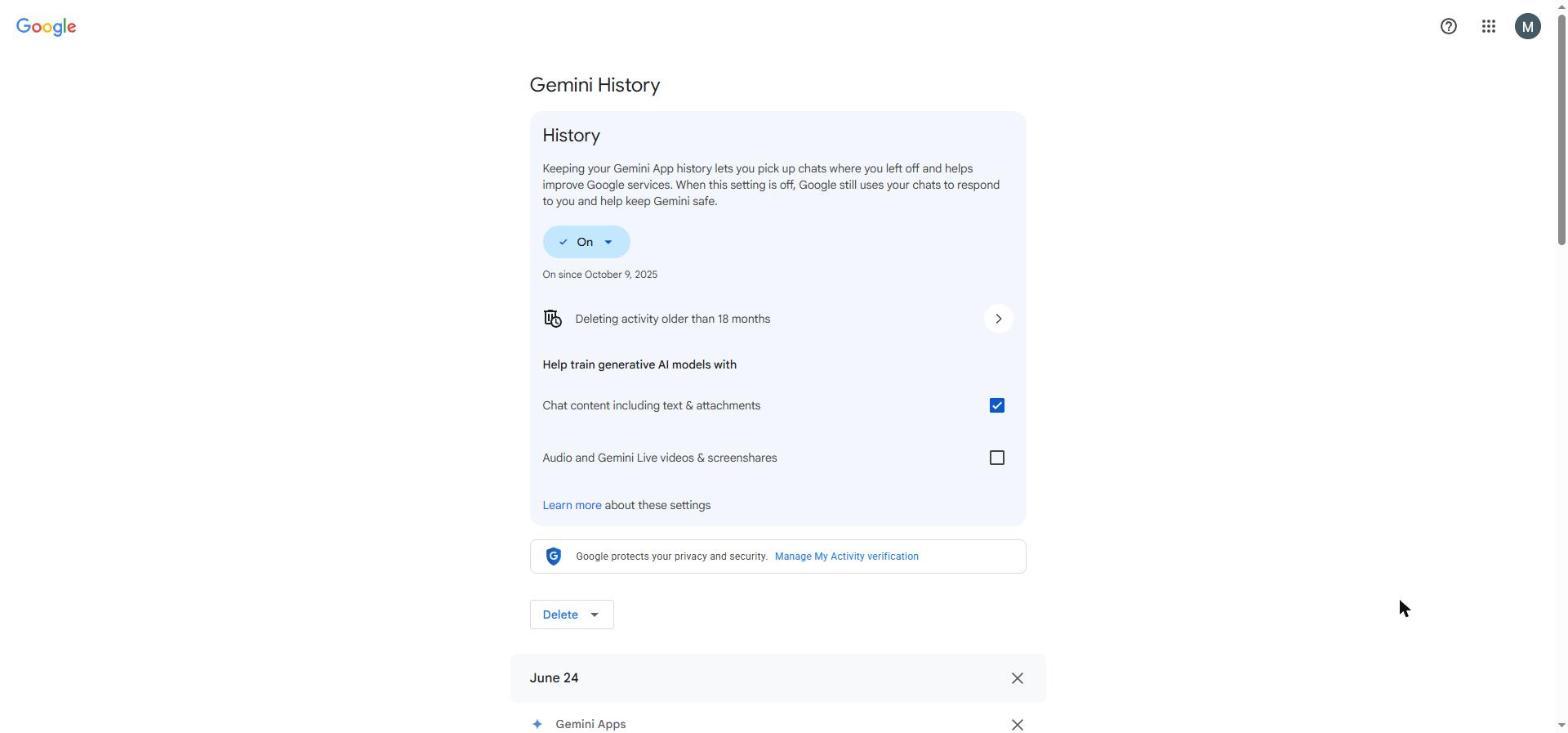
On a personal account, it appears under History as "Help train generative AI models with," with separate checkboxes for chat content and for audio and Gemini Live. Once your settings match what you want, our list of prompts for Gemini is a good next stop.
Copilot
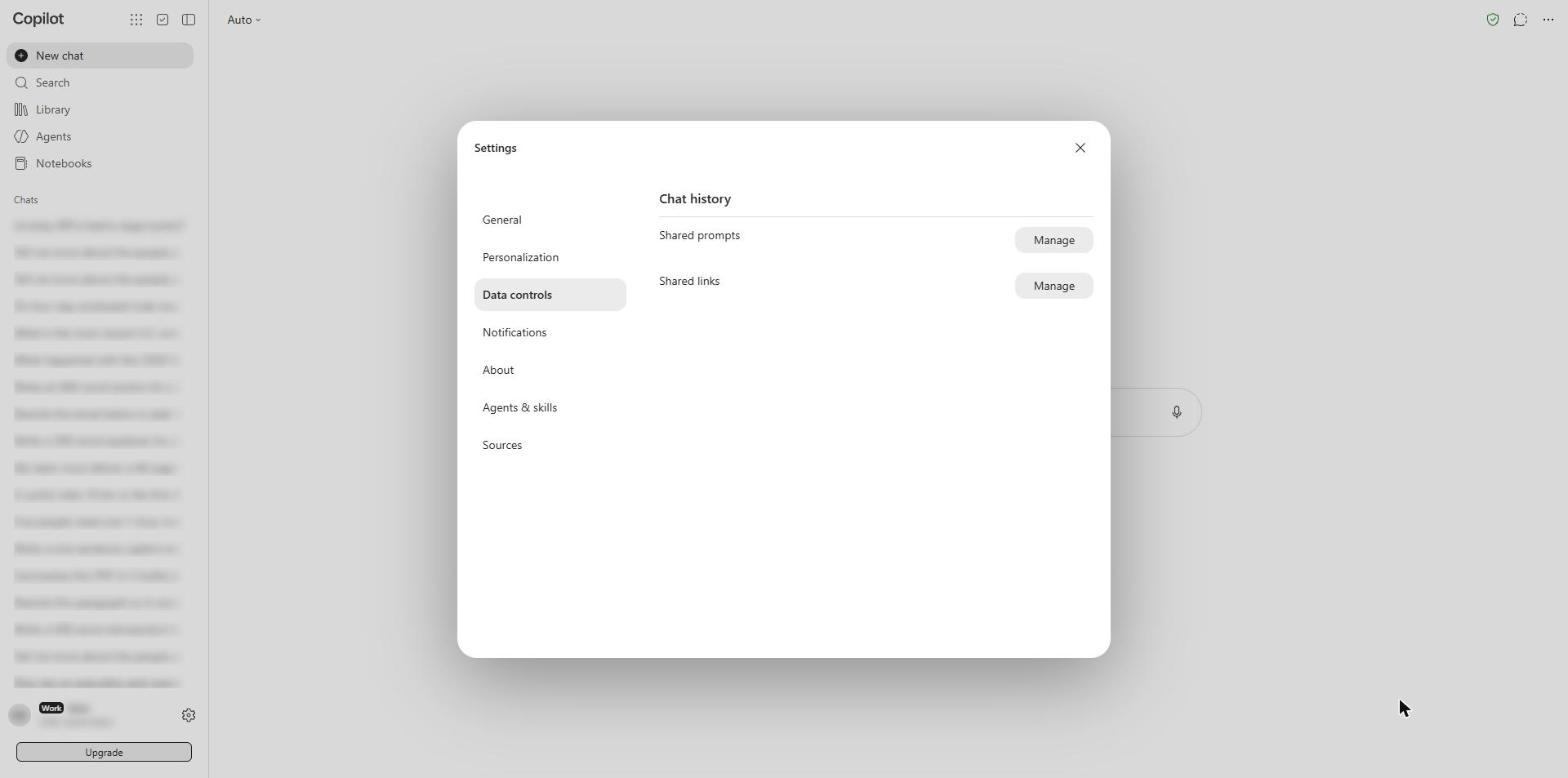
Microsoft released a new Copilot app on August 18, 2026, and its privacy pages for that app say prompts, responses and file contents "aren't used to train foundation models." Its privacy controls show no training switch and state no retention period. The older app's FAQ, which Microsoft says covers only that version, describes "Training on conversation activity" and "Training on voice conversations" switches under Privacy and an 18-month default for conversation history (Microsoft).
Under that older FAQ, signed-out users, users under 18 and work or school accounts were excluded from training. On our free Microsoft 365 Copilot work account, Data controls showed no training switches at all. Microsoft asks older-app users to move to the new app by December 31, 2026.
Perplexity
Perplexity turns "AI data retention" on by default for Free, Pro and Max users and lets them switch it off in their account settings. It says the opt-out applies only to data collected afterwards, and that enterprise data is never used for training (Perplexity).
Meta AI and Grok
Meta uses people's interactions with Meta AI to train its models and offers no in-app switch, only an objection form in its Privacy Center where local law gives that right. Since December 16, 2025, Meta also uses conversations with Meta AI to personalize ads on Facebook and Instagram.
Grok offers an "Improve the Model" switch in its data controls, and xAI says Private Chats are deleted from its systems within 30 days (xAI). As with ChatGPT, feedback you give with the thumbs buttons can still be used for training after you opt out.
DeepSeek
DeepSeek's privacy policy, last updated February 10, 2026, says it may use your inputs to train its models and that you can opt out (DeepSeek). The switch is "Improve the model for everyone" under Settings > Data on the web and Data controls in the app, and the policy says personal data is stored in the People's Republic of China.
Privacy is a separate question from detection, so if you're also wondering whether DeepSeek text is detectable, that's covered on its own page.
Decide What Work Data Goes Into a Chatbot Before You Paste It
Decide before you paste, not after, because no setting can recall a document once it's in a chat. A short rule beats a long policy, and ours fits on one screen.
Is it safe for me to paste work documents into ChatGPT if training is off? It's safer, not safe by default, because the document still lives in your history, inside OpenAI's retention window and within reach of a legal hold.
Never paste these into a personal chatbot account
Training settings don't change this list, because the risk isn't only training: it's storage, review and a link you forgot you shared. Whatever your training setting, keep these out of personal ChatGPT, Claude, Gemini or Copilot accounts:
client contracts, unreleased financials and pricing
passwords, API keys and login links
personal data about customers or staff (names with emails, phone numbers, IDs, health details)
anything covered by an NDA or a client's own AI policy
unpublished drafts a client hasn't cleared for AI tools
If a client has its own AI policy, that policy wins over any setting on this page. Ask once at kickoff, write the answer into the brief, and you won't have to guess later.
The same question applies to every tool you paste into, including detectors. We wrote a separate guide on whether it's safe to paste an essay into an AI detector, and the checklist there works for any upload box.
Swap client names for placeholders before you prompt
Our SEO and content team uses one habit more than any setting. Before a brief goes into a chatbot, we swap the client's name, product names and any figures that aren't public for placeholders such as [CLIENT], [PRODUCT] and [FIGURE], then swap them back in the final draft.
We keep the key that maps each placeholder to the real value in the project folder, never in the chat. It takes a minute per brief, a leaked chat would then show a structure rather than a client, and the same template works for the next client with new values.
The prompt quality barely changes, because the model needs the structure of the task, not the client's identity. If you want prompts that stay sharp without the sensitive details, our guide on how to write good AI prompts shows the structure we use.
Use a business workspace for client briefs
For client work, a workspace changes more than training. An admin can set retention, manage members and remove access when someone leaves, which a personal account can't do.
Here's how we sort data by sensitivity:
Data type | Personal account, training off | Temporary Chat | Business or Enterprise workspace |
|---|---|---|---|
Public research, keyword lists | Fine | Fine | Fine |
Your own drafts and outlines | Fine | Fine | Fine |
Client briefs with names swapped out | Fine | Fine | Fine |
Client briefs with real names and data | Avoid | Avoid | Fine, if the client allows AI tools |
Contracts, financials, personal data | Never | Never | Only under a signed data agreement and client approval |
Does ChatGPT Enterprise train on your data? No by default, and the same goes for Business, which is why we keep real client material there. It's a governance choice: admins, contracts and retention rules, on top of the training default.
The table isn't legal advice, and your client's contract always comes first. It's the default we use when nobody has told us otherwise, and we review it whenever a vendor changes its terms. It also gives you a one-sentence answer when a client asks how you use AI with their material.
Run this five-minute privacy checklist
If you're working out how to stop ChatGPT from using your data for training, this checklist covers it and the other leaks in one pass. It's what we run when a new writer joins the team, before any brief is shared:
Turn off "Improve the model for everyone" in Settings > Data controls on every account you use.
Turn off "Include your audio recordings" if you use voice.
File a "Do not train on my content" request in the Privacy Portal if you also use Sora.
Review Shared links > Manage and delete the ones you no longer need.
Review your memory summary and delete anything you wouldn't want reused.
Use Temporary Chat for one-off sensitive questions, and skip the thumbs buttons there.
Repeat the training check in Claude, Gemini, Copilot or any other chatbot your team uses.
Set a calendar reminder to run the list every few months. Vendors rename settings and add new ones, as Google did with Gemini in November 2026.
So, does ChatGPT use your data for training? On a personal account, yes, until you switch it off, and nothing on this page undoes what was already used. The habit of leaving sensitive details out of your prompts protects client work more than any switch, and a structured ChatGPT prompt generator makes that habit easier to keep.
Set up Phrasly for your content team
If your team writes client content every day, Phrasly's chatbot gives you one place to draft, humanize and check copy. You can compare plans on phrasly.ai/pricing before you decide. Phrasly doesn't use your chats, prompts or uploaded files to train its models, as the Phrasly Ethics page states, and your chats stay in your account until you delete them. Like most AI products, some features send what you submit to third-party AI model providers to generate the result, as the Phrasly privacy policy explains.
FAQs
Does ChatGPT train on my conversations by default?
Yes, on personal accounts: on Free, Go, Plus and Pro, OpenAI may use your conversations to train its models unless you turn off "Improve the model for everyone" in Data controls. That's the short answer to "does ChatGPT use your data for training" by default. Business, Enterprise, Edu and API data are excluded; the plan table shows every tier.
How do I stop ChatGPT from training on my data?
Turn off "Improve the model for everyone" in Settings > Data controls, or select "Do not train on my content" in OpenAI's Privacy Portal. OpenAI says either one is enough for ChatGPT conversations and Codex tasks. The setting covers new chats only, so it won't undo earlier training, and the Myth 2 section has the web steps.
Does Temporary Chat get used for training?
No: a temporary chat isn't used to improve OpenAI's models while it stays temporary, even a personalized one, though OpenAI may keep a copy for up to 30 days for safety. Saving it turns it into a normal chat with your usual settings. Study sessions work well there, and our ChatGPT prompts for students run fine in it.
Does ChatGPT Plus train on your data?
Yes, by default: Plus follows the same default as Free, Go and Pro, because a subscription buys features and limits, not a different training rule. Switch off "Improve the model for everyone" to stop it, as covered in Myth 1. If you're comparing other chatbots on privacy, see our list of the best ChatGPT alternatives.
Does ChatGPT Business or Enterprise train on your data?
No, not by default. OpenAI says it doesn't use data from ChatGPT Business, Enterprise, Edu or the API platform for training unless an organization explicitly opts in. Storage still applies, admins can manage workspace data, and legal holds can override deletion, so read Myth 4 before treating a workspace as a sealed vault for client data.
Does a thumbs up or down undo my opt-out?
For that conversation, yes. OpenAI says that if you rate a response on Free, Plus or Pro, it may use the entire conversation tied to that feedback to improve its models, even after you've opted out. If the chat is sensitive, skip the rating buttons and write your feedback in the chat instead, as Myth 5 explains.
Does ChatGPT retain data after I delete a conversation?
Yes, for a short time. A deleted chat leaves your account at once and is scheduled for permanent deletion from OpenAI's systems within 30 days, unless it was already de-identified and disassociated from your account or must be kept for security or legal reasons. Saved memories and Library files are stored separately, so delete those too.
If I opt out, does OpenAI delete what it already learned from my chats?
No: opting out only stops new conversations from being used for training, and OpenAI doesn't remove what earlier training already absorbed. You can still delete stored chats, memories and files, export a copy first, or delete your account. Myth 6 walks through those steps and shows that Claude and Perplexity treat past training the same way.