AI Tools for Writers: A Phrasly Workflow From Brief to Final Draft
13 min read
With so many AI tools for writers, picking one can feel harder than the writing itself. If you need a first draft from an approved brief, use an AI writer. If your draft says the right thing but reads awkwardly, use a text enhancer. If a passage still sounds mechanical, use a humanizer.
This is not just advice. As the team behind Phrasly, we ran one real project with our own tools and show the raw outputs, the edits we kept and rejected, and what still needed a human check. It walks through our AI for writers.
If you would rather start writing first, the AI Writer is right below.
Draft From Your Brief With Phrasly AI Writer 👇
Which AI Writing Tool Fits the Job in Front of You?
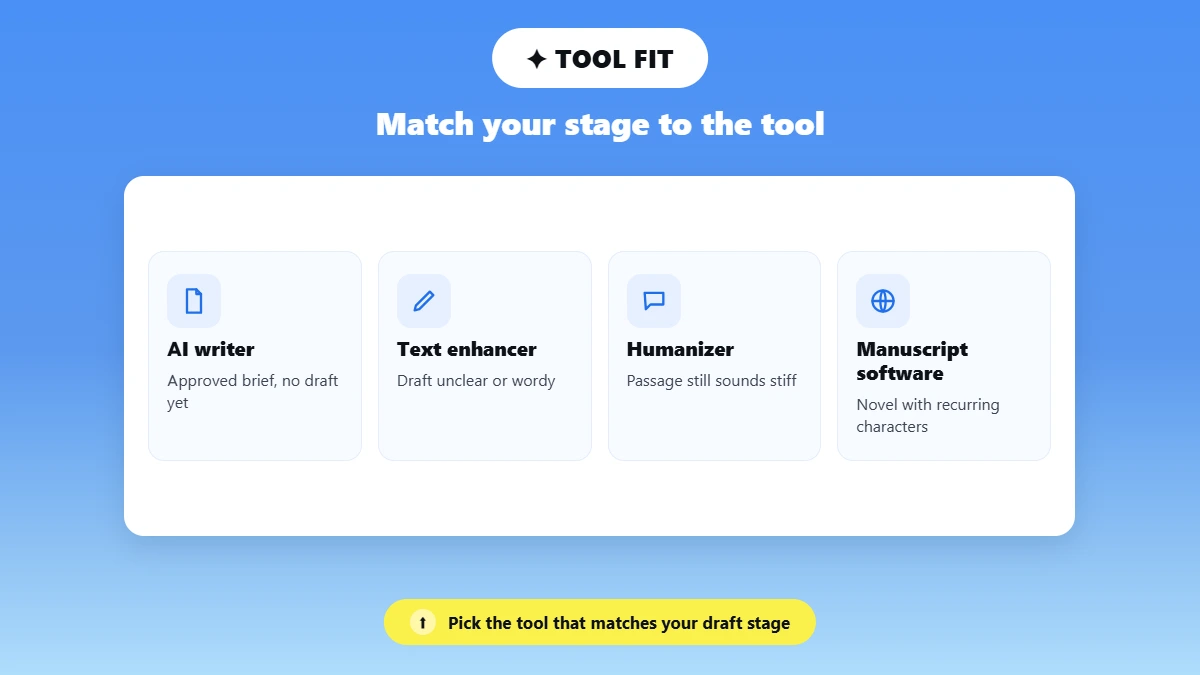
The best AI tool for writing is the one that solves your problem. If you have a brief but no draft, then an AI writer is the best tool for the job. If the draft is unclear, then it is a text enhancer, and if it sounds stiff, a humanizer. Similarly, for a novel, it is manuscript software.
Drafting and editing are common AI jobs at work. Pew Research Center found that about half of U.S. workers who use AI chatbots on the job rely on them to edit or draft writing.
Match Your Writing Stage to the Right Tool
Your Starting Point | Function to Consider | Phrasly Option | Human Decision |
|---|---|---|---|
An approved brief but no draft | AI writer | Phrasly AI Writer | Is the structure right, and is every claim supported? |
A draft with unclear sentences | Text enhancement | Phrasly AI Text Enhancer | Does the revision keep the original point? |
An AI-assisted passage with repeated patterns | Humanization | Phrasly AI Humanizer | Does it read better without changing facts or the author's position? |
A novel with recurring characters and lore | Fiction or manuscript-planning software | Not the focus of this guide | Does it support continuity and the writer's method? |
For articles, emails and blog posts, the table above covers you. When it comes to fiction, though, you need something else. Tools such as Sudowrite and Novelcrafter offer AI for writers working on novels. They help you develop the story and keep track of your characters from chapter to chapter.
If you want the broader roadmap, start with our guide on how to use AI for content creation. If you are weighing a rewriting tool against a correction-focused editor, see Phrasly vs Grammarly.
What Should Your Brief Include Before You Open an AI Writer?
Before you ask for AI writing assistance, write down who the reader is, the one message, the approved points, the length, your voice and any details that must not change. The clearer the brief, the less an AI writer has to guess, and the easier its draft is to check.
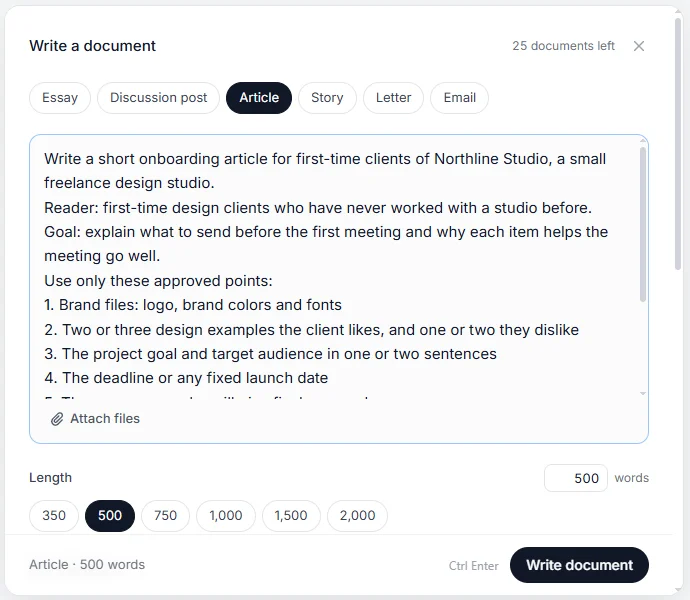
Our test project was fictional, so no real client data was involved. We wrote a short onboarding article for Northline Studio, an illustrative freelance design studio, titled "What Clients Should Send Before the First Design Meeting." This brief is step one of our Phrasly writing workflow.
Here is the list of inputs we gave Phrasly AI Writer.
Reader: First-time design clients who have never worked with a studio.
Message: What to send before the first meeting, and why each item helps.
Approved points: Brand files; two or three liked designs and one or two disliked ones; the project goal and audience; the deadline; the one person who gives final approval.
Length: About 500 words.
Voice: Direct, friendly, plain English, with no prices, testimonials, statistics or new studio policies.
Protected detail: "Send the materials two business days before the meeting." The words "business days" had to survive every stage, because "two days" is a different policy.
💡 Tip: We also told the tool to add [CHECK] next to anything that needed a source or the studio owner's approval. This was a test to see if the tool would point out the things it added on its own.
The same brief structure works with other AI-assisted writing tools too. The more detail you put into a prompt, the better the draft you get back.
For ready-made ideas, browse our AI prompt examples.
How Do You Get a Reviewable First Draft From Phrasly AI Writer?
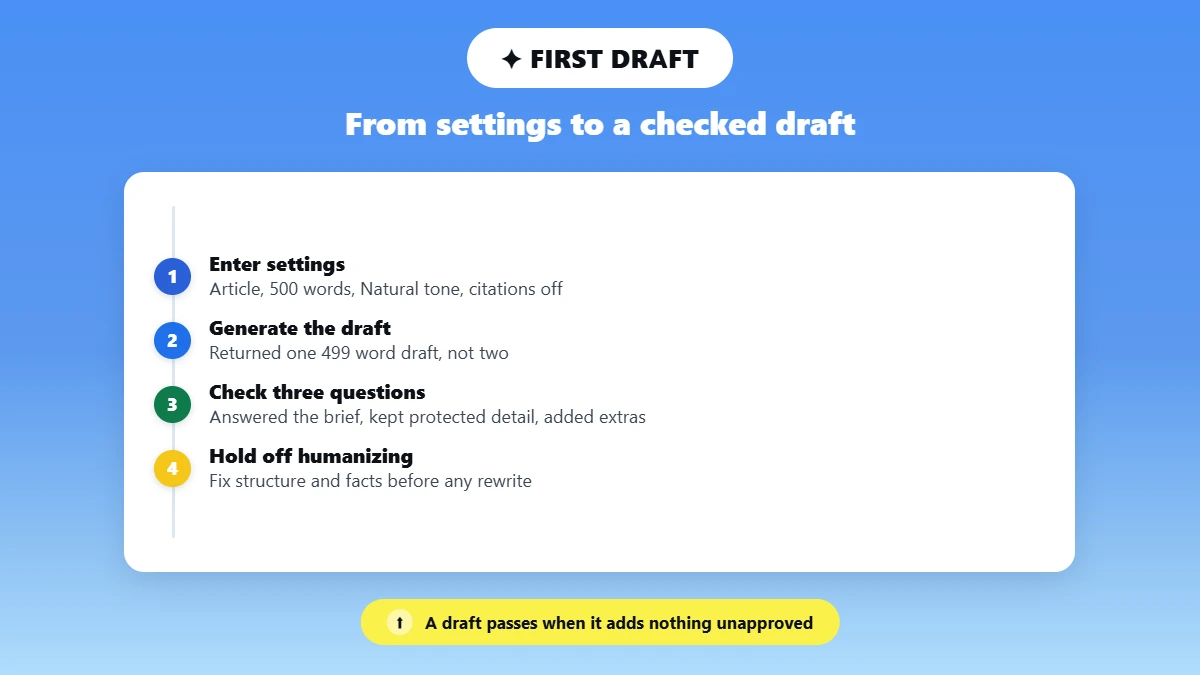
To get a reviewable first draft from Phrasly AI Writer, enter your approved brief in its setup fields, note every setting, and read the result for structure and accuracy before fixing any wording. A draft passes review when it answers the reader, keeps protected details exact and adds nothing you did not approve.
Enter the Project Details and Record the Settings
Like most AI content writing tools, Phrasly AI Writer gives you several settings, so note the ones you pick. We chose Article, 500 words, our own title, four hand-typed sections, Natural tone, Any level and English. Citations stayed off, since a fictional article needs no outside facts, and no citation feature replaces opening each source yourself.
Review the Draft Before Polishing It
The product page describes two drafts per run, but ours returned one 499-word draft. We checked it against three questions.
✅ Does it answer the client's question? Yes, all five approved items appear.
✅ Did the protected detail survive? Yes, word for word.
⚠️ Did it add anything unapproved? Yes. File-sharing advice, a description of studio meetings and a "free consultation" example, none marked [CHECK].
It also dropped one section heading and left out words in the final sentence. Still, the core was solid, which is what you want from an AI tool for writing at this stage. Here is a short raw passage, unedited.
"Your deadline or launch date. If there is a fixed date the project must be live or delivered, share it now. A known deadline shapes every decision about scope and process."
The author then swapped a generic opener, "Sending a few things in advance is a small effort that saves everyone a lot of back-and-forth later," for "With your files in hand, the studio can spend the meeting on your goal instead of asking for logos and dates," because it shows the client what they gain.
Why This Workflow Skips One-Click Humanizing at This Stage
💡 Key point: Phrasly AI Writer offers a Humanize All option that rewrites the whole draft. We skipped it, because rewriting everything before review makes changes hard to trace. When you use AI to help write anything a client will read, fix structure and facts first. A polished sentence cannot rescue a missing point.
When Should You Run a Passage Through Phrasly AI Text Enhancer?
Use Phrasly AI Text Enhancer when a passage says the right thing but is hard to read. Start with one passage, pick the lightest level that fixes it, and line up every version against your original. Names, numbers and policies are where an AI rewrite most often slips, so check those first.
Pick One Passage and Make One Controlled Revision
To edit an AI draft with any AI writing software, work on one passage at a time. We took a 133-word passage explaining when to send materials. Its problem was wordiness, with one sentence running past 40 words.
We set the mode menu to Balanced, chose Easy, the lightest of three levels (Easy, Medium and Aggressive), and ran it once. The button is labeled Enhance & Humanize, and the run returned five versions.
Keep the Useful Change and Reject the Damaging One
All five versions did improve writing clarity. The long sentence was split up, and lines such as "Clearly written sentences are more important than formatting" read better than our source. The meaning held up less well, as the table shows.
Version | Kept "Two Business Days"? | Other Changes Found |
|---|---|---|
1 | ❌ No ("two days") | Reversed who asks the questions |
2 | ❌ No ("two days") | Added a new claim ("If you send it too early, they may forget") |
3 | ❌ No ("2 days") | Turned a suggestion into a rule |
4 | ✅ Yes | Turned a suggestion into a rule; "passed back via email" changed the meaning |
5 | ✅ Yes | Turned a suggestion into a rule |
⚠️ Three of five versions changed two business days to two days, which would quietly let weekends count.
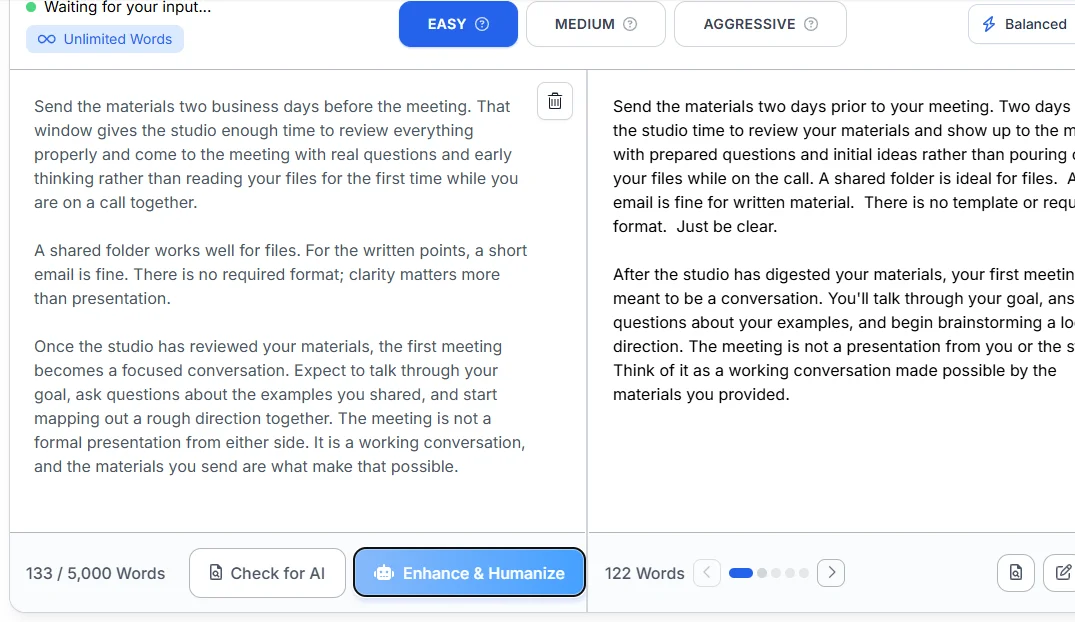
We kept version 4, because it was the only one that kept "business days" and left the studio asking the questions. We then made three corrections. We restored the exact protected sentence, changed "Use a shared folder" back to "A shared folder works well," and removed "passed back via email."
The product page suggests more than one pass for long, complex content. For a passage this short, one pass was enough.
For more ways to fix stiff phrasing, see how to improve AI text readability and tone.
Got a draft that makes the right point but reads awkwardly? Clarify your draft with Phrasly AI Text Enhancer, and always check each version against your original.
Do You Need a Phrasly AI Humanizer After Enhancing a Passage?
Usually not. Enhancing and humanizing overlap, so stop if the enhanced text already reads well. Use Phrasly AI Humanizer when a passage still sounds stiff or robotic. Then read the result and add back any example or phrase that makes it sound like you. Even AI writing tools that preserve voice need that final human touch.
Decide Whether Another Rewrite Is Needed
Phrasly AI Text Enhancer already does part of a humanizer's job, which is why its button says Enhance & Humanize. After that one pass and our three fixes, the passage read naturally, so it did not need another tool.
What was left to fix was accuracy, like the policy the tool made up, and only a person can catch that. To show when a humanizer is useful, we tested it on a different paragraph from the draft that still sounded stiff.
Review the Result Against the Writer's Intended Voice
We ran the paragraph about the final approver through Phrasly AI Humanizer in Balanced mode at the Easy level. It returned five versions. Here is the first one, unedited.
"Final Approver Name. The single person who will sign-off on the work. Design projects tend to bog down considerably when nobody knows who has the final authority. If you know their name from the beginning, the studio can set up reviews and revisions with that person in mind from day one."
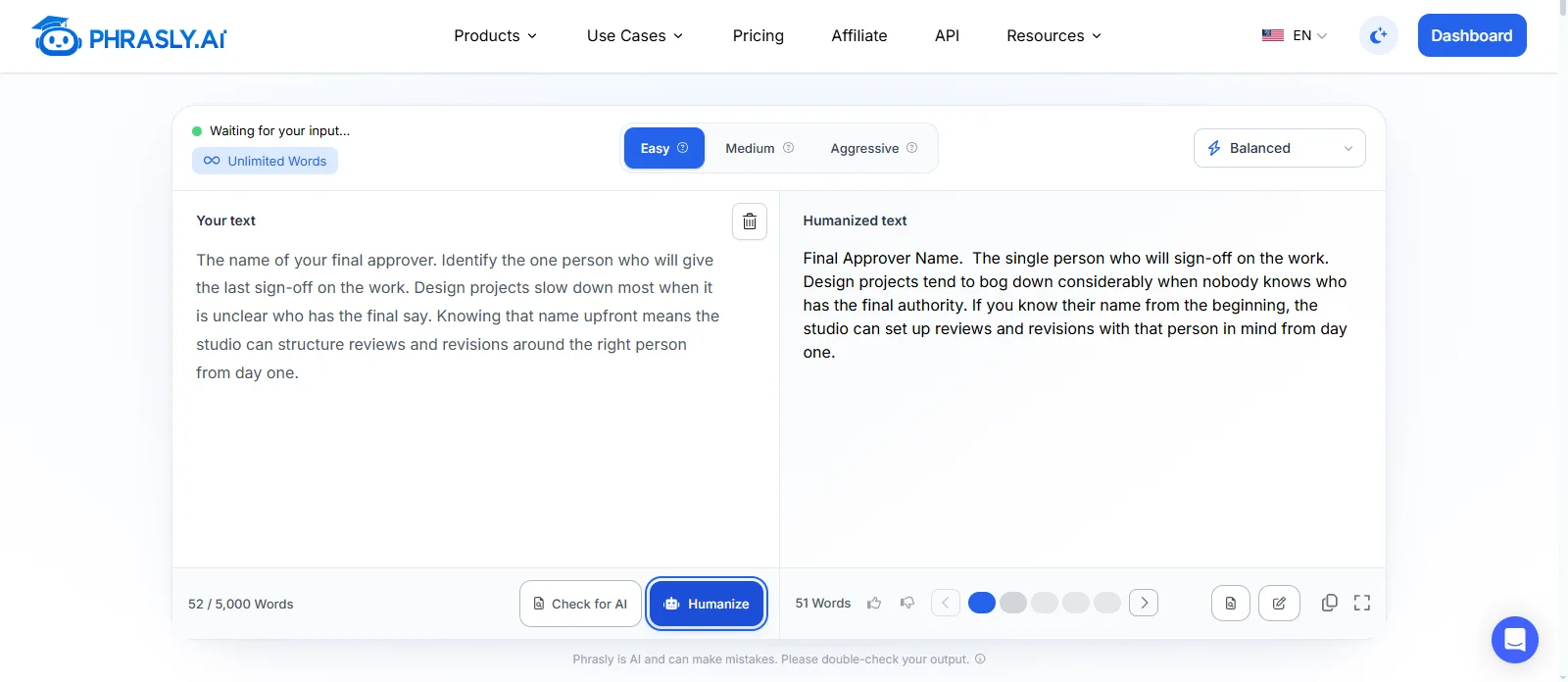
It did make AI-assisted writing sound natural. "If you know their name from the beginning" reads like a person talking. But the instruction disappeared. "Identify the one person" became a fragment, so the paragraph no longer told the client what to do.
Here is the writer's final version (author-edited).
"The name of your final approver. Tell the studio who will give the final sign-off. Projects tend to stall when nobody knows who has the final say, so knowing that name from the start lets the studio plan reviews around the right person from day one."
The writer restored the instruction, because every item in the article is something the client must do, and brought back "the final say," the plainer phrase from the original.
For more hands-on fixes like this, read our guide on how to humanize AI text.
Got a passage of your own that still sounds mechanical? Refine natural phrasing with Phrasly AI Humanizer, then restore any details or expressions that matter to your voice.
What Changed Between the First Draft and the Approved Version?
In this Phrasly writing workflow, every tool helped and every tool needed a human check. The AI Writer kept the policy but added unapproved advice, three of five enhancer versions broke the policy, and the humanizer dropped an instruction. The author rejected those changes, restored the exact wording and added concrete reasons the tools left out.
The table below shows how to review an AI rewrite stage by stage, following one detail from brief to approval.
Stage | Excerpt | Setting or Input | Human Correction | Acceptance Reason |
|---|---|---|---|---|
Brief constraint | "Send the materials two business days before the meeting." | Protected sentence in the brief | None | The studio's real policy |
AI Writer output | "Send the materials two business days before the meeting..." | Article, 500 words, Natural tone, citations off | Flagged unapproved file-sharing advice; fixed the missing words in the final sentence | Protected sentence survived exactly |
Text Enhancer revision | "Send materials two business days before the meeting..." (version 4 of 5) | Balanced mode, Easy level, one run | Rejected versions 1 to 3 because they removed "business"; restored "the" and "works well" | Only version that kept the policy and the right speaker |
Humanizer revision (optional, separate passage) | "The single person who will sign-off on the work." | Balanced mode, Easy level, one run | Restored the direct instruction "Tell the studio who will give the final sign-off" | Natural wording kept, client instruction back |
Author-approved text | "Send the materials two business days before the meeting. This gives the studio time to review your materials." | Author review | Kept the policy word for word and the shared-folder advice optional | Policy exact, meaning clearer |
That is the real difference in AI drafting vs editing. The tools drafted and polished the text, but none of them flagged its own additions or guarded the policy across every rewrite. The author did.
To measure how much editing time a workflow like this saves, see our roundup of AI tools that reduce editing time while keeping brand voice.
🧪 How We Ran This Test
Test date: October 1, 2026
Author and tester: Hasnain, Content Writer, Phrasly
Access level: Company-provided paid account
Tools and settings: AI Writer (Article, 500 words, Natural tone, citations off; model not displayed); Text Enhancer (Balanced mode, Easy level); Humanizer (Balanced mode, Easy level)
Project length: 499-word AI Writer draft; 133-word Text Enhancer passage; 52-word Humanizer passage
Runs: One run per tool. AI Writer returned one draft; Text Enhancer and Humanizer each returned five versions (first Humanizer version reviewed)
Edits before display: None. Tool excerpts are unedited; author edits are labeled.
Limitations: A single project, and voice judgments are subjective.
When Does This Workflow Fit, and When Should You Choose Another Approach?
This workflow works best for writers who start with approved information and like to review each passage themselves, such as articles, blog posts and client copy. For long novels, team-wide voice rules, automatic publishing or regulated topics, look at other AI writing software, because we did not test those needs here.
✅ It fits freelance writers, bloggers and solo creators who want a starting draft, have a clear message and can judge passage-level revisions.
⚠️ Consider another approach for long fiction, team-wide voice rules, publishing automation, or medical, legal and financial content. For those topics, keep a specialist reviewer, because better wording is not the same as checked facts.
🔍 Before approval, check names, numbers, policies, links, citations, tone and your own contribution. Stop rewriting when another pass changes words without improving the message.
Like any artificial intelligence writing software, these AI tools for writing work best with a person checking the result. Access and usage limits differ by tool and plan, so check the current offer on the Phrasly pricing page before starting a project.
If you want to compare dedicated editing tools side by side, see our roundup of the best AI tools for editing writing.
Frequently Asked Questions
Is Phrasly Free for Writers?
Access depends on the tool and the plan. Some tools offer limited use without a paid plan, while features such as automatic citations and higher usage limits sit on paid plans. Limits change over time, so check the Phrasly pricing page for the current offer before you start a project.
Can I Use These Tools on a Draft I Wrote Myself?
Yes. You do not need to generate a new draft first. Paste a passage you wrote into Phrasly AI Text Enhancer, name the problem you want fixed, and compare each version with your original. Start with one passage rather than the whole piece, so every change stays easy to check.
Will Phrasly Automatically Learn My Writing Voice?
No. No persistent voice-training feature was verified for these tools. State your tone preferences in the brief, keep a few samples of your own writing to compare against, and review the final wording yourself. Our guide to few-shot prompting shows how writing samples can guide tone.
Can I Trust the References an AI Writer Supplies?
Treat them as a starting point, not proof. Open each source, confirm it exists, check that it supports the exact sentence it is attached to, and check its date and context. In Phrasly AI Writer, automatic citations are listed as a feature of paid plans.
Can Phrasly Publish the Finished Article Automatically?
No native publishing automation was verified in this workflow. In this project, the finished text was copied out of the editor by hand. Paste or upload it into your CMS yourself, then review the formatting, headings and links in the destination before you publish.
Does Using AI Writing Tools Help My Content Rank on Google?
Using AI does not decide rankings on its own. Google's guidance on generative AI content stresses accuracy, quality and real value for users, so research, original contribution and careful review still matter. Our guide to writing good SEO content covers that process.

Written by
Hasnain
Karachi, Pakistan
I help businesses grow with SEO-friendly blog posts, landing pages, and long-form content. With 3+ years of experience, I deliver clear, original, and well-researched writing that drives results.