10 Best AI Tools for Editing Writing in 2026: Free and Paid
20 min read
The best AI tools for editing writing in 2026 include Phrasly Docs for an all-in-one editing workflow, Grammarly for everyday grammar and tone, ChatGPT for custom structural feedback, ProWritingAid for long-form and fiction, and Paperpal for academic writing.
There is no single “best” AI tool for editing writing. Different tools suit different needs, from grammar and readability to sentence rewrites, academic language, and longer documents.
The right choice depends on the type of text, the level of editing you need, and whether you want a free or paid option. This guide compares 10 tools based on their editing capabilities, not their ability to draft or generate new writing.
If you're specifically looking to improve tone, fluency, or polish rather than edit an existing draft, see our guide to AI text enhancers.
Best AI Editing Tools at a Glance
The table below compares the 10 tools by their main editing strengths, free availability, pricing, supported workflows, and key limitations.
Tool | Best for | Type of editing | Free plan | Paid starting price | Works with / files | Biggest limitation |
|---|---|---|---|---|---|---|
All-in-one editing workflow | Grammar, rewriting, summaries, citations, document review | Free to start; usage limits may apply | $10.99 / month | Documents, Word/PDF workflows | More features than needed for basic proofreading | |
Everyday grammar and tone | Grammar, clarity, tone, sentence rewrites | Yes | $12/mo billed annually | Web, Word, Google Docs and other integrations | Less suited to deep structural editing | |
Custom and structural editing | Rewriting, structure, feedback, clarity and custom edits | Yes | $8/mo | Uploaded documents and text | Results depend heavily on the instructions and need manual review | |
Multilingual editing | Grammar, spelling, style and paraphrasing | Yes | $2.91/month | Web, browser and desktop integrations | Advanced features require Premium | |
Quick paraphrasing | Paraphrasing, grammar and sentence rewriting | Yes | $19.95/month | Web, browser, Word and other integrations | Aggressive paraphrasing can change the original meaning | |
Fiction and long-form analysis | Grammar, style, readability, repetition, structure and manuscript analysis | Yes, with limits | $10/mo billed annually | Web, desktop and writing integrations | Heavier than a simple grammar checker; English-focused | |
Readability and concision | Readability, sentence complexity, passive voice and AI-assisted edits | Yes | $8.33 USD/month | Web editor and document workflows | Its simplicity-focused approach can flatten intentional writing style | |
Sentence rewriting and tone | Rewriting, shortening, expanding, and tone adjustments | Yes, with limits | $6.99 per month/ billed annually | Web, browser and document integrations | Better for sentence-level edits than whole-document reasoning | |
Academic writing | Academic language, grammar, paraphrasing and research-focused editing | Yes | $11.60 / mo | Web, Word and academic writing workflows | Specialized for academic writing rather than general-purpose editing | |
Book-length documents | Long-form editing, rewriting and document revision | Yes | $16/mo | Long documents, Word/PDF workflows | Less convenient for everyday editing across email and websites |
Note: Pricing is accurate as of the date this article was written and is subject to change. Confirm the current price on the tool's official pricing page before purchasing.
How We Tested the AI Editing Tools
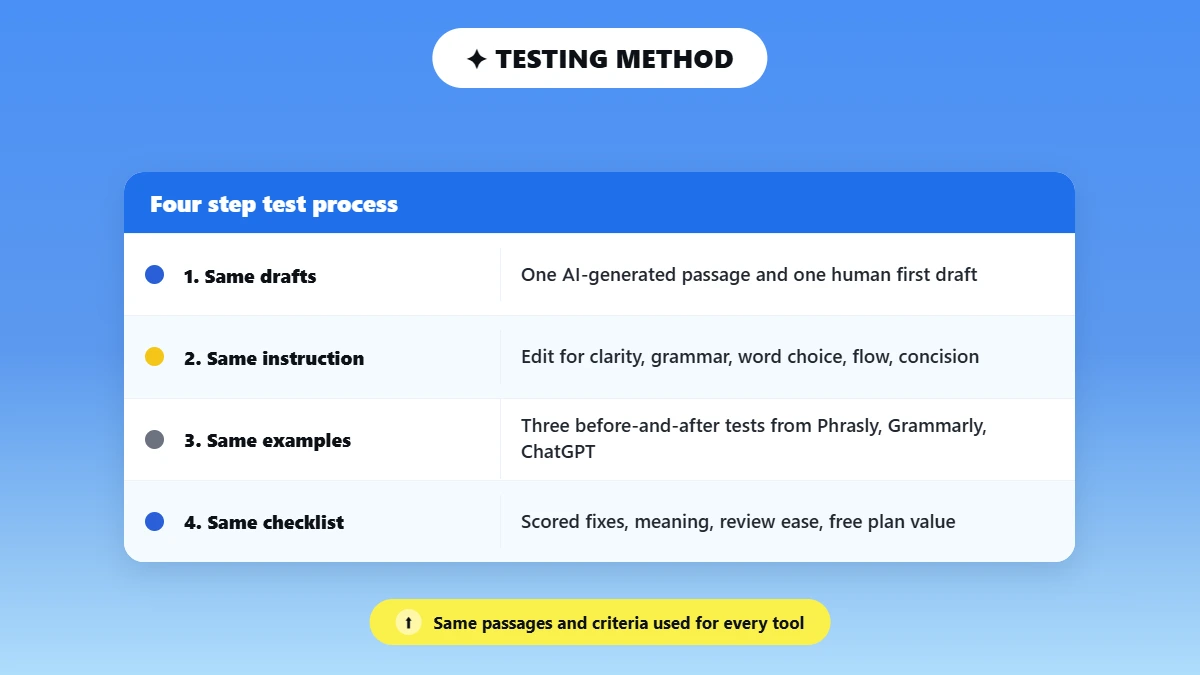
To make the comparison more than a feature and pricing roundup, we tested all 10 featured AI editing tools using the same writing samples and editing criteria. We used the same two short passages for the testing: a messy AI-generated draft and a rough human first draft.
The AI-generated passage used repetitive, overly formal, and generic wording, while the human draft contained grammar mistakes, wordiness, and awkward sentence construction.
We gave each tool the same editing instruction wherever its interface allowed it:
“Edit this draft for clarity, grammar, word choice, flow, and concision. Keep my meaning, voice, facts, and any citations. Replace awkward, repetitive, or overly complicated wording with clearer and more natural alternatives. Show me the changes rather than silently rewriting everything.”
For tools without a direct prompt-based editing workflow, we used their standard editing or suggestion features on the same passages. This kept the input consistent so we could compare edit quality rather than different prompts or different pieces of writing.
💡 To keep the methodology easy to follow, we show three representative before-and-after examples from the hands-on tests below. We used the same editing samples and evaluation criteria when testing the other featured tools, and we summarize their individual results in their respective reviews.
AI Generated Draft Test
We first ran the AI-generated passage through the featured tools that supported this editing workflow. The goal was to see how well each editor handled repetitive wording, overly formal language, unnecessary phrases, weak transitions, and other common problems in AI-generated writing.
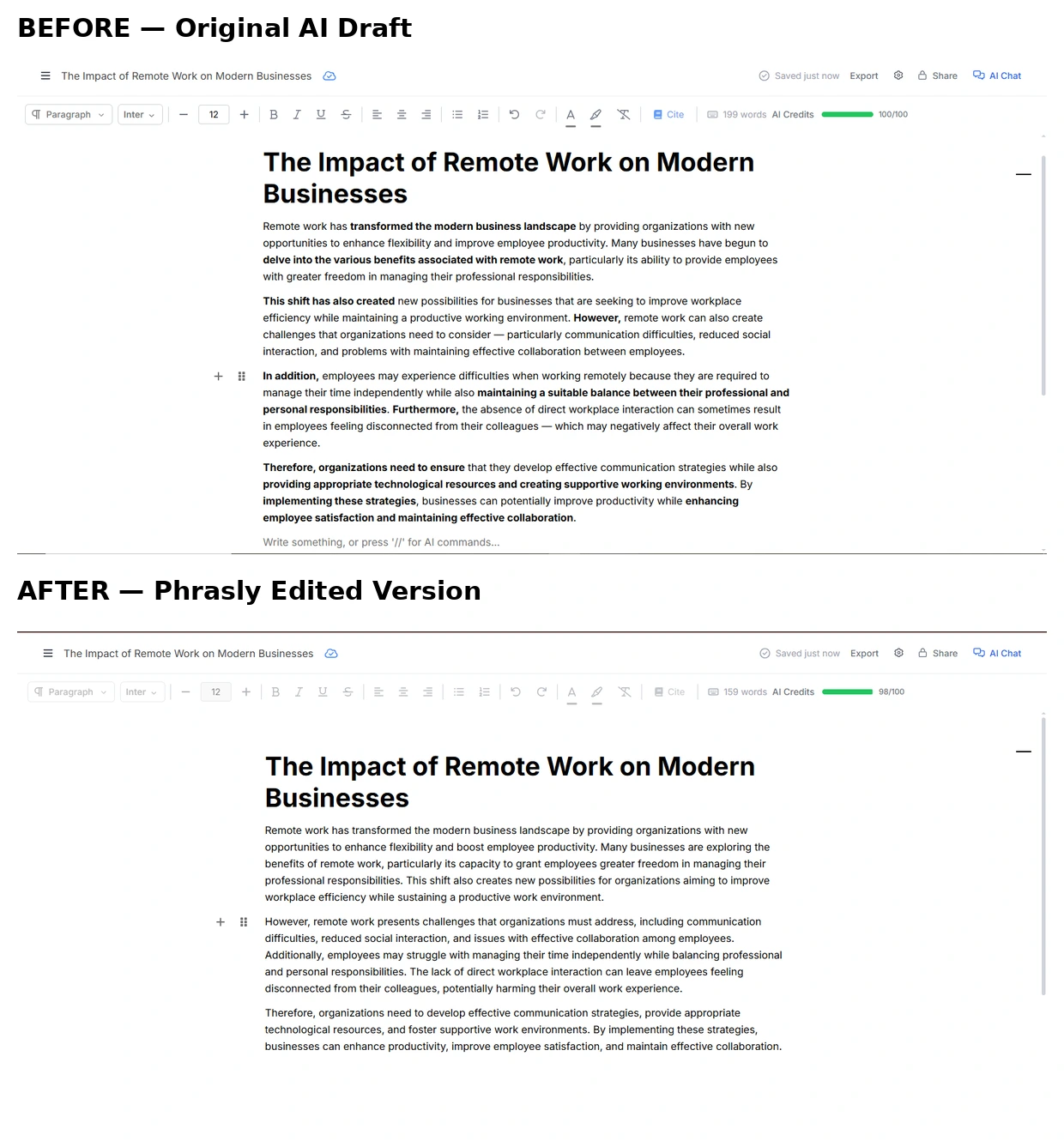
Phrasly before and after: The edited version simplifies repetitive and overly formal wording while keeping the main ideas intact.
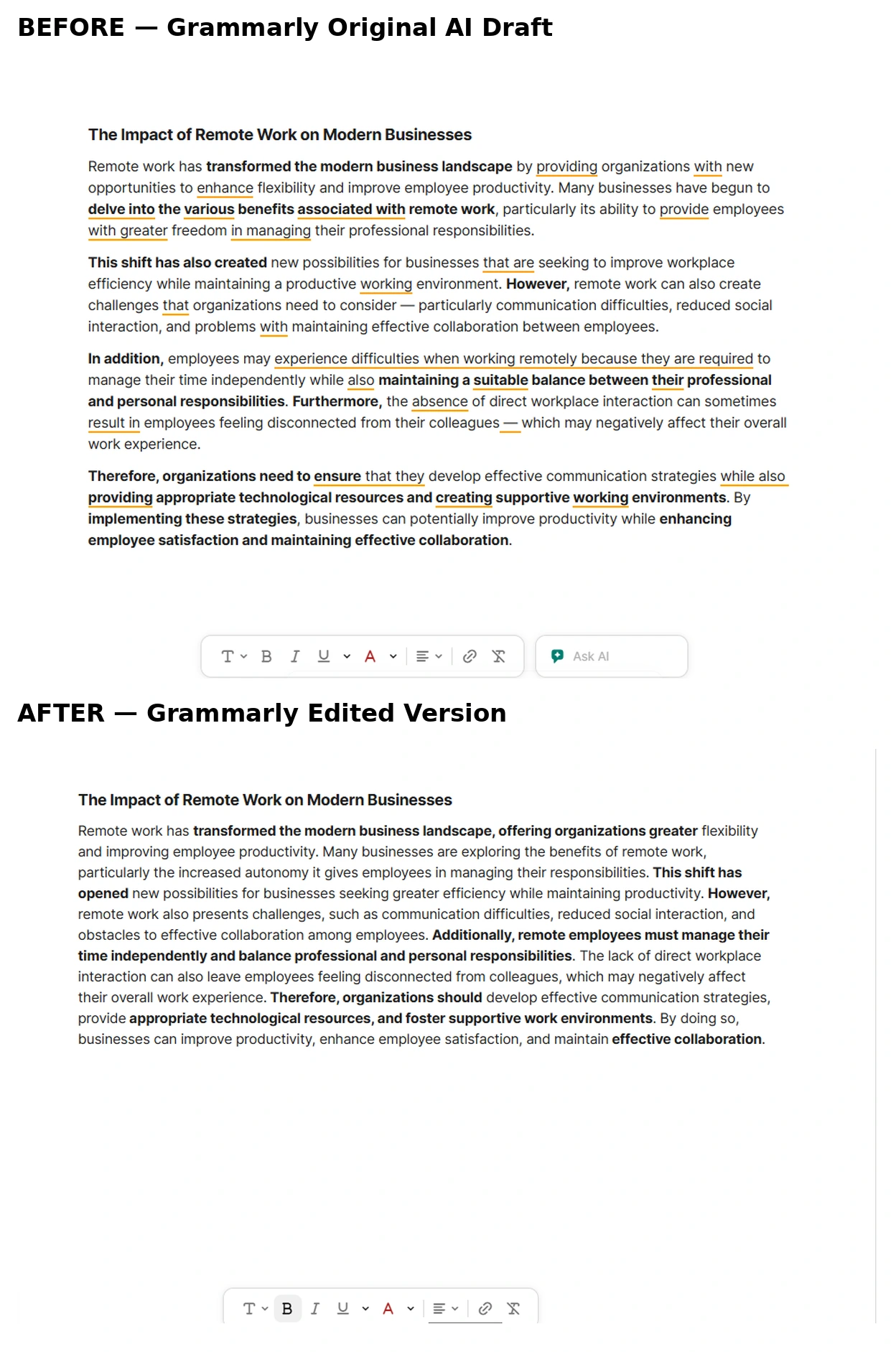
Grammarly before and after: the tool tightens several phrases and replaces some of the more complicated wording with clearer alternatives.
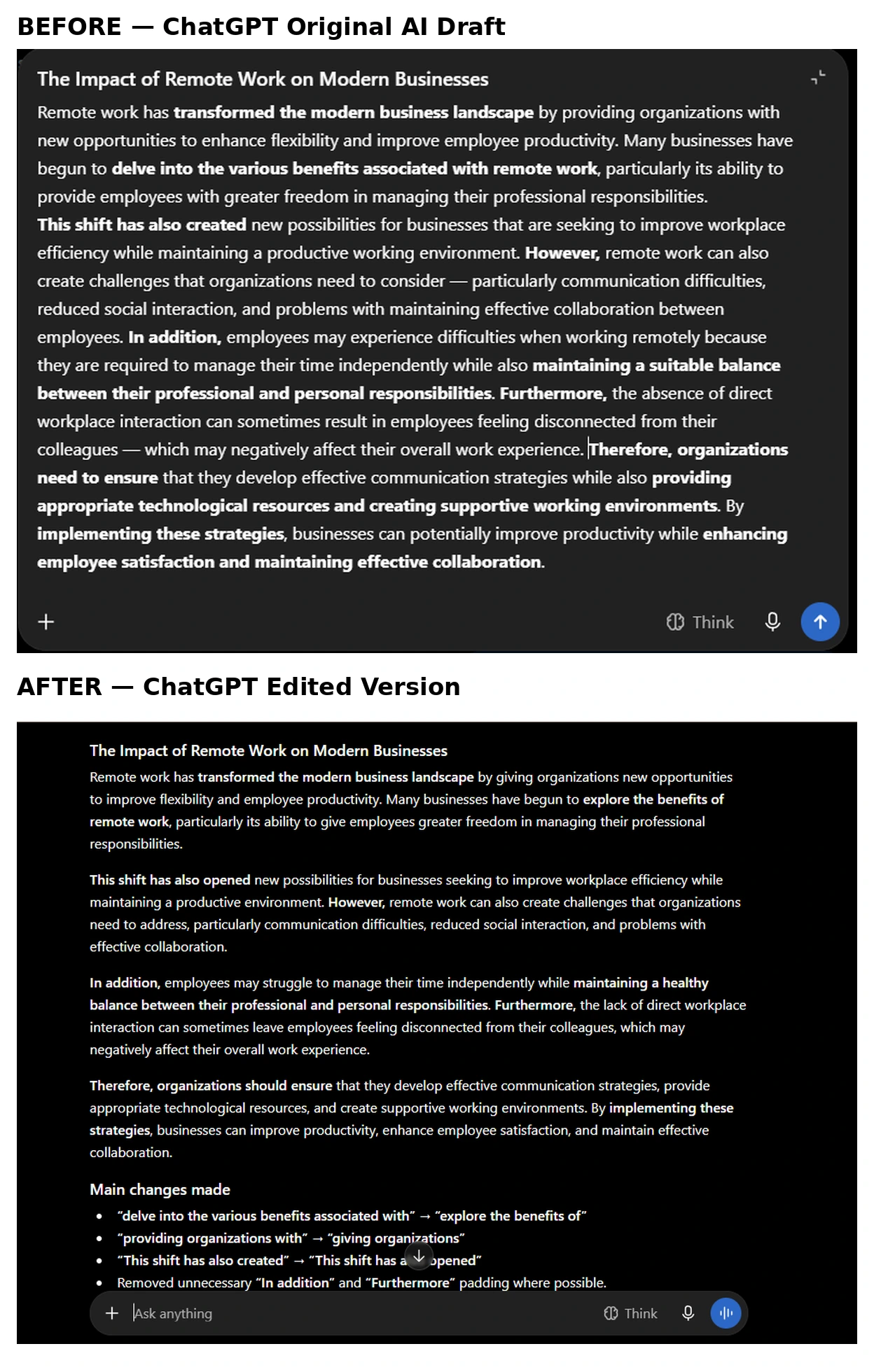
ChatGPT before and after: the edited version reduces repetition, simplifies phrasing, and makes the passage more concise.
Human First Draft Test
We then repeated the same process with the rough human first draft, using the same editing criteria. The passage contained real grammar mistakes, wordiness, and awkward sentence structure, allowing us to see how well the tools handled problems a writer might encounter in an everyday first draft.
The passage was intentionally different from the AI sample, with real grammar mistakes, wordiness, and awkward sentence structure. This test was designed to see how well the tools handled the kind of problems a writer might encounter in an everyday first draft.
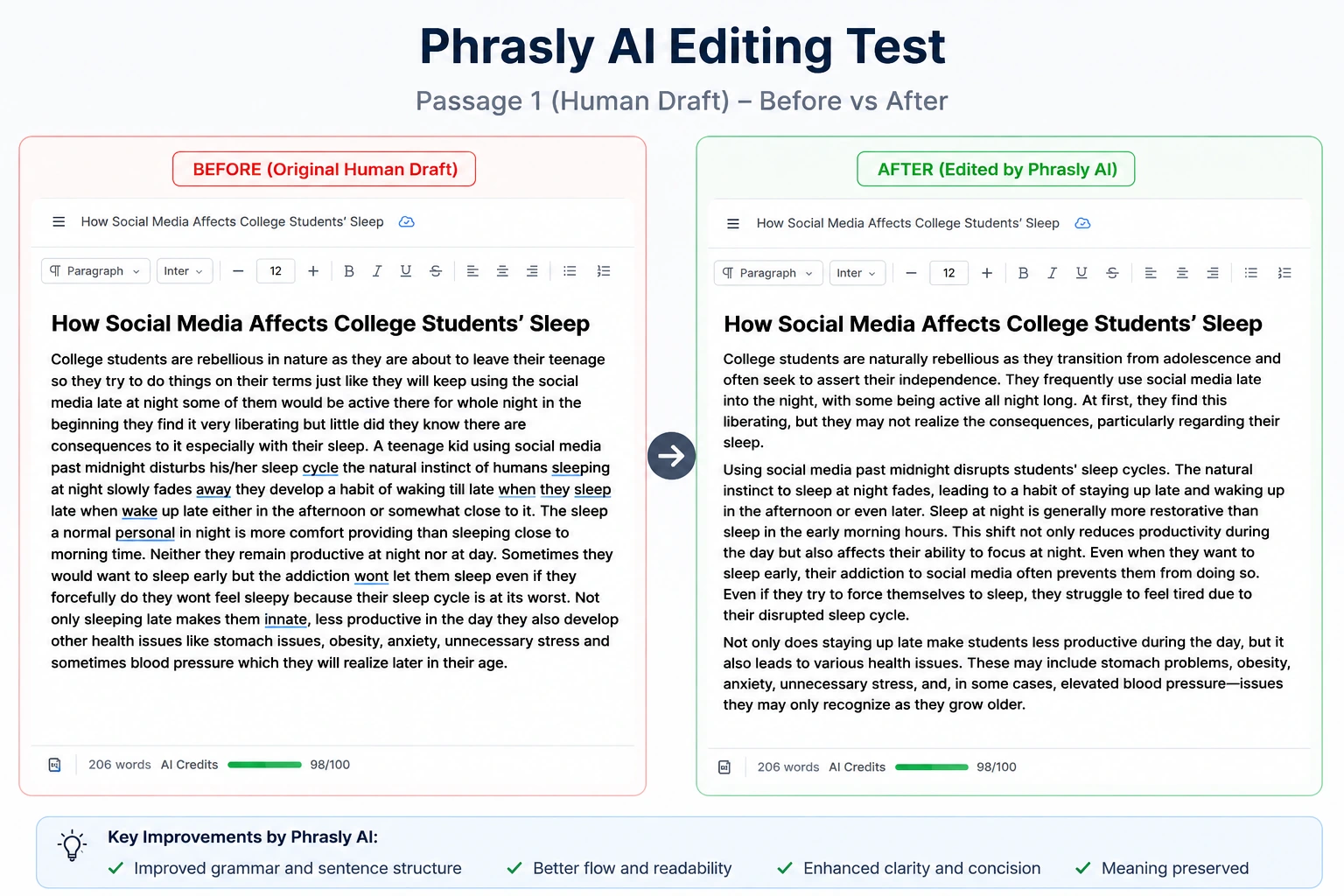
Phrasly before and after: the tool corrects grammar and improves the clarity and flow of the original human draft.
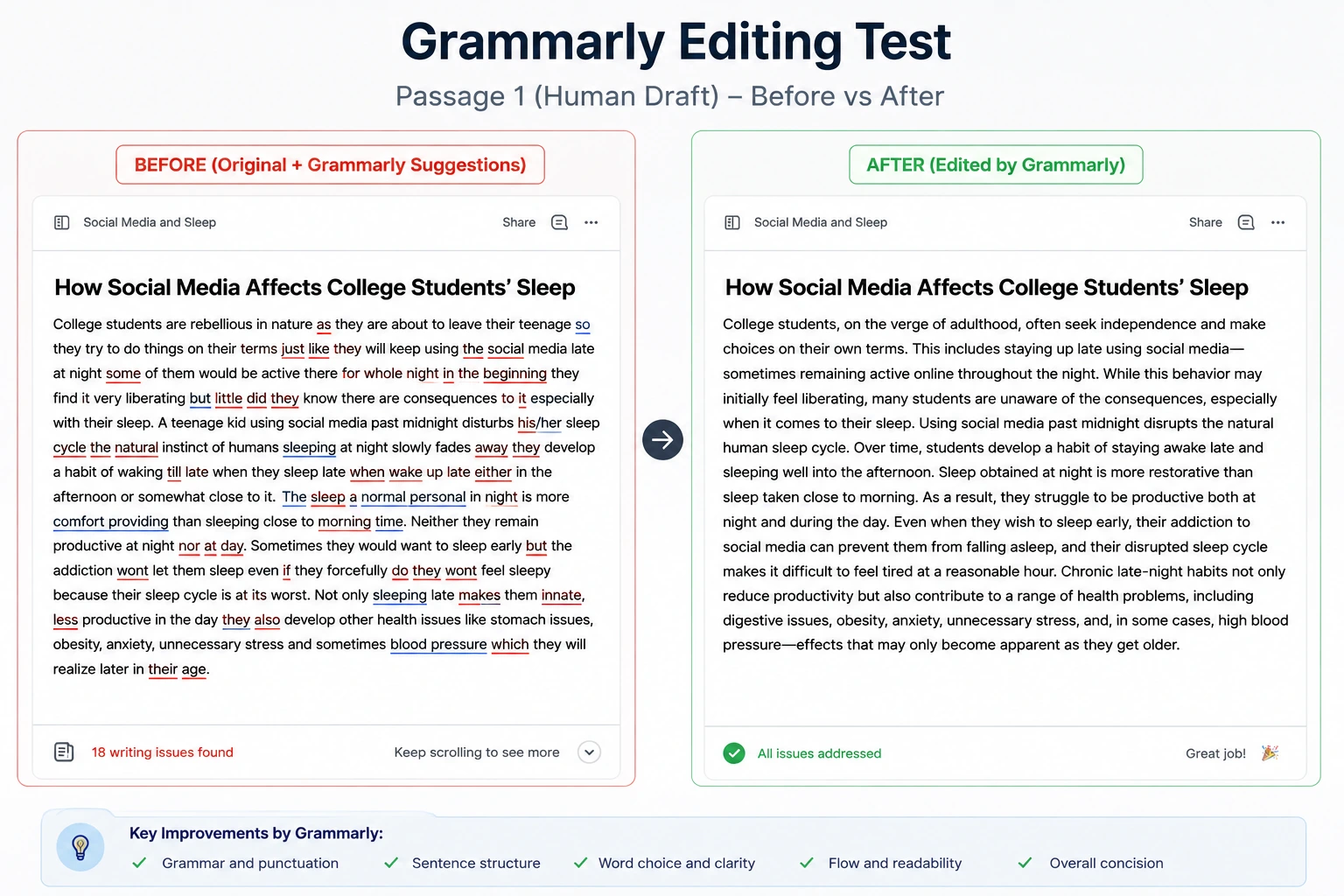
Grammarly before and after: the suggestions focus on grammar, clarity, and sentence level improvements.
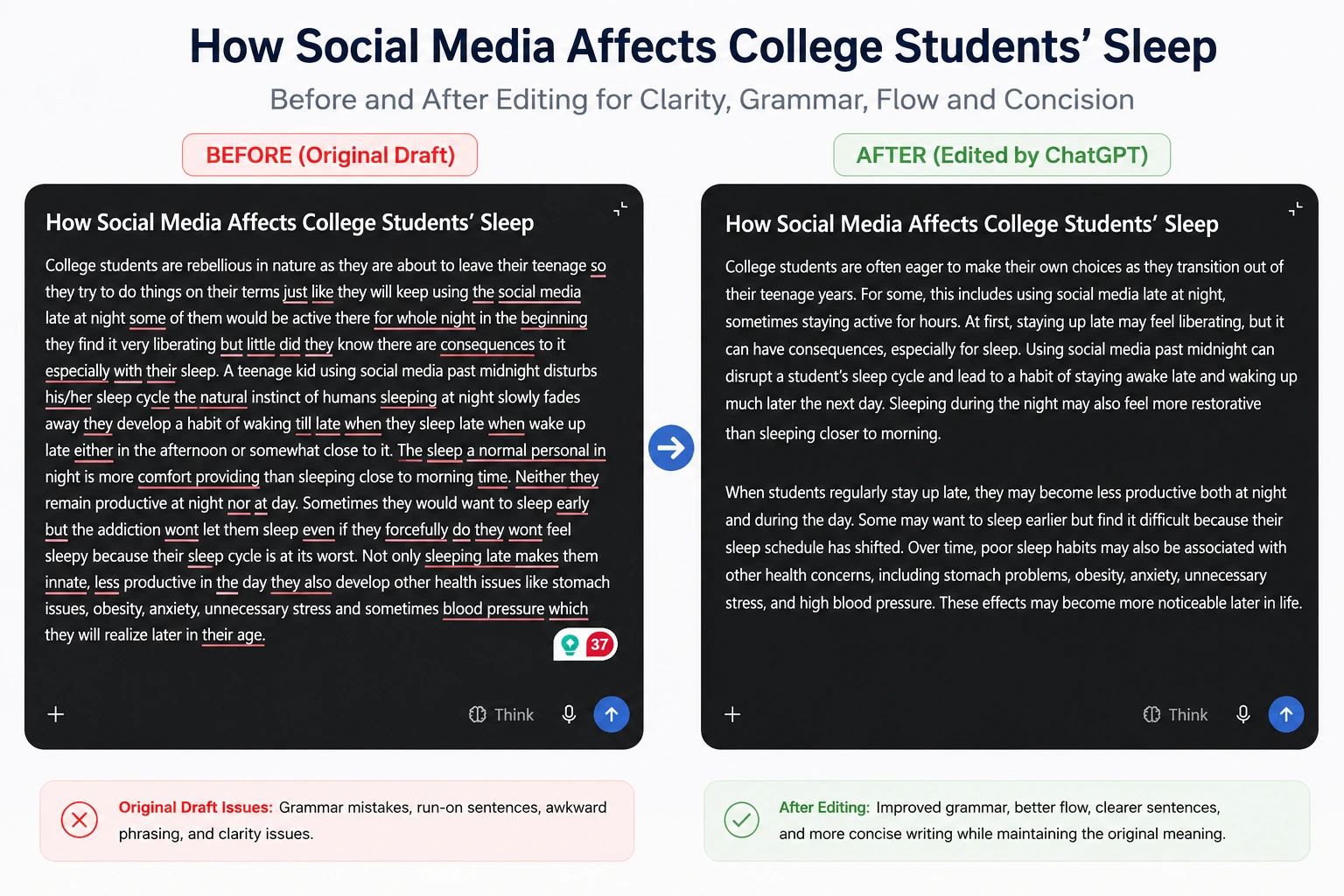
ChatGPT before and after: the response restructures unclear wording while keeping the original argument and meaning.
How We Scored the Results
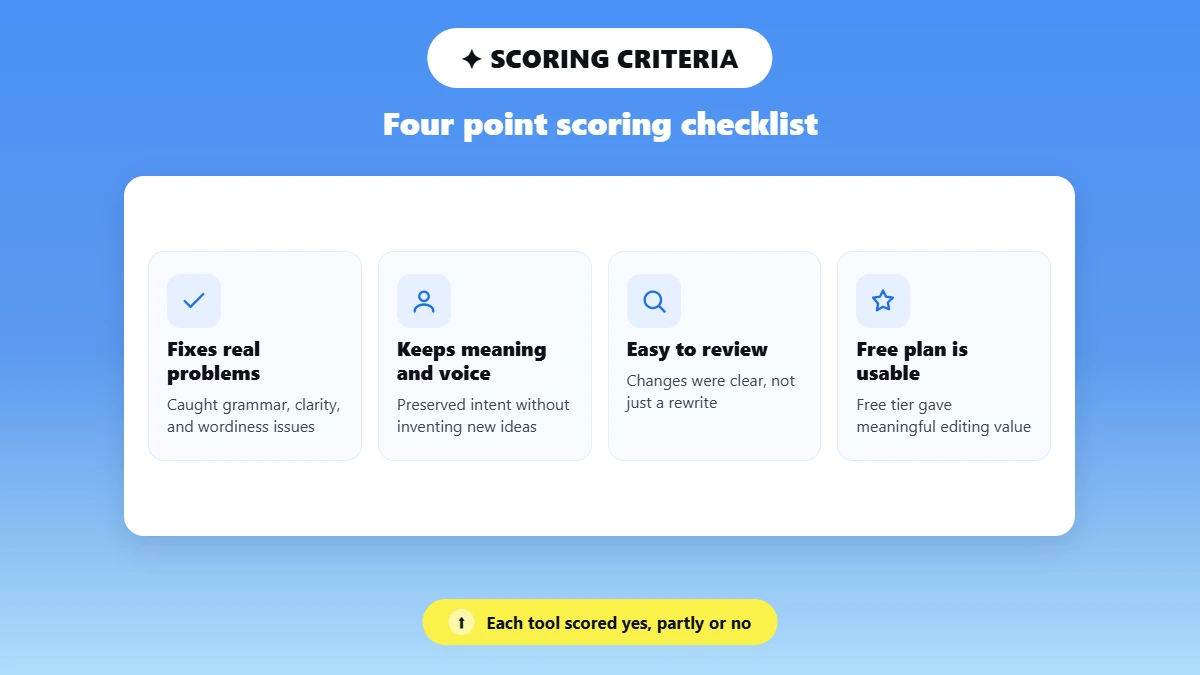
We evaluated each tested tool using the same four-point checklist and marked each criterion as Yes, Partly, or No based on the hands-on test results.
Check | What we looked for |
|---|---|
Fixes the real problems | Did the tool actually catch the grammar, clarity, word choice, or wordiness issues in the passage? |
Keeps meaning and voice | Did the edited version preserve what the writer was trying to say without inventing new ideas or flattening the voice? |
Easy to review | Could the writer easily understand and review the suggested changes, or did the tool simply return a rewritten passage? |
Free plan is usable | Could a free user get meaningful editing value, or was the useful functionality mainly behind a paid plan or trial? |
For the hands-on tests, we used the available free version, free trial, or paid access for each tool, depending on what was available during testing. The access level used for each tool is reflected in its individual review where relevant. Pricing and plan information was checked against current vendor documentation.
Taken together, these tests gave us a consistent basis for comparing how the featured tools handle real editing tasks. We used the hands-on results alongside vendor documentation when assessing the broader features, pricing, supported workflows, and limitations of the tools included in this comparison.
Ownership disclosure: “Phrasly publishes this comparison and is included as one of the tools. We used the same editing samples and criteria for every product, listed each tool’s limitations, and verified feature claims through current vendor documentation.”
Best Free AI Tools for Editing Writing
We tested the editing tools using the same writing samples and the same editing criteria so the comparison would be as consistent as possible. The goal was not simply to see which tool produced the most polished rewrite, but to see which tools actually fixed writing problems while preserving the original meaning and making the changes easy to review.
1. Phrasly Docs, Best Free-to-Start All-in-One Editing Workspace
Best for: All-in-one AI writing and editing
Free plan: Free access with usage limits
Paid price: $10.99/month
Main strength: Combines editing, rewriting, citations, research, and document workflows in one workspace
Main limitation: Free usage is limited, and the full feature set can be more than needed for basic proofreading
Phrasly Docs is designed as an all-in-one workspace rather than a single grammar checker. It combines AI editing and rewriting with features such as AI Commands, an AI Chat Agent, citations and research tools, autocomplete, outlining, collaboration, and Word/PDF export. Its humanizer and AI detector are also available within the same workspace.
In our test, Phrasly worked directly with the passage and made noticeable changes to wording and sentence structure. This makes it useful when a draft needs more than basic spelling or grammar corrections.
The main advantage is convenience. Instead of moving a draft between several separate tools, writers can edit, research, add citations, and prepare documents in one place. The main limitation is that free access comes with usage restrictions, so heavier users may need a paid plan.
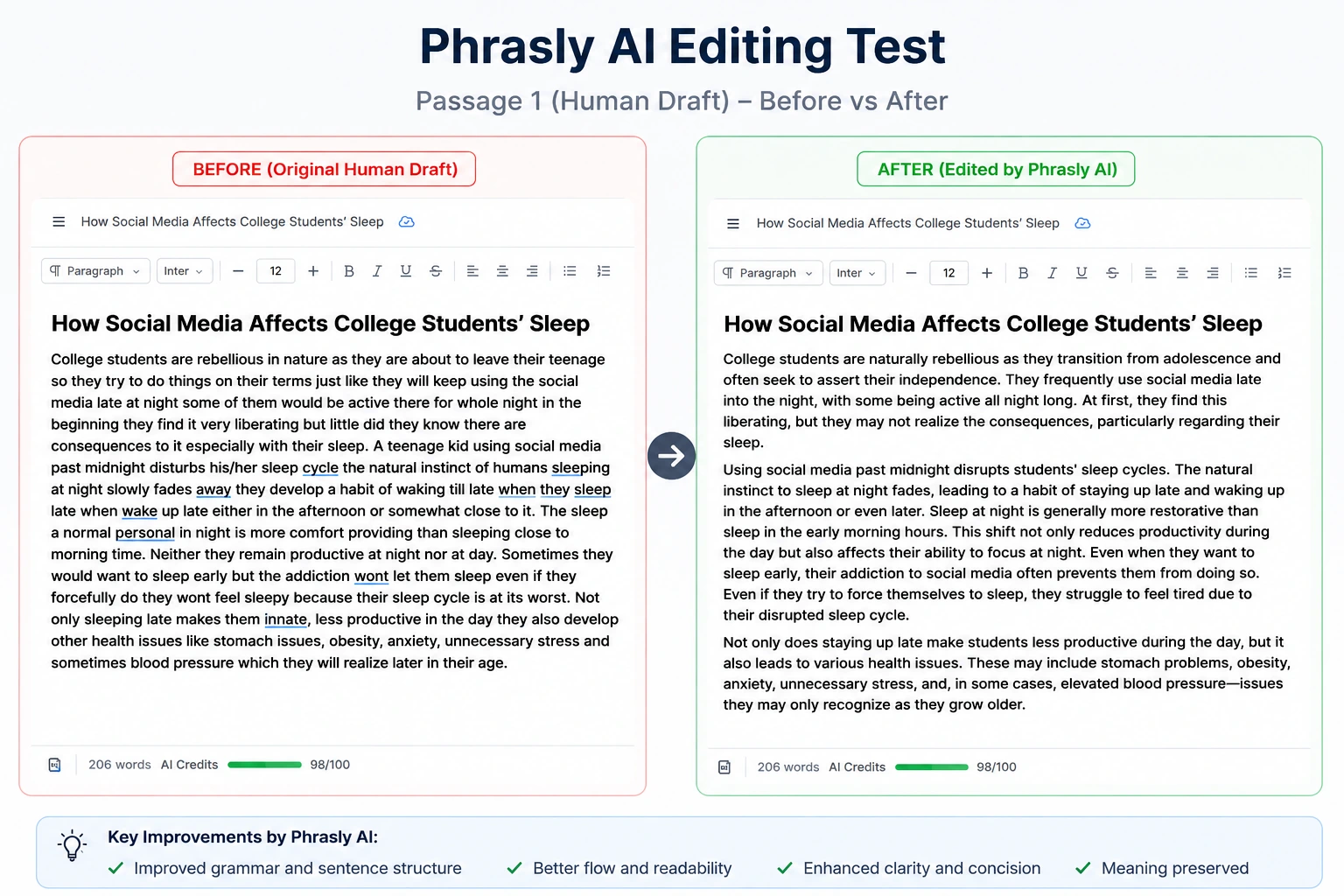
Test takeaway: Useful when you want editing and additional writing features inside the same workspace, rather than a basic grammar checker.
Want to edit, cite, and review your draft without jumping between separate apps? Try Phrasly Docs.
2. Grammarly, Best for Everyday Grammar and Tone
Best for: Grammar, clarity, and tone
Free plan: Yes
Paid price: $12/month billed annually
Main strength: Fast, easy-to-review writing suggestions across multiple writing environments
Main limitation: Less useful for major structural editing or restructuring an entire document
Grammarly is strongest when you want quick feedback while writing. It provides real-time suggestions for grammar, spelling, clarity, tone and sentence-level improvements, and it works across environments such as the browser, Microsoft Word and Google Docs.
In our test, Grammarly was useful for identifying and correcting the more obvious problems in the human draft. Its suggestion-based approach also makes individual changes relatively easy to review rather than forcing the writer to accept a completely rewritten passage.
However, Grammarly is less suited to fixing a weak argument or restructuring an entire document. It works best when the underlying ideas and organization are already in place and the writer needs help polishing the language.
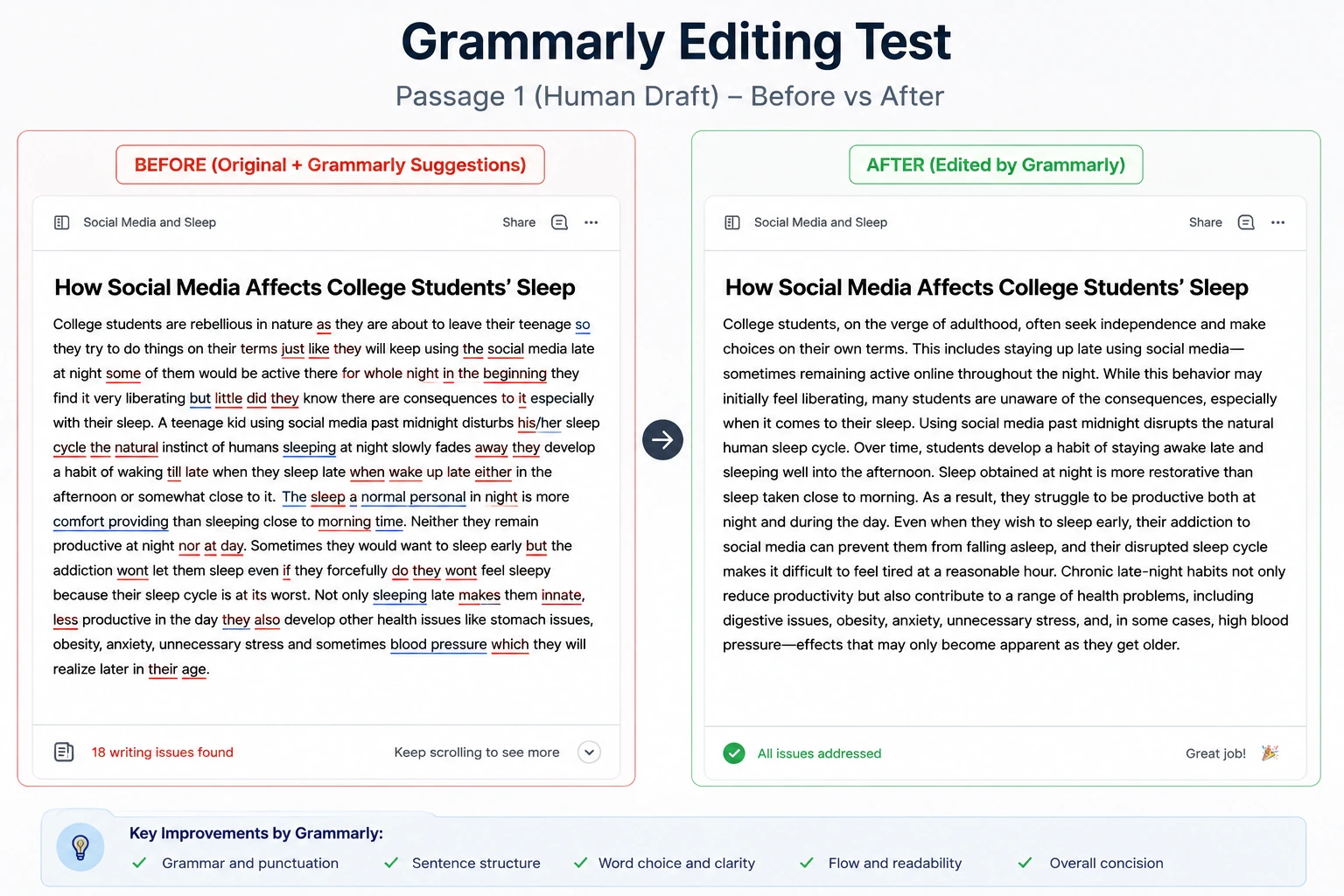
Test takeaway: A strong choice for everyday proofreading and sentence-level improvement, especially when you want to review suggestions individually.
3. ChatGPT, Best for Custom and Structural Editing
Best for: Custom editing instructions and structural feedback
Free plan: Available with usage limits
Paid price: $8/month
Main strength: Highly customizable editing, feedback, restructuring, and rewriting
Main limitation: Results depend heavily on the prompt and require manual review
ChatGPT is more flexible than a traditional grammar checker because you can tell it exactly what kind of editing you want. A precise prompt can ask it to improve grammar, word choice, flow, concision, or sentence structure while preserving the writer's original meaning and voice.
It can also provide developmental feedback, reorganize sections, suggest stronger transitions, and work with longer documents. Canvas and file-upload workflows can make this particularly useful when editing a larger piece of writing.
In our test, the quality of the result depended heavily on the instruction given to the tool. A detailed prompt produced a more controlled edit, while a vague request could lead to a heavier rewrite. Writers should also check factual claims after AI-assisted editing because a general editing request doesn't guarantee every statement will remain accurate.
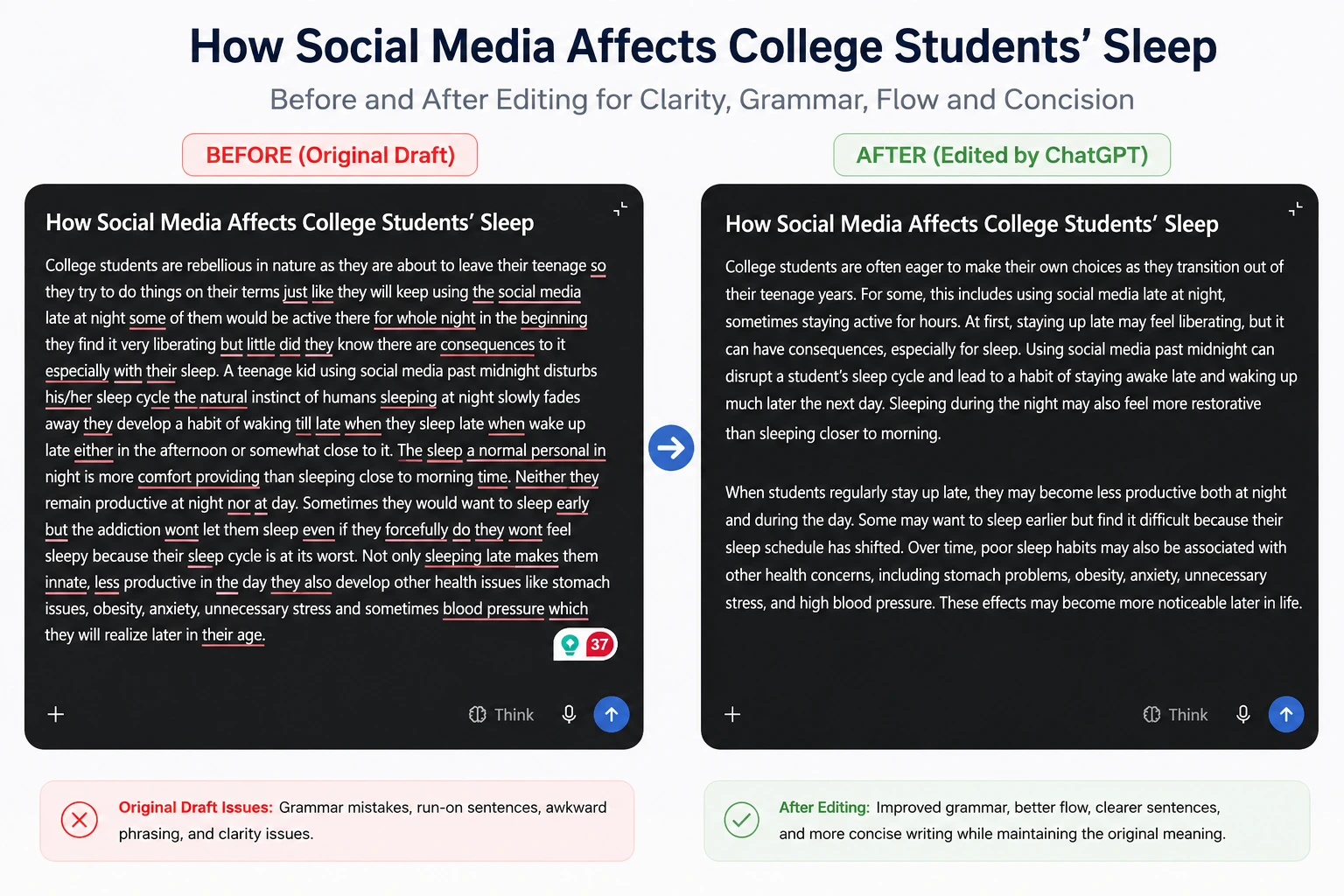
Test takeaway: The most flexible option when you want to control exactly how the writing should be edited, but the prompt matters.
4. LanguageTool, Best for Multilingual Editing
Best for: Multilingual grammar and style checking
Free plan: Yes
Paid price: $2.91/month
Main strength: Grammar, spelling, style, and paraphrasing support across multiple languages
Main limitation: Some advanced suggestions and features require Premium
LanguageTool is particularly useful for writers working across multiple languages. It supports grammar, spelling, and style checking across 30+ languages and dialects, with additional paraphrasing functionality.
Our human-draft test showed that LanguageTool could identify a substantial number of problems in the original passage. After correction, the visible text was cleaned up considerably, although some advanced issues remained behind the Premium upgrade.
That makes LanguageTool a practical choice for writers who want automated proofreading without relying on a full AI rewrite. It is especially useful for multilingual and ESL writers who want grammar and style feedback while keeping more control over their original wording.
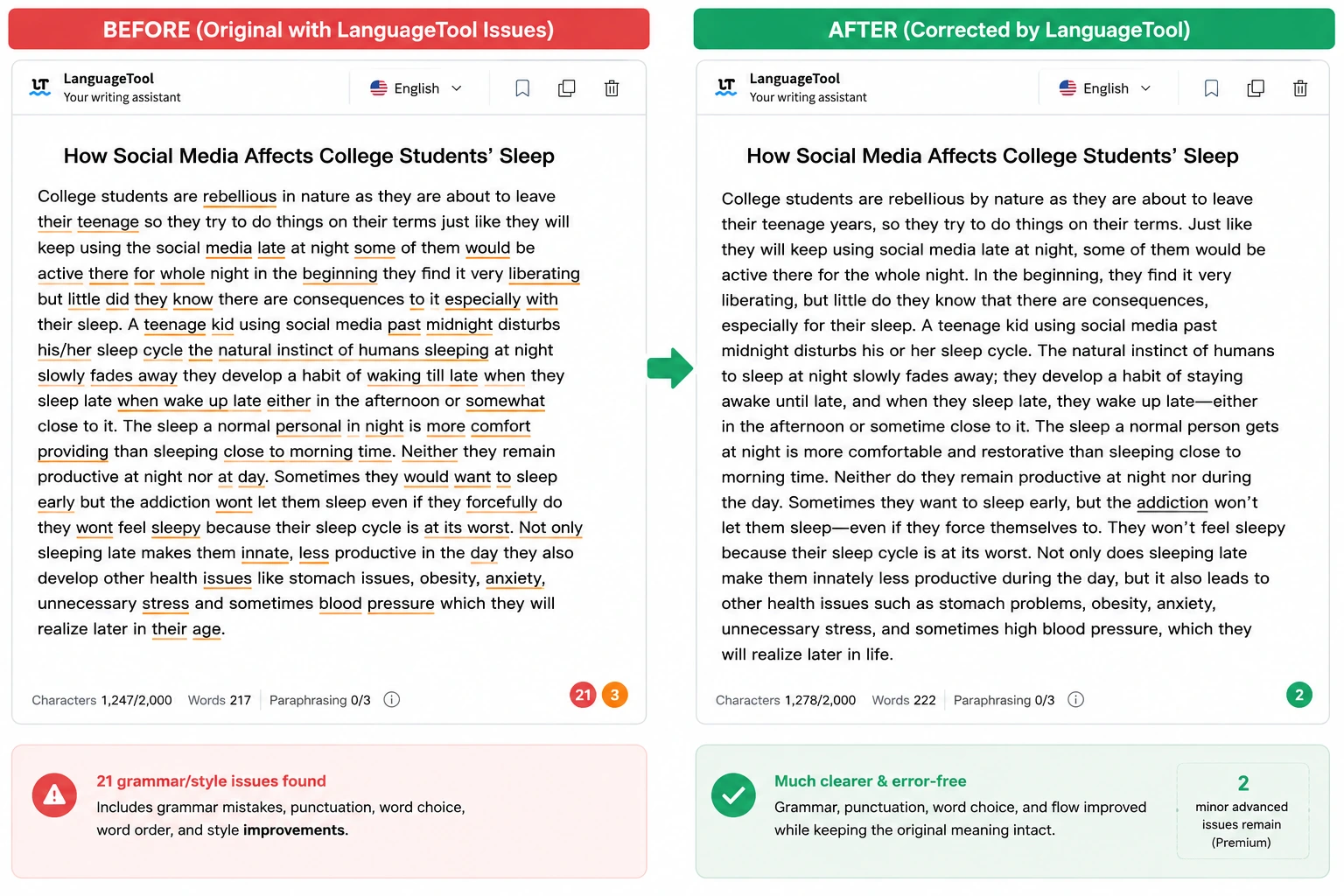
Test takeaway: Strong for catching grammar and style problems, particularly when multilingual support is important. Some advanced corrections are limited on the free version.
5. QuillBot, Best for Quick Paraphrasing
Best for: Quick paraphrasing and sentence rewriting
Free plan: Yes, with limits
Paid price: $19.95/month
Main strength: Fast paraphrasing with multiple rewriting modes
Main limitation: Aggressive paraphrasing can change the original wording, length, or meaning more than necessary
QuillBot takes a different approach from a traditional grammar checker. Its main strength is paraphrasing, with different modes designed to change how closely the rewritten text follows the original. It also includes grammar-checking functionality.
In our test, the original human passage was 122 words, while the resulting paraphrased version expanded to 274 words. That shows an important limitation: paraphrasing can substantially change the length and structure of a passage rather than simply fixing its existing problems.
For short passages where you want alternative wording, this can be useful. But for careful editing, writers should compare the result against the original to make sure the meaning has not shifted and that unnecessary wording has not been added.
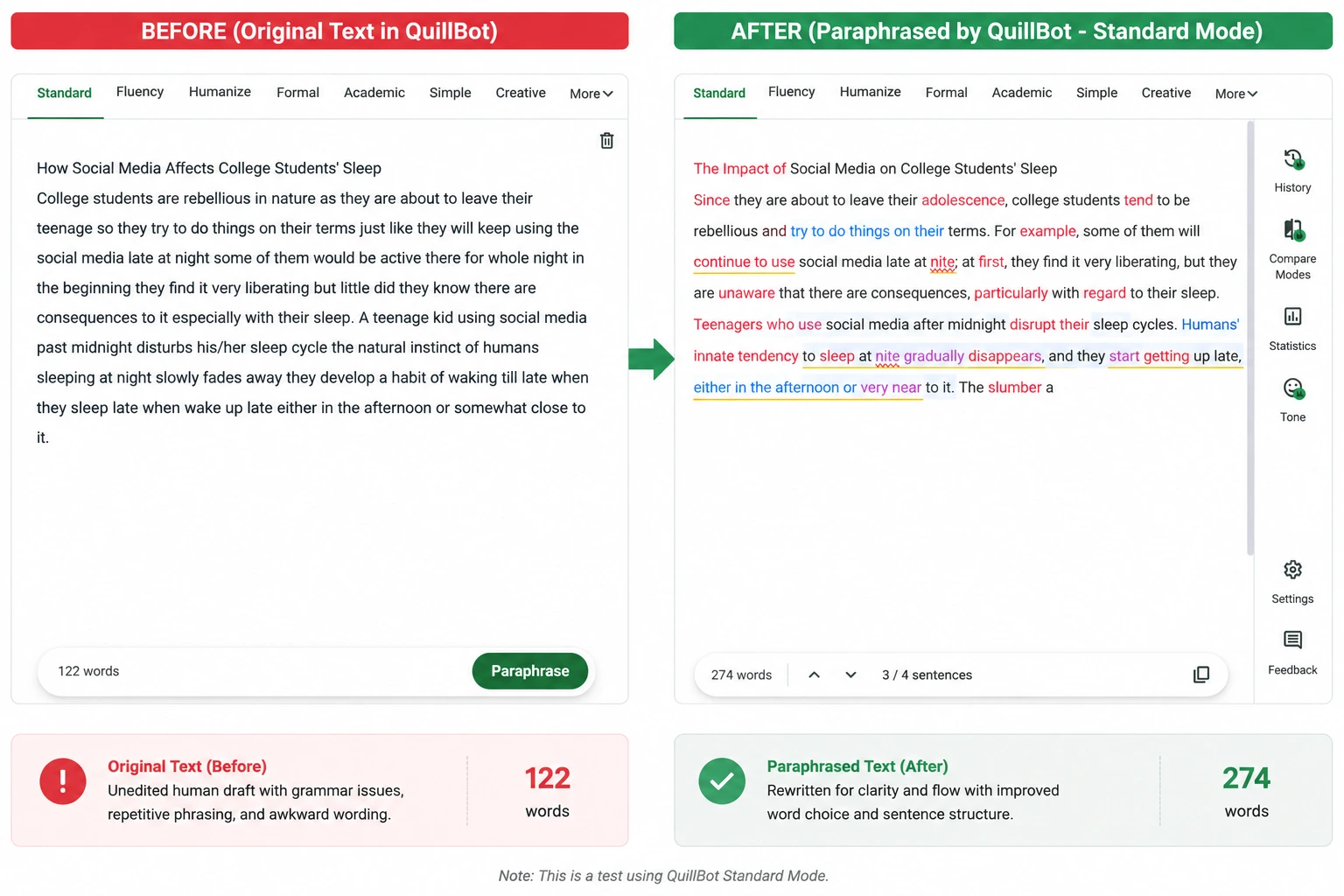
Test takeaway: Useful for generating alternative wording quickly, but it should be reviewed carefully when preserving the original meaning and length matters.
Best Paid AI Editing Tools
We used the same passage containing grammar mistakes, wordiness, awkward phrasing, and unclear sentences for each of the five paid editing tools below. Each tool received the same editing instruction, and we reviewed the results using four criteria: problem-solving, meaning and voice preservation, ease of review, and plan usability.
For these paid tools, we used the available free version, free trial, or paid access where applicable and noted important features or usage restrictions in each review. The screenshots below show the actual before-and-after results from these tests.
6. ProWritingAid, Best for Fiction and Long-Form Analysis
Best for: Fiction, manuscripts, and detailed long-form analysis
Free plan: Yes, with a 500-word limit
Paid price: $10/month billed annually
Main strength: Detailed writing analysis with 25+ reports covering readability, repetition, structure, and style
Main limitation: English-focused and more feature-heavy than a basic grammar checker
ProWritingAid is designed for writers who want detailed feedback beyond basic grammar correction. Its 25+ reports examine areas such as pacing, repetition, readability, sentence variation, and other aspects of writing style. It also includes features designed for chapters and manuscripts, making it particularly useful for fiction and other long-form projects.
In our test, ProWritingAid identified several problems in the human-written passage and provided detailed suggestions for improving the writing. Its report-based approach gives writers more information about why something may need changing, rather than simply replacing the original sentence.
The free version has a 500-word limit, while longer documents and additional features require paid access. Another limitation is that ProWritingAid is focused on English-language writing, so it is not the strongest option for multilingual editing.
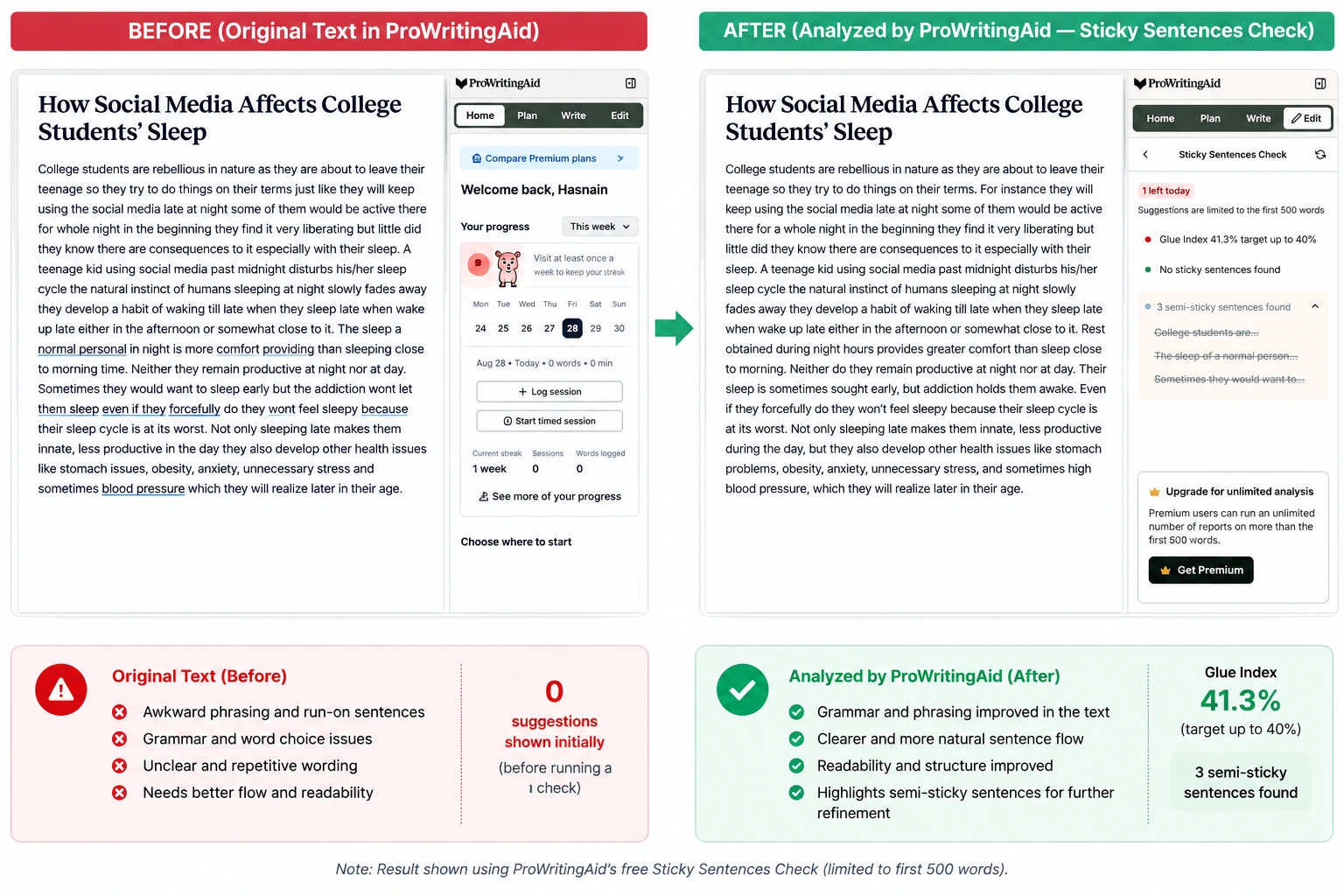
Our take: ProWritingAid is particularly valuable for fiction writers and anyone working on long-form documents who wants detailed analysis rather than basic proofreading.
7. Hemingway Editor Plus, Best for Readability
Best for: Readability, concision, and clearer sentences
Free plan: Yes, with core readability analysis
Paid price: $8.33/month billed annually
Main strength: Highlights difficult sentences, passive voice, adverbs, and other readability issues
Main limitation: Its simplicity-focused approach can flatten intentional or complex writing styles
Hemingway Editor takes a readability-focused approach to editing. It highlights passive voice, adverbs, difficult sentences, and other readability issues, while the Plus version adds AI-powered editing and rewriting features.
In our test, Hemingway focused heavily on simplifying the original passage. The revised version was more direct and easier to read, while the readability analysis provided a quick way to see how difficult the original writing was.
However, this approach can sometimes go too far. Not every long sentence or complex construction is a problem, particularly in creative or technical writing. Writers should therefore treat Hemingway's suggestions as guidance rather than automatically accepting every simplification.
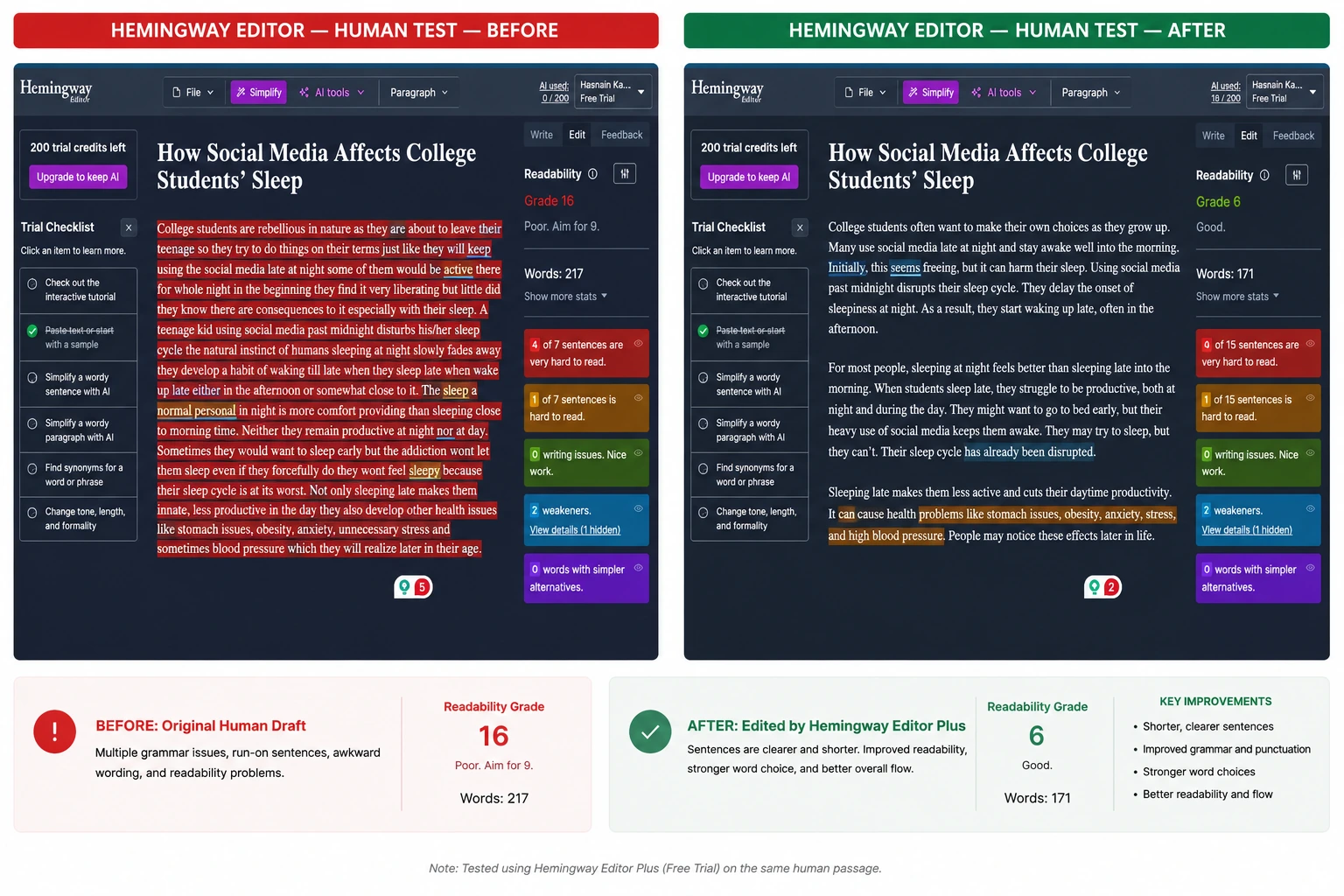
Our take: Hemingway Editor Plus is a strong choice when your main goal is clearer, more accessible writing. It is less suitable when preserving a deliberately complex or distinctive writing style is important.
8. Wordtune, Best for Sentence Rewriting and Tone
Best for: Sentence rewriting, alternative phrasing, and tone adjustments
Free plan: Yes, with a daily usage allowance
Paid price: $6.99/month billed annually
Main strength: Provides multiple ways to rewrite and refine individual sentences
Main limitation: Better suited to sentence- and passage-level editing than full-document structural reasoning
Wordtune focuses on sentence rewriting, alternative phrasing, tone, clarity, vocabulary, and fluency. Rather than simply flagging an error, it can give writers different ways to express the same idea.
In our test, Wordtune made several sentence-level improvements to the original passage and offered alternative wording. This makes it useful when the meaning is already clear but the sentence sounds awkward, repetitive, or unnatural.
The limitation is that Wordtune works primarily at the sentence and passage level rather than reasoning through the structure of an entire document. Its free version also has a daily usage allowance, while paid access provides more extensive use.
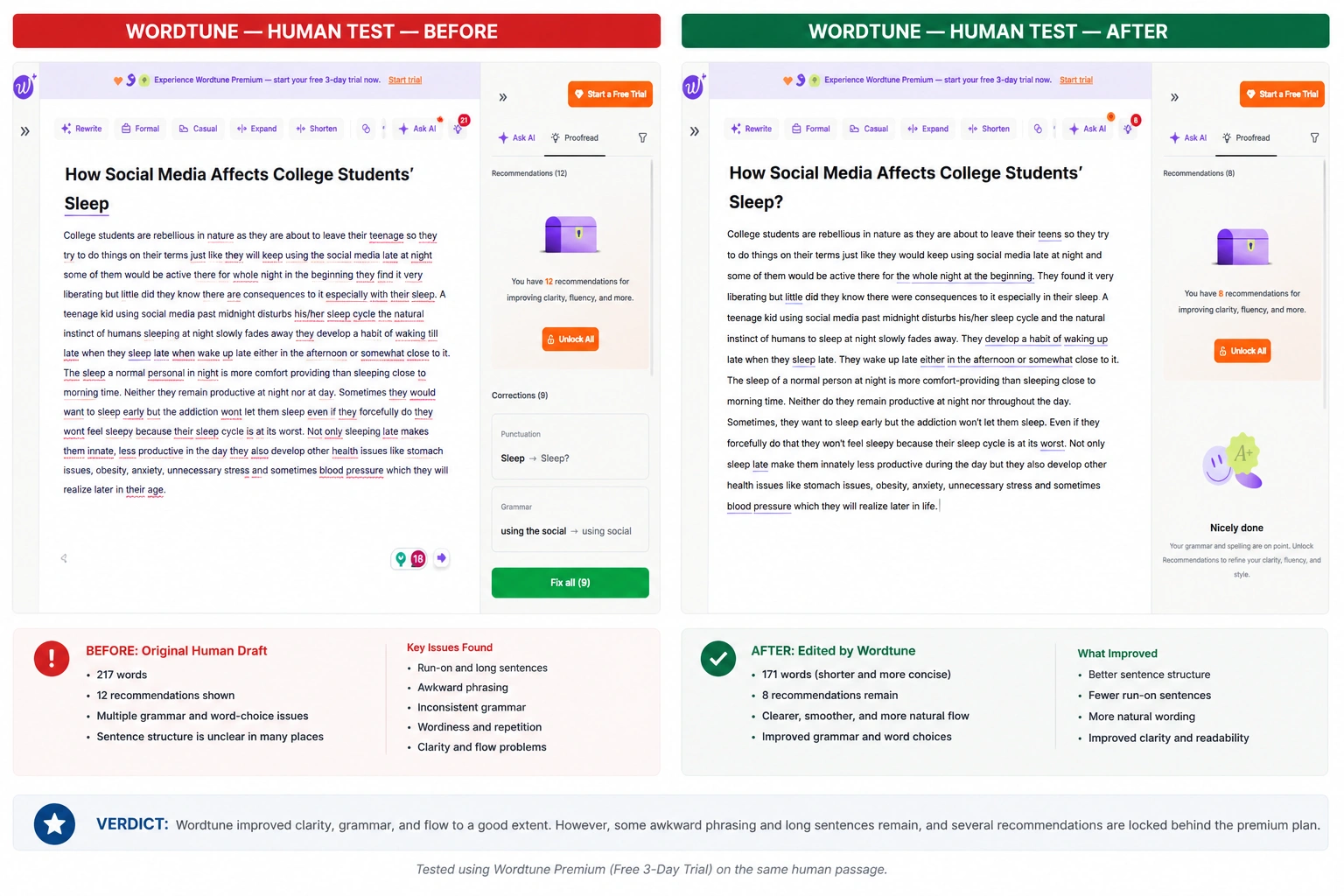
Our take: Wordtune is a good option when you need alternative ways to phrase individual sentences, but it is not a replacement for a full-document structural editor.
9. Paperpal, Best for Academic Writing
Best for: Academic papers, research writing, and scholarly language
Free plan: Yes, with additional features available through Prime
Paid price: $11.60/month
Main strength: Academic language, terminology, paraphrasing, citations, and research-focused editing
Main limitation: More specialized than necessary for casual, marketing, or creative writing
Paperpal is specifically designed for academic and research writing. Its features focus on academic terminology, language improvement, paraphrasing, consistency, citations, and research-related workflows.
In our test, Paperpal made substantial changes to the original passage and presented its edits in a way that let the writer review them. Its academic orientation can be particularly useful when terminology, formal language, and consistency matter more than conversational style.
That specialization is also its main limitation. Paperpal can be more than you need for casual emails, marketing copy, or fiction, where a general-purpose editor may be more appropriate. Its broader feature set is also available through its Prime offering rather than entirely through the free version.
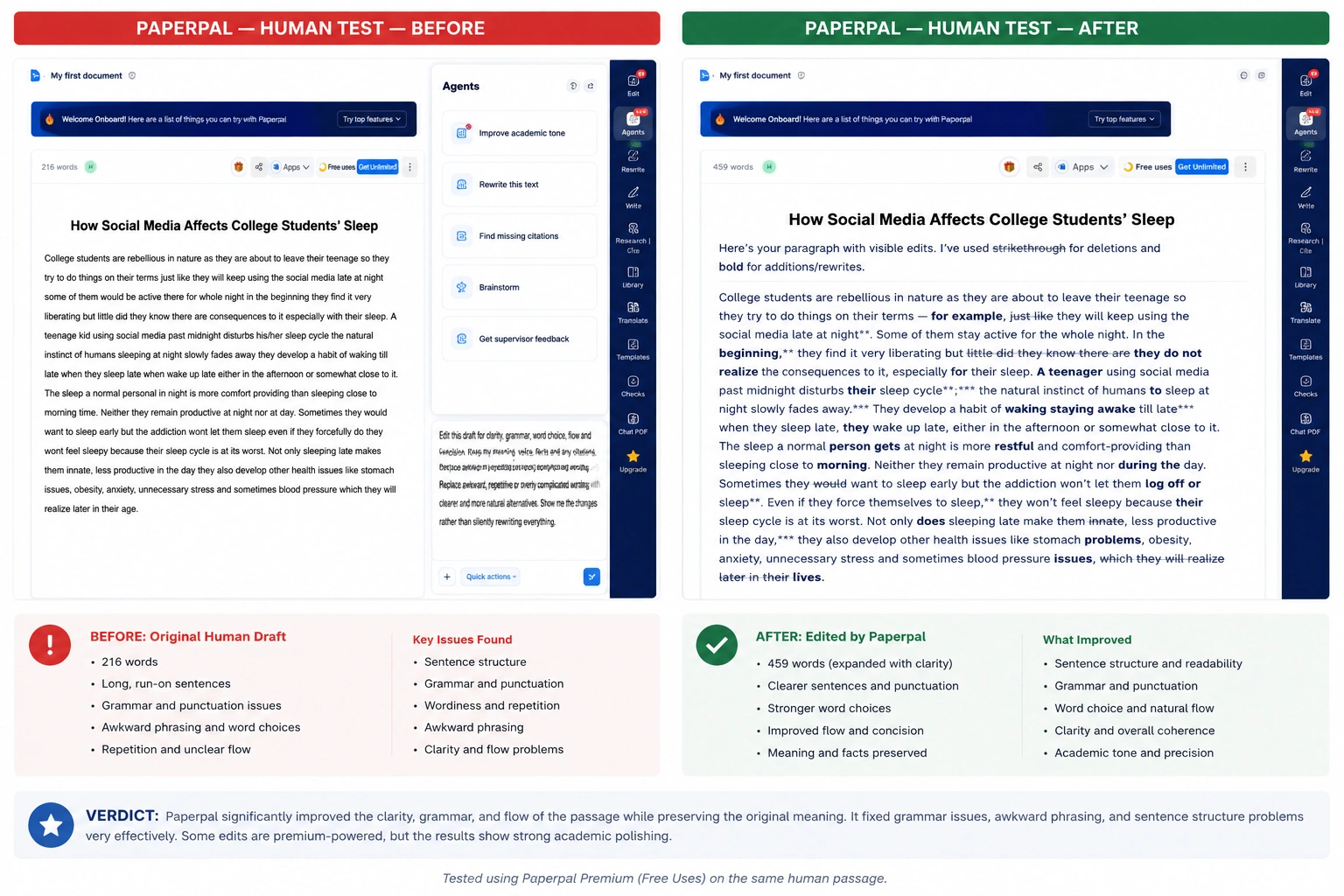
Our take: Paperpal is the strongest fit among these tools for students, researchers, and academic writers who need more specialized, research-oriented language editing.
10. Type.aiBest for Book-Length Documents
Best for: Book-length documents, manuscripts, and long-form writing
Free plan: Yes
Paid price: $16/month
Main strength: Long-form editing with support for large documents and Word/PDF workflows
Main limitation: Less convenient for quick edits across email, browsers, and everyday websites
Type.ai is built around long-form writing and document editing, making it particularly relevant for authors and writers working on books or lengthy manuscripts. It supports documents up to 150,000 words, plus Word/PDF import and export and revision-focused tools.
In our test, Type.ai corrected several grammar, clarity, and sentence-structure problems in the original passage. The revised version was more polished while keeping the original meaning.
One thing to watch is that AI editing can sometimes add wording instead of simply tightening the original, so you should still compare the final version with the source. Its long-form focus can also make it less convenient for writers who mainly need quick edits across email, browser-based writing, or everyday websites.
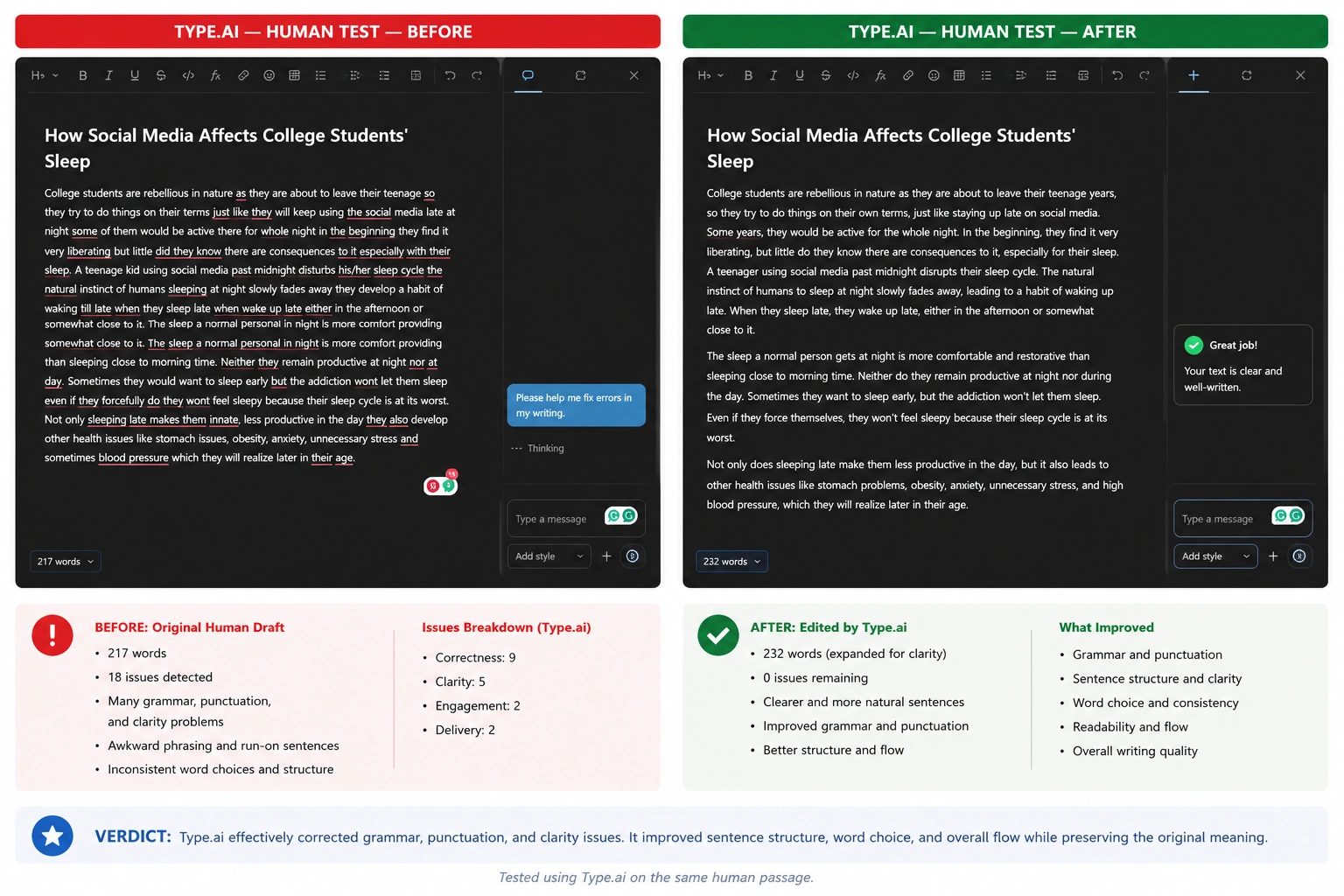
Our take: Type.ai is most compelling for authors and other long-form writers. For short everyday writing, a more lightweight editor may be more practical.
Which AI Editing Tool Should You Choose?
If you need… | Recommended option |
|---|---|
One workspace for writing, editing, citations & review | Phrasly Docs |
Grammar correction wherever you type | Grammarly |
Custom structural feedback | ChatGPT |
Fiction or manuscript analysis | ProWritingAid |
Simpler, more readable sentences | Hemingway |
Alternative sentence rewrites | Wordtune |
Academic editing | Paperpal |
Multilingual proofreading | LanguageTool |
Fast paraphrasing | QuillBot |
Book-length project editing |
For writers who need more than a grammar checker, Phrasly’s AI document editor keeps rewriting, citations, collaboration, and final review in one workspace.
How to Edit Writing With AI Without Losing Your Voice
AI editing works best when you treat it as an assistant rather than handing over complete control of the draft. If you want a step-by-step approach, see our guide on how to use AI to edit a document.
💡 Before accepting any changes, decide what you want the tool to improve and what should remain yours. A clear editing process can help you improve grammar, clarity, and flow without making the final piece sound generic or unlike you.
1. Decide what the tool is allowed to change
Be specific about whether you want help with grammar, clarity, word choice, sentence structure, or overall flow. If you only need proofreading, do not ask the tool to rewrite the entire piece.
2. Tell it to preserve claims, citations, examples and terminology
Give the tool clear boundaries. Ask it to keep your factual claims, citations, examples, technical terms, and important details unless you specifically ask for changes.
3. Ask for suggestions before accepting full rewrites
Suggestions give you more control than an automatic rewrite. Review individual changes first so you can decide which ones actually improve the writing.
4. Compare the edit against the original
Always keep the original version available. Comparing both versions makes it easier to spot unnecessary changes, missing details, or places where the tool has changed your intended meaning.
5. Restore personal wording and specific details
AI can make writing sound smoother while also removing the details that make it sound like you. Restore phrases, examples, or wording that reflect your own experience and writing style.
6. Fact-check every changed claim, then read aloud once
Editing tools can accidentally change a statement's meaning or introduce unsupported information. Check factual claims after editing, then read the final version aloud to catch awkward phrasing that automated checks may miss.
If a draft needs several passes, it can be faster to edit and review the document in one AI workspace than to copy it between a chatbot, grammar checker, citation tool, and document editor.
What AI Editing Tools Still Get Wrong
AI editing tools can save time, but a cleaner sentence is not always a better sentence. Even strong editing tools can make changes that look polished while weakening the original writing. The safest approach is to treat AI suggestions as edits to review, not changes to accept automatically.
1. Changing factual meaning
An AI editor may improve the wording of a sentence while accidentally changing what the sentence actually claims. This is especially important when editing statistics, research findings, qualifications, dates, or other factual statements.
2. Stripping away intentional voice
AI often favors smooth, conventional phrasing. That can make a draft sound more polished while removing the expressions, rhythm, or personality that made the original writing distinctive.
3. Making technical writing less precise
Simplifying a sentence is not always an improvement. Technical, scientific, and professional writing often depends on precise terminology, so replacing specialized language with more familiar wording can reduce accuracy.
4. Damaging citations or formatting
AI-assisted editing can sometimes alter citation wording, formatting, references, or the relationship between a claim and its source. Always check citations and formatting after making substantial AI-assisted changes.
5. Adding generic language
Some AI edits make writing sound polished but less specific. Generic phrases can replace concrete examples, details, or terminology that give a piece its authority and usefulness.
6. Overcorrecting dialect or creative style
Not every unusual construction is an error. AI tools may treat dialect, conversational language, deliberate fragments, or creative stylistic choices as problems and “correct” them even when they are intentional.
7. Privacy risks with confidential documents
Writers should also consider what they upload to an AI editing service. Confidential business information, unpublished research, client material, personal information, or other sensitive documents may require additional privacy checks before being submitted to an online tool.
💡 AI editing works best as a review layer, not an automatic replacement for the writer. The more important the document, the more carefully you should compare the edited version with the original and verify any factual or citation-related changes.
Frequently Asked Questions
What is the best AI tool for editing writing?
There is no single best tool for every writer. Phrasly Docs is strongest for an all-in-one writing workflow; Grammarly for grammar and tone; ChatGPT for custom editing; ProWritingAid for long-form analysis; and Paperpal for academic writing.
What is the best free AI editing tool?
Phrasly Docs is a strong free-to-start option for broader editing and writing workflows. Grammarly is useful for everyday grammar, ChatGPT offers flexible custom editing, LanguageTool is strong for multilingual proofreading, and QuillBot is useful for quick paraphrasing.
Can ChatGPT edit my writing?
Yes. ChatGPT can edit writing using custom instructions and can provide structural feedback through Canvas. Give clear boundaries about what to change and what to preserve, then compare the edited version with your original and verify important factual claims.
Which AI editing tool is best for academic papers?
Paperpal is the more specialized choice for academic language, terminology, and research-focused editing. Phrasly Docs is a broader option if you also need features such as citations, research, rewriting, and document editing in one workspace.
Is Grammarly better than an AI rewriting tool?
It depends on the task. Grammarly is primarily useful for grammar, clarity, tone, and sentence-level corrections. If you're specifically evaluating its detection features, you may also want to know how accurate Grammarly's AI Checker is. AI rewriting tools, meanwhile, are better suited to changing phrasing or restructuring text.
Can AI editing tools replace a human editor?
No. AI editing tools, including AI humanizers, can speed up proofreading and early revision, but they can miss nuance, factual problems, context, and the writer's intended meaning. Important documents still benefit from human review, particularly when accuracy, originality, or specialized knowledge matters.
Is it safe to upload confidential writing to an AI editor?
Check the tool's data-retention and training policies, privacy settings, enterprise controls, and your organization's or institution's rules before uploading confidential material. Avoid submitting sensitive information unless you understand how the service handles and stores your content.

Written by
Hasnain
Karachi, Pakistan
I help businesses grow with SEO-friendly blog posts, landing pages, and long-form content. With 3+ years of experience, I deliver clear, original, and well-researched writing that drives results.