How to Write Good SEO Content: Draft, Edit, and Polish With Phrasly
23 min read
Good SEO content answers the searcher's problem and adds something the current results do not carry. It also makes that answer easy for people and search engines to follow.
To write it: pick a query you can win and match its intent. Then build an evidence-backed brief and draft for the reader. To make sure Google can find and understand that draft, optimize the page.
After publishing, keep improving the page with your own Search Console data, which shows you exactly which part is falling short. Good SEO content does not mean repeating a keyword or clearing a tool's content score. It means the page finishes the reader's task.
This guide gives you four things:
🧭 The 10-step workflow for writing an SEO page
📋 A one-page brief template you can copy
🔍 A worked before-and-after example
✅ A pre-publish checklist
This ten-step process works the same way whether you write the first draft yourself or start with an AI writer. It holds the same way whether you are writing for SEO on a blog post or a landing page.
Want to Skip Ahead and Draft Now?
An AI writer turns an approved brief and a source list into a structured first draft. Paste yours in and start from something you can verify.
What Is Good SEO Content?
Good SEO content satisfies a real search need and adds original value on top of the results already ranking. It also gives search systems enough context to understand the page. The content earns rankings by being genuinely useful, so a keyword count or a third-party content score has no part in the judgment.
Two things have to be true in the same draft.
The page has to help the person who lands on it.
The systems that send them there have to understand it.
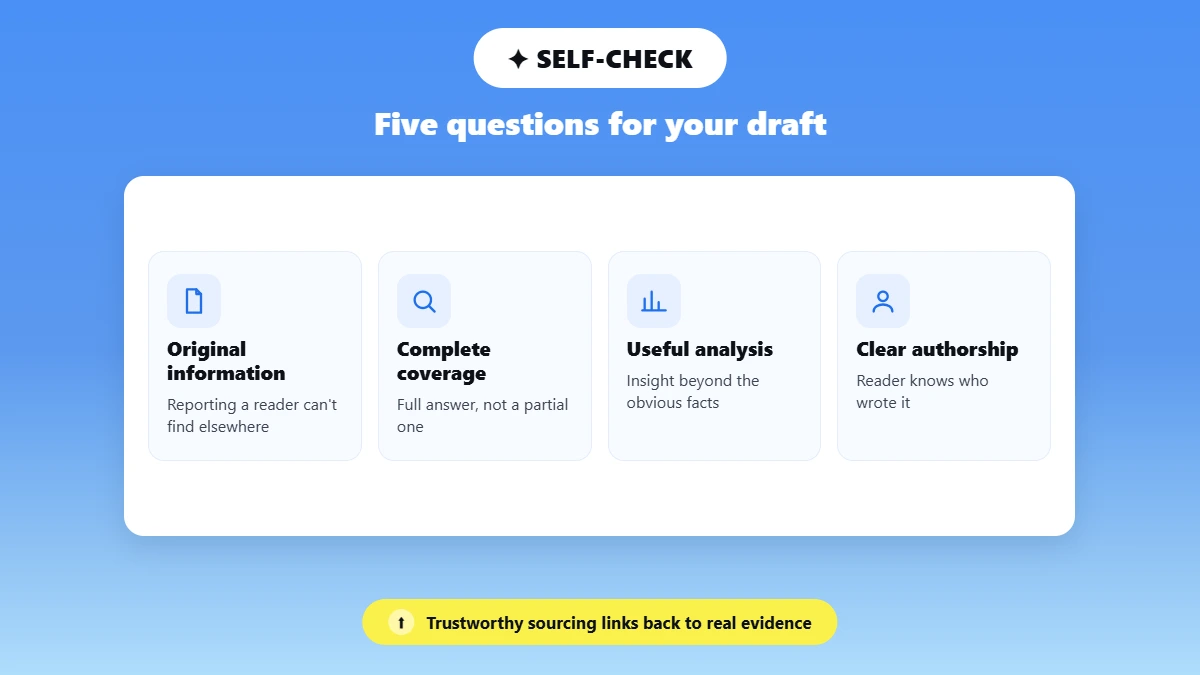
Google's guide to helpful, reliable, people-first content sets out self-assessment questions worth running on your own draft:
📌 Original information, reporting, or research a reader cannot get elsewhere
📌 Complete coverage of the topic instead of a partial answer
📌 Useful analysis that goes past the obvious
📌 Clear authorship, so the reader knows who stands behind the page
📌 Trustworthy sourcing, with links to the evidence
How Does Google Judge Whether Content Is Good?
Google judges content two ways. Human quality raters score pages against a standard called E-E-A-T, which decides whether a page can be trusted. It stands for experience, expertise, authoritativeness and trustworthiness, and you earn it by showing firsthand work and naming an author readers can check.
Google's ranking systems never see those rater scores, so they look for signals that point to the same qualities, like firsthand detail and sources a reader can open. There is no report that calculates an E-E-A-T number for your page, and no tool can sell you one.
What Makes Content Worth Citing Instead of Skipping?
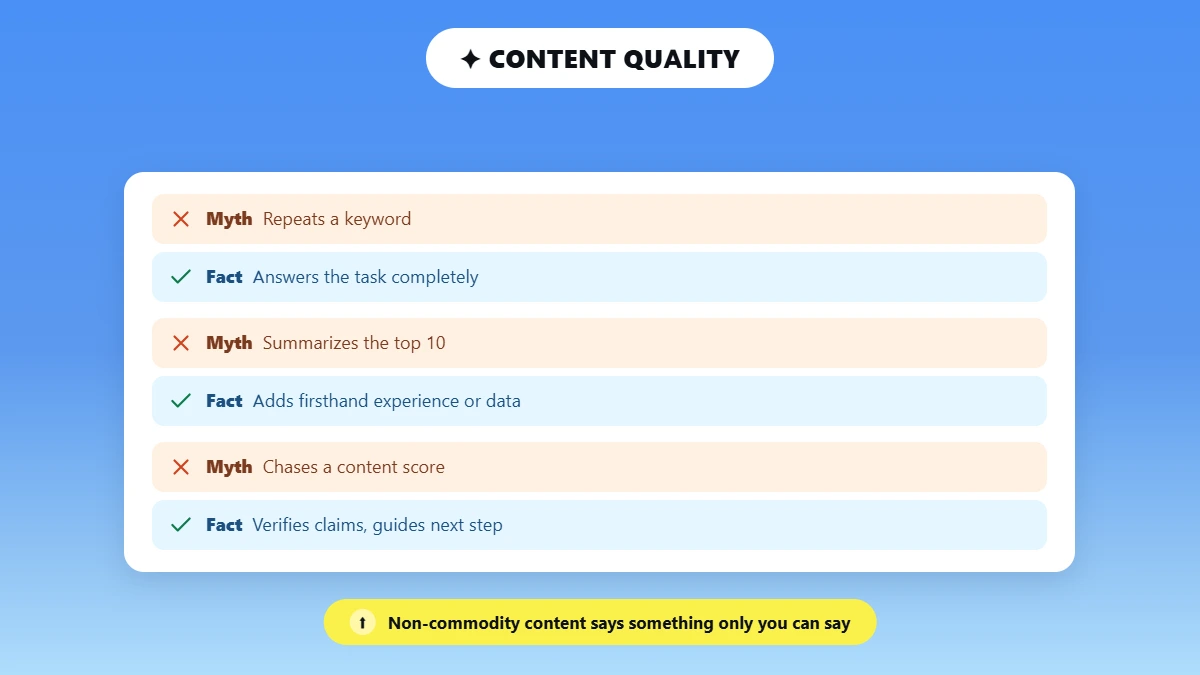
Google cites a page when it carries information the other ranking pages miss. Google calls that non-commodity content. Google's generative AI optimization guide splits content into two kinds.
Commodity content repeats what everyone else already publishes. Google's example of it is a post called "7 Tips for First-Time Homebuyers."
Non-commodity content says something only you can say, from work you actually did. Google's example there is "Why We Waived the Inspection & Saved Money: A Look Inside the Sewer Line."
❌ Looks optimized | ✅ Is genuinely useful |
|---|---|
Repeats a keyword | Answers the task completely |
Summarizes the current top 10 | Adds firsthand experience, data, or a defensible point of view |
Hits an arbitrary word count | Stops when the reader has what they need |
Chases a content score | Verifies claims and makes decisions easy |
Ends without a next step | Guides the reader to the next useful action |
How to Write Good SEO Content in 10 Steps
Here is how to write SEO content in ten steps. Define the reader and the business goal, then pick one primary keyword. Read the live SERP for intent, build a one-page brief and outline, and gather evidence. Draft for the reader, place keywords naturally, optimize the on-page elements, edit and verify, then publish. Finally, measure and refresh.
Every step below gives you an Action to take and an Output you should be holding before you move on to the next one.
1. Define the Reader, Problem, and Business Goal
Name one reader, one problem, and one action in a single sentence. That sentence decides which subtopics matter and how much you explain. It also fixes what the page asks for at the end.
Action: Narrow the audience until it changes your word choice. "Marketers" is too wide. "A solo consultant writing her own site copy" tells you what to leave out.
Traffic potential and business potential are different numbers. A query with heavy demand can be worth less than a quiet one that brings buyers.
Output: one sentence naming your reader, the problem you are solving for them, and the action you want them to take.
2. Choose One Primary Keyword and a Related Cluster
Pick one primary query per page, then gather the variants that belong under it. Close variants split across separate pages put your own URLs in competition.
Action: Judge every candidate you are considering against these three questions:
🎯 Feasibility: can a page on your site realistically compete for this query today?
📈 Traffic potential: how much demand the whole topic holds across all its variants
💰 Business potential: how naturally your product answers what the searcher asked
A query with 200 searches a month can be worth more to you than one with 5,000. The small one describes exactly what you sell, so the people who find it are ready to buy. The broad one brings browsers who leave.
Output: one primary keyword, 5 to 10 supporting terms, and a list of topics that deserve their own pages.
3. Read the Live SERP to Match Search Intent
Open the live results page and read what Google already rewards for your query. Those ranking pages tell you which format and angle searchers already accepted, so treat them as intent data rather than a list to copy.
Action: Read the current results for the three Cs before you decide anything about your own page:
📄 Content type: blog post, landing page, video, or tool
🧩 Content format: guide, list, comparison, template, or tutorial
🎤 Content angle: beginner, fast, current, tested, or expert
Then look past the ten blue links. Note the SERP features and whether forum threads rank. Also, check what the AI Overview already answers. Forum results mean readers want candid, experience-based guidance.
📊 An AI Overview changes what a top ranking is worth. Ahrefs re-ran its click study on 300,000 keywords, using Google Search Console data from December 2025. When an AI Overview appeared, the top-ranking page saw a 58% lower average click-through rate. Ahrefs frames that as a correlation, so read it as a signal about what a top spot is worth today, and factor it into how much you invest in the page.
Output: one sentence naming the search intent behind your query, plus the content format you have chosen to match it.
4. Build a One-Page SEO Content Brief and Outline
Your brief is the one page that settles every later decision, so write it before you draft a sentence. You will actually use a one-page brief, and nobody reads a ten-page one twice.
Action: Fill the template below once per article, and keep it open while you write:
Brief field | What to enter |
|---|---|
Reader | Who is searching and what they already know |
Search problem | The decision or task they need to complete |
Primary query | One main keyword |
Supporting queries | Relevant variations and follow-up questions |
Intent and format | Why they searched and the format they expect |
Unique value | Experience, test, data, template, example, or point of view |
Evidence | Primary sources and the claims that need verification |
Outline | Logical H2 and H3 sequence |
Internal links | Helpful related pages plus descriptive anchors |
Conversion | The next action that continues the reader's task |
QA | Fact, originality, readability, and on-page checks |
Here is that same template filled in for a sample query, "how to price freelance copywriting", so you can see what a finished brief looks like before you build your own:
Reader: a freelance copywriter setting rates for the first time
Search problem: decide what to charge without underselling
Intent and format: informational, so a guide with a worked example
Unique value: the writer's own rate history and two client quotes
Conversion: a rate calculator already on the same site.
Output: a one-page brief plus a logical H2 and H3 outline.
5. Gather Evidence and Decide Your Information Gain
Before you write a word, collect your sources and decide the one thing your page will carry that the current results do not. That one contribution is your reason for publishing, and it is what a reader cannot get from the pages already ranking.
Action: Keep three columns as you research: the claim, the source URL, and the date you checked it. Then label every line by the kind of statement it is, because these four carry very different weight:
🟢 Sourced fact: traceable to a primary page you opened yourself
🔵 Vendor claim: what a company says about its own product
🟡 Writer observation: what you saw during your own test
🟠 Inference: your own reading of the evidence, labelled clearly as your interpretation
Your information gain can be a test you ran, original screenshots, or proprietary data. Expert input and a template readers can reuse work just as well. Anything short of that leaves you with a reworded version of the current winners, which any of them could have published, and it pulls you straight into the question of whether paraphrasing counts as plagiarism.
Output: a sheet listing every claim with its source and the date you checked it, plus the one contribution competitors cannot copy.
6. Draft for the Reader Before Optimizing the Page
Write the draft from your approved brief and evidence, then optimize. If you draft straight into keyword placement, every sentence bends around a phrase and loses the point you were making.
Action: Follow one pattern for most sections:
Give the answer or the action
Say what it changes for the reader
Show how, with an example or a source
Lead into the next decision
An AI writer belongs at this point in the process, and not before it. Once you approve the research and the brief, those inputs can go into an AI writer to speed up the first draft. Make sure the tool you choose pulls real, live citations as it writes. Open every cited page and confirm it supports the sentence.
Then add what only you know:
the client example
the test that failed
the number from your own dashboard
Most guides to writing a blog post with an AI writer treat that check as optional. The rest of the speed comes from the repeatable parts of the job, which is where these 12 ways to simplify the writing process pay off.
✍ Want a first draft that arrives with real, live citations already attached, so your verification pass takes minutes instead of an afternoon?
A free account covers five content pieces. A paid plan raises that to fifteen a month.
Output: a reader-first first draft that follows your approved outline section by section.
7. Use Keywords Naturally and Cover the Topic Completely
Place the primary concept where it clarifies the page: the title, the H1 and the opening. Use it again in one heading, in the body, and in the closing summary. If you force it into every slot, the sentence gets worse and the ranking does not improve.
Action: Write the sentence you mean first, then check whether the term still fits it. Search engines understand synonyms, and Google states plainly that you do not need to write in a specific way for its generative AI features.
🚫 Stuffed: Our SEO content writing service offers SEO content writing for businesses that need SEO content writing that ranks.
✅ Natural: We handle the research, the brief, and the draft, so your team publishes pages that answer the query completely.
Complete coverage helps you far more than extra length. Cover the subtopics a reader needs, then stop. Google says there is no ideal page length, so a 900-word page that completes the job outperforms a padded one. Never write to a density target either.
Output: a page where the primary term reads naturally and every subtopic the query implies is covered.
8. Optimize the On-Page Elements a Writer Controls
You can finish most of the on-page work yourself, without waiting on a developer. These are the parts of SEO-optimized content that stay in a writer's hands.
Action: Work down this list before you hand the page over:
🏷️ Title tag: descriptive and concise, written for the person scanning results
🧱 One H1, then an H2 and H3 order that matches the reading path
🔗 URL: short, stable, and descriptive, set once and left alone
📝 Meta description: a click promise. Google may show different text from the page, and the description is not a direct ranking factor
➡️ Internal links with descriptive anchors, coded as crawlable links
📚 External links placed next to the claim they support
🖼️ Alt text on informative images, empty alt on decorative ones, and answers in text rather than locked inside a graphic
🧾 Article or BlogPosting plus BreadcrumbList structured data, where it describes the page accurately
Do I need FAQ schema or special AI markup?
No. Google retired two of the tactics people still recommend for this.
⚠️ Three 2026 corrections to make before you publish
1. FAQ rich results are gone. Google's FAQPage documentation states that FAQ rich results stopped appearing in Google Search on May 7, 2026. Search Console reporting was dropped in June 2026 and API support ended in August 2026. FAQPage remains a valid Schema.org type, and it now earns no rich result.
2. No special AI setup exists. Google's guidance on AI features and your website says you do not need new machine-readable files, AI text files, markup, or Markdown to appear in its generative AI features. On llms.txt, Google's wording is that keeping one will neither harm nor help your visibility. Artificial chunking is not required either.
3. No fixed character count is safe. No title or description length guarantees the snippet displays as written, because Google may rewrite it using content from the page.
Output: a title, headings, URL, links and images that serve the reader and let Google crawl the page cleanly.
9. Edit the Draft Without Losing Meaning, Evidence, or Keywords
Edit in a fixed order, from meaning down to commas. If you polish sentences before you fix the structure, you throw that work away the moment the structure changes.
Action: Run these six passes in order:
Accuracy and source alignment. Does every claim match the page it cites?
Search-intent completeness. Is anything the query implies still missing?
Originality and specificity. Which lines could a competitor publish unchanged?
Structure and logic. Does each section carry exactly one job?
Clarity, tone, rhythm, and grammar.
Preservation. Are the keywords, CTA, links, and formatting still intact?
Pass six is the one most writers skip, and it catches the most expensive mistake in AI-assisted editing. A rewrite that reads better and quietly drops your focus keyword, an internal link, or the CTA has cost you the page. That is the method behind humanizing AI SEO content without hurting rankings.
Pass five is where a text enhancer earns its place, once your facts are already settled. A text enhancer rewrites a passage for clarity, tone and flow while leaving your facts untouched. Work through it like this:
Paste one section at a time into a text enhancer, after your accuracy pass
Choose Easy for a close polish, or Medium when structure and flow need work
Pick the version closest to your voice, then compare it against your source paragraph
Recheck every fact, quote, keyword, link and CTA before you accept it
An AI detector works as an optional self-check afterwards, and this roundup of the best AI checker tools explains what those scores mean. Treat the result as one more data point you weigh, because a detector score says nothing about whether the page is ready to rank.
Output: a clean, accurate draft that still carries its keywords and links.
Does your draft that says the right things but reads badly?
Run one section through a text enhancer and keep the version closest to your own voice.
An account covers 300 words, with a one-day trial before a paid plan lifts the limit.
10. Publish, Measure, and Improve
Publish the page once Google can crawl and index it, then measure what it does and improve it from there. A page Google cannot fetch has no ranking problem worth solving yet, so that check comes first.
Action: Confirm five things before you publish:
🔎 Google can index the page
🔗 The canonical tag points to this URL
📱 The page renders correctly on mobile
⚡ Page speed is acceptable
👀 The main content is visible without interaction
Request indexing once those five checks pass, then give Google time to work through it. Indexing stays its decision even after you have asked.
Which numbers tell you the page is working?
In Google Search Console, track impressions, clicks, average position and click-through rate. Then track conversions and the visits to your pricing or signup page that started on this article.
Search Console also carries a Generative AI performance report, rolled out to all websites worldwide on August 31, 2026. It shows impressions, pages and dates for AI Overviews and AI Mode, broken down by country and device. Clicks for those features are still missing from it.
📊 Pew Research Center tracked the browsing of 900 US adults across 68,879 Google searches in March 2025. Users who saw an AI summary clicked a traditional result in 8% of visits, against 15% when no summary appeared. Links inside the summary itself were clicked in 1% of visits.
What the data shows | What it usually means | What to do next |
|---|---|---|
High impressions, low clicks | The title and snippet miss the intent | Rewrite the title and the opening 100 words |
Positions 8 to 20 | A coverage or evidence gap | Add the missing subtopic and internal links |
Rankings without conversions | The next step is wrong for the reader | Change the CTA and where it appears |
No indexation | Technical eligibility | Fix crawling, rendering, and canonicals first |
Refresh when your sources, the product facts, the SERP, or the reader's need changes.
Output: a live page with a measurement and refresh loop.
SEO Content Writing Example: From Generic to Search-Ready
An SEO content writing example shows the workflow faster than any rule. It also shows what SEO article writing looks like once the full process is applied. This section runs one short blog section through all three stages and records exactly what a human changed at each one.
The setup, taken from the approved brief:
Sample topic: a section answering "Should you still add FAQ schema to a blog post?"
Reader and intent: a content writer who added FAQ schema last year and wants a decision, not background
Primary query: should I use FAQ schema
Approved fact and source: FAQ rich results stopped appearing in Google Search on 7 May 2026, per Google’s FAQPage documentation, checked 14 September 2026
Tools used: Phrasly AI Writer for Version 1, Phrasly AI Text Enhancer on Easy for Version 3
Version 1 · Generic draft (Phrasly AI Writer output, unedited)
You added FAQ schema to your pages last year, smart move at the time. But SEO best practices shift, and you’re right to revisit whether that structured markup is still pulling its weight. Here’s what you need to know to make a clear decision today.
FAQ schema can still deliver real visibility benefits when used correctly. On the positive side, eligible pages may display rich results in Google Search, expanding your snippet size and potentially increasing click-through rates [VERIFY]. It also helps search engines better understand your page structure, which can support voice search and featured snippet opportunities. However, the landscape has changed. Google reduced the frequency of FAQ rich results in search [VERIFY], meaning the visibility boost many sites relied on is no longer guaranteed.
Version 2 · Evidence added (editor’s pass, by hand)
You added FAQ schema to your pages last year, a smart move at the time. But SEO best practices shift, and you’re right to revisit whether that structured markup is still pulling its weight. Here’s what you need to know to make a clear decision today.
FAQ schema no longer delivers the visibility benefit it once did. Google’s FAQPage documentation states that FAQ rich results stopped appearing in Google Search on 7 May 2026. Search Console reporting was dropped in June 2026 and API support ended in August 2026. FAQPage is still a valid Schema.org type, and it now earns no rich result at all.
Version 3 · After Phrasly AI Text Enhancer on Easy, then repaired by hand
Last year you included FAQ schema on your pages. At the time that was a good idea. SEO best practices evolve, and it’s good that you’re thinking about whether that markup is still helping you. Here’s what you need to know to decide confidently.
FAQ schema doesn’t provide the visibility advantage it used to. According to Google’s FAQPage documentation, FAQ rich results are no longer available on Google Search as of 7 May 2026. Search Console reporting for FAQPage was removed in June 2026 and API support ended in August 2026. FAQPage will still validate as a Schema.org type, but will earn no rich result.
Version | Main issue | What changed | Still needed human review |
|---|---|---|---|
Generic draft | Stated the opposite of the current fact, and flagged two claims it could not source | Nothing yet | Research, point of view, useful detail |
Evidence added | Accurate and sourced, still rough to read | Verified source plus one firsthand detail | Structure, clarity, tone |
Enhanced final | Cleaner and easier to follow | Phrasing and flow | Final fact, keyword, link, and removing quotation framing |
🔒 Integrity rule for this section. No claim about time saved, readability gains, or ranking improvements appears here unless the team defines a method and collects the data first. The comparison shows what changed in the text, and nothing more.
Where AI Tools Fit in an SEO Content Workflow
AI tools do two jobs inside this workflow. They draft from inputs you have already approved, and they improve the language of a draft you have written yourself. You keep the intent, the research, the verification, and the final approval.
1. Your brief comes first. You supply the audience, the intent and the outline. You also supply the approved sources, the keywords and the CTA. A tool given none of that returns generic copy.
2. Draft with an AI writer. It generates a structured first draft and attaches candidate live citations. Open each source page, then add what only your business or your own experience can supply.
3. Polish with a text enhancer. It improves clarity, tone and flow. Compare the versions it returns against your source paragraph, then run the final SEO and fact QA.
💡 Write the prompt so the draft can be checked. A prompt that names your sources and your non-negotiables gives you a draft you can verify line by line, instead of one you have to rebuild.
Create a first draft from this approved SEO brief.
Audience: [reader]
Intent: [intent]
Primary query: [keyword]
Sections: [outline]
Approved facts and sources: [list]
Preserve these names, claims, and CTA: [non-negotiables]
Do not invent statistics or links.
Mark any unsupported statement as [VERIFY].
You will get the same benefit from every other tool you prompt, and this guide to writing good AI prompts covers the patterns that hold up.
⚠️ What these tools do not do. They speed up drafting and language improvement. They do not replace keyword research, firsthand expertise, source verification, or performance measurement.
Common SEO Content Writing Mistakes
Most SEO content fails for the same handful of reasons, and nearly all of them are decisions made before the first sentence was written. Each one below shows the mistake, the cost, and the fix.
🚫 Mistake | What it costs | ✅ Fix |
|---|---|---|
Choosing a keyword before defining the reader problem | Ranking for a query the page cannot satisfy | Write the reader and problem statement first |
Copying the top-ranking outline | Commodity content nobody cites | Match the format, add your own evidence |
Treating every related keyword as a required heading | A broken reading path | Give a subtopic a heading only when it answers a question |
Writing to a density or word-count target | Padding that buries the answer | Stop when the task is complete |
Burying the answer under a long introduction | Lost snippets and AI citations | Answer in the first 100 words |
Publishing AI output without checking sources | Wrong facts under your byline | Open every citation before publishing |
Treating a third-party content score as a ranking guarantee | Effort spent on a number Google never sees | Optimize the answer, not the score |
Assuming meta descriptions are a ranking factor | Wasted rewrites | Write a click promise, accept Google may replace it |
Adding FAQ schema for a rich result Google removed | Maintenance for zero return | Keep useful FAQs as content, drop the visibility claim |
Creating thin pages for every fan-out query | Keyword cannibalization, where your own pages compete | Cover subtopics inside one strong page |
Optimizing for traffic with no useful next step | Rankings that never convert | Give the page one action that continues the task |
Publishing once and never measuring | Slow decay nobody notices | Set a Search Console review at two and six weeks |
Pre-Publish SEO Content Checklist
Give yourself ten minutes and run through every line below before the page goes live. These are the SEO content writing tips that catch the most damage in the least time.
# | Check | Pass? |
|---|---|---|
1 | The page solves one clearly defined search task | ✅ / ❌ |
2 | Format and angle match the live SERP | ✅ / ❌ |
3 | The opening gives the answer without filler | ✅ / ❌ |
4 | Every factual claim is supported and current | ✅ / ❌ |
5 | The article adds firsthand evidence, an example, data, or a unique tool | ✅ / ❌ |
6 | Primary and supporting terms read naturally | ✅ / ❌ |
7 | Headings follow a logical hierarchy | ✅ / ❌ |
8 | Title, URL, snippet copy, links, and images serve the reader | ✅ / ❌ |
9 | Product names, facts, keywords, links, and CTAs survived editing | ✅ / ❌ |
10 | A qualified human reviewed any AI-assisted text | ✅ / ❌ |
11 | The page has a relevant next step | ✅ / ❌ |
12 | Measurement and refresh dates are assigned | ✅ / ❌ |
The step most writers skip is the brief, and skipping it is exactly what makes the rest of the work slow. Everything after it moves faster once you write down the reader, the intent, the evidence and the conversion.
Start with one page. Run all ten steps, publish, then open Search Console at two weeks and again at six. That pattern tells you what to change next time.
You control the intent, the evidence, and the verification. Those three decide whether the page earns its ranking, whichever tools you use to write SEO content along the way.
Frequently Asked Questions
What is SEO content writing?
SEO content writing is the practice of creating web content that satisfies a specific search intent, and building the page so Google can find and understand it. You research the reader and select the keyword. Then you gather the evidence, structure the page, and optimize the title, headings and links. The reader gets a complete answer, and Google gets enough context to match the page to the query.
How do you write SEO content?
Whether you are working out how to write for SEO in general or how to write SEO articles specifically, the answer is the same ten steps. Define the reader and business goal, then pick one primary keyword with a supporting cluster. Read the live SERP for intent and build a one-page brief and outline. Gather evidence and decide your information gain, which is the part of the page nobody else has. Draft for the reader and place keywords naturally. Optimize the on-page elements, edit while protecting keywords and links, then publish, measure and refresh.
What makes content SEO-friendly?
Content is SEO-friendly when it matches search intent and states accurate, current facts. It also adds something original, follows a logical heading structure, and stays crawlable and indexable. On-page elements carry their share: a descriptive title, a clean URL, useful links and alt text on informative images. A page that reads well on a phone is part of creating SEO-friendly content too.
What is an example of SEO content writing?
The worked example above takes one short blog section through three stages: a generic first draft, the same section with a verified source and firsthand detail added, and a final version after a language pass. The observable improvements are specificity and sourcing, then structure and readability. The keyword, the links and the CTA all survive to the final version.
How many keywords should I use in SEO content?
There is no correct keyword count or density. Use one primary concept, then the variants and subtopics needed to answer the query naturally. Exact repetition adds nothing. If a sentence exists only to hold a keyword, delete it. Coverage matters far more than how many times a term appears.
How long should SEO content be?
There is no universal ideal length, and Google states plainly that no ideal page length exists. Write long enough to complete the reader's task and no longer. A short page can be complete, and a long page can be padded. Check the depth of the current ranking pages, then decide by task completion.
Can AI write SEO content that ranks?
Yes, when a person owns the intent, the evidence and the final review. Google judges the page on quality and purpose rather than how the text was produced. The tool that typed the words carries no penalty of its own, though automation used mainly to manipulate rankings is what breaks Google's spam policies. The full position is covered in this guide to whether Google penalizes AI content.
How often should SEO content be updated?
Update when something changes, rather than on a fixed schedule. A change in the facts is what should trigger the work, so leave the calendar out of it. Act on new or corrected sources, changed product facts, or a shift in what the SERP rewards. Act again when a stronger competitor arrives or your own performance data declines. Accuracy ages first, which is also why whether Google can detect AI content matters less than whether your claims still hold.
Do FAQs or schema help content appear in AI Overviews?
No special schema is required for AI Overviews or AI Mode, and Google says no markup, AI text file or Markdown version is needed to appear there. FAQs still help readers when the questions are genuinely useful, so keep them as content. Google stopped showing FAQ rich results in May 2026, so the markup produces no visible result in Search.

Written by
Alina Shah
SEO Content Specialist · Karachi, Pakistan
She writes about AI so you don't have to guess. 8+ years in content strategy and editing. Now she puts AI writing tools and detection systems through real tests and shares what actually works.