How to Check a Blog Post for Plagiarism Before and After Publishing
10 min read
To check a blog post for plagiarism before it goes live, paste the draft or upload the file into a plagiarism checker for blog posts. Then open every matched passage and its source.
A post that's already published needs a different input: its URL, scanned by a tool that finds copies on other sites. We scanned one test sample twice to show what a report flags and what it can miss.
This guide gives you a method picker for each stage, a match triage table, and a copyable approval checklist.
Try Our Free Plagiarism Checker👇
Paste your draft or upload the file to see matching sources.
Which Kind of Blog Post Are You Checking?
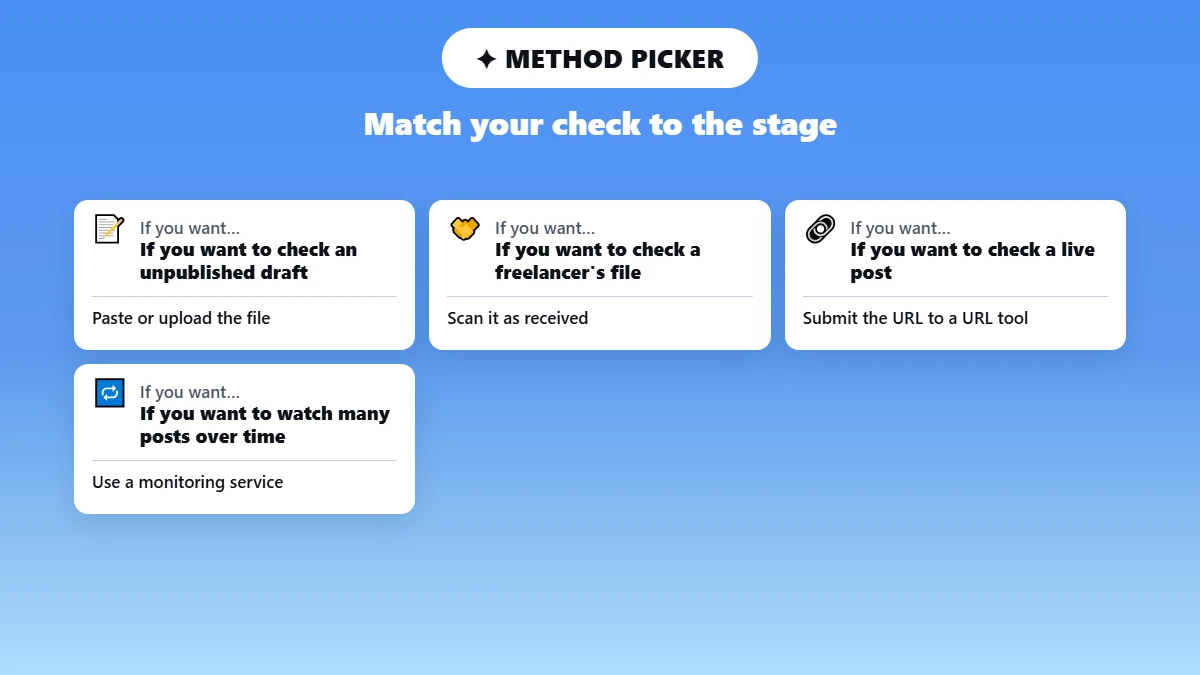
The right check depends on where the post is in its life. An unpublished draft or a freelancer's file has no public URL, so you check it as pasted text or an uploaded file. A live post needs a plagiarism checker that takes a website URL, and a whole archive of posts needs a monitoring service that rescans on a schedule.
Situation | Input and next action | Important limit | Where Phrasly fits |
|---|---|---|---|
Unpublished draft | Paste the text or upload the file, then open each matched source | A draft has no public URL to scan | ✅ Paste or upload |
Freelancer or client submission | Scan the file as received and record each matched passage with its source URL | A score alone doesn't prove misconduct | ✅ Paste or upload |
Already published post | Submit the URL to a URL-capable tool to find pages with matching text | Your own URL will match, so check dates and permissions | ❌ No URL input. For a new revision, paste the text into Phrasly |
Many posts over time | Use a monitoring service and a review schedule | A one-time scan doesn't watch your site | ❌ Use a monitoring service |
Tool inputs were checked on each vendor's live pages in September 2026. Features and plans can change, so confirm them on the tool's official page before you buy.
A monitoring service runs on its own schedule. Copyscape's Copysentry service, for example, scans the web daily or weekly for new copies of your pages and emails you when one appears.
How Do You Check a Draft Blog Post for Plagiarism Before Publishing? 📝
Save a dated copy of the finished draft, then run it through a plagiarism checker. Open every matched passage with its source and fix or credit it. Scan the edited version again before you publish.
Lock the draft. Finish the source list and save a dated copy, so the report matches the exact version you approve.
Choose paste or upload. Include the full post body, and decide up front whether to leave out a reusable author bio or a standard disclaimer. A draft in Google Docs needs exporting first, and the steps to check for plagiarism in Google Docs cover that. For a DOCX file, follow the plagiarism checker for Microsoft Word walkthrough.
Run the scan. Phrasly takes 50 to 5,000 words per scan, so split a longer post into parts. When the report loads, open each matched excerpt and its source URL before you look at the percentage.
Draft ready? Run it through the checker and see which sources it matches. 👇
Classify every meaningful match. Sort it into one of the five match types in the source decision log, from copied passage to coincidental phrase.
Fix what needs fixing. Rewrite the passage from your own understanding, quote and credit the source, or get permission to reuse it.
Rescan and save. Scan the edited final text again, then save the report with your editorial decision.
Checking a Freelancer's Submission 🤝
To check a freelance blog post for plagiarism, scan the file exactly as you received it, before anyone edits it. Record the matched passages and their source URLs, because the percentage alone won't show where a problem starts.
Share those excerpts with the writer and ask for their sources before you draw conclusions. A similarity score doesn't prove misconduct, since credited quotes and common phrasing raise it too. Keep the report with the assignment.
✍️ What fixes a real match
✔ Better sourcing and original writing resolve the match at its cause.
✘ Synonym swaps only lower the number and leave the borrowed idea uncredited.
What Does a Blog Plagiarism Checker Result Actually Mean?
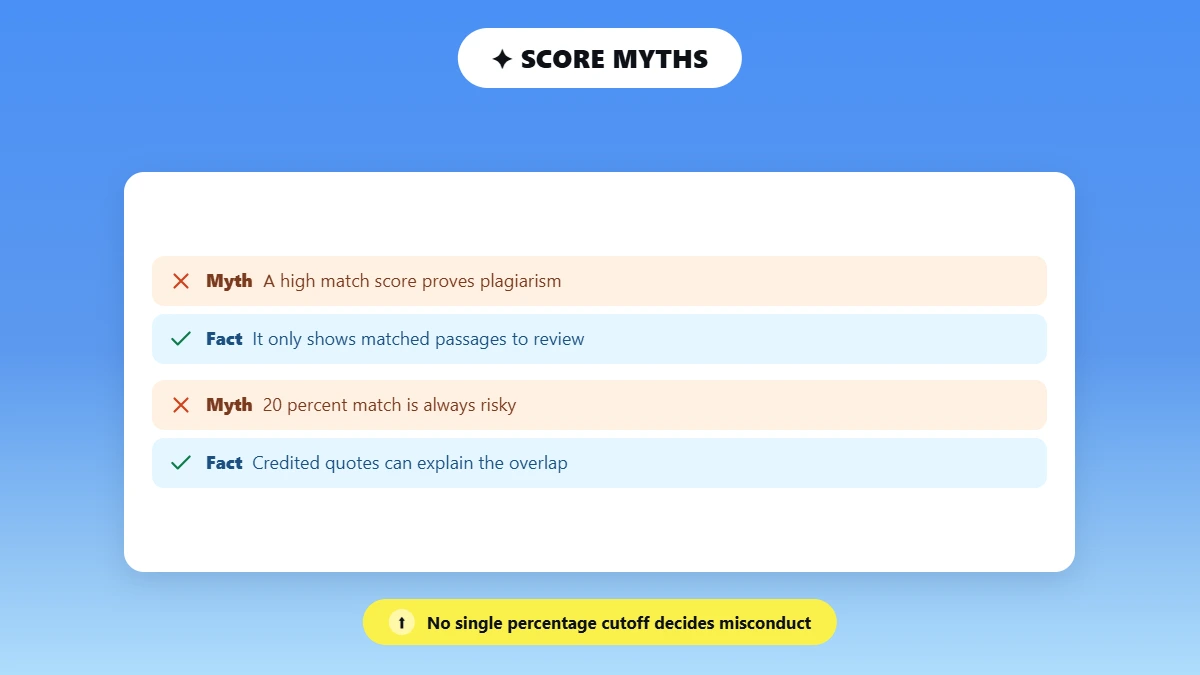
A blog plagiarism checker result shows which parts of your text match pages or documents the tool can reach, with a link to each source. It isn't a plagiarism verdict or a copyright ruling, and it can't prove who published first. Judge each match by its source and your right to use that text.
There's no universal percentage cutoff, so 20% similarity can be harmless or serious. Twenty percent made of credited quotes needs no fix, while one uncredited paragraph from a single source does. SEO posts also collect matches from shared phrasing, which Phrasly's guide on why SEO content gets plagiarism flags explains.
📊 Why a score threshold misleads
In Phrasly's 50-scan content plagiarism report (August 2026), 20 published blog posts averaged a 74.9% match total, even after the report removed each post's match to its own URL. That figure comes from one selected sample measured with Phrasly's checker, so it doesn't estimate how many blogs plagiarize. It shows how little a high number says until you open the sources.
Log every meaningful match as one of these five types:
Match type | What you see | What to do | Log as |
Exact uncited copying | Sentences match a source word for word, with no quote marks or credit | Rewrite from your own understanding, or quote and credit it | ✏️ Copied passage: fixed |
Legitimate quotation | The matched text has quote marks and a named source | Confirm the quote is accurate, credited and within your quoting policy | ✅ Quoted material: kept |
Your own cross-post or syndicated copy | The match points to your site, a guest post, or a partner that republished you | Confirm ownership and the canonical or attribution arrangement separately | 🔁 Own syndicated post |
Short generic wording | Common phrases, definitions, product names or headings | Usually keep it and note it. Watch for many small lifts from one source, a pattern called incremental plagiarism | 🤞Coincidental phrase |
Paraphrased idea | Close structure or an idea from a source, often with few or no matches | Review the sourcing by hand, credit the idea, and rewrite from understanding (see is paraphrasing plagiarism) | 📎 Paraphrase: credited |
⚠️ Copying is often reworded
Researchers behind PlagBench (NAACL 2025) built 46.5K synthetic text pairs to cover three kinds of copying: word for word, paraphrased and summarized. Phrasly's own test of the Grammarly plagiarism checker shows why that matters: it flagged 99% of a verbatim article in August 2026, but only 5% of that article after a QuillBot paraphrase.
A plagiarism report also leaves two questions open:
🤖 AI writing: text similarity and AI-writing estimation are different analyses, so a plagiarism report is not an AI check.
💬 ChatGPT as a checker: a general chatbot can't replace a source-backed web comparison. Phrasly's test of whether ChatGPT can check for plagiarism found it gives no reliable similarity score.
What a Test Scan Looks Like
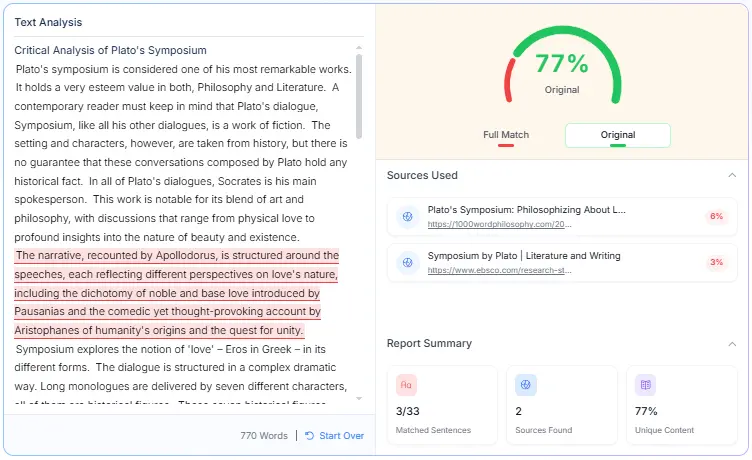
In the test below, Phrasly matched 3 of the 5 copied sentences and linked both source pages. It missed the first sentence of each copied passage and did not match the credited quote. Once the copied passages were removed, the same sample essay came back 100% original.
How we ran the test
📝 The sample essay: an original 617-word essay on Plato's Symposium, pasted into the checker as text.
📋 Copied passage 1: two sentences from EBSCO's Research Starters page on the Symposium, pasted word for word with no quote marks or credit.
📋 Copied passage 2: three sentences from 1000-Word Philosophy's essay on the Symposium, pasted the same way.
💬 Credited quote: one sentence from a DePaul University study guide, in quote marks with the source named.
🔁 Scan 2: the same essay with both copied passages removed. Both scans ran on the same day.
Known test item | Scan 1 (with copied passages) | Scan 2 (passages removed) |
|---|---|---|
EBSCO passage (2 sentences) | ✅ 1 of 2 sentences matched; EBSCO listed as a source (3%) | Removed |
1000-Word Philosophy passage (3 sentences) | ✅ 2 of 3 sentences matched; 1000-Word Philosophy listed as a source (6%) | Removed |
Credited DePaul quote | ❌ Not matched | ❌ Not matched |
Overall result shown | 77% original; 3 of 33 sentences matched; 2 sources | 100% original; 0 of 28 sentences matched; 0 sources |
Both scans ran on Phrasly's Plagiarism Checker on the same day in September 2026, with the text pasted in. A second run of Scan 1 returned the same result. Results reflect the tool at that time and can change as it updates.
How Do You Check a Published Blog URL for Copied Content?
To check a published article for copies, submit its URL to a tool that accepts URLs, or search Google for one distinctive sentence from the post. Open every page that matches, and set aside your own URL and any syndication you approved. For true copies, save the evidence before you contact the site owner.
🔗 Use a URL-capable tool. Copyscape's free search takes a live URL and lists pages with matching text, and Phrasly's Copyscape plagiarism checker review covers its URL lookup and monitoring plans.
🔎 Run a free manual check. Put one or two distinctive sentences in quotation marks before you search them, so Google looks for pages with that exact wording.
🗂️ Record the evidence. Save each copy's URL and the date you found it, then take a screenshot. Archive the page as well if it may change.
✉️ Contact the owner first. Ask the site owner or editor to remove or credit the copy. For formal options, Google's Report Content for Legal Reasons page explains how to request removal from Google products.
💡 Why your published post matches itself
Google has already indexed your live post, so a checker that searches the web will list your own URL as a match. Read that self-match apart from the matches on other domains.
A new revision of your own live post works as a text check. Paste the revised text into Phrasly or upload it as a file, since the checker doesn't take URLs. Then read external matches separately from the match to your own page.
What Should You Do Before Approving the Article? ✅
Approve the post only after every meaningful match has a logged decision and the final text has a fresh scan. Save that final report with the date and your decision, so anyone on the team can see what was checked. A clean scan is one quality check, and it doesn't clear rights or guarantee rankings.
📋 Blog post plagiarism checklist
☐ Every source verified and linked
☐ Direct quotes marked and credited
☐ Every matched excerpt reviewed in context
☐ Licensed or syndicated text documented
☐ Original analysis or examples added
☐ Revised version scanned again
☐ Report or screenshots saved with the date
☐ Editor sign-off recorded
A plagiarism check doesn't control how Google ranks your blog, and duplicate content isn't an automatic penalty. Google's URL canonicalization page says "some duplicate content on a site is normal" and that it doesn't break Google's spam policies.
Google's spam policies target a different problem: scraped content and scaled content abuse, which means mass-producing unoriginal pages to manipulate rankings. The guide Does Google Penalize AI Content? shows how that policy applies to AI drafts, and the self-editing checklist covers the wider edit pass.
Keep each approved report with the post's publish date. That record becomes your evidence if a copy of the post appears on another site later.
Edits done? Run one final check on the publish-ready post and save the report for your editor. 👇
Frequently Asked Questions
Can I check an unpublished blog post before it has a URL?
You can check an unpublished post as text. Paste the draft into a plagiarism checker or upload a supported file such as a DOCX, and the tool compares it with the sources it can reach. The report then shows matching passages to review before the post goes live.
Can I scan a published blog URL with Phrasly?
Phrasly's Plagiarism Checker works on pasted text and uploaded files, so it doesn't scan live URLs. To find copies of a published post, use a service that accepts a URL, such as Copyscape. To check a revised version of your own post, paste the new text into Phrasly.
Does a high similarity score mean my blog is plagiarized?
A high score alone doesn't prove plagiarism. Quotes, common phrases, your own syndicated posts and pages that copied you can all raise it. Open each match and check the passage against its source, then confirm whether it carries credit and who owns the text.
Can a plagiarism checker find someone who copied my blog post?
A URL-based scan can list pages that carry matching text, and some tools, such as DupliChecker, show a URL input (see our DupliChecker plagiarism checker review). The scan can't show which version came first or whether the copy was licensed, so check dates, archives and permissions before you act.
Is there a free blog plagiarism checker?
Yes, Phrasly plagiarism checker is a free blog plagiarism checker. Some plagiarism checkers for blogs advertise free checks, usually with word or scan limits, and our roundup of the best plagiarism checkers compares them.

Written by
Alina Shah
SEO Content Specialist · Karachi, Pakistan
She writes about AI so you don't have to guess. 8+ years in content strategy and editing. Now she puts AI writing tools and detection systems through real tests and shares what actually works.