Does Turnitin Detect Grammarly? Editing vs AI Writing
10 min read
Turnitin says its AI detector does not target Grammarly's spelling, grammar, and punctuation corrections, and those changes were not flagged in most of its tests (Turnitin AI writing detection FAQ).
Grammarly's generative AI is a different case when it drafts or paraphrases text, and Turnitin says that output will likely be flagged. Even so, a flag needs human review before anyone acts on it (Turnitin AI writing detection model guide).
The feature you used matters more than your Grammarly plan, and your assignment's rules decide what you were allowed to use.
Review Your Draft With Free AI Detector 👇
Which Grammarly Features Can Turnitin Flag?
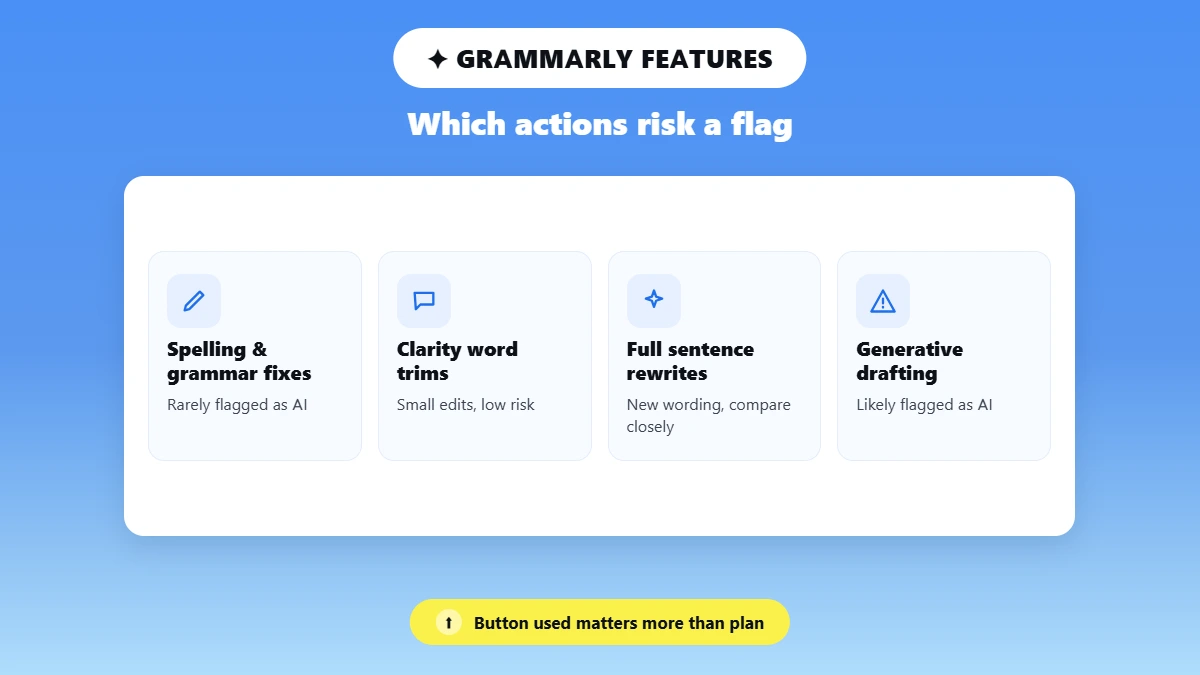
Turnitin can flag Grammarly text that a generative AI feature wrote or rewrote. Basic corrections to your own sentences were usually not flagged in tests described in Turnitin's AI detection FAQ. What a button did to your text matters more than your plan.
Grammarly's Free plan includes 100 generative AI prompts a month, so a free account can also produce AI-written text (Grammarly's plans page). The table below shows how each common Grammarly action is likely to get detected as AI in Turnitin, based on what both companies publish.
Grammarly action | What changes in your text | What Turnitin's guidance suggests |
|---|---|---|
✏️ Fix spelling, punctuation, or grammar | Small corrections to words you wrote | ✅ Not the detector's intended Grammarly target, though a flag stays possible |
🎯 Accept a clarity or tone suggestion | Grammarly adjusts your existing wording | ⚠️ Judge by how much changed, because these edits vary in size |
🤖 Generate a draft, paragraph, or summary | An AI model supplies new text | 🚩 Likely to be flagged, according to Turnitin |
🔁 Use Paraphraser or another generative rewrite | An AI model replaces your wording | 🚩 Can be flagged, including text that AI only modified |
🧹 Proofread text another AI tool wrote | Existing AI text gets corrected | 🚩 Proofreading does not make the text human-written |
🔍 Run Grammarly's plagiarism checker or AI Detector | Grammarly assesses the text and changes nothing | ℹ️ A check is different from accepting generated wording |
Sources: Turnitin AI writing detection FAQ; Grammarly AI Detector user guide. Feature names and plan details can change; we checked them in October 2026.
Spelling and Grammar Corrections
Spelling, grammar, and punctuation fixes change single words or marks in sentences you already wrote. Turnitin says its detector is not tuned to target these corrections, and Grammarly's AI Detector user guide says its non-generative suggestions should typically not affect its own AI score.
💡 Correction or generation? (An example we wrote, not a detector test)
✏️ Correction: "The results shows a difference" becomes "The results show a difference."
🤖 Generation: you ask a tool to write a new paragraph that explains the results.
What About Clarity and Tone Suggestions?
Grammarly uses the clarity and tone labels for changes of very different sizes. A suggestion that removes one extra word changes very little. A full-sentence rewrite, which Grammarly Pro offers, puts new words into your sentence, so compare the result with your original.
Generative Drafting and Rewriting
Turnitin can detect Grammarly AI output, and its FAQ says Grammarly's paraphrasing and summarizing results will likely get flagged as AI-generated. Grammarly says the same about its own detector: rewrites from its Paraphraser and Humanizer agents come from its large language model (LLM), the type of AI that writes text.
Grammarly launched its generative AI as GrammarlyGO in March 2023. Today that output comes from AI Chat and writing agents such as Paraphraser, and these features are what counts as AI in Grammarly when a detector reviews your work.
⚠️ Another rewrite does not hide AI text
Turnitin also looks for AI-generated text that a paraphrasing tool or word spinner changed. Turnitin offers this paraphrase detection for English submissions only.
What Published Studies Found About Grammarly and Turnitin
Published research shows that Turnitin can detect Grammarly text written by generative AI, but it often misjudges how much of a document that text makes up. Grammarly's non-generative edits received a 0% AI score in a 2026 study. Neither study supports a blanket yes or no for every Grammarly feature.
The most recent study, by Lucky E. Atamhenwan of Central Queensland University, appeared in Education and Information Technologies on June 4, 2026. He submitted 81 scripts to Turnitin through a Canvas course, and one of them was fully human. The other 80 mixed a human base of about 4,000 words with 5% to 100% AI text, and each AI tool supplied text for 20 scripts: ChatGPT (GPT-4o), Copilot, Gemini, and Grammarly.
📊 What the June 2026 study found for Grammarly
0% AI score for scripts edited with Grammarly's non-LLM features, the ones that do not generate text.
6 of 20 (30%) Grammarly-generated scripts scored higher than the share of AI text they held.
12 of 20 (60%) scored lower than that share.
The other 2 scripts, with 5% and 10% Grammarly text, showed an asterisk (*%) instead of a number.
A lower score means Turnitin reported a smaller AI share than the script contained. It does not mean Turnitin missed the document. Keep these limits in mind before you apply the numbers to your own essay:
The scripts shared one human base text, so the results describe this experiment, not all student papers.
The paper does not give enough detail on the edited scripts to calculate a general false-positive rate.
The tests ran before Turnitin's later 2026 report updates.
An earlier study by Barbara Bordalejo and colleagues appeared in the International Journal of Educational Technology in Higher Education in February 2025. The team ran three older human-written texts through common writing tools. Grammarly's versions generally scored 0% in Turnitin, with one exception: its rewrite of Perrault's "Little Red Riding Hood" scored 11%. The team used paid Grammarly Premium, asked it to improve each text and title, and accepted every suggestion, so the study did not test spelling fixes alone.
Detectors can also flag writing that no tool touched, which is why AI detector false positives always need a human check.
What a Turnitin AI Flag Actually Means
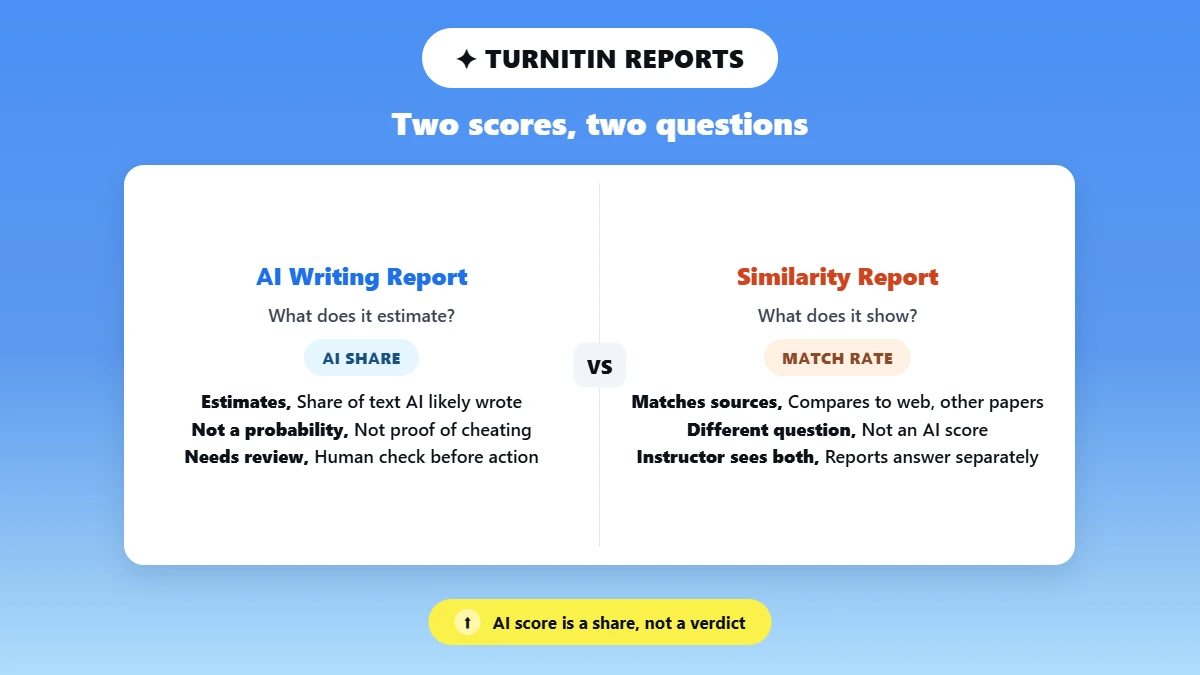
A Turnitin AI flag means Turnitin's model estimates that part of your qualifying prose was written or modified by AI. The AI writing percentage is a share of your text, not the probability that you cheated. Turnitin and Grammarly both check text, but Turnitin's two reports answer different questions:
🤖 AI Writing Report: estimates how much of your qualifying text AI likely wrote or modified.
🔍 Similarity Report: shows how much of your text matches other sources, such as websites and other students' papers.
Three report details shape what your instructor sees, according to Turnitin's AI writing model guide:
Qualifying prose: Turnitin scores long-form prose sentences only and skips lists and bullet points. A submission needs at least 300 words of prose for a score.
Asterisk (*%): scores from 1% to 19% show an asterisk with no number or highlights, because false positives are more likely in that range. Turnitin states a vendor goal of a false-positive rate under 1% for documents with over 20% AI writing.
Blue highlights: since August 4, 2026, English reports mark likely AI text with one set of blue highlights, according to Turnitin's product updates.
The asterisk is a display rule, and it says nothing about whether your AI use was allowed. Turnitin does not decide misconduct, so what an AI detection score means for your grade depends on your instructor's review.
Can Turnitin Tell You Used Grammarly?
An AI score alone cannot show that you used Grammarly. Turnitin's AI Writing Report highlights passages its model predicts AI wrote or modified, and Turnitin does not say the report names the tool. A flag also cannot show which Grammarly button you clicked.
Your instructor sees the final text you submitted unless the assignment uses a writing-process tool. Turnitin Clarity, for example, produces a Writing Report with timestamps from your writing sessions, and that report is separate evidence from the AI score.
💡 A 0% Grammarly score does not predict a 0% Turnitin score
Grammarly says its scores may differ from Turnitin, GPTZero, and Copyleaks. Each detector runs its own model, and Phrasly's results can differ for the same reason. Tests of Grammarly AI checker accuracy also show its scores shifting on the same text.
How to Review a Grammarly-Edited Draft Before Submission
Review a Grammarly-edited draft by checking what each accepted suggestion changed, then save proof of how you wrote it before you submit. Start with your assignment's rules on AI and editing tools. A detector scan is optional and comes last.
📋 Read the policy. Note whether the rules treat grammar help and generated text differently. Even if your school supplies Grammarly, the assignment decides which features you may use.
💾 Save your original draft. Keep a copy from before you opened Grammarly, with its file date.
🔎 Review the suggestions you accepted. Compare the edited version with the original, and mark any sentence Grammarly rewrote instead of correcting.
📚 Check sources and meaning. Confirm that quotations and citations still match their sources, and that each rewritten sentence still says what you meant.
🧪 Compare before and after (optional). If your assignment permits external checking, Phrasly's free AI writing detector gives you a second signal to compare with your original draft. It will not tell you what Turnitin will report. Scan both versions on the same day with the same settings.
🗂️ Keep the record. Save your version history, notes, and any AI disclosure the assignment requires. Grammarly's Authorship feature can also record your writing process if you turn it on while you write.
Version history is one of the records teachers review when they check for AI, so save it before you delete old files.
⚠️ What a before-and-after comparison can and cannot show
A change between two scans shows that one detector's output moved. It cannot prove that Grammarly caused the change. Avoid rewriting your essay until a score reaches zero, because each rewrite can change what you meant to say.
What to Do If Turnitin Flags Work You Wrote
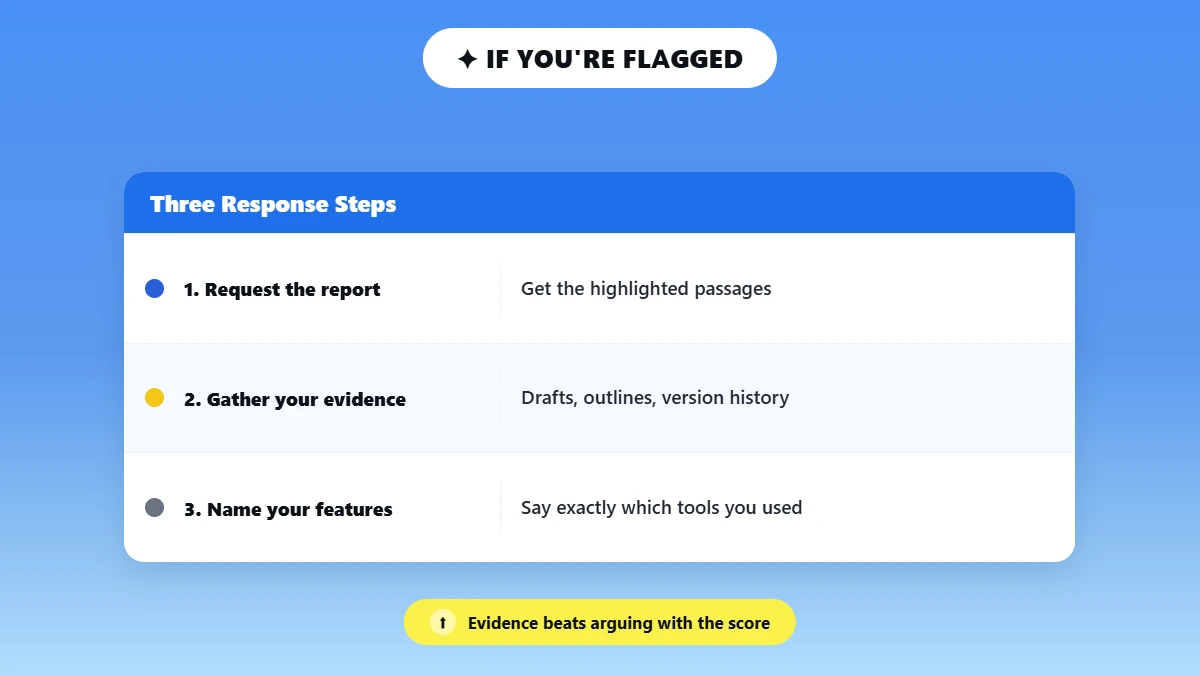
If Turnitin flags work you wrote, ask for the AI Writing Report, gather proof of your writing process, and explain exactly which Grammarly features you used. A flag on a Grammarly-edited essay has more than one possible cause, such as a generative rewrite you accepted or a false positive on your own sentences.
These steps cover the Grammarly side of responding to a Turnitin AI flag:
📄 Ask for the report and its highlighted passages, so you know which sentences the model marked.
🗂️ Gather your evidence: notes, outlines, earlier drafts, version history, and any Authorship or Clarity records.
✍️ Describe your Grammarly use feature by feature, for example "accepted spelling fixes" or "used Paraphraser on one paragraph."
⚖️ Follow your school's review or appeal process, and keep copies of everything you send.
🎓 What one university tells students
The University of Texas Rio Grande Valley's Turnitin false-positive guidance tells students to save drafts, outlines, and research notes, because these records can help defend work against a false positive.
Want another look at your edited draft? Scan it with Phrasly's AI Detector and read the result together with your drafts and notes, not as a Turnitin prediction. 👇
Frequently Asked Questions
Does Turnitin Detect Grammarly Premium or Pro?
Your plan name matters less than the feature you used. Grammarly Pro includes both corrections and 2,000 AI prompts each month, and the older Premium plan offered both as well. Turnitin's tests rarely flagged spelling fixes, while passages that AI drafted or rewrote will likely be flagged.
Can Grammarly Rephrasing Be Flagged as AI?
Turnitin can detect Grammarly rephrasing as AI-generated text, because a model supplies the new wording instead of fixing an error you made. Results vary by passage, and a flag still cannot show which tool you used or whether your assignment allowed it.
Will My Grammarly AI Score Match Turnitin's?
Expect the two scores to differ. Grammarly and Turnitin run separate detection models, so a low result in Grammarly gives you one tool's reading of your text. It does not predict the score your instructor will see in Turnitin.
Does Grammarly Check Plagiarism Like Turnitin?
Both tools check similarity, but they search different collections. Grammarly compares text with web pages and ProQuest's academic databases, while Turnitin also compares papers with other students' submissions. Phrasly's Grammarly plagiarism checker review tests its source coverage, and a plagiarism result says nothing about AI writing.
Is Using Grammarly Cheating?
Grammarly use counts as cheating only when your assignment's rules ban the feature you used. An instructor may allow proofreading but restrict generated or rewritten passages, and disclosure rules differ. Name the exact feature you used instead of calling Grammarly "just a grammar checker."
Can Grammarly Make ChatGPT Text Pass Turnitin?
No dependable method makes ChatGPT text pass Turnitin through Grammarly edits. Edits to AI text do not change where it came from, as how Turnitin detects ChatGPT explains. Whether a document gets flagged is also a separate question from whether it follows your assignment's rules.

Written by
Alina Shah
SEO Content Specialist · Karachi, Pakistan
She writes about AI so you don't have to guess. 8+ years in content strategy and editing. Now she puts AI writing tools and detection systems through real tests and shares what actually works.