Claude vs ChatGPT vs Gemini for Writing: Free Plans Compared
69 min read
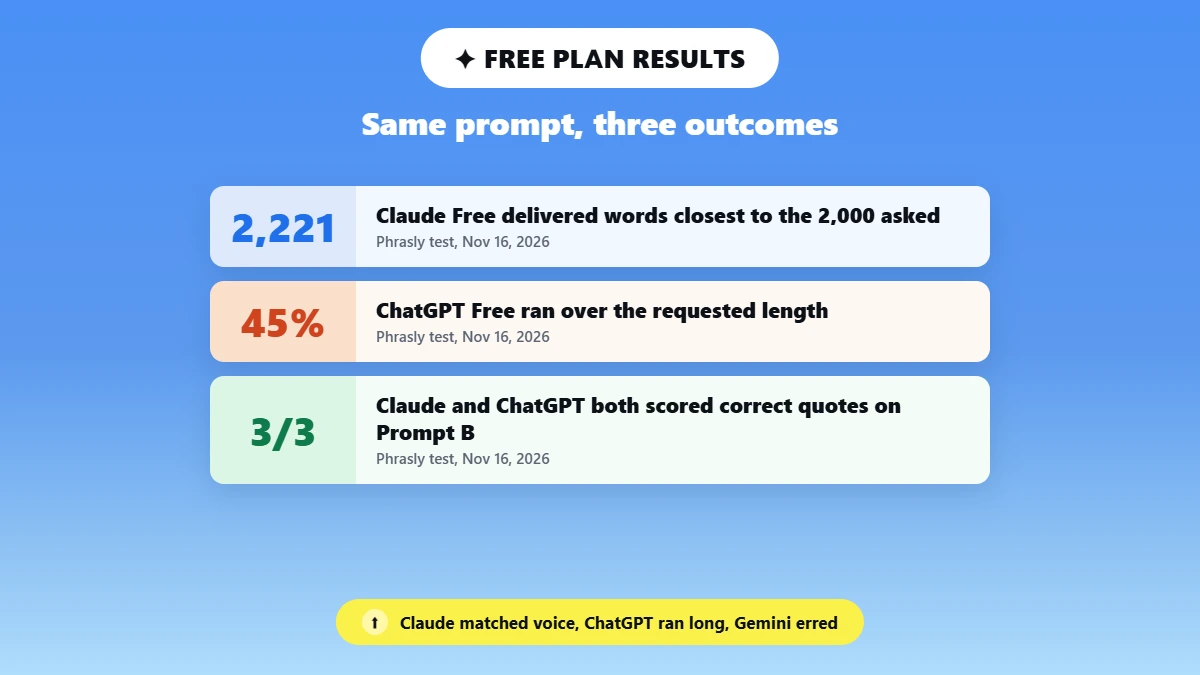
On free plans, Claude vs ChatGPT for writing comes down to the job, not the logo. In our same-day test, ChatGPT Free got every fact right but ran 45% over length, Gemini came in 10% short and invented two facts, and Claude Free came closest to the voice sample without a single wrong fact. If ChatGPT keeps closing with a tidy recap, or Claude’s free plan cut you off mid-draft, this test is for you.
We ran the free plans of Anthropic’s Claude, OpenAI’s ChatGPT and Google’s Gemini on November 16, 2026 with the same prompts: a 2,000-word blog post in a supplied voice (plus a one-paragraph edit) and a brief built from the same PDF. You get the comparison table first, then six common writer beliefs checked against what we counted.
This post covers writing quality and free-plan features, not AI detection, which has its own posts linked further down. Disclosure: Phrasly makes Neo, a competing AI chatbot. Neo was not part of the scored tests and appears only in the widget below and at the end.
Plans and limits checked on November 16, 2026 on each tool’s official pages.
Want Drafts That Sound Like You? Try Neo 👇
Claude, ChatGPT and Gemini Free Plans at a Glance
As of November 16, 2026, Claude vs ChatGPT vs Gemini for writing splits by job: Claude Free wrote the closest match to the voice sample with no factual errors, ChatGPT Free had zero factual errors but ran 45% long, and Gemini Free used the most em dashes and made the only wrong claims. All three plans cost nothing, but they ration different things.
Feature (checked Nov 16, 2026) | Claude Free | ChatGPT Free | Gemini Free |
|---|---|---|---|
Free plan price | $0 | $0 | $0 |
Model shown in the app on test day | Sonnet 5.5 (Medium) | Not shown in the app (OpenAI’s pricing page lists GPT-6 for Free) | “4 Hydrogen” (Everyday help) |
Usage limits (official wording) | “Limited usage every 5 hours and every week”; messages “vary based on demand” | “Unlimited everyday text chats, subject to abuse-prevention safeguards” | “Standard limits” without an AI plan |
Supported files | PDF, DOCX, CSV, TXT, HTML, ODT, RTF, EPUB, JSON, XLSX, images | Common text, spreadsheet, presentation and document files | “Most file types” |
Upload caps | 500MB per file, up to 20 files per chat, PDFs up to 1,000 pages | 3 file uploads per day on Free; 512MB per file | Up to 10 files per prompt, 100MB per file |
Context window on free | Up to 1M tokens, “varies by model” and can vary with demand | 27K tokens (about 12 pages of input) | 32K tokens |
Projects, memory, instructions | Up to 5 Projects on Free | Projects with up to 5 files each on Free | Gems (saved instructions) on free |
Prompt A: words delivered (2,000 asked) | 2,221 | 2,909 | 1,803 |
Prompt A: voice match (/5) | 4 | 3 | 3 |
Edit: words changed outside paragraph 3 | 0 | 0 | 0 |
Prompt B: correct quotes (/3) | 3 | 3 | 3 |
Sources: Anthropic Help Center, OpenAI Help Center and Google Gemini Apps Help, links in the Sources section. Test scores are from Phrasly’s runs on November 16, 2026.
Claude Free is best for long-form drafts in your own voice, because it matched the sample’s paragraph shape and vocabulary most closely and made no factual errors. ChatGPT Free is best for structured, fact-heavy drafts you plan to trim, because it made no factual errors and stayed in scope on the edit. Gemini Free is best for a fast first draft you will rework, because its middle sections had the most vivid detail but also the only wrong facts.
Pick Claude Free if you draft one long post a week and want it to sound like you on the first pass, and the edit to stay inside the paragraph you asked about.
Pick ChatGPT Free if you write explainers where accuracy matters more than length, and you are happy to cut a third of the draft.
Pick Gemini Free if you want a lively first draft to react to and you will fact-check every number before publishing.
Should I use Claude or ChatGPT to write my blog posts? Use ChatGPT Free when the post leans on facts and you have time to cut it down, and use Claude Free when the voice has to sound like you.
How We Tested the Three Free Plans
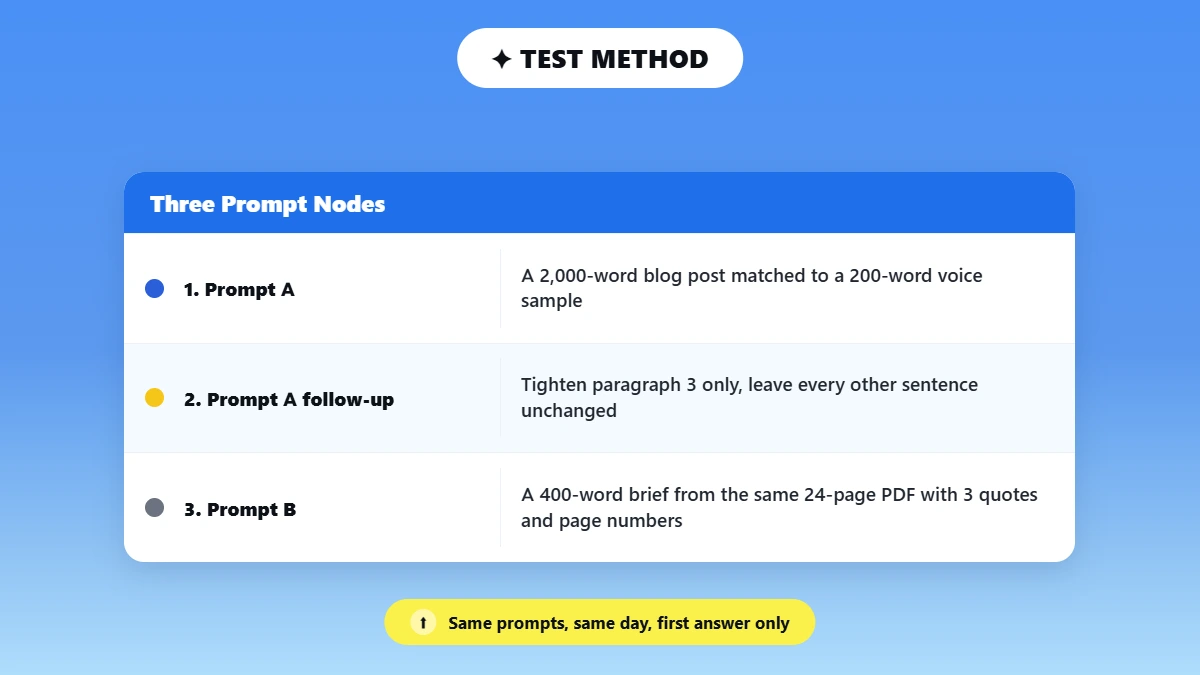
We gave each free plan the same three prompts on the same day, then counted what changed, what broke and what was made up. Nothing was regenerated, and every result below is the first answer each tool gave.
Test date and time zone: November 16, 2026, between about 3:45 and 5:15 PM (UTC+5), all three tools in the same window.
Accounts: logged-in free accounts, with memory switched off and no custom instructions in all three tools.
Prompts: pasted verbatim, with no rewording between tools. The full text of each prompt sits in the boxes below.
Prompt A: a 2,000-word blog post titled “Your Open Rate Is Lying to You: What Apple Mail Privacy Protection Changed for Small Newsletters”, written to match a 200-word voice sample about running a small newsletter.
Prompt A follow-up (same chat): “Tighten paragraph 3 only and leave every other sentence unchanged.”
Prompt B: the same 24-page PDF uploaded in a new chat, with a request for a 400-word brief that includes 3 direct quotes and their page numbers. The PDF is Chapters I to IV of William Strunk Jr.’s The Elements of Style (1920 edition, public domain in the United States, from Project Gutenberg eBook #37134), with a page number printed on every page.
We picked the Apple Mail topic on purpose. It has checkable facts (dates, how the feature works, who it affects), so a confident draft can be checked line by line. We used plain prompts with no tricks, so the results show each tool’s default behavior; if you want better output, see these Claude prompting techniques.
Prompt A (paste verbatim)
Write a 2,000-word blog post titled "Your Open Rate Is Lying to You: What Apple Mail Privacy Protection Changed for Small Newsletters". The readers are solo newsletter writers with fewer than 5,000 subscribers. Match the voice of the sample below: its sentence length, its word choice and the way its paragraphs open. Write it as prose paragraphs with a few subheadings.

Voice sample:

I sent my first newsletter to 41 people. Eleven of them were relatives, and one was my old landlord, who I'm fairly sure signed up by accident. I checked the stats every hour that night like a kid checking the oven.

Here's what nobody tells you about small lists. The numbers are loud. One unsubscribe feels like a breakup, and one reply feels like a parade. You start writing for the dashboard instead of the people, and the writing gets worse. It's a strange way to live.

So I made a rule. I look at the numbers once a week, on Friday, with coffee. The rest of the week I read replies, and I read them slowly. Most weeks there are six or seven. Some weeks there are none, and that's fine too. Replies tell me what landed. Numbers tell me what got opened, which is a different and much smaller thing.

That rule saved the newsletter. It didn't grow faster. It grew calmer, and calm is when I write the issues people forward to a friend. If you take one thing from me this week, take that: check less, read more, and let the boring weeks be boring.
Edit follow-up, same chat (paste verbatim)
Tighten paragraph 3 only and leave every other sentence unchanged.Prompt B, new chat with the PDF attached (paste verbatim)
Read the attached PDF and write a 400-word brief for a blog writer on its main advice. Include 3 direct quotes and their page numbers.Rubric metric | What it measures | How it is scored | Used in |
|---|---|---|---|
Voice match | How closely the draft matches the 200-word sample | 1 to 5 | Prompt A |
Instruction misses | Requested items skipped or ignored (length, format, topic) | Count | Prompt A, edit, Prompt B |
AI tells per 1,000 words | Sycophantic openers, bullet blocks, summary endings, em dashes, stacked hedges, repeated openers | Count per 1,000 delivered words | Prompt A |
Words changed outside paragraph 3 | Edits made where the tool was told not to | Word-level diff | Edit follow-up |
Unsupported or wrong claims | Statements not backed by a source, or contradicted by one | Count | Prompt A, Prompt B |
Correct page-referenced quotes | Quotes that match the PDF word for word, on the right page | Out of 3 | Prompt B |
Free-cap hits | Whether the free plan stopped the session | Yes or no, plus message count | All prompts |
AI tells were counted by hand and with a script, then divided by the delivered word count and multiplied by 1,000. For the edit, we compared the before and after versions paragraph by paragraph with a word-level diff script (longest common subsequence) after normalizing curly and straight quotes. Quotes are checked word for word against the PDF, then the page number is checked separately.
Each tool got one run per prompt, so a rerun can come out differently. We didn’t do a second run.
Myth 1: “Claude Always Sounds More Human Than ChatGPT”
Writers on Reddit say Claude sounds like a person and ChatGPT sounds like a press release. Our test mostly backs that up: Claude Free scored 4 out of 5 on voice match against 3 for both ChatGPT and Gemini, though ChatGPT matched the sample’s sentence length more closely.
So is Claude better than ChatGPT for writing that sounds less robotic? The chatgpt vs claude for writing debate usually skips the counting, so we compared each draft with the 200-word sample on three checks: sentence length, vocabulary and paragraph shape. The sample averages 10.5 words per sentence and 4.8 sentences per paragraph, and only 3% of its words run nine letters or longer.
ChatGPT Free came in at 9.9 words per sentence, the closest match of the three. Then it broke the rhythm a different way: 81 of its 156 paragraphs were a single sentence, so the post reads like a string of punchlines rather than a person talking.
Gemini Free went the other direction, with fuller paragraphs (3.8 sentences each) but sentences nearly twice as long (17.3 words). Claude Free sat closest overall: 13.5 words per sentence and 4.4 sentences per paragraph, with just two single-sentence paragraphs in the whole post.
Vocabulary followed the same pattern. ChatGPT used long words more than three times as often as the sample (10.1% of words), while Gemini (5.5%) stayed plainer. Claude Free matched the sample almost exactly at 2.8%, against the sample’s 3.0%.
Our evaluator gave Claude 4 out of 5 and ChatGPT and Gemini 3 each, for opposite reasons. All three borrowed from the sample, but differently: ChatGPT reused its opening line about sending a first newsletter to 41 people, while Claude echoed its Friday-with-coffee routine and closed on the sample’s last line word for word.
Claude’s reputation rests on skipping flattering openers, bullets and recap endings. For this voice sample, the counts back that up: no flattery, no bullets, no recap ending, no em dashes and the fewest repeated openers of the three. The free plan served Claude Sonnet 5.5 on test day.
Robotic-sounding text raises a separate question, covered in our post on whether Claude’s writing gets flagged. For Gemini, see how Gemini text holds up with AI checkers.
3a. Prompt A Results: The 2,000-Word Blog Post
ChatGPT Free delivered 2,909 words, 45% over the 2,000 we asked for, and didn’t mention the overrun. Gemini Free delivered 1,803 words, about 10% short, also without a note.
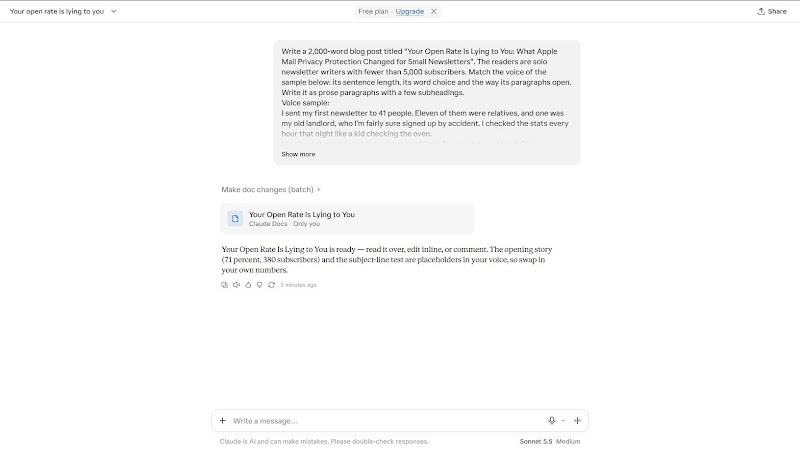
Claude Free delivered 2,221 words, 11% over, also without flagging it. It did flag something else in its chat reply: the opening story (a 71% open rate on 380 subscribers) and a subject-line test were placeholders in the writer’s voice, to be swapped for real numbers.
Each excerpt below comes from the same place in each draft: the second body section, where the tool explains how open tracking works.
ChatGPT Free excerpt, second body section
Before this change, most email marketing platforms measured an open using something called a tracking pixel. It's a tiny, invisible image placed inside your email. When someone opens the email and their email client loads that image, the platform records an open. It was never a perfect measurement. Some people blocked images. Some email clients didn't load them automatically. Some people opened an email in a preview pane without really reading it. But it gave newsletter writers a reasonably useful signal. Apple changed that. When someone uses Apple Mail and has Mail Privacy Protection enabled, Apple can download the email's remote content in the background, often before the person opens the message themselves. That includes the tracking pixel.
Gemini Free excerpt, second body section
Here is what happens behind the curtain every time you hit send. Inside your email sits a tiny invisible image, one pixel by one pixel, hosted on your email provider's server. When a subscriber opens your newsletter, their email app loads that pixel, and your provider counts an open. It is a simple system, and for twenty years it was good enough. Apple broke that system on purpose. When someone uses Apple Mail with Mail Privacy Protection turned on, Apple routes all incoming emails through its own proxy servers before the user even touches their phone. Those servers download every image in the email automatically, including your tracking pixel. To your newsletter platform, a server in California downloading a file at 3:14 in the morning looks identical to a human being reading your essay over breakfast.
Claude Free excerpt, second body section
The feature is called Mail Privacy Protection, and it arrived with iOS 15 and the matching updates for iPads and Macs. If someone uses the Apple Mail app and turns it on, Apple does a few things on their behalf. It downloads the images in your email ahead of time, through its own servers, before the person ever looks at the message. It hides their IP address. And it makes it hard for you to tell when, where or on what device they opened anything. That first part is the one that breaks the open rate. Almost every email tool measures opens with a tiny invisible image, called a tracking pixel. When the image loads, the tool records an open. Under Apple's system, the image loads whether or not anyone reads a word.
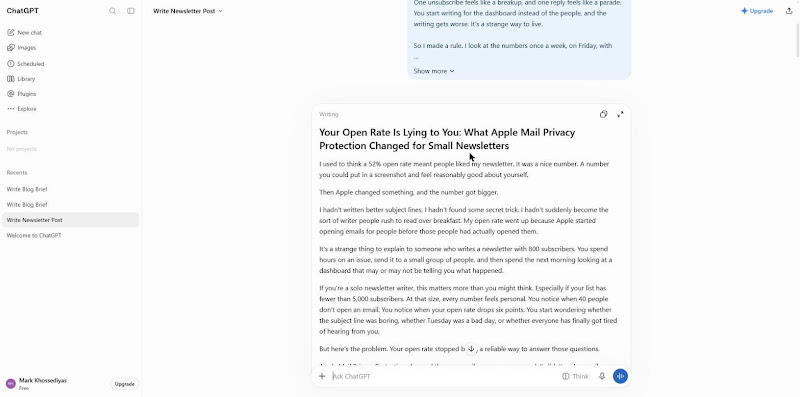
ChatGPT Free full Prompt A output, November 16, 2026
Your Open Rate Is Lying to You: What Apple Mail Privacy Protection Changed for Small Newsletters
I used to think a 52% open rate meant people liked my newsletter. It was a nice number. A number you could put in a screenshot and feel reasonably good about yourself.
Then Apple changed something, and the number got bigger.
I hadn't written better subject lines. I hadn't found some secret trick. I hadn't suddenly become the sort of writer people rush to read over breakfast. My open rate went up because Apple started opening emails for people before those people had actually opened them.
It's a strange thing to explain to someone who writes a newsletter with 800 subscribers. You spend hours on an issue, send it to a small group of people, and then spend the next morning looking at a dashboard that may or may not be telling you what happened.
If you're a solo newsletter writer, this matters more than you might think. Especially if your list has fewer than 5,000 subscribers. At that size, every number feels personal. You notice when 40 people don't open an email. You notice when your open rate drops six points. You start wondering whether the subject line was boring, whether Tuesday was a bad day, or whether everyone has finally got tired of hearing from you.
But here's the problem. Your open rate stopped being a reliable way to answer those questions.
Apple Mail Privacy Protection changed the way email opens are measured. It didn't make email marketing useless, and it didn't make your newsletter impossible to measure. It just made one of the numbers we've relied on for years a lot less honest.
Let's talk about what happened, what it means for a small newsletter, and what I'd pay attention to instead.
What Apple Actually Changed
In September 2021, Apple introduced Mail Privacy Protection as part of iOS 15, iPadOS 15, and macOS Monterey.
The idea was simple. Apple wanted to make it harder for email senders to know when someone opened a message, where they were, and whether they were using their email activity for tracking.
Before this change, most email marketing platforms measured an open using something called a tracking pixel. It's a tiny, invisible image placed inside your email. When someone opens the email and their email client loads that image, the platform records an open.
It was never a perfect measurement. Some people blocked images. Some email clients didn't load them automatically. Some people opened an email in a preview pane without really reading it. But it gave newsletter writers a reasonably useful signal.
Apple changed that.
When someone uses Apple Mail and has Mail Privacy Protection enabled, Apple can download the email's remote content in the background, often before the person opens the message themselves.
That includes the tracking pixel.
Your email platform sees the pixel load and records an open. As far as its reporting system is concerned, somebody opened your email.
Except nobody may have read it.
They might not have even seen it.
That's the important distinction. Apple didn't start reading your newsletter for your subscribers. It started protecting their privacy by making certain tracking information less available to senders.
And because the tracking pixel is how most platforms measure opens, the numbers became less dependable.
There are a few details worth knowing. Mail Privacy Protection isn't enabled for every email account or every email app. It affects people using Apple Mail who have the protection enabled, including accounts from other email providers accessed through Apple Mail.
It also doesn't mean every open from an Apple user is fake. Some are genuine. The problem is that your email platform generally can't tell the difference reliably.
That's where things get awkward.
Why Small Newsletters Feel This More
If you run a newsletter with 100,000 subscribers, a change in measurement can be annoying. You have enough data to spot patterns, compare campaigns, and look at other signals.
With 600 subscribers, things are different.
Imagine you send an issue to 600 people. Your dashboard reports 330 opens. That's a 55% open rate.
It looks good. You might even congratulate yourself.
But suppose a meaningful portion of those recorded opens came from Apple Mail's background activity. Your actual human readership could be considerably smaller.
You don't know exactly how much smaller. That's the point.
And this creates a particular problem for small writers. We tend to treat our dashboards as feedback. We don't have a marketing department or a data analyst. We have a laptop, a cup of coffee, and an email platform telling us that 55% of our subscribers opened something.
So we believe it.
Then we make decisions based on it.
We keep using a subject line style because the open rate looks good. We send more emails because the numbers suggest people are interested. We remove subscribers because they appear inactive. We start comparing ourselves with other newsletters that may be measuring the same unreliable thing.
The trouble is that a measurement problem can become a writing problem.
You start optimizing for a number that doesn't necessarily describe what your readers are doing.
And that's a fairly miserable way to spend a Sunday afternoon.
The Big Mistake: Treating Every Open as a Reader
Here's something I wish more newsletter platforms would explain in plain English.
An email open is not the same thing as a person reading your email.
It never was.
Even before Apple's privacy changes, an open only told you that a tracking image had loaded. It didn't tell you whether someone read the first paragraph, skimmed the whole thing, or immediately closed the message.
Now there's another layer of uncertainty.
A recorded open could mean someone genuinely opened your email. It could mean their email client automatically loaded the tracking pixel. It could mean Apple downloaded the content to protect the subscriber's privacy.
Your dashboard puts these events into one number.
That's convenient for the software. It's not especially useful for making decisions about your writing.
I think this is where small newsletter writers need to change their expectations.
Don't treat your open rate as a popularity score. Don't treat it as proof that your subject line worked. And please don't treat a sudden jump from 38% to 61% as evidence that you've discovered the perfect time to send emails.
You might have improved. You might have found a better subject line. Or Apple might have changed what your dashboard is counting.
You can't confidently separate those things using opens alone.
What Should You Measure Instead?
This is the part that matters.
You still need numbers. I'm not suggesting you throw away your analytics and start writing into the darkness.
I'm suggesting you use measurements that tell you more about what readers actually do.
For a small newsletter, I'd start with four things.
1. Click-through rate
Clicks are generally a stronger signal of engagement than opens.
If someone clicks a link in your newsletter, something happened. They interacted with the content in a way that a background tracking pixel can't easily imitate.
Say you send a newsletter to 1,000 subscribers. Your platform records 600 opens and 90 unique clicks.
The open rate is 60%. The click-through rate is 9%.
I'd pay more attention to the 90 people who clicked.
What did they click? Was it the article you recommended? The product you mentioned? The link to your latest project?
That tells you something about what people found interesting.
Just remember that clicks aren't perfect either. Security scanners and email protection services can sometimes trigger link clicks automatically. So look for suspicious patterns, and don't assume every recorded click represents a human reader.
Still, clicks usually give you a more useful signal than opens.
2. Replies
I know. This sounds almost embarrassingly obvious.
But if you write a small newsletter, replies are one of the most valuable things you can measure.
A reply means somebody stopped doing whatever else they were doing and decided to write something back.
It doesn't have to be a long message. It might be three words. It might be a question. It might be someone telling you that your story reminded them of something that happened ten years ago.
Those are real interactions.
I would rather have 12 thoughtful replies from a newsletter with 700 subscribers than a dashboard claiming 500 opens without any other evidence of interest.
Replies also tell you things analytics cannot. They show you which ideas people remember, what confuses them, and what they want you to write about next.
Keep a simple record. You don't need a complicated spreadsheet. A note with the date, topic, and number of replies is enough.
Over time, you'll notice patterns.
3. Unsubscribes
Unsubscribes are uncomfortable.
You send something you've worked on for three hours, and somebody clicks a button to leave. It can feel like a personal rejection, particularly when your list is small enough that you recognize some of the names.
But unsubscribes are useful information.
If you send a newsletter about writing and suddenly lose 15 people after publishing an issue about personal finance, that might tell you something about audience expectations.
Or it might not. People unsubscribe for all sorts of reasons. They change jobs, clean up their inboxes, or stop reading newsletters altogether.
Don't overreact to one issue.
Look at the pattern over several months. Are people leaving at a consistent rate? Does a particular kind of content lead to more departures? Are you sending more frequently than your subscribers expected?
These are questions worth asking.
And remember that an unsubscribe isn't necessarily a failure. A smaller list of people who genuinely want your emails can be healthier than a larger list full of people who forgot they signed up.
4. Forwarding and sharing
This one is harder to measure, depending on your email platform.
But if people forward your newsletter, share your links, or mention your writing somewhere else, pay attention.
A reader who forwards an issue to a friend is doing something important. They're putting their own reputation behind your work, even if only a little.
For a small newsletter, that can be more valuable than another 100 passive opens.
Ask people to share an issue when it genuinely makes sense. Don't turn every email into a request for promotion. Sometimes just writing something worth forwarding is enough.
Stop Making Decisions Based on Open Rates
This is probably the biggest practical change I'd make.
You don't have to stop looking at open rates. You just have to stop treating them as the final answer.
Let's say you're testing two subject lines.
The first email gets a 58% open rate. The second gets 64%.
It's tempting to declare the second subject line the winner.
But what if the second email has fewer clicks? What if it gets fewer replies? What if the subject line is more dramatic but the actual content doesn't deliver on the promise?
A higher open rate doesn't automatically mean a better newsletter.
For small lists, these tests are also difficult because the numbers are limited. If you're sending to 800 people, splitting your audience into two groups gives you 400 people per version. That's not a lot of data, especially when some of the opens are affected by privacy features.
You can still experiment with subject lines. Just don't pretend that a small difference in open rate proves anything.
Instead, look at the whole picture.
Did more people click? Did anyone reply? Did the subject line accurately describe the issue? Did people stick around for the next email?
And perhaps most importantly, would you still be happy with that subject line if you knew nobody was measuring opens?
That's a surprisingly useful question.
A Better Way to Think About Your Newsletter Numbers
I have a small suggestion.
Once a month, spend 20 minutes looking at your newsletter performance.
Not every morning. Not every time you send an issue. Once a month.
Look at the number of subscribers, the number of new signups, unsubscribes, clicks, and replies. If your platform provides a reliable way to filter or account for privacy-related opens, use it as additional context.
Then write down three things.
What did people respond to?
What did people ignore?
What do you want to try next month?
That's it.
You don't need to build a spreadsheet with 17 tabs. You don't need to calculate a complicated engagement score. You don't need to compare your numbers with someone who has 40,000 subscribers and a full-time marketing team.
Your newsletter is a small publication. Treat it like one.
The goal isn't to maximize every metric. The goal is to understand whether you're making something useful or interesting for the people who chose to receive it.
And that takes more than an open rate.
What About Cleaning Your Email List?
There's one place where Apple Mail Privacy Protection can cause real trouble.
List cleaning.
Many newsletter platforms have features that identify inactive subscribers. If someone hasn't opened your emails in 90 or 180 days, the platform might label them as unengaged.
Some writers use this information to send a re-engagement campaign. Others automatically remove subscribers who appear inactive.
That made a certain amount of sense when open tracking was more dependable.
Now it's complicated.
A subscriber might have read every issue without generating a meaningful open signal. Another subscriber might have generated dozens of recorded opens without reading a single word.
If you use open activity alone to decide who stays on your list, you risk removing people who actually enjoy your newsletter.
I'd be careful with automatic deletion.
Instead, look at several signals. Has the subscriber clicked a link recently? Have they replied? Have they purchased something, attended an event, or taken another action that suggests they're still interested?
You can also send a simple re-engagement email.
Something like:
"Hey, I'm doing a little housekeeping. Do you still want to receive this newsletter? If so, there's nothing you need to do. If not, you can unsubscribe here."
Keep it friendly. Don't make people feel guilty.
And don't delete someone just because a dashboard says they haven't opened an email.
Especially if your list is small. Every subscriber represents a person who once decided your writing was worth receiving.
Give them a fair chance.
The Things That Haven't Changed
It's easy to spend too much time talking about technology.
Apple changed something. Email platforms adjusted their reporting. Marketing people started arguing about engagement metrics. Everyone published a guide explaining what to do next.
Meanwhile, the actual job stayed the same.
You still have to write something worth reading.
You still have to send it consistently enough that people remember who you are. You still have to respect the fact that someone's inbox is a fairly private place. And you still have to give people a reason to keep receiving your emails.
Apple didn't change any of that.
If anything, I think the privacy changes are a useful reminder of something we should have known already.
A newsletter isn't a collection of opens.
It's a relationship between a writer and a reader.
You might have 350 subscribers. Maybe 1,200. Maybe you're slowly working your way toward 5,000 and wondering whether you'll ever get there.
Those people aren't percentages. They're not green arrows on a dashboard. They're people who gave you permission to show up in their inbox.
Some will read every issue. Some will read only when the subject catches their attention. Some will forward your best work. Some will unsubscribe after six months.
That's normal.
Your job is to keep making something worth opening, even when the software can't tell you who did.
So, What Should You Do This Week?
Nothing dramatic.
Don't change your entire newsletter strategy because of Apple's privacy settings. Don't spend the weekend trying to reverse-engineer your open rate. And don't panic if your analytics look different from the numbers you saw two years ago.
Start with a few small changes.
Stop using open rates as your main measure of success. Look at clicks, replies, and subscriber growth instead. Be careful about removing people based on inactivity. If you're testing subject lines, consider more than just the reported opens.
And spend a little more time reading the actual responses you receive.
If somebody replies to tell you that your last issue helped them make a decision, that's worth remembering. If three people click the same link, that's worth investigating. If someone forwards your newsletter to a friend, that's worth celebrating.
Those are signals you can use.
I sent my first newsletter to 41 people. I thought the numbers would tell me whether I was any good at this. They didn't. They told me how an email system had recorded a few technical events, which was a much less interesting answer.
The replies were better. The occasional forwarded email was better. The person who wrote back six months later to say they'd been reading every issue was better.
So here's the rule I'd give any solo newsletter writer with fewer than 5,000 subscribers.
Check the dashboard, but don't let it decide how you feel about your work. Measure what people do, not just what their email software reports. And remember that a list of 400 interested readers is not a disappointing version of a list of 4,000.
It's a newsletter.
Write the next issue. Make it useful. Make it honest. Give someone a reason to forward it.
Then close the dashboard and go make yourself a coffee.
Your open rate can wait.
Claude Free full Prompt A output, November 16, 2026
Your Open Rate Is Lying to You: What Apple Mail Privacy Protection Changed for Small Newsletters
My first real open rate was 71 percent. I was thrilled. I told my sister, and I took a screenshot and sent it to a friend who also writes a newsletter, mostly so I could say the number out loud to another human being.
Then I looked closer. The list had 380 people on it. Maybe forty had ever written back. The rest were quiet, and I had decided the quiet meant they were reading. It didn't. A lot of it meant their phones were opening my email for them.
Here's what nobody tells you about the open rate. It stopped measuring what you think it measures in September 2021, and most dashboards still show it to you with a straight face. That matters for everyone who sends email. It matters more if you're a solo writer with a few hundred or a few thousand subscribers, because your list is small enough that one bad number can ruin your week. So let's go through it slowly.
What Apple actually changed
The feature is called Mail Privacy Protection, and it arrived with iOS 15 and the matching updates for iPads and Macs. If someone uses the Apple Mail app and turns it on, Apple does a few things on their behalf. It downloads the images in your email ahead of time, through its own servers, before the person ever looks at the message. It hides their IP address. And it makes it hard for you to tell when, where or on what device they opened anything.
That first part is the one that breaks the open rate. Almost every email tool measures opens with a tiny invisible image, called a tracking pixel. When the image loads, the tool records an open. Under Apple's system, the image loads whether or not anyone reads a word. The email lands, Apple's servers fetch everything, and your dashboard logs an open. The person might be asleep. They might be on a plane. They might have forgotten they ever subscribed.
One detail trips people up. This isn't limited to people with an iCloud address. It applies to anyone who reads email in the Apple Mail app, even if the account behind it is Gmail or Outlook or something your cousin set up in 2009. And the setting is offered to people during setup as a choice, so a large share of them said yes.
How large? It depends on your readers, and I can't give you your number. Industry reports have put Apple Mail at roughly half of all email opens or more, and on lists full of people who read on iPhones, it can run higher. You can check your own list in about five minutes. Look at the breakdown by email client, if your tool offers one, and see how much of your audience is Apple Mail. That share is the part of your open rate you can no longer trust.
Why small lists feel it most
A big publisher has a lot of readers to average out the noise. If a million people get an email and some portion of them are machines, the trend lines still tell a rough story. A few hundred people can't do that for you. When half your list opens automatically, your open rate is mostly a measure of how many of your subscribers use an iPhone.
There's a second problem, and it's quieter. Small writers tend to build habits around their numbers, because the numbers are all they've got. You test two subject lines and pick the winner. You clean out the people who haven't opened in ninety days. You compare this issue to last issue and decide whether the topic worked. Every one of those habits leans on the open rate, and every one of them has gotten worse since 2021.
I learned this the hard way with a subject line test. I tried two versions on a list of about 900. One had a question in it and one didn't. The question version "won" by eleven points, and I spent a month writing question subject lines like a game show host. Later I realized I had no way to know how many of those opens were people and how many were Apple's servers saying good morning. A test on a list that size was shaky even before the change. After it, the test was close to a coin flip with a chart attached.
Then there's the cleanup habit. Many of us were taught to remove subscribers who haven't opened in a few months, to keep the list healthy. With Mail Privacy Protection, an Apple Mail reader can look active forever, even if they stopped reading the day they signed up. You end up keeping the ghosts. Meanwhile your real readers on other clients might get flagged as inactive for the opposite reason, because some of them block images or read in plain text, and those opens never register at all. The number errs in both directions, and you can't tell which way for any one person.
The open rate got inflated, and it got shuffled around too.
What the number is still good for
I don't want to be dramatic about this. The open rate isn't useless. It's just a smaller thing than it used to be.
It still tells you something rough about delivery. If your open rate falls off a cliff overnight, say from the mid-sixties to the low twenties, something has probably gone wrong. Maybe your emails are landing in spam. Maybe you changed your sending setup and something broke. A sudden, big drop is worth a look, because machine opens don't usually disappear all at once.
It can also be useful as a trend over a long stretch, compared only to yourself. If your rate has crept slowly in one direction over six months, that might mean something. Just hold it loosely. Think of it like the temperature outside. It's fine for deciding whether to bring a jacket, and it's no good for deciding whether to move to a new city.
What it can't do anymore is tell you which subject line was better, which readers are engaged, or whether your latest issue landed. Those are the questions most of us actually care about, and the open rate stopped being able to answer them.
Some email tools have started adding a filter or a separate count for opens that look like machines, and a few now let you see an estimate of "real" opens. Those can help, and it's worth poking around your settings to see what yours offers. Just remember that they're guesses built on top of a number that was already murky. They narrow the fog. They don't remove it.
What to look at instead
So what do you watch? I'd start with the signals that a person has to cause on purpose, because a machine can't fake them.
Replies come first, and they're the best signal you have. Nobody's phone replies to your email for them. A reply means a human read something, thought something and typed something back. On a small list, six replies is a real event. If you're not getting any, that's worth knowing too, and it's worth asking what you could write that would make someone want to answer. Ending an issue with one honest, specific question works better than any subject line trick I've tried.
Clicks come second. Apple's system does fetch images ahead of time, but it doesn't click your links for you. A click means somebody read far enough to get curious. The caveat is that some security tools and corporate email filters do follow links automatically, which can add a few false clicks, mostly on lists with a lot of work addresses. For most solo writers writing to regular people, click rate is much steadier than open rate. If you want to compare one issue to another, compare clicks on the same kind of link, like the one you put near the end of each issue.
Forwards and shares are third. Ask people to hit forward, and then count the new subscribers who say a friend sent them. Most signup forms let you add a "how did you find us" field. It's low-tech and a little messy, and it tells you more about word of mouth than any chart will.
Unsubscribes are fourth, and they deserve some respect. They sting, but they're honest. A few after a big issue is normal. A pile after a change in format or topic is a message. Read the pattern, and try not to read the individual names.
Last is what I think of as the slow number, which is growth over time. Not this week's growth, which jumps around, but the number of people on your list three months ago compared to today, along with how many of them replied or clicked at least once in that stretch. It's slow and it's boring, and that's why it's reliable.
How to test things without opens
Testing is where people feel stuck, because A/B tests were built on the open rate. You can still learn things. You just have to change what you're measuring and how long you're willing to wait.
If you want to test a subject line, measure clicks or replies instead of opens. On a small list, you'll need to run the idea across several issues before you can say anything. Try one style for four issues, then the other style for four issues, and compare the replies and clicks. It's slower, and your sample is still small, so treat the result as a nudge and nothing firmer.
Better still, skip the subject line test and test the thing inside the email. Try a shorter issue against a longer one. Try opening with a story against opening with a tip. Those choices affect whether people respond, and responses are measurable. A subject line only gets someone through the door, and the open rate can't even confirm they came in.
And sometimes the best test is just asking. Send a two-line message to your subscribers once or twice a year and ask what they like and what they skip. You'll get twenty answers, and those twenty will teach you more than a year of dashboards.
Cleaning your list without the old rule
You still need to prune your list sometimes. Sending to people who don't want your email can hurt your deliverability, and it costs money on most platforms once you pass a certain size.
The old rule was to cut anyone who hadn't opened in ninety days. I'd retire that one. A better approach is a re-engagement email that asks for something a machine can't give. Send a short note that says you'd love to keep them, and ask them to click a link or reply if they'd like to stay. Give it a couple of weeks. Anyone who does neither can go, kindly, with a line that says the door's open if they change their mind.
Be gentle with this. On a small list, every subscriber is a person you could picture, and a few quiet ones are fine. Quiet isn't harmful. I keep a handful of people who haven't clicked anything in a year, because I have a hunch they read every word and just don't like to click. I can't prove it. I'd rather be wrong in that direction.
A Friday routine for the new numbers
Here's the routine I'd suggest, and it's close to the one I use. Once a week, on a day that isn't the day you send, sit down with coffee and look at four things. How many replies came in. Which links got clicked. How many people joined and how many left. And whether anything strange happened, like a sudden drop or a spike that doesn't match anything you did.
Write down one sentence about what you noticed. Just one. "Readers clicked the book link more than the podcast link." "Two people replied about the ferry story." Over a few months, those sentences add up to a real picture of your readers, and you'll have built it from things that actually happened.
Then close the dashboard. The rest of the week, read your replies, and read them slowly. They're the part of this that's still honest.
The point of all this
It's easy to feel cheated by a change like Apple's. For years, the open rate gave small writers a little hit of proof that somebody was out there. Taking that away stings, and I think it's fair to be annoyed.
But I've come to see it differently. That number was always a thin kind of evidence. It said a message arrived and the picture loaded. It never said anyone cared. What we have now is a push toward measuring the things that were better all along: a reply, a click, a forward, a friend who says "I found you through my sister."
Your open rate is lying to you a little. It was probably always a bit of a fib, and now it's a bigger one. You don't have to fight it. You just have to stop asking it questions it can't answer, and start paying attention to the people who write back.
Check less, read more, and let the boring weeks be boring.
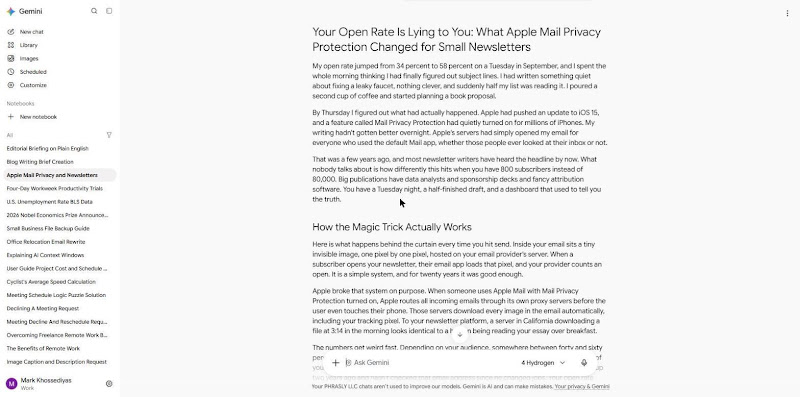
Gemini full Prompt A output, November 16, 2026
Your Open Rate Is Lying to You: What Apple Mail Privacy Protection Changed for Small Newsletters
My open rate jumped from 34 percent to 58 percent on a Tuesday in September, and I spent the whole morning thinking I had finally figured out subject lines. I had written something quiet about fixing a leaky faucet, nothing clever, and suddenly half my list was reading it. I poured a second cup of coffee and started planning a book proposal.
By Thursday I figured out what had actually happened. Apple had pushed an update to iOS 15, and a feature called Mail Privacy Protection had quietly turned on for millions of iPhones. My writing hadn't gotten better overnight. Apple's servers had simply opened my email for everyone who used the default Mail app, whether those people ever looked at their inbox or not.
That was a few years ago, and most newsletter writers have heard the headline by now. What nobody talks about is how differently this hits when you have 800 subscribers instead of 80,000. Big publications have data analysts and sponsorship decks and fancy attribution software. You have a Tuesday night, a half-finished draft, and a dashboard that used to tell you the truth.
How the Magic Trick Actually Works
Here is what happens behind the curtain every time you hit send. Inside your email sits a tiny invisible image, one pixel by one pixel, hosted on your email provider's server. When a subscriber opens your newsletter, their email app loads that pixel, and your provider counts an open. It is a simple system, and for twenty years it was good enough.
Apple broke that system on purpose. When someone uses Apple Mail with Mail Privacy Protection turned on, Apple routes all incoming emails through its own proxy servers before the user even touches their phone. Those servers download every image in the email automatically, including your tracking pixel. To your newsletter platform, a server in California downloading a file at 3:14 in the morning looks identical to a human being reading your essay over breakfast.
The numbers get weird fast. Depending on your audience, somewhere between forty and sixty percent of your list uses Apple Mail on an iPhone, an iPad, or a Mac. That means roughly half of your subscribers are being marked as "opened" every single week, even the guy who signed up two years ago and hasn't checked that email address since he changed jobs. Your open rate didn't go up. The floor just got raised, and it got raised unevenly across your list.
Worse, you can no longer tell who is awake. Before this change, a zero percent open rate over six months meant someone had moved on, and you could quietly remove them to keep your list healthy. Now that same silent subscriber shows a fifty percent open rate because their phone sits on a charger every night downloading emails they never read. The dashboard is polite, and it tells you everyone is still listening.
Why Small Lists Feel the Lie Harder
When you have fifty thousand subscribers, a twenty-point distortion is a math problem. You adjust your benchmarks, tell your sponsors about click rates instead, and move on with your week. When you have six hundred subscribers, a twenty-point distortion is a psychological problem.
Small lists run on feedback. You know half the names on your subscriber list, or at least you recognize their email addresses when they pop up in the activity feed. Seeing Sarah from your old writing group open an issue five minutes after you sent it feels like a nod across a crowded room. Now you look at Sarah's profile and see she has opened every single issue for a year, and you have no idea if she is actually reading or if her iPhone is just doing its job.
That uncertainty changes how you write. You test a weird subject line, and the open rate stays at fifty-four percent. You send your best essay of the year, and the open rate is fifty-five percent. You rush out a sloppy link roundup because you had a bad week, and the open rate is fifty-three percent. When every issue gets the same polite applause, you stop trusting your own instincts about what worked.
It also makes list cleaning feel like guesswork. Every email platform charges you based on how many subscribers you have, and crossing from 1,000 to 2,500 subscribers usually bumps you into a higher pricing tier. You want to trim the people who stopped caring so you aren't paying to send emails into a void. But when Apple tells you that eighty percent of your list is "active," cutting anyone feels like throwing away real readers.
The Metrics That Still Tell the Truth
So you stop looking at open rates. You don't need to delete them from your brain entirely, and you can still watch for massive drops that mean your emails are landing in spam. Beyond that, the open rate is background noise, like the hum of a refrigerator you stop noticing once you know it is broken.
Here is what you look at instead:
Replies: A human being had to hit a button, type words into a box, and hit send. No server on earth fakes a reply. Even a two-word response like "needed this today" carries more real data than five hundred pixel loads.
Clicks on specific links: Apple's privacy tools preload images, not links. If someone clicks through to an article you recommended or a project you built, a person actually moved their thumb and tapped the screen. (A quick caveat: some corporate security scanners do click links to check for viruses, so ignore a single subscriber who clicks every single link within two seconds of delivery.)
Forwards and new signups from referrals: When a reader sends your issue to a friend, and that friend subscribes, you have proof that your writing crossed a real threshold. You won't always see this in a neat chart, though you will notice new subscribers showing up with the same last name or company domain as an existing reader.
Unsubscribes: This one sounds backward, but a healthy trickle of unsubscribes means real people are opening your email, reading it, and deciding it isn't for them. A list with zero unsubscribes over several months is usually a list nobody is actually looking at.
Notice what all four of those have in common. They require friction. Opening an email takes zero effort now, which is why the metric lost its value. Replying, clicking, forwarding, and unsubscribing all require a small decision, and small decisions are the only proof of life left in an inbox.
How to Clean Your List Without Guessing
If you can't trust opens to tell you who is inactive, you have to build a different filter. Most solo writers avoid this because it feels complicated, or because watching your subscriber count drop from 1,400 to 1,100 hurts your pride. Do it anyway. A smaller list of real readers is cheaper to run, lands in the primary inbox more often, and feels much better to write for.
Start by separating your Apple Mail users from everyone else, if your platform lets you. Tools like Kit, Buttondown, and Beehiiv increasingly flag "machine opens" or "Apple MPP opens" so you can filter them out. If your tool gives you that toggle, turn it on, and look at the real open rate of the remaining forty percent of your list. That number will be lower, probably closer to twenty-five or thirty percent, and it will feel like cold water at first. Good. That is your actual baseline.
For the Apple Mail crowd, look at clicks and replies over a six-month window. Anyone who hasn't clicked a single link or replied to a single email in half a year is a candidate for a quiet check-in. You don't have to delete them without warning. Send a plain-text email with a simple subject line like "Still want these?" and tell them they will be removed from the list on Friday unless they click a single link to stay.
Most people won't click it, and that is the point. The twenty or thirty people who do click it will often reply to tell you they read every week on their morning train and just never click links. Now you know who they are. You can tag them as engaged, remove the rest, and stop paying for ghosts.
Writing for the Quiet Room
There is a strange relief that comes once you accept that your dashboard is mostly fiction. For years, newsletter advice trained us to optimize for the open. We wrote curiosity-gap subject lines, A/B tested three words against four words, and worried about whether sending at 8:00 AM beat 8:30 AM. Half of that optimization was aimed at a metric that no longer measures human attention.
When the open rate stops being the scoreboard, you get to focus on the only part of the email that actually matters: what happens after they open it. You write a better opening paragraph. You cut the bloated throat-clearing at the top and get straight to the story or the idea. You ask a real question at the bottom, not a marketing gimmick like "Hit reply and tell me your #1 goal for Q3!", just a normal question you would ask a friend over lunch.
I started ending my issues with one small line in italics. Sometimes it was "Have you ever dealt with something like this?" and sometimes it was just "Tell me what I missed." The open rate didn't budge, of course, because Apple doesn't care how I end an email. But the replies doubled within a month, and those replies started turning into ideas for future issues.
Let the Numbers Be Quiet
You didn't start a newsletter to become a data analyst. You started it because you had things to say, or links to share, or a subject you couldn't stop thinking about, and you wanted a direct line to people who cared about the same things. That direct line still works. Email is still the one place on the internet where an algorithm doesn't decide whether your regular readers get to see your work.
The catch is that you have to give up the illusion of total visibility. You don't get to stand over your readers' shoulders and watch them nod anymore. You send the letter out into the dark, trust that the right people will read it when they have a quiet ten minutes, and wait to see who writes back.
Check your stats on Friday if you want to make sure nothing broke. Watch your click rates over a few months to see what topics pull people in. Beyond that, close the tab and go write the next issue. The real readers are still there, even if the dashboard forgot how to count them.
3b. The AI Tells We Counted in Each Draft
We counted six AI writing tells in every draft, each with an example from the real outputs:
Sycophantic openers, such as “Great question!” or “Absolutely!”: none of the three drafts opened with one.
Bullet-list blocks inside a draft we asked for as prose: Gemini turned its “metrics that still tell the truth” section into a four-item bulleted list.
Summary conclusions: ChatGPT ended with a “So, What Should You Do This Week?” section that restated its earlier advice, then restated it again in its final lines.
Em dashes: Gemini used four, two of them around a single aside about a re-engagement email.
Stacked hedges, such as “may or may not” or “can sometimes”: ChatGPT used two, including a dashboard “that may or may not be telling you what happened.”
Repeated sentence openers, the same first word three or more times in one paragraph: ChatGPT’s “Some will read every issue. Some will read only when…” is a typical case.
AI tell (per 1,000 words) | Claude Free (2,221 words) | ChatGPT Free (2,909 words) | Gemini Free (1,803 words) |
|---|---|---|---|
Sycophantic openers | 0.00 (0) | 0.00 (0) | 0.00 (0) |
Bullet-list blocks | 0.00 (0) | 0.00 (0) | 0.55 (1) |
Summary conclusions | 0.00 (0) | 0.69 (2) | 0.55 (1) |
Em dashes | 0.00 (0) | 0.00 (0) | 2.22 (4) |
Stacked hedges | 0.00 (0) | 0.69 (2) | 0.00 (0) |
Repeated sentence openers | 0.45 (1) | 3.78 (11) | 1.11 (2) |
Raw counts in brackets. Counted by Phrasly on November 16, 2026.
Repeated openers separated ChatGPT and Gemini more than any other tell. Some of ChatGPT’s repetition copies the sample’s own short, punchy rhythm, but at 11 paragraphs it turns from voice into a pattern a reader starts to hear.
Claude had the fewest repeated openers of the three and zero on every other tell. It even kept its four replacement metrics in prose (“Replies come first,” “Clicks come second”), where Gemini turned the same four into bullets.
Claude’s Em Dash Habit
Writers complain that Claude leans on em dashes, which makes its prose feel eager and samey. In this run Claude Free used none in the draft, the same as ChatGPT, while Gemini used 2.22 per 1,000 words. The one em dash Claude did type showed up in its short chat reply that introduced the draft.
The habit shows up often enough in everyday use that a one-line fix is still worth pasting into any prompt: “Use commas, colons or full stops instead of em dashes.” We didn’t need it here, so we didn’t test it. For the background, see why AI leans on em dashes.
Myth 2: “ChatGPT Free Is Unlimited, So It Is the Best Free Writer”
ChatGPT Free is unlimited for everyday text chats, with a catch: as of November 16, 2026, OpenAI says free users get “unlimited everyday text chats, subject to abuse-prevention safeguards,” while file uploads and other tools carry separate limits. The belief that this makes it the best free writer comes from Reddit threads and AI Overview answers, and it mixes up access with quality.
Here is the official limit wording for each plan, checked on test day:
Claude Free: Anthropic lists “limited usage every 5 hours and every week,” and its help center says the number of messages “will vary based on demand.” Anthropic doesn’t publish a fixed message count.
ChatGPT Free: “unlimited everyday text chats,” with file uploads, image generation, voice and data analysis on separate limits. OpenAI’s file FAQ adds that free users are limited to 3 file uploads per day.
Gemini Free: Google’s limits page lists “standard limits” for accounts without an AI plan and a 32K-token context window, with no prompt count for the free tier.
In our session, none of the three plans hit a cap. Claude Free handled Prompt A, the edit, a follow-up request for the file and Prompt B without a limit message.
Writers who draft every day say Claude’s free limit is the one they hit first, often halfway through a long piece. Our single-post session didn’t trigger it, but Anthropic’s own wording (“vary based on demand”) means a heavy day or a busy hour can. The 2,000-word prompt is a fair stress test, because one long reply and one follow-up is a normal working session for a blogger.
Heavy writers don’t need one plan to do everything. Based on our counts, here is how to split content creation across free plans:
Outlines and headline options in ChatGPT Free, which never capped and handles short structured tasks without a daily text limit.
The long draft in Claude Free, which had the best voice score and no factual errors.
Scoped edits in any of the three, since all of them changed zero words outside the paragraph we asked about.
Source-based briefs in Claude Free, which tied on quote accuracy and used the most material from the PDF.
Unlimited access didn’t buy the best draft here: ChatGPT’s unlimited plan produced the most repeated sentence openers and ran 45% long. More messages help when you are iterating, but they don’t fix the first draft.
Myth 3: “All Three Free Plans Read Your PDF the Same Way”
Many writers assume that once a PDF is uploaded, every chatbot reads it the same way. The complaint we see most is that the AI acknowledges the reference material but still produces generic text. On accuracy, the myth held: all three free plans got 3 of 3 quotes right with the correct page numbers, but how much of the PDF actually made it into each brief varied a lot.
The usual claim is that Claude uses provided sources better than ChatGPT or Gemini. Our counts back that up on depth rather than accuracy: Claude cited 10 page references and four worked examples from the book, while ChatGPT cited 3 and Gemini 4.
Context window matters here only where it is official and applies to the free plan. Google lists 32K tokens for Gemini without an AI plan, OpenAI lists 27K tokens for ChatGPT Free’s Instant model, and Anthropic lists up to 1M tokens depending on the model, with free capacity that can vary with demand.
For students, quote and page accuracy is where claude vs chatgpt for academic writing actually matters, because a wrong page number in an essay is a citation error with your name on it. Check every quote against the original, and follow your school’s AI policy before using any of these tools on graded work.
5a. File Types and Upload Caps on Each Free Plan
Claude Free: PDF, DOCX, CSV, TXT, HTML, ODT, RTF, EPUB, JSON and XLSX (with code execution and file creation turned on), plus images. Up to 500MB per file and 20 files per chat; PDFs are limited to 1,000 pages. Project files are capped at 30MB each.
ChatGPT Free: common text, spreadsheet, presentation and document files, with a hard limit of 512MB per file and 2M tokens per text file. Free users are limited to 3 file uploads per day, and OpenAI says it may lower limits at peak times.
Gemini Free: “most file types,” up to 10 files in one prompt and 100MB per non-video file. Google doesn’t state a PDF page limit.
All three free plans accepted the 24-page, 53KB test PDF on the first try.
5b. Prompt B Results: Did Each Tool Actually Use the Source?
Prompt B check | Claude Free | ChatGPT Free | Gemini Free |
|---|---|---|---|
Correct quotes (out of 3) | 3 | 3 | 3 |
Correct page references (out of 3) | 3 | 3 | 3 |
Invented or altered quotes | 0 | 0 | 0 |
Page references in total (all correct) | 10 | 3 | 4 |
Generic filler sentences (not from the PDF) | 4 | 6 | 5 |
Delivered length vs 400 words requested | 436 | 468 | 368 |
Test PDF: The Elements of Style by William Strunk Jr., Chapters I to IV, 1920 edition, public domain in the United States (Project Gutenberg eBook #37134), 24 pages with printed page numbers.
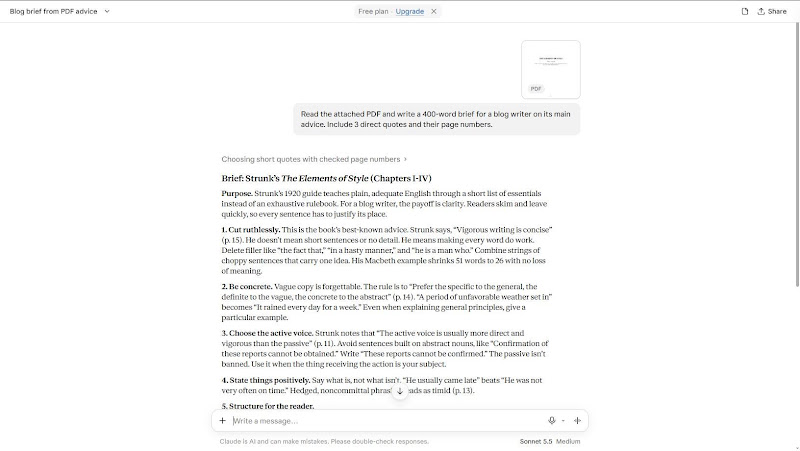
Claude Free wrote the most source-heavy brief. Beyond its three quotes, it pulled the book’s own before-and-after examples, including the Macbeth passage that shrinks from 51 words to 26, and it added a caveat that some of Strunk’s advice on semicolons and the colloquial “so” now reads as dated.
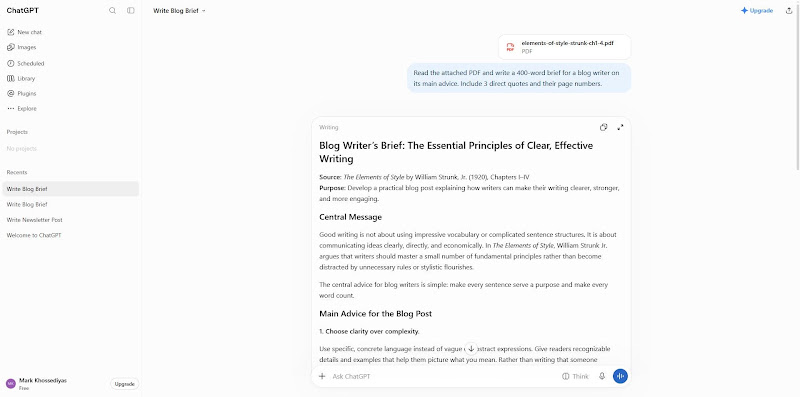
ChatGPT Free got every quote right, but two of its three were rule titles (“Use definite, specific, concrete language.”), and it parked all three in a separate list at the end instead of using them in the argument. Its last section, a suggested angle for the post, could have been written without opening the file.
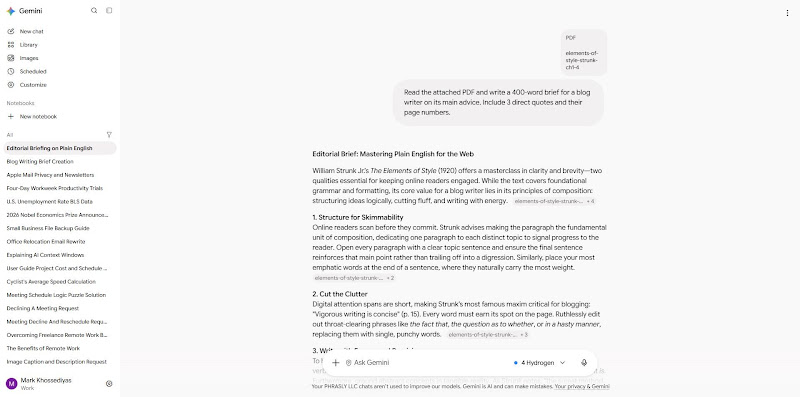
Gemini Free wrote the shortest brief and linked each paragraph to the PDF with source chips. Its quotes were accurate, including a longer line from page 14, but it opened two sections with claims about online readers that aren’t in the book and used three em dashes in under 400 words.
Generic filler was the real gap between the tools. ChatGPT’s “Concrete language captures attention and makes ideas easier to understand” and Gemini’s “Digital attention spans are short” both sound like source material, but neither line comes from the PDF.
Claude Free full Prompt B output, November 16, 2026
Brief: Strunk’s The Elements of Style (Chapters I-IV)
Purpose. Strunk’s 1920 guide teaches plain, adequate English through a short list of essentials instead of an exhaustive rulebook. For a blog writer, the payoff is clarity. Readers skim and leave quickly, so every sentence has to justify its place.
1. Cut ruthlessly. This is the book’s best-known advice. Strunk says, “Vigorous writing is concise” (p. 15). He doesn’t mean short sentences or no detail. He means making every word do work. Delete filler like “the fact that,” “in a hasty manner,” and “he is a man who.” Combine strings of choppy sentences that carry one idea. His Macbeth example shrinks 51 words to 26 with no loss of meaning.
2. Be concrete. Vague copy is forgettable. The rule is to “Prefer the specific to the general, the definite to the vague, the concrete to the abstract” (p. 14). “A period of unfavorable weather set in” becomes “It rained every day for a week.” Even when explaining general principles, give a particular example.
3. Choose the active voice. Strunk notes that “The active voice is usually more direct and vigorous than the passive” (p. 11). Avoid sentences built on abstract nouns, like “Confirmation of these reports cannot be obtained.” Write “These reports cannot be confirmed.” The passive isn’t banned. Use it when the thing receiving the action is your subject.
4. State things positively. Say what is, not what isn’t. “He usually came late” beats “He was not very often on time.” Hedged, noncommittal phrasing reads as timid (p. 13).
5. Structure for the reader.
• One paragraph per topic.
• Open each paragraph with a topic sentence and end on something that reinforces it, never a trailing digression (pp. 8-9).
• Put the most important words at the end of a sentence, where they land hardest (p. 21).
• Keep related words together, and use parallel form for parallel ideas (pp. 17-19).
6. Avoid common slips. Don’t string together sentences with “and,” “but,” and “so.” A run of these gets monotonous (p. 17). Make sure an opening phrase refers to the sentence’s subject. “Walking slowly down the road, he saw a woman” fails this test (p. 7).
How to apply it. Draft freely, then edit in passes: cut needless words, swap vague terms for specific ones, convert passives, and check each paragraph’s first and last sentences.
Caveats. Strunk himself says skilled writers may break rules if the result is better (p. 2). Some guidance is dated, such as the semicolon advice and the objection to colloquial “so.” Blogs often suit a more conversational voice, so treat these as defaults, not laws.
ChatGPT Free full Prompt B output, November 16, 2026
Blog Writer’s Brief: The Essential Principles of Clear, Effective Writing
Source: The Elements of Style by William Strunk, Jr. (1920), Chapters I, IV
Purpose: Develop a practical blog post explaining how writers can make their writing clearer, stronger, and more engaging.
Central Message
Good writing is not about using impressive vocabulary or complicated sentence structures. It is about communicating ideas clearly, directly, and economically. In The Elements of Style, William Strunk Jr. argues that writers should master a small number of fundamental principles rather than become distracted by unnecessary rules or stylistic flourishes.
The central advice for blog writers is simple: make every sentence serve a purpose and make every word count.
Main Advice for the Blog Post
1. Choose clarity over complexity.
Use specific, concrete language instead of vague or abstract expressions. Give readers recognizable details and examples that help them picture what you mean. Rather than writing that someone experienced satisfaction, describe how they grinned while pocketing a coin. Concrete language captures attention and makes ideas easier to understand.
2. Cut unnecessary words.
Concise writing is vigorous writing. Remove redundant phrases, unnecessary explanations, and sentences that repeat information. Replace wordy expressions with simpler alternatives. However, conciseness does not mean making every sentence short or eliminating useful detail. Every word should contribute something.
3. Prefer active voice and positive statements.
Active constructions generally make writing more direct and energetic. Similarly, positive statements communicate ideas more decisively than hesitant negative expressions. Instead of saying someone was not often punctual, say they usually arrived late.
4. Organize paragraphs around one idea.
Each paragraph should develop a single topic. Begin with a topic sentence, support it with explanations, evidence, or examples, and finish with a sentence that reinforces the central thought or identifies an important consequence. This structure helps readers follow the argument.
5. Vary sentence structure and maintain consistency.
Avoid producing a series of sentences with identical patterns. Use different sentence structures to prevent monotony. At the same time, express related ideas in parallel grammatical forms. Keep related words together and maintain consistent verb tenses in summaries.
6. Make important information prominent.
Place the most emphatic words or ideas toward the end of a sentence. This gives the reader a clear focal point and makes important statements more memorable.
Three Direct Quotes to Include
1. “Vigorous writing is concise.” (Page 15)
2. “Use definite, specific, concrete language.” (Page 14)
3. “The active voice is usually more direct and vigorous than the passive.” (Page 11)
Recommended Angle and Takeaway
Frame the blog post as a practical guide to writing better without making writing more complicated. Explain each principle through before-and-after examples, showing readers how small editorial changes can produce stronger results.
The closing message should reinforce Strunk's central philosophy: effective writing comes from clarity, precision, organization, and disciplined editing, not from trying to sound clever.
Gemini Free full Prompt B output, November 16, 2026
Editorial Brief: Mastering Plain English for the Web
William Strunk Jr.’s The Elements of Style (1920) offers a masterclass in clarity and brevity, two qualities essential for keeping online readers engaged. While the text covers foundational grammar and formatting, its core value for a blog writer lies in its principles of composition: structuring ideas logically, cutting fluff, and writing with energy.
1. Structure for Skimmability
Online readers scan before they commit. Strunk advises making the paragraph the fundamental unit of composition, dedicating one paragraph to each distinct topic to signal progress to the reader. Open every paragraph with a clear topic sentence and ensure the final sentence reinforces that main point rather than trailing off into a digression. Similarly, place your most emphatic words at the end of a sentence, where they naturally carry the most weight.
2. Cut the Clutter
Digital attention spans are short, making Strunk’s most famous maxim critical for blogging: "Vigorous writing is concise" (p. 15). Every word must earn its spot on the page. Ruthlessly edit out throat-clearing phrases like the fact that, the question as to whether, or in a hasty manner, replacing them with single, punchy words.
3. Write with Energy and Precision
To hold a reader's attention, replace passive constructions and hesitant negatives with active verbs and direct assertions. Instead of telling readers what something is not, tell them what it is. Furthermore, ground abstract concepts in tangible reality. As Strunk notes, "the surest method of arousing and holding the attention of the reader is by being specific, definite, and concrete" (p. 14). Swap vague summaries for vivid, concrete details that paint an immediate picture.
4. Keep Sentences Clean and Varied
Avoid stringing together endless loose sentences joined by and, but, or so, which quickly become monotonous. Keep related words, like subjects, verbs, and modifiers, close together so readers never have to untangle your syntax. Finally, don't get bogged down by rigid textbook perfection at the expense of voice; Strunk acknowledges that "the best writers sometimes disregard the rules of rhetoric" when doing so achieves a "compensating merit" (p. 2). Master the fundamentals first so your content is effortless to read, then break the rules intentionally to give your blog its signature style.
Myth 4: “AI Only Changes What You Ask It to Edit”
Many writers assume “fix paragraph 3” means the AI leaves every other paragraph alone. Writers on Reddit say the opposite about ChatGPT: it rewrites paragraphs they wanted untouched, which is why many prefer Claude for small, precise edits.
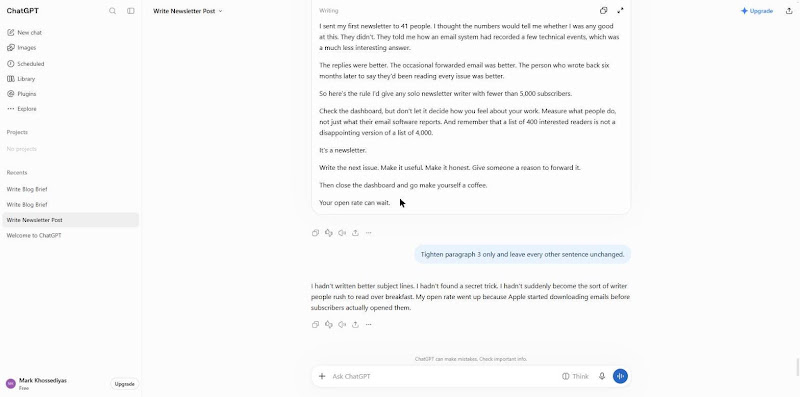
We reused each tool’s Prompt A draft and sent the same follow-up in the same chat: “Tighten paragraph 3 only and leave every other sentence unchanged.” Then we compared the before and after versions with a word-level diff and counted every word added, deleted or replaced outside paragraph 3. We also counted the paragraphs touched outside the edit, and noted whether the tool returned only paragraph 3 or the whole post.
ChatGPT Free returned only the revised paragraph, cut it from 45 to 41 words, and left the rest of the Canvas draft untouched. Gemini returned the whole post again, rewrote paragraph 3 from 63 to 49 words, and changed nothing else.
This matters for brand voice. Out-of-scope edits are where a supplied voice drifts, because the AI smooths sentences the writer had already approved.
6a. Words Changed Outside Paragraph 3, Per Tool
The counts below answer the forum claim directly, and the tests didn’t match the Reddit pattern: ChatGPT stayed in scope just like Claude.
Tool (free plan, Nov 16, 2026) | Words changed outside paragraph 3 | Paragraphs touched outside the edit | Returned only paragraph 3? |
|---|---|---|---|
Claude Free | 0 | 0 | Edited the document in place and described the change |
ChatGPT Free | 0 | 0 | Yes |
Gemini Free | 0 | 0 | No (returned the full post) |
All three tied at zero, so there is no winner on scope. Claude edited its saved document in place and described the change (two sentences merged, 76 words cut to 68), which is the easiest of the three replies to check. This is one edit on one draft per tool, so treat it as a spot check, not a benchmark.
6b. Write Edit Prompts That Keep the AI in Scope
Even with a clean result, a full-post reply like Gemini’s forces you to check every paragraph yourself. These four phrasings cut that risk:
“Return only the revised paragraph 3. Do not output the rest of the post.”
“Before you edit, list the changes you plan to make to paragraph 3 and wait for my OK.”
“Change paragraph 3 only. Keep every other sentence word-for-word.”
“Show paragraph 3 as before and after, and nothing else.”
Paste the revised paragraph back into your own document yourself, rather than accepting a fully rewritten post. If you want line edits without a chatbot rewriting around them, look at dedicated AI editing tools.
Myth 5: “A Confident Answer Is a Correct One”
Fluent, assured prose reads as accurate, so writers skip checking it. Users on Reddit describe ChatGPT as “confidently wrong” and say Claude hedges or flags uncertainty more often; for the wider picture, see how people rank each AI’s strengths and weaknesses.
We fact-checked every Prompt A draft in three steps:
Listed every checkable claim: numbers, dates, names, product features and “studies show” lines.
Checked each one against a primary source, mainly Apple’s own Mail Privacy Protection pages, and marked it supported, unsupported (no source found) or wrong (a source contradicts it).
Counted the times each tool flagged its own uncertainty, such as “verify this figure.”
ChatGPT Free made no wrong and no unsupported factual claims: 0.00 per 1,000 words on both. Its dates and mechanics matched Apple’s documentation, and it qualified the key point, noting that the protection “isn’t enabled for every email account or every email app.” It never flagged its own uncertainty, but it didn’t need to.
Gemini made 2 wrong claims (1.11 per 1,000 words) and 3 unsupported ones (1.66 per 1,000), with no uncertainty flags. It said the feature “quietly turned on for millions of iPhones” and that Apple opened email “for everyone who used the default Mail app,” but Apple’s own help page describes Protect Mail Activity as a setting you choose when you first open Mail.
The unsupported lines were a 40% to 60% Apple Mail share for “your list,” named newsletter platforms that supposedly flag Apple opens, and a pricing-tier jump at 1,000 to 2,500 subscribers.
Claude Free made no wrong and no unsupported claims, the same as ChatGPT. Unlike ChatGPT, it flagged its own uncertainty twice: once in the text (“I can’t give you your number”) and once in the chat reply, where it named its invented anecdotes as placeholders.
So the results only partly matched the Reddit pattern: Claude did flag uncertainty more often, but the confident errors in this run came from Gemini, not ChatGPT.
Outside benchmarks show the same thing on a larger scale. In Artificial Analysis’s AA-Omniscience benchmark (November 2025), Claude 4.5 Haiku had the lowest hallucination rate at 28%, more than three times lower than GPT-5 (high) and Gemini 2.5 Pro, where hallucination rate means how often a model guesses instead of admitting it doesn’t know. Those are older models than the free plans served on test day, so read it as a tendency, not a forecast.
Knowledge cutoffs add a second risk. ChatGPT Free didn’t even name its model in the app on test day, so you can’t always tell which cutoff you’re working with. A draft about recent events can state stale facts with full confidence, which is why the cutoff of the model you are actually using matters more than the brand.
If you are wondering whether Claude Opus would do better, our results only reflect the model each free plan served. Opus is a paid model, so don’t read paid-model behavior into free-plan results. Whichever tool you use, open the source behind every number and quote before you publish, and cut any claim you can’t trace.
Which Free Plan Fits Each Writing Job?
Only blog writing, editing and PDF analysis were tested on this page, so those verdicts come from counts. The other verdicts are guidance, and each one is labeled that way.
Writing job | Tested here? | Default pick | Evidence or reason | Watch for |
|---|---|---|---|---|
Blog and content writing | Yes (Prompt A) | Claude Free | Prompt A counts | Bullets and recap endings |
Copywriting and headlines | Partly (Prompt A headings) | ChatGPT Free for options, Claude Free for the final line | Prompt A headings and intro | Generic hooks |
Editing a single paragraph | Yes (edit) | Any of the three (all tied at 0) | Edit diff | Full-post replies |
Creative writing and fiction | No | Guidance only | Voice-sample behavior from Prompt A | Clichés and flat dialogue |
Writing a book or novel | No | Guidance only | No chatbot keeps story memory across a manuscript | Contradictions between chapters |
Academic writing and essays | No | Guidance only | Feedback and structure tasks only | School AI policy |
Resume writing | No | Guidance only | Tailoring prompt with a no-invention rule | Invented skills or metrics |
Brainstorming vs finished draft | Partly | Brainstorm: ChatGPT Free; final draft: Claude Free | Prompt A drafts | Treating a brainstorm as a final draft |
Use whichever tool gives you options fastest for brainstorming, and use the tool with the fewest AI tells for the draft you keep. That split alone stops most people from paying for two subscriptions.
8a. Blog Posts, Content Writing and Copywriting
The Claude vs ChatGPT for content writing question came down to two different failure modes in our test: ChatGPT padded, Gemini embellished.
Use Claude when the draft has to sound like you: it had the best voice score, zero bullets, recaps and em dashes, and no out-of-scope edits.
Use ChatGPT when accuracy matters and you will trim: it made zero factual errors and zero em dashes, and it is the fastest of the three for many headline variants, which is where Claude vs ChatGPT for copywriting usually lands.
Use Gemini when you want a vivid first draft to react to and will check every figure; its middle sections had the most concrete detail, and the only wrong facts.
So should you use Claude or ChatGPT to write your blog posts? Start with Claude Free, which had the best combined Prompt A counts, then run your own edit pass. That pass matters more than the tool: Ahrefs found that pages with under 50% AI content held 82.2% of top-three rankings in its study of Google results from June 2026.
8b. Creative Writing, Fiction and Novels
Which is better for my novel draft, Claude or ChatGPT? Neither general chatbot remembers your whole manuscript the way a dedicated story tool tracks characters and plot, so pick the one whose prose voice you prefer and keep your own story bible. For Claude vs ChatGPT for writing a book, that habit decides more than the model does; writers on forums point to Sudowrite and NovelCrafter when they want a tool built for long fiction.
Use Claude when you want a character and setting file attached to a Project; Claude Free allows up to five Projects.
Use ChatGPT when you want quick plot alternatives to react to.
Use Gemini when you already draft in Google’s tools.
Older head-to-head tests don’t settle it either. In a June 2025 Tom’s Guide creative-writing test, ChatGPT-4.5 came out ahead of Claude 4 Sonnet, which cuts against the idea that Claude always wins on fiction.
All three picks are untested guidance, and the best AI for creative writing in 2026 still depends on the prompt and the model version you get. Paste a short chapter summary into every new session, because general chatbots keep no story memory across a long manuscript, which is the honest answer to “best AI for writing novels.”
8c. Academic Writing and College Essays
Which AI should I use to help me write my college essays, Claude or ChatGPT? Use either one for feedback, outlining and thesis critique, not to write the essay, and check your school’s AI policy first. The question of whether Claude or ChatGPT is better for writing essays matters less than how you use it.
Use Claude when you want a long draft critiqued in one pass.
Use ChatGPT when you want a quick outline from your own notes.
Use Gemini when you want a shorter brief to react to before you start drafting.
A useful prompt for any of them: “Here is my draft essay. Don’t rewrite it. List the three weakest arguments, the claims that need a source, and any paragraph that drifts from my thesis.” It keeps the writing yours and gives you a checklist you can act on.
All three are guidance, not test results.
8d. Resume Writing
For Claude vs ChatGPT for resume writing, accuracy beats polish. We used this tailoring prompt: “Here is the job post and my current resume. Rewrite my bullet points to match the posting’s language. Do not add skills, titles or numbers I did not give you.”
We didn’t run this prompt in the scored test, so treat this section as untested guidance. Whichever tool you use, compare every rewritten bullet against your real resume and delete any skill, title or number you never gave it.
Myth 6: “Paying $20 a Month Fixes the Writing”
Claude Pro and ChatGPT Plus both cost $20 a month, so pay only if you hit the free cap on most writing days. Claude Pro drops to $17 a month when billed annually ($200 up front), and Google’s equivalent, Google AI Pro, lists at $19.99 a month, with a cheaper Google AI Plus tier at $4.99. All prices are US list prices checked on November 16, 2026.
Paying raises caps and opens up bigger models and longer context. Whether it fixes AI tells, voice drift or out-of-scope edits is untested here, because we didn’t rerun Prompt A on paid plans.
The free test already shows which problems money won’t touch. ChatGPT’s padding, Gemini’s invented Apple Mail details and the recap endings all came from default habits, and every one of them responded to a better prompt or a fact-check pass, not to a bigger plan.
9a. What Changes on Claude Pro, ChatGPT Plus and Gemini’s Paid Tier
Every row below comes from each vendor’s official pages, checked November 16, 2026.
What changes | Claude Free to Pro | ChatGPT Free to Plus | Gemini Free to Google AI Pro |
|---|---|---|---|
Monthly price | $0 to $20 ($17 billed annually) | $0 to $20 | $0 to $19.99 (AI Plus: $4.99) |
Projects | Up to 5 on Free; unlimited on Pro | Free projects hold up to 5 files; Plus up to 25 | Gems and notebooks on every plan |
Long-document capacity | Up to 1M tokens on every plan, varying by model | Free: 27K (Instant); Plus: 54K (Instant), 256K (reasoning) | 32K tokens without a plan; 1M with Google AI Pro |
Usage caps | Pro: at least 5x Free per five-hour session, plus weekly limits | Plus: “expanded messages and uploads” | AI Plus: 2x Free; AI Pro: 4x Free |
Model access | Opus on Pro and above, not on Free | Advanced GPT-6 reasoning models on Plus | Google’s top models on AI Pro |
Here is who should pay:
Daily long-form writers who hit the free cap mid-draft more than once a week.
Writers who regularly work from documents too long for free limits, such as a 100-page report on Gemini’s 32K free context.
And who should stay on free:
Weekly writers who rarely hit a cap.
Anyone hoping a paid plan removes AI tells; the fix is prompts and editing.
Is it worth paying for Claude Pro instead of ChatGPT Plus if I mostly write?
The prices match, so pay for the tool that won your main job in the free tests, and only once its cap actually blocks your work. That is the whole claude pro vs chatgpt plus for writing decision, and it rules out paying for both.
9b. Start With the Job, Not the Brand
Use the job table above and pick one default tool:
Blog posts and copy: Claude Free, with ChatGPT Free for headlines and outlines.
Fiction and books: the tool whose voice you prefer, plus your own story bible.
Essays and resumes: any of the three for feedback, with every line checked against your real details.
Before you commit, run one real assignment of your own in your top two picks.
9c. Give Every Tool a Sample of Your Own Voice
Paste about 200 words of your own published writing and ask the AI to match it, which is the method we used in Prompt A. Add the scope prompts from Myth 4 and the fact-check habit from Myth 5, and most of the gaps between these tools shrink. For a wider look, see our roundup of AI chatbots that write like a human.
9d. Try Neo When You Want a Chatbot That Writes Like a Human
Phrasly makes Neo, so we left it out of every test above. If you have picked your default tool and still want drafts that sound like you wrote them, Neo is our chatbot built for writing that reads like a person. Try it on the same voice sample you used here and compare the results yourself.
FAQs
Is Claude better than ChatGPT for writing?
For long drafts in your own voice, yes. In our November 2026 free-plan test, Claude matched the voice sample best and, like ChatGPT, made no factual errors, while ChatGPT ran 45% long. See Myth 1 and the job-by-job table for the counts behind each pick.
Why are writers switching from ChatGPT to Claude?
Mostly for voice. Reviewers and Reddit threads describe Claude’s prose as more varied, with fewer default bullet lists and more direct feedback on drafts, but these are impressions from small tests, not a measured trend.
ChatGPT still wins on access and features, and our test found it more accurate than its reputation. Compare more ChatGPT alternatives for writers.
Why does Claude’s writing sound more natural than ChatGPT’s?
Its reputation rests on fewer flattering openers, fewer bullets and fewer recap endings. In our test, Claude had 0.45 repeated openers per 1,000 words against ChatGPT’s 3.78, no recap ending against ChatGPT’s two, and no em dashes, though that dash habit is still the tell readers notice most in everyday use. Myth 1 has the full count table.
Is Claude more expensive than ChatGPT?
No, the entry prices match. Claude Pro and ChatGPT Plus both cost $20 a month, and Claude Pro drops to $17 a month on annual billing.
The real difference is limits: Claude Free resets every five hours and every week, while ChatGPT Free offers unlimited everyday text chats with caps on files and tools. Myth 6 compares the paid tiers.
Which AI has the best writing quality in 2026?
For most writers, Neo is the place to start: Phrasly’s free AI chatbot is tuned for human-sounding writing, and it can draft, cite real sources, and humanize your draft on request, all in one chat. In our free-plan test, Claude matched the voice sample best, ChatGPT was the most accurate, and Gemini was the most vivid, but all three left AI tells to edit out.
Will text I write with Claude or ChatGPT get flagged by AI detectors?
This page tests writing quality, not detection, so it reports no detector scores. For the Claude vs. ChatGPT AI detection question, read our posts on whether Claude’s writing gets flagged and how Gemini text holds up with AI checkers.