
AI Prompt Examples: 50+ Ready-to-Use Prompts That Actually Work
50+ AI prompt examples for writing, work, marketing, and academics. Each one showing exactly why the weak version fails and the strong version works.
You typed a question into ChatGPT, Gemini or Claude, hit enter, and got back a wall of generic text you still had to rewrite from scratch.
That’s because vague input produces unclear prompts. This article gives you 50+ AI prompt examples for writing, work, marketing, and academics that will get you exactly the outputs you want.
Each prompt example is formatted to use right now, with a breakdown of why the strong version works where the weak one fails.
What Makes an AI Prompt Actually Work?
Typically, users approach a problem from what is wrong before they know what works. A prompt isn’t a search engine query. It’s a project brief.
The clearer you are about the role, task, context and output you want, the more accurately a generative AI model can deliver.
If you want to go deeper on this, here's a full guide on how to write good AI prompts that covers the methodology in detail.
The four ingredients of a strong prompt are:
- Role: Tell the AI who it is. 'You are a senior UX researcher' produces sharper output than an unnamed assistant.
- Task: Define exactly what needs to happen. One clear action per prompt, not three bundled together.
- Context: Supply the background the model cannot guess: audience, tone, subject matter, constraints, and word count.
- Output format: Specify what you want back. A bullet list? A 3-paragraph email? A table? Saying so eliminates ambiguity.
This four-part framework is the basis of prompt engineering, and it distinguishes experts who receive consistent AI responses from those who keep regenerating.
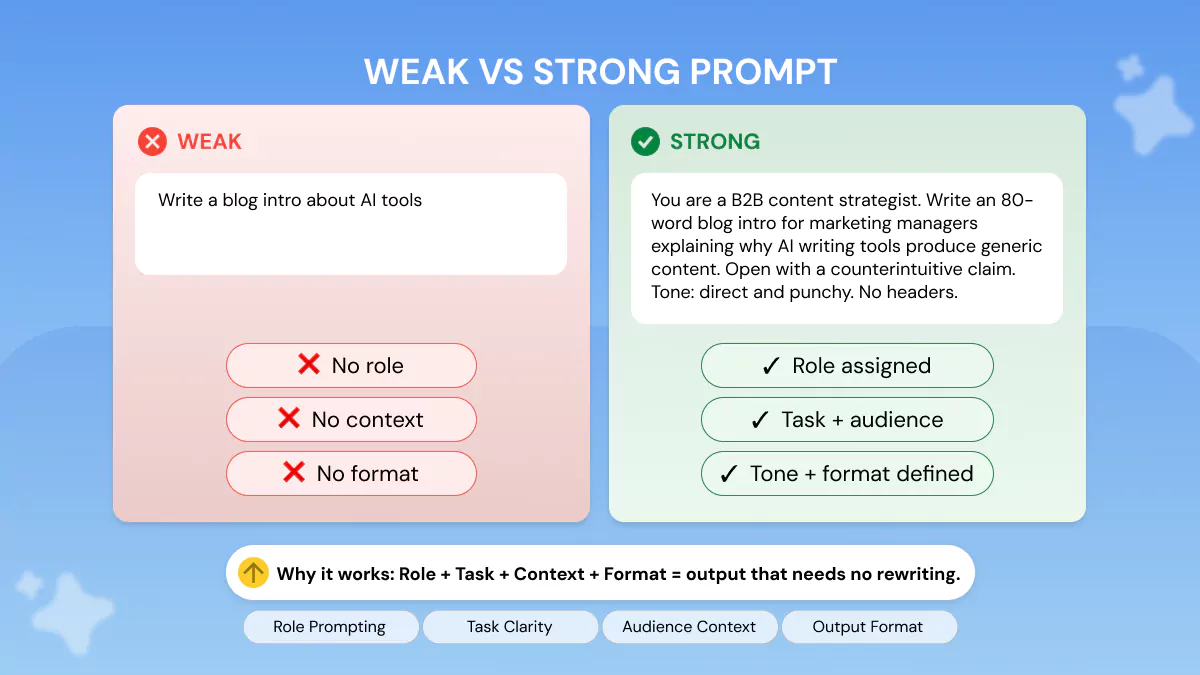
Side-by-side example:
💡 Why it works: The strong version assigns a role (B2B content strategist), defines the audience (marketing managers), sets a constraint (80 words), specifies the angle (counterintuitive claim), and locks the tone.
The AI has no room to default to generic output.
The two best ways to improve any bad-performing prompt are usually role prompting and output format specification.
Generate a Prompt Built Around Your Exact Task 👇 Its Free to Use
AI Prompt Examples for Writing & Content Creation
Because content creation is where generic output can do the most obvious harm, AI prompt examples for writing are some of the most searched for.
The examples below have copy-paste-ready prompts you can use immediately.
Blog Writing Prompts
A well-written AI prompt looks like a brief, not a search query. For blog content, that means specifying the reader, the angle, the hook style, and the word count.
If you want to go beyond blog writing, these 100+ AI creative writing prompts cover everything from fiction to storytelling.
💡 Why it works: Audience specificity (HR managers), angle specificity (the 6-month plateau), and a banned technique (no opening question) give the model precise constraints to work within instead of averaging across all possible intros.
Social Media & Email Prompts
The ideal AI prompt for LinkedIn post creation includes your role, the professional insight you want to convey, your target audience, and a hook instruction.
Vague posts are created when you leave those parameters blank.
💡 Why it works: Professional role, word count, structural instruction (short paragraphs, specific ending), and a banned element (no hashtags) turn an impossibly broad topic into a targeted, high-engagement post format.
AI Prompt Examples for Work & Productivity
AI prompt examples for work represent the highest-value use case for most professionals. Good prompts will save you time on tasks, help you communicate better, and minimize the back-and-forth that destroys productivity.
The work tasks where AI prompts deliver the biggest time savings include:
- Email drafting
- Meeting summarization
- Competitor research
- Decision analysis
- Meeting preparation
Meeting & Communication Prompts
💡 Why it works: Assigning a role (executive assistant), setting a word limit, and prescribing the exact three-part structure means the AI cannot produce a rambling wall of text. The output is boardroom-ready on the first attempt.
Research & Summarization Prompts
💡 Why it works: Specifying the reader type (non-technical VP), the word ceiling, and the exact three-point output format forces the model to distil the document rather than just paraphrase it paragraph by paragraph.
Strategy & Decision-Making Prompts
Chain-of-thought prompting allows the model to reason step-by-step towards an answer for complicated decisions instead of directly producing an answer that may overlook important dependencies.
Two popular prompt frameworks for strategic work are CO-STAR (Context, Objective, Style, Tone, Audience, Response) and RACE (Role, Action, Context, Execute).
They both provide you with a repeatable framework for high-stakes prompts. Research into instruction tuning reveals that models have vastly better responses when the goal and evaluation criteria are stated outright at the beginning.
AI Prompt Examples for Marketing
Most AI prompt examples for marketing stop at a flat list. Below, you get the weak to strong transformation so you can learn the logic and apply it to any campaign, instead of just using a template.
Ad Copy & Landing Page Prompts
💡 Why it works: Character limit, target persona, angle guidance, and a banned phrase category give the model precise guardrails. You get 5 testable variants, not one generic suggestion.
Social & Campaign Prompts
For a deeper library covering ads, landing pages, product launches, and campaign reporting, the full collection of AI prompts for marketing has 50+ ready-to-use templates built for every stage of a campaign.
AI Prompt Examples for Students & Academic Use
AI prompt examples for students are one of the most underserved categories. Most prompt guides are written for professionals and skip the academic use case entirely.
Essay Planning & Research Prompts
Can you show me AI prompt examples for students writing essays? Yes, and the biggest change you can make is changing your topic dump to a structured brief. See the example below.
💡 Why it works: The strong prompt defines word count, audience, essay type, topic angle, and output type (structure only, not the finished essay). This means the AI aids planning rather than doing the work for the student.
Study & Revision Prompts
These prompts use the model as your study partner instead of a cheat-sheet. They help turn natural language processing into a personalized tutor.
- Flashcard generator: You are a study coach. Based on the following lecture notes, create 15 flashcards in Q&A format. Each question should test understanding, not just recall. Vary the question types: definition, application, and comparison. [PASTE NOTES]
- Concept explainer (Feynman technique): You are a brilliant teacher explaining complex ideas to a 15-year-old. Explain [CONCEPT] in under 150 words. Use one everyday analogy. Avoid all jargon. End with one example from real life.
- Practice exam question generator: You are a university professor. Based on the following topic summary, write 5 exam-style questions at three difficulty levels: recall, application, and analysis. Include the ideal answer length for each. Topic: [PASTE TOPIC SUMMARY]
- Revision schedule planner: You are a productivity coach. I have 3 weeks before my [SUBJECT] exam. Based on the syllabus below, create a day-by-day revision plan with estimated time allocations and a 2-day buffer before the exam. Syllabus: [PASTE SYLLABUS]
A Note on Academic Integrity
These prompts are intended to help you understand, plan, and research. They are not meant to create work that you then submit as if it were yours.
Submitting AI-generated output as your own work is generally considered a violation of academic integrity at most institutions.
Generate Your Own AI Prompts Instantly
Writing good prompts from scratch requires practice. Even with solid examples, crafting the appropriate role, context, constraints, and output format for each new task can be time-consuming.
If you're still figuring out which tool fits your workflow, this breakdown of the best AI prompt generators is a good place to start before committing to one.
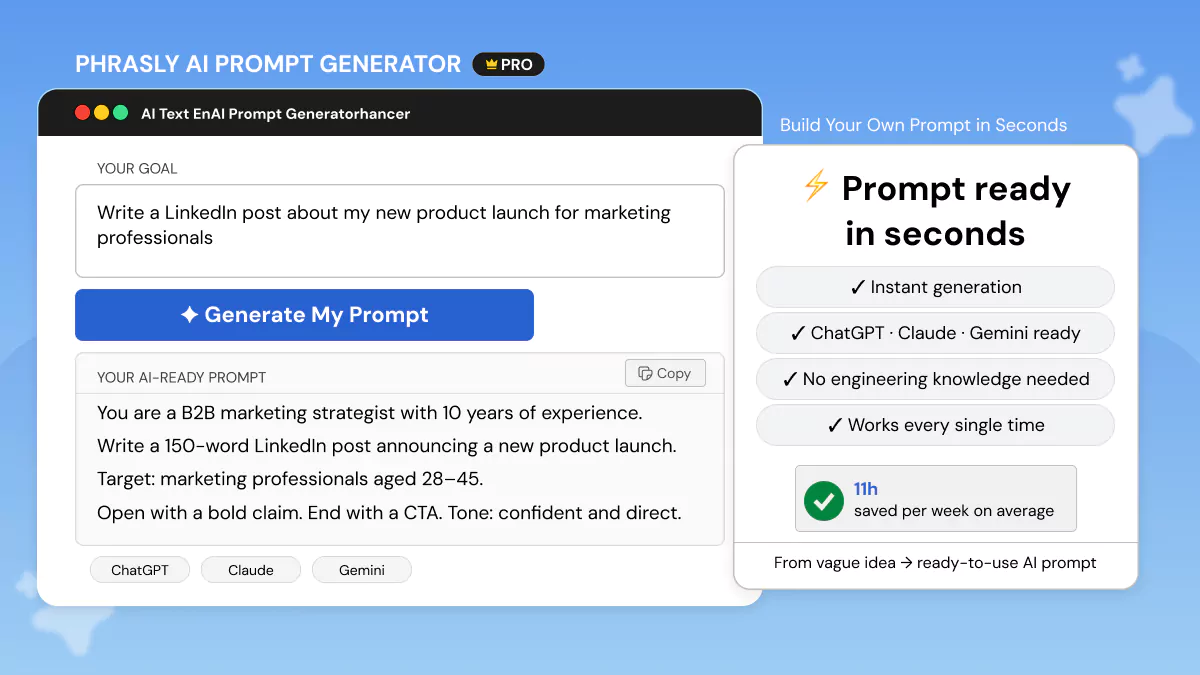
The Phrasly AI Prompt Generator instantly creates a complete, ready-to-copy-and-paste prompt for any task in just seconds.
Simply describe what you want and let Phrasly handle the prompt engineering architecture behind the scenes.
- No prompt-writing experience needed.
- Supports all major AI models, including ChatGPT, Claude, and Gemini.
- Built for professionals, marketers, students, and content creators.
- Free to start. No credit card required.
FAQs
What is an example of a prompt in AI?
A prompt is any instruction you provide to a language model to get it to generate a specific output.
For a deeper look at how prompts work across both human and AI writing contexts, this guide on what is a prompt in writing covers the different prompt types, how to read them, and how to use them effectively.
A basic example is: 'You are a copywriter. Write a 50-word product description for wireless earbuds targeting gym-goers. Focus on sound isolation and sweat resistance. Tone: energetic.'
That one prompt sets the role, task, audience, focus, and tone.
What are good prompts to use for AI?
All effective prompts contain four elements: role, task, context, and format. The best prompts also contain constraints. Templates using this structure are referred to as prompt templates.
What are the best ChatGPT prompt examples for work tasks?
Best ChatGPT prompts for work are those that define a role, target deliverable, format and length. See this dedicated collection of the best ChatGPT prompts for professionals, organized by use case, so the right prompt is easy to find.
If you're using Google's model instead, this collection of the best prompts for Gemini AI is worth bookmarking alongside it.
Prompts that work great for ChatGPT include meeting summary prompts, email writing prompts, competitor research prompts, and decision-analysis with chain-of-thought prompting.
How do I write a good AI prompt?
Begin with either a zero-shot or few-shot prompt. Either way, be sure to clearly define role, task, context, and output format. Don't use ambiguous verbs.
Be explicit about what you want the model to do: 'draft', 'rewrite', 'compare', 'summarize', or 'generate' are all good choices. The context window is large in modern models. Use it.
Since different models also have their own quirks, it's worth reading up on model-specific guidance. This guide on how to write better prompts for Claude AI is a solid example of how small adjustments can meaningfully improve your results.
Once the basics are in place, applying prompt optimization techniques is what takes output from good to consistently reliable.
What is the difference between a good and a bad AI prompt?
A weak prompt presents the AI with a topic. A strong prompt gives it a brief. The distinction is specificity: role, audience, format, constraints and tone are determined upfront.
Strong prompts, sometimes crafted using prompt templates like CO-STAR or RACE.


Keep reading

How to Prompt Claude Fable 5 (With Copy-Paste Prompts)
Claude Fable 5 doesn't respond like older Claude models. Get 7 prompting rules from Anthropic's own docs, copy-paste templates for writing, research, and work, plus current pricing and plan access after the July 20 change.

Claude Prompt Generator: Build Better Prompts for Claude AI (Free Tool)
Learn how a Claude prompt generator builds better prompts for every Claude model, from Sonnet 4.6 to Fable 5. Includes ready-to-use XML templates, effort levels, and a free tool.