
Gemini AI Prompts: Examples, Templates & How to Write Better Ones in 2026
From Gemini 3.5 Flash to Nano Banana 2 and Veo, the 2026 Gemini lineup changed fast. Here's how to prompt each model properly, with 100+ ready-to-use examples.
At Google I/O 2026 in May, Google pushed the Gemini ecosystem further than ever. Gemini 3.5 Flash arrived on May 19 as the fastest model for agentic work, alongside Veo 3.1 Lite for video and Lyria 3 for music.
If you're hunting for the best Gemini prompts 2026 has to offer, or just the latest prompt for Gemini to try today, the lineup has changed a lot since this guide was first published.
Even with all these updates, the quality of Gemini's output still depends heavily on the prompt you give it.
A vague prompt yields a generic answer, while a well-structured prompt can generate detailed reports, polished emails, research summaries, and even videos and music.
Below, you'll find the top prompts for Gemini AI, covering everything from Gemini 3.5 Flash and Gemini 3.1 Pro to Nano Banana 2, Veo, and Lyria, plus a new Gemini prompt set built around the 2026 models.
Generate Your Gemini Prompt for Free 👇
What Makes Prompting Gemini Different in 2026
If you've been copy-pasting ChatGPT prompts into Gemini and wondering why the results feel off, that's probably why.
Gemini 3 isn't just a new version of another LLM. It's a fundamentally different kind of AI, and it responds to prompts differently, too.
And in 2026, it moves faster than ever. As of June 2026, Gemini 3.5 Flash is the fastest model in the lineup for agentic tasks, and that subtly changes how it handles context. It's built to plan, execute, and iterate on multi-step work quickly, so feeding it a clean, well-ordered context up front matters more than it used to.
Here's what makes it different: Gemini processes text, images, audio, and video natively.
It also supports up to 1 million tokens of context, which means it can analyze hundreds of pages of documents, entire codebases, or long video transcripts in one go. Earlier AI tools couldn't come close to that.
But more context capacity also means more responsibility on your end.
The way you write your Gemini instructions prompt now has a much bigger impact on what you get back.
Three things that make Gemini uniquely different to prompt:
- It weighs context more heavily than instructions alone. If you upload a document or include background information, Gemini prioritizes that over your one-line command. With Gemini 3.5 Flash, this matters even more for agentic loops. The model can move through multi-step tasks quickly, but only when the source material is clear, relevant, and well-ordered. More relevant context = better output.
- It follows constraints literally. Telling Gemini to "keep it short" won't always work. "Maximum 150 words" will. The model treats your constraints as rules, not suggestions. So spell out limits, format, exclusions, and sequence, especially for long-horizon or multi-step tasks.
- It defaults to direct, efficient answers. Gemini is optimized for speed and conciseness, and 3.5 Flash pushes this even further with fast agentic execution. If you want a detailed breakdown or step-by-step explanation, you have to ask for it explicitly; otherwise, you'll get a summary.
This matters especially if you're using Gemini prompts for anything beyond simple questions.
Once you know these three behaviors, writing better Gemini prompts becomes a lot more straightforward. The next section breaks down exactly how to structure them.
The 3-Part Gemini Prompt Formula (Intent + Context + Constraints)
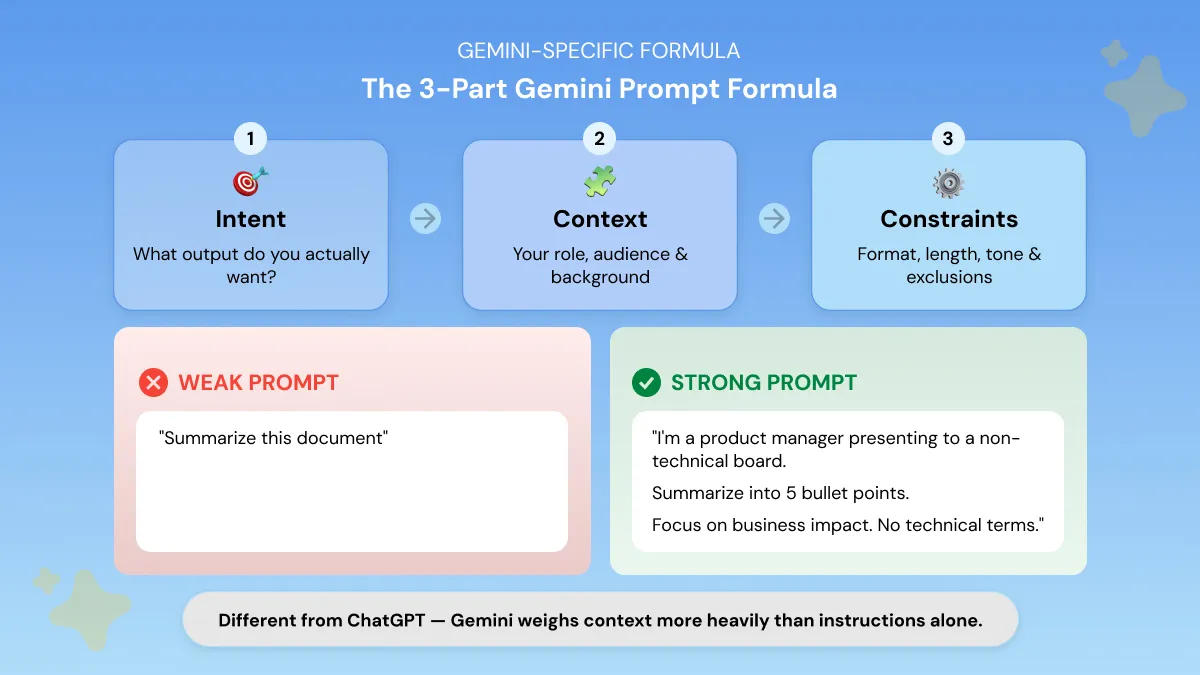
The most common question beginners have is: what prompt should I use for Gemini?
The answer depends on your output and this three-part formula makes that decision simple every time.
Most people start by typing into Gemini the same way they'd search Google.
That works for simple lookups, but it breaks down fast when you need something genuinely useful.
Gemini is a reasoning system, not a search engine. It responds to structure, and once you give it that structure, the quality of your output changes immediately.
The formula has three parts. Every strong Gemini prompt uses all three.
Here's what that looks like in practice:
Same task. Completely different output quality.
The strong version tells Gemini the intent (5-bullet summary), the context (non-technical board presentation), and the constraints (no jargon, 120-word cap).
This is the foundation of every good Google Gemini prompt template and once you internalize it, writing prompts gets much faster.
Reusable Gemini Prompt Template
Once you understand the 3-part formula, this template makes it easy to apply every time.
Below is a Gemini prompt copy paste template you can reuse for any task. Fill in the brackets and you're done.
A filled-in example looks like this:
That's it. Same structure, any task.
If you're on Gemini 3 Pro or 3.1 Pro, you can also select “Pro” or “Thinking mode”. This activates deeper reasoning for complex research or multi-step tasks and it makes a noticeable difference on detailed outputs.
Gemini Model Guide 2026: Which Model and How to Prompt It
Gemini 3 Pro launched in November 2025. Google's Gemini lineup changed fast after this article was first published. Between March and May 2026, Google released or stabilized 8+ new models across text, image, video, audio, music, embeddings, and open-weight AI, culminating in the May 19, 2026, launch of Gemini 3.5 Flash at Google I/O 2026.
That matters because a single Gemini prompt does not work equally well across all models. Each one rewards a different prompting style.
A prompt for Gemini 3.5 Flash should read like a task chain. A prompt for Veo 3.1 Lite should describe scene, motion, camera angle, and duration. A prompt for Lyria 3 should include genre, mood, BPM, instrumentation, and length.
The old Gemini 3 Pro vs Gemini 3.1 Pro comparison still holds, but it is no longer the whole picture. Gemini 3.1 Pro remains the stronger choice for deep reasoning and careful long-context work (it scored 77.1% on ARC-AGI-2, more than double Gemini 3 Pro's 31.1%). Gemini 3.5 Flash is now the better pick for fast, agentic workflows, coding, and multi-step execution, delivering 4x more output tokens per second than other frontier models.
Here is the updated Gemini model guide for 2026.
No matter which model you're prompting, you don't have to memorize a different format for each one. Phrasly's free AI prompt generator builds prompts for every current Gemini model, from Gemini 3.5 Flash agentic task chains and Gemini 3.1 Pro reasoning prompts to Nano Banana 2 image prompts, Veo 3.1 Lite video prompts, and Lyria 3 music prompts.
It also covers Gemini Omni Flash, Google's newest any-input video model from I/O 2026. Omni Flash rolls out through the Gemini app, Google Flow, and YouTube Shorts, and generates 10-second clips with audio from text, image, audio, or video inputs. Support for Gemini 3.5 Pro is ready for when the model finishes rolling out this month.
Describe your task once and get a prompt structured for the right model.
Gemini 3 Pro Prompts for Deep Research & Analysis
These prompts are built for the kind of work that used to take hours.
Analyzing large documents, mapping competitive landscapes, or working through multi-variable decisions.
Each of these follows the Intent + Context + Constraints formula.
The explicit output format instruction at the end is what separates a clean, usable result from a wall of text.
Gemini 3.1 Pro Prompts for Agentic & Long-Context Tasks
Gemini 3.1 Pro is where things get genuinely powerful. It handles multi-step workflows, long uploaded documents, and multimodal inputs.
The key with 3.1 Pro: place any examples or reference material before your task instruction.
The model prioritizes earlier context, so front-loading your source material consistently produces better outputs.
Gemini 3.5 Flash prompt (agentic loop):
This is where Gemini 3.5 Flash earns its place. Because it's built for fast agentic execution, it can run a multi-step loop like this in one pass instead of making you prompt four separate times.
100+ Best Prompts for Gemini AI (By Output Type)
If you're looking for someone to just give you some prompts for Gemini you can use right now, this is that section.
This is the most comprehensive list of all prompts for Gemini in one place, from practical work prompts to creative and cool ideas, organized by what you actually want to create: images, writing, research, work tasks, student assignments, video, and audio.
Most people don't sit down thinking, "I'm a content marketer, what should I prompt?" They think, "I need an email written" or "I need this report summarized in two minutes."
That's exactly how this section is built.
Skip to what you need to produce, copy the prompt, swap the placeholders, and you're done.
Every prompt below is formatted for direct copy-paste, just swap the [brackets] for your specifics. These are free prompts for Gemini, so you can test them straight inside Gemini or use Phrasly's free Gemini prompt generator to customize one around your exact task.
Photo Prompts for Gemini AI: Nano Banana 2 Edition
Let's start with image generation, because Nano Banana 2 changes what's possible here.
Nano Banana 2 first launched as Gemini 3.1 Flash Image Preview on February 26, 2026, built as a high-efficiency image model optimized for speed and high-volume use. As of May 28, 2026, both Nano Banana 2 (officially Gemini 3.1 Flash Image) and Nano Banana Pro (officially Gemini 3 Pro Image) reached general availability in the Gemini API.
That matters because Gemini now has two clear image lanes. Nano Banana 2 is the faster choice for quick image creation, edits, and everyday visual prompts. Nano Banana Pro is the one to reach for when you need more polished, detailed, higher-control output. Nano Banana 2 is now the default image model across the Gemini app, Google Search AI Mode, and Google Lens, so the quality bar it has to clear is genuinely high.
What makes it genuinely useful is that it's built into Gemini's multimodal architecture, so it can pull from real-world knowledge to generate more accurate scenes, diagrams, and visuals. You can describe the composition, reference visual context, and ask for precise edits rather than a vague "make this better."
Below are prompts organized by use case.
Gemini Cinematic & Portrait Prompts
Gemini Professional & LinkedIn Headshot Prompts
If you need something polished and professional, these work well.
Image Quality Enhancement Prompt
Background Replacement & Scene Prompts
Already have a subject photo? These prompts let you swap the environment while keeping the subject intact.
Infographic & Data Visualization Prompts
Because Nano Banana 2 can render text within images, it's also surprisingly good at diagrams and visual content.
Gemini Prompts for Writing & Content
Image generation is just one side of Gemini. If writing is where you spend most of your time, these prompts are where you'll get the most value day-to-day.
Writing is where most people spend the bulk of their day, emails, reports, briefs, blog posts, client updates.
The tasks are different but the problem is the same: they take longer than they should. These prompts cut that time down without cutting the quality.
Gemini also embeds an invisible SynthID watermark in its text output, and our guide on how to remove the Gemini text watermark explains what that watermark is and how it affects your drafts.
Gemini Blog & Article Writing Prompts
Gemini Professional Bio & LinkedIn Prompts
Gemini Email & Communication Prompts
Gemini Prompts for Research & Summarization
This is where Gemini's long-context capability really earns its place.
It handles dense, lengthy documents better than almost any AI tool right now and these prompts make that practical for everyday work.
Gemini Document & Report Summarization Prompts
Gemini Academic & Literature Research Prompts
Gemini Notes & Action Items Prompts
Gemini Prompts for Work & Productivity
For the strategic and operational side of work, these are built for the tasks that take up the most time and brain space.
Gemini Strategy & Planning Prompts
Gemini Data & Reporting Prompts
Gemini Google Workspace-Specific Prompts
These prompts only work inside Google Workspace, where Gemini has direct access to your live documents and email threads. Here is a full breakdown of how to prompt Workspace effectively:
System Prompts and Personal Context Instructions for Gemini
The best system prompt for Gemini is not a one-time message. In the Gemini app, the feature is called Instructions for Gemini, and it lives inside Personal Context (part of Gemini's Personal Intelligence settings). You set your default response preferences once, and Gemini applies them across every future chat. You can toggle these instructions on or off from the Gemini app or web app whenever you want.
Use a system prompt when you want Gemini to consistently write, research, summarize, or format work in the same style. Here are three you can copy straight into the Instructions field.
Set these once in Gemini's Instructions field, and every response will align to your defaults.
Gemini Prompts for Students & Academic Use
These Gemini prompts for students turn Gemini into a study partner, not a shortcut machine. Use them to structure essays, prepare for exams, simplify difficult concepts, map research evidence, and organize your ideas before you start writing.
Essay Structuring
Best for: when you know your topic but need help turning it into a clean essay structure.
Best for: persuasive essays, debate assignments, and papers where your argument needs to be clear.
Study & Exam Prep
Best for: when finals are close and you need a realistic plan from your own class material.
Best for: biology, chemistry, economics, statistics, coding, or any subject that feels abstract.
Research & Applications
Best for: literature reviews, research essays, and assignments where your evidence needs to match your claims.
Best for: when you want structure and brainstorming help while keeping the final essay in your own voice.
For more study-specific prompts, see our ChatGPT Prompts for Students guide.
For students working on visual projects, Gemini's image generation through Nano Banana 2 is worth exploring, too. The infographic and diagram prompts from the photo section earlier work well for presentations, reports, and academic visuals.
That's the full library. If you'd rather have a single go-to prompt built for your specific work, Phrasly's free Gemini prompt generator creates one in seconds 👇.
New Trending Gemini Prompts: Updated June 2026
Since Google I/O 2026, the latest Gemini prompts are no longer just about writing better emails or summarizing documents. Gemini now covers fast agentic work with Gemini 3.5 Flash, video generation with Veo 3.1 Lite, and music generation with Lyria 3. If you are looking for a new Gemini prompt to try in 2026, start with the examples below.
Here's a quick reference for the newest 2026 models and the prompt style each one rewards:
Each one is covered in detail above, and the copy-ready prompts below are built around exactly these formats.
Best Gemini 3.5 Flash Prompts for Agentic Tasks
Gemini 3.5 Flash is best for fast multi-step work where you want the model to plan, execute, and format the result without needing five follow-up prompts.
Gemini Prompts for Veo Video Generation
If you need video generation prompts for Gemini, use Veo 3.1 Lite. Here are 4 copy-ready examples.
Google launched Veo 3.1 Lite Preview on March 31, 2026 as its most cost-efficient video generation model, built for rapid iteration and high-volume creative work. You access it through the Gemini API and Google AI Studio rather than the standard Gemini chat box, which makes it ideal for teams testing many video ideas quickly: product shots, social clips, explainers, and brand reels. Clips run short, roughly 4 to 8 seconds, so write each prompt with that length in mind.
Every Veo prompt works best when it names five things: scene, motion direction, camera angle, duration, and style. The examples below follow that exact pattern. Swap the [brackets] for your specifics and copy.
It is best for quick video concepts, social clips, product visuals, or brand reels (it runs via the Gemini API and AI Studio).
Gemini Prompts for Lyria Music Generation
Lyria 3 is Google's music generation model for creating songs from text or image prompts. It launched on March 25, 2026 with two versions: lyria-3-clip-preview for 30-second clips and lyria-3-pro-preview for full-length songs.
Both run through the Gemini API (not the chat box), and every track carries a SynthID watermark. That makes Lyria 3 useful for jingles, study tracks, brand music, and cinematic audio ideas.
A strong Lyria prompt names five things: genre, tempo (BPM), mood, instrumentation, and duration. The examples below follow that pattern. Swap the [brackets] and copy.
It is useful for turning a mood, campaign idea, or image into music. Use detailed prompts with genre, BPM, mood, instruments, and duration.
These are the latest Gemini prompts worth testing first in 2026. Need one built around your exact task instead? Try Phrasly's free AI prompt generator to create a ready-to-use Gemini prompt in seconds 👇.
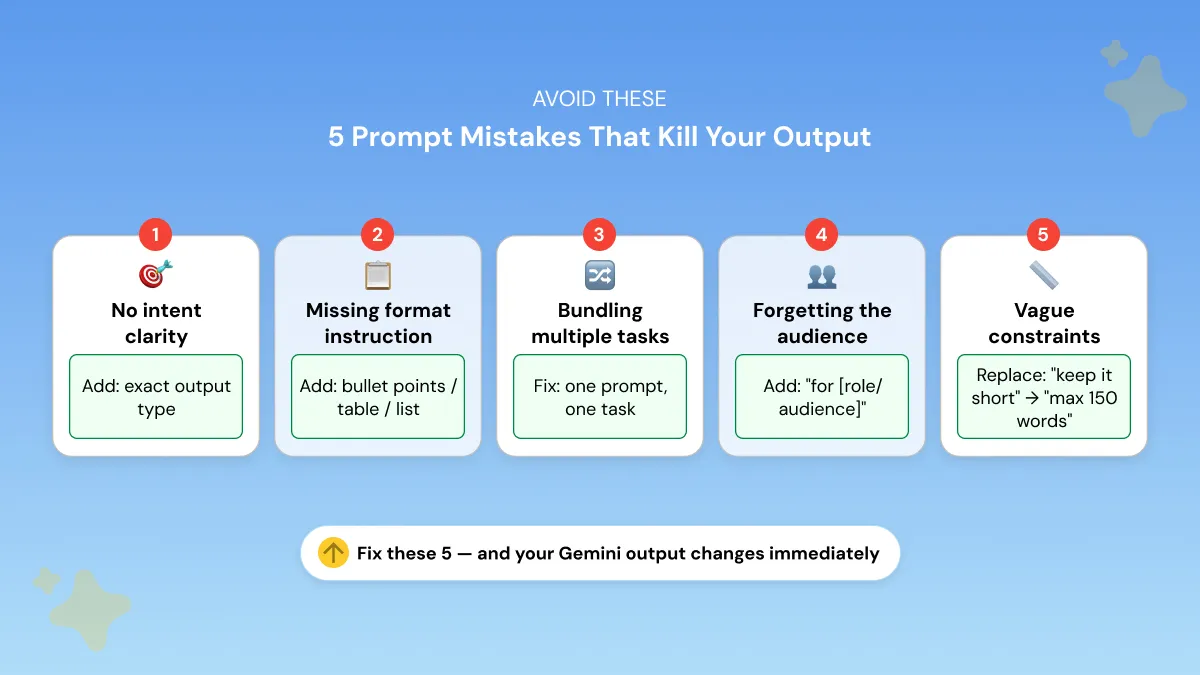
5 Gemini Prompt Mistakes That Kill Your Output
The fastest way to get better, more detailed responses from Gemini is simple: add an explicit format instruction and a word count floor.
For example, instead of 'explain this topic,' write 'explain this topic in at least 200 words using a numbered breakdown.'
The gap between a mediocre and a great Gemini response is almost always in the prompt itself.
Here are the five patterns that consistently produce bad output.
1. No intent clarity If you don't specify the exact output you want, Gemini defaults to a generic overview. "Tell me about content marketing" gets you a textbook summary. "Give me 5 content marketing tactics a B2B SaaS company can run this quarter" gets you something actionable. Same topic, completely different result.
2. Missing format instruction Gemini writes long prose by default. If you want bullet points, a table, or a numbered list, say so explicitly. Don't assume the model will choose the right format for your situation. It won't.
3. Bundling multiple unrelated tasks Gemini 3 can handle complexity, but cramming two or three different tasks into one prompt dilutes the output quality on all of them. Write a separate prompt for each task. It takes 30 extra seconds and the results are noticeably better.
4. Forgetting to specify your audience Without an audience, Gemini writes for everyone, which effectively means nobody. "Explain cloud storage" lands very differently when you add "to a 60-year-old small business owner who has never used it before." Audience context shapes tone, vocabulary, and depth.
5. Vague negative constraints "Keep it short" doesn't work. "Maximum 150 words" does. "Don't make it too technical" doesn't work. "Avoid industry jargon, write for a general audience" does. Gemini follows constraints literally, so vague ones get ignored.
The fix for all five mistakes is the same: go back to the Intent + Context + Constraints formula.
For deeper prompting strategy beyond these basics, see our guide on prompt optimization techniques.
Zero-Shot vs. Few-Shot Prompting in Gemini — When to Use Each
One more prompting concept worth understanding, especially if you're using Gemini for client work or repeatable tasks.
Zero-shot prompting means giving Gemini a task with no examples. You simply describe the intent, context, and constraints.
This approach works well for:
- brainstorming
- first drafts
- exploratory tasks
- research summaries
because it allows the model to reason freely without being influenced by a predefined style.
Zero-shot example
Few-shot prompting means including one or more examples of the output style you want before giving the task.
This works best when tone consistency or formatting matters, such as:
- client deliverables
- branded content
- recurring content formats
- structured responses
The examples act like a mini style guide that the model learns from.
Few-shot example
Two or three examples are usually enough to guide the model effectively.
How Gemini's Unique Features Change Your Prompting Approach
Most generic prompt guides treat Gemini like any other chatbot.
But Gemini has capabilities no other AI tool has, and if you're not prompting around them, you're leaving a lot on the table.
Prompting Gemini with Google Workspace Context
Gemini can pull live data directly from your Gmail, Google Docs, Drive, Sheets, and Calendar.
This isn't a chat window you switch to. It's an AI embedded inside the tools you're already working on.
That changes how you should write prompts. Instead of copying and pasting context manually, you can reference it directly.
A few prompting habits that work specifically well in Workspace:
- Reference documents by name or project context rather than describing them from scratch
- Ask Gemini to cross-reference multiple sources in one prompt
- Be specific about what output you need from that information. Summary, task list, email draft, etc.
That single prompt pulls from two live sources and produces something you can send.
Prompting Gemini's Deep Research Mode
Deep Research is available on Google AI Pro ($19.99/month) and it works differently from a standard Gemini response.
Instead of answering quickly, it searches across dozens of web sources, evaluates them, and compiles a structured report.
It's particularly useful for market research, competitor analysis, industry trend reports, and technical briefings.
Because it produces a full structured report rather than a short answer, your prompt needs to do more upfront work. This template consistently gets the best results:
Define the topic, the structure, and the audience. Deep Research has everything it needs to organize the output without going off track.
How Long Should a Gemini Prompt Be?
Short answer: as long as it needs to be but not a word longer.
Gemini 3 supports up to 1 million tokens of context, which is enormous. But that capacity is there for your source material, not your instructions. Clarity always beats length.
Here's a practical guide:
- Simple tasks (summary, caption, rewrite): 1–3 sentences is enough
- Professional outputs (emails, reports, strategy docs): 4–7 sentences with explicit format instructions
- Gemini 3 Pro / 3.1 Pro complex tasks: Longer structured prompts work best. Include the section headers you want in the response so the model organizes its output to match
The pattern is consistent across all of them: structure matters more than length.
A 3-sentence prompt with clear intent, context, and constraints will outperform a 10-sentence prompt that rambles.
Generate Your Own Gemini Prompts — Without Starting From Scratch
Every use case, industry, and audience is different.
The prompts in this guide are a strong starting point, but a template written for a generic product manager isn't the same as one built around your specific goal, your audience, [your model,] and your exact output.
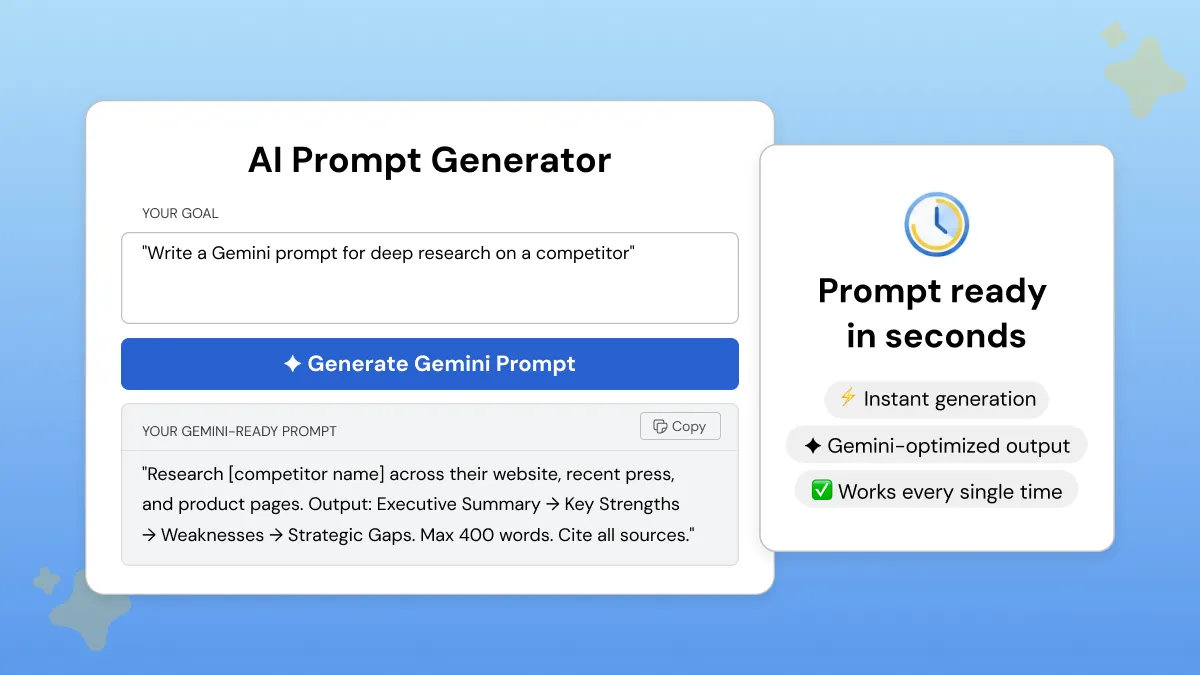
That's the gap Phrasly's AI Prompt Generator fills.
You tell it what you're trying to do, add a bit of context, and choose the AI tool you want to prompt. Phrasly then builds a fully structured, ready-to-use prompt around your task, whether that's writing, research, photo editing, Workspace tasks, academic work, or Gemini 3.5 Flash-style agentic workflows.
- No prompt engineering experience needed.
- Works for every 2026 Gemini model, including Gemini 3.5 Flash, Gemini 3.1 Pro, Nano Banana 2, Veo 3.1 Lite, and Lyria 3, plus ChatGPT, Claude, and other AI tools.
- Free to try.
FAQs
What is the difference between Gemini 3 and Gemini 3.1 Pro?
Gemini 3 is Google's standard model family for everyday tasks: multimodal input, writing, planning, and general assistance. Gemini 3.1 Pro is built for more complex reasoning, long-context work, and multi-step tasks, scoring 77.1% on ARC-AGI-2.
As of June 2026, Gemini 3.5 Flash is the newest model above both for fast agentic workflows and coding. If Gemini 3 is the generalist and Gemini 3.1 Pro is the deep-reasoning specialist, Gemini 3.5 Flash is the faster execution model for structured, multi-step prompts.
Can I use the same prompts for Gemini and ChatGPT?
Partially. Basic prompts transfer well, but Gemini responds better to its 3-part Intent + Context + Constraints structure than to ChatGPT's role-based format.
Gemini-specific features like Workspace integration, Deep Research mode, Nano Banana 2 image generation, Veo video generation, and Lyria music generation require prompts tailored to how Gemini works. If you're looking for prompts built specifically for ChatGPT, read our 75+ Best ChatGPT Prompts for Professionals guide, or our Claude AI prompts guide if you work across multiple AI tools.
Is it safe to upload photos to Gemini AI?
For everyday use, yes, but you should still be careful with sensitive images. Google says Gemini Apps chats are not used to show ads, and Google Photos says personal data in Photos is not used for ads or reviewed by humans unless you submit feedback.
That said, avoid uploading private documents, IDs, confidential work files, or sensitive personal photos unless you understand the privacy settings on your account. Apply the same caution you would with any cloud-based tool.
Can Nano Banana 2 keep my face or subject consistent when editing photos?
Yes. You can upload a photo and ask Gemini to make targeted edits while preserving the same person, subject, pose, or product details.
For best results, use a clear reference photo and say exactly what should stay the same. For example: "Keep the face, pose, and outfit unchanged, but replace the background with a modern office."
How do I use Gemini for photo editing with Nano Banana 2?
Upload your image into Gemini, then describe the exact edit you want. Be specific about what should change and what should stay the same.
A good prompt would be: "Keep the subject unchanged, improve lighting and sharpness, and replace the background with a misty forest at sunrise." The more precise your preservation instructions, the better the result.
What is Gemini 3.5 Flash, and how is it different from Gemini 3.1 Pro?
Gemini 3.5 Flash is Google's newer model for fast agentic execution, coding, and multi-step workflows, released on May 19, 2026. Google's documentation says it supports a 1M-token context window, thinking, and a 65K max output tokens, and runs up to 4x faster on output tokens than comparable frontier models.
Gemini 3.1 Pro is better suited for deeper reasoning and careful long-context analysis. Gemini 3.5 Flash is the one to use when you want speed, structured task chains, and fast autonomous execution. Both have 1M token context windows.
Can Gemini AI generate music with Lyria 3?
Yes. Lyria 3 launched through the Gemini API on March 25, 2026, with two versions: lyria-3-clip-preview for 30-second clips and lyria-3-pro-preview for full-length songs.
Both models accept text and image inputs and generate high-quality 48kHz stereo audio. For now, treat Lyria 3 as an API-based music model rather than a feature available to every Gemini chat user.
How do I write video prompts for Gemini using Veo 3.1 Lite?
Veo 3.1 Lite is a Gemini API video generation model launched on March 31, 2026. Effective Veo prompts describe the scene, subject, motion direction, camera angle, duration, visual style, and audio mood.
A simple format is: "Create an [X]-second video of [scene]. Motion: [pan/zoom/static]. Camera angle: [close-up/wide/overhead]. Style: [cinematic/animated/product demo]. Mood: [calm/energetic/dramatic]." Full examples are in the video prompts section above.
Is there a free Gemini prompt generator?
Yes. Phrasly's AI Prompt Generator is free to use and builds a fully structured Gemini prompt around your specific task, audience, and output format.
It works for Gemini 3.5 Flash, Gemini 3.1 Pro, ChatGPT, Claude, and other AI tools, and you can generate prompts without creating an account. Our Gemini Prompt Generator guide walks through exactly how it works with examples.


Keep reading

How to Prompt Claude Fable 5 (With Copy-Paste Prompts)
Claude Fable 5 doesn't respond like older Claude models. Get 7 prompting rules from Anthropic's own docs, copy-paste templates for writing, research, and work, plus current pricing and plan access after the July 20 change.

Claude Prompt Generator: Build Better Prompts for Claude AI (Free Tool)
Learn how a Claude prompt generator builds better prompts for every Claude model, from Sonnet 4.6 to Fable 5. Includes ready-to-use XML templates, effort levels, and a free tool.