
Claude Prompt Generator: Build Better Prompts for Claude AI (Free Tool)
Learn how a Claude prompt generator builds better prompts for every Claude model, from Sonnet 4.6 to Fable 5. Includes ready-to-use XML templates, effort levels, and a free tool.
A Claude prompt generator solves vague instructions that lead to generic answers by converting your goal into a clearer, structured request.
Claude follows your instructions literally, so the structure you give it, the role, context, task, and output format, is what separates a generic reply from a precise one.
Phrasly's free Claude AI prompt generator builds ready-to-use prompts for Claude Sonnet 4.6, Claude Opus 4.8, Claude Haiku 4.5, and Claude Fable 5.
Use it as a Claude Fable 5 prompt generator when you need a structured prompt for long-context reasoning, agentic coding, or multi-step research.
Your first prompt is free, with no prompt engineering required.
Use the free Claude prompt generator below 👇
Why Claude Prompts Fail (And What to Fix)
Claude usually gives generic responses when a prompt leaves it to decide the audience, scope, tone, and final format.
Anthropic recommends using clear, explicit instructions instead of expecting Claude to infer important requirements from a vague request. Its guidance also recommends defining the desired format and constraints.
Four common gaps weaken Claude prompt generation:
- No role: Claude does not know which professional perspective or tone to use.
- Vague constraints: Words such as “detailed” or “engaging” provide no measurable target.
- No structure: Instructions, context, and source material can blur together.
- No output format: Claude must choose the length, layout, and level of detail.
XML is useful, but it is not required for every prompt. Tags such as <role>, <context>, <task>, and <output_format> help Claude distinguish parts of a complex request and reduce misinterpretation.
A prompt generator for Claude fills these missing fields automatically.
How to Use Phrasly's Claude Prompt Generator
Using Phrasly's free Claude AI prompt generator takes under a minute, and your first Claude prompt is free to generate.
- Describe your goal. Open the Phrasly AI Prompt Generator and explain what you want Claude to do in plain English.
- Add useful details. Include the audience, task, tone, length, constraints, and preferred output format. If you want the prompt tailored to Claude Sonnet 4.6, Claude Opus 4.8, Claude Haiku 4.5, or Claude Fable 5, type that model name into your request.
- Add the Claude Model: Make sure to mention the Claude model you want to generate the prompt for.
- Generate your prompt. Click Generate AI Prompt. Phrasly expands your idea into a clearer, more detailed prompt with the context and instructions Claude needs.
- Review and copy it. Check that the generated prompt preserves your goal and requirements. Adjust your description and regenerate it if anything important is missing.
- Paste it into Claude. Add any source text, documents, or data requested by the prompt, then run it in Claude and refine the instructions if needed.
See It in Action
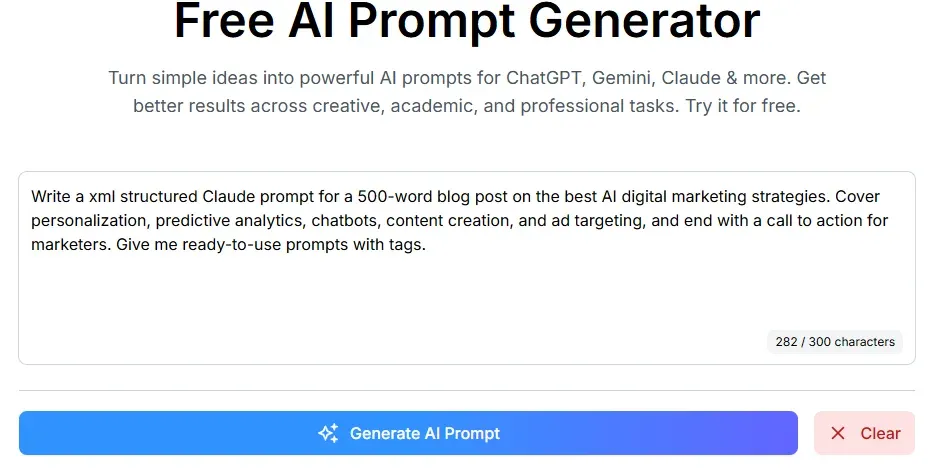
Here is the whole loop with a real example. You start with one plain sentence and end with a prompt Claude can act on cleanly.
What you type into Phrasly:
What Phrasly generates:
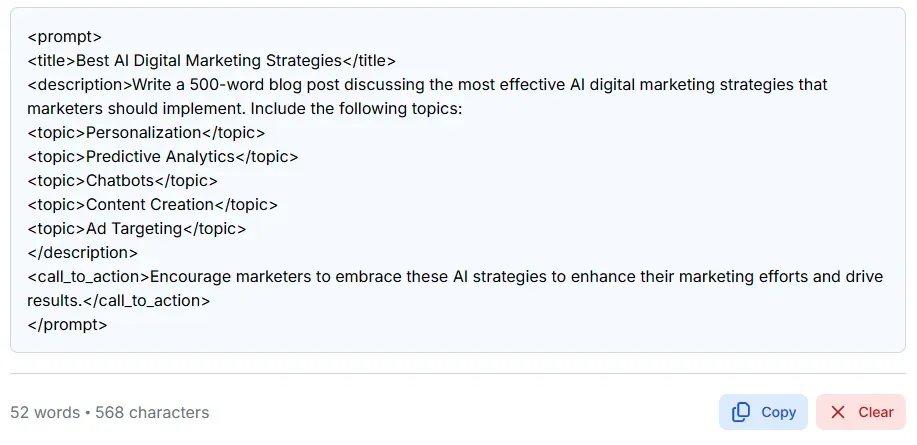
One sentence in, a titled and sectioned XML brief out. You copy that block, paste it into Claude, and get a finished draft without touching a single tag. That is the free tool doing the prompt engineering, so you do not have to.
Claude Model Comparison: Which Model Are You Prompting?
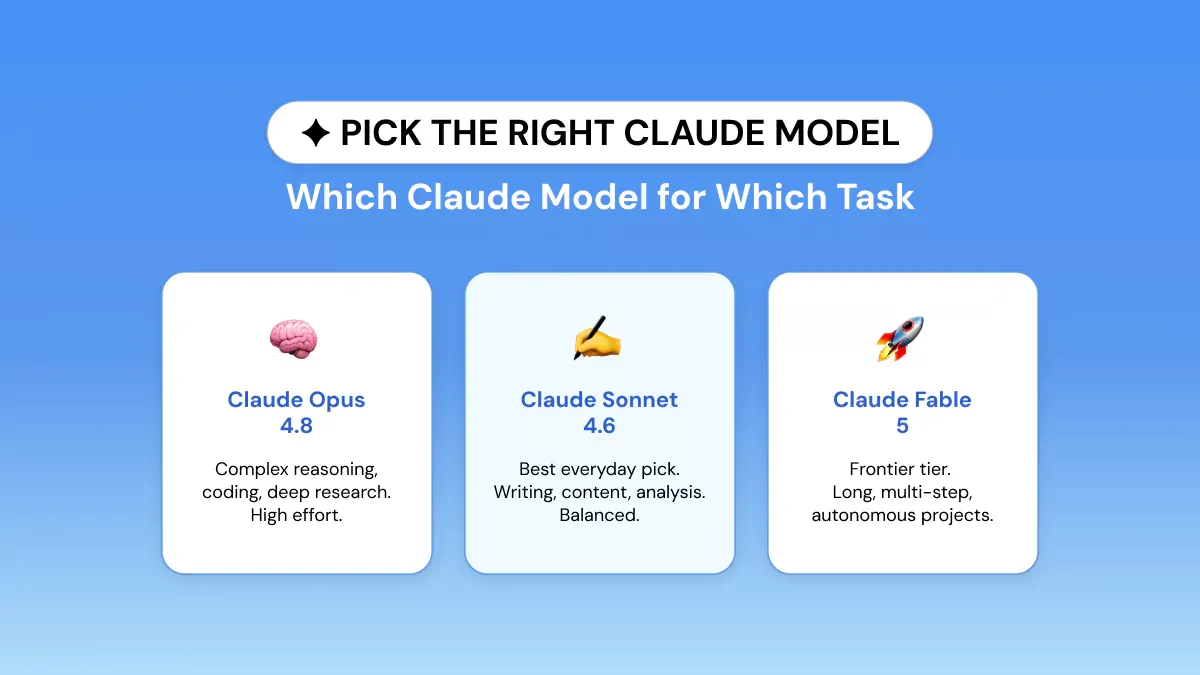
Every Claude model works better with clear context, constraints, and output instructions, but the model you pick changes capability, speed, cost, and how much text it can read at once.
As of July 3, 2026, Claude Fable 5 is live again after a short June suspension, so it should be treated as the frontier option for the hardest long-horizon work.
When the model matters, name it in your request, then set any supported options like effort level inside Claude or the API.
| Model | Tier | Context | Best For | Recommended Setting |
|---|---|---|---|---|
| Claude Opus 4.8 | Opus | 1M tokens | Complex reasoning, agentic coding, architecture, deep research | High or xhigh effort with adaptive thinking |
| Claude Sonnet 4.6 | Sonnet | 1M tokens | Writing, analysis, coding, and everyday professional work | Medium effort for a speed and quality balance |
| Claude Haiku 4.5 | Haiku | 200K tokens | Classification, routing, chat, and short summaries | No effort parameter support |
| Claude Fable 5 | Frontier | 1M tokens | Long-horizon reasoning and multi-step agentic work | High or max effort with adaptive thinking |
Swipe the table sideways to see all columns.
Specifications from Anthropic's model overview and effort documentation.
Claude Opus 4.8 Prompts
Claude Opus 4.8 is Anthropic's strongest currently available Opus model for complex reasoning, long-running coding, research, and high-autonomy work.
Its 1M-token context window holds large document sets and codebases, though precise instructions still matter even at that scale.
Effective Claude Opus 4.8 prompts define the objective, the available evidence, the constraints, the success criteria, and the deliverables you expect. For long tasks, split the work into stages and ask Claude to check its progress against the original requirements.
Skip the common tip to end your prompt with "Use extended thinking." Opus 4.8 does not support manual extended thinking. On the API you turn on adaptive thinking and choose high, xhigh, or max effort based on how hard the task is.
Claude Sonnet 4.6 Prompts
Claude Sonnet 4.6 is the strongest everyday pick for writing, marketing, analysis, coding, and general knowledge work. Anthropic recommends medium effort as the practical starting point on the API because it balances quality, speed, and token use.
Good Claude Sonnet 4.6 prompts spell out the audience, the purpose, the source material, the tone, the length, and the output format. For writing tasks, add a short example when the output needs to match a specific voice or structure.
In Anthropic's early Claude Code testing, users preferred Sonnet 4.6 over the older Opus 4.5 in 59% of comparisons.
That was a controlled early-user test rather than a survey of every developer, so read it as a strong signal and not a universal ranking. You can see the details in Anthropic's Sonnet 4.6 announcement.
Claude Haiku 4.5 Prompts
Claude Haiku 4.5 is Anthropic's fastest and most affordable current model. Its 200K-token context window fits classification, routing, customer chat, quick summaries, and other high-volume jobs.
Keep Claude Haiku 4.5 prompts short and direct. State one task, give it only the input it needs, define the output format, and leave out background it will not use. Haiku 4.5 does not support Anthropic's effort parameter, so there is no low or high setting to configure here.
Claude Fable 5 Prompts
For Claude Fable 5 prompts, write the brief like a project handoff: define the objective, source material, constraints, success criteria, allowed tools, review steps, and final deliverable. Use Fable 5 for multi-stage coding, complex research synthesis, architecture decisions, document-heavy analysis, and tasks where Claude must plan, execute, check its own work, and produce a finished result.
Claude Fable 5 launched on June 9, 2026 as a frontier-tier model with a 1M-token context window, up to 128K output tokens, and always-on adaptive thinking. Anthropic describes it as its most capable widely released model for demanding reasoning and long-horizon agentic work.
Short availability note: Fable 5 was suspended on June 12 after U.S. export controls, but Anthropic restored access starting July 1, 2026. Some cybersecurity or biology requests may still trigger safeguards or be routed to another Claude model, so build a fallback plan for sensitive technical workflows.
Claude Prompts for Every Effort Level: Low to Max
Claude’s effort setting controls how many tokens the model is willing to spend across its answer, thinking, and tool calls. It is a behavioral signal rather than a fixed reasoning budget. Lower settings favor speed and efficiency, while higher settings support more thorough analysis.
Phrasly creates the prompt but does not select an effort level. Choose the setting separately in Claude, Claude Code, or the API.
Low-Effort Claude Prompts
Low effort suits quick, tightly scoped tasks such as classification, short rewrites, summaries, and simple lookups. Keep the request direct and define one clear output.
Example:
Use Claude Sonnet 4.6 or Claude Opus 4.8 at low effort. Claude Haiku 4.5 does not support the effort parameter.
Medium-Effort Claude Prompts
Medium effort balances quality, speed, and token use. Anthropic recommends it as the starting point for most Claude Sonnet 4.6 applications, including content creation, emails, analysis, and routine coding.
Example:
High-Effort Claude Prompts
High effort is the default and suits research synthesis, difficult analysis, detailed code review, and multi-step strategy. High-effort Claude prompts should define the evidence, evaluation criteria, required checks, and final deliverable.
Example:
Choose Claude Sonnet 4.6 for balanced professional work, Claude Opus 4.8 for harder specialist tasks, or Claude Fable 5 when the prompt needs long-horizon reasoning with more autonomous planning.
Extra-High and Max-Effort Claude Prompts
Extra-high (xhigh) is designed for advanced coding, agentic research, and long-running tasks with Claude Opus 4.8. For Claude Fable 5 prompts, start at high or max effort when the job involves long-context reasoning, large codebases, multi-document synthesis, or multi-step agentic execution.
Extra-high example:
Use max effort only for the most demanding problems because it consumes more tokens and can overthink simpler work.
Max-effort example:
Opus 4.8 uses adaptive thinking, which must be enabled separately.
Why XML Helps Claude Prompts and When to Use It
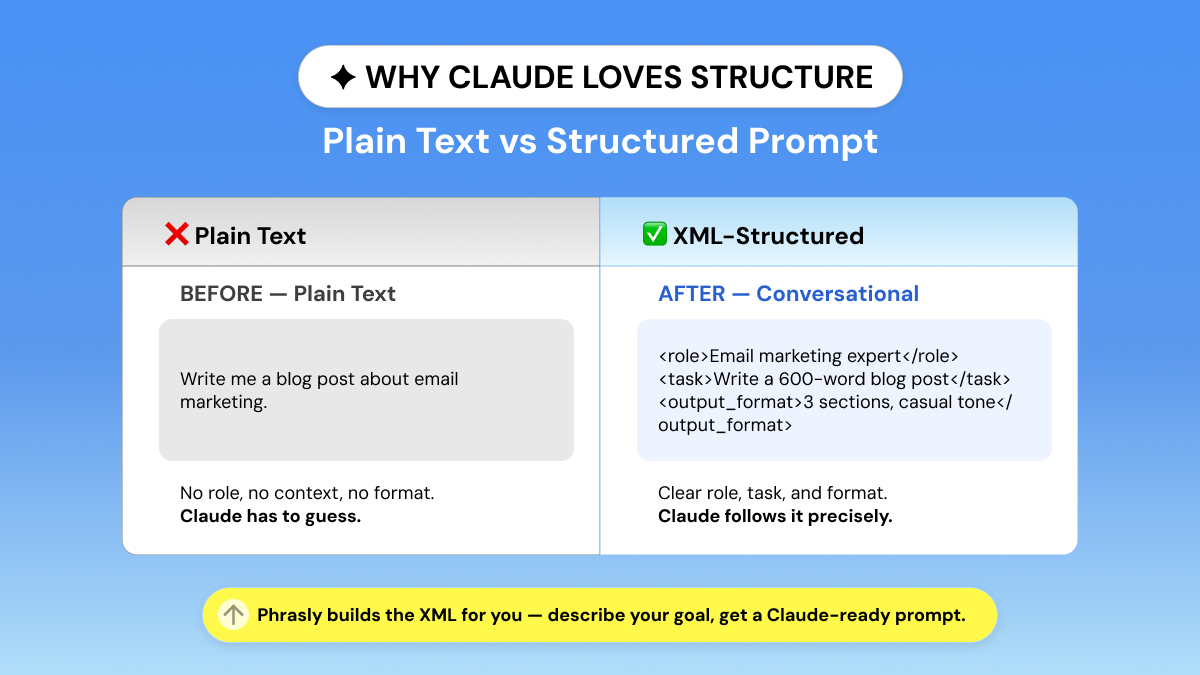
Claude does not need XML tags for every prompt. Plain language works well for simple requests such as summarizing a paragraph or rewriting an email.
XML becomes valuable when a prompt combines instructions, context, examples, source material, and output requirements.
Anthropic explains that tags such as <instructions>, <context>, and <input> help Claude distinguish different parts of a complex prompt and reduce misinterpretation.
However, Anthropic does not state that Claude was trained specifically on XML-tagged data or provide a universal accuracy improvement.
Both prompts can work, but the XML version clearly separates Claude’s role, the background information, the task, and the required response format.
You do not need special tag names. Choose short, descriptive labels, close every tag, and use the same structure consistently. Avoid adding tags to a simple one-sentence request because unnecessary structure can make the prompt harder to read.
XML tags organize the instructions you send to Claude.
Phrasly can turn your plain-language idea into a more detailed prompt. To get an XML-formatted prompt, simply add: “Format the generated prompt with clear XML tags” to your request.
For example:
Create a Claude prompt that compares three research reports, identifies conflicting findings, and produces a cited summary. Format the generated prompt with clear XML tags.
This approach makes a Claude XML prompt generator most useful for document analysis, repeatable workflows, detailed content briefs, few-shot examples, and Claude Project instructions.
Claude Prompt Examples for Every Use Case
These ready-to-use Claude prompt templates combine clear instructions, XML organization, and explicit output requirements. Replace the text inside [square brackets], remove any tags you do not need, and paste the completed template into Claude.
The recommended effort level must be selected separately in Claude, Claude Code, or the API. Phrasly does not set it automatically.
Content Writing Prompt
Best for: Blog posts, guides, and educational content
Model: Claude Sonnet 4.6
Effort: Medium
<role>
You are an experienced SEO content editor.
</role>
<context>
Topic: [topic]
Audience: [target audience]
Primary search intent: [informational/commercial]
Primary keyword: [keyword]
Supporting sources: [paste links, notes, or research]
</context>
<task>
Write a practical [word count]-word guide that answers the reader's main question directly and covers the topic completely.
</task>
<requirements>
Use only verified information.
Do not invent statistics, quotations, or product claims.
Explain technical terms in plain language.
</requirements>
<output_format>
Use one H1, descriptive H2s, short paragraphs, useful bullet points, and an actionable conclusion.
</output_format>
Email Outreach Prompt
Best for: Cold emails, partnership outreach, and sales introductions
Model: Claude Sonnet 4.6
Effort: Low
<role>
You are a B2B email copywriter.
</role>
<context>
Recipient: [name and role]
Company: [company]
Relevant problem: [verified pain point]
Our offer: [product or service]
Proof: [real result, credential, or case study]
</context>
<task>
Write a personalized outreach email that connects the recipient's problem to our offer.
</task>
<constraints>
Do not invent personal details or pretend to have researched information that was not provided.
Avoid hype, jargon, and forced familiarity.
</constraints>
<output_format>
Provide one subject line and one email under 120 words. End with a single low-pressure CTA.
</output_format>
Deep Research and Analysis Prompt
Best for: Comparing studies, reports, policies, or competing claims
Model: Claude Opus 4.8 or Claude Fable 5
Effort: High to Max with adaptive thinking
<role>
You are a senior research analyst.
</role>
<research_question>
[Insert the question you want answered]
</research_question>
<source_material>
[Paste or attach the sources]
</source_material>
<method>
Extract each source's main claims and evidence.
Identify agreements, contradictions, limitations, and missing information.
Evaluate the strength and relevance of the evidence before reaching a conclusion.
</method>
<rules>
Use only the supplied sources.
Cite the source supporting each factual conclusion.
Separate established facts from inference.
State clearly when the evidence cannot support an answer.
</rules>
<output_format>
Provide a comparison table, a cited synthesis, key limitations, and a concise conclusion.
</output_format>
Code Review Prompt
Best for: Security checks, bug detection, and regression analysis
Model: Claude Opus 4.8 or Claude Fable 5
Effort: High or Extra High (xhigh)
<role>
You are a senior software engineer specializing in secure code review.
</role>
<project_context>
Language and version: [language/version]
Framework: [framework]
Expected behavior: [what the code should do]
</project_context>
<code>
[Paste the code or attach the relevant files]
</code>
<task>
Review the code for correctness, security vulnerabilities, performance problems, edge cases, and regression risks.
</task>
<rules>
Report every meaningful issue, including uncertain findings.
Do not focus on style unless it affects maintainability or behavior.
Do not recommend unrelated refactoring.
</rules>
<output_format>
For each issue, provide its location, severity, evidence, likely impact, confidence level, and recommended fix. End with the three highest-priority actions.
</output_format>
LinkedIn Post Prompt
Best for: Thought leadership, company updates, and professional insights
Model: Claude Sonnet 4.6
Effort: Low or Medium
<role>
You are a LinkedIn content strategist.
</role>
<context>
Audience: [target audience]
Goal: [educate/start discussion/announce]
Core message: [main takeaway]
Supporting notes: [facts, experience, or examples]
</context>
<task>
Turn the supplied notes into a useful LinkedIn post without changing the factual meaning.
</task>
<style>
Use a conversational, specific, and credible voice.
Avoid clichés, exaggerated hooks, fake stories, and invented statistics.
</style>
<output_format>
Write 120 to 150 words with a clear opening, short body paragraphs, one practical takeaway, and one genuine discussion question.
</output_format>
Claude Project Instructions Template
Best for: Creating consistent behavior across every chat in a Claude Project
Model: Any available Claude model
Effort: Choose according to each task
<role>
You are our ongoing [research/content/development] assistant.
</role>
<source_priority>
Use the files in Project Knowledge as the primary source.
Use information from the current conversation when it provides newer or more specific instructions.
</source_priority>
<instructions>
Answer the question directly before adding detail.
Separate sourced facts from your own inference.
Never invent citations, statistics, quotations, or project details.
Ask a clarifying question only when missing information prevents an accurate answer.
Follow the terminology and formatting used in the project files.
</instructions>
<quality_checks>
Check factual claims against the available project sources.
Identify uncertainty, conflicting evidence, and missing information.
Preserve important names, figures, requirements, and constraints.
</quality_checks>
<output_format>
Provide a direct answer, supporting evidence, and recommended next steps when appropriate.
</output_format>
Claude Fable 5 Long-Horizon Agent Prompt
The best Claude Fable 5 prompt reads like a project handoff. Give it the objective, the source material, the constraints, and how success will be judged, then let it plan, execute, and check its own work before it answers.
This is the setup to use when one prompt has to carry a multi-stage task from start to finished deliverable.
<role>
You are a senior autonomous project agent.
</role>
<objective>
[Describe the finished outcome you need]
</objective>
<context>
Current situation: [brief background]
Source material: [files, links, documents, or notes]
Constraints: [budget, timeline, technical limits, compliance rules]
Success criteria: [how the final answer or deliverable will be judged]
</context>
<workflow>
Create a short plan before starting.
Work through the task in stages.
Check each stage against the success criteria.
Flag missing information instead of guessing.
Revise the final answer once before presenting it.
</workflow>
<output_format>
Provide the plan, completed work, evidence used, unresolved risks, and recommended next steps.
</output_format>Claude vs. ChatGPT vs. Gemini: Does Prompting Style Matter?
Prompting style matters, but the differences are smaller than many comparisons suggest.
Claude, ChatGPT, and Gemini all perform better when given a clear task, relevant context, explicit constraints, and a defined output format. None should be expected to reliably “guess” requirements you leave out.
| Prompting Area | Claude | ChatGPT | Gemini |
|---|---|---|---|
| Preferred structure | Responds well to explicit scope and XML tags for separating instructions, context, examples, and input. | Works well with clear natural-language instructions and enough context. OpenAI recommends reviewing the response and refining the prompt iteratively. | Gemini 3 recommends direct instructions with consistent XML tags or Markdown headings. |
| Handling complex tasks | Define every required step and state whether instructions apply to one part or the entire response. | Break complex requests into manageable steps and refine them conversationally when needed. | Break complex workflows into chained prompts and clearly define ambiguous parameters. |
| Long or mixed inputs | Place long source material before the question and label documents clearly. | Separate instructions from source material with headings or delimiters. | Put long context first, place the task at the end, and clearly reference text, images, audio, or video. |
Swipe the table sideways to see all columns.
Anthropic emphasizes clarity, explicit constraints, and XML structure. OpenAI recommends clear prompts followed by iterative refinement, while Google recommends consistent structure and context-first prompting for long inputs.
The difference between a Claude prompt and a ChatGPT prompt is therefore one of emphasis, not an entirely different language. Claude often benefits from stricter scope and labeled sections, while ChatGPT is well suited to conversational refinement.
Claude’s 1M-token context window is useful for large document sets, but it is no longer unique. Current frontier API models from OpenAI and Google also offer roughly 1M-token context windows, although limits inside consumer apps can vary by plan and feature.
Working across platforms? Use Phrasly’s ChatGPT Prompt Generator for ChatGPT-specific prompts, or its Gemini Prompt Generator for Google’s models.
Tips for Building Better Prompts With a Claude Prompt Generator
A prompt generator for Claude can organize your request, but it cannot know facts or requirements you never provide. Better Claude prompt generation starts with a complete description of the result you need.
- State the goal and audience. Explain what Claude must create, who will use it, and what a successful response should accomplish.
- Assign a role when it adds value. A role such as “SEO editor” or “security-focused code reviewer” can guide vocabulary and priorities. Simple tasks do not always need one.
- Separate complex inputs with XML. Use tags such as <context>, <task>, <source_material>, and <output_format> when your prompt contains several types of information. Anthropic says this structure helps reduce misinterpretation.
- Define the output precisely. Specify the format, length, tone, required sections, and exclusions. Replace subjective words such as “short” with measurable limits such as “under 150 words.”
- Ground factual work in sources. Provide the relevant documents or links and tell Claude whether it may use outside knowledge. Ask it to identify missing evidence rather than inventing facts, quotations, or citations.
- Match effort to task complexity. Medium effort is a practical starting point for Claude Sonnet 4.6. Use high or extra-high effort for demanding Claude Opus 4.8 tasks. Effort and adaptive thinking are configured separately from the prompt and are not selected by Phrasly.
- Provide examples and refine the result. One strong example can establish tone or format. For highly consistent outputs, Anthropic recommends three to five relevant examples. Our guide to few-shot prompting explains how to select and structure those examples. Review the first response, identify what missed the brief, and update the prompt accordingly.
The generator supplies structure, but your context, constraints, evidence, and quality criteria determine whether the final output is genuinely useful.
Stop rewriting weak prompts and getting generic answers back. Describe your goal in plain English, and the Claude prompt generator structures it for Sonnet 4.6, Opus 4.8, Haiku 4.5, or Fable 5 in seconds. It starts free, and it does the prompt engineering so you do not have to.
Frequently Asked Questions
What Is a Claude Prompt Generator?
A Claude prompt generator turns a rough idea into a clearer prompt with a defined task, context, audience, constraints, and output format.
Phrasly’s free AI Prompt Generator creates structured, ready-to-use prompts for Claude without requiring an account. To compare it with other free and paid options, see our guide to the best AI prompt generators.
How Is Prompting Claude Different From ChatGPT?
Both tools perform best with clear instructions and relevant context. Anthropic particularly recommends explicit scope and optional XML tags for complex Claude prompts, while OpenAI emphasizes clarity and iterative refinement.
It is inaccurate to assume ChatGPT will reliably fill every gap. Current Claude and OpenAI frontier APIs both offer roughly 1M-token context windows, although app limits vary.
What Are Low, Medium, and High Effort Prompts in Claude?
Effort is a Claude setting, not a type of prompt. Supported models offer low, medium, high, xhigh, and max: low favors speed, medium balances performance and cost, while high and above support more demanding work. Phrasly does not select the effort setting; users configure it separately in Claude or the API.
Which Claude Model Should I Use for Prompting?
Use Claude Sonnet 4.6 for everyday writing, analysis, coding, and professional tasks. Choose Claude Opus 4.8 for difficult reasoning, research, and long-running coding, or Claude Haiku 4.5 for fast, high-volume work. Claude Fable 5 is the frontier option for the most demanding long-horizon and agentic tasks, and access was restored on July 1, 2026, after a brief June suspension.
Do I Need to Know XML to Use a Claude Prompt Generator?
No. Claude understands ordinary language, and XML is optional. Tags become useful when you need to separate instructions, context, examples, and source material in a complex prompt. Phrasly does not guarantee XML output, so add “Format the generated prompt with clear XML tags” when you want that structure.


Keep reading

How to Prompt Claude Fable 5 (With Copy-Paste Prompts)
Claude Fable 5 doesn't respond like older Claude models. Get 7 prompting rules from Anthropic's own docs, copy-paste templates for writing, research, and work, plus current pricing and plan access after the July 20 change.


50 Highest-Engagement AI Prompts for LinkedIn, Instagram, and X for marketers
Learn the prompt frameworks behind top-performing social posts, avoid common AI prompting mistakes, and use proven templates to scale your content creation across every platform.