
AI Creative Writing Prompts: 100+ Copy-Paste Templates for Writers, Bloggers & Content Creators
AI writes, but without the right prompt, it writes like everyone else. Here are 100+ copy-paste creative writing templates to get output that actually sounds like you.
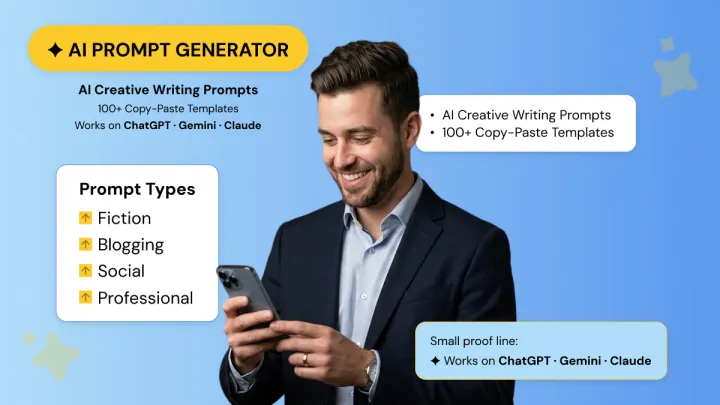
AI can write. The question is whether it writes well for you. Without the right prompt, even the best models default to generic, surface-level output that feels like it could belong to anyone.
Structured creative prompts solve that by giving you actionable ideas you can actually use. Here are over 100 AI creative writing prompts sorted by use case (fiction, blogs, social media, professional copy, and more).
You'll also learn a simple formula to craft your own in under a minute.
Why Are Creative Prompts Different from Every Other AI Prompt?
Many guides to AI prompts generalize prompts as though all prompts are the same.
However, when you’re talking about creative writing this isn’t the case. Creative writing isn’t like data analysis, email writing, or drafting a marketing email.
Creative writing prompts help AI to make decisions about voice, tone, emotion, and narrative flow. What helps you write spreadsheets and professional documents often falls flat for stories, poems, and creative whims.
Creative writing prompts should inspire you, lead you, and provide enough structure to create worthwhile output- while still letting the AI be creative. That’s what makes them unique and indispensable for writers.
How to Match Your Prompt to What You Actually Need?
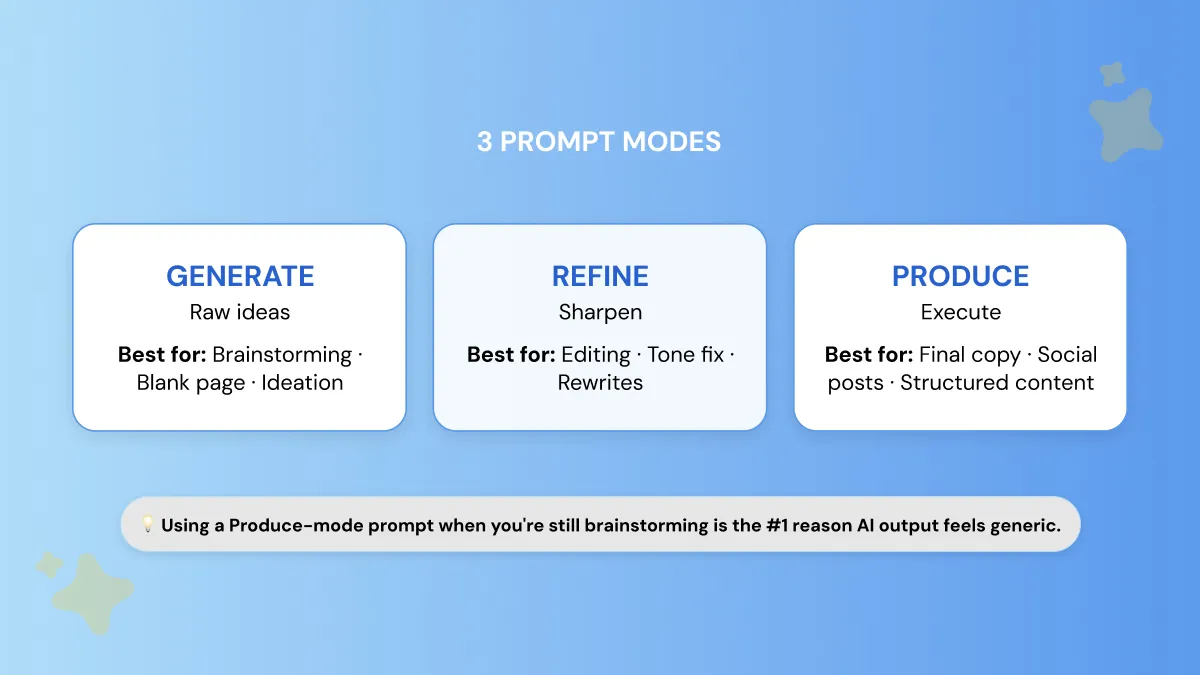
A mistake many writers make with AI isn’t bad prompt structure. It’s choosing the wrong prompt type for the task.
Creative work moves through different stages. First you generate ideas, then you refine them, and finally you produce a finished piece.
Too often writers will fail to tailor their prompts to the stage they’re at, and end up with stale or unnatural results. You can stay on track by thinking of prompts in one of three modes along a spectrum.
If you want to go deeper on this, we've put together a full guide on 12 ways to simplify the writing process with an AI writer. It's worth a read before you dive into the prompts below.
Generate Mode (For Ideas and Exploration)
Generate mode is all about quantity and diversity. You don't want the right answer, you want options. Use generate when staring at a blank screen or wanting to see different perspectives.
Generate mode is best used for:
- Brainstorming blog topics
- Overcoming writer’s block
- Early-stage ideation
Signal words often include:
- “Give me 10 ideas for…”
- “List all possible angles for…”
- “What are different ways to approach…”
Refine Mode (For Improving What Already Exists)
Refine mode works on the assumption you have a draft or some direction. Rather than creating entirely new ideas from scratch you prompt AI to edit, refine or reshape what you've already got.
Best used for:
- Editing weak sections
- Adjusting tone or style
- Improving clarity and flow
Signal words often include:
- “Rewrite this to sound more…”
- “Make this more engaging…”
- “Cut this down to 150 words…”
Produce Mode (For Creating a Finished Output)
Produce mode is the most structured. You know what you want and tell the AI straight up to create it. The prompt contains what format you want it in, how long you want it to be, the tone, and purpose of the final content.
Best used for:
- Final blog sections
- Social media posts
- Structured articles or scripts
Signal words often include:
- “Write a 300-word article about…”
- “Create a LinkedIn post that…”
- “Draft a short story with…”
Example: How the Same Topic Changes by Mode
The topic stays the same, but the output changes dramatically depending on the prompt mode.
- A well-designed prompt aligns its mode with its purpose. Generate-mode prompts are broad and provide options.
- Produce-mode prompts are narrow and specific.
Attempting to use a produce-mode prompt while you're still ideating is one of the most common causes of stilted, strained, or generic AI text.
Generate a Custom Creative Prompt for Your Task 👇
How to Use These Prompts Across Any AI Tool?
Prompts provided in this guide are model agnostic. They are compatible with most modern generative AI tools.
If you're working with ChatGPT, Gemini, Claude or some other AI tool just know that the structure of the prompt doesn't change. You can use it as is or just swap out the example topic for the topic of your choice.
Let's say you have a prompt that looks like this:
You can use the same template hundreds of times and get completely different stories by simply changing the topic, audience, tone, etc.
Prompt iteration after the first output is another strong strategy. Rarely will you get a perfect result from AI immediately.
That is perfectly fine!
Rather than restarting, you can continue prompting the model by changing the prompt mode.
For instance, if you start with a generate-mode prompt to brainstorm ideas, your follow-up might look like this:
This simple follow-up tells the AI exactly what to improve while preserving the core idea you already generated.
The answer is typically not changing tools. It’s changing modes.
If your output seems stale, shift from produce mode back to generate mode and ask the AI to offer multiple angles/approaches first.
Brainstorming ten different paths before deciding on one exponentially increases your creativity and circumvents the generic-output problem writers often face.
Zero-Shot vs. Few-Shot for Creative Writing — Which Gets Better Results?
AI will often give drastically different results if you use zero-shot prompting versus few-shot prompting while writing creatively.
Understanding when to use each can significantly improve the quality of your output.
Zero-shot prompting is when you don't provide examples to the AI. You only instruct the model what you want, and let it generate the response. This method is useful when you need ideas fast or in bulk.
Best use cases for zero-shot:
- Brainstorming story ideas
- Generating multiple blog angles
- Creating rough first drafts
Few-shot prompting is when you provide one or two examples of what you want the AI to follow. These examples serve as demonstrations of voice, structure, or narrative approach you expect.
Best use cases for few-shot:
- Matching a specific writing voice
- Maintaining tone across content
- Producing higher-quality drafts
Here’s a simple heuristic many writers use:
- If you want volume/exploration, go zero-shot.
- If you want quality/consistency, go few-shot.
Zero-Shot vs Few-Shot Prompting (Comparison)
Here’s a simple copy-paste few-shot template you can use to match a specific creative voice:
AI Creative Writing Prompts for Fiction & Storytelling
Fiction prompts need to do something most prompt guides ignore. They must give AI enough creative constraint to produce something surprising, not just something competent.
Too loose of a prompt usually yields rote responses. Give it the correct balance of direction, tone, and limitations, however, and it can feel surreal.
All prompts in this guide were built using either Generate mode or Produce mode.
- Generate mode prompts are used to help you uncover characters/ideas, and
- Produce mode prompts are more instructive, asking the AI to write scenes/story elements you can use.
Character Development Prompts
Great characters make stories unforgettable. Use these prompts to delve into backstory, motivations, and internal conflicts to help your characters come alive.
Push further: Ask the AI to pick the most interesting backstory and expand it into a detailed timeline of the character’s life.
Push further: Ask the AI to identify which motivation would create the strongest internal conflict.
Push further: Ask the AI to rewrite the scene with the opposite choice winning.
Push further: Request a second version where the same character speaks 10 years later after life has changed them.
Push further: Ask the AI to build a short character arc where the flaw leads to a critical turning point.
Plot & Story Starter Prompts
These prompts take you straight to the idea of a story. They each have enough constraint built in to create something unique rather than generic.
A simple story-starter prompt is often enough to begin. For example:
These prompts work on ChatGPT, Gemini, Claude, and most AI writing tools, and they can quickly generate a starting point for a larger story.
How to Use AI to Write an Entire Story, Not Just a Single Scene?
Lots of writers attempt to coax a full story out of the AI with one giant prompt.
This works poorly.
Long-form fiction is better approached with chained prompts. With chained prompts, you lead the AI through each step:
- Scene creation: Generate a rough opening scene or concept.
- Character depth: Expand the main character’s motivations and conflicts.
- Conflict development: Introduce obstacles or complications.
- Resolution planning: Shape how the story might resolve.
Simple prompt chain template:
Step 1: Generate a short opening scene for a story about [topic].
Step 2: Expand the main character’s background and motivations.
Step 3: Introduce a major conflict that complicates the character’s goal.
Step 4: Suggest three possible endings that resolve the conflict in different ways.
Dialogue Writing Prompts
Dialogue prompts concentrate on conflict, subtext, and character development instead of narration. Effective dialogue reveals personality and conflict through spoken words and those left unsaid.
Dialogue prompts are different from narrative ones because they must encourage subtext and emotional tension, not just information exchange.
World-Building Prompts
Fictional worlds contextualize characters and plot. These prompts help develop the setting, atmosphere, and internal rules of your story’s universe.
AI writes generic output when given generic input. The more particular you are with your mode, constraints, and overall guidance, the better your output will be.
Most writers find AI to be most helpful as a brainstorming tool to think of ideas/directions in Generate mode before the writer shapes the final narrative.
AI Creative Writing Prompts for Bloggers & Content Creators
Blog writing is creative writing with a deadline and an algorithm. You’re not just trying to write something that’s interesting. You’re trying to grab attention. You’re trying to communicate clearly. You’re trying to create something that actually performs online.
Below you'll find prompts crafted to create blog-worthy content that will read naturally, rank well, and doesn't sound like it took 30 seconds to write. The constraints in each prompt are there so the AI doesn't just give you garbage outputs.
Blog Post Hook & Intro Prompts
Great blog posts have great beginnings. These prompts will help you create captivating introductions with popular hook types. Prompts are written for use with Produce mode so you can copy and paste directly.
“Can AI help me come up with ideas for my blog post?” Yes—but you should use Generate mode, not Produce mode.
This distinction is important because generate mode gives you options; produce mode chooses one of them. Several writers jump straight to drafting too soon instead of brainstorming for a few minutes first.
Thought Leadership & Opinion Piece Prompts
Perspective and strong reasoning are key to effective thought leadership content. Please note these prompts are designed to generate opinion-driven pieces rather than bland summary.
Listicle & How-To Content Prompts
Structured education content works because it is scannable and actionable. These prompts generate structured articles quickly.
How to Make AI-Generated Blog Content Sound Like You Wrote It?
The problem with even high-quality AI-generated text is that it can sound a little generic. The fix is something many writers may not consider: voice priming.
Voice-Priming Technique: Paste 3 of your best articles or paragraphs before requesting AI to write for you. It allows the AI to learn your tone, pacing, writing patterns etc.
After the AI drafts the article, remove common AI filler such as:
- Overly formal opening lines
- Excessive hedging language (“it is important to note that…”)
- Repetitive transition phrases
Voice-Match Prompt Template
Study the writing style in the three samples below.
Sample 1:
[Paste your writing]
Sample 2:
[Paste your writing]
Sample 3:
[Paste your writing]
Now write a blog post about [topic] using a similar tone, pacing, and level of clarity as the samples.
“How do I ask AI to write in my voice and style?” Use voice priming. Copy and paste 2-3 examples of your writing prior to providing the task. Then prompt the AI to write in the style of those samples.
This template will work for the majority of AI tools. Once you provide the model actual examples of your writing, the response is typically drastically more in line with your natural voice.
Content Repurposing Prompts
One of the quickest ways to scale content is transforming one piece into many different formats. Use these prompts to help turn your existing content into new assets.
AI Creative Writing Prompts for Social Media
Social media is the hardest form of creative writing. Usually you have single sentence to hook people before they scroll away.
That’s why generic prompts don’t work. Each platform has its own voice, rhythm, and audience expectations. The prompts below were created to generate platform-specific content, not broad “shareable content.”
LinkedIn Creative Writing Prompts
LinkedIn content performs best when it combines professional insight with human storytelling. Posts that feel honest and specific usually outperform overly polished corporate writing.
Note: LinkedIn rewards specific experiences and vulnerability more than perfectly polished writing.
Instagram & Short-Form Caption Prompts
The best Instagram captions feel personal, visual, and conversational. Simple sentences work best. Make your emotion clear. Emojis are optional.
Tone Tip: Instagram captions should feel informal, punchy, and human. Emojis are optional but often help reinforce the tone.
Use platform-specific prompts rather than generic ones.
On LinkedIn, you are establishing yourself as a thought leader (hopefully with a human story threaded through). On Instagram, you want your captions to be snappy, personal and fast.
Twitter/X Thread Starter Prompts
Threads work best when your opening sentence raises intrigue and promises value later in the thread.
Different platforms respond better to different prompts, less about word choice but more about intent of platform. A LinkedIn thought leadership prompt will fall flat on Instagram where folks prefer casual conversations wrapped around visuals.
Real-world winning prompts take into consideration how humans speak on each platform, whether that be LinkedIn professional narratives, Instagram quick personal captions, or Twitter/X curiosity-inducing thread openings.
AI Creative Writing Prompts for Professional & Academic
Professional creative writing is about applying narrative techniques to real-world content. Rather than writing fictional stories, you’re using story tools - voice, framework, clarity to communicate, persuade, or enhance reputation.
Designed to bridge the gap between creative writing techniques and professional output, these writing prompts will help you make content like bios, case studies, and academic writing more interesting while maintaining factual accuracy.
Professional Bio & About Page Prompts
Your bio shouldn’t just be a list of jobs you’ve had. Narrative framing will help your reader understand who you are, what you do, and why they should care.
Example: Flat vs Narrative Bio
The difference is subtle but powerful: one lists credentials, the other tells a story.
Case Study & Success Story Prompts
Case studies become far more compelling when structured as a story of transformation, rather than a collection of statistics.
A proven structure is: Situation → Struggle → Solution → Result
Academic & Research Writing Prompts
There’s still room for storytelling and narrative structure in academic writing. Use these prompts to help you introduce your research topic in interesting ways.
If you are new to AI writing assistance, it's beneficial to learn about prompting as well. Check out our article “What Is a Prompt in Writing” for a basic understanding of how prompts influence AI responses.
“Can I use AI creative writing prompts for professional or academic work?” Yes! Professional creative writing isn’t about fiction. It’s about applying narrative techniques to real-world communication.
Storytelling can make bios more natural, case studies more convincing, and academic text more readable. Done right, AI prompts merely formalize this procedure, enabling authors to combine accuracy with clarity and narrative flow.
AI Prompts to Break Through Writer's Block
Occasionally you don’t need an entire well-formed prompt. Sometimes you just need a nudge to get unstuck.
Writer’s block rarely stems from having no ideas. It’s usually the result of getting stuck at one stage of the writing process: the opening line, the body, the conclusion or the overall angle.
These micro-prompts are crafted for those precise moments. Forget broad “overcome writer’s block” tips. We zone in on the exact moment most writers find themselves stuck.
5 Creative Prompting Mistakes That Kill Good AI Output
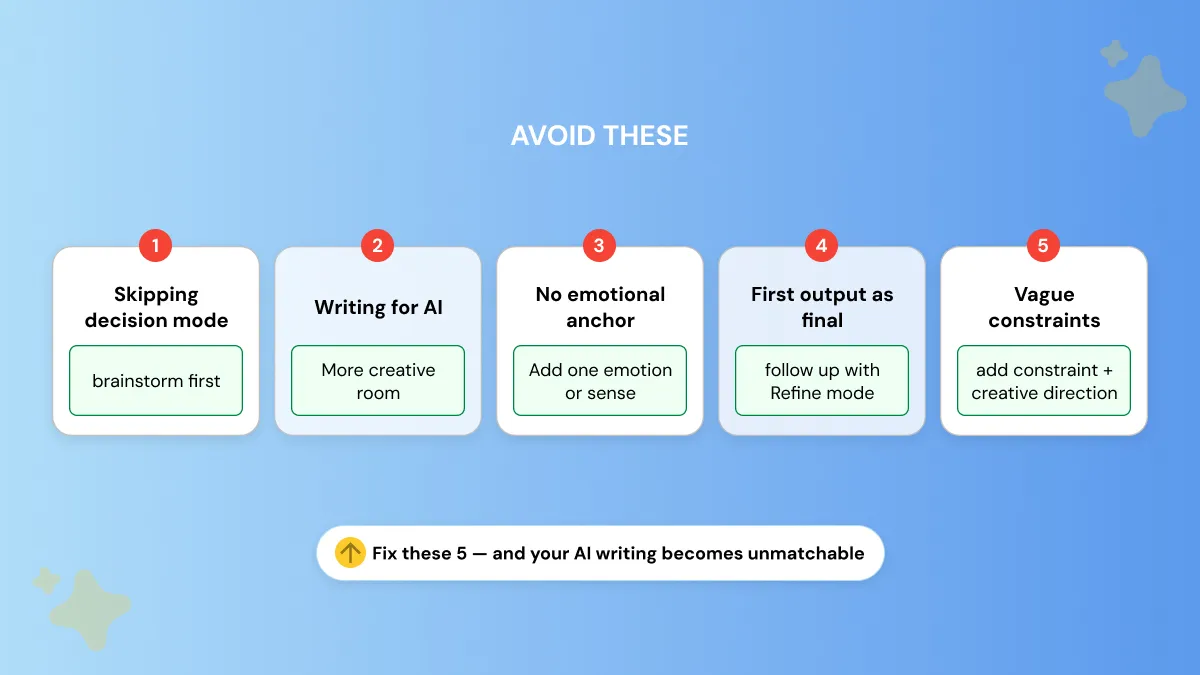
Bad prompts will elicit bad creative writing output even from the most powerful AI tools. The majority of poor results are derived from a handful of typical errors in prompting.
Recognizing these errors will allow you to leverage AI as a creative partner instead of a simple text producer.
Skipping the Mode Decision
One of the biggest creativity killers is jumping right into Produce mode without spending time generating ideas first. You'll wind up producing your first idea rather than your best idea.
Use Generate mode to come up with a variety of angles/options, then switch to Produce mode to figure out how to best execute on the strongest idea.
Writing for AI Instead of for Your Reader
Technical prompts yield sterile, mechanical prose. Allow your prompts some creativity. Write your prompts from the perspective of your reader.
Consider tone, emotion, and clarity. Machine-readable prompts often generate machine-like responses.
No Sensory or Emotional Anchor
Abstract prompts get abstract writing in return.
Adding an emotion, sense, or physical description/details—that one moment, the place you’d like to set your story, the challenge your character faces grounds the AI and creates more impactful writing that you’ll remember.
Treating the First Output as Final
AI's first output is rarely its best.
Treat its first response as a draft. Generate mode material. Issue subsequent Refine mode prompts to polish wording, shift tone, restructure information.
Iterate until it shines.
Overloading the Prompt with Instructions
Bombarding the AI with instructions clutters its thought process and stifles creativity. Begin with your primary constraint. Then, request style, tone, formatting changes in subsequent prompts.
The simpler you are in the beginning, the better and more unexpected the results.
Generate Your Own AI Creative Writing Prompts
You have 100+ templates, but eventually you'll reach a limit: there are no premade prompts that fit your creative needs.
It's too niche. The voice is close, but not quite right.
You know what you want to say, but you can't instruct it perfectly enough for the AI to follow through. You edit and re-run, but you still end up with something bland.
That's not a lack of creativity. It's a prompt-structure problem.
Phrasly's free prompt generator was created to fill this need. Enter your messy, idea and receive a polished, ready-to-use creative prompt that you can copy and paste into your favorite AI tool.
The process takes seconds:
Enter your unrefined idea → get a structured prompt → paste and write.
It works across ChatGPT, Gemini, and Claude — no adjustments needed.
FAQs
How do I write a good creative prompt for AI?
Start by choosing your mode. Generate for ideas, Refine for editing, or Produce for finished content. Add specific constraints. The more precise your direction, the stronger the output.
What are the best AI prompts for storytelling?
Ideal storytelling prompts feature character motivation, setting, and conflict all in one prompt.
"Write an opening scene where [character] must choose between [option A] and [option B]" always works better than ambiguous prompts. Chained prompts work best for full stories.
Can AI really help with creative writing?
Yes! AI can be particularly helpful when brainstorming ideas, overcoming writer's block, and producing first drafts at hyper speed. It's most effective when used collaboratively, not substitutionally.
How do I use ChatGPT for creative writing?
Paste any prompt from this guide directly into ChatGPT. Replace the bracketed placeholders with your topic.
Begin with a prompt in Generate mode to brainstorm. Then write a prompt in Produce mode to create. Prompt iterations work best when split across multiple prompts rather than in one long prompt.
For even more structured starting points, check out this collection of the best ChatGPT prompts for professionals. Many of them translate directly into creative and content writing workflows.
Can I use these prompts on Gemini and Claude, not just ChatGPT?
Yes! All the prompts in this guide can be used with ChatGPT, Gemini, Claude and most other leading AI writing tools. Copy and paste the prompt. Fill in the bracketed sections with your topic. There is no need to change the prompt itself.


Keep reading

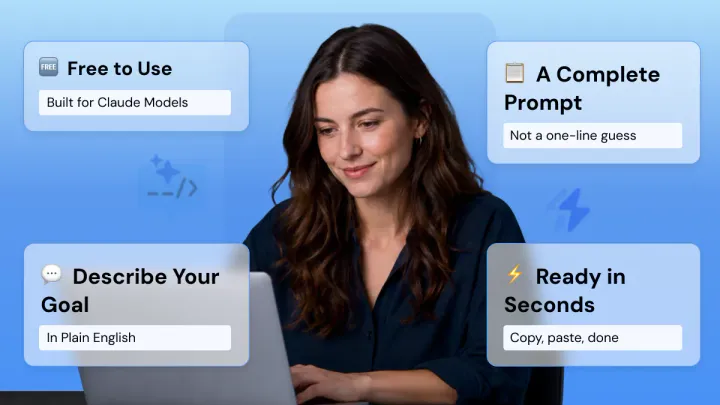
Claude Prompt Generator: Build Better Prompts for Claude AI (Free Tool)
Learn how a Claude prompt generator builds better prompts for every Claude model, from Sonnet 4.6 to Fable 5. Includes ready-to-use XML templates, effort levels, and a free tool.

50 Highest-Engagement AI Prompts for LinkedIn, Instagram, and X for marketers
Learn the prompt frameworks behind top-performing social posts, avoid common AI prompting mistakes, and use proven templates to scale your content creation across every platform.