15 LinkedIn About Section Examples and How to Write Yours With AI
19 min read
A strong LinkedIn About section says what you do, shows your skills through one piece of real evidence, and tells readers what you want next. Many people also call it the LinkedIn profile summary.
Below are 15 LinkedIn About me section examples, also known as LinkedIn summary examples, for students, job seekers, career changers and people in specific roles. Each one is fictional and comes with a note on what to replace, so pick the closest match and keep only what is true for you.
We also show how to draft yours with AI, including what happened when we tested Phrasly’s Bio Generator.
Draft Your LinkedIn About Section With Phrasly 👇
Which LinkedIn About Section Example Fits You?
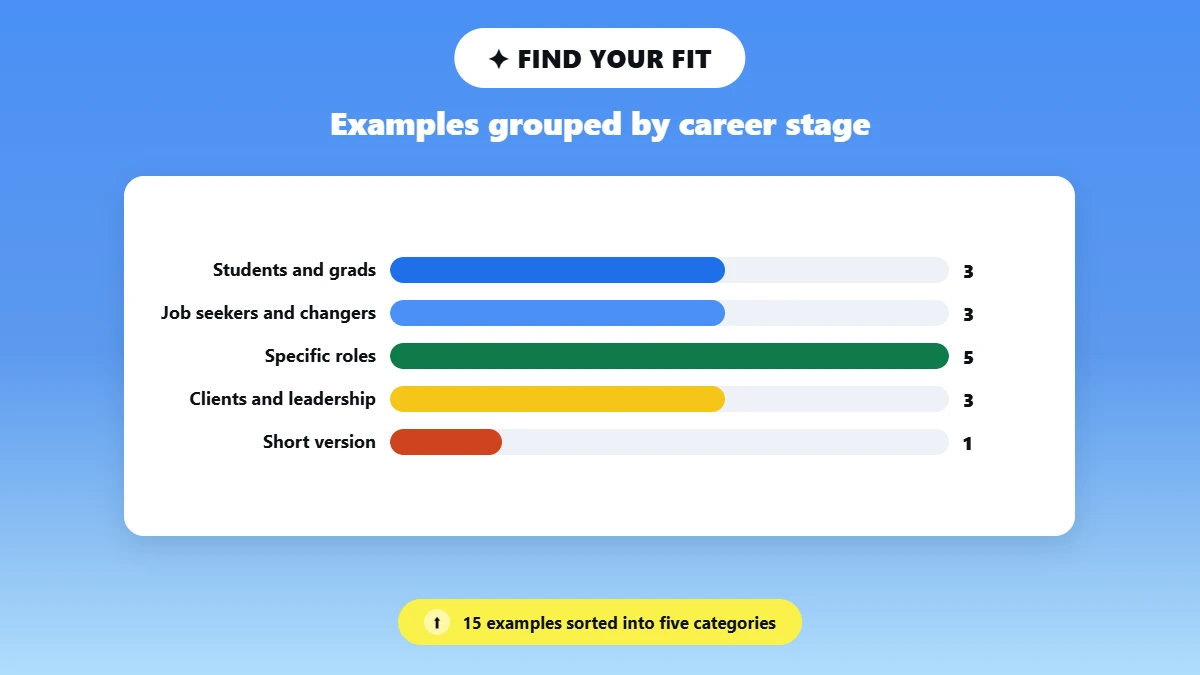
Pick the example closest to your current situation and the readers you want to reach. Students start with 1 to 3, job seekers, career changers and returners with 4 to 6, specific roles with 7 to 11, and client or leadership profiles with 12 to 14.
You may hear this part of your profile being called the summary, the bio or the intro, but it is the same as the About section. Jump to the LinkedIn About me examples closest to you:
Students and Graduates: 1. College Student, 2. Student With No Work Experience, 3. Recent Graduate or Fresher
Job Seekers and Transitions: 4. Experienced Job Seeker, 5. Career Changer, 6. Returning After a Career Break
Specific Roles: 7. Software Engineer, 8. IT Professional, 9. Marketing Professional, 10. Project Manager, 11. Sales Professional
Clients, Partners and Leadership: 12. Founder, 13. Freelancer or Consultant, 14. Executive
Short Version: 15. Short LinkedIn Summary
These examples cover the About section only. Your headline, the short line under your name, is separate, and your Experience, Education and Skills sections carry the rest of your profile.
15 LinkedIn About Section Examples by Career Stage and Role
Every example below follows the same simple pattern: a first line that says who you are, one piece of evidence, skills shown in context, and a clear next step. All 15 are fictional, so treat each one as a sample LinkedIn profile summary to adapt. Each sits well under LinkedIn’s 2,600-character limit, leaving room for your own details.
Students and Graduates
These LinkedIn summary examples for students work without paid experience. Coursework, clubs and personal projects all count as evidence.
1. College Student
I’m a third-year marketing student who wants to understand why people choose one brand over another.
In my consumer behavior course, I surveyed classmates about coffee shop loyalty and presented the results with simple charts. I also write posts for our student marketing club’s Instagram account, which taught me to plan content around what members actually read.
I’m looking for a summer internship in brand or social media marketing, and I’d be glad to connect with people working in consumer research.
Why this works: One course project and one club role give a recruiter two real things to ask about.
What to replace: Your own project and club duties.
2. Student With No Work Experience
I’m a computer science student who likes building small tools that solve everyday problems. I work mainly in Python and JavaScript, and I keep all my projects on GitHub.
My most complete project is a budget tracker for students that sorts spending by category. After friends tested it on their phones, I fixed several layout bugs.
I haven’t had an internship yet, so I’m looking for a trainee or entry-level developer role where I can learn through code reviews.
Why this works: It is honest about the missing internship and lets a real project do the work of a job title.
What to replace: The project and languages. Never present a personal project as a job.
3. Recent Graduate or Fresher
I graduated in civil engineering this year and want to start my career in site supervision.
For my final-year project, I designed the drainage layout for a small housing scheme. I prepared the drawings in AutoCAD and the cost estimate in Excel, then presented both to a panel of faculty members. During a site visit program, I shadowed an engineer who checked concrete work and wrote daily progress reports.
I’m looking for a graduate engineer role with a contractor that offers on-site training.
Why this works: "Fresher" means a graduate seeking a first job. This one shows exactly what the graduate can discuss in an interview.
What to replace: Degree, project and target role. Skip licenses you have not earned.
Job Seekers and Career Transitions
4. Experienced Job Seeker
I’m a logistics coordinator with six years of experience keeping deliveries on schedule for a regional distributor.
I plan daily routes, track shipments in our warehouse system and act as the first contact when a delivery runs late. Last year, I rewrote our driver handover sheet so important details stopped getting lost between shifts.
I’m now looking for a senior coordinator or dispatch lead role. If your team needs steady planning and clear communication, I’d welcome a conversation.
Why this works: As an example LinkedIn summary for job seekers, it shows capability before the request.
What to replace: Your systems and one process you improved. Add numbers only if you can prove them.
5. Career Changer
After eight years managing retail stores, I’m moving into human resources.
Hiring, scheduling and training new staff were always my favorite parts of the job. I interviewed candidates for three stores, built a first-week checklist for new hires, and handled day-to-day staff questions about shift schedules and time off. I’m also taking an online course in employment law basics.
I’m looking for an HR assistant or recruitment coordinator role, and I’m happy to connect with HR teams in retail and hospitality.
Why this works: It links old and new roles through tasks already done, without claiming a new title.
What to replace: Tasks that carry over, and only courses you are really taking.
6. Returning After a Career Break
I’m a graphic designer returning to work after a three-year career break.
Before the break, I designed packaging and print ads as part of a food brand’s in-house team. Over the past few months, I’ve refreshed my skills in Figma and finished two practice projects: a restaurant menu redesign and a set of social media templates. Both are in my Featured section.
I’m looking for a design role, full time or part time, with a team that values clean, practical work.
Why this works: It names the break plainly and shows recent work that proves current skills.
What to replace: Your past role and preparation. You never need to explain the break.
Specific Roles
7. Software Engineer
I’m an Android developer who builds apps with Kotlin and Jetpack Compose.
On my current team, I work on the checkout flow of a shopping app. I added offline handling so orders are not lost on weak connections, and I wrote tests for the payment screens. I like talking with designers early, because it makes screens easier to build and easier to use.
I’m open to Android roles at product companies. My side projects are linked in my Featured section.
Why this works: Each skill sits next to something the engineer built.
What to replace: Your stack and contribution. Mention Featured only if it has work in it.
8. IT Professional
I’m a network administrator who keeps a 300-person office connected and secure.
My daily work covers Cisco switches, firewall rules, VPN access and user accounts in Active Directory. I also wrote our team’s outage checklist, which new technicians now use in their first month. I explain technical problems in plain language, which helps when colleagues simply want to know when things will work again.
I’m interested in senior network or infrastructure roles where documentation is taken seriously.
Why this works: Many LinkedIn IT summary examples just list systems. This one turns those duties into a benefit for colleagues.
What to replace: Your systems and scope. Never imply admin rights you did not have.
9. Marketing Professional
I’m an email marketing specialist for e-commerce brands. I plan campaigns in Klaviyo, write subject lines and build segments based on what customers actually buy.
In my current role, I rebuilt our welcome email series and set up a monthly report so the sales team can see which emails lead to orders.
I’m looking for a lifecycle or CRM marketing role where testing and clear reporting matter. Campaign samples are in my Featured section.
Why this works: Strong LinkedIn summary examples for marketing name a channel, an audience and a process. This one does all three.
What to replace: Your channel and tools. Describe your own part, not company-wide growth.
10. Project Manager
I’m a project manager in healthcare IT. I plan software rollouts for clinics and keep vendors, clinical staff and IT working from the same timeline.
On my last project, I managed the move of three clinics to a new appointment system. I ran training sessions for front-desk staff and kept a risk log that stakeholders reviewed every week, which helped us catch scheduling conflicts before go-live.
I’m open to conversations about digital health projects and delivery roles.
Why this works: A LinkedIn summary for a project manager should show the work, not list methods. This one uses a real rollout.
What to replace: The project and your duties. Add certifications only when accurate.
11. Sales Professional
I help restaurant owners choose point-of-sale systems that fit how their kitchens actually work.
As an account executive, I start by learning a kitchen’s busy periods and staff habits before I suggest anything. I work closely with our support team, so customers know who to call after setup, and I keep every account’s notes and next steps up to date in HubSpot.
If you’re reviewing your restaurant’s ordering or payment setup, message me and we can talk through what fits.
Why this works: It speaks to buyers, not recruiters, and invites a conversation instead of a pitch.
What to replace: Your customers, product and CRM.
Clients, Partners and Leadership
12. Founder
I founded a small online store that sells baking tools and ingredients to home bakers.
We started because good equipment was hard to find in our city, and we still pack every order ourselves. I handle sourcing, product testing and most customer questions, which keeps me close to what bakers actually need.
If you supply baking products or want to collaborate on recipes, send me a message.
Why this works: It explains the business through a customer problem and the founder's hands-on role.
What to replace: Your business, role and the contact you want.
13. Freelancer or Consultant
I’m a freelance English to Urdu translator working with NGOs and healthcare organizations.
Most of my projects are patient leaflets, survey forms and training guides that need to be accurate and easy for everyday readers to follow. Before I start, I agree on the audience, key terms and deadline with each client, and I keep a shared glossary so terms stay consistent across documents.
If you have a document to translate, message me with its topic, length and deadline.
Why this works: A client knows exactly what you do and what to send.
What to replace: Your service, clients and process. Share only samples you may show.
14. Executive
I lead finance teams at mid-sized manufacturing companies through growth and system changes.
My focus is making financial information useful for decisions, not just accurate for reports. I’ve led the move to new accounting software, set up monthly reviews with operations managers, and coached team leads to take ownership of their forecasts.
I’m interested in conversations about finance leadership in manufacturing and in mentoring finance professionals who want to move into management.
Why this works: It shows leadership through decisions and habits, not titles.
What to replace: Your industry and practices. Keep confidential details out.
Short Version
15. Short LinkedIn Summary
I’m a UX writer who makes banking apps easier to understand. I write button labels, error messages and onboarding screens, and I test wording with real users before launch. My portfolio is in Featured, and I’m open to UX writing roles.
Why this works: This short LinkedIn summary fits identity, evidence and direction into four sentences.
What to replace: Your field and evidence.
How Do You Write a LinkedIn About Section?
To write a LinkedIn About section, decide who should read it, gather your real facts, then write three short first-person paragraphs: what you do or want to do, one piece of proof, and the next step you want readers to take. Check that every claim is true and that your first line makes sense on its own before you save.
Follow these five steps:
1. Pick Your Reader: Decide whether you are writing for recruiters, clients or collaborators. That choice shapes your first line and your closing request.
2. Collect Facts First: Note your current role or target direction, three or four skills you can explain, and one or two pieces of evidence.
3. Open With a Line That Stands Alone: Say what you do or are working toward. If you serve clients, name the problem you solve.
4. Show Skills in Context: "I built a stock report in SQL to track shortages" says more than "SQL" alone. Borrow wording from job descriptions only when it matches skills you really have, and use the same titles and tool names as your Experience and Skills sections.
5. Close With a Clear Next Step: Ask for what you want, such as a junior role, a project enquiry or a conversation.
No numbers? That is fine. A strong professional summary on LinkedIn does not need percentages. Evidence can be a project you built, a responsibility you held, an output you produced or a problem you fixed. Describe the work, how big it was and what changed.
Length: we suggest 100 to 200 words for a LinkedIn profile summary, shorter for a simple profile and longer only if you need to explain a career change. That is our guidance, not a LinkedIn rule. The editor allows up to 2,600 characters, including spaces and line breaks (checked on desktop and mobile, October 2026).
If you hold a verified skill, mention the task you did with it. In January 2026, LinkedIn added verified skills from partner tools such as Descript, Lovable, Relay.app and Replit.
Your About section is a profile field, not a post. If you also publish updates, see how to humanize AI text for LinkedIn posts.
Facts Worksheet: What to Gather Before You Write
Fill in this worksheet before you write or use AI. Each row gives you one building block:
What to gather | What to include | Example |
|---|---|---|
Reader and goal | Who should read it and what you want from them | Hiring managers for junior HR roles |
Role or direction | Current job, field of study or planned move | Retail manager moving into HR |
Skills | Three or four tools or abilities you can explain | Interviewing, scheduling, onboarding |
Evidence | A real project, responsibility or verified result | Built a first-week checklist for new staff |
Your part | What you did yourself and who else was involved | Wrote it alone, store managers reviewed it |
Next step | Role, inquiry, collaboration or networking invite | Open to HR assistant roles |
LinkedIn About Section Template You Can Adapt
This LinkedIn summary template turns the five steps above into a three-paragraph sample LinkedIn summary. Replace every bracket with your own facts:
I’m a [role or field of study] who [what you do or want to do]. I work with [audience] on [problem], mainly using [skills or tools].
Recently, I [what you did on a real project or in a real role], which involved [output, scope or a result you can support]. I’m especially interested in [area or way of working].
I’m looking for [type of opportunity], and I’d welcome a message from [the people you want to hear from]. [Point to real work, such as your Featured section.]
Like any LinkedIn About me template, this one only works with real facts. No result you can prove? Describe the work and its scope instead. A class report or a practice project gives readers plenty to ask about, without an invented figure.
Have the facts but need the wording?
Paste your role, skills and one real example. Keep what you can back up and rewrite the rest in your own voice.
How to Write Your LinkedIn About Section With AI
You can write your LinkedIn About section with AI by using an AI Bio Generator. Enter your role, skills, one real piece of evidence and your goal, then choose LinkedIn as the platform. Delete anything it made up, add the context it missed and reword lines that don’t sound like you. The proof has to come from you.
Start With a Short Input in Phrasly's AI Bio Generator
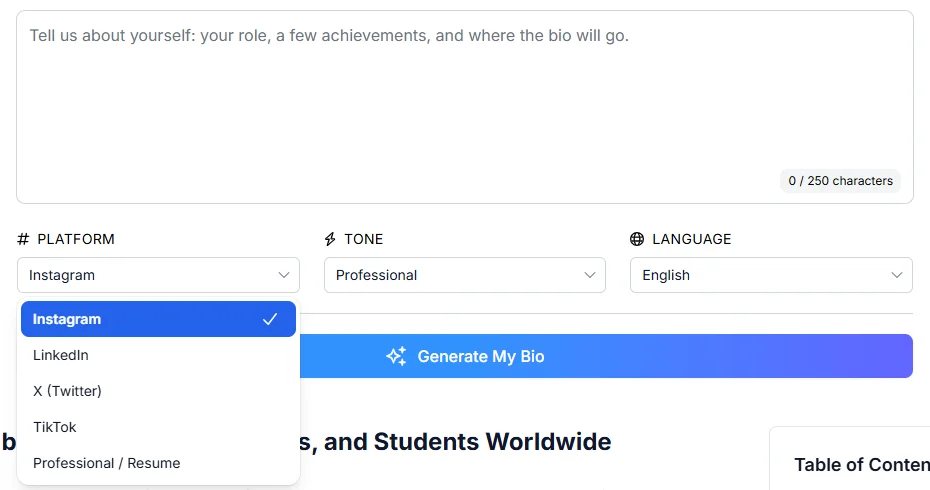
Phrasly’s Bio Generator works from a short description of up to 250 characters. When we checked it on October 13, 2026, you could choose LinkedIn as the platform, pick one of five tones (Professional, Friendly, Confident, Creative or Witty) and set the language. Expect a headline plus a short About, then build it out with your worksheet. It works best with plain facts, like this fictional input:
Retail manager moving into HR. Interviewing, scheduling, onboarding. Built a first-week checklist for new store staff. Seeking HR assistant role. First person. Do not invent experience or results.
Use an Expansion Prompt for a Fuller About Section
For a longer draft, use a general AI chat assistant, which can take your whole worksheet. If you are new to prompting, start with how to write good AI prompts. Then adapt this prompt:
Help me write a LinkedIn About section using only the facts below. First, tell me if anything essential is missing: my reader, role or direction, skills, evidence or next step. Ask about any gaps before you write.
Facts: [paste your completed worksheet]
Write in first person with short paragraphs. Start with my role or direction and one specific strength. Include my evidence without adding any employer, qualification, number or job I did not give you. Keep it under 2,600 characters, including spaces and line breaks. Give me a short version and a longer version, then list every claim I should double-check.
For more prompt ideas, see these ChatGPT prompts for professionals and Gemini prompts for professional bios.
LinkedIn Bio Generator vs Manual Writing
Each approach suits a different starting point:
Approach | Works well when | What still needs you |
|---|---|---|
Writing it yourself | You know your story and your voice | Picking evidence, structure and length |
AI bio generator | You want a quick first draft from a few facts | Checking claims and expanding a short bio |
AI chat assistant | You want to work through a full worksheet | Removing invented details and fixing tone |
Both together | You want help with wording but full control | Supplying real facts and owning the final text |
Our recommendation is the combined approach. Whether you call it a LinkedIn bio generator, a LinkedIn summary generator or an AI About section generator, look for these features:
A LinkedIn Option: Or control over length.
Uses Only Your Facts: No added jobs or results.
Tone Choice: So you can try a few versions.
A Free Try: To test the style before signing up.
A Clear Data Statement: Phrasly's page, for example, says your text is used to generate your bio and not to train AI models (vendor claim).
What Happened When We Ran Three Fact Sets Through Phrasly
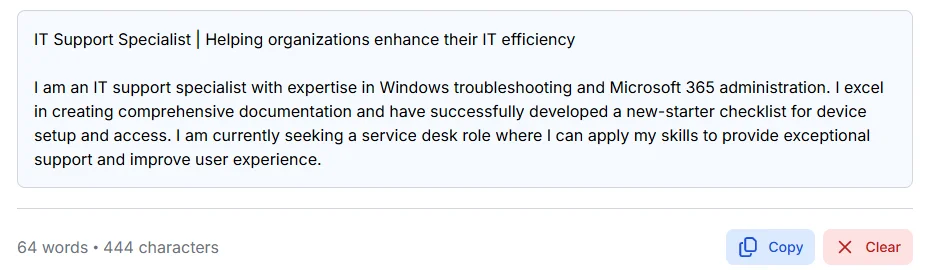
All three drafts came back as a headline plus a short About of 444 to 464 characters, and every one needed editing. None invented an employer, a number or a credential. But each headline added a claim we had not supplied, and one draft turned “helped build” into “successfully developed.” All three also leaned on inflated words such as “expertise,” “passion” and “I excel.”
On October 13, 2026, we ran three fictional fact sets once each, with LinkedIn, Professional tone and English selected:
Sample | Output length | About or short bio? | Anything invented? | Edits we made |
|---|---|---|---|---|
A. Student, no internship | 455 characters | Headline + short About | Headline claim about "helping peers" | Cut the claim, restored "no internship yet" |
B. Teacher moving into L&D | 464 characters | Headline + short About | "Empowering Teams" headline; one quiz became "quizzes" | Fixed the facts, cut "passion" and "impactful" |
C. IT support | 444 characters | Headline + short About | "Helped build" became "successfully developed" | Restored shared credit, cut "I excel" |
The first bio needed no account; the other two used a free account. None of the outputs was a full About section, so treat the tool as a quick start for wording and use your worksheet to fill the gap.
What Makes a LinkedIn About Section Sound Generic?
A LinkedIn About section sounds generic when it describes you with adjectives instead of showing what you have done. Labels such as passionate, hardworking or results-driven could fit anyone. A good LinkedIn summary replaces each label with proof: a task you owned, a project you built or a problem you fixed.
Watch for these common problems:
Empty Adjectives: "Motivated" and "dynamic" say nothing a reader can verify.
Skill Lists Without Context: Ten tools in a row, with no sign of how you used them.
Mismatched Details: A title or date that differs from your Experience section.
Oversharing: Personal reasons for a career break or a job change.
No Request at the End: A closing line that asks readers for nothing.
Here is the difference in practice:
Before: I’m a passionate, results-driven HR enthusiast looking for exciting new opportunities.
After: I’m a former retail manager moving into HR. I interviewed candidates for three stores and built a first-week checklist for new staff. I’m looking for an HR assistant role.
The after version gives readers something to ask about. It is still fictional, so use your own details.
Rewriting an AI draft so it stops sounding generic? See why AI copy sounds generic and how to rewrite AI drafts without losing your voice.
How Do You Add or Update Your About Section on LinkedIn?
To update your About section on LinkedIn, open your profile, click the pencil icon on About, edit the text and click “Save.” No About section? Click “Add section,” open Core and choose “Add about.” Then check how your first line looks on desktop and mobile.
Two things we noticed on October 13, 2026:
Same Editor on Mobile: The iOS app showed the same “Edit about” window, counter and “Save” button.
“Add About” Can Hide: It appears under Core only when your About text is empty.
For LinkedIn's own instructions, see how to edit the About section on your profile and add sections to your profile.
Final Check Before You Save
Run through this list before you click “Save”:
Every claim is true and you can talk about it.
Titles and dates match your Experience section.
Your paragraph breaks are still there after pasting.
Your first sentence makes sense on its own.
Start with your facts. Finish with your voice.
Generate a starting bio, add the context your About section needs, and check every claim before you save.
FAQs
How Long Should a LinkedIn About Section Be?
LinkedIn allows up to 2,600 characters, which we confirmed in the editor on desktop and mobile in October 2026. You rarely need all of it. Aim for about 100 to 200 words covering your role, one piece of evidence and a next step.
Should I Write My LinkedIn Summary in First or Third Person?
Use first person. You are introducing yourself, so “I” reads naturally and makes your own contribution clear. Third person suits speaker bios, team pages and author bylines, so keep LinkedIn biography examples in that style for those places.
What Should I Write in My About Section If I Have No Work Experience?
Focus on what you have done outside a job: coursework, a personal project, volunteering or a club role. Explain your part and the skills it used, then name the internship or entry-level role you want. Real learning is more convincing than invented experience.
Is the LinkedIn Summary the Same as the About Section?
Yes. The About section is what LinkedIn used to call the Summary, so the two names mean the same thing. Many people call it their LinkedIn bio too, but some tools use “bio” for a shorter headline-style intro, so check what LinkedIn bio examples or tools are actually giving you.
Can I Use AI to Write My LinkedIn About Section?
Yes, AI can write a first draft of your About section or LinkedIn summary if you feed it real facts. Then cut anything invented, soften big claims and make sure it matches your Experience section. Curious how employers react? See whether hiring managers check for AI.
Is Phrasly’s AI Bio Generator Free?
Your first bio is free with no account. When we tested it, a second try opened a sign-up page. Phrasly says a free account lets you make more and paid plans cover heavier use. Treat any result as a starting draft.
How Do I Update My LinkedIn About Section?
Go to your profile, click the pencil icon on About, edit your text in “Edit about” and click “Save.” If you have no About section, use “Add section,” then Core, then “Add about.” Check how it looks on mobile afterward.
Should My LinkedIn About Section Match My Resume Summary?
Keep the facts the same but the writing different. A resume summary is short and tailored to one job, while your About section can explain your direction and invite contact. Match titles, dates and skills across both. Related: whether AI detectors on resumes actually work.

Written by
Hasnain
Karachi, Pakistan
I help businesses grow with SEO-friendly blog posts, landing pages, and long-form content. With 3+ years of experience, I deliver clear, original, and well-researched writing that drives results.