How to Humanize AI Text for LinkedIn Posts Without Losing Your Voice
17 min read
To humanize AI text for a LinkedIn post, start with your own insight, use a humanizer to remove formulaic language, then add the details only you can provide, such as a real experience, clear opinion, and natural phrasing. Rewrite the opening, verify every claim, format the post for mobile reading, and end with a relevant conversational CTA.
An AI draft can be grammatically polished and still feel like something anyone could have written. It may communicate the right idea but lack the details, opinions, and personality that make a LinkedIn post feel personal. For a broader guide, see Phrasly’s how to humanize AI text.
The goal is not just to remove robotic language. It is to turn a generic draft into a post with a recognizable point of view.
Does LinkedIn Penalize AI-Generated Posts?
LinkedIn does not say that using AI alone leads to a penalty. Its guidance focuses on content quality, originality, and whether a post reflects the creator’s voice, perspective, and experience. AI can help with writing, but generic, repetitive, low value content may receive less distribution.
In 2026, LinkedIn added a “Seems like AI slop” option for posts and comments. Members can use it when content feels generic, repetitive, low value, or lacks a clear point of view. Enough feedback can trigger a tip in Post Analytics, but it does not mean the post was removed or that LinkedIn made a policy decision against it.
LinkedIn also distinguishes AI assistance from AI slop. Using AI to refine language or make a post more concise is not the same as publishing generic content that lacks the creator’s perspective, experience, or expertise.
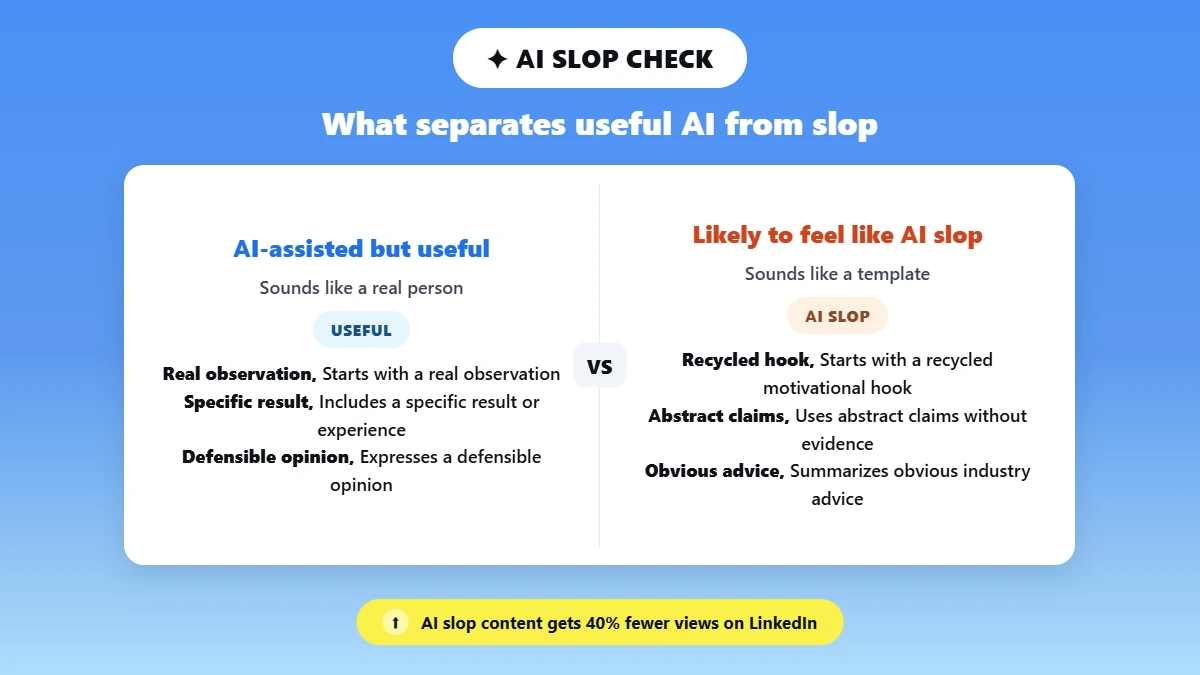
AI-assisted but useful | Likely to feel like AI slop |
Starts with a real observation | Starts with a recycled motivational hook |
Includes a specific result or experience | Uses abstract claims without evidence |
Expresses a defensible opinion | Summarizes obvious industry advice |
Has natural, varied structure | Repeats an easily recognized formula |
Invites relevant discussion | Ends with generic engagement bait |
LinkedIn’s Chief Product Officer reported that more than 1 million people used the AI slop feedback option. He also said LinkedIn considers multiple signals rather than letting one report determine distribution. LinkedIn reported 40% fewer views for content it classifies as AI slop compared with a few weeks earlier.
The goal is not to make your post pass an AI detector. It is to make the post useful, specific, credible, and genuinely worth reading.
Why Do AI LinkedIn Posts Sound Robotic?
AI LinkedIn posts can sound robotic because AI often relies on familiar language patterns, structures, and business phrases. When a prompt contains little personal context, the output can fall back on wording that works across many topics. The result may be polished and grammatically correct, but still feel generic, predictable, or disconnected from the writer.
The problem is rarely one word or punctuation mark. “Leverage,” for example, does not prove AI authorship. The stronger signal is when several predictable patterns appear together. These patterns can also appear in human writing. Phrasly explains what triggers an AI detector on human written copy.
1. Generic Hooks
Posts often open with familiar lines such as:
“In today’s fast-paced landscape…”
It sounds professional, but it could introduce almost any topic. A human writer usually starts with a specific observation, event, or reason.
2. Excessively Neat Three-Part Structures
AI often creates perfectly balanced lists and sentences:
“Think smarter. Work faster. Grow better.”
It is easy to read, but repeated use can feel formulaic.
3. Empty Business Language
Words such as “unlock,” “leverage,” “foster,” and “seamless” are not inherently bad. The problem comes when they replace a specific idea or example.
4. Repeated “Not Just X, But Y ” Constructions
This contrast is useful occasionally, but repeated use across posts can create a recognizable formula.
5. Fake Vulnerability
AI can write:
“I failed. I struggled. I learned.”
Without a real event or consequence behind them, the vulnerability can feel manufactured.
6. Broad Claims With No Evidence
Statements such as “Great leaders know that…” tell the reader very little. Names, dates, numbers, examples, and experiences make an idea more credible.
7. A Tone That Does Not Match the Author
If someone's profile and normal conversations are direct and informal, but their post suddenly sounds like a corporate press release, readers may notice the disconnect.
8. Generic Endings
“What are your thoughts?”
There is nothing wrong with asking a question, but repeated generic engagement prompts can feel formulaic.
Phrasly found 15 common AI phrases in its analysis of AI generated samples, including openings such as “whether you…”. The report can help writers spot language that may make posts feel predictable.
But phrases are only part of the problem. Context matters more. Give AI the real event, audience, opinion, and details behind a post, and it has more specific material to work with.
How to Humanize AI Text for LinkedIn Posts in 7 Steps
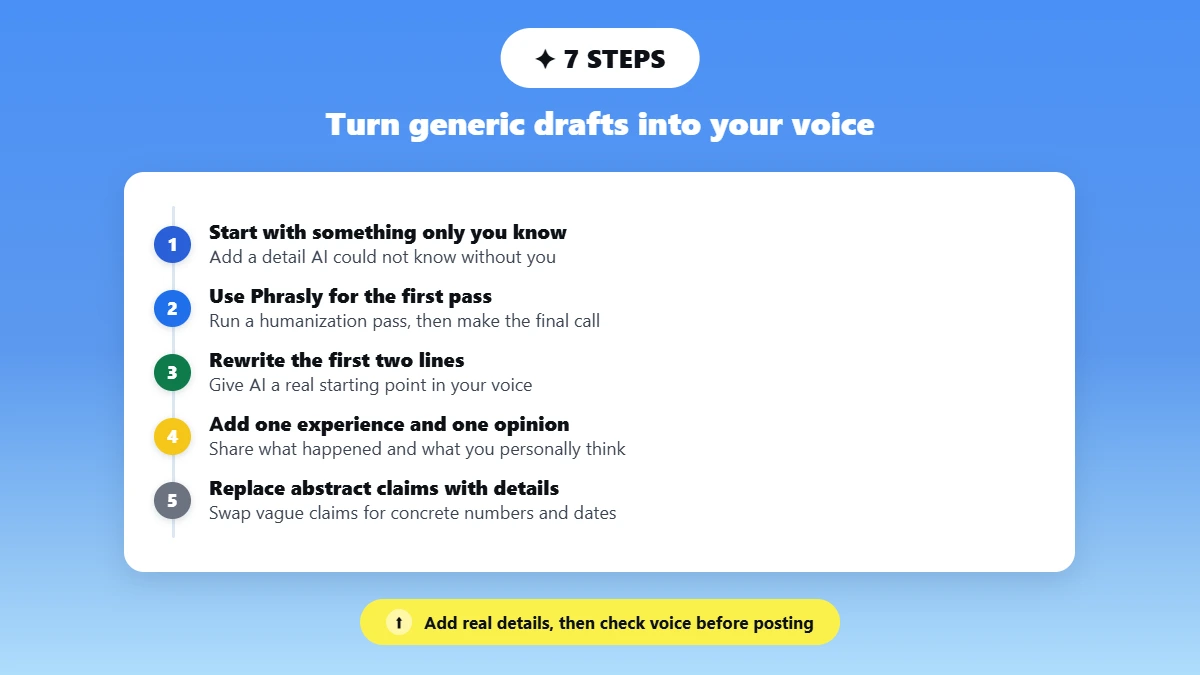
To humanize AI text for a LinkedIn post, start with your own context, then refine the wording, structure, and rhythm. Add a real experience, genuine opinion, and specific details that AI could not know without you. Rewrite the opening, verify the facts, and make sure the final version still sounds like you.
1. Start With Something Only You Know
Add something to your post that only you could know or that AI could not know without you telling it. It could be a small detail from your day, something that went wrong, a conversation you had, or an unexpected situation.
For example:
“I was ready for the client meeting, but my laptop stopped working ten minutes before the call.”
Small details give your post something real, specific, and personal that AI cannot know without your input.
Give AI details it could only know because you were there.
2. Use Phrasly for the First Humanization Pass
Once you have your AI draft, paste it into Phrasly’s AI Humanizer and choose the mode that fits the draft:
Easy for light polishing when the draft already feels close to your voice.
Medium for a more balanced rewrite.
Aggressive when the draft feels highly formulaic and needs deeper restructuring.
You can start with a free account, while paid plans support up to 5,000 words per request with no monthly caps. Phrasly supports content from ChatGPT, GPT-5, Claude, Gemini, DeepSeek, Grok, and other AI writing tools.
Don’t copy the result blindly. Compare it with the original draft and check names, facts, numbers, and meaning. Phrasly also recommends double checking the output.
Use the humanizer for the first pass, then make the final call yourself.
3. Rewrite the First Two Lines Yourself
Next, write the first two or three lines yourself. This gives the AI a better idea of how you naturally write and where you want the post to go. Instead of starting with something generic like:
“In today’s rapidly evolving technology landscape…”
Start with something only you would naturally say:
“We were driving along the side road when I noticed an ad on a billboard. Something about the copy made me stop and look twice.”
Now AI has your tone, context, and a real starting point to build from, rather than a generic opening.
You do not need to write the whole post yourself. Just give AI a genuinely human starting point.
4. Add One Experience and One Opinion
Whether you write the post yourself or use AI to help, always add at least one real experience and one genuine opinion.
Tell the reader what actually happened:
“We ran into this problem while working on…”
Then add what you personally think about it:
“Others might disagree, but I think this worked because…”
A simple structure is:
What happened → What you noticed → What you believe → What the reader can do
This makes the post sound like a real person sharing something they experienced or considered, rather than generic content.
A humanizer can improve phrasing, but it cannot provide a real experience or genuine opinion.
5. Replace Abstract Claims With Concrete Details
AI often makes broad claims without giving the reader enough detail. It might say:
“The campaign produced poor results and caused major losses for the company.”
That sounds serious, but how poor were the results? How much did the company lose? When did it happen? What happened afterward?
Instead, give AI concrete details:
“The campaign generated 18 demo bookings in three weeks, compared with 12 during the previous campaign.”
This is illustrative, but it shows why specific numbers, dates, results, and consequences are more useful than broad claims.
Don’t just tell AI something was successful, expensive, or important. Give it the details that explain why.
6. Make the Rhythm Feel Natural on LinkedIn
Keep your LinkedIn post easy to scan on mobile. Use short paragraphs and vary sentence length so the rhythm feels natural. For more techniques, see Phrasly’s guide on improving AI text readability and tone
Use first-person language and contractions when they match your normal voice. Add bullets or emojis only when they genuinely help. Keep one central takeaway so the post has a clear point.
And don’t add fake mistakes or follow rigid rules about the “perfect” post length or number of line breaks. Focus on clarity, readability, and your natural voice.
7. Run a Final Fact, Voice, and Usefulness Check
Read the post once more before publishing. Ask yourself: Does this actually sound like something I would say? Did I add my own experience and opinion? Are the facts, numbers, names, and quotes correct? Did humanizing change what I originally wanted to say? Does the post give the reader something useful to learn, do, or think about?
If you can read it and genuinely think, “Yeah, this sounds like me,” you’re on the right track.
Before and After: Three Humanized LinkedIn Post Examples
To see what humanization actually changes, we tested three different LinkedIn post types using the same workflow. Each raw draft was generated with the free version of Gemini, processed through Phrasly using Medium mode, and then manually edited using real context, personal experience, and human judgment.
Test date: September 4, 2026
Source model: Gemini free version
Phrasly mode: Medium
Manual editing: Added specific context, personal observations, factual details, and final voice edits.
The examples below show how the posts changed at each stage.
1. Thought Leadership Post
Raw AI Draft
The landscape of professional content creation is undergoing a profound transformation. As artificial intelligence becomes increasingly integrated into daily workflows, the way professionals communicate, share insights, and build thought leadership is evolving at an unprecedented pace.
AI powered writing tools offer undeniable efficiency. They enable creators to draft articles faster, structure complex ideas effortlessly, and maintain a consistent publishing schedule. However, this shift also introduces significant challenges to the digital ecosystem.
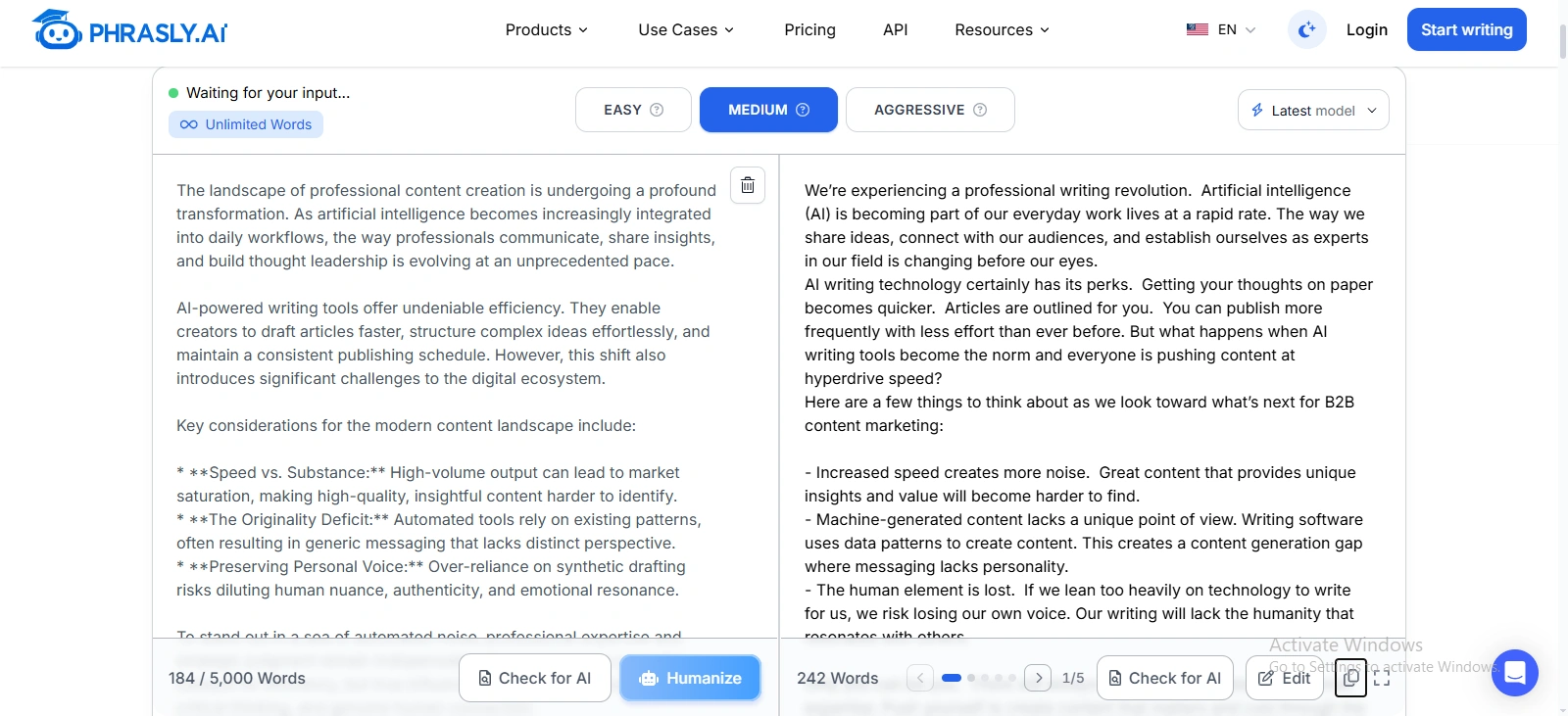
Final Human Edited Version
I use AI. I find it useful, especially when I need help getting an idea into shape or working through a first draft.
But I think we’ve started using it for things we could sometimes do better ourselves.
Take LinkedIn posts as an example. I can ask AI to write a post for me, but then I have to go through it, change the wording, remove generic lines, add my own perspective, and make sure it actually says what I wanted to say.
Sometimes, that editing takes just as long as writing the post myself. Sometimes it takes longer.
And after all that work, the result can still feel... okay.
That’s where I think AI gets interesting.
The goal shouldn’t be to use AI for everything just because we can. The goal should be to use it where it genuinely saves us time or helps us do something better.
If I can write something faster and better myself, why hand it over to AI in the first place?
AI can be a great assistant. But I don’t think it should become a replacement for thinking, writing, or having your own point of view.
Use AI where it adds value. Not simply because it’s available.
What Changed?
The raw draft relied on broad industry language. Phrasly made it more conversational, but the final edit added the personal experience and opinion that gave the post its point of view.
What Still Needed Human Judgment?
The experience, opinion, and final decision about what to keep came from the human writer, not the rewriting process.
2. Career and Project Update
Raw AI Draft
Excited to announce the successful completion of a comprehensive website redesign project!
In today’s digital first environment, a strong online presence is essential. A modern, intuitive platform is often the first point of contact between a brand and its audience, making seamless design and functionality vital for long term engagement.
This project focused on elevating the overall digital experience through a modern visual aesthetic, intuitive navigation structure, and enhanced user interface.
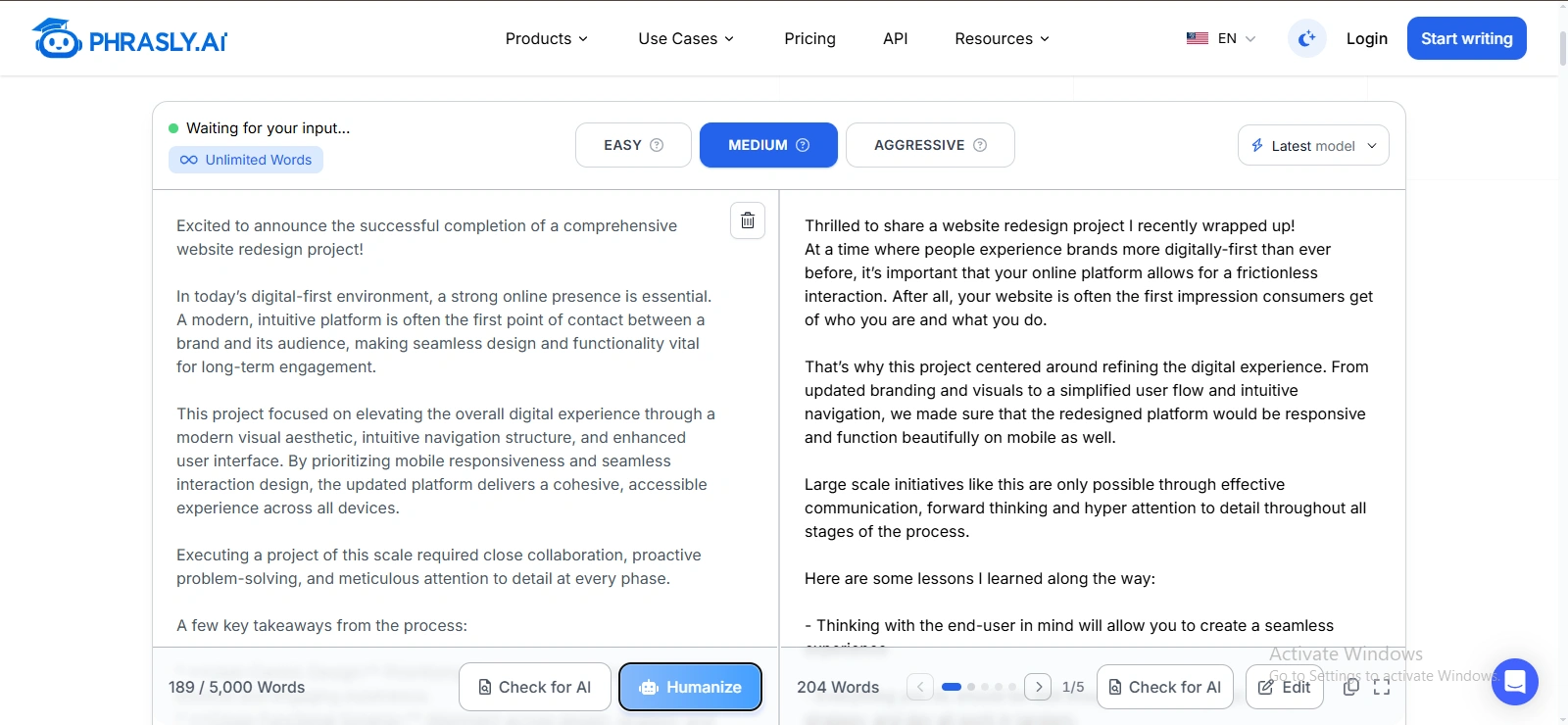
Final Human Edited Version
Our website looked fine at first glance.
But once we looked closer, there were problems everywhere. The design wasn’t great, it wasn’t properly responsive on mobile, pages were slow, and the overall user experience needed serious work.
Over time, our monthly visitors dropped from around 50,000 to just 5,000.
So we brought in experts.
We collected the details, got quotations, negotiated the costs, and eventually agreed on a better approach. But even after the redesign, we weren’t completely happy with the colour theme, so we had that changed too.
Eventually, the website was in a much better place.
But that created our next problem:
How do you bring back the visitors you’ve already lost?
Our marketing experts were also away at the time, so we had to figure things out and keep moving with the resources we had.
It wasn’t an overnight recovery. It took around two months before we started seeing the numbers move in the right direction.
We’re now at around 10,000 monthly visitors, and hopefully, we’ll gradually get back to where we were and eventually go beyond it.
The biggest lesson for me?
Fixing the website was only half the job. Recovering the audience you lost was the real challenge.
What Changed?
The AI draft used broad website and UX language that could describe almost any redesign. The final version replaced that generic language with the real traffic decline, redesign process, setbacks, and recovery.
What Still Needed Human Judgment?
The traffic figures, website problems, decisions, setbacks, and recovery all came from the human writer and needed factual verification.
3. Product and Company Announcement
Raw AI Draft
We are thrilled to announce the launch of our newest feature: an AI powered project management assistant designed to streamline workflows and elevate team execution.
Modern teams often face significant challenges with communication silos, manual administrative tracking, and the constant effort required to keep projects on schedule.
Our new feature addresses these friction points by introducing intelligent automation directly into your workspace.
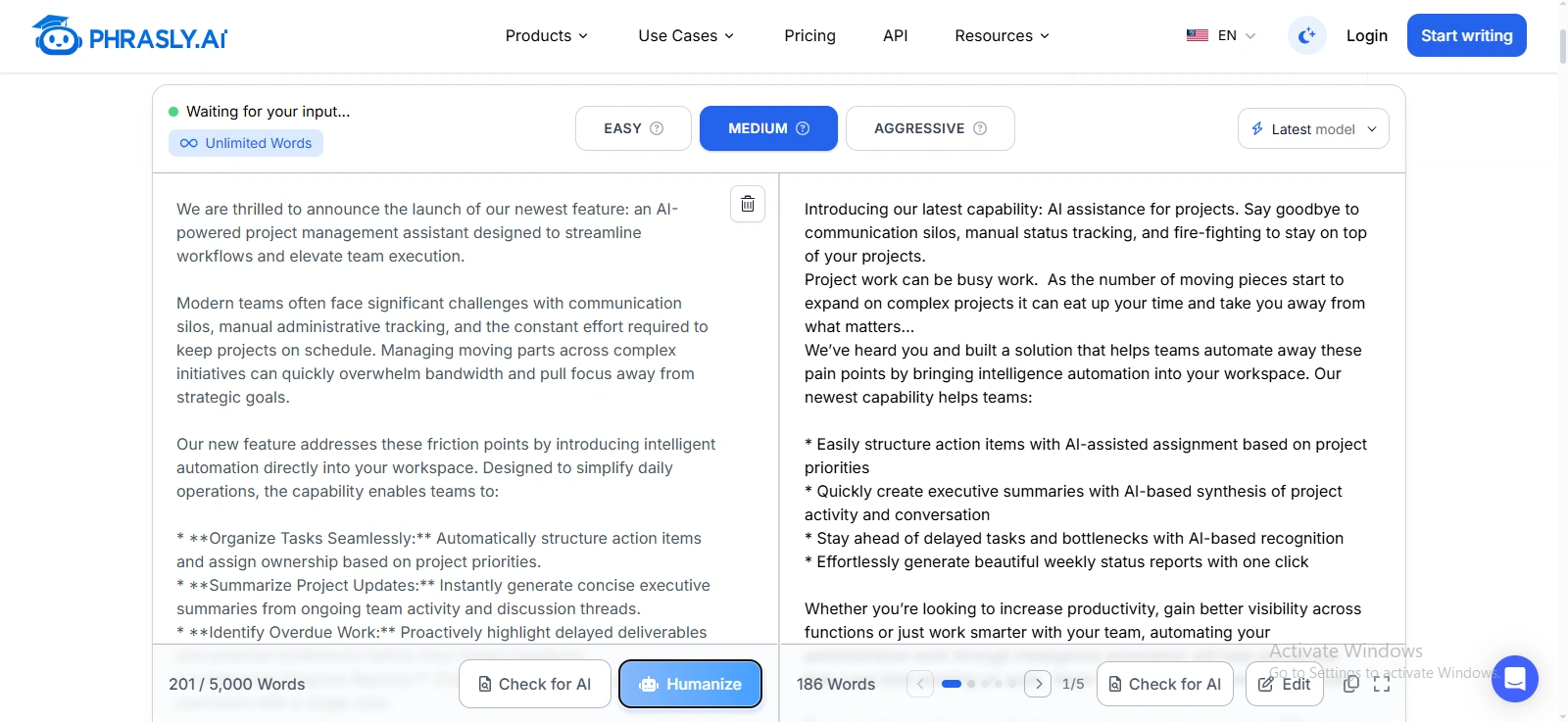
Final Human Edited Version
We’re building something that should make project management a little less painful.
We’ve been testing a new feature internally that lets you find and manage project tasks in real time, without digging through different databases or libraries to find the information you need.
Enter a name, and the related tasks come up with the details that actually matter:
What’s the current status?
When is it due?
Who is responsible?
Which client is it for?
What’s the project value?
We’ve also added live feedback, with support for text, audio, video, and other media.
But we’re not launching it publicly just yet.
We’ve been testing it with our own team for about a week, and we’ve already found two major glitches that we need to fix.
That’s actually why we’re taking our time with the launch.
It’s tempting to build something, put a big marketing budget behind it, and get it in front of as many people as possible. But if the product isn’t ready, more attention just means more people finding the problems.
So for now, we’re testing, fixing, and testing again.
The goal isn’t to launch quickly. It’s to launch something we’re confident people can actually rely on.
More to come.
What Changed?
The AI draft followed a standard product announcement formula. The final version replaced broad productivity claims with the actual workflow, testing process, glitches, and reason for delaying the launch.
What Still Needed Human Judgment?
The workflow, testing results, glitches, and launch decision all came from the product team. Those details changed the post from a generic announcement into an honest product update.
What These Three Tests Show
Across all three tests, Phrasly improved wording and rhythm, but the strongest versions came from adding real experiences, specific details, genuine opinions, and human decisions. A humanized draft can sound more natural, but the final post still needs to reflect the person publishing it.
A Copy-Paste Prompt for Better LinkedIn Drafts
If you’re using AI prompt to write a LinkedIn post, give it enough context to understand your audience, point of view, and communication style. Use this prompt as a starting point:
Write a LinkedIn post for [audience] about [topic]. Preserve my central argument and all verified facts. Use a professional but conversational first-person voice that sounds natural and matches the way I normally communicate. Add no invented experiences, quotes, statistics, or results. Remove generic business clichés, vague claims, and formulaic motivational language. Use specific details from the information I provide rather than filling gaps with assumptions. Vary sentence length and paragraph structure naturally. Keep these phrases because they match my voice: [phrases]. Avoid these phrases: [phrases]. Make the opening clear and relevant to the main point. End with one relevant question or CTA, not both. Before finalizing, check that the meaning, facts, and intended tone have not changed.
The more useful context you give the AI, the less work you may need to do later. But always read the final draft yourself before publishing it.
For more prompt ideas and examples, check Phrasly’s prompts to humanize AI text guide
How to Preserve Your Personal or Brand Voice at Scale
To preserve your personal or brand voice when using AI, create a short voice profile that defines your tone, sentence rhythm, preferred phrases, phrases to avoid, formality, humor, emoji use, approved topics, and opinions. Give AI examples of your existing posts, then use the same profile during humanization and final review.
Create a Simple Voice Fingerprint
Keep a one page voice fingerprint you can reuse during drafting and humanization. Include:
1. Three adjectives: Direct, thoughtful, conversational.
2. Sentence rhythm: Mostly short to medium sentences, with longer sentences when needed.
3. Preferred phrases: “The biggest lesson for me…” or “Here’s what I noticed…”
4. Phrases to avoid: “In today’s rapidly evolving landscape,” “unlock your potential,” and similar clichés.
5. Formality: Professional but conversational.
6. Humor, contractions, and emojis: Define what fits your normal communication style.
Define What You Can Talk About
Your voice also includes what you are comfortable saying. Keep a short list of:
Topics and opinions you regularly discuss
Topics requiring extra caution
Claims needing legal or SME review
Personal experiences you are comfortable sharing
This helps prevent AI from adding opinions, experiences, or claims you never intended to make.
Give AI Examples of Your Best Posts
Include five previously successful LinkedIn posts in your voice profile.
These examples show AI your vocabulary, sentence rhythm, structure, level of detail, and way of expressing opinions.
You can also note what worked about each post:
Post 1: Strong personal story
Post 2: Direct opinion
Post 3: Good use of specific numbers
Post 4: Conversational tone
Post 5: Strong discussion in the comments
The goal is not to copy these posts. Use them as examples of your established voice.
Use the Same Voice Fingerprint During Humanization
Once your draft is ready, give the same voice fingerprint to your AI writing or humanization tool.
That way, the process becomes:
Voice fingerprint → AI draft → Humanization → Personal review → Final post
This is much more reliable than asking AI to “make it sound like me” every time without giving it any reference.
And if you're using Phrasly’s AI Humanizer, you can compare the output against your voice fingerprint during your final review. The tool can help with the wording and structure, but you still decide whether the final version actually sounds like you.
For Teams and Executive Ghostwriting, Keep One Rule
For team or executive ghostwriting, the named author must approve the final post. Never attribute an experience, opinion, or result to someone who never expressed or experienced it.
For example, don't write:
“I learned this lesson when my team made a major mistake…”
unless the person actually experienced and approved it.
A strong ghostwritten post should represent the real person's experiences, opinions, and voice.
LinkedIn AI Post Checklist
Before publishing an AI assisted LinkedIn post, run through this quick checklist:
☐ The insight came from me or a named source
☐ The first two lines are specific
☐ The post includes a real detail or example
☐ Every fact and number has been checked
☐ Generic AI phrases have been removed
☐ The tone matches my normal voice
☐ Phrasly did not change the intended meaning
☐ Paragraphs are easy to scan on mobile
☐ The CTA is relevant and natural
☐ Employer, client, or disclosure policies have been followed
Your draft should sound like you before it represents you. If you use AI to help with the writing, paste the draft into Phrasly’s AI Humanizer, choose the humanization level that fits your draft, and then finish with your own voice and fact check. Phrasly offers Easy, Medium, and Aggressive humanization modes, and recommends reviewing the output before publishing.
FAQs
Does LinkedIn Penalize AI Generated Posts?
LinkedIn has not announced a blanket penalty for AI assisted writing. It distinguishes AI use from low quality “AI slop,” uses multiple signals to assess content, and collects community feedback on posts that feel generic or inauthentic.
Can LinkedIn Detect AI Written Content?
LinkedIn uses classifiers and community feedback to identify low quality or inauthentic content, but it does not publish a universal AI detection accuracy or threshold for ordinary posts. No third party AI detector can reproduce LinkedIn’s internal system.
How Do I Make a ChatGPT LinkedIn Post Sound More Human?
Start with a real event, experience, or opinion. Rewrite the opening lines yourself, add specific details, remove generic AI language, verify every fact, and review the final draft in your natural voice before publishing.
What Is the Best AI Humanizer for LinkedIn Posts?
There is no universal ranking for the best AI humanizer. Phrasly is designed to help rewrite AI generated content with three humanization modes and a built in AI detector. These are documented product features, not a claim that it is objectively best for every LinkedIn post.
Is Phrasly Free for LinkedIn Posts?
A free Phrasly account lets you start humanizing content, and Phrasly describes its built in AI detector as free and unlimited. Paid plans support up to 5,000 words per request with no monthly usage caps.
Should I Disclose AI Use in a LinkedIn Post?
It depends on your employer, client, industry, and the type of content. Whatever approach you take, AI should never invent personal experiences, testimonials, credentials, or material facts and present them as real.
Can a Humanizer Preserve My Personal Brand Voice?
A humanizer can improve wording, rhythm, and formulaic language, but your distinctive voice still needs your input. Provide your viewpoint, examples, preferred phrases, and writing style, then review the final post yourself before publishing.

Written by
Hasnain
Karachi, Pakistan
I help businesses grow with SEO-friendly blog posts, landing pages, and long-form content. With 3+ years of experience, I deliver clear, original, and well-researched writing that drives results.