50 Highest-Engagement AI Prompts for LinkedIn, Instagram, and X for marketers
21 min read
Understanding what makes an effective prompt and learning to build one can maximize your use of AI and enhance your productivity. It helps you communicate with greater impact, make your marketing calendar more productive and impactful, and research complex topics more easily.
Prompting is a skill we can all learn, so you don’t have to be a prompt engineer to use generative AI. However, if you’re noticing that you’re not getting the desired outcome, it might be time to try a different approach.
While freestyling prompts may be your entry point, learning proper prompting tactics will take your output to the next level.
If you’re a marketing professional, you’re probably using prompts for social media to bring attention, trust, and interactions - including likes, comments, shares, direct messages, and brand mentions - to your brand.
You’re responsible for creating captivating campaigns, brand experiences, generating leads, and more. Although you have to be creative at different times throughout your day, prompt writing is more about precision than creativity.
AI has rapidly shifted from an experimental novelty to a non-negotiable operational asset. According to Sociality.io's 2026 AI in Social Media Marketing report, nearly 90% of marketers now rely on AI every single week. And why are marketers using it? Because prompts are efficient. According to the report, 71.1% of respondents cite time savings as the biggest improvement AI brings to their workflow.
In this guide, you’ll learn that prompt style matters more than prompt length, and how to master your prompts to elevate your content creation, enhance brainstorming, and refine your brand’s messaging and positioning.
Generate your custom prompt in seconds with Phrasly.AI 👇
AI Prompt Social Media Mistakes to Avoid
As social media is central to digital marketing and customer interaction strategies, AI prompts are transforming how marketers manage, analyze, and scale their operations. But to successfully improve audience targeting, personalize content, and increase customer engagement, it’s necessary to ensure your brand's safety and avoid misinformation.
Whether you're using AI prompts for content creation (including captions, visuals, short-form videos, and conversational responses) or as an analysis tool, these are the mistakes you should avoid.
Did you know that research showed that AI-identified LinkedIn posts received 45% less engagement than human-authored content? That's why it's important to know how to prompt AI tools for richer, more engaging results.
So, if you don’t want your content to be like those boring, generic and quite frankly cringe posts this is what you ought to do:
Handling Prompts as Searches
Asking a simple question is very different from asking for a task. Of course you can use AI for queries, but in this case you don’t want to learn more about a subject; you want AI to follow your instructions. If your prompt could be typed into Google unchanged, it’s probably too weak.
A good AI prompt tells the model: what to do and how to do it.
Bad prompt (search-style): "LinkedIn post about AI productivity"
Good prompt: "Write a LinkedIn post for marketing leaders about how AI can improve team productivity. Use a professional but conversational tone, include one practical example, keep it under 200 words, and end with a question that encourages comments."
Not Detailing the Output Format
You can use AI prompts for different reasons: maybe you want it to analyze a competitor's page, get ideas to maximize engagement, or write a compelling caption. Whatever result you want, you must be specific. AI can easily ramble if you let them.
That is why not defining the exact structure every time can yield odd results. For an engaging post, for example, you need to explain what you want the post to accomplish.
Keep in mind that the more context you give an LLM, the better the results will be.
Bad prompt (no output format specified): "Create a post about the importance of engaging with followers on Instagram."
Good prompt: "Write an Instagram caption about the importance of engaging with followers. Keep it under 150 words; start with a relatable hook; include 3 short tips in bullet points; use a friendly, encouraging tone; add a clear call to action; and finish with 5 relevant hashtags."
The bad prompt tells the AI what topic to cover but not how to present the information. The good prompt defines the structure, length, tone, and key elements, making it much more likely to produce a post ready for publication with minimal editing.
Requesting Various Actions in One Prompt
As we mentioned before, a good prompt is not necessarily a long prompt.
Requesting “analyze, explain, generate insights, suggest improvements, and write a report” all at once confuses the AI and will just take longer. Trust me, the rework is not worth it. So, instead of requesting everything in a single prompt, condense it into the shortest, clearest version possible.
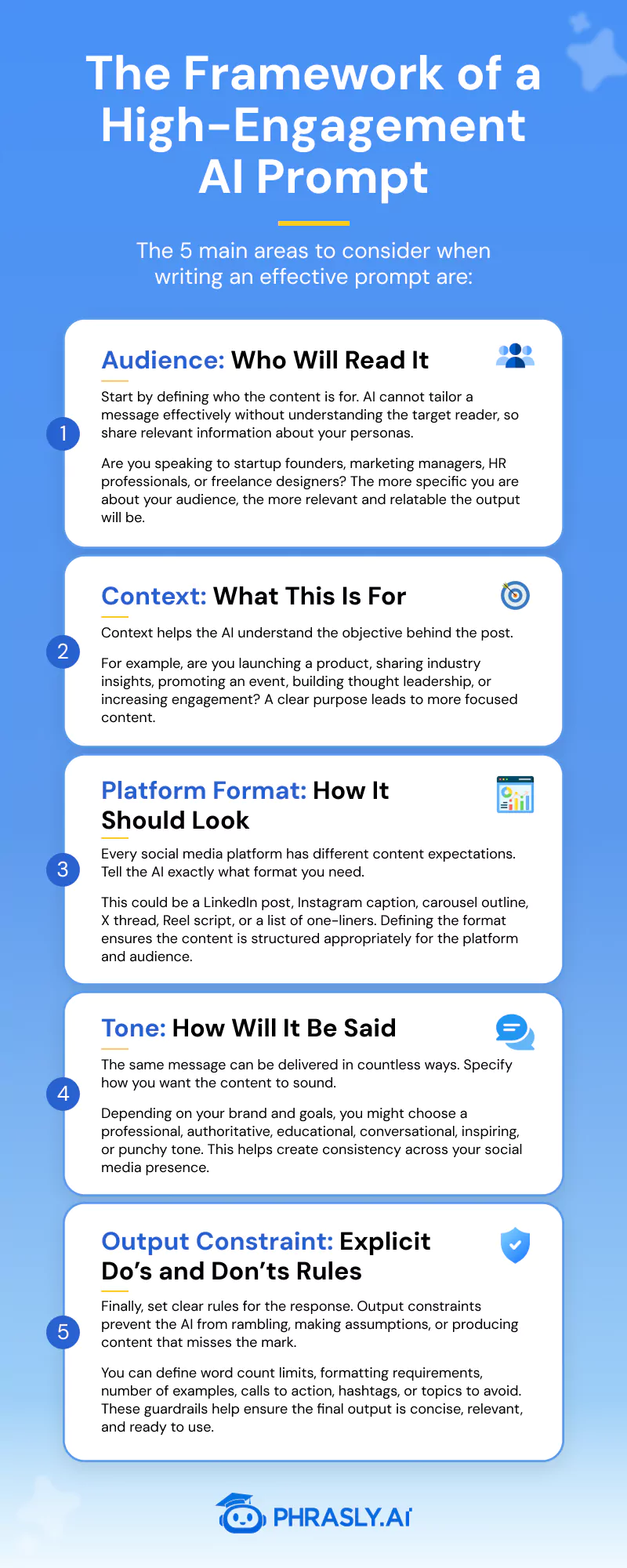
The Framework of a High-Engagement AI Prompt
The difference between an average AI-generated post and one that drives meaningful engagement usually comes down to the quality of the prompt. When building prompts for LinkedIn, Instagram, or X, focus on five key elements.
The goal is to help you build your own prompts that produce output you can actually use. Be concise and avoid complexity. State your request in brief, but specific, language. Avoid jargon.
Here's an example:
Bad prompt (generic prompt): “Write a social media post about AI for marketing.”
Good prompt: “Write a LinkedIn post for digital marketing managers and agency owners about how AI can reduce content production time. The goal is to position our brand as a practical AI resource for marketers.
Use a professional but conversational tone. Start with a strong hook, include three actionable examples, keep the post under 250 words, and end with a question that encourages comments.”
🏆 Want to improve your results even further? These Prompt Optimization Techniques explain how small changes in wording, structure, and constraints can improve AI output quality.
You can also explore Zero-Shot Prompting and Few-Shot Prompting strategies to understand when examples are necessary.
Top 15 AI Prompts for LinkedIn: Thought Leadership, Hooks & Carousels
LinkedIn rewards content that sparks conversations, demonstrates expertise, and provides practical value. While AI can help you create these posts faster, the quality of the output depends heavily on the prompt you provide.
Below are 15 proven AI prompts organized by content type. Each is designed to help marketers, founders, consultants, and professionals create engaging LinkedIn content that drives engagement and visibility.
15 AI Prompts That Generate More LinkedIn Engagement
1."Write a LinkedIn post about a hard-earned lesson from [specific failure]. Open with the mistake. Close with how it changed how I work."
Why it works: vulnerability + resolution arc makes readers feel seen and compelled to share their own stories.
💬Triggers comments
2. "Write a LinkedIn post with a contrarian take on [industry trend]. Make a case most people in [field] would push back on, backed by one real data point. Present a balanced argument and invite readers to share their perspective."
Why it works: Disagreement triggers replies, even critical ones boost algorithmic reach.
💬Triggers comments
3. "Create a LinkedIn post sharing three lessons learned from [project, campaign, or experience]. Use a storytelling format and conclude with practical advice for other professionals."
Why it works: Personal experiences build credibility and trust.
💬Triggers comments
4. "Write a LinkedIn 'what I wish I knew' post about [topic] addressed directly to someone starting out in [role]. Use 'you' throughout."
Why it works: Direct second-person address and mentor framing make this highly shareable among junior audiences.
➡️Drives shares
5. "Write a LinkedIn post predicting how [topic] will look in 3 years. Give 3 specific predictions with brief reasoning. Ask readers to add their own."
Why it works: Future-framing positions you as a forecaster; the CTA turns passive readers into contributors.
💬Triggers comments
Hook-Driven Short Posts
6. "Write a 3-line LinkedIn hook about [topic]. Line 1: a bold claim. Line 2: what makes it surprising. Line 3: here's why it matters.”
Why it works: Three lines map perfectly to LinkedIn's "see more" cutoff, maximizing expand-clicks.
💬Triggers comments
7. "Write a LinkedIn post starting with 'Nobody talks about this in [industry]:' followed by one underrated insight about [practice]. Keep it under 120 words and end with a thought-provoking question.”
Why it works: Creates curiosity and emotional engagement.
💬Triggers comments
8. “Create a LinkedIn post about the biggest mistake professionals make when trying to achieve [goal]. Explain the mistake and suggest a better approach.”
Why it works: People are naturally drawn to avoiding mistakes.
👉Drives engagement
9. "Rewrite this update: [paste text] as a LinkedIn post that opens with a number (stat, time, or dollar amount) and closes with a single-line insight."
Why it works: Number-led openings visually interrupt the feed.
👉Drives engagement
10. “Create a LinkedIn post comparing how you approached [problem] before versus after learning a key lesson. Two sentences each side. End with the single decision that caused the shift."
Why it works: Demonstrates growth and expertise.
💬Triggers comments
Carousel Script Prompts
11. “Create a 7-slide LinkedIn carousel teaching professionals how to achieve [goal]. Include a compelling title slide, actionable steps, and a CTA slide. Slide 1: a bold problem statement. Slides 2-6: one numbered insight each. Slide 7: one clear CTA. ”
Why it works: Educational content performs exceptionally well.
📥Drives saves
12. “Write a LinkedIn carousel outlining 6 common mistakes people make when [activity]. Dedicate one slide to each mistake and provide a solution.”
Why it works: Readers save practical checklists.
📥Drives saves
13. “Create a LinkedIn carousel breaking down a successful [campaign, strategy, or project]. Include challenge, approach, results, and lessons learned.”
Why it works: Combines storytelling with proof.
📥Drives saves
14. "Turn [blog post or talk transcript] into a LinkedIn carousel. Extract 5 quotable insights. Each slide: bold headline + 1-sentence context."
Why it works: Repurposed long-form content consistently outperforms original short-form content.
➡️Drives shares
15. “Create a LinkedIn carousel highlighting 5 trends that will shape [industry] in the next year. Include implications and recommended actions for each trend."
Why it works: Future-focused content positions you as a strategic thinker.
➡️Drives shares
Looking for more workplace-focused use cases? Explore our collection of the best ChatGPT prompts for professionals to improve productivity, communication, research, and strategic thinking.
Top 15 AI Prompts for Instagram: Reels, Captions & Story CTAs
On Instagram, attention is everything. The most successful posts stop the scroll, capture interest within seconds, and give people a reason to save, share, or engage. While AI can help speed up content creation, the results are only as good as the prompts you use.
To make that easier, we've compiled 15 proven AI prompts designed specifically for Instagram growth. Organized by engagement goal - including Reels hooks, save-worthy captions, and Story CTAs - these prompts help creators, marketers, and brands generate content that resonates with audiences and performs well in the algorithm.
15 AI Prompts that generate more Instagram engagement
1. "Write a 3-second Reels hook for a video about [topic]. Open mid-action. Use present tense. Create a gap the viewer has to watch to close."
Why it works: When viewers stay to discover the payoff, completion rates increase, a key signal Instagram uses to expand reach.
🔁 Increases watch time
2. "Write a Reels hook for [topic] that makes the viewer think 'this is exactly me.' Use 'you' and one hyper-specific detail that feels embarrassingly relatable."
Why it works: Identity-mirror hooks get shared to group chats with "this is literally you" - a high-intent share behavior.
➡️Drives shares
3. "Write an Instagram Reels hook that begins with 'Save this before you [do X].' Follow it with a one-sentence preview of the value viewers will get from the video."
Why it works: Asking for a save up front positions the content as useful and worth revisiting, and encourages engagement.
➡️Drives shares
4. "Write a one-sentence Instagram Reels hook about [topic] that opens with a surprising statistic or unexpected number. Don't explain it, let the number create curiosity."
Why it works: Unexpected numbers can stand out in a crowded feed. They create a pattern interrupt that captures attention and encourages viewers to stop scrolling.
🔁 Boost replays
5. "Write a Reels hook for [topic] that promises a list ('3 things', '5 signs', '7 reasons') and cuts off before naming any of them."
Why it works: Numbered-list teasers create a completion loop, where viewers replay or save to make sure they caught everything.
🔁 Boost replays
Caption Frameworks
6. "Write an Instagram caption for [topic] structured as: one bold claim, 3 punchy supporting lines, then 'Save this, you'll want it later.' Keep under 150 words."
Why it works: When a caption delivers clear value, a direct save CTA gives readers a reason to bookmark it for future reference, increasing engagement.
📥Drives saves
7. "Write a caption for [post] that ends with 'Tag someone who needs to hear this.' Make the body so specific it feels like it was written for one person."
Why it works: People share content that reminds them of someone they know. The more specific and relatable the message, the more likely readers are to tag a friend.
➡️Drives shares
8. "Write a caption for [topic] as a mini-guide with 5 short bullets, with actionable tips. Open with 'Here's what most people miss about [X]:”
Why it works: Actionable lists are easy to save and revisit. The "most people miss" frame creates curiosity and value.
📥Drives saves
9. “Write an Instagram caption about [topic] that begins with a strong opinion, adds nuance in the middle, and ends with: 'Agree or disagree? Tell me below.”
Why it works: A thoughtful, slightly controversial perspective encourages discussion while avoiding the backlash that often comes from extreme opinions.
💬Triggers comments
10. "Write a before-and-after Instagram caption for [transformation]. Use two sentences to describe the struggle before the change and two sentences to describe the result after. End with: 'Share this with someone who's still in the before."
Why it works: Transformation stories create emotional connection. Pairing them with a share CTA encourages readers to pass the content along to someone who could benefit from it.
➡️Drives shares
Story CTA Slides
11. "Write a copy for an Instagram Story slide that teases a carousel post. One headline. One benefit sentence. CTA: 'Swipe to the post, save it before you need it.”
Why it works: Repeating the value proposition across Stories and feed content reinforces the save action and increases the likelihood that viewers bookmark the post for later.
📥Drives saves
12. "Write an Instagram Story poll or question sticker prompt about [topic]. Make both answer choices relatable so viewers feel compelled to participate."
Why it works: When both options resonate, more viewers engage. High participation rates signal relevance to Instagram and can increase Story distribution.
👉Drives engagement
13. "Write a Story slide that gives away one free resource for [topic]. CTA: 'DM me [keyword], and I'll send it over.' Keep it to 15 words max."
Why it works: Keyword-based DM offers create a low-friction way for followers to raise their hand and engage directly, generating valuable conversations and stronger audience signals.
💬Triggers comments
14. "Write a Story slide with a 'This or that' question about [topic]. Make both options appealing. Add: 'Share this to your Story and let your followers vote.”
Why it works: When followers reshare interactive content, they introduce it to new audiences, creating additional opportunities for engagement and reach.
➡️Drives shares
15. "Write a 3-slide Story sequence for [topic]: slide 1 = the problem, slide 2 = the insight, slide 3 = 'Screenshot this and save it, you'll thank yourself later."
Why it works: Short narrative sequences encourage viewers to watch through to the final slide, while the screenshot CTA turns passive viewers into active savers.
📥Drives saves
Top 15 AI Prompts for X (Twitter): Threads, Hot Takes & Viral Formats
Success on X comes down to consistency and speed. While other platforms reward a slower publishing cadence, X favors creators who show up multiple times a day with content that sparks immediate reactions, conversations, and shares.
The challenge is maintaining that pace without sacrificing quality.
To help, we've put together 15 AI-powered prompts you can use to generate X-native content faster. Organized by format - including thread openers, hot takes, quote-tweet ideas, and engagement polls - these prompts are designed to help you publish more often while still creating posts people want to reply to, repost, bookmark, and quote-tweet.
15 AI Prompts That Generate More X Engagement
1. "Write a 7-tweet thread opener about [topic]. Tweet 1: one bold claim under 200 characters. End it with 'Thread:' and a line break. No context yet, make them click."
Why it works: A clear promise and holding back the explanation encourages readers to click through to understand the reasoning behind the claim.
👉Drives engagement
2. "Write a thread opener for [topic] that opens with 'X years ago I [did something bold]. Here's what I learned that nobody tells you:’ Keep the opener under 220 characters."
Why it works: Personal experience builds credibility, while the promise of a hard-earned lesson gives people a reason to keep reading and share the thread with others.
➡️Drives reposts
3. "Write the opening tweet for an 8-post thread about [topic]. Start with: 'Most people think [X]. They're wrong. Here's why:' Then structure the rest of the thread around counter intuitive insights.”
Why it works: The thread delivers practical insights readers can reference later.
👉Drives engagement
4. "Write a 'how I did X' thread for [achievement or project]. Each tweet should cover one step in the process. End the final tweet with: 'Save this thread, it works.’ Keep each tweet under 240 characters."
Why it works: Process threads get bookmarked at a higher rate than opinion threads, because utility beats novelty on X.
📥Drives saves
Hot Takes
5. "Write a hot take about [industry topic] under 240 characters. One sentence. No hedging. Make it specific enough to be wrong in someone else's opinion."
Why it works: Specificity is what turns opinions into arguments. The more precise the claim, the more likely people are to agree, disagree, or add their own perspective.
💬Triggers comments
6. "Write a 'the real reason X happens' tweet about [topic]. State the surface explanation, then the real one. Under 240 characters. End mid-thought."
Why it works: This format naturally encourages people to quote, challenge, or expand on the idea with their own interpretation.
➡️Drives shares
7. "Write a tweet starting with 'Unpopular opinion:' about [topic]. State it cleanly in one sentence. Then one sentence of reasoning. Total: under 240 characters."
Why it works: The format signals debate from the start, encouraging readers to weigh in with their own experiences and viewpoints.
💬Triggers comments
8. "Write a prediction about [trend, technology, or business decision] using either 'This will age well' or 'This will age poorly.' Be specific and keep it under 200 characters."
Why it works: Predictions invite people to publicly agree, disagree, or revisit the claim later.
➡️Drives shares
Quote-Tweet Bait
9. "Write a tweet that states an incomplete framework or rule for [topic]. Leave one obvious gap, something an expert would immediately want to fill in."
Why it works: Professionals often can't resist improving, expanding, or refining a framework they partially agree with.
➡️Drives shares
10. "Write a tweet comparing two approaches to [topic] as a binary: 'Option A people do X. Option B people do Y. Which one are you?' Under 220 characters."
Why it works: People enjoy identifying with a particular approach and explaining why they believe it's the better choice.
➡️Drives shares
11. "Write a tweet that gives a list of 3 things about [topic] but makes one of them subtly wrong or debatable. Don't label which one."
Why it works: The "spot the mistake" mechanic converts passive readers into active participants.
💬Triggers comments
12. "Write a single-sentence tweet about [topic] that sounds obvious when you read it but takes 10 seconds to actually land. Under 180 characters."
Why it works: Slow-burn insight tweets get reposted hours or days later because they continue to resonate after the reader scrolls past them.
➡️Drives shares
Engagement Polls
13. "Write a 2-option X poll about [topic]. Both options should feel valid and reasonable. Question under 100 characters. Each option under 25 characters."
Why it works: Equal-weight options drive higher vote rates; when one answer is obviously right, people scroll past.
👉Drives engagement
14. "Write an X poll for [topic] where voting on either option commits the voter to a position they'd want to defend. Add: 'Drop your reasoning below.'"
Why it works: Identity-commitment polls generate reply threads. People are more likely to comment when they feel invested in defending or explaining their choice.
💬Triggers comments
15. "Write a 4-option X poll about [topic] that functions as a mini market-research question for [audience]. Frame it as: 'Curious what you all think:' There should be no obvious right answer."
Why it works: Research-oriented polls feel collaborative rather than argumentative, making them more approachable for a wider audience.
👉Drives engagement
Bonus: 5 Cross-Platform & Repurposing Prompts
Most marketers create content once and publish it once. That's leaving reach on the table. A single idea, properly repurposed, can show up as a LinkedIn post, an Instagram Reel, and an X thread, each native to its platform and optimized for different audience behaviors.
These five prompts are designed to help you do exactly that: take one core idea and multiply its impact across channels without having to start from scratch every time.
5 AI Prompts to Repurpose One Idea Across LinkedIn, Instagram & X
1. Full Repurpose Pack
“I have the following idea: [paste your core idea, post, or key insight]. Turn it into three separate pieces of content:
- LinkedIn post for marketing professionals, under 250 words, professional but conversational, ending with a question;
- Instagram caption under 150 words with a hook, 3 bullet points, and a save CTA;
- X thread opener under 220 characters that cuts off before the payoff.
Keep the core message consistent but make each piece feel native to its platform."
Why it works: Each platform rewards different content behaviors, so adapting the format and delivery typically generates stronger engagement than reposting the same content.
👉Drives engagement
2. Blog Post to Three-Platform Sprint
"Take this blog post excerpt or key argument: [paste content]. Repurpose it into:
- LinkedIn carousel outline (7 slides, one insight per slide, CTA on the last); - Reels hook script (under 15 seconds, opens mid-action, teases the full takeaway);
- A hot-take tweet (under 240 characters, no hedging, specific enough to spark disagreement).
Do not reuse the same opening line across any of the three."
Why it works: Long-form content already has the research and structure; the prompt extracts the highest-value moments for each format.
💬Triggers comments 📥Drives saves
3. One Stat, Three Formats
"Here is one data point or statistic: [paste stat + source]. Write three pieces of platform-native content using only this stat as the hook:
- LinkedIn thought leadership post that builds a short argument around it (under 200 words);
- Instagram caption that opens with the number cold, then delivers three implications in bullet points;
- X poll where the stat is the setup and the question asks the audience to weigh in on what it means.
Tone should match each platform: professional on LinkedIn, punchy on Instagram, direct on X."
Why it works: A strong data point is a creative asset; this prompt gets the most mileage out of a single piece of evidence.
💬Triggers comments 👉Drives engagement
4. Turn a Comment or Reply Into Content
"Someone left the following comment or reply on my content: [paste comment]. Use it as the starting point for:
- LinkedIn post that acknowledges the perspective and adds a layer of nuance (under 220 words, end with a question);
- Instagram Story 3-slide sequence (slide 1 = the comment as a relatable problem, slide 2 = your take, slide 3 = poll or question sticker);
- X hot take that distills your response to one sentence under 200 characters.
Each piece should feel like an original thought, not a public reply."
Why it works: Content built around community input feels more authentic and encourages additional interaction from readers.
💬Triggers comments 📥Drives saves
5. Evergreen Asset, Fresh Angles
"Here is a piece of content I've already published that performed well: [paste or summarize]. Generate three new angle variations for republishing across platforms:
- LinkedIn post that approaches the same idea from a contrarian perspective;
- Instagram Reel hook that reframes it as a personal story or transformation;
- X thread opener that treats it as a prediction about where [topic] is heading next.
Do not repeat any original phrasing. Each variation should feel like a new conversation starter, not a repost."
Why it works: If a piece of content performed well once, there's often more value to uncover. This prompt helps you find fresh angles without starting from scratch.
👉Drives engagement
Using an AI Prompt Generator to Scale Your Content Output
By this point, you have more than 50 AI prompts to work with, but the real takeaway isn't the prompts themselves. It's the framework behind them.
Every example prompt follows a tried-and-true engagement hook. They’re designed to increase watch time on Instagram, get replies on X, or drive saves and shares across LinkedIn. When you know the “why” behind a format, your ability to produce high-performing content on each platform scales exponentially. No more shotgunning random content onto the hope it performs. You have access to high-level patterns backed by each platform’s native distribution.
Pick three prompts from this document. Try them out this week. Measure their performance against your normal content. Monitor the metrics that actually matter, and you’ll learn more from this exercise than you will from 10 viral posts, tweets, or Reels.
Bonus tip: The reason the best marketers win with AI is not that they use it more - they win because they teach it more. There’s a difference between creating content and creating content that others will engage with. It’s a lesson that will serve you well on every platform, in every campaign, and throughout every prompt you build.
Adapting each prompt for each campaign, segment, and platform will get old fast. If you’re ready to level up beyond copy/pasting templates and start building out platform-specific prompts for each of your goals and brand’s tone of voice, Phrasly’s AI Prompt Generator can help. It takes a content idea and outputs structured, high-quality prompts for generating better content with AI tools.
Check out Phrasly’s AI Prompt Generator and build your own prompts for your next campaign 👇
FAQs
What makes an AI prompt effective for social media marketing?
An effective AI prompt includes five key elements: audience, context, platform format, tone, and output constraints. The more precise your prompt, the more relevant and usable the AI-generated content will be.
Why do AI-generated social media posts sometimes receive low engagement?
AI-generated posts often underperform when prompts are too vague or produce generic content that lacks personality, insight, or audience relevance.
Common mistakes include treating prompts like search queries, failing to specify an output format, and asking the AI to complete too many tasks at once.
Should I use the same AI prompt across LinkedIn, Instagram, and X?
No. Each platform rewards different content formats and user behaviors.
While the core idea can remain the same, adapting prompts for each platform typically results in better engagement and reach.
Can AI help repurpose content across multiple social media platforms?
Yes. AI can significantly speed up content repurposing by transforming a single idea into multiple platform-specific formats.
By using structured repurposing prompts, marketers can extend the lifespan of their content, maintain consistent messaging, and reach different audiences without creating everything from scratch.

Written by
Gabriela Cofre
Gabriela Cofre is a content strategist and writer specializing in SEO, inbound marketing, and B2B, B2C content with +7 years of experience.