Does Gradescope Check for Plagiarism, Copy-Paste, or Code?
9 min read
Gradescope does not have a general plagiarism checker built into the platform. If you're wondering whether your essay, PDF, or homework upload gets scanned automatically the moment you submit, it doesn't, at least not by Gradescope itself.
The platform's only native similarity feature is Code Similarity. It only applies to programming assignments. Written work is only checked if your school runs a separate tool. Such as Turnitin, alongside Gradescope.
This guide breaks down exactly what Gradescope can see, what it can't, and what to do before you submit.
Check Your Work for Plagiarism! 👇
What Gradescope Can and Can't See (Quick-Answer Matrix)
Question | Documented native behavior | Caveat |
Essay plagiarism | No native text-similarity scan | A school may run Turnitin or another tool separately |
Programming code similarity | Code Similarity can flag overlap (instructor-run) | Requires an institutional license; not an automatic verdict |
Copy/paste activity | No documented clipboard log | Pasted text or code can still be found to match another source |
Tab switching | No native report; no built-in lockdown browser | A separate proctoring tool chosen by the school may track this |
Screenshots | No documented screenshot alert | Separate proctoring software may behave differently |
Previous submissions | Instructors can view submission history | Docs don't confirm every version is automatically compared |
AI / ChatGPT writing | No native AI-writing detector | Depends on a separate Turnitin AI setting. |
Turnitin relationship | Turnitin owns Gradescope (since 2018) | Ownership doesn't mean an automatic Turnitin Similarity Report runs |
Does Gradescope Check for Plagiarism?
What is Gradescope? Gradescope is a digital grading platform built by a UC Berkeley team. Acquired by Turnitin in 2018. Schools use it to collect, organize, and grade exams, quizzes, bubble sheets, online assignments, and code, plus run autograder tools for programming work, all in one place. Its job is grading, not detection.
For essays, PDFs, and written homework, Gradescope has no documented native plagiarism scan. For programming assignments, its Code Similarity tool can surface overlap between students in the same class for an instructor to review.
Either way, a similarity result is something an instructor evaluates, not an automatic misconduct finding.
Can Gradescope See When You Copy and Paste?
Gradescope's published documentation doesn't describe an instructor-facing log of copying or pasting. So it doesn't “see” the act of pasting itself.
But copied wording can still be caught by a person reading your work or by a separate plagiarism tool. Pasted code can still resemble a classmate's submission in a Code Similarity report.
Seeing a paste and finding a match are two different things.
Copying and Pasting Written Text
There's no documented clipboard report for essays or text answers. So if you're asking, does Gradescope track copy and paste as a logged, timestamped action an instructor can see, the answer is no. At least not natively.
If wording is copied from a source, a human grader or a separate checker like Turnitin can still catch it during review.
If you're relying on rewording rather than copying outright, see this breakdown of is paraphrasing plagiarism.
Copying and Pasting Code
Code Similarity can surface overlap between your submission and a classmate's within the same assignment.
It doesn't scan GitHub, the open internet, or past semesters unless your school pairs it with another tool. There's no public evidence that Gradescope does that on its own.
And can Gradescope detect copy and paste on its own, outside of that classmate-to-classmate comparison? Not directly. It only surfaces matches. It doesn't flag the act of pasting itself.
Does Gradescope Check Code for Plagiarism?
Gradescope's Code Similarity tool is available to courses with an institutional license. Compares submissions within a single assignment.
According to Gradescope's own documentation, it does not automatically identify plagiarism.
It shows how similar two programs are. An instructor runs the “Review Similarity” step and reviews the results. Results are sorted by the length of matching code.
It's similar in spirit to MOSS (Measure of Software Similarity). The Stanford tool computer science courses have used since the 1990s, though Gradescope's Code Similarity feature is a separate, in-house tool.
Supported languages are C, C++, C#, F#, Go, Java, JavaScript, MATLAB (manual grading only), MIPS, ML, Python, and R. Other languages can still be submitted and graded. They just won't go through similarity review.
The report does not automatically prove academic dishonesty. The instructor still has to review it and decide.
Does Gradescope Check Previous Submissions or Only the Final One?
Students often ask does Gradescope checks previous submissions for plagiarism, not just the newest upload. The most recent upload is normally what counts for grading. Instructors can view your submission history.
Gradescope's Code Similarity documentation doesn't state that every earlier version is automatically pulled into a similarity check. So don't assume either “only the final draft counts” or “every draft gets compared” without checking with your instructor.
Does Gradescope Track Tabs, Screenshots, or Browser Activity?
Gradescope's documentation doesn't describe tab-switching, clipboard, or screenshot reports for instructors.
Gradescope states that it doesn't currently offer its own proctoring or lockdown browser. It can enforce time limits, hide questions and responses, and randomize questions, its native anti-collusion features.
Can Gradescope see if you screenshot a question or your screen? There's no documented feature that alerts an instructor when you do. A separate proctoring or device-control tool chosen by your school, such as Respondus, could monitor more than that.
Action | What Gradescope's own documentation supports |
Switching tabs | No documented native instructor report; no built-in lockdown browser |
Taking a screenshot | No documented native screenshot alert |
Copying/pasting | No documented native clipboard log |
Timed assignment | Gradescope can enforce and display a time limit |
Anti-collusion (native) | Time limits, hiding questions/responses, question randomization |
Resubmitting | Instructors can access submission history |
Gradescope and Turnitin. What’s the Connection?
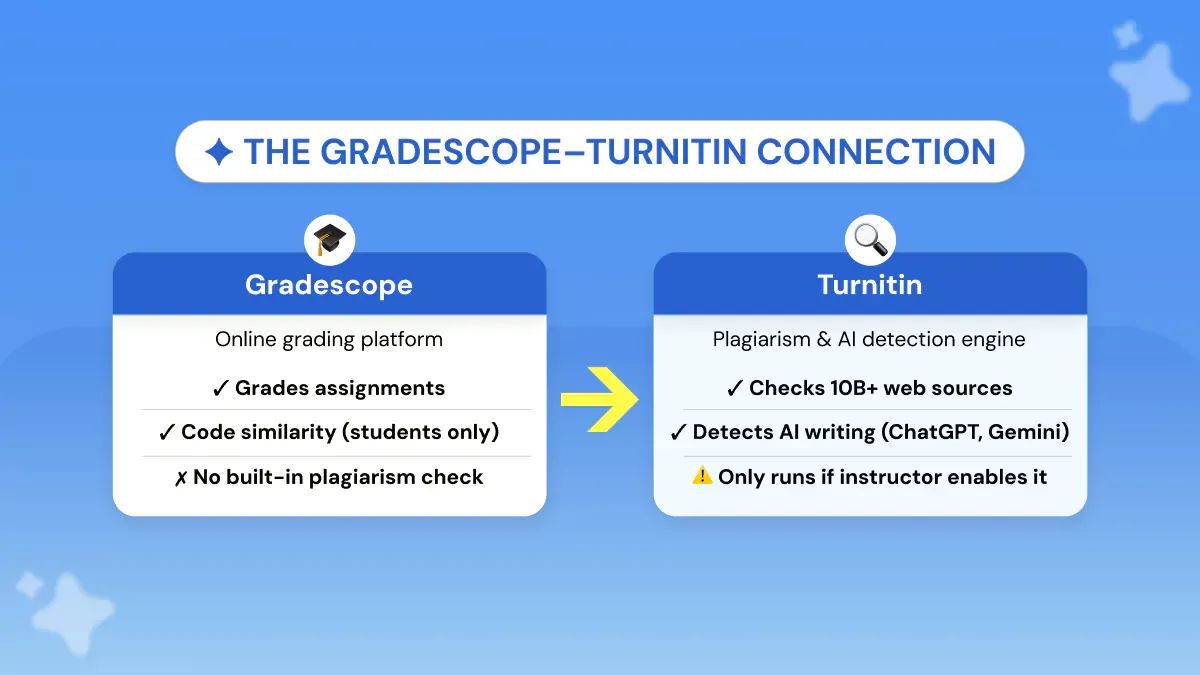
Turnitin acquired Gradescope in October 2018. So yes, Gradescope is owned by Turnitin. But ownership doesn't mean every Gradescope submission is automatically checked by Turnitin.
Gradescope's own documented similarity feature is Code Similarity, and it only covers code.
Some schools do run Turnitin separately, often through their LMS workflow rather than a switch inside Gradescope itself. An instructor could always manually check exported work with another tool.
What you shouldn't assume is that a Gradescope assignment has a Turnitin toggle you or your instructor can flip on. If your school does pair the two, that's an institution-specific setup. Not a universal Gradescope setting.
Turnitin's own reporting puts its footprint at 17,000 institutions, 71 million students, and 185 countries. So treat it as a tool that could be involved somewhere in your school's process even when Gradescope itself isn't running it.
If you're ever wrongly flagged by Turnitin, remember it's your instructor, not the software, who reviews the evidence and decides next steps.
For AI writing, Gradescope Turnitin AI detection works the same way. It only runs if your institution has the Turnitin AI Writing Report feature turned on.
When active, the report shows your instructor a percentage of text it flags as likely AI-generated or likely AI-paraphrased.
If your course runs through an LMS such as Canvas, Blackboard, Moodle, or D2L, Turnitin may already be integrated there as a separate setting, independent of anything inside Gradescope.
For a closer look at how Turnitin's similarity report actually works, see this guide on how to check plagiarism in Turnitin.
For a deeper breakdown of how Turnitin handles ChatGPT-generated writing, see this guide on does Turnitin detect ChatGPT.
Does Gradescope Detect AI or ChatGPT?
Does Gradescope have AI detection built in? No, not natively! Gradescope has no built-in AI-writing detector. If your written work gets checked for AI use, that comes from a separate Turnitin AI Writing Report setting that your school has to turn on. Not from Gradescope itself.
Gradescope's own AI-assisted grading features help instructors group similar answers faster. This is a grading aid, not an AI-content detector.
It's a different question from how professors detect ChatGPT manually, through writing style and source review.
If you want the full AI-specific breakdown, read this guide on does Gradescope check for AI, which explains how Turnitin, instructor review, and AI writing reports fit into Gradescope submissions.
What Should Students Do Before Submitting on Gradescope?
You can run your own check before your professor ever sees your work. The whole process takes about two minutes.
Since you usually cannot know whether your instructor has Turnitin active inside Gradescope, the smart move is to catch any unintentional similarity issues like copied phrases, weak paraphrasing, or missing citations before they become an academic integrity problem.
Step 1: Finish Writing Your Assignment as Normal
Do not write around a detector. Use your notes, sources, and your own explanation.
Step 2: Run It Through a Plagiarism Detection Tool
Paste your draft into Phrasly's plagiarism checker before you upload to Gradescope.
A few reasons it works well for students:
Plagiarism + AI detection in one scan. Most tools only do one. Turnitin charges extra for AI detection.
Your work is not stored. Phrasly deletes content immediately after scanning. Your paper does not end up sitting in a database forever.
Built for pre-submission. This is exactly the "check before your professor does" use case. Turnitin is locked behind your institution, and you usually cannot self-check there.
Step 3: Review the Similarity Report
A match does not always mean plagiarism, but it shows where your wording, citation, or paraphrasing needs attention.
This is also where you catch incremental plagiarism - the small bits of copied phrasing or weak paraphrasing that quietly add up and trigger flags, and reduce the risk of false-positive plagiarism by fixing them early.
Use the report as a quick revision checklist:
Add citations where you used someone else's idea
Put exact wording in quotation marks
Rewrite weak paraphrases in your own structure
Remove accidental copy-paste from notes or sources
Step 4: Submit once the flagged sections are clean.
Phrasly can reveal possible matches before you submit. It can't reproduce another vendor's report exactly. Plagiarism checkers use different databases and matching methods. Use it to strengthen your own work. Not to guess your way around a professor's tools.
FAQs
Does Gradescope Check for Plagiarism in Code?
Yes, through its Code Similarity tool, available to courses with an institutional license. It compares your code against classmates' submissions in the same assignment. It gives the instructor a report to review, not an automatic verdict.
Does Gradescope Check for AI Writing?
Gradescope has no built-in AI-writing detector for essays. AI checks depend on a separate Turnitin AI Writing Report setting. This shows the instructor a percentage of text flagged as likely AI-generated when it's turned on.
Is Gradescope Owned by Turnitin?
Yes! Turnitin acquired Gradescope in October 2018. Ownership doesn't mean every submission is automatically run through a Turnitin check. That still depends on whether your school enables it separately.
Does Gradescope Tell Your Professor if You Plagiarize?
Gradescope doesn't automatically flag plagiarism to your professor. For code, it can generate a Code Similarity report. But Gradescope's own documentation says this doesn't automatically detect plagiarism. The instructor has to review it and decide.
Does Gradescope Track Tabs?
No! Gradescope doesn't currently offer a built-in lockdown browser or tab-tracking tool, according to its own documentation. A school may still use a separate proctoring tool alongside Gradescope.
Can Gradescope See When You Copy and Paste?
No! Gradescope's documentation doesn't describe a clipboard or paste log. Copied text or code can still be caught later by a human reviewer for essays or by Code Similarity for programming assignments.
Does Gradescope Check Previous Submissions, or Only the Final One?
The most recent upload usually counts for grading, and instructors can view your submission history. Gradescope's documentation doesn't confirm that every earlier draft is automatically pulled into a Code Similarity check, so don't assume only the final version, or every version, gets compared.
Can Gradescope See or Detect Screenshots?
There's no documented native screenshot alert in Gradescope. If your school uses a separate proctoring or device-monitoring tool, that tool, not Gradescope, would be responsible for catching screenshots.

Written by
Obaid Ahsan
Content Lead · Pakistan
Obaid Ahsan is a Content Lead with 5+ years of experience in SEO, content strategy, and AI-focused publishing. At Phrasly, he leads content development with a focus on accurate research, search performance, and useful, trustworthy information for readers.