Auto Typer Extension for Google Docs: How It Works
10 min read
Your draft is finished, and it's in the wrong place. Paste it into Google Docs and the whole block lands at once. An auto typer extension enters the same text gradually, at a speed you set. Most people use it to move the work they drafted elsewhere into Docs at a natural pace.
⚖️ Auto typing changes how text is entered. It does not determine who originally wrote the words.
We installed and tested an auto typer chrome extension ourselves. This guide covers how it works, what it changes in version history, what it does not prove, and how to pick one safely.
🚀 Want to see an auto typer in action? Phrasly's Human Auto Typer enters your prepared text into Google Docs with adjustable speed, pauses, and typing variation. 👇
What Is an Auto Typer Extension?
An auto typer extension is a browser add-on that inserts prepared text into an on-screen editor character by character, at a set or variable speed, rather than pasting it all at once. "Auto typer" is an umbrella term, so each product differs in speed, control, and supported sites.
Three nearby tools get confused with it 👇
Auto Typer vs Text Expander
A text expander swaps a short trigger for a saved snippet. You type "brb" and it becomes "be right back" instantly. An auto typer enters a full paragraph gradually, character by character.
Auto Typer vs Browser Autofill
Autofill fills predefined form fields, like your name, email, and address. It only targets fields it recognizes. An auto typer types free text into any editor.
Auto Typer vs Browser Automation
Browser automation can type, click, navigate pages, and run multi-step workflows. An auto typer does one job: text entry into the field you point it at.
How Does an Auto Typer Extension Work in Google Docs?
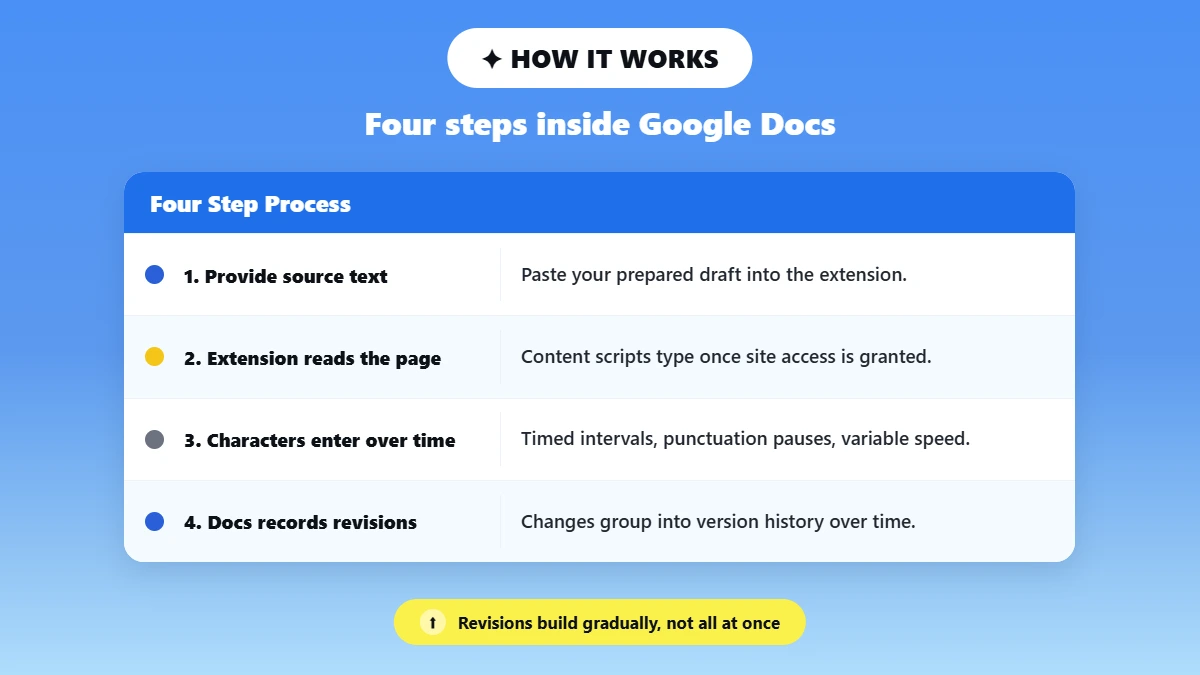
An auto typer for Google Docs loads your prepared text, then enters it into the active document on a timer. Google Docs then saves the resulting changes as revisions.
The extension types at the selected speed into the open document. It never uploads a file. It is a simple loop, not a keystroke recorder. Here is the flow.
You provide the source text. Paste your prepared draft into the extension.
The extension interacts with the active page. Chrome content scripts can read and change page content when you grant the required site access, per Chrome for Developers documentation.
Characters are entered over time. One after another, with timing intervals, punctuation pauses, optional corrections, and variable speed.
Google Docs records the changes and groups them into revisions over time.
📌 The line worth holding: Auto typing changes how text is entered. It does not determine who originally wrote the words.
Auto Typing vs Copy and Paste in Google Docs
No. Paste inserts a block instantly, while an auto typer builds the text gradually.
Method | How text enters | Timing | Version-history appearance | Best for |
|---|---|---|---|---|
Manual typing | User types | Gradual | Gradual revisions | Original drafting |
Copy / paste | Block inserted | Instant | Large single addition may appear | Moving finished text quickly |
Auto typer | Automated character input | Gradual | Text develops over time | Re-entering a prepared draft |
Text expander | Shortcut insertion | Usually immediate | Block / snippet addition | Repetitive phrases |
💡 Native Google Docs does not label an insertion "from ChatGPT" simply because text was pasted. A large addition may be visible between revisions, but version history does not itself identify where the text came from.
What Does an Auto Typer Change in Google Docs Version History?
An auto typer makes your text appear gradually across grouped revisions instead of as one large addition. That is the only change. Version history is contextual evidence of how a document changed, and it is not proof of authorship or AI use.
🕒 Docs saves changes over time and groups them into revisions, so character-by-character input develops gradually.
🚫 A gradual pattern says nothing about where the words came from. History tracks edits, never sources.
For the full breakdown of what Google Docs version history shows, read our dedicated guide.
What Should You Look for in a Human Auto Typer Extension?
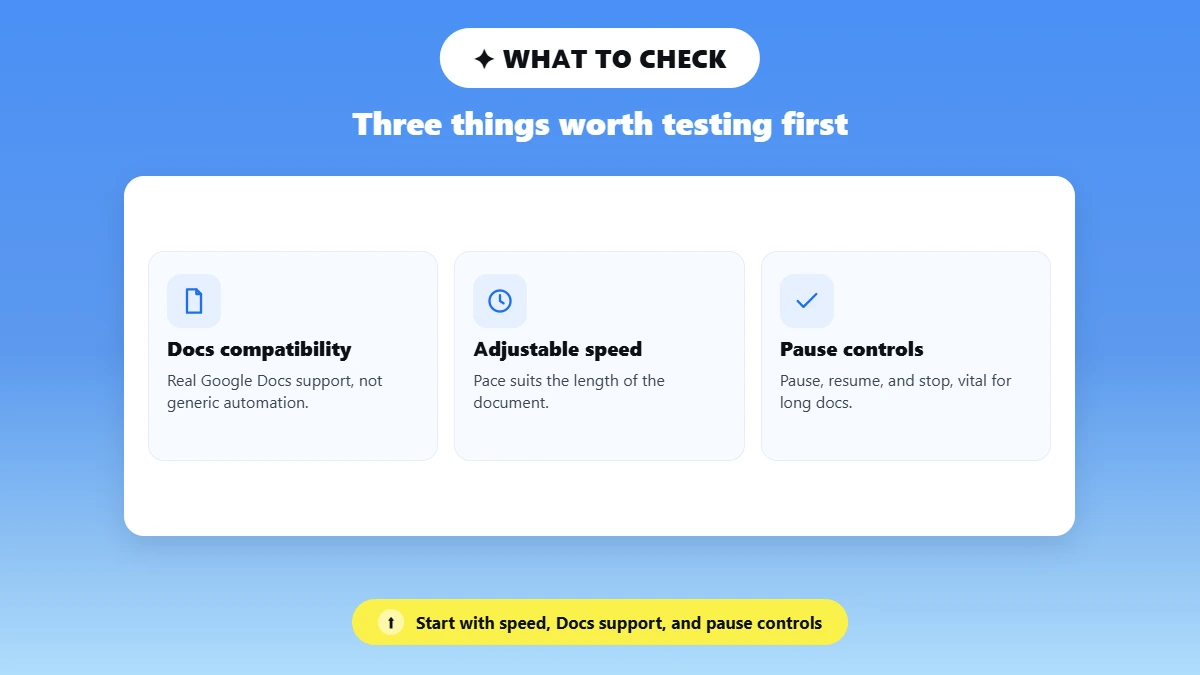
Start with three criteria: real Google Docs support, adjustable typing speed, and working pause, resume, and stop controls.
✅ Google Docs compatibility. Generic web-input automation is not Docs-specific support.
🎚️ Adjustable typing speed, so the pace suits the document.
⏸️ Pause, resume, and stop controls, which matter most on long documents.
🔀 Timing variation. Fixed intervals feel mechanical, and variation reads as ordinary typing.
⌨️ Error and correction controls, optional always.
🔤 Formatting reliability. Test quotation marks, apostrophes, lists, headings, and URLs.
🔒 Permissions and privacy. Google's advice is plain: "Make sure you only approve extensions that you trust." Chrome also lets you limit an extension's site access.
Phrasly Human Auto Typer for Google Docs
If your use case is transferring a prepared draft into Google Docs at a human pace, the Phrasly Human Auto Typer for Google Docs is built for that workflow. It enters your text character by character and lets you shape the speed and process.
What it does:
⚡ It lets you adjust typing speed: Slow, Average, and Fast.
🎚️ You can set break frequency: how often typing pauses.
🕐 You can adjust break duration: how long each pause lasts.
⚠️ You can set error rate: how often a typo appears.
✏️ You can adjust correction speed: how fast a typo gets fixed, but how it corrects is not adjustable.
🌐 It works in: Google Docs, Google Slides, essay portals, text forms, and web-based editors.
🔍 Chrome Web Store disclosure, checked 20 August 2026. The Phrasly Human Auto Typer listing shows version 1.0.1, updated 1 June 2026, and publisher PHRASLY LLC. It carries a 5.0 rating from 3 ratings and about 1,000 users.
It states: "The developer has disclosed that it will not collect or use your data." Treat that as a developer disclosure, never an independent audit.
Best for: moving your own prepared or AI-assisted draft into Google Docs at a pace you control.
Honest note: an auto typer handles text entry only. It does not improve weak writing, and it does not prove who wrote the words.
How to Use Phrasly's Auto Typer in Google Docs (First-Hand)
The Setup takes about a minute. The four steps below follow Phrasly's own product walkthrough.
Install Phrasly - Human Auto Typer from the Chrome Web Store, then open a blank Doc.
Open the Google docs you want to paste the text into.
Click on the extension panel and paste your prepared text into the input box.
Set your preferences: typing speed, error rate, pause frequency, and break duration.
Click Start Simulation and leave the tab in focus while the text goes in.’
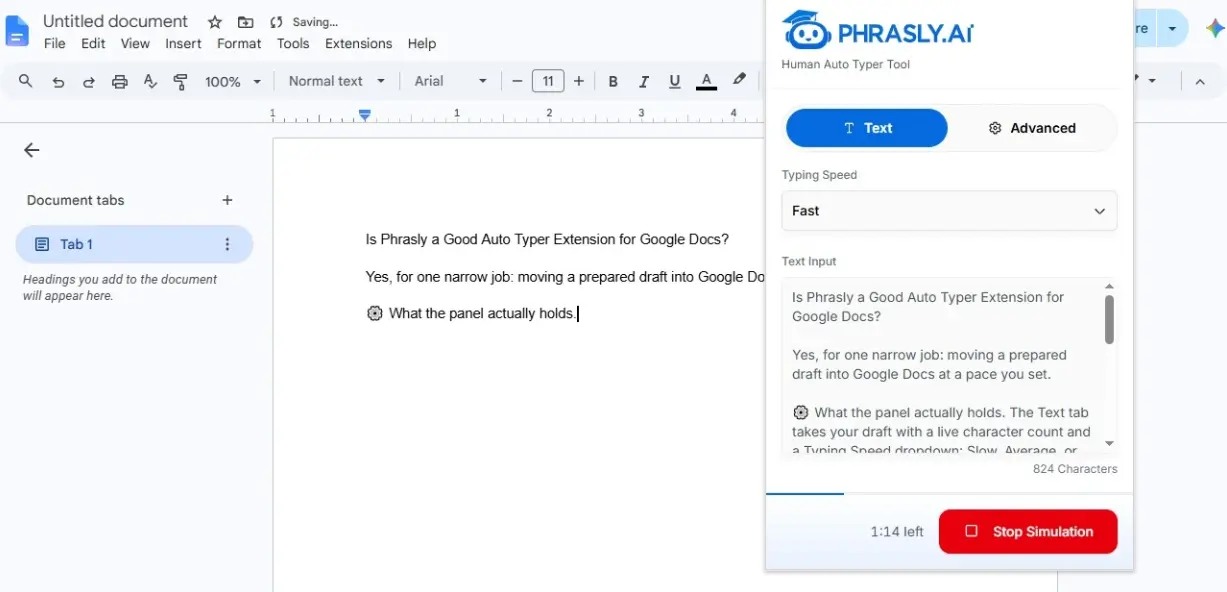
Step 4 is where the run gets its character. The Text tab holds Typing Speed, and the Advanced tab holds four numeric controls. These are the values recorded in our own test panel.
Control | Range | Step | What it changes |
⚠️ Error Rate | Not recorded | Not recorded | How often a typo appears |
⚡ Correction Speed | 0 to 2 | 0.1 | How fast a typo gets fixed |
🎚️ Break Frequency | 0 to 0.1 | 0.01 | How often typing pauses |
🕐 Break Duration | 0 to 1 | 0.1 | How long each pause lasts |
A reset button restores the recommended defaults, so nothing here is permanent. During a run the Start button turns into a red Stop Simulation button and a countdown shows the time left.
Does Google Docs Detect an Auto Typer?
No, not on its own. Google Docs version history records how a document changes, and it cannot tell anyone how the text was produced. Schools can add separate third-party tools that analyze writing activity inside Docs, so no extension should be marketed as undetectable.
One example is GPTZero's Chrome extension. Its listing advertises Writing Replay, which "brings your Google Docs writing process to life, showing exactly how a piece was written, edited, and pasted," plus activity insights on edits, pastes, and writing bursts.
Those tools read the writing process. For the wider picture, see how AI detectors work and can schools detect ChatGPT in separate guides.
Does Google Classroom Have an AI Detector?
Google Classroom does not currently provide a built-in AI writing detector. Google offers Originality Reports, which compare a student's work against webpages and books on the internet.
They can also check past student submissions when an administrator enables school matches. That is plagiarism and originality checking, not AI-authorship classification. For the full picture, read our guide to what AI detector Google Classroom uses.
Are Auto Typer Chrome Extensions Safe?
Yes, they can be safe when you install from the official Chrome Web Store, check the publisher, review the site permissions requested, and read the privacy disclosure first. Even then, avoid using any extension with sensitive, regulated, or confidential material.
Check Where You Install It From
Official Chrome Web Store listings are safer than unknown sites and direct downloads. One page shows the publisher, version, last update date, and privacy section.
Review the Publisher and Site Permissions
Some extensions read or change data on the sites you visit. Google tells users to approve only extensions they trust.
How Do You Limit an Extension's Site Access?
Chrome gives three levels of site access: when you select the extension, on the current site only, or on all sites. Change it later under Extensions, Manage Extensions, Details.
Check the Privacy Disclosure
Every listing has a privacy section worth 20 seconds of your time. Phrasly's listing states the developer will not collect or use your data.
⚠️ Permissions are where the risk sits. Incogni's January 2026 review of 442 AI extensions found that 52% collected some form of user data, with scripting the most common sensitive permission.
What Should You Avoid Typing Through an Extension?
Keep out passwords, medical records, client contracts, and anything under a confidentiality rule. A false AI flag on an ordinary essay is a separate problem, covered in why is my essay detected as AI. Students who want a pre-submission check can compare free AI checkers for students.
When an Auto Typer Is Useful, and When It Isn't
An auto typer earns its place when finished text needs to live in a browser editor.
✅ Good fits:
📄 Your own draft, moved from another editor into Google Docs
🔁 Repetitive document entry
📝 Long transcription or re-entry work
♿ Accessibility and reduced typing strain
🌐 Browser-based document workflows
⚠️ Honest limits:
❌ It does not improve weak writing
❌ It does not fact-check anything
❌ It does not prove authorship
❌ It does not make prohibited AI use acceptable
❌ It cannot replace your school or workplace rules
🧩 Formatting and compatibility vary by editor
📊 Demand for this workflow tracks student AI use. Per Pew Research Center's February 2026 report, 54% of U.S. teens say they have used chatbots for help with schoolwork, and 10% say chatbots help with all or most of it.
If your draft started with AI help, refine it before the transfer. Our guide on how to humanize AI text covers that step, and the best Google Docs alternatives roundup helps if you are still picking an editor.
Curious how your draft reads before it goes into the doc? Run it below 👇
Is Phrasly a Good Auto Typer Extension for Google Docs?
Yes, Phrasly is a strong fit, for a human-style auto typer aimed at Google Docs.
Against the criteria above it clears the ones that matter most: native Docs support, adjustable speed, timing variation, and a published privacy disclosure.
It also sits inside the wider Phrasly writing toolkit, so refining and transferring a draft happen in one place.
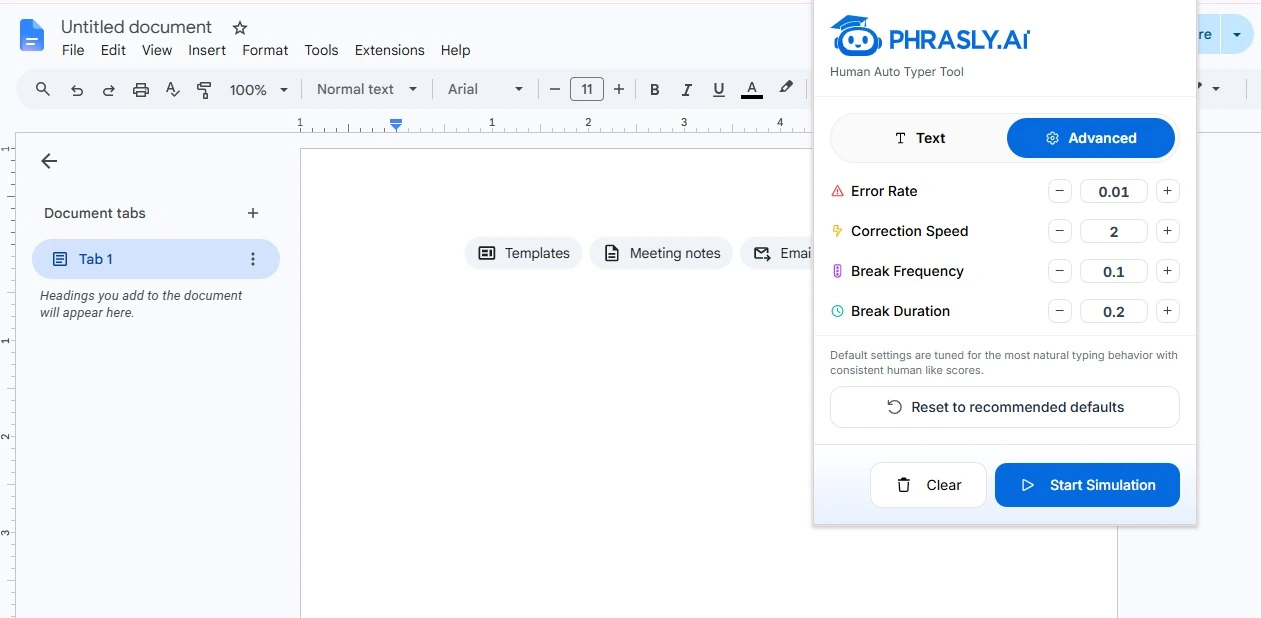
Where it misses that list is the run itself. The panel gives you Start and Stop, with no pause in between.
🎛️ Every timing value is one you set, so the same settings reproduce the same run.
⚠️ The listing is young at 1.0.1 with about 1,000 users, and its description never names Google Docs.
Anyone wanting thousands of reviews behind a listing should compare first.
Ready to transfer your draft into Google Docs without retyping it? 👇
Frequently Asked Questions
What Is the Best Human Auto Typer Extension?
The best one supports Google Docs natively, offers adjustable speed, gives you pause, resume, and stop controls, varies timing, and publishes a clear privacy disclosure. Phrasly Human Auto Typer fits that shape.
Does an Auto Typer Work in Google Docs?
Yes. Google Docs is a supported target for auto typers that type into the active editor character by character. Compatibility varies by tool, so Docs-specific support matters more than generic web-input automation.
Is an Auto Typer the Same as Copying and Pasting?
No. Paste inserts a whole block instantly, and an auto typer builds the text gradually with optional timing variation. Version history reflects gradual entry rather than one large addition.
Does Google Classroom Have an AI Detector?
No. Classroom has no built-in AI writing detector. Google offers Originality Reports, which check for matching or uncited material against webpages, books, and past submissions. They never classify AI authorship.
Can Teachers Detect an Auto Typer in Google Docs?
Google Docs version history shows how a document changed. It does not identify an auto typer or the author of the text. Teachers may add third-party tools that analyze writing activity, so nothing should be marketed as undetectable. Our guide covers what teachers can see.
Is Phrasly Human Auto Typer Free?
Yes. The extension installs from the Chrome Web Store at no cost and runs in Google Docs without a Phrasly subscription, confirmed in our own install. Subscribers get it included at no extra charge. Phrasly's other tools keep their own signup and limits.

Written by
Alina Shah
SEO Content Specialist · Karachi, Pakistan
She writes about AI so you don't have to guess. 8+ years in content strategy and editing. Now she puts AI writing tools and detection systems through real tests and shares what actually works.