12 Best Google Docs Alternatives in 2026 (Free & Paid)
14 min read
The best Google Docs alternative for you comes down to what you value most. Cost, privacy, offline access, or AI features.
Search interest in alternatives to google docs spans free tools, offline editors, privacy-first suites, and full team platforms. No single tool wins on every front.
Their top picks for Google Docs alternatives in 2026 are Microsoft Word & Zoho Writer (formatting), LibreOffice & OnlyOffice (free and offline/open source).
Proton Docs & CryptPad (privacy), Notion & Lark (teamwork), and Phrasly Docs (writers/students who write with AI). Which one is best for you depends on your needs.
✅ If you write with AI and want it to read human, Phrasly Docs is on this list. But so are ten other tools that do other jobs better.
Why Look for a Google Docs Alternative?
Whether you search for Google Docs alternative or Google Docs alternatives, the reasons why people search these phrases are relatively similar.
Google Docs works great for quick, free, real-time collaboration but falls short when dealing with advanced formatting or layout of long documents.
For privacy, the accounts and content can blur between personal and work use. For offline editing, which takes extra setup to turn on. For Drive's organization limits as a team grows.
For privacy-minded users who are uneasy about AI features touching their content by default.
None of this is to say that Google Docs is a terrible app.
It just means that the best alternative to Google Docs really depends on which, if any, of these problems affects you. And that is exactly what this guide is here to help you with.
How we picked (what to look for)
Every tool here was tested hands-on and verified with its official documentation for 7 categories.
Collaborative editing, formatting capabilities, offline capabilities, privacy/data-training policy, cost and freemium options, supported platforms, and how tools use AI features.
Whether they have them, and whether they can be disabled. When a tool's own AI features would hurt privacy-seeking readers, we call that out instead of automatically praising AI.
Google Docs Alternatives Compared (Quick Table)
A fast, scannable view of all twelve picks before the full breakdown below:
Tool | Best for | Free tier | Offline | Price (2026) |
Phrasly Docs | Students & professionals using AI | 3-day trial ($2) | Sync | $19.99/mo; Unlimited $10.99/mo (annual) |
Microsoft Word | Formatting / MS users | Web free | Desktop (paid) | 365 from $7/user/mo |
Zoho Writer | Free full-featured | Yes | Yes | Free (paid add-on for automation) |
LibreOffice | Free open-source offline | Yes | Yes | Free |
ONLYOFFICE | Best .docx / self-host | Yes (capped) | Yes | Free; DocSpace ~$20/admin/mo |
Notion | Docs + wiki + databases | Yes | Limited | Free; Plus $10; Business $20/mo |
SuperHuman Docs (ex-Coda) | Docs that act like apps | Yes | Limited | Free; Pro $12; Business $33/Maker/mo |
Proton Docs | Privacy / encrypted | Yes (5GB) | Limited | Free; Unlimited $9.99/mo |
CryptPad | Max privacy / open-source | Yes | Limited | Free; €5, €100/mo 03006987174 |
Apple Pages | Apple users | Yes | Yes | Free; Creator Studio $12.99/mo |
Dropbox Paper | Simple team notes | Yes | No (web-only) | Free with Dropbox |
Lark Docs | All-in-one team suite | Yes (20 users) | Yes (app) | Free; Pro $12/user/mo |
The 12 best Google Docs alternatives in 2026
Every entry includes: what the tool does, who the tool actually works best for, the features that set it apart, its current price. The tools are ordered based on their suitability for different user needs.
The use-case table further down does the real routing.
1. Phrasly Docs
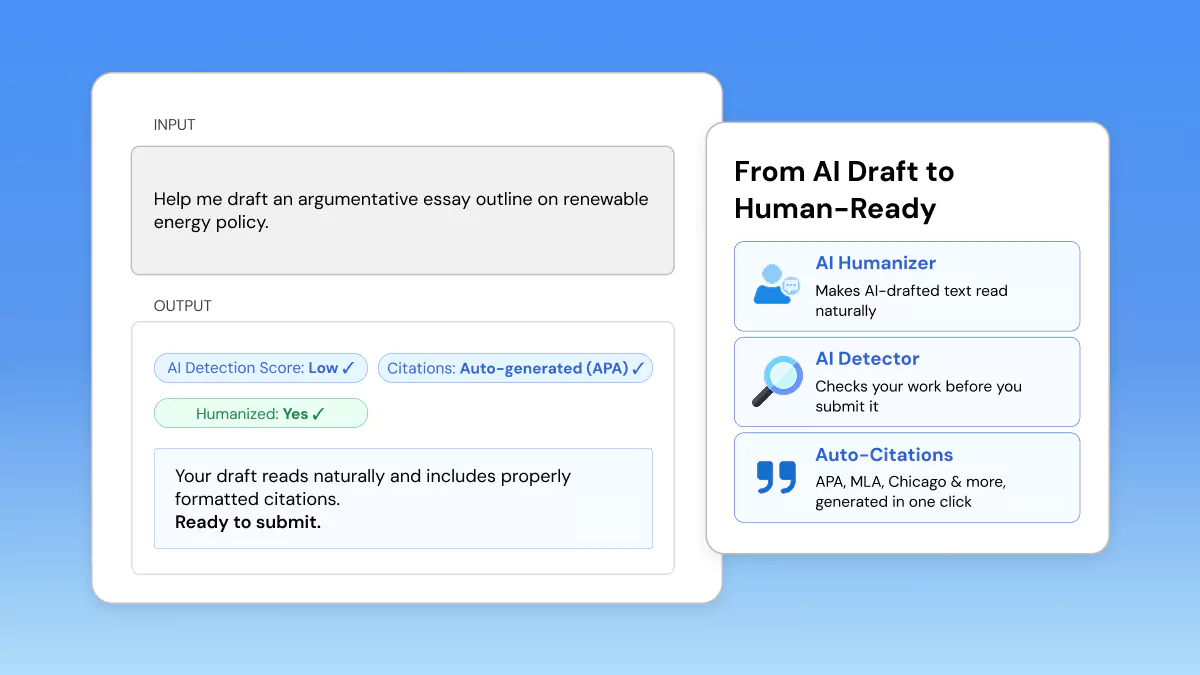
Best for: Students and professionals who draft with AI and need it to read naturally and meet academic standards.
Phrasly Docs is an AI-first document editor designed for writers who write with AI but need the finished product to look like it was written by a human.
Drafting + humanizing + AI-detection passing + citations, all in one tab. Phrasly Docs is one of the most robust solutions available today when it comes to a Google docs alternative for writers in the AI-native space.
For Students
Phrasly Docs is built to survive AI-detection checks while keeping citations accurate. This makes it a strong fit for essays, research papers, and coursework.
The built-in outline builder and auto citation generator (APA, MLA, Chicago, and more) help students go from a rough draft to a submission-ready paper without switching tools.
For Professionals
For reports, proposals, and client-facing writing, Phrasly Docs' humanizer and AI chatbot help smooth over AI-drafted content. These then read naturally in a business context.
Live collaboration and Word/PDF export make it easy to slot into existing team workflows without disrupting how documents get shared or reviewed.
✅ Standout features: Integrated AI humanizer & AI detector, AI chatbot, auto citation generator (APA/MLA/Chicago, etc,), AI autocomplete, outline builder, table of contents, Word/PDF export, live collaboration, 30+ languages, auto save/offline sync, and more.
If you're comparing options, we've rounded up the best AI humanizer tools available in 2026.
Phrasly's built-in humanizer is one of the few that lives right inside the document editor instead of a separate tab.
Available in dark mode too. Used by 3M+ writers and students.
You can try the AI editor directly to see how the humanizer and citation tools work together in one workspace.
Pricing: 3-day access $2.00, then 19.99$ per month, billed annually; Paid: "Unlimited" plan, $10.99 per month, billed annually. Annual plan saves 45%.
❌ Honest Limitation: Phrasly is built around AI first. So, if you’re looking for a platform with no AI, that can be self-hosted, or end-to-end encrypted for that matter, you’ll want to check out Proton Docs or CryptPad below.
If your drafts start with AI, Phrasly Docs lets you humanize and check them for AI without leaving the page.
2. Microsoft Word (Microsoft 365 / Word for the Web)
Best for: Formatting-heavy work and anyone already in the Microsoft ecosystem. The closest thing to a Google Docs Word alternative.
Microsoft Word for the web is free with a Microsoft account at office.com.
Word for the web is the closest direct analogue to Google Docs, as it also has real-time co-editing built in. Unlocked with Microsoft 365, the full desktop app includes deep formatting control, print layout, track changes, and templates.
Copilot AI has been integrated throughout. Word is no longer an AI-free option.
Pricing (as of July 2026): Free on the web. Microsoft 365 pricing increased effective July 1, 2026.
Business Basic is $7/ user/ mo, paid yearly for web and mobile app versions only. Business Standard is $23.50/user/ mo, paid yearly, which adds the desktop applications.
Business Premium is $32/ user/ mo, paid yearly. There are also Personal and Family plans for individuals.
❌ Honest limitation: The best formatting features sit behind a paid plan. It isn't a privacy- or AI-free option since Copilot is woven throughout.
3. Zoho Writer
Best for: A free, legitimately full-featured Google Docs alternative with excellent offline support.
Zoho Writer is a free web-based word processor. It offers robust MS Word and ODF compatibility,
"True Offline" per-document mode, mail merge, fillable forms, and e-signatures. Built-in Markdown support across the web editor and iOS/Android apps. Integrated into the larger Zoho Office and WorkDrive ecosystem.
Comes with an AI writing assistant named Zia.
Pricing: Writer itself is 100% free for individuals and businesses. Optional paid add-on: document automation credits (merge, forms, e-signatures). 200 free credits/month for individuals, 1,000 free/month for businesses, with tiered pricing beyond that.
❌ Honest limitation: The best value comes from leaning into the Zoho ecosystem. Some AI features are credit-limited.
Free, Offline & Open-Source Picks
This section groups LibreOffice, ONLYOFFICE, and Apple Pages together. So the offline, open-source, and free Google Docs alternatives are all answered in one place.
Which Google Docs alternative works fully offline?
LibreOffice Writer is the most complete pick for fully offline use. A free, open-source desktop suite with no cloud account and no AI. ONLYOFFICE's desktop edition and Apple Pages also work fully offline.
ONLYOFFICE additionally offers the strongest free .docx compatibility of the group.
4. LibreOffice Writer
Best for: Free/open-source, fully offline editing with no cloud account necessary and absolutely no AI.
LibreOffice gives you Writer, Calc, Impress, Draw, Base, and Math. It's open-source and completely free. Works on Windows, macOS, and Linux in over 100 language packs.
Maintained by The Document Foundation. The latest reference release is 2026; LibreOffice 26.2 includes Markdown import/export and improved stability when exporting to Word.
LibreOffice is a powerful, privacy-focused alternative to Google Docs, open-source.
Price: Completely free and open-source (there may be a one-time fee if you purchase LibreOffice through certain app stores).
❌ Honest limitation: There's no turnkey live co-editing in the standard desktop app. Real-time collaboration is still in early development. Heavily formatted .docx files can shift slightly on export, and the interface looks dated by default.
5. ONLYOFFICE
Best for: The best Microsoft .docx compatibility in a free, self-hostable suite. Privacy through self-hosting.
ONLYOFFICE includes docs, sheets, slides, forms, and PDF. Collaborate in real-time. Highest fidelity to .docx of free suites. Self-host for complete control over your data. Or use ONLYOFFICE via DocSpace rooms.
AI is optional. Connect a local model or disable cloud AI entirely. This also makes it a fit for a Google Docs alternative with no AI search.
Pricing: Free desktop/self-hosted Community edition. Cloud DocSpace offers a Free plan (up to 3 admins, unlimited users/guests, up to 12 rooms, 2 GB storage).
Business plan at $20/admin/month (discounted from $30), which unlocks unlimited rooms, 250 GB storage per admin, branding, SSO, backups, and priority support. On-premise Enterprise licensing is custom-quoted and billed per connection.
❌ Honest limitation: Self-hosting takes real setup effort. The smoothest cloud collaboration experience lives behind paid DocSpace.
6. Apple Pages
Best for: Mac, iPad, and iPhone users who want a free, offline, well-designed editor.
Pages is free for Apple users. Works offline on-device and through iCloud on the web. Offers strong templates, page-layout tools, and export to Word, PDF, and EPUB. A natural, no-cost alternative to Google Docs inside the Apple ecosystem.
Price: Free! Core writing, formatting, and real-time collaboration require no subscription.
Optional Apple Creator Studio subscription ($12.99/month or $129/year) adds premium templates, AI image tools, and Content Hub assets across Pages, Keynote, Numbers, and Freeform.
❌ Honest limitation: It's Apple-centric. Cross-platform collaboration is weaker, and Windows access is web-only.
Private & no-AI picks
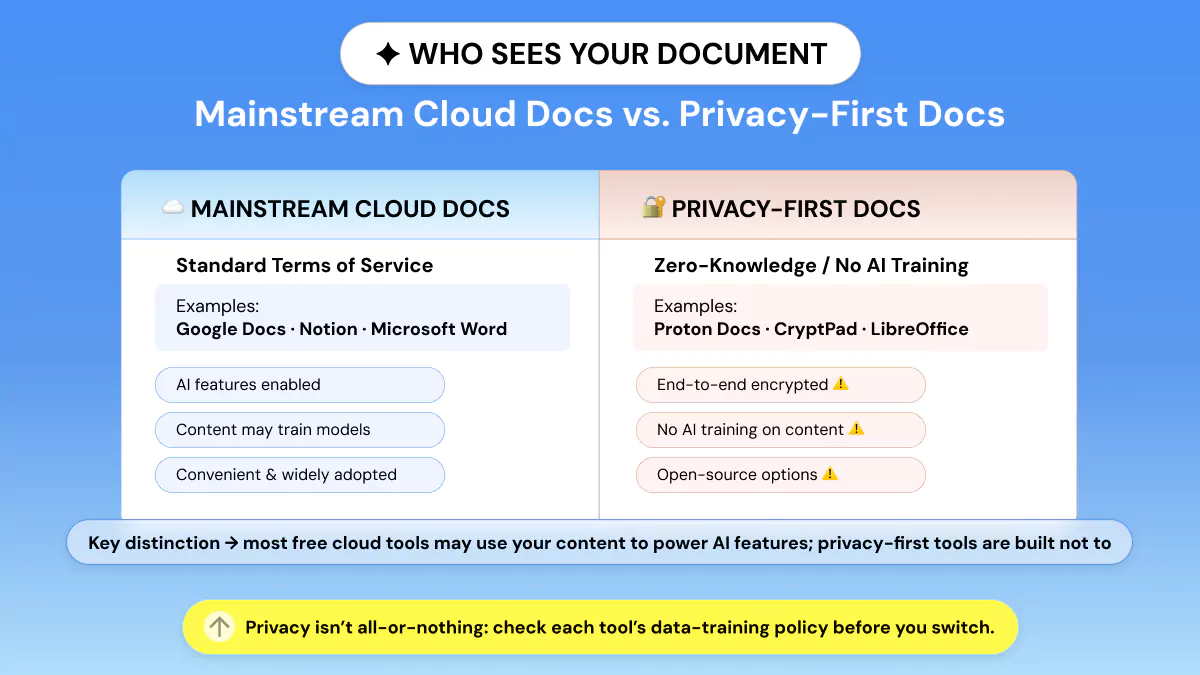
Reddit's r/degoogle and Lifehacker both flag strong demand for a free Google Docs alternative.
Which Google Docs alternative doesn't train AI on my data?
Proton Docs and CryptPad are our top recommendations for a Google Docs alternative no AI model was trained on. Proton Docs offers end-to-end encryption of content stored in Proton Drive.
While CryptPad is a zero-knowledge suite that works without creating an account. LibreOffice can be run completely offline and never connects to the cloud.
7. Proton Docs
Best for: Privacy-first users who want end-to-end encryption and no AI training on their content.
Proton Docs is an end-to-end encrypted editor that's part of Proton Drive, from the Swiss company behind Proton Mail. This tool even encrypts your keystrokes, cursor movements, filenames, and paths.
So there's nothing to scrape for AI training. Features include real-time collaboration, .docx/.txt support, and Markdown. Proton Docs' apps are open-source and independently audited.
Price: Free with Proton account (up to 5 GB); Mail Plus $3.99/mo annual ($4.99/mo monthly) with 15 GB; Unlimited $9.99/mo annual ($12.99/mo monthly) with 500 GB. Docs is included at every tier, including free.
❌ Honest limitation: Fewer advanced formatting and power features than mature suites. It's still a newer, maturing product.
8. CryptPad
Best for: Maximum privacy with an open-source, zero-knowledge suite.
CryptPad lets you create zero-knowledge, end-to-end encrypted office suite documents, spreadsheets, slides, kanban without an account or self-host them.
It trades interface polish for uncompromising privacy. This is why it's a favorite among activists, journalists, and privacy-first teams.
Price: Free on public instances or self-hosted. Paid flagship instance (CryptPad.fr) plans run €5, €100/month for extra storage and priority support.
Enterprise/self-hosted managed plans start from €1,500/year (with 50% education/nonprofit discounts).
❌ Honest limitation: Fewer collaboration niceties and a plainer interface than mainstream editors.
Team Collaboration & All-in-One Picks
This section captures alternatives to Google Docs for collaboration searches. Notion and Lark lead the team-first picks. Coda and Dropbox Paper for lighter workflows.
9. Notion
Best for: Teams that want documents, wikis, and databases in one flexible workspace.
Notion is a flexible page and database tool with real-time collaboration, nested pages, bi-directional linking, and thousands of templates to transform any document into an organized team knowledge base.
Ideal for teams that view documents as linked data instead of individual files.
Price: Free ($0); Plus is $10/user/mo; Business is $20/user/mo. Full Notion AI has been Business-only since May 2025. Students and educators can get Plus free through Notion for Education.
See Notion's pricing page for full plan details.
❌ Honest limitation: Steeper learning curve. Offline access is weaker than desktop-first apps, and full AI is gated behind Business.
10. Coda (Now SuperHuman Docs)
Best for: Teams who want their docs to act like lightweight applications. Examples: trackers, dashboards, calculators. Now with a built-in AI assistant and MCP support baked in.
Coda brings together documents, tables, and no-code buttons/automations. Docs AI (currently in beta), an assistant built into every page for writing, building trackers/dashboards, and surfacing answers across your workspace.
It also supports MCP, so you can connect tools like Claude directly into your docs. Its pricing model is unique. You pay only for “Doc Makers” that create docs, while editors/viewers remain free.
That’s affordable when a small number of builders are creating docs for many readers. The rebrand also bundles in access to Grammarly (included on Pro and above) plus Go and Mail on the Business tier.
Price: Free ($0); Pro is $12/Doc Maker/mo (billed annually, $15/mo monthly); Business is $33/Doc Maker/mo (billed annually, $40/mo monthly); Enterprise is custom-priced.
❌ Honest limitation: There's a learning curve, and it's overkill for plain writing. It's also newly folded into the Superhuman suite.
Legacy Coda users may see different terms or pricing depending on whether they've migrated their workspace to the new bundle.
11. Dropbox Paper
Best for: Simple, clean collaborative notes and project docs for teams already on Dropbox.
Dropbox Paper is Dropbox's lightweight, collaboration-first editor that features real-time editing, Markdown editing, media embeds, to-dos, and templates. Paper is free with any Dropbox account.
Status update: Dropbox Paper is now web-only.
The mobile and beta desktop apps were retired on October 9, 2025.
Price: Free with any Dropbox account.
❌ Honest limitation: It's web-only now. Formatting is light, and the long-term roadmap is uncertain.
12. Lark Docs
Best for: Growing or remote teams that want docs plus chat, calendar, meetings, and OKRs in one suite.
Lark Docs integrates with Lark's messenger, calendar, tasks, and Base. Whiteboards, mind maps, and offline editing in-app make Lark Docs a natural fit for teams looking to consolidate vendors rather than bolt-on integrations.
Pricing: Free Starter plan (up to 20 users, 100 GB storage); Basic $6/user/month; Pro $12/user/month (most popular: 15 TB storage, meetings up to 500 participants); Enterprise custom-priced (unlimited users, SSO, advanced compliance).
❌ Honest limitation: the interface takes time to learn, and it's best value only if you adopt the whole suite.
Which has the Best Microsoft Word Compatibility?
If preserving .docx fidelity is your primary concern, our top picks for Google Docs word alternative are ONLYOFFICE and Microsoft Word itself. When it comes to complex tables and tracked changes, ONLYOFFICE proves dependable.
And naturally, Word excels with its own format, requiring no external conversion. LibreOffice works well enough if you're working offline by yourself, but intricately formatted .docx documents can shift slightly upon export.
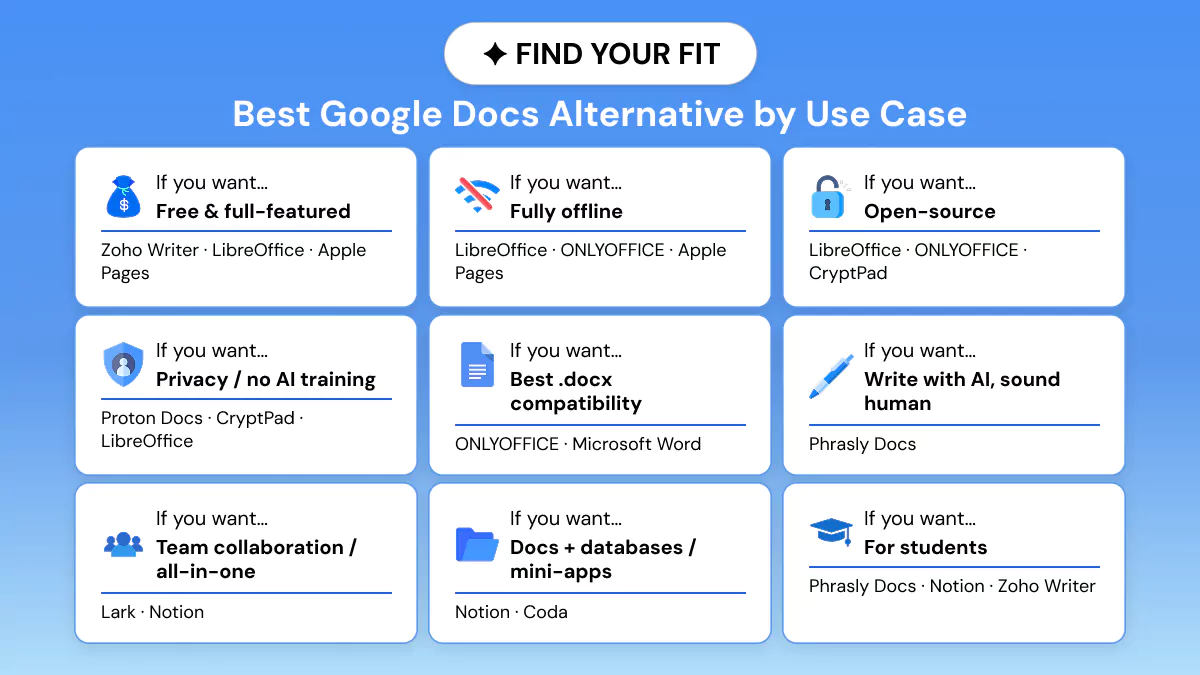
The Best Google Docs Alternative by Use Case
If you want… | Best pick(s) |
Free and full-featured | Zoho Writer; LibreOffice; Apple Pages (Apple users) |
To work fully offline | LibreOffice; ONLYOFFICE (desktop); Apple Pages |
Open-source | LibreOffice; ONLYOFFICE; CryptPad |
Privacy / no AI training | Proton Docs; CryptPad; LibreOffice |
Best Microsoft Word (.docx) compatibility | ONLYOFFICE; Microsoft Word |
To write with AI and sound human | Phrasly Docs |
Team collaboration / all-in-one | Lark; Notion |
Docs + databases / mini-apps | Notion; Coda |
For students | Phrasly Docs (AI + citations); Notion (free Plus for students); Zoho Writer |
How to Switch from Google Docs (Migration Tips)
Changing tools doesn't have to be painful if you migrate gradually instead of all at once:
Download your Google Docs as .docx or Markdown; bulk-download your files from Drive before you start paying for a new tool.
Test drive the switch on one project or team. Don’t migrate everyone all at once.
Clean up and remap sharing permissions as part of the move instead of copying old permission chaos into the new tool.
If your exported docs also carry over awkward AI-generated phrasing or formatting artifacts, running them through one of the best AI text cleaners before re-importing can save you a manual cleanup pass.
Prefer applications with a real import path. Notion, OnlyOffice, Zoho Writer, and Lark all maintain basic formatting when imported.
Conclusion
There's no single best alternative to Google Docs. There's only the best pick for what you're optimizing for.
Pick whatever your primary goal is: price, offline use, privacy, formatting, AI, or team collaboration, and one of these 12 tools will match perfectly.
👊 If your priority is AI-assisted writing that still reads human, try Phrasly Docs free. If it's privacy or offline, one of the tools above will fit better and that's the point.
Frequently Asked Questions
Is there a free alternative to Google Docs?
Yes! LibreOffice, Zoho Writer, Apple Pages, and Microsoft Word for the web are free. Proton Docs, Notion, Coda, and Dropbox Paper have free tiers. LibreOffice is the only full-featured completely free option.
What is the best Google Docs alternative for students?
For AI-assisted writing with built-in citations and an AI/plagiarism check, Phrasly Docs fits students well. For notes and study wikis, Notion offers free Plus to students. For a free classic word processor, use LibreOffice or Zoho Writer.
What is the best Google Docs alternative for writers?
For writers considering alternatives to Google docs for writing who draft with AI, Phrasly Docs offers a tool to humanize and heck text inside a single editor.
You can read this full Phrasly AI review for a deeper breakdown of how it performs for long-form writing and academic work. For distraction-free long-form work, Zoho Writer, Microsoft Word, and dedicated apps like Notion are strong choices.
What is the Microsoft version of Google Docs?
Microsoft Word for the web is included with Microsoft 365 and is free if you have a Microsoft account at office.com. It allows for real-time co-editing similarly to Google Docs.
There is also a Microsoft Word desktop application for computers with paid Microsoft 365 plans.
Is there a Google Docs alternative that is private or does not use AI?
Yes! Proton Docs and CryptPad are end-to-end encrypted and will not train AI on your data, and LibreOffice works completely offline with no cloud or AI integration. Those are your best bets privacy-wise and for avoiding AI.
Why do people switch from Google Docs?
Popular ones are lack of advanced formatting options, privacy issues, poor offline editing experience, and limitations with how much you can organize in Drive.
The right alternative depends on which of those matters most to you. Google Docs still works well for simple free collaboration.

Written by
Muhammad Usman Ali
Pakistan
Muhammad Usman Ali is an experienced SEO content writer with 3+ years of professional writing experience. He specializes in AI tools, AI detection technologies, and search engine optimized content.