What AI Detector Does Google Classroom Use? (2026 Answer)
9 min read
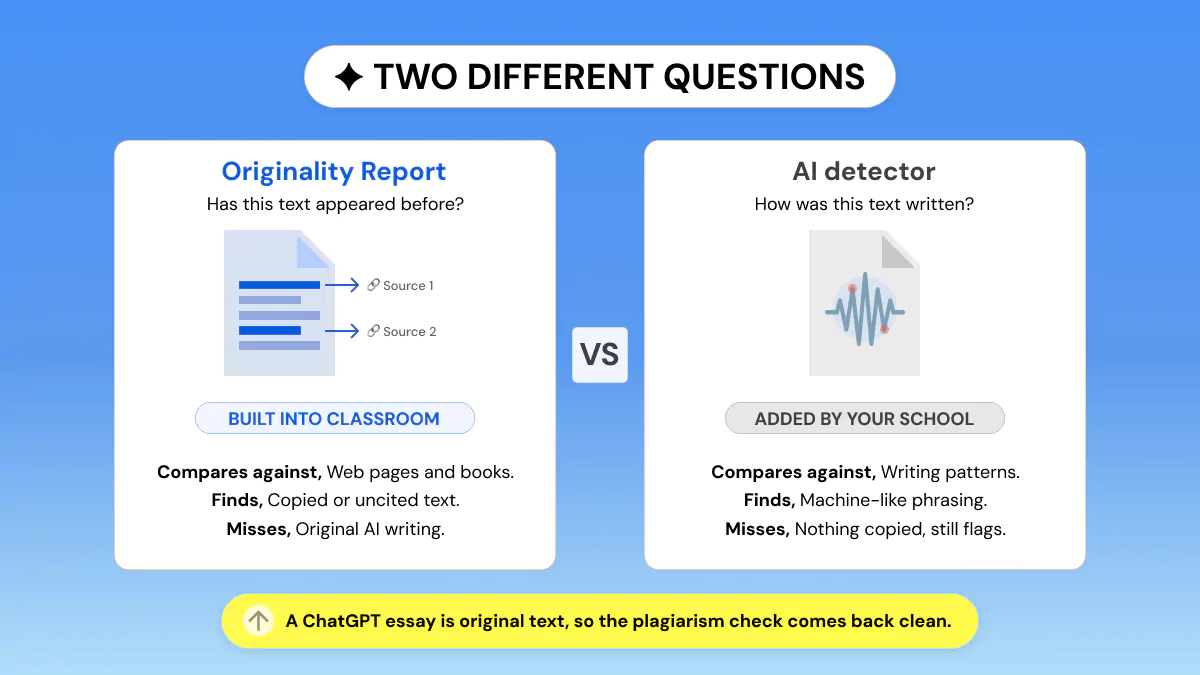
Google Classroom does not use any AI detector. It has no native AI-detection feature. Its only integrity tool, Originality Reports, is a plagiarism checker: it compares work against the web and books, not against AI writing patterns, so it cannot flag ChatGPT, Gemini, or Claude text on its own.
Schools that want AI detection add a third-party tool such as GPTZero, Turnitin, or Copyleaks separately. So the honest answer is by default, none. If your work is being screened for AI, an add-on tool is doing it, not Classroom itself.
Below is what Originality Reports actually check, how schools bolt AI detection on top, and how accurate those tools really are.
Want to know how your own writing scores before you turn it in?
Run it through a free AI detector like Phrasly first 👇
The short answer: Google Classroom does not use an AI detector
There is no AI detector inside Google Classroom, and Google has not announced a classifier for it.
The confusion comes from one feature. Classroom has a built-in integrity tool called Originality Reports, and because it flags passages and produces a percentage, it looks like AI detection. It checks plagiarism, which is a different job entirely.
If your school screens assignments for AI, a tool your administrator installed is doing that work. Classroom is where the result appears, not what produced it.
There is a reasonable explanation for the gap. Detection produces probability scores, and a wrong score can end a student’s academic standing. Google has so far left that call to specialist vendors.
Google’s own 2026 direction points the same way. At BETT in January, the company outlined its plans for verifying AI content through SynthID watermarks on media made with Google tools, checkable in the Gemini app. That is provenance for Google-generated media, not a text classifier for student essays.
What Originality Reports actually check (and why it is not AI detection)
Originality Reports compare a student’s Google Docs, Google Slides, and Microsoft Word files against webpages and books on the internet, then link to the sources found and flag uncited text. That is what Google’s Classroom Help says they do.
Here is what that means in practice:
Teachers on Education Fundamentals get 5 originality assignments per class. Unlimited requires the Teaching and Learning upgrade or Education Plus.
Students can run 3 reports on their own work before turning it in. Teachers cannot see those student-run reports.
Reports stay viewable for 45 days. After that, a teacher reruns one from the grading tool.
"School matches", which compares against previous submissions from your own school or district, is only available on Education Plus and the Teaching and Learning Upgrade.
Files must be under 2MB, and matches are never checked across other school domains.
A teacher sees a count of flagged passages, which can also display as a percentage. Each flagged passage shows the matching external text and a link to its source. A toggle includes or excludes cited and quoted material, so the same document can show two different percentages. Google is explicit that the tool cannot judge whether a citation is correctly formatted.
The mechanism underneath is string and similarity matching. It looks for text that already exists somewhere else. It does not analyse perplexity, burstiness, or any statistical fingerprint of how the writing was produced.
💡 A ChatGPT essay written from scratch is original text. It matches nothing on the web, so Originality Reports return a clean report.
This runs the other way too. A clean Originality Report says your work is not copied. It Doesn’t say anything about whether the writing reads as human to an AI detector, and those are two separate questions your school may be asking.
So how does Google Classroom detect AI? (third-party integrations)
Schools add a separate tool, and it connects to Classroom in one of three ways.
LTI add-ons. A district admin installs at the domain level and it replaces the native submission flow. Turnitin works this way, returning a Similarity Report plus a separate AI Writing Indicator in the gradebook.
One-click org install or the Workspace Marketplace. GPTZero’s Classroom integration works this way, and the company says its tools are used in over 3,500 colleges.
Chrome extensions. Copyleaks, Brisk, and Pangram run over the Docs and Classroom grading view rather than the submission pipeline.
One row in that table works differently from the rest. Brisk’s Inspect Writing does not score text for AI at all. Its own product FAQ says it produces no accuracy score and instead replays how a document was built, showing where text was typed, pasted, or deleted. A finished essay that appears in one paste shows up plainly, without any classifier being involved.
Tool | How it connects | What it detects | Free tier |
|---|---|---|---|
Originality Reports | Native, built in | Plagiarism only, not AI | 5 per class |
GPTZero | Org install or Marketplace | AI-generated text | 10,000 characters per scan |
Turnitin | Turnitin | Plagiarism plus AI indicator | Institutional only |
Copyleaks | LTI, API, or Chrome extension | AI and plagiarism | None listed |
Pangram | Native or Chrome extension | AI, sentence level | 20 checks a day |
Brisk | Chrome extension | Writing replay, not AI | Free plan |
Free-tier details reflect each provider’s own live pages as of August 2026 and may fluctuate; check before relying on a number. GPTZero needs a free account for scans above 10,000 characters, and Pangram’s 20 daily checks need an account too. Copyleaks lists no free tier, with paid plans from $16.99 a month month-to-month, or $13.99 a month billed annually.
If you are weighing these up rather than just identifying them, our AI checker comparison tests several of them side by side.
Can Google Classroom detect ChatGPT, Gemini, or Claude?
Classroom by itself, no. It has no AI classifier, so it cannot tell you which model wrote something, or whether a model wrote it at all.
If your school added a detector, that tool can flag output from ChatGPT, Gemini, Claude, and most other major models. The detector is model-agnostic in the sense that it reads writing patterns rather than looking up which product produced the text. Our guide on whether schools detect ChatGPT covers what those tools actually catch.
There is a second signal worth knowing about, and it has nothing to do with detectors. Google Docs keeps version history, and teachers can open it.
A document that appears in one paste at 11pm the night before a deadline looks different from one with edits spread across several sittings. That difference is visible whether or not any AI tool is installed, and it cuts both ways: a natural revision trail is the strongest evidence that you wrote something yourself.
How accurate are these detectors?
No AI detector is 100% accurate, and the vendors say so themselves.
GPTZero’s own published FAQ states that results should not be used to punish or as a final verdict, that accuracy improves with longer inputs, and that it trains specifically to hold false positives for ESL writing at around 1%.
Independent testing lands in a similar place. In a Chicago Booth working paper published in August 2025, the leading commercial detectors held false positives at or below about 1% on medium-to-long passages, while an open-source baseline mislabelled a large share of genuinely human writing as AI.
Who gets falsely flagged?
Detection error concentrates in particular kinds of writing rather than spreading evenly across a class. Three groups get caught more often than the rest:
• Formal, structured prose, including the academic register students are taught to write in.
• Writing by ESL students.
• Writing by neurodivergent students.
The reason is the same in each case. Predictable word choice and consistent sentence structure are what detectors read as machine-like, and they are also how a great many people genuinely write. Our breakdown of how AI detectors work explains what the score is measuring.
One percent sounds small until you scale it. A district running 20,000 essays at that rate is looking at roughly 200 honest students flagged, and those 200 are not drawn at random.
What we found in 37,874 human essays
Phrasly’s own detector testing found the same pattern at scale. We collected 37,874 student essays written between 2010 and 2021, years before ChatGPT existed, and ran them through ZeroGPT’s API.
💡 ZeroGPT flagged 9,987 of them as AI-generated. That is 26.4% of confirmed human writing, or roughly one in four honest papers wrongly accused by a single widely used free tool.
Every one of those essays was human-written by definition, because the technology being blamed did not exist when they were submitted.
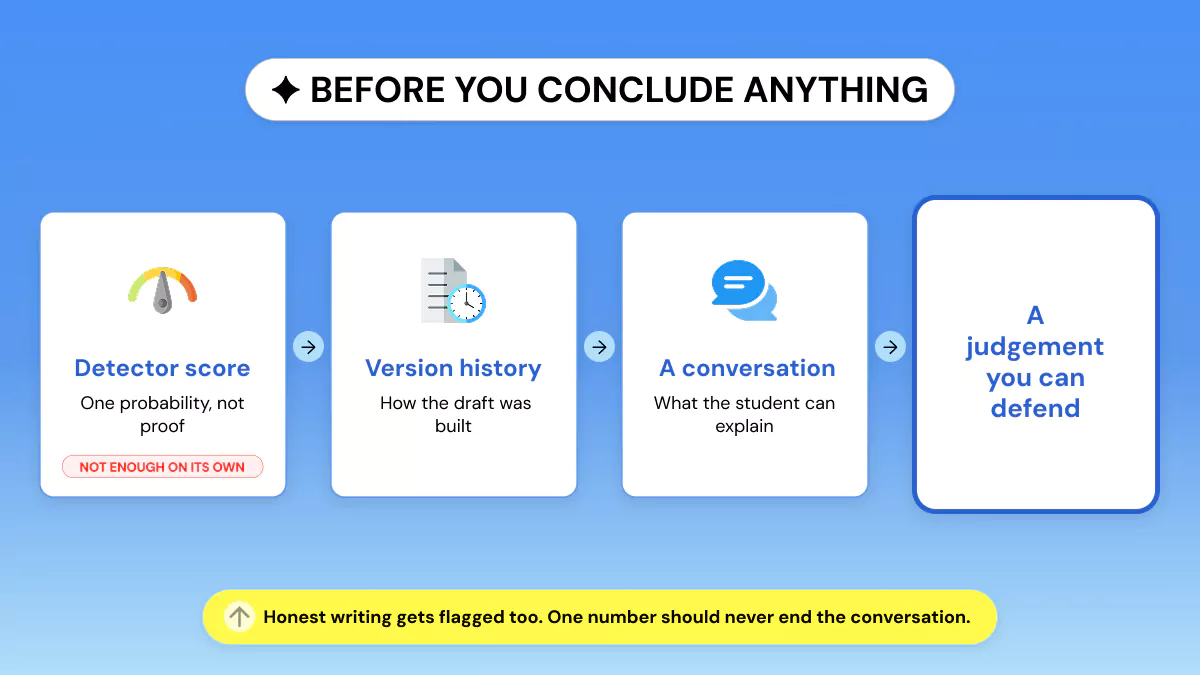
For teachers, that makes a score one signal among several, to be paired with version history and a conversation, never treated as sole evidence.
For students, it means an honest paper can be flagged, which is exactly why seeing your own score first is worth the two minutes. If it has already happened, our guide on what to do when Turnitin flags you walks through the appeal.
Want to see what a school’s detector would see?
Run your draft through Phrasly’s AI Detector. It shows sentence-level highlights, so you can fix anything that reads as AI before you submit.
What to do about it
If you’re a student
Draft in Google Docs, and the version history becomes timestamped proof of your own process.
Write in the doc rather than pasting a finished draft in. The revision trail is the record.
Self-check before you submit, so a surprising score is something you see first.
If your teacher allows AI for brainstorming or outlining, keep the final words yours.
If you are flagged unfairly, your version history is the strongest single piece of evidence you have.
Used AI to get started? Paste your draft into Phrasly’s AI humanizer to rewrite the stiff, AI-sounding parts so the final text reads like you, while keeping your ideas.
If you’re a teacher
Originality Reports alone will not tell you whether a student used AI, so if you need that, you have to add a tool.
Worth setting expectations early in the term rather than after the first flag. Students who know a detector is running, and know that version history counts as evidence in their favour, tend to work in ways that leave a clearer record.
GPTZero, Turnitin, and Copyleaks are the common choices, installed as an add-on, over LTI, or as an extension.
Treat every score as one data point, alongside version history and what you know of the student’s work.
Assignment design does work no detector can: in-class writing samples, personal reflection, an oral defence.
Never open with an accusation on a single percentage. False positives are real, and the cost of getting it wrong is high.
Frequently Asked Questions
Does Google Classroom have a built-in AI detector?
No. As of 2026 Google Classroom has no native AI detector. Its Originality Reports check plagiarism, not AI authorship. Any AI detection comes from a third-party tool your school added.
What do Google Classroom Originality Reports check?
They compare a Doc, Slides, or Word file against webpages and books on the internet, and on Education Plus against other students’ work in your school. They flag copied or uncited text, not AI-generated writing.
Can Google Classroom detect ChatGPT?
Not on its own. Classroom has no AI classifier. It can only catch ChatGPT text if your school added a detector like GPTZero, Turnitin, or Copyleaks. Our guide on whether professors detect ChatGPT covers the rest.
What AI detectors integrate with Google Classroom?
Common ones are GPTZero via one-click org install, Turnitin as an LTI add-on, plus Copyleaks, Pangram, and Brisk. Schools connect them through add-ons, LTI, or Chrome extensions.
Is Google Classroom’s AI detection accurate?
Classroom has none. Added detectors are not 100% accurate and can false-flag ESL, neurodivergent, or formal writing, so any score should be treated as one signal rather than proof.
How can I check my work before submitting?
Run your draft through a free AI detector such as Phrasly to see how it scores before your teacher’s tool does, then revise anything that reads as AI. Our roundup of free AI checkers for students compares the options.

Written by
Alina Shah
SEO Content Specialist · Karachi, Pakistan
She writes about AI so you don't have to guess. 8+ years in content strategy and editing. Now she puts AI writing tools and detection systems through real tests and shares what actually works.