
Small SEO Tools Plagiarism Checker: Is It Actually Good Enough in 2026?
We tested the Small SEO Tools Plagiarism Checker with 3 real samples in 2026. See how it handles copied text, AI writing, and word limits, plus a better pick.
Small SEO Tools Plagiarism Checker is one of the most-used free plagiarism tools on the internet, and it still looks like it: busy, ad-heavy, and dated. The real question for 2026, when most content is AI-assisted and patchwork copying is normal, is whether the Small Seo Tools Plagiarism Checker still holds up. So we ran three real samples through the free scanner and tested it ourselves.
We checked how it handles duplicate content, verbatim copying, and AI-written text, the things bloggers and SEO professionals trust an originality check to catch.
Quick Verdict Scorecard
What Is the Small SEO Tools Plagiarism Checker?
The Small SEO Tools plagiarism checker is a free, web-based originality checker from SmallSEOTools.com. The platform has been around since 2010, which is a big reason it still ranks near the top of search whenever someone looks for a quick plagiarism checker without registration.
Over the years, it has become a go-to name for students, bloggers, freelancers, SEO professionals, and small content teams, much like other free tools we've put to the test, such as DupliChecker.
The way it works is simple. You give it your content one of four ways:
- Paste text straight into the box
- Upload a file (.doc, .docx, .txt, .tex, .rtf, .odt, .pdf)
- Enter a URL to check a live page
- Import from Google Drive or Dropbox
From there, the tool compares your text against billions of indexed web pages and returns a similarity report: plagiarism and uniqueness percentages, sentence-by-sentence highlighting, red and green labels, and clickable links to any matched sources.
It also bundles in extras beyond plagiarism, including a one-click paraphraser for flagged text, an AI detector, a grammar checker, a WordPress plugin, and API access. Just keep in mind those last few are separate tools, not proof that the plagiarism scan itself catches AI writing (more on that shortly).
What We Found: Our Test Results
Here's how the free scanner handled each of the three samples, plus what happened when we pushed past the word limit.
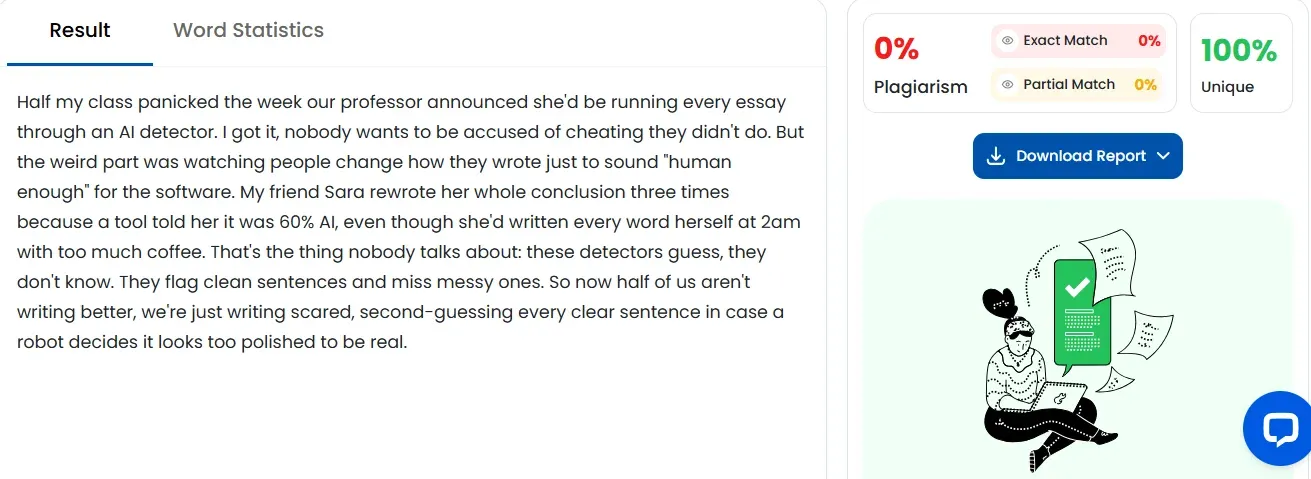
Test 1: Original Writing
We ran a 150-word original piece, written by hand and never published anywhere online.
- Plagiarism score: 0%
- Sources flagged: 0
- Speed: fast
Test 2: Copied Paragraph
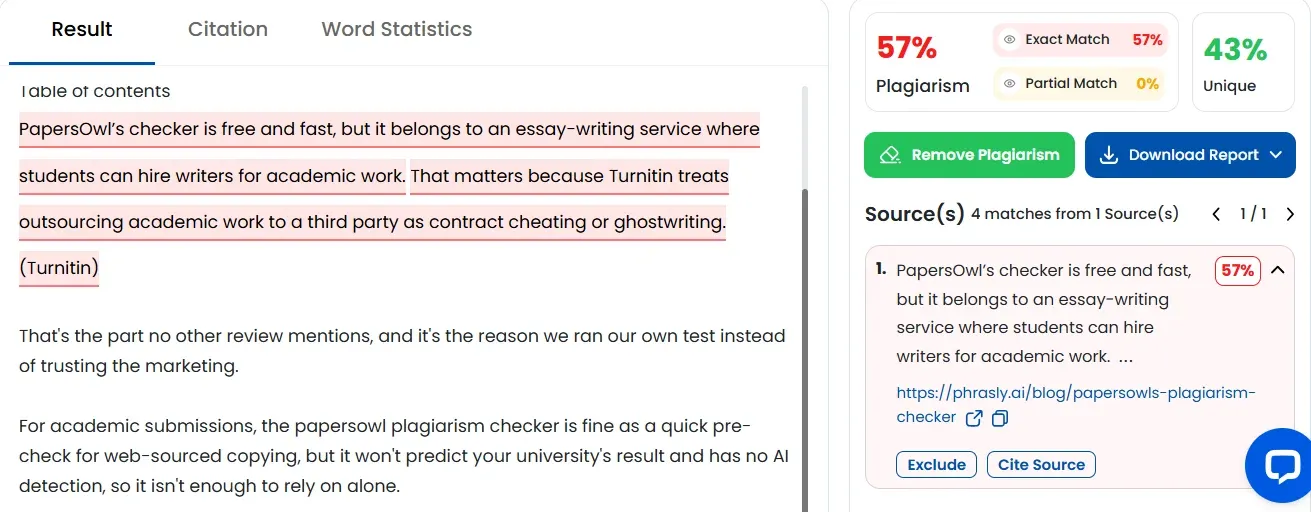
Next, we pasted a 200-word paragraph copied word-for-word from our published blog post titled “PapersOwl's Plagiarism Checker”.
- Plagiarism score: 57%
- Correct source found: yes
- Speed: 20 to 30 seconds
Test 3: AI-Generated Content
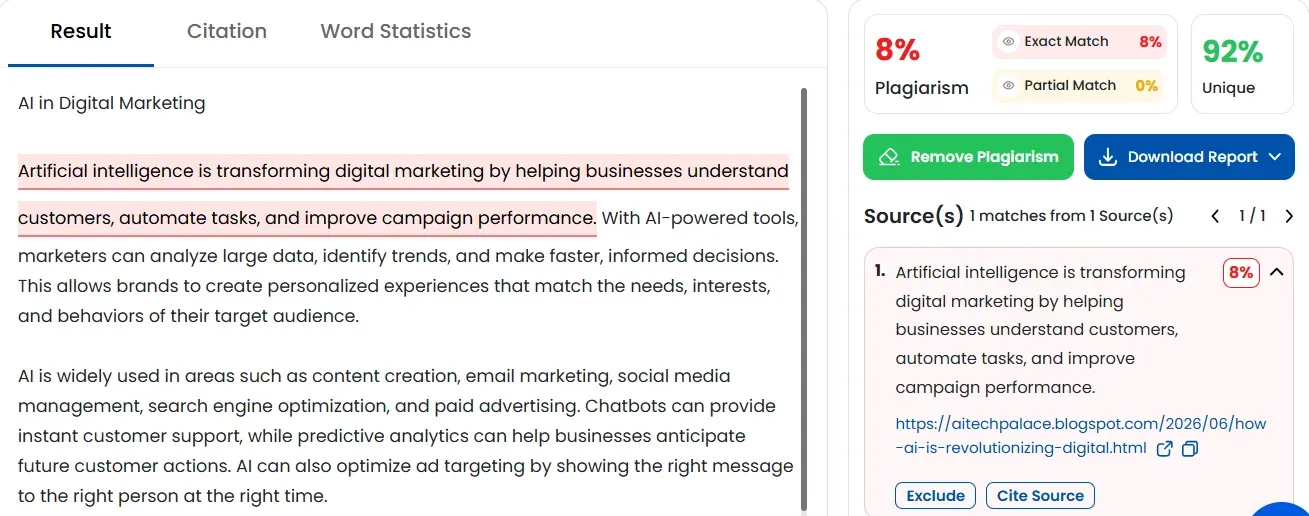
Finally, we ran a 200-word article generated entirely by AI.
- Plagiarism score: 8%
- Uniqueness: 92% unique
- AI flagged: no, none at all
Bonus: The Word Limit
We also pasted a 1,500-word post to test the free cap.
- The tool checked only the first 1,000 words and quietly ignored the rest
- The results page confirmed it: "Plagiarism Results for 1000 Words"
The Overall Verdict
Test Results at a Glance
What Small SEO Tools Gets Right
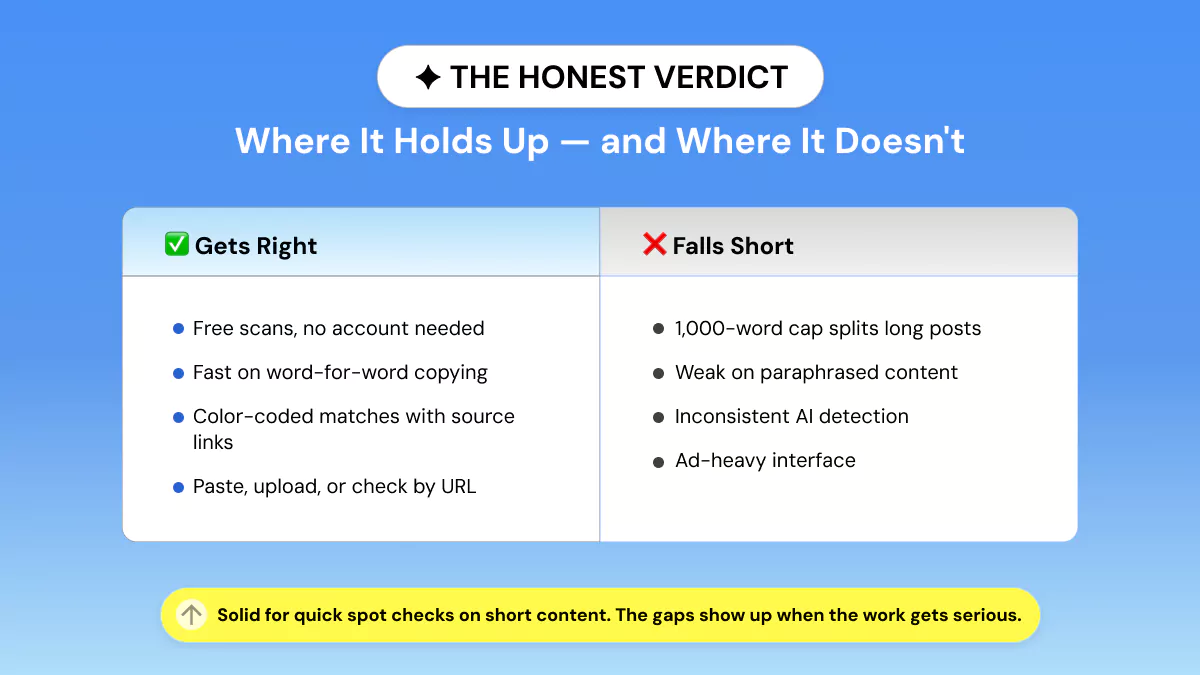
Credit where it's due: Small SEO Tools nails the basics. Its biggest strength is convenience. It's a plagiarism checker without registration, so you can paste text, upload a file, drop in a URL, or import from Google Drive or Dropbox and scan in seconds.
For quick, low-stakes duplicate content checks, that speed genuinely matters. A student checking an assignment or a blogger running a fast content uniqueness check gets an answer without an account or a credit card.
Here's what stands out in its favor:
- ✓ No signup required for basic use, so you paste and scan instantly
- ✓ Fast and accurate on verbatim, word-for-word copying (our Test 1 and Test 2 confirmed it)
- ✓ Multiple input methods: paste, file upload, URL check, Google Drive, and Dropbox
- ✓ Sentence-level, color-coded results with direct links to matched sources
- ✓ One-click rewrite that routes flagged sentences into its paraphrasing tool
- ✓ WordPress plugin and API for teams checking content inside a publishing workflow
- ✓ Good enough for quick spot checks on short content under 1,000 words
That rewrite button won't guarantee originality, but it gives beginners a fast way to spot which lines need work. And the WordPress plugin and API make sense if you want plagiarism checks built into how you already publish.
On safety, it's reasonably safe for basic checks. The free scan needs no account, and the company says checked content is removed after scanning. The one caveat: its privacy policy counts submitted text and files as "User Content," so avoid uploading confidential client drafts, unpublished research, or sensitive business material unless you're comfortable with those terms.
Where Small SEO Tools Falls Short
Small SEO Tools works best as a quick free checker, not a complete originality workflow. The cracks show the moment you move from short text to full articles, AI-assisted drafts, or professional review. This is where the case for switching gets specific, and our tests back up every point.
Limitation 1: Confusing, Inconsistent Word Limits
The free scanner caps every check at 1,000 words, so any longer piece gets split into separate scans, and copying that spans the split point can slip through unnoticed. Paid plans and the Deep Plagiarism Checker go higher, up to 30,000 words per search, but the free ceiling is where most people actually live.
That's a real hassle for everyday content. A normal 1,500-word blog post needs two scans, and a 2,500-word article needs three, which slows the whole workflow and adds room for error.
Limitation 2: Weak AI-Generated Content Detection (Our Test Proved It)
This is the biggest gap. In our test, a 200-word article written entirely by AI came back 92% unique with zero AI warning, because the plagiarism scan has no AI detection built in.
There's a separate AI Content Detector, but it isn't part of this scan, and it has its own issues. Quetext's review reports that Small SEO Tools misses paraphrased and AI-rewritten text, and Trustpilot reviews include a 2026 complaint about a casual, obviously human sentence being flagged as "100% AI."
This matters because most drafts in 2026 aren't copied word-for-word anymore. They're AI-assisted, AI-smoothed, or stitched together, and a checker that can't tell human from machine writing leaves real risk on the table for anyone with strict originality standards.
Limitation 3: Ad-Heavy, Cluttered Interface
The free tool is functional, but it isn't clean. Originality.ai's review points out ads around and inside the checker, including third-party "try now" buttons that can trip up less experienced users.
That's a problem because plagiarism checking already demands focus. You're reviewing sources and comparing flagged lines, and a pop-up-heavy screen makes that slower. Tellingly, the company's own reply to one complaint just points users toward a paid ad-free option.
Limitation 4: Subscription and Credit Complaints
The paid side deserves caution too. Some Trustpilot reviews report cancellation difficulty, inconsistent accuracy, and poor support, and the site sits at roughly 2.5 out of 5 from a small pool of reviews.
To be fair, that's a limited sample and not a final verdict. But the pattern is consistent enough that professionals should test the paid workflow carefully before trusting it for agency, academic, or client-facing work.
Small SEO Tools vs Phrasly: Side-by-Side
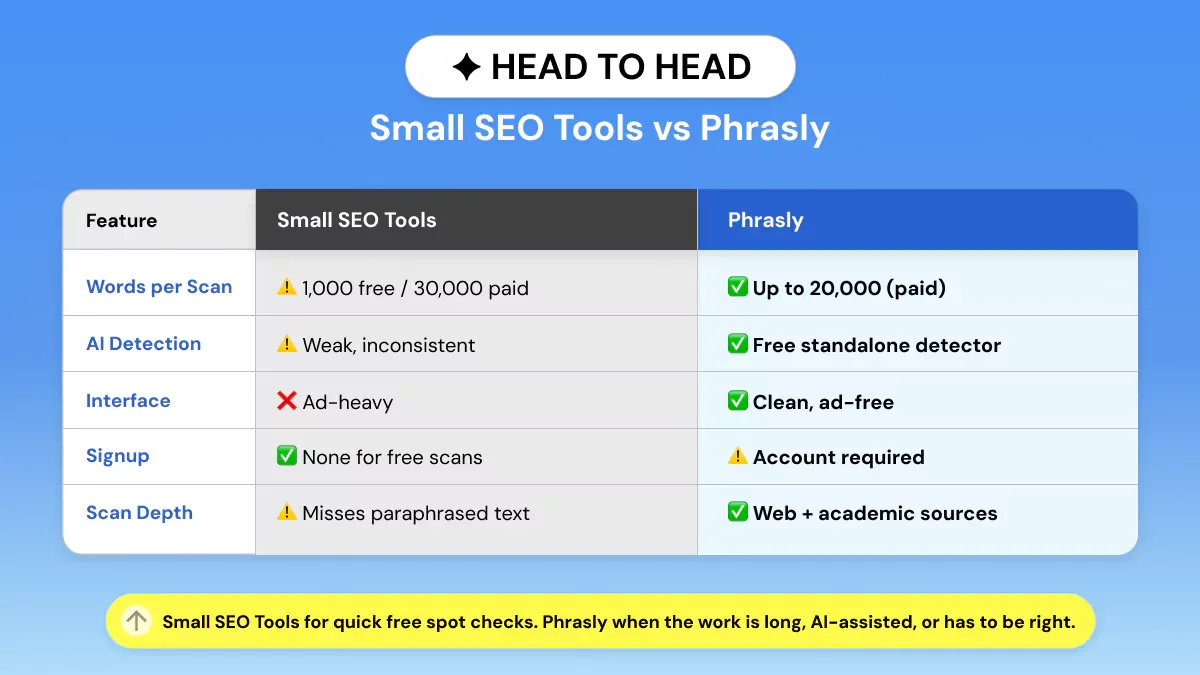
Both tools check for plagiarism, but the AI side is where they split. Small SEO Tools bundles a weak, inconsistent AI detector that our test showed you can't rely on.
Phrasly pairs its plagiarism checker with its own strong, leading AI detector that's free to use, so copied text and AI-written text both get caught on the same platform.
The patchwork and AI ratings below reflect our hands-on tests, not marketing claims.
Small SEO Tools is still handy for a quick verbatim check under 1,000 words with no login. But for longer, client-facing, or AI-assisted content. Phrasly does more on one platform: reliable plagiarism checking plus a strong, leading AI detector, with no ads in the way.
Should You Use Small SEO Tools' Plagiarism Checker?
It depends on what you're checking. Small SEO Tools is a practical choice for occasional, short checks, but for longer or higher-stakes content, a stronger tool pays off. Here's the quick call by user type:
Small SEO Tools handles 1,000 words per basic scan, and Scribbr or Turnitin fit strict academic review.
For everyday blog, marketing, and client work, the smarter move is skipping the juggling act. Phrasly rolls plagiarism checking and a strong AI detector into one place, so you're not running two separate tools on every draft.
Frequently Asked Questions
Is Small SEO Tools plagiarism checker accurate?
It's reasonably accurate for exact or near-exact copying, but not a definitive originality check. In our tests it performed best on verbatim matches and was weaker on paraphrased and patchwork text. Its plagiarism report also doesn't tell you whether content was AI-generated.
Is Small SEO Tools plagiarism checker free?
Yes. It allows basic checks with no payment and no account, capped at 1,000 words per scan, and you can repeat those checks as needed. Paid plans raise the per-scan limit in stages up to 30,000 words and add premium workflow features like the WordPress plugin and API.
What is the word limit on Small SEO Tools' plagiarism checker?
The basic checker accepts up to 1,000 words per scan. The wording across the platform can make limits look inconsistent, but the current checker page and its limit table both list 1,000 words for basic use. Paid tiers scale the cap from 2,000 up to 30,000 words.
Does Small SEO Tools detect AI-generated content?
Not within the plagiarism report. It offers a separate AI Content Detector on the same site, so AI analysis is a distinct tool, not part of the scan. The company claims high accuracy, but our testing found inconsistent results, including missed AI text, so treat any AI score as a screening signal, not proof.
Is it safe to use Small SEO Tools for plagiarism checking?
It's reasonably safe for basic use. The company says submitted text and files are removed from its servers after the scan, and basic checks need no login. Even so, avoid uploading confidential, unpublished, or legally sensitive material to any third-party checker.
What are the best alternatives to Small SEO Tools?
It depends on the job. Phrasly's plagiarism checker is the strongest all-rounder here, pairing plagiarism checks with a leading AI detector; subscribers get 20,000 plagiarism-check words monthly, with single scans sold separately. For the full picture, see our roundup of the best plagiarism checkers in 2026.


Keep reading

Copyleaks Plagiarism Checker: Tested, Rated & Compared
Copyleaks Plagiarism Checker review: we tested verbatim, minor-change, and paraphrased content to see how its 3-layer detection performs. See pricing, AI-detection accuracy (77%-96%), free plan limits, and how it compares to Phrasly in a head-to-head scan before you subscribe.
Does Canvas Have a Plagiarism Checker? What It Uses, How It Works & What Students Should Do
Canvas has no built-in plagiarism checker. It relies on instructor-enabled tools like Turnitin or Copyleaks. Learn how scanning actually works, whether Canvas detects AI writing (ChatGPT, Claude, Gemini), and how to check your paper for plagiarism and AI content before you submit.