
How to Check Plagiarism in Turnitin: Step-by-Step for Students
Turnitin is the plagiarism checker most universities use to review submitted work. Here's exactly how to use it, read your report, and understand what your score means.
Your paper's due tomorrow, the submission portal's right there, and Turnitin's the final hurdle before you get your grade. If you're rushing to search online for "how to check plagiarism in Turnitin" as submission time looms, you're in a very common situation.
Most students run into Turnitin when they’re busy or have urgent deadlines.
It's not as easy as uploading a file and receiving a verdict. Access is dependent on your institution, the report doesn't happen instantly, and a high similarity score doesn't necessarily indicate plagiarism, something most students think.
In this guide, we will cover everything from submitting, reading your originality report, interpreting your score, and what to do if your school doesn't provide you with direct access to Turnitin.
Don't wait for Turnitin Access. Check Your Work for Plagiarism Right Here 👇
What Does Turnitin Actually Check?
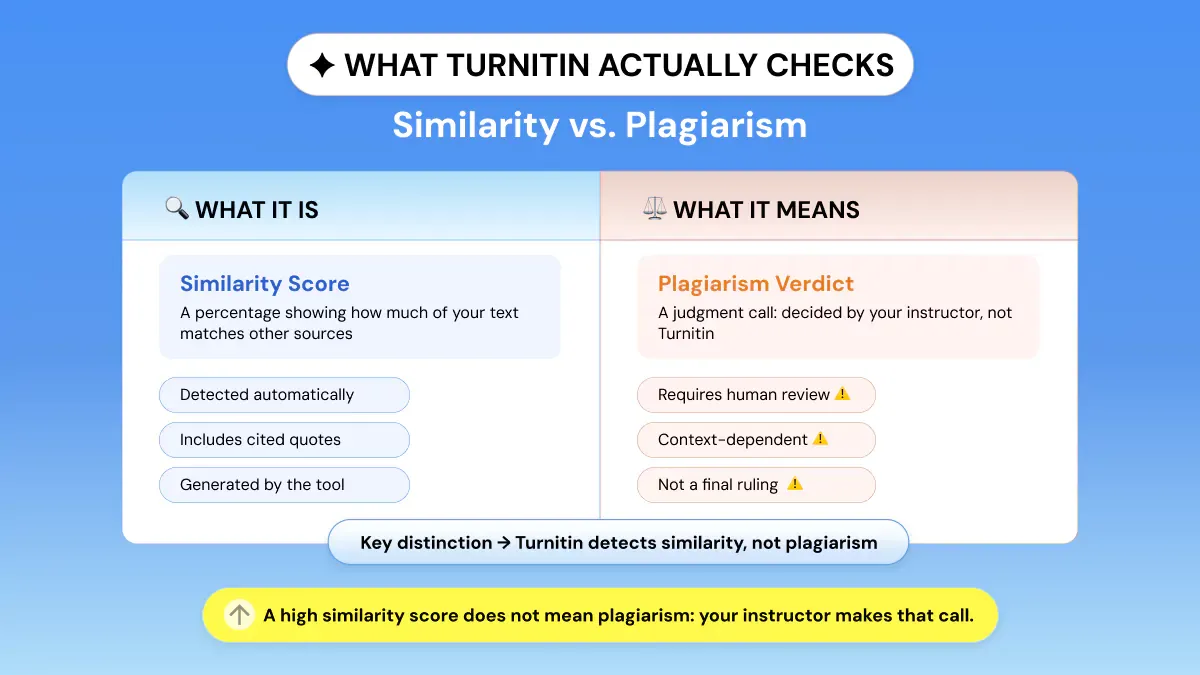
Keep in mind this before you turn anything in: Turnitin doesn't flag plagiarism. It flags similarity.
That small piece of information, pulled directly from Turnitin's website, shifts your perspective on what comes next.
The tool checks your paper against its collection of current and past websites, journals, and magazines, and its library of previously submitted student papers. What is returned is a percentage of similarity index, not a judgment of plagiarism.
Your instructor makes the determination if the similarity is an issue. It's also worth knowing that not all plagiarism looks like copy-pasting.
Incremental plagiarism, where small borrowed phrases accumulate across a paper, is one of the most common patterns Turnitin picks up that students don't even realize they're committing.
Accurately cited quotes will appear as matches since the tool looks for text matches rather than valid citations. A low score does not mean your work is original, and a high score does not mean your work is plagiarized.
Keep in mind that your originality report is exactly what the originality report’s meaning says: it's a measure of similarity.
This is also why Turnitin is an institutional plagiarism checker, not a copy-detector. Turnitin finds matches; instructors decide.
With this distinction in mind, below is how to submit your work and access your report.
How to Check Plagiarism in Turnitin: Step by Step
Method 1: Through Your LMS (Canvas, Moodle, Blackboard)
Here's how most students use Turnitin. Your instructor creates a Turnitin-enabled assignment within your school's LMS integration, and you submit it right there.
However, not every student has institutional access to begin with. If that's your situation, it's worth exploring Turnitin alternatives that let you run an originality check on your own before your final submission.
For those who do have access, here's the full step-by-step process:
- Sign in to your university's LMS Canvas, Moodle, or Blackboard account (whatever your university uses).
- Go to the assignment your teacher/professor has created with Turnitin on. Not every assignment has Turnitin enabled. Only the ones that your professor has turned on.
- Click submit, and select your file to upload. Files accepted: DOC, DOCX, PDF, TXT, RTF, HTML. The file size limit is usually 100 MB.
- On your first submission, you will be required to accept Turnitin's End User License Agreement. You cannot proceed until this step is completed.
- Wait for the similarity report to be created. This may take a few minutes. Occasionally, during peak submission times (such as at the end of the semester), it can take up to one day.
- Click on the similarity score badge. It is displayed as a colour-coded percentage near your submission.
- The complete Similarity Report will open inside Turnitin's Feedback Studio window. All matching sources will appear in the right-hand column.
Method 2: Through a Direct Turnitin Account
Some schools provide students with direct Turnitin access instead of LMS course integration. If your teacher provided you with a Class ID and Enrollment Key, follow these directions.
- Navigate to turnitin.com and log in using the email you signed up with.
- On your homepage, find your class and click on the associated assignment.
- Click Submit 🡪 File Upload 🡪 Select your document.
- Confirming your submission details, click 'Upload and Submit.'
- You'll see the Similarity Report pop open, taking roughly the same time as before.
- Click on the colored similarity score to view the complete report.
How to Read Your Turnitin Similarity Report?
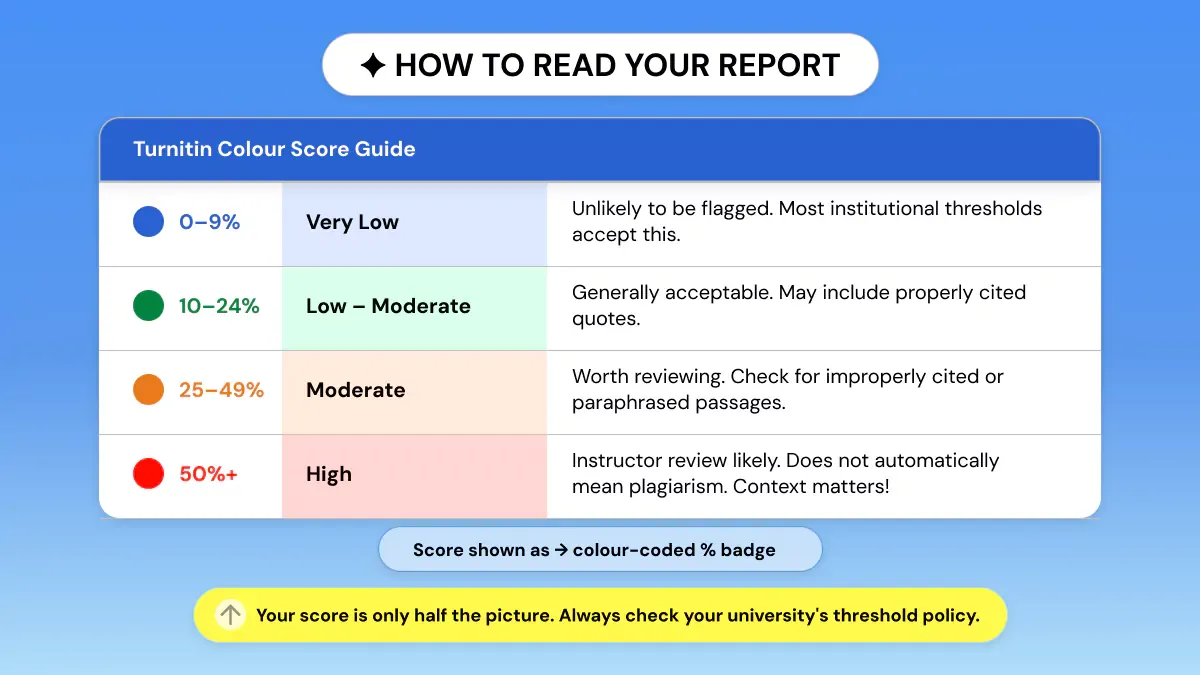
Understanding the Color-Coded System
Upon opening your report within Feedback Studio, you'll notice there is a color-coded score visible. Before diving into what each color means, it helps to understand that similarity detection isn't unique to Turnitin.
If you draft your papers in Google Docs, you may already be wondering whether there's a way to check for plagiarism directly in Google Docs before your work ever reaches Turnitin.
Below is what each color corresponds to, plagiarism percentage-wise:
Ranges are approximate only. Each school will have its own acceptable threshold. It's crucial to review your university's guidelines on academic integrity before interpreting your score.
Reading the Source Panel
Your report's right-hand panel contains two views: Top Sources (summary of the highest matching sources) and All Sources (complete list). You can click on any source to highlight the matching text inline within your document.
The key question students ask is:
Why does Turnitin flag citations? Keep in mind that Turnitin matches text even if it is cited. If you quote something properly and cite it, it will still show up as a match on your report. This is perfectly normal, and your instructor is aware of this.
For a purer view of truly uncited content, apply exclusion filters in Feedback Studio: do not search bibliography, do not search quoted text, and do not search matches under a predefined word count.
This removes predictable matches and sharpens the focus of your source matching to only what truly matters.
What does a bad Turnitin score actually mean? There's no universal answer. See the table above and always defer to your institution's policy.
How to Download Your Turnitin Report?
- Access your Similarity Report through Turnitin's Feedback Studio.
- Click on the download icon in the top-right corner of your report. This will resemble an arrow pointing down.
- Opt for 'Current View' if you want a PDF mirroring your report's current display, or pick 'Digital Receipt' for your submission's confirmation.
- Your downloaded PDF will include your similarity score, highlighted text that matched (color-coded), and a list of all sources (the same view your instructor has).
Save the downloaded report before your submission deadline. Some institutions only allow report access for a limited period after the course ends.
Can Turnitin See Copy and Paste?
Yes! Copy/pasted text is the easiest thing Turnitin detects.
If you copy word-for-word from any source that's indexed by Turnitin, it will flag it instantly. Black and white. There's no grey area here.
Turnitin, however, detects more than just cut-and-paste plagiarism. It also catches paraphrased content detection through contextual pattern matching. Simply substituting synonyms or changing up sentence order will not get you very far.
It can detect patterns in structure.
Turnitin's Flags Panel (updated 2025–2026) identifies attempts to manipulate text as well: white-on-white hidden text, character replacements, and Unicode substitutions.
These ploys are ineffective against Turnitin, and when detected, they trigger a much graver academic integrity alert than a high similarity score would.
Turnitin Plagiarism and AI Checker: Does It Detect AI-Generated Content?
Yes! Turnitin introduced AI detection in 2023, with an updated model in February 2026. Due to this, Turnitin AI detection 2026 is one of the top student-searched topics currently.
When text is completely AI-generated, the upgraded model achieves more than 95% accuracy.
There is one big caveat that you should know about. Accuracy decreases dramatically when it comes to hybrid writing. Hybrid writing is when a student crafts a draft with the help of AI and then manually goes back to edit it.
The more human input involved, the trickier it becomes for AI to flag. This is why the question, “Does Turnitin detect AI writing?” is not simply yes or no.
Turnitin has become considerably more aggressive following its February 2026 update, with outside observers noting an increase in false positives specifically for ESL writers whose stylistic output can resemble AI generated text even when 100% originally written by a human.
This is why using a reliable academic integrity checker AI before submitting is increasingly recommended, especially for non-native English speakers. This is very much a legitimate issue to be considered when discussing academic integrity policies.
What students need to know about the AI detection report:
- Visibility: The AI probability score will only be seen by instructors. Your institution has to enable student-facing reports for you to see your personal AI score.
- Separate reports: Turnitin's AI detection report is completely different from their plagiarism similarity report. A paper can have 0% similar and still return a high probability of AI.
- Does Turnitin detect ChatGPT? Yes! Submissions containing ChatGPT output are some of the most consistently flagged submissions. If your submission was fully written by ChatGPT, it will likely receive a high AI Probability score.
- There is no independent, free Turnitin AI detector for students. Turnitin AI detection is available only for institutions. That's why plagiarism checkers with AI detection tools like Phrasly are popular.
For a deeper breakdown of how these systems work, read this guide on how AI detectors work.
What If You Don't Have Turnitin Access?
Is there a way to check Turnitin before submitting? It's one of the most pragmatic questions students ask, and the answer varies by school. Turnitin doesn't provide subscriptions for individual students.
Only institutions can have access to Turnitin, and there isn't an officially free version for students.
The best solution is to do a pre-submission plagiarism check with a tool that students can access themselves. If you're already using Grammarly for writing assistance, you might wonder whether its built-in checker is enough.
Here's a full breakdown of how the Grammarly plagiarism checker works and where it falls short compared to dedicated tools.
It's not a substitute for Turnitin. But it allows you to catch and correct problems before your paper goes into your school's system.
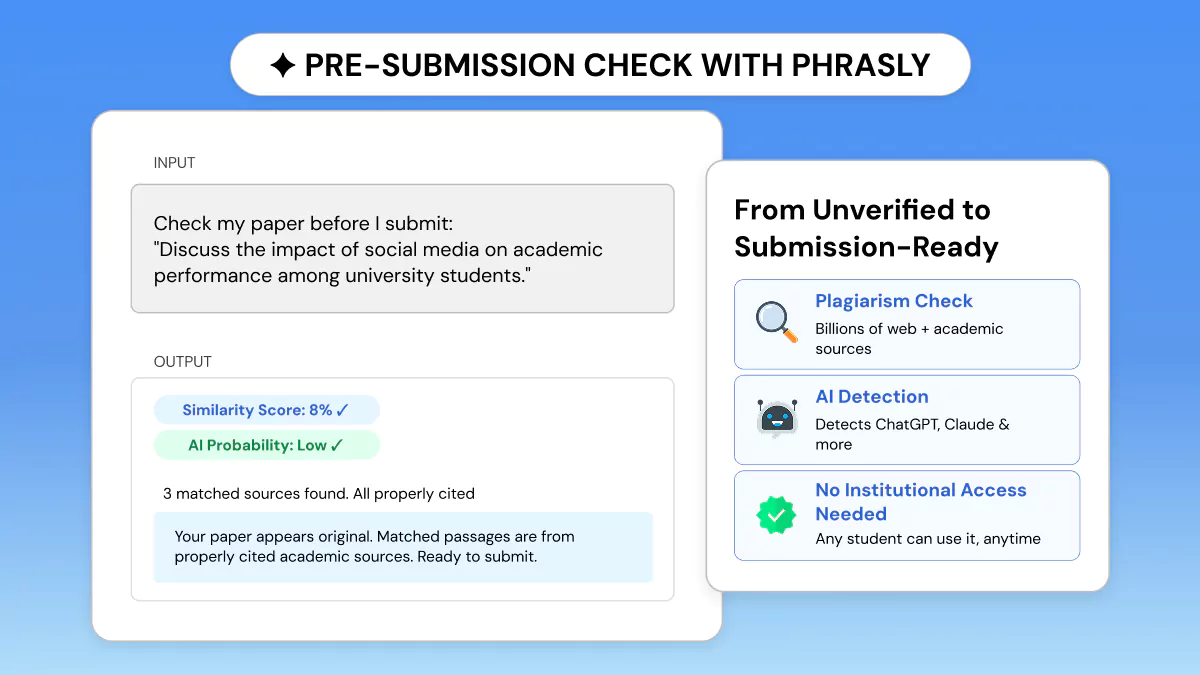
Phrasly offers both plagiarism detection and AI detection, all in one tool, and no institutional access is required.
Compare your paper to billions of web pages, review highlighted matches with clickable links to sources, then use the AI humanizer tool to edit AI-enhanced writing if needed, and submit your paper.
Phrasly is a real turnitin-free alternative for students without institutional access.
FAQs: How to Check Plagiarism in Turnitin?
What is a good Turnitin similarity score?
There is no one-size-fits-all definition of a "safe" score. Every institution has different policies. As a general benchmark, 0-9% is extremely low and is unlikely to raise suspicion.
10-24% will often be considered safe. Above 25%, you may want to start reviewing. Once you hit 50% mastery, the score will likely have caught an instructor's eye. Keep in mind your institution's policies before believing any score will or will not raise suspicion.
Why is my Turnitin score so high even though I cited everything correctly?
Turnitin flags text matches whether they are cited or not. Even with quotation marks and a citation, Turnitin will still flag these as matches. Turnitin matches similarity, not citation checking.
You can filter the report to exclude bibliography entries, quoted sections, and brief similarities. This will provide a clearer view of truly uncited work.
Can students check their own Turnitin score before submission?
It varies from school to school. Some give students access to view their report after submission. Others allow you to submit multiple drafts. If your instructor hasn't turned on student access, you will not be able to see your report. Only they will be able to see it.
If you want to check before submitting, try a plagiarism checker like Phrasly or Scribbr that offers you your own originality report.
Does Turnitin store my paper in its database permanently?
By default, yes! Turnitin adds all papers to its global student paper database to compare against later submissions. They allow instructors to turn this feature off, however.
Some schools use the 'do not store' option for certain assignments. You can check your assignment settings or ask your instructor if you have concerns prior to submitting.
Does Turnitin detect ChatGPT or other AI-generated writing?
Yes, but with limitations. Turnitin updated its AI detection in February 2026. They claim to correctly detect AI-generated text with 95% accuracy or higher.
However, it performs worse when identifying text that has been partly written by AI (a student writing with AI assistance, then manually editing). Only your instructor can see if your writing was flagged by Turnitin's AI detection.
Students will not be able to see their own AI score unless the school turns it on.


Keep reading

Copyleaks Plagiarism Checker: Tested, Rated & Compared
Copyleaks Plagiarism Checker review: we tested verbatim, minor-change, and paraphrased content to see how its 3-layer detection performs. See pricing, AI-detection accuracy (77%-96%), free plan limits, and how it compares to Phrasly in a head-to-head scan before you subscribe.
Does Canvas Have a Plagiarism Checker? What It Uses, How It Works & What Students Should Do
Canvas has no built-in plagiarism checker. It relies on instructor-enabled tools like Turnitin or Copyleaks. Learn how scanning actually works, whether Canvas detects AI writing (ChatGPT, Claude, Gemini), and how to check your paper for plagiarism and AI content before you submit.