How to Remove ChatGPT Watermark (And When You Actually Should)?
14 min read
ChatGPT doesn't stamp your text with an official, verifiable watermark. Newer models can leave two traces though: invisible Unicode characters like the narrow no-break space (U+202F), and the writing patterns detectors are trained to spot.
Both are why you’re here. Maybe you pasted a ChatGPT draft into Word and the spacing looked wrong. Maybe you just want the final version to sound like you wrote it. Either way, how to remove ChatGPT watermark comes down to owning your own writing.
That matters more in 2026 than it used to. The AI detection arms race is under way, and professionals need to know where "using AI" ends and "editing AI-assisted work" begins.
So we went to the primary sources: OpenAI's own developer forum, the researchers who first reported these characters, and a University of Chicago detector audit. Below is what each trace is, how to reveal it, how to clean it, and when doing so is the right call.
Clean ChatGPT Watermark from Your Own Text
Paste a draft below and see what comes back 👇
Why People Want to Remove ChatGPT Watermark (And When It’s Usually Fine)
Most ChatGPT users are drafting, not fabricating. They write the brief and bring the expertise, and ChatGPT produces the first pass. That leaves AI writing fingerprints on the page, which is a style problem rather than an ethics one.
You may have first noticed this when pasting ChatGPT text into Word and seeing odd spaces or dashes appear where you didn't put any.
The audience for that problem keeps growing. Per Pew Research Center, 44% of US adults said they use ChatGPT in early 2026, up from 34% a year earlier, and 38% of employed adults use chatbots for tasks at work.
Trouble starts when the conversation reaches detection tools. Companies are writing AI usage policies. Universities are tightening rules. Platforms are learning to spot ChatGPT output patterns.
Where does that leave professionals?
According to Intapp's 2025 survey, 72% of professionals across accounting, consulting, finance and legal reported using AI at work, up from 48% the year before.
That spike shows how ordinary AI-assisted writing has become, and why removing the GPT watermark stopped being a fringe question.
The goal here is making AI text sound human, and that stays legitimate as long as you follow whatever policies apply to you.
The people asking this question are usually the ones already doing the work. They wrote the argument and they own the expertise. They just want the prose to carry their voice.
What is at stake is rarely dramatic. A freelancer wants a client deliverable that reads in their own voice. A student wants a paper that reflects their own thinking.
For a full breakdown of what these markers are and how they work, read What Is an AI Text Watermark.
Does ChatGPT Actually Add a Watermark to Your Text?
There are two different things people call a "ChatGPT watermark," and only one of them is a real, removable marker.
The first is a set of invisible Unicode characters that can end up inside the output. The second is the statistical pattern of the writing itself. Most confusion about this topic comes from people arguing about one while meaning the other.
Neither one is an official cryptographic watermark, meaning a hidden signal deliberately encoded so it can later be verified. OpenAI has never deployed that kind of OpenAI watermark approach in ChatGPT.
That part is settled. The company built a text watermarking system and chose not to ship it. Per Search Engine Journal, an OpenAI survey found almost 30% of ChatGPT users would use the service less if watermarking arrived, and OpenAI called its method "technically promising but has important risks."
So the honest position is that the technology exists and sits unused. Most OpenAI watermark 2026 coverage discusses research and policy rather than anything running inside the product. What reaches your clipboard is something else.
Invisible characters | Statistical patterns | |
|---|---|---|
What it is | Unicode marks inside the text | How the writing behaves |
Visible? | No, until you reveal them | No, and nothing to reveal |
Deliberate? | Reported as a training artifact | A by-product of generation |
How to remove | Find and replace, seconds | Rewriting voice and structure |
Fools a detector? | No | This is what detectors read |
The Invisible Characters (U+202F and Zero-Width Marks)
Newer ChatGPT models have been widely reported to insert invisible Unicode characters into longer answers, most often the narrow no-break space, U+202F. They look like ordinary spaces on screen, survive a copy-paste, and show up as odd compressed gaps in Word or a code editor. Zero-width spaces (U+200B, U+200C, U+200D), the word joiner (U+2060) and stylised em-dash characters behave the same way.
Unicode is the standard that gives every character its own code, and U+202F is a legitimate one: a space narrower than usual that won't break across a line, correct typography in French and Mongolian.
Here's where the story started. In April 2025, the academic-integrity startup Rumi first reported it: GPT-o3 and o4-mini were adding these characters to longer responses, and older models like GPT-4o weren't.
OpenAI then contacted Rumi directly and said the characters are not a watermark, describing them as "a quirk of large-scale reinforcement learning." Rumi also noted days later that it had stopped seeing them in its own testing.
So treat them as reported output artifacts rather than an announced watermark. That distinction matters, because plenty of pages ranking for this topic call them a deliberate marker without saying where the claim came from.
That explanation holds up on inspection. Models learn from professionally typeset text, and the habit leaks into English output where nobody wants it. The characters are harmless on their own, but they break code in a snippet, confuse resume parsers, and survive a paste into a CMS.
The Statistical Patterns (What Detectors Really Catch)
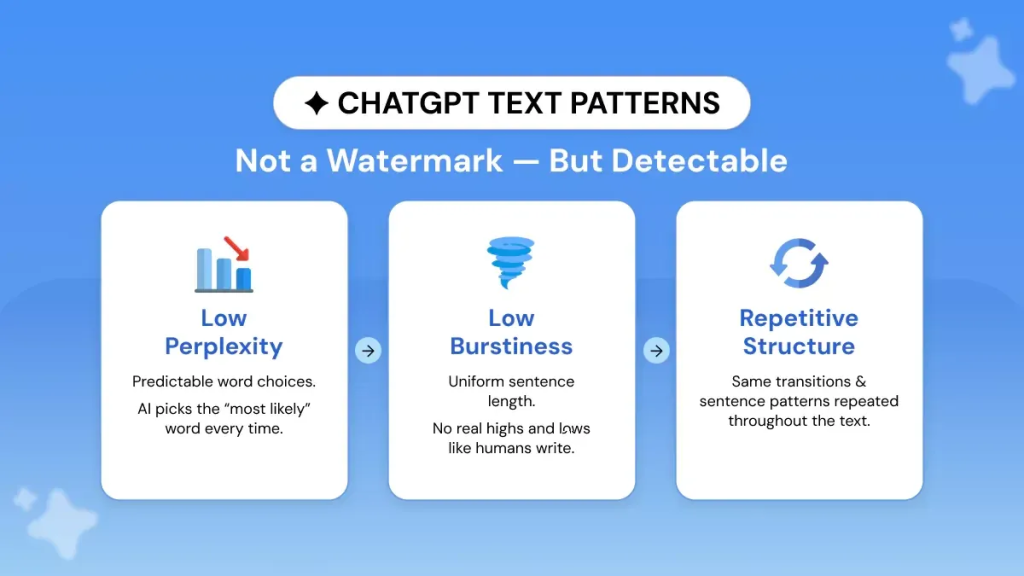
The second meaning is not a character at all. ChatGPT leaves statistical writing signatures: predictable sentence cadence, uniformly high fluency, low burstiness (how much sentence length varies from one sentence to the next), and distinctive word-frequency patterns.
Detectors read those signals, which is why the idea of a GPT watermark keeps circulating even without a cryptographic one.
Here's the bridge that runs through the rest of this guide. Stripping invisible characters takes seconds, and it will not get you past a pattern-based detector on its own.
What About GPT-5?
GPT-5 has no acknowledged cryptographic watermark either. As of mid-2026, OpenAI hasn't confirmed any large language model (LLM) watermark operating inside it.
GPT-5 is also where readers report the invisible characters most often. On OpenAI's developer forum in October 2025, a user documented GPT-5 inserting U+202F instead of standard spaces in headings, Markdown tables and ordinary prose, and traced it to a specific token. Other users confirmed the same behaviour in their own apps, and one worked around it by asking the model not to use the character.
The text GPT-5 produces differs from GPT-4 in style and complexity. The underlying point holds: what detectors read are statistical signatures.
Treat the model version as a prompt to check. The characters came and went across releases through 2025, so the only reliable answer for the draft in front of you is to open that draft and look.
For how Google's SynthID-Text differs from ChatGPT's approach, read how to detect an AI watermark.
How to See (Detect) a ChatGPT Watermark
Turn on formatting marks in Word or paste the text into a Unicode viewer, and the invisible characters become visible symbols you can find. Checking the writing patterns is a separate job that needs a detector, since patterns leave nothing to look at.
Here's the sequence for the characters:
Open your draft in Word and click the pilcrow button on the Home tab. Hidden spacing characters appear on screen.
In Google Docs, paste the text into a code editor or a Unicode viewer instead. Docs has no equivalent toggle.
Search for the character directly. Word's Find accepts a Unicode code point by its decimal number, and U+202F is 8239.
Look for the symptom as well as the character. Compressed gaps, spacing that will not line up, and dashes you never typed all point the same way.
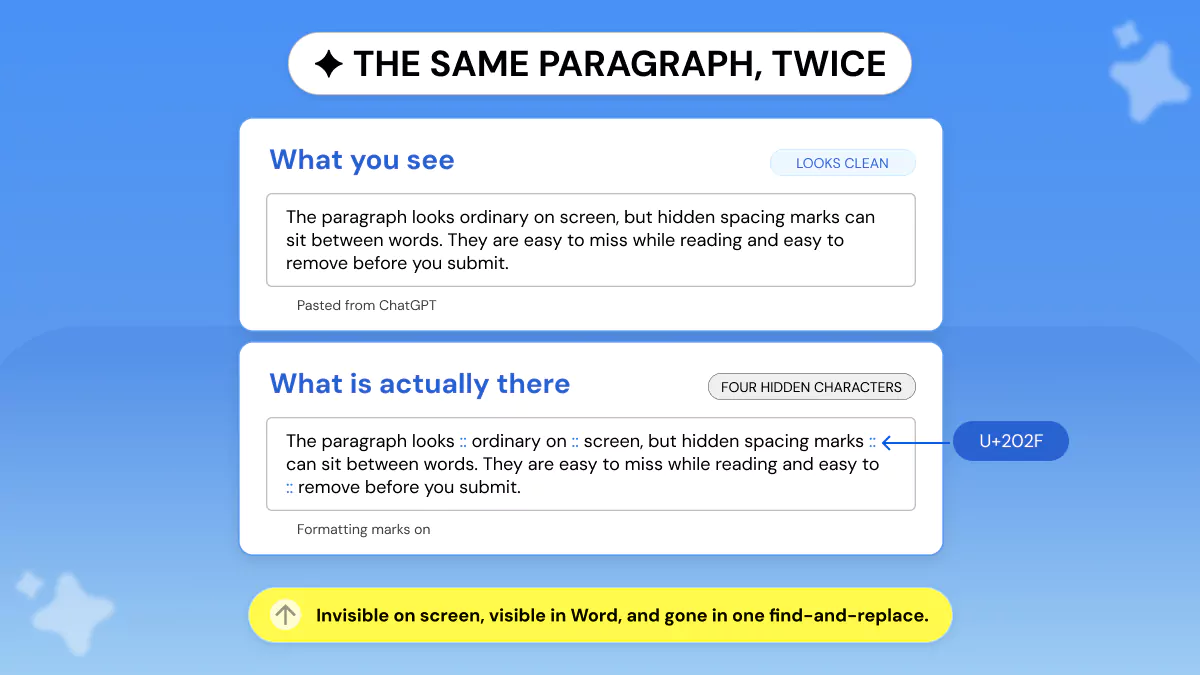
For the pattern side, run the draft through a free AI detector and treat the score as a starting point for review. A clean character sweep and a high AI score can sit side by side, which is why the next section splits into two jobs.
Run both before you decide anything. A character sweep tells you what is physically in the file, and the answer is yes or no. A detector estimates how the writing behaves, and that answer is a probability.
How to Remove ChatGPT Watermark Ethically?
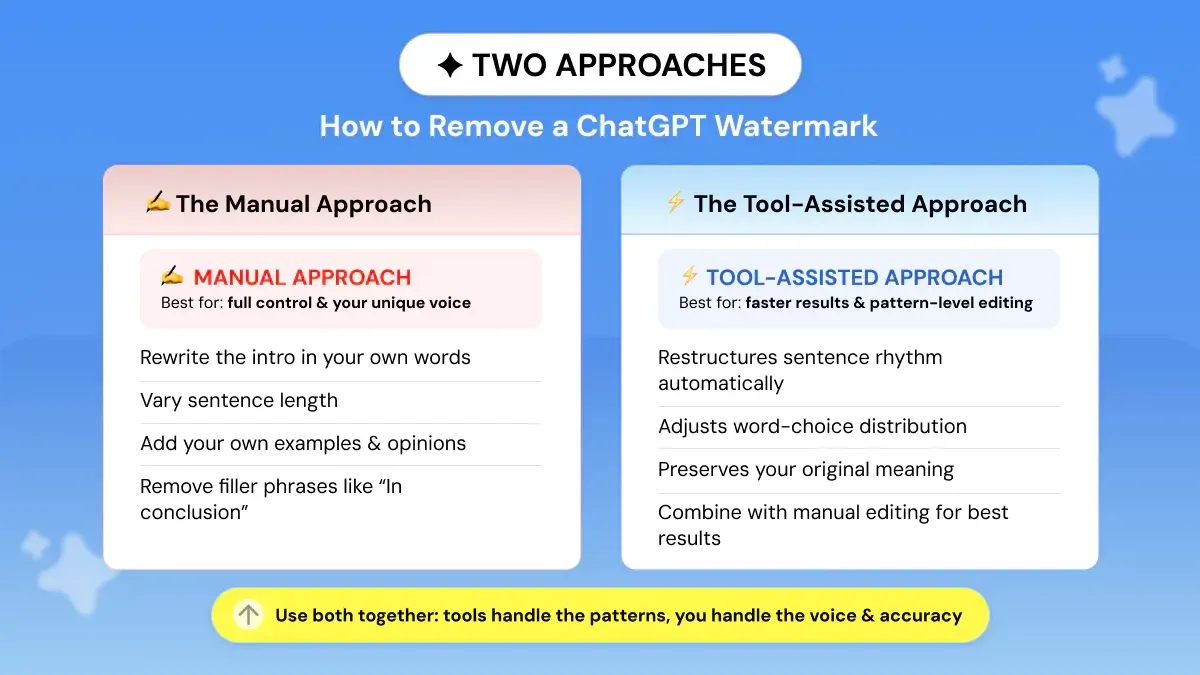
Removing a ChatGPT watermark means two separate jobs: stripping the invisible characters, then rewriting the patterns until the text sounds like you. The first takes a minute. The second is the actual work.
Step 1: Strip the Characters
In Word, open Find and Replace, search for ^u8239, and replace it with a single normal space. Repeat for the zero-width characters at 8203, 8204 and 8205, and the word joiner at 8288, replacing those with nothing.
In Google Docs, open Edit then Find and replace, and paste the character itself into the search box.
Faster route: paste the whole draft through a watermark remover and clean them in one pass. Our guide to removing AI watermarks from text walks through the options in more depth.
Verify before you move on. Turn formatting marks back on and reread the passages that looked wrong, because a single missed character in a heading will still travel wherever the file goes next.
Go carefully with dashes. Em dashes are ordinary punctuation that human writers use constantly, so a blanket find-and-replace will flatten sentences you wrote yourself. Change the ones that arrived with the draft and leave your own alone.
Step 2: The Manual Approach
Rewrite the opening paragraph in your own words. The opener is where ChatGPT output patterns show most clearly, and a sentence you built from scratch signals your register and your rhythm.
Vary your sentence length deliberately. Mix short punches with longer analytical sentences.
Add your own examples, opinions and specific references that ChatGPT couldn't have produced.
Replace generic transitions like "In conclusion," "It's worth noting" and "Additionally." Detectors recognise them instantly.
Read the draft aloud. If a sentence sounds like a press release nobody asked for, rewrite it.
Step 3: The Tool-Assisted Approach
Use a dedicated AI text watermark remover for the structural work. A ChatGPT watermark remover restructures sentence rhythm and word-choice distribution while preserving your meaning.
Best practice combines the two. The tool handles patterns, you handle voice and factual accuracy.
💡 One caution on detection scores. In a Chicago Booth working paper published in August 2025, an open-source detector baseline mislabelled roughly 30% to 69% of genuine human-written passages as AI, while the commercial detectors tested held at or below about 1% on medium-to-long text.
Read a score as evidence to examine, then check which passages triggered it before you rewrite anything.
Knowing when to stop helps. The target is writing you would defend as your own in a conversation: your examples, your argument, your rhythm. Once a paragraph passes that test, rewriting it further just to move a score stops being editing.
The same audit ran AI text through a humanizer tool and found the strongest detector still caught nearly all of it on longer passages. That's the honest reason character stripping alone won't carry you, and why voice and structure matter more than any find-and-replace.
Trying to remove a watermark from an image?
Different task. ChatGPT declines requests to erase a visible watermark from a photo you don’t own, because OpenAI's usage policies rule out attempts to infringe intellectual property rights. This guide covers hidden characters in text, so for images you’ll want an image editor and the rights to edit the file.
Is It Ethical to Remove ChatGPT Watermark?
The answer depends entirely on context. Here is a clear framework.
When It's Perfectly Fine
You wrote the brief, the ideas, and the structure, and ChatGPT helped with phrasing.
You're editing AI-drafted content as part of your professional editing workflow, and your organisation or client has no policy prohibiting AI use.
You care about your work sounding like you rather than like generic AI writing.
As a contractor, marketer or content creator, you're using ChatGPT as your drafting assistant rather than your author.
When It Raises Ethical Concerns
Turning in AI-written work as your own to an entity that prohibits AI usage.
Publishing AI-generated work in high-stakes situations such as medical advice or legal documents, where the reader is meant to think a person wrote it.
Using editing tools to get around AI detection that exists for a valid protective reason.
Where the Rules Are Heading
Disclosure is turning into a regulatory signal. The EU AI Act's transparency obligations under Article 50 apply from 2 August 2026. Per European Commission guidance, providers must mark synthetic content in a machine-readable format, and deployers must label deepfakes and AI-generated text on matters of public interest. It is the clearest sign yet that AI disclosure laws 2026 are turning AI content provenance into a compliance question rather than a courtesy.
The scale behind those rules is easy to underestimate. Graphite's 2025 analysis of 65,000 web articles found AI-generated articles overtook human-written ones in November 2024, settling near half of everything sampled by May 2025.
In practice, responsible AI content rarely means a banner across your work. It usually means a line in a client brief about how the draft was produced, or a straight answer if an editor asks.
One more question comes up constantly: is removing a ChatGPT watermark the same as removing a Gemini one? No. Gemini uses SynthID-Text, a cryptographic system, and ChatGPT leaves statistical patterns. Each needs its own approach, and the Gemini case is covered in is it ethical to remove a Gemini text watermark.
If editing your own ChatGPT-drafted text is the right call for your workflow, Phrasly's AI text watermark remover is built for exactly this use case 👇
Best Tools to Remove ChatGPT Watermark Ethically
The tools below are positioned around legitimate AI-generated text editing. Each one suits a different working style.
Tool | What it does | Best ethical use case |
|---|---|---|
Phrasly AI | Strips invisible characters and rewrites the statistical patterns behind them | Editing your own AI-drafted content to match your voice |
QuillBot | Paraphrasing tool with multiple modes, sentence-level rewrites only | Light editing and tone changes on short passages |
Wordtune | Suggests rewrites and alternative phrasings, one sentence at a time | Writers who want hands-on control of every rewrite |
Phrasly is built for writers who use AI as a drafting tool and want the final output to sound like them. It is an editing tool for people working responsibly, and it is not sold as a detection-evasion product.
The reason it sits at the top of this table is scope. QuillBot and Wordtune both work a sentence at a time, which suits a passage you already know needs attention. Neither one touches the invisible characters described earlier, so on a ChatGPT draft you would still be running a separate find-and-replace pass first.
Editing text drafted with ChatGPT assistance is entirely normal professional writing in 2026, provided your intentions are right and you aren't breaking a policy that applies to you.
Intent and context are what separate legitimate editing of AI-generated content from dishonest practice. Passing AI-written work off as your own is an attempt to deceive your readers, educators or institution.
Content ownership is the point of the whole exercise. Aim to edit AI-drafted writing until it is fully yours, in structure and in voice as well as in wording.
Edit your ChatGPT draft until it's fully yours. Phrasly's AI Watermark Remover handles the structural patterns while you handle the voice 👇
Frequently Asked Questions
Does ChatGPT watermark text?
ChatGPT has no cryptographic watermark like Gemini's SynthID-Text. It does leave statistical writing signatures that AI detectors identify, and newer models have been reported to include invisible Unicode characters. Neither is an officially announced watermark.
Does ChatGPT leave a watermark when you copy and paste?
Sometimes, in the sense that invisible characters such as U+202F can survive a copy-paste into Word or Google Docs. OpenAI has described these as a training quirk rather than a watermark, and find-and-replace removes them.
What is the U+202F character in ChatGPT text?
U+202F is the narrow no-break space, a legitimate Unicode character that looks like a normal space but is thinner and won't break across a line. Newer ChatGPT models have been reported to insert it into longer answers.
How do I remove a ChatGPT watermark in Word?
Open Find and Replace, search ^u8239, and replace with a normal space. Repeat for zero-width characters at 8203, 8204 and 8205, replacing with nothing. Turn the pilcrow button on first so you can see what you are removing.
Can detectors still flag my text after I remove the characters?
Yes. Detectors read writing patterns rather than hidden characters, so a clean document can still score as AI. Rewriting for voice, structure and sentence variation is what changes the result.
Is removing a ChatGPT watermark the same as removing a Gemini watermark?
No. Gemini watermarks with SynthID-Text, cryptography hidden in token probabilities that can be verified. ChatGPT produces statistical fingerprints instead, so each one demands its own detection strategy.
Is it illegal to remove ChatGPT watermark?
No. Editing your own AI-assisted writing isn't illegal. Whether it is ethical depends on context: submitting AI-generated work to a school that forbids it is academically dishonest, though still not a criminal matter.
Does GPT-5 watermark text?
OpenAI hasn't publicly confirmed any cryptographic watermarking inside GPT-5 as of 2026. GPT-5 is where users most often report invisible characters such as U+202F, which OpenAI has attributed to training rather than deliberate marking.
What is the best website to remove ChatGPT watermark?
For a professional editing workflow you can trust, Phrasly's AI watermark remover targets ChatGPT's statistical signatures without changing your meaning or voice. Pair it with a manual pass for examples, opinions and structure.
Can AI detectors still detect text after watermark removal?
Accuracy depends on the tool and how much you edit. No tool can promise a clean score, and chasing one is the wrong goal anyway. Edit responsibly and the content becomes genuinely yours. See how to detect an AI watermark.

Written by
Muhammad Usman Ali
Pakistan
Muhammad Usman Ali is an experienced SEO content writer with 3+ years of professional writing experience. He specializes in AI tools, AI detection technologies, and search engine optimized content.