Does Schoology Detect AI? What It Can Actually Check in 2026
10 min read
The answer to the question “Does Schoology detect AI?” depends on how your school or district has configured Schoology and the tools connected to it. Schoology does not automatically apply one universal AI detector to every student submission.
Instead, it collects and manages assignments, while a connected service may analyze submitted text for AI-generated writing or plagiarism. Teachers may also review work manually. So, whether your assignment is checked for AI depends on your school’s setup, assignment settings, and teacher workflow.
Check Your Draft with Phrasly AI Detector 👇
Does Schoology Have AI Detection Built In?
Schoology is PowerSchool’s learning management system for managing assignments, assessments, grades, and course communication. It does not apply one universal AI-authorship detector to every assignment.
AI analysis can instead be added through an institutional integration, while teachers may also use separate tools to review submissions.
💡 Schoology manages the learning workflow, while connected services can add AI detection, plagiarism checking, or other assessment features. This means a standard Schoology submission screen does not necessarily show whether your particular assignment is being checked.
Schoology Function | Possible Connected Function |
Collect and organize work | Analyze prose for likely AI writing |
Record submissions and grades | Compare text with source databases |
Host quizzes and assignments | Add proctoring or lockdown controls |
Want to see how Edgenuity handles AI detection? Check out our guide on what AI detector does Edgenuity use.
What AI Detector Does Schoology Use?
There is no single Schoology AI detector. Schools and districts can connect different third-party services to their Schoology workflows, so the tool used can vary by institution. Copyleaks, Turnitin, PlagiarismCheck.org, CoGrader, and Pangram are examples of services that can work with Schoology in different configurations.
Copyleaks documents a Schoology integration that combines AI detection, plagiarism detection, and grammar checking. For more context on its detection capabilities, see is Copyleaks accurate.
Turnitin supports Schoology, but using Schoology does not automatically mean an institution has Turnitin AI detection enabled. Its AI Writing Report is separate from the Similarity Report and requires eligible licensing and activation.
💡 PlagiarismCheck.org also documents Schoology integration through LTI, with access to similarity and AI reports. CoGrader and Pangram are further examples of tools that can be used in school or district workflows.
Tool | Works with Schoology? | What it may return | Universal / default? |
Copyleaks | Yes, provider-documented | AI + plagiarism analysis | No |
Turnitin | Yes, supported LMS | Similarity report; optional AI report | No |
PlagiarismCheck.org | Yes, provider-documented LTI | Similarity and AI reports | No |
CoGrader | Yes, school/district plans | AI/plagiarism indicators + grading support | No |
Pangram | Yes, Schoology LTI documented | AI-detection report | No |
A teacher can also export or copy student work into a separate checker, so the student interface may not reveal every review.
Schoology doesn’t give you one standard AI pre-check. If you just want to quickly check your text yourself, try the Phrasly AI Checker for free, then consider the result alongside your draft history and school policy.
PowerBuddy Is Schoology AI, but It Is Not an AI Detector
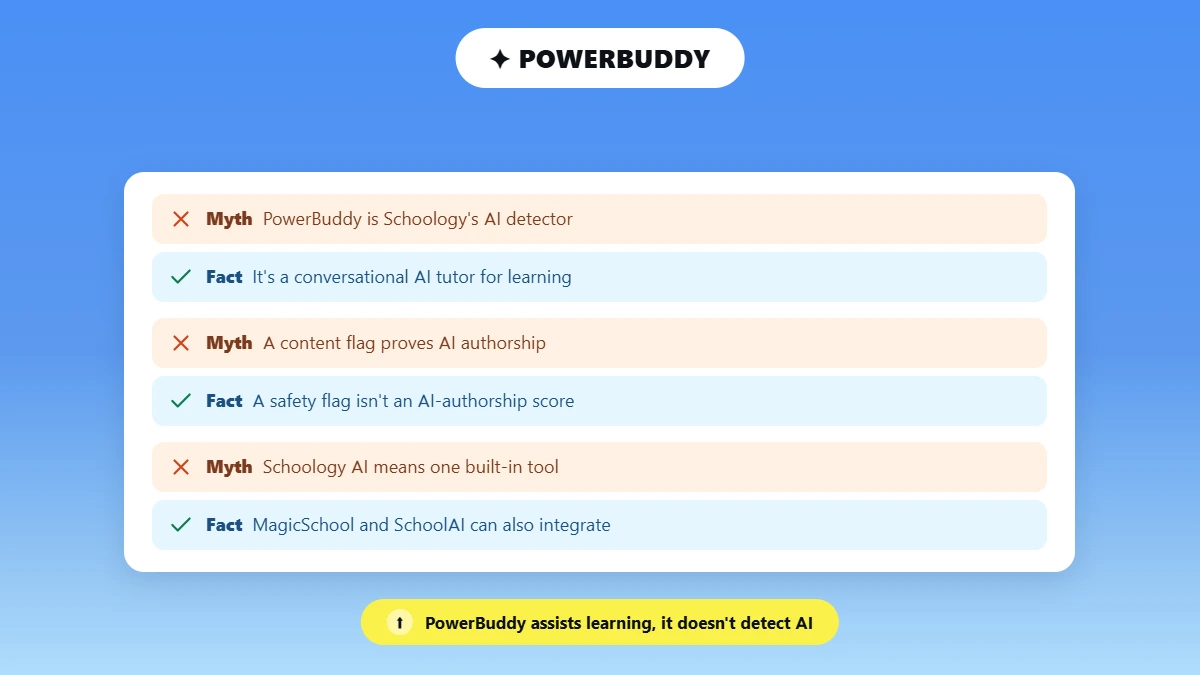
As of 2026, PowerBuddy for Learning is Schoology’s AI assistant for teaching and learning, not a universal AI detector. PowerSchool describes it as a conversational AI tutor for students and a generative AI tool that helps educators create instructional content.
Schools can enable or restrict access by organization, school, role, or individual user, while teachers can enable PowerBuddy Chat for specific assignments, discussions, or pages.
When PowerBuddy chat is enabled, student conversations are logged. PowerSchool’s documentation says conversations can take up to about 15 minutes to load into the chat logs and are available for 60 days.
Administrators can also review flagged chats, and PowerSchool notes that AI can make mistakes when filtering content.
That distinction matters: a safety or content flag on a PowerBuddy conversation is not an AI-authorship score for an uploaded essay. PowerBuddy supports student learning and gives educators AI-assisted content tools.
Its use does not mean every assignment submitted through Schoology is automatically scanned for AI writing.
Other AI products, including MagicSchool and SchoolAI, can also integrate with Schoology, which is one reason searches for “Schoology AI” can produce mixed results. The key is to distinguish Schoology’s own PowerBuddy features from separate AI tools and AI-detection integrations.
How Can You Tell Whether a Schoology Assignment Is Checked?
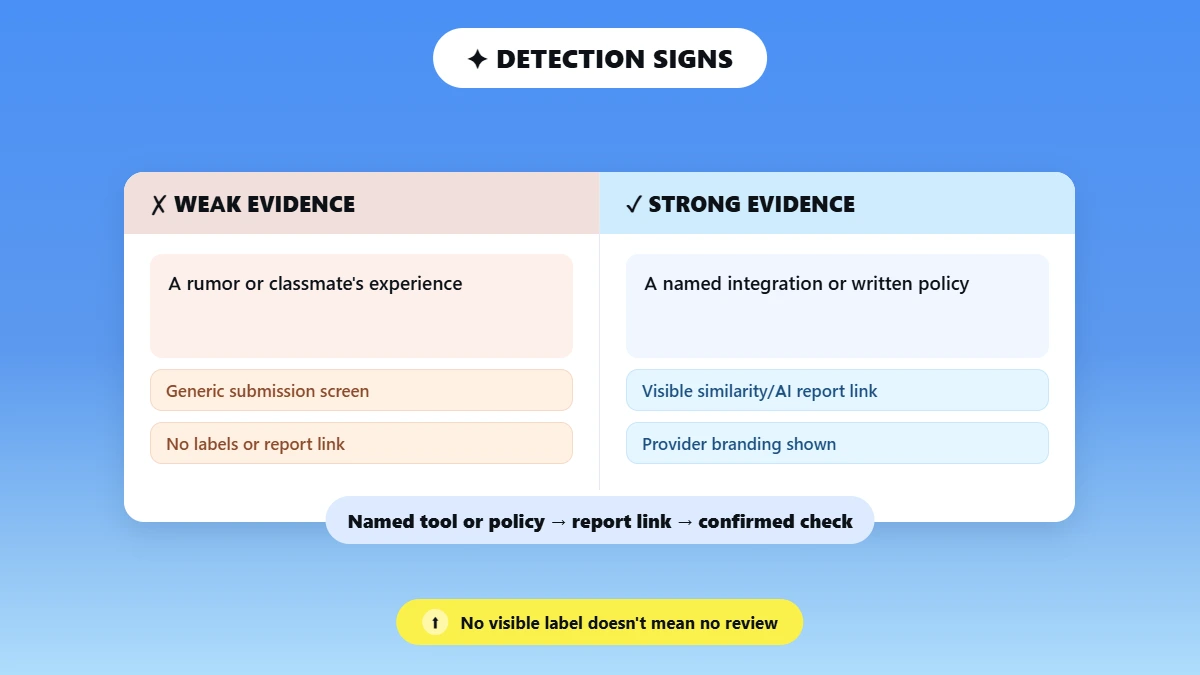
You can sometimes tell whether a Schoology assignment is being checked by looking for a named detection or originality tool, a report link, or provider branding. Check the assignment instructions for references to an external tool or originality check, such as Turnitin or Copyleaks. Your school or district’s academic-integrity and AI-use policies may also explain which tools are used.
Before submitting, look for an external-tool launch, a similarity-report link, or instructions that name a specific provider. If the assignment does not show any of these, you can ask your teacher which tools and rules apply to that submission.
Strong Evidence It Is Checked | Weak Evidence |
|---|---|
A named integration or written policy | A rumor or classmate’s experience |
A visible similarity/AI report link or provider branding | A generic Schoology submission screen with no labels |
No visible label does not necessarily mean no review. A teacher may still review or check your work manually outside Schoology, so the student interface may not show every type of review.
What Can Schoology and Connected Tools Actually See?
If your concern is “can Schoology detect copy and paste,” the answer is not necessarily. But that’s not the only thing it can check. Here’s what Schoology and its connected tools can actually see.
A configured similarity checker can identify matching text, while an AI detector may flag writing that appears likely to be AI-generated.
Separate assessment or proctoring tools may provide additional activity controls. PowerBuddy activity can also be logged when enabled.
Concern | Best Answer |
AI-written essay | A configured AI detector may return an AI probability or highlight likely AI-written passages |
Plagiarism | A configured similarity checker may identify matching text and its sources |
ChatGPT specifically | A detector may flag likely LLM-written text, but generally cannot prove the exact model or account used |
Copy and paste | A text match can be found after submission; a clipboard event alone is not proof of AI use |
Tab switching | Depends on separate assessment/proctoring controls; not universal Schoology behavior |
PowerBuddy use | PowerBuddy chats can be logged when the feature is enabled |
Students often have the same concern about Turnitin, especially whether it can detect ChatGPT. If that’s something you’re wondering about too, see our guide on does Turnitin detect ChatGPT.
How Accurate Are AI Results in Schoology?
AI detection results depend on several factors, including the detector being used, text length, language, writing style, genre, and the detector’s current model. For example, take Turnitin.
When an institution has Turnitin’s AI Writing Detection enabled, it can analyze files such as .docx, .pdf, .txt, and .rtf, with support for English, Spanish, Japanese, and Arabic. However, Turnitin says qualifying prose must contain at least 300 words and no more than 30,000 words.
There is another important limitation. If the AI result falls between 1% and 19%, Turnitin displays it as *% because this range has a higher risk of false positives. Turnitin also warns that its AI report can misidentify human or AI-generated writing and should not be the sole basis for adverse action.
If you want to understand the technology behind these results, see our guide on how AI detectors work. And if you are wondering how much AI detection is acceptable, we cover that in more detail too.
For Schoology, this means there is no single accuracy rate that applies to every assignment. The result depends on which AI detection tool your school or district has connected and whether that tool’s AI detection feature is enabled for the assignment.
💡 A Schoology AI result should therefore be treated as an indicator for review, not definitive proof of AI use.
Phrasly Test
To see how much AI detection results can vary in practice, we ran a test using three different types of writing. We tested one clearly human-written sample, one raw AI-generated sample, and one sample that combined human writing with AI-assisted editing.
The Phrasly AI Detector returned 14% AI, 100% AI, and 48% AI, respectively.
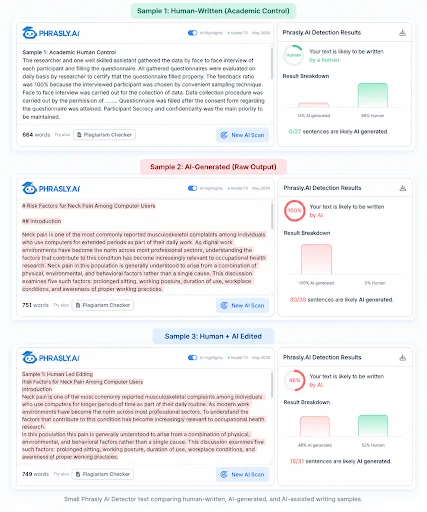
These results show how one detector classified these specific samples, but they do not reproduce Schoology’s or a school’s private detector configuration.
The test is therefore an example of how detection results can differ based on the text being analyzed, rather than a measure of how accurate Schoology or any particular institutional detector is.
What to Do Before You Submit, or If You Are Flagged
Before submitting, check your school’s AI-use policy and make sure your work follows it. Keep your outlines, notes, sources, and version history so you can show how your work developed.
Verify every quotation, citation, calculation, and factual claim. Then read the final draft carefully and revise it in your own voice. If AI assistance is permitted, make sure any use of it follows the specific rules for that assignment.
💡 If you use an AI detector, treat the result as a probabilistic second opinion, not proof of misconduct. Different tools can produce different results, and a score alone cannot establish how a piece of writing was created.
Even if you follow these steps, your assignment could still be flagged, or you may be flagged before you have a chance to clarify your work. If that happens, ask which detector was used and request to see the relevant report.
Share your drafts, notes, sources, or version history where appropriate, and request human review. That covers what to do when a Schoology assignment is flagged.
If you want to understand the same situation specifically with Turnitin, see our guide on what to do when Turnitin flags human writing.
AI detectors generally look for patterns and predictability in writing, and a draft that sounds overly polished, generic, or robotic may also feel unlike your usual voice.
If you have something that reads that way, the Phrasly AI Humanizer can help refine its tone and flow by making the writing feel more natural and less predictable.
Then review it yourself to make sure the meaning, citations, and final wording still reflect your own permitted work. No rewriting tool can guarantee another detector’s result.
Why This Question Matters in 2026
The question matters because generative AI is now part of everyday student work, while school policies and AI-use rules are far from uniform.
College Board reported that 84% of surveyed U.S. high-school students used generative AI for schoolwork by May 2025, up from 79% in January, with 69% using ChatGPT for assignments or homework.
That makes it important to check your own assignment instructions and school policy rather than rely on a universal claim about Schoology.
Some older search results reference Schoology’s historical Unplag or Unicheck integration. Unicheck was retired by Turnitin on January 1, 2025, so those results should not be treated as evidence of a current Schoology detection setup.
FAQs
Does Schoology automatically detect AI writing?
No. Schoology does not automatically apply one universal AI detector to every assignment. A school or district may connect an external AI-detection service, configure originality tools, or have teachers review submissions separately. Whether an assignment is checked depends on the institution’s setup, the assignment configuration, and the tools available to the instructor.
Can Schoology detect ChatGPT?
A connected AI detector may flag writing that resembles ChatGPT or other large language model output, but it cannot reliably prove which model or account produced the text. AI-detection results are probabilistic and should be treated as indicators for review rather than definitive evidence that a student used ChatGPT. For more context, see can schools detect ChatGPT.
What AI detector does Schoology use?
Schoology does not have one required AI-detection provider. Depending on the institution, a school or district may connect services such as Turnitin, Copyleaks, PlagiarismCheck.org, CoGrader, Pangram, or another approved tool. The specific provider and features available to students can therefore vary between schools and even between assignments.
Can Schoology detect copy and paste?
Do not assume that pasted text is automatically labeled as AI-generated. A connected similarity checker can identify passages that match other sources, while separate assessment or activity tools may capture different types of information. Copying and pasting by itself does not establish that AI was used, and the exact monitoring available depends on the school's configuration.
Does Schoology check for plagiarism?
Schoology can support plagiarism checking through connected similarity services. These tools can compare submitted text against selected sources and generate similarity results or reports. However, plagiarism-checking availability, report visibility, and the specific service used depend on the school or district configuration and the settings applied to the individual assignment.
Can students see the AI score in Schoology?
Sometimes, but not universally. Whether students can see an AI or originality result depends on the connected provider and instructor settings. A teacher may also review or analyze a submission outside Schoology, in which case the student may not see that report. Students looking for an independent check can explore the best free AI checkers for students.
Does PowerBuddy detect AI-written assignments?
No. PowerBuddy is Schoology's AI tutor and content assistant, not a universal authorship detector for Schoology assignments. Its student chat logs and safety-related flags concern activity within PowerBuddy. They should not be interpreted as an AI-writing score for every essay or document submitted through Schoology.

Written by
Hasnain
Karachi, Pakistan
I help businesses grow with SEO-friendly blog posts, landing pages, and long-form content. With 3+ years of experience, I deliver clear, original, and well-researched writing that drives results.