SafeAssign Plagiarism Checker: How It Works & How to Check Before Submitting
14 min read
The SafeAssign plagiarism checker runs automatically the moment you submit, and the report goes to your instructor either way. What it compares your paper against decides the score you get.
SafeAssign is Blackboard's built-in text-matching tool. It compares your work against student papers, your school's archive, the open web, and a journal database, then sends your instructor a similarity report.
You cannot run it yourself as a public checker, which is why so many students ask whether a draft can be checked first. Read on to learn more about how the SafeAssign check for plagiarism works and what your score means.
Need to check your first draft before Blackboard?
SafeAssign only runs after you submit, but Phrasly lets you paste or upload a draft and fix citations first.
Check your Assignment with Phrasly Before you Submit 👇
Phrasly is an independent plagiarism checker and has no affiliation with Anthology, Blackboard or SafeAssign. The results differ because the two services use different databases and matching methods.
What Is SafeAssign, and What Does “Originality Report Enabled” Mean?
SafeAssign is Blackboard’s plagiarism prevention tool, built into the LMS your school already runs. Your instructor switches it on for a specific assignment or test. Every submission to that item is then compared against stored sources, and the result lands in your instructor’s grading view.
“Originality Report enabled” means your instructor turned SafeAssign on for that assignment. Anthology’s student documentation says you see that label in the Details & Information panel of the assignment or test.
Two things follow from the label:
📄 Your submission will be scanned. No extra step is needed from you.
👀 A report will exist. Whether you can open it is a separate setting.
On the submission page itself you get a second signal. Anthology tells students to look for a SafeAssign statement and a list of supported file types above the upload area.
Not every Blackboard assignment uses SafeAssign, because instructors choose it item by item. A course can run it on the final essay and skip it on weekly discussion posts.
How Does the SafeAssign Plagiarism Checker Work?
SafeAssign plagiarism checker works by matching your text. It compares the words in your submission against four stored collections, marks every block that overlaps an existing source, and reports the percentage that matched.
Blackboard describes the engine as a text matching algorithm capable of detecting exact and inexact matching. Exact means word for word. Inexact means reworded closely enough that your sentence still lines up with the source.
The scan starts the moment you select Submit. You do nothing to trigger it.
The Four Sources SafeAssign Compares Your Work Against
Your submission is compared against four sources, not three. Blackboard’s own documentation lists all four:
📚 Global Reference Database: over 15 million papers volunteered by students at Blackboard client institutions. Students opt in, and they agree not to delete those papers later.
🏫 Institutional document archives: every paper submitted to SafeAssign by users at your own school.
🌐 Internet: SafeAssign searches the broader web through an internal search service.
📰 ProQuest ABI/Inform Journal Database: more than 3,000 publication titles, 4.5 million documents and 200+ topical categories, from the 1970s to the present.
The Global Reference Database is kept separate from your school’s archive, and you can check a paper without adding it to the global pool.
That fourth source changes the odds. A line lifted from a business or social science journal can match even when nothing similar exists on the open web.
Your own paper in the global pool works in both directions. Anthology frames it as protection: papers from other institutions get checked against yours. The trade is permanent, because opting in includes agreeing not to delete the paper later.
What SafeAssign Checks Automatically
SafeAssign catches copied and pasted text. It handles verbatim copying the best, because your words line up exactly with a stored source.
Anthology’s student guide states that SafeAssign checks your work automatically, including attachments and text responses. Each part gets its own report.
Two limits to know before you upload:
📁 Files must convert to plain text: DOCX, DOC, PPT, PPTX, PDF, TXT, ODT, RTF, HTML and HTM. Spreadsheets are not supported.
📏 Your file must be under 10 MB and under 100,000 words.
Can Students Check SafeAssign Before Submitting?
Sometimes, and only when your instructor allows it. A pre-submission look is possible only when the instructor both lets students open the Originality Report and permits more than one attempt. Upload attempt one, read the report, fix what it flags, then send the final version.
Anthology is direct about who holds that control: your instructor decides whether you can see Originality Reports for your attempt. You can open a report before grading, but only with that permission switched on.
One worry students raise about the two-attempt route: will attempt two match attempt one and come back at 100%? It will not. Anthology states that SafeAssign does not check the contents of the current attempt against your previous submissions.
Is SafeAssign a public plagiarism checker I can use myself? No. There is no student login, no upload page, and no route into SafeAssign outside a Blackboard course that already has it turned on.
Does SafeAssign store my paper in the Global Reference Database? Only when your instructor leaves that option on. Instructors can select Exclude submissions from the Institutional and Global Reference Databases before you submit. Your attempt is then stored as a draft, you still get an Originality Report, and no later submission can match against it.
Blackboard setup | Can you check before the final attempt? |
Multiple attempts + report visible | ✅ Yes, conditionally. First attempt in, report read, corrections made before the last allowed try. |
One attempt + report visible | ⚠️ The report appears after you submit. Revising depends on whether another attempt is allowed. |
Report hidden by instructor | ❌ No. The report goes to your instructor only. |
DirectSubmit | ❌ No. Instructor and admin tool, with no student access. |
Phrasly | ✅ Yes. Independent draft check before anything reaches Blackboard. Results will not reproduce a SafeAssign score. |
Settings and access per Anthology’s student SafeAssign documentation, checked September 2026.
If your instructor keeps the report hidden, check the draft yourself before you submit. 👇
Why DirectSubmit Is Not a Student Self-Check Tool
DirectSubmit is an instructor tool. Anthology’s documentation says users need the Create and Manage SafeAssignments privilege to reach it, and instructors open it from the course tools panel.
Instructors use it to scan a paper outside a SafeAssign assignment, or to add material to the institutional archive so later submissions match against it.
Your institution may not have it switched on at all. Either way, no student route into DirectSubmit exists, which is exactly where the pre-submission gap comes from.
How to Read a SafeAssign Originality Report & Score
You read a SafeAssign Originality Report by checking the score first, then every highlighted match against its listed source. The SafeAssign score is a similarity index, the share of your document that matched existing text. Anthology calls that overall score a warning indicator only, so the matches decide the meaning rather than the number on its own.
The report opens next to your attempt in three parts:
Overall Risk: low, medium or high, based on the average text matching range.
Overall Text Matching: the average and highest match across the pieces of your attempt.
Originality Reports: the percentage for each piece, including text questions and attachments.
Every source gets its own color in the highlighted text, and the report can show up to 30 colors for 30 different sources.
Instructors see one panel you may not expect. Document Properties lists file metadata: who created the file, when it was created and last modified, total editing time, the revision count, and the software used.
SafeAssign score | What it means |
0% | ✅ No matched text found. Common on short answers and fully original writing. It says nothing about AI use. |
Below 15% | ✅ Low similarity. Usually quotes, common phrases, or small matching blocks. |
15% to 40% | ⚠️ Medium. Extensive quoted or paraphrased material, or unoriginal content. |
Over 40% | 🚫 High. A very high probability that text was copied. Strongly suggested for review. |
Originality Report in progress | ⏳ Not a score. The scan is still running. |
Individual matches carry their own probability. Anthology explains that a sentence matching score is the probability that two phrases mean the same thing. A 90 percent match leaves a one in ten chance the overlap is coincidence.
One source type surprises students. When a submission has been deleted from a course, the text stays in the database and can still trigger a match. The report then lists a non-existent paper as the source, and nobody can open it to compare.
Score bands per Anthology’s SafeAssign Originality Report documentation, checked September 2026. Product details and prices can change; check the source page before relying on them.
For how other online tools handle source matching, here is our PrePostSEO Plagiarism Checker Review.
What 0%, Under 15%, 15% to 40% and Over 40% Mean
They describe how much of your paper matched an existing source, and nothing more. 0% means no match found, under 15% is low, 15% to 40% is medium, and over 40% is high. Anthology labels those bands by match volume, so a low score is never the same as a clearance.
A 12% score can still open an academic integrity case when one full paragraph came from somewhere else without credit. A 35% score can be fine when the matches are your reference list, a required template, and properly cited quotes.
What SafeAssign score is too high? Over 40% is the band Anthology calls high, and those papers are strongly suggested for review. No published number decides the outcome on its own. Your institution and your instructor read the matches and apply their own policy.
Short submissions and heavily original writing both land at zero. A clean number still leaves your instructor reading the paper itself.
What Does “Originality Report in Progress” Mean?
“Originality Report in progress” means SafeAssign is still scanning your work and has no score yet. The label appears the instant you upload, and it stays on the panel until the service finishes.
Nothing has gone wrong when you see it, so wait and open the Details & Information panel again. How long the scan takes varies with file length and how busy the service is.
Is SafeAssign Accurate? What It Catches and What It Misses
SafeAssign is accurate at the job it was built for: matching text that already exists in its four sources. Verbatim copying and closely reworded passages are the cases it handles reliably.
Accuracy drops on heavily reworded writing, short fragments stitched from many sources, and anything the tool has never indexed. No credible fixed accuracy percentage exists for SafeAssign. Any hard number quoted online has no primary source behind it.
Source coverage and how the text was written decide the result. The engine detects both exact and inexact matches, so a light rewrite is a weak defense.
One gap is mechanical rather than clever. SafeAssign does not run OCR, so a PDF made of scanned images holds pictures of text, not readable text. Anthology tells instructors to export to PDF from a word processor instead.
Heavily Paraphrased Content
Heavy rewording can slip through. SafeAssign catches close paraphrasing while enough wording still overlaps, and it weakens as the rewrite moves further from the original.
Full paraphrase detection needs semantic understanding, which means recognizing that two differently worded sentences carry the same borrowed idea. SafeAssign compares text, so it is strongest on visible overlap and weakest on judging whether an argument was taken.
Mosaic and Patchwork Plagiarism
Mosaic plagiarism can slip through too. It means phrases and sentences from several sources stitched into one paper with small wording changes between them, closely related to incremental plagiarism.
One sentence from source A, the next from source B, a phrase from source C. Each match may be too short to move the percentage much, so the report can come back low while the paper holds little original thinking.
SafeAssign misses some of this. A second check on your own draft catches what it does not. 👇
Does SafeAssign Detect AI Writing?
No, SafeAssign does not classify AI authorship at all. It matches text against stored sources, and that is the whole scan. The Originality Report carries no AI indicator.
AI output can still trigger matches when the model reproduces a common definition or a stock phrase. Anything close to a passage already indexed will register as similarity on your report.
Anthology makes no AI-detection claim for SafeAssign. Its guidance points institutions toward authentic assessment design instead, set out in the white paper AI, Academic Integrity, and Authentic Assessment.
Some institutions add a separate AI detector on top of Blackboard. Copyleaks sells a Blackboard plugin that reports AI detection alongside plagiarism, a different product from SafeAssign. Which schools scan at all varies, covered in do colleges check for AI.
💡 Want the full AI answer? Our dedicated guide walks through what SafeAssign does and does not see in AI-written text: does SafeAssign detect AI.
SafeAssign vs Phrasly for Checking a Draft
SafeAssign and Phrasly differ on two plain things: when the check happens, and who gets to run it. Nobody has run a controlled test between the two, and they search different databases. A “which catches more” verdict would be made up.
SafeAssign is the institutional check. It runs after you submit, inside Blackboard, and your instructor holds the settings. Phrasly is a draft check you run yourself, before anything reaches Blackboard.
One point on Turnitin, since students ask: its AI writing detection is available only where the institution licenses Turnitin Originality and has the feature enabled. It is not on for every Turnitin user. See how Turnitin detects ChatGPT and our list of Turnitin alternatives.
Feature | SafeAssign | Phrasly Plagiarism Checker |
Where it works | Inside Blackboard LMS | Standalone web tool |
Main purpose | Scans submitted assignments for source overlap | Scans drafts before submission |
What it shows | Similarity score, matched text, source links | Similarity score, highlighted passages, matched sources, direct links |
AI detection | ❌ Not included | ⚠️ A separate AI scan, started from the same screen as the plagiarism check |
Student control | ⚠️ Depends on instructor settings | ✅ Run it yourself, anytime |
Best for | Instructor review after submission | Citation fixes before final submission |
Here's how the two tools handle the same scenarios:
Sample scenario | SafeAssign result | Phrasly result |
A paragraph copied from a public article without citation | Flags the matching text and source when it is in the databases | Highlights the copied passage and shows the matched source |
A draft you want to check before final submission | ❌ Only when your instructor enables report access and another attempt | ✅ Available by pasting or uploading the draft |
💡 Not on Blackboard? If your school runs a different platform, here is how Gradescope handles plagiarism checks.
How to Check Your Paper With Phrasly Before Submitting
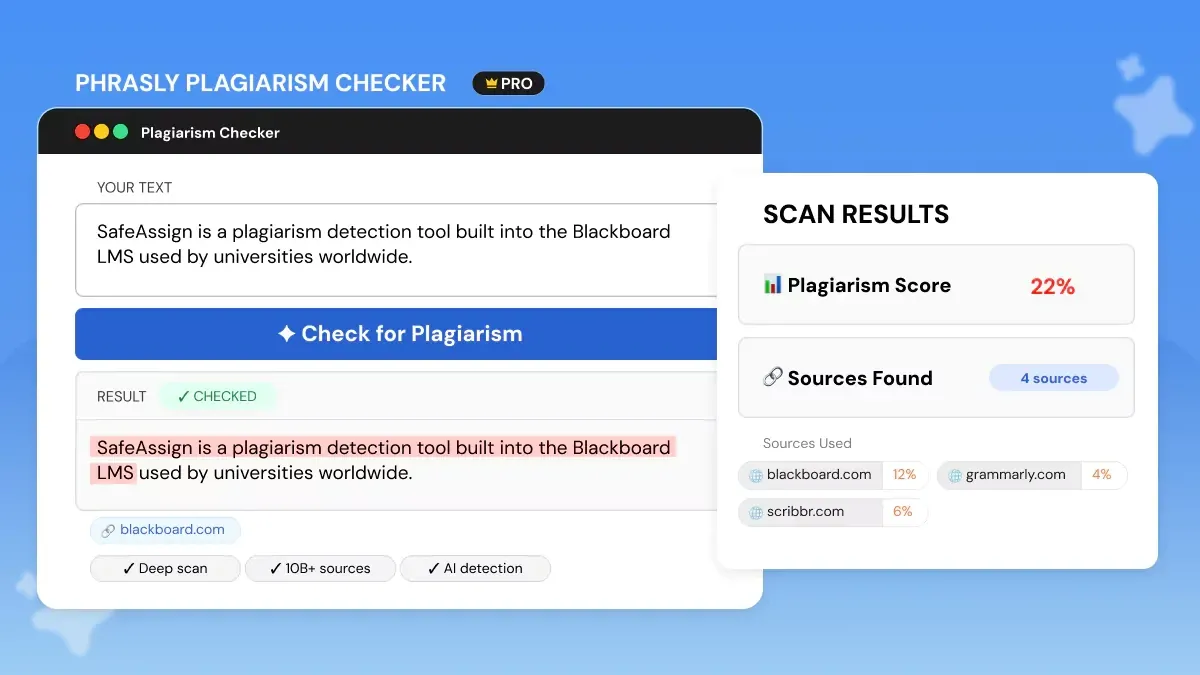
The draft stage is the part you control, because the institutional scan happens later. Three steps, about three minutes.
Paste or upload your draft into Phrasly’s plagiarism checker. It handles essays, research papers, dissertations and longer academic work, so you can review a full draft before it becomes your official submission.
Review the similarity report. You get a similarity score, highlighted matches and a source-by-source breakdown, so you can see which passages need quotes, citations or a rewrite.
Fix the flagged sections. Open each highlighted passage, check the matched source, add the missing citation, and rewrite anything still too close to the original.
Phrasly’s page states that documents are never stored, indexed or shared, and that content is deleted after scanning.
On access, checked September 2026: non-subscribers get one free trial scan, then a report costs $5 per scan or $20 per month for 20,000 plagiarism-check words. AI Humanizer subscribers get the checker included with their plan.
Pricing is accurate as of the date this article was written and is subject to change. Confirm the current price on the tool’s official pricing page before purchasing.
Phrasly’s AI Detector runs from the same screen as a separate free scan, so you can check the AI side of the same draft. Full walkthrough in our Phrasly AI Review 2026.
Two settings decide what you can see: report visibility and multiple attempts. Ask your instructor about both at the start of term, in writing, so you know before the deadline rather than after it.
The rest is in your hands. Cite as you draft, keep your source list current, and read the SafeAssign plagiarism checker result yourself instead of treating the percentage as a verdict. A score is a list of places to check, and checking them is the part that protects your grade.
Run the finished paper through a check of your own first. 👇
FAQs
Is SafeAssign free for students?
Yes, at no cost to you. Your institution licenses SafeAssign and it runs inside Blackboard, so there is no student fee and no separate purchase. There is also no student version to buy. You cannot use it outside a course where your instructor has turned it on.
Can students use SafeAssign before submitting an assignment?
Sometimes. Two instructor settings have to be on together: student report visibility and more than one allowed attempt. With both, you can revise between uploads. With either one off, your first upload is the graded one and the score may stay hidden.
What does “Originality Report enabled” mean in Blackboard?
The label marks an assignment or test that will be scanned. It shows up in the assignment details and confirms SafeAssign is switched on for that item. Nothing extra is required from you at upload. Viewing the report yourself needs a second permission.
How long does a SafeAssign report take?
Timing varies. The scan begins at upload, and the panel shows Originality Report in progress until it finishes. Short papers clear quickly, long files take longer, and heavy submission periods stretch it further. Open the assignment again later to see the finished score.
Can SafeAssign detect copied-and-pasted text?
Yes. Pasted material is the easiest case for a text-matching engine, since every word lines up with something already stored. Reworded passages often register too, through inexact matching. Both typed answers and uploaded files go through the same check.
What is a good or bad SafeAssign score, and what does 0% mean?
No pass or fail number exists. The published bands are low under 15%, medium from 15% to 40%, and high above 40%. Zero percent simply means the scan found no overlap. What the matches contain decides the outcome. More on thresholds in how much AI detection is acceptable.
Does SafeAssign detect AI or ChatGPT?
No. There is no AI authorship judgment anywhere in the scan. Machine-written text can still overlap indexed material and lift your similarity percentage, which measures something else. Schools that want AI screening license a different detector, outside the SafeAssign report.
Is SafeAssign the same as Turnitin?
No. Two separate products, two separate reference sets, and two separate institutional licenses. Turnitin adds AI writing detection only for schools on a Turnitin Originality license with the feature switched on. Here is how to check plagiarism in Turnitin.

Written by
Obaid Ahsan
Content Lead · Pakistan
Obaid Ahsan is a Content Lead with 5+ years of experience in SEO, content strategy, and AI-focused publishing. At Phrasly, he leads content development with a focus on accurate research, search performance, and useful, trustworthy information for readers.