Does Brightspace Detect AI? The Honest 2026 Answer
14 min read
When you sit down to write an essay, reply to a discussion post, or answer a quiz on Brightspace, the real question on your mind probably isn't academic.
You are probably wondering, "Can my professor actually tell?" That concern is completely understandable.
The truthful response to the question ‘does Brightspace detect AI’ isn’t a simple yes or no.
Brightspace does not have a built-in AI detector that automatically scans every submission.
However, schools have the ability to integrate AI detection into Brightspace Assignments through tools such as Turnitin or Copyleaks.
It depends on what tools your school licensed, how your assignment is configured, and if AI Detection is enabled. Does Brightspace have AI detection? Only if your institution enabled it.
Worried a paper might get flagged before you even submit it? You can run it through Phrasly's free AI Detector in seconds.
The Short Answer, in One Line
Brightspace doesn't have its own built-in AI detector. If AI-writing analysis is happening, it is from a third-party tool that your school decided to integrate, and it only works where that tool is activated.
That is why the same question "does Brightspace check for AI" can have two completely different answers that are both correct depending on what class you are in, what assignment you are on and what campus you are at.
If you've searched "does Brightspace detect AI Reddit" and landed on a thread full of secondhand exam stories, you're not alone. Those posts capture the real anxiety accurately.
But they're anecdotal, not verified against what Brightspace and Turnitin actually document. This guide sticks to confirmed release notes and product pages, so you get an answer you can actually rely on.
This guide will then thoroughly explore the instances where detection holds true versus when it falls short.
It Depends on What You Submit: Brightspace AI Detection, by Scenario
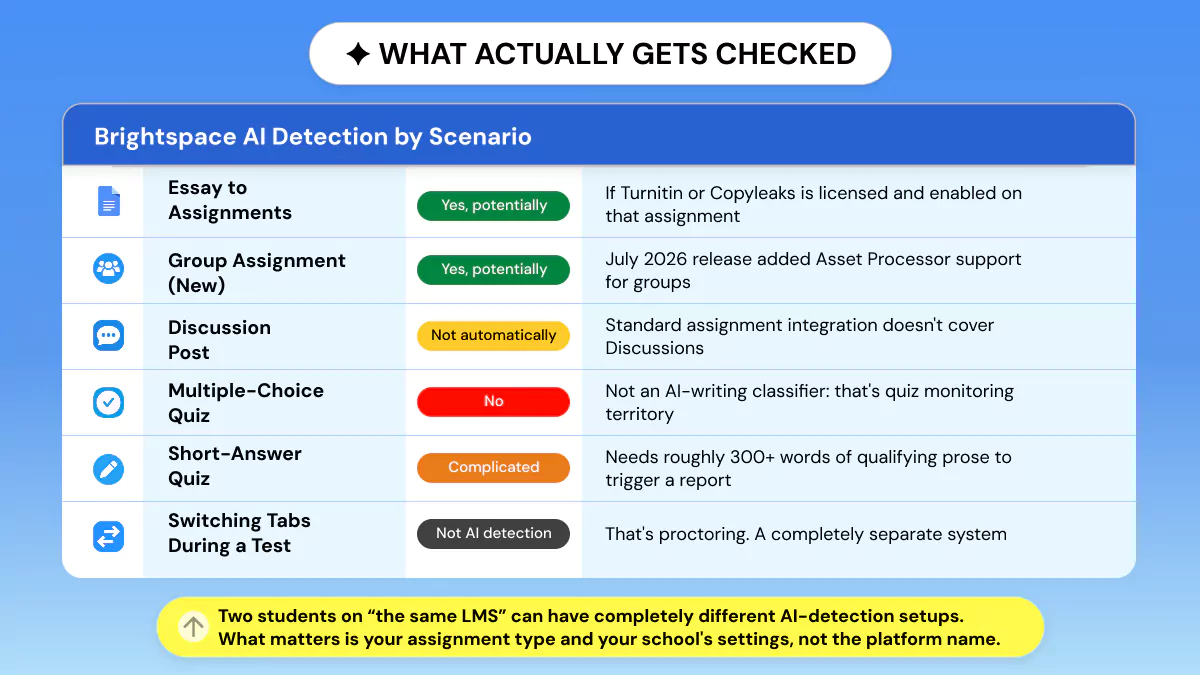
The most teachers skip over, but it's the section that directly answers: Can Brightspace detect AI in discussion posts, quiz answers, etc.
AI detection is not a global on/off toggle within Brightspace. It resides within individual tools paired with particular submission types.
What you submit | AI detection possible? | The nuance |
Essay to Assignments | ✅ Yes, potentially | If Turnitin, Copyleaks, or another processor is licensed and enabled on that assignment. |
Group assignment | ✅ Yes, potentially | Brightspace added LTI 1.3 Asset Processor support for group assignments in the July 2026 release. The older Turnitin V2 integration did not support group assignments. |
Discussion post | ❌ Not automatically | Standard assignment-integration detection doesn't cover Discussions; Turnitin for Discussions is a separate, requested capability. |
Multiple-choice quiz | ❌ No | This is quiz monitoring or proctoring territory, not AI-text detection. |
Short-answer quiz response | ⚠️ Complicated | Standard Turnitin AI reporting needs roughly 300+ words of qualifying prose; many short answers don't qualify. |
Switching tabs during a test | ❌ Not AI detection | That's proctoring or monitoring, a different system entirely. |
Seeing a Turnitin similarity score | ❌ Doesn't prove AI detection is on | Similarity and AI-writing detection are separate features. |
Assignments (Where Detection Usually Lives)
If there is anywhere that AI detection exists in a Brightspace course, it's probably right here.
Instructors activate it for every assignment. Assignment submissions are typically funneled through Evaluation & Feedback before they reach Manage Turnitin. There, instructors can independently enable similarity checking and AI writing detection.
How Do Instructors Turn It On?
Turning on Turnitin for an assignment will not automatically turn on AI Detection.
The teacher (or administrator) must turn on the Turnitin Originality plugin's/add-on AI-writing report feature for each assignment individually. Students experience the most confusion over this distinction with Brightspace AI detector.
Group Assignments (New in July 2026)
This is actually new. The July 2026 Brightspace release included support for LTI 1.3 Asset Processor on group submissions.
This allows tools integrated via LTI 1.3 Asset Processor like Turnitin to analyze group submissions for Originality, AI detection, grammar, etc.
The legacy Turnitin V2 integration did not have this functionality at all, so if your professor says they will be checking group papers for AI, they are probably referring to this newly developed feature.
See the D2L July 2026 (20.26.07) release notes for the full changelog.
Discussion Posts
Standard Turnitin and Copyleaks integrations tie into the Assignments tool, not Discussions.
So can Brightspace detect AI in discussion posts through the normal setup? Not automatically!
Turnitin for Discussions is an optional feature that you must request and is not part of the basic assignment integration. An instructor who's suspicious could still copy your post into a detector manually. But there's no built-in scan running on every reply.
Quizzes (Multiple-Choice Vs Short Answer)
Multiple-choice quizzes don't factor into AI-writing detection, because there's no prose to check. Short-answer quizzes are more questionable.
The default Turnitin AI Reports are calibrated for approximately 300+ words of eligible text. Two sentences usually do not meet the threshold for producing a substantive report.
What Does Brightspace Use to Detect AI? (Turnitin, Copyleaks, and The Asset Processor)
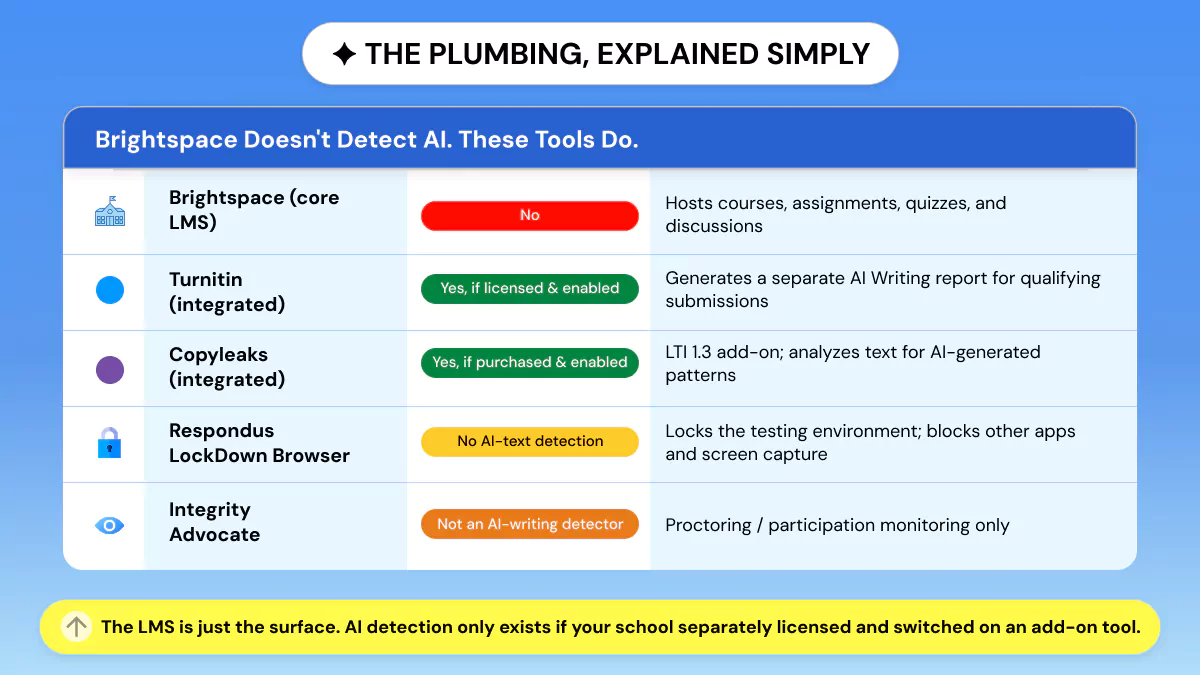
Well, what AI detector does Brightspace use? Well, they don’t use one by itself. Brightspace is your learning management system, where the work is submitted.
AI Detection occurs when Brightspace forwards your submission to the LTI 1.3 Asset Processor.
The Asset Processor is a standardized connector that sends your text to an external processor (typically Turnitin or Copyleaks) and then returns that processor's report back to be viewed inside Brightspace.
Turnitin launched integration with D2L Asset Processor in general availability (GA) for new customers on July 1, 2026. Support for group assignments was included in the July 2026 release.
Existing schools that had already implemented the legacy V2 integration remain on it throughout the migration process, as confirmed in Turnitin's Integrations release notes.
This means that two students at two different schools can have vastly different integration experiences.
System | Detects AI writing? | What it actually does |
Brightspace core LMS | ❌ No | Hosts courses, assignments, quizzes, discussions, and submissions. |
Turnitin (integrated) | ✅ Yes, if licensed and enabled | Can generate an AI Writing report for qualifying submissions (separate from similarity). |
Copyleaks (integrated) | ✅ Yes, if purchased and enabled | LTI 1.3 add-on that analyzes text for likely AI-generated content, plus plagiarism. |
Respondus LockDown Browser | ❌ No AI-text detection | Locks the testing environment: blocks other sites, apps, screen capture, and printing. |
Integrity Advocate | ❌ Not an AI-writing detector | Proctoring and participation monitoring. |
You can have two students at two different universities who both "use Brightspace" yet run completely different AI-detection mechanisms underneath. Brightspace is that flexible.
The same is true across other platforms.
See does Moodle detects AI for how the same inconsistency plays out there.
If your course also runs assignments through Gradescope, the answer looks different again, so it's worth checking does Gradescope check for AI separately rather than assuming one platform's setup tells you anything about the other.
That single fact reframes almost every version of this question people search for. Including can Brightspace detects AI in general.
Once you understand how Turnitin's report actually works, checking your own draft first starts to make a lot more sense; see how Turnitin AI detection works for the full breakdown.
Since there's no free student version of Turnitin AI, many students self-check with Phrasly's free detector before they submit anything.
Does Brightspace Use Turnitin, and Does Turnitin on Brightspace Detect AI?
The two myths.
Myth #1: Yes, Brightspace can have Turnitin integration capabilities. But that doesn't necessarily mean your school does.
Myth #2 (and this is really important): Turnitin's similarity score is completely different from Turnitin's AI-writing detection.
This guide on how to check plagiarism in Turnitin breaks down what that score means and how to read it.
Turnitin AI detection requires use of the Turnitin Originality plug-in, which is enabled at the institutional or sub-account level.
Brightspace can have Turnitin integration; however, not every school uses Turnitin, and Turnitin's Similarity Check feature and AI-writing detection are two different features.
Turnitin AI detection requires the Turnitin Originality add-on and must be enabled by an admin. So seeing "Turnitin" on a Brightspace assignment does not prove AI detection is active.
The proof for this statement is CUNY's Hostos campus. Their CUNY-licensed Turnitin instance ships without AI detection enabled, as confirmed on Hostos's own Assignments & Plagiarism Detection in Brightspace page.
That's a literal, confirmed example of a school that "uses Turnitin" but does CUNY Brightspace detect AI still return false.
For at least one configuration, it comes back as no. It's the clearest evidence that the tool being present tells you nothing about what's switched on.
What Does a Brightspace/Turnitin AI score Actually Mean?
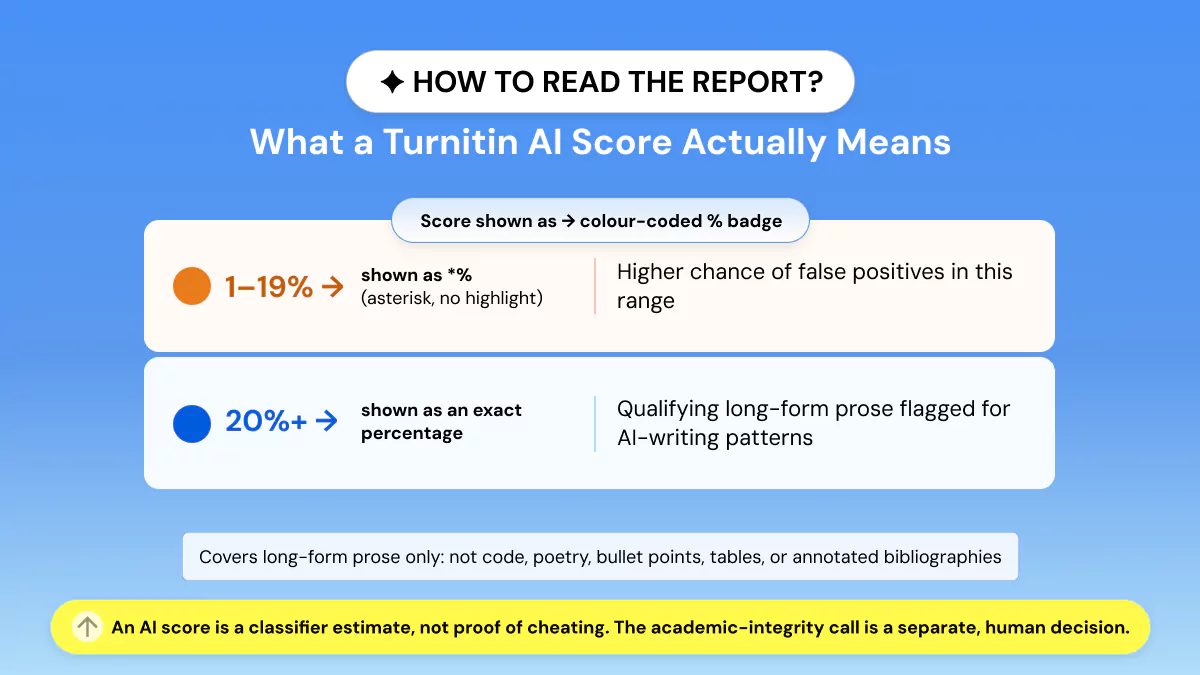
Most concerns about Brightspace AI detector and Brightspace AI checker searches stem from this misunderstanding. An AI percentage is not evidence of cheating.
Rather, it is how much qualifying text the classifier thinks may follow similar patterns as AI-generated text.
Turnitin AI score predicts the percentage of eligible prose that has writing patterns similar to AI-generated writing; it is not evidence of wrongdoing.
💡 Scores between 1% and 19% display only an asterisk, as false positives are more common in that range. Scores of 20% and higher display a percentage.
The academic-integrity determination is made separately by a human, per Turnitin's AI writing detection model guide.
Quick little details to note: The report only covers qualifying long-form prose, not code, poetry, scripts, bullet-heavy text, tables, or annotated bibliographies.
As of August 2026, Turnitin also moved to a single unified blue highlight in its report. This replaces the older two-color blue-and-purple system, as explained in Turnitin's own write up on simplifying AI detection.
Additionally, no version of this report will indicate to an instructor what AI tool was used. It does not know the difference between ChatGPT vs Claude vs Gemini.
The tool can only determine if a passage's patterns resemble those of a machine.
A detector estimate isn't a verdict.
See how much AI detection is acceptable before you assume a score means trouble, or check what a detector flags in your own draft before an instructor does.
Can Your Professor See the AI Score? (What Instructors Actually See)
This is without question the number one concern students have about this feature. So, here's the simple answer.
By default, the AI-writing indicator inside Brightspace's conventional Turnitin workflow is instructor-only.
The Turnitin AI-writing feature within Brightspace is instructor-only. You may receive your similarity report and never see an AI score.
Newer configurations of Asset Processor allow reports to be visible to instructors. Depending on configuration, students not seeing an AI percentage doesn't mean your instructor can't see one.
Can Brightspace Detect Copy and Paste?
This covers a whole cluster of related worries. Can Brightspace detect copy and paste? Can D2L detect copy and paste? Does Brightspace track copy and paste, and can D2L see if you copy and paste?
The truth is no. It does not by default. Cutting and pasting text into a regular Brightspace submission box does not automatically trigger, log suspicious activity, or constitute evidence of AI usage.
Formatting artifacts have been specifically mentioned by D2L staff as not to be considered evidence of content originating from ChatGPT.
Brightspace will not flag text because it was copied/pasted into the submission box. There is no built-in copy-paste AI detector.
Separately, Turnitin Clarity, a distinct licensed product, can reveal writing-process details like pasting and drafting. But that's an add-on, not something ordinary Brightspace assignments do by default.
Can Brightspace Detect Switching Tabs, Screenshots, or Cheating?
This question, and its close relatives: Can Brightspace detect switching tabs, can Brightspace detect screenshots, and can Brightspace detect cheating, deserve a firm separation from everything above.
Detecting tab-switching/screenshots is a screen monitoring question, not an AI-writing detection question, and is covered by completely separate systems.
Standard Brightspace cannot detect if you opened ChatGPT in another tab or window or took a screenshot.
Brightspace quiz logs track activity like entering, re-entering, and finishing the quiz, and session info.
Tab-blocking, screen-capture blocking, and similar controls only exist if your school adds a proctoring tool such as Respondus LockDown Browser or Integrity Advocate. And that is monitoring, not AI-text detection.
Session IDs can be used to determine if more than one session was used. The older "Switched Tab" quiz event has reportedly been removed from standard Brightspace.
So out of the box, there's no simple "opened ChatGPT in another tab" record at all.
What Can Brightspace Do on Quizzes Instead?
Even without AI-text detection, standard Brightspace has real integrity controls built in for quizzes:
Password and access controls that restrict who can open a quiz and when.
IP restrictions that limit attempts to specific networks or locations.
Randomized questions and answer order so no two students see an identical layout.
Question pools and navigation restrictions that prevent going back to change earlier answers.
How Reliable is AI Detection Through Brightspace?
Turnitin itself acknowledges its model can incorrectly flag text both ways. It also says its AI report should not be the sole factor in making an academic-integrity decision. False positives impact ESL and non-native English writers more.
So do unusual formatting or technical blocks of prose.
An independent four-detector study published in the International Journal for Educational Integrity in June 2026 examined roughly 160 documents across tools including Turnitin, Copyleaks, GPTZero, and Pangram.
It's worth treating as one more data point rather than a final verdict. Since detector accuracy tends to shift as the underlying models change.
What This Means for False Positives?
Consider any AI percentage you see as statistical evidence, not confirmation of cheating. Whether it's from Turnitin built into Brightspace, or another detector like Phrasly's own detector.
If you're unsure whether your score falls in a normal range, this breakdown of how much AI detection is acceptable walks through typical thresholds.
Which is also why running your own writing through a detector beforehand can actually be helpful. It provides you with a second signal, while you still have time to address it.
Remember, no detector is a guarantee.
Does My School Actually Use AI Detection on Brightspace? (Checklist)
There is no single "default" Brightspace configuration. This is sort of the point of this article. The two questions are better separated. Does CUNY Brightspace detect AI and does D2L Brightspace detect AI?
D2L is the parent company of Brightspace. While their software can enable AI detection, it doesn't mean your campus has enabled it.
CUNY's Hostos campus is the clearest public example of a school running Turnitin without AI detection turned on.
Read your syllabus or academic-integrity policy for any mention of Turnitin, originality checks, or AI detection.
Check the assignment description and its Evaluation & Feedback settings. Since Turnitin often appears as a separate setting or icon.
Remember that seeing a similarity score is not proof that AI detection is enabled. And seeing "Turnitin" is not proof that Turnitin AI detection is enabled.
If you're still unsure, just ask your instructor or TA. Asking is not a red flag.
For the broader picture across every major LMS, see do colleges check for AI.
What to Do If You're Worried Your Writing Will Be Flagged?
If you've read this far, you probably want a plan, not just an explanation. Here's a genuinely useful one:
Self-check before you submit. So you're never caught off guard by a score you didn't expect.
If AI helped you draft, make the writing genuinely yours by revising it in your own voice and structure.
Keep your drafts and version history as a record of your own writing process.
Ask your instructor about their specific AI policy rather than guessing.
If you used AI to brainstorm/draft something and you want to polish it till it doesn't seem like AI wrote it, that's a legitimate use of a humanizing tool.
✊ Refining your own work is not the same as evading an integrity rule. What's never okay, and what we won't pretend is possible, is claiming any tool makes writing "100% undetectable" or "guaranteed to pass."
No responsible detector or humanizer can promise that, and you shouldn't trust any product that does.
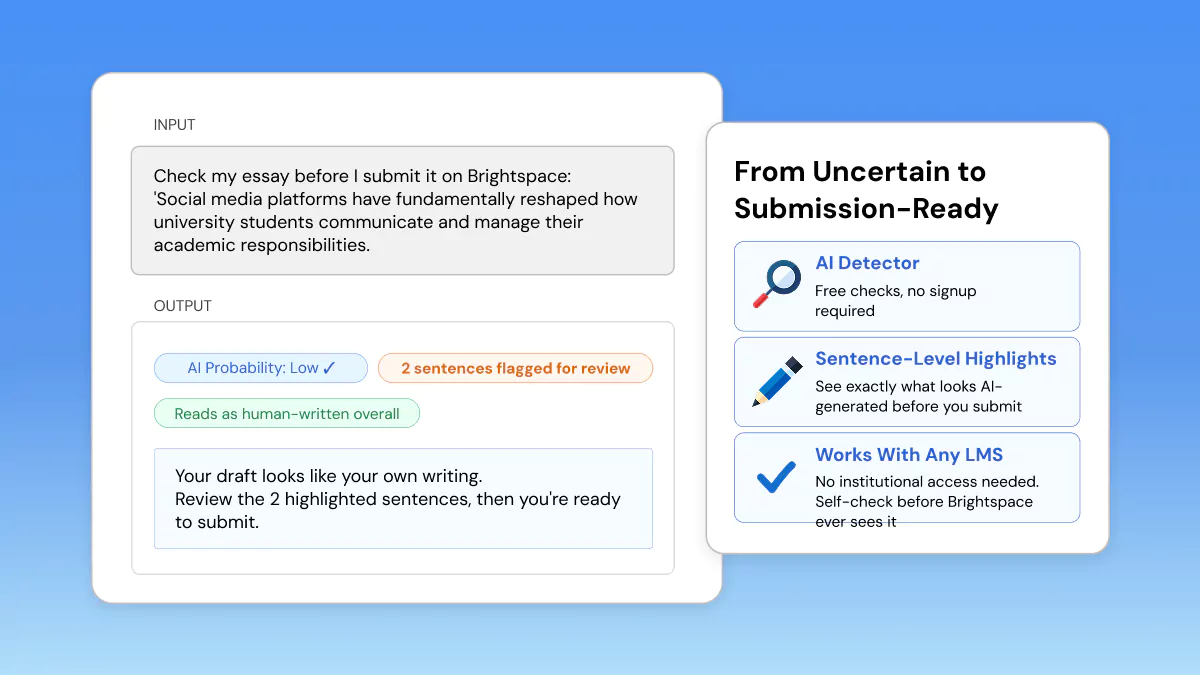
Check your draft for free with Phrasly's AI Detector. Free checks, no signup, and sentence-level highlights so you can see exactly what looks AI-generated.
Only if you're refining your own AI-assisted draft to sound like you. Designed to pass detectors like Turnitin in our testing, never a guarantee.
FAQs
Q: Does Brightspace use Turnitin?
A: Yes, but not all schools use it. Brightspace has an official Turnitin integration that instructors enable per assignment. However, the school must have licensed Turnitin.
Turnitin similarity checking is different from Turnitin AI detection, which requires the Originality add-on to be enabled.
Q: Can Brightspace detect ChatGPT?
A: No, it cannot detect ChatGPT by itself. If your school enabled Turnitin or Copyleaks with AI detection, those tools estimate whether text looks AI-generated.
But a report can't prove a passage specifically came from ChatGPT, Claude, or Gemini.
If you're on Canvas instead, see Can Canvas detect ChatGPT for the platform-specific breakdown.
Q: Does Brightspace detect AI in discussion posts?
A: No, not through regular assignment integration. Turnitin/Asset Processor detection is built around Assignments. Discussions are a separate area. An instructor could still copy a post into a detector manually.
Q: Does CUNY Brightspace detect AI?
A: Not necessarily! The CUNY-licensed version of Turnitin has shipped without AI-detection tools. This shows that "my school uses Turnitin" doesn't guarantee AI detection is available.
Check your specific course setup, and see also do colleges check for AI.
Q: Can Brightspace detect copy and paste on a quiz?
A: Not as a native AI alarm. Pasting text isn't automatically flagged. D2L warns against treating formatting quirks as proof of ChatGPT. Writing-process insight exists only through add-ons like Turnitin Clarity.
Q: Can Brightspace tell if you cheat or switch tabs?
A: Brightspace can't detect tab opening in Standard mode.
It can only log quiz activities and session data. Tab-blocking/screen-monitoring only occurs when a proctoring application is used, such as Respondus LockDown Browser or Integrity Advocate.
Q: Is there a way to check my paper before submitting?
A: Turnitin doesn't offer a free student version for AI detection. Lots of students first self-check with a free tool. Phrasly's AI Detector allows free checks with sentence-level highlighting so you can see potential AI-generated content before you submit.

Written by
Muhammad Usman Ali
Pakistan
Muhammad Usman Ali is an experienced SEO content writer with 3+ years of professional writing experience. He specializes in AI tools, AI detection technologies, and search engine optimized content.