
ChatGPT Prompt Generator: Build Better Prompts in Seconds (Free Tool)
A ChatGPT prompt generator does the prompt engineering for you across GPT-5.5, GPT-5.4, and every model in between. So you stop rewriting bad outputs and start getting what you actually asked for.
In 2026, the majority of individuals using ChatGPT daily are missing out on massive amounts of output quality because creating an effective prompt requires knowledge of prompt engineering.
That's where a ChatGPT prompt generator changes everything.
A ChatGPT prompt generator removes the guesswork. Rather than struggling with structuring natural language input and building prompt frameworks, simply tell the tool what you want, and it instantly gives you a high-quality, ready-to-use prompt.
Generate Your ChatGPT Prompt within Seconds 👇
What Is a ChatGPT Prompt Generator?
A ChatGPT prompt generator automatically formats your plain intent, your topic, task, or job to be done into a high-performing prompt you can paste into ChatGPT.
It handles the parts of a great prompt for you: role, context, format, constraints, and tone. You tell it what you want; it figures out how to ask for it.
There are five elements to consider when writing an effective prompt for a large language model (LLM):
- The role you want ChatGPT to take
- The context you should provide
- The task at hand
- The output format
- Any constraints on length/style.
If you skip one of these steps, you will see a drop in the quality of the output.
A ChatGPT prompt generator helps you by automatically applying all five elements to turn a vague concept into a concrete set of instructions.
Whether you're using GPT-5.5, GPT-5.4 Mini, or an older model, the same five elements: role, context, task, format, constraints determine output quality across every version.
For daily conversational AI developers, this is the critical difference between a tool that can occasionally impress and one you can genuinely count on.
How Is It Different from Writing Prompts Manually?
Manual prompting involves trial and error.
You type something, get a lackluster response. Rewrite it slightly and try again. You get something marginally better. Tweak and repeat until you achieve success.
A ChatGPT prompt generator gives you a consistent output format every time. No guessing is required.
The formatted prompt manages token efficiency by eliminating ambiguity up-front, preventing ChatGPT from using output tokens to try to figure out what you meant. You get an on-brief copy your AI writing assistant produces without cleaning up.
Does a Prompt Generator Work with the Latest ChatGPT Models?
Yes and it's worth knowing how the model lineup changed in 2026.
GPT-5.5 is OpenAI's current flagship, replacing GPT-4o and the o-series in the consumer interface. GPT-5.4 is the recommended production API model. For most everyday prompting tasks, the same structured prompt works across all of them.
GPT-5.5 and GPT-5.4 Pro also support a reasoning.effort parameter. Set to low, medium (default), high, or xhigh. That controls how deeply the model reasons before responding. A well-structured prompt works at any effort level.
xhigh just adds more reasoning depth on top.
Role, context, task, format, constraints: they all still apply, whatever model you're on. Phrasly's ChatGPT prompt generator works across the full GPT-5 family. The prompts it generates run instantly in any of today's OpenAI models.
And if you work across multiple AI tools, the same prompting principles apply. This guide on writing better prompts for Claude AI shows you how to adapt your approach for Anthropic's model.
Using Gemini alongside ChatGPT? This guide on the best prompts for Gemini AI covers everything you need to get consistent results there, too.
How Does a ChatGPT Prompt Generator Work?
The quickest way to go from vague concept to polished, production-ready ChatGPT output is a generator that formats your thoughts for you.
Simply: enter your topic/goal in plain English, the tool runs prompt engineering (utilizing zero-shot prompting architecture) behind the scenes, and returns a ready-to-copy-paste prompt with system prompt layer included when appropriate.
Technically, a good prompt generator is doing what a skilled prompt engineer does manually. Crafting a role and scope, defining the output format, setting hard constraints, and removing ambiguity before feeding the prompt to the model.
The difference? What takes a seasoned prompt engineer 5 minutes of thoughtful-work takes seconds from your 1-line description.
The prompt generator is also a quick prototyping tool for developers integrating with the ChatGPT API. Rather than writing your own base prompt from scratch, you can use a prompt generator to generate one that you can then customize for production.
ChatGPT Prompt Generator by Use Case
Here are specific examples of how a ChatGPT prompt builder will turn fuzzy ideas into precise, polished results for the professionals who will be using it every day.
Marketing & Copywriting
A marketer needing Facebook ad copy doesn't just need words. They need a copy that fits a character limit, speaks to a specific audience, and drives a single action. A ChatGPT prompt generator for marketing makes this simple.
Outcome: On-brief ad copy that matches tone, audience, format, and CTA requirements, requiring zero rewrites.
SEO Content Writing
Content writers using a ChatGPT prompt generator for SEO can generate search-intent-aligned outlines in under 30 seconds.
The key is structure. A vague prompt gives you a generic outline. A structured prompt gives you a content plan that maps directly to search intent.
One of the most frequent complaints of ChatGPT-generated content is that it tends to drift off-topic. Or just send you giant walls of unstructured text. The solution is always the same: define format, length, and section structure upfront.
A solid ChatGPT prompt template generator does this for you automatically, ensuring your output arrives already shaped how you need it.
Email & Professional Communication
When a professional requires a refined client email, they usually don't have time to second-guess tone, structure, and level of formality. The custom ChatGPT prompt generator encodes those decisions in the prompt so you get an email ready to send.
Outcome: a client-ready email requiring no editing and drafted in seconds.
Image & Visual Content (DALL-E / Midjourney)
Artists using AI image creation tools have one common need: a prompt generator that helps artists make magical imagery.
OpenAI deprecated DALL-E 3 in May 2026. The current image model is gpt-image-2, with gpt-image-1 and gpt-image-1-mini also available.
A Prompt generator for images ChatGPT incorporates the visuals-specific controls that turn a generic response into a detailed one: aspect ratio, art style, lighting, subject details, medium, and mood.
When creating prompts for ChatGPT to create images, instead of a role and task description, you provide it with keywords about what you want to see, what art style it should emulate, and other technical instructions.
A dedicated generator handles this switch automatically.
System Prompt Generator
A system prompt is a block of instructions that consistently informs ChatGPT how to act throughout a full conversation. Think of it as the 'personality and rules' of your GPT before it receives its first message from your user.
When designing custom GPTs, creating your own ChatGPT system prompt generator will be crucial if you're a developer/power user.
The distinction between prompt vs. system prompt: a prompt is a single instruction to reach a single piece of output; a system prompt is a standing operating procedure that leads every response in that session.
Prompt Engineering vs. Context Engineering: What You Need to Know in 2026
Many in the AI field are now using "context engineering" as a fresh perspective for discussing how to enhance large language model outputs, especially in the 2025–2026 timeframe.
Context engineering vs prompt engineering is the defining debate, and it has real importance for everyday users.
Prompt engineering is the skill of writing the best instructions: concise, structured, specific.
Context engineering is a broader field orchestrating everything that comes along with the prompt: prior conversation history, external docs, ChatGPT API tools, memory, and retrieved knowledge.
The prompt instructs the model on what to do. Context engineering instructs the model who it is, what it knows, and what resources it has access to.
When building for the typical person who wants to use an AI writing assistant, context engineering can create unnecessary complexity.
The ChatGPT prompt generator does the prompt engineering layer, formatting the instruction properly so you can dramatically improve outputs from your prompts even if you're not a context engineering expert.
Does Context Engineering Replace Prompt Generators?
No! They operate at different layers of the same stack. A ChatGPT prompt generator optimizes the instruction itself. Context engineering optimizes what surrounds and informs it.
If you’re not developing ChatGPT plugins and APIs (technical folks), the quickest way to improve results is still via a prompt generator. No code is required.
Think of it this way: prompt optimization is the entry point. Context engineering is the advanced layer. Most users need the first. Only developers and power users need to master both.
For a deeper dive into how to refine and improve your prompts beyond the basics, this guide on prompt optimization techniques covers the advanced methods worth knowing.
ChatGPT Models in 2026: Which One Should You Use for Prompting?
The short answer and the best ChatGPT model for prompts 2026 in one line: GPT-5.5 is the current ChatGPT flagship for complex tasks. GPT-5.4 is the recommended production model at half the cost. GPT-5.4 Mini and Nano handle simple, high-volume work.
GPT-4o and o3 are retired from the consumer interface. A structured prompt works across all of them. The model choice affects reasoning depth, not prompt structure.
GPT-5.5 and GPT-5.4 Pro both support a reasoning.effort parameter. None, low, medium (default), high, or xhigh. Medium is the default in most interfaces.
For hard analytical or coding tasks, setting high or xhigh gives you deeper chain-of-thought reasoning before the response. For quick everyday prompts, medium is fine.
If you've been using ChatGPT since 2024, note that GPT-4o, GPT-4.1, o3, and o4-mini were all retired from the consumer ChatGPT interface in early 2026. API access remains for existing integrations. But new projects should use the GPT-5 family.
Just as every AI has its own prompt quirks, Gemini has its own generator too.
If you're switching between models, this Gemini prompt generator guide applies the same role-context-task-format-constraints structure, adapted to how Gemini responds best, so you're not starting from scratch each time you switch tools.
Whatever model you're on: GPT-5.5, GPT-5.4, or GPT-5.4 Mini the Phrasly AI Prompt Generator builds structured prompts that work across all of them.
How to Use the Phrasly ChatGPT Prompt Generator?
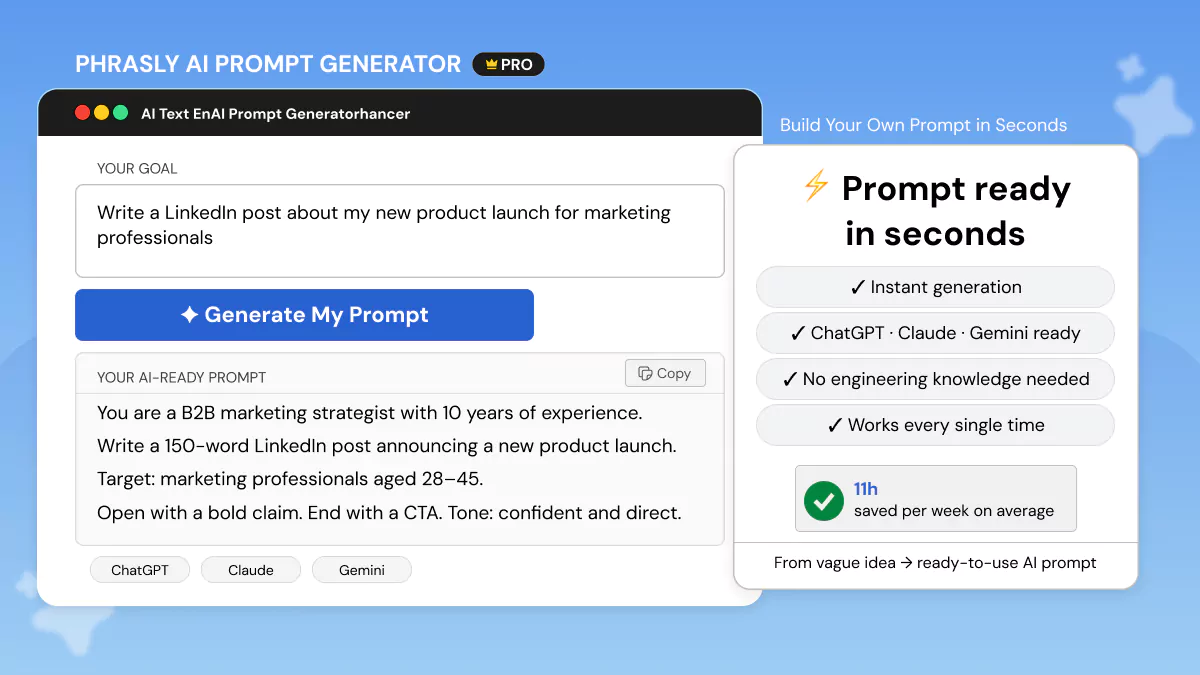
Creating a prompt with the Phrasly AI prompt generator for ChatGPT takes less than 60 seconds. Follow these simple steps to turn your concept into a usable prompt in 5 steps:
- Enter your topic or goal in plain English. No need to pre-structure anything.
- Write your use case: marketing, SEO, email, image generation, system prompt, and more.
- Choose your output format and tone preferences, such as formal, casual, technical, or creative.
- Click generate to receive a fully structured, copy-paste-ready prompt instantly.
- Paste directly into ChatGPT and review the output. Refine the generated prompt if needed for follow-up iterations.
The distinction between manually prompting ChatGPT vs using a ChatGPT prompt generator: manually prompting requires you to know what makes a good prompt before writing it.
The generator reverses that process. You tell the tool what you want, and it assembles the prompt structure.
Tips to Get Even Better Results from Your ChatGPT Prompts
While your generator may be doing most of the work for you, these five tips will help you take your results from good to great.
- Assign a role first. 'You are a senior data analyst' produces measurably different outputs than 'help me with data.' Role prompting ChatGPT is the single highest-leverage technique available and one that your generator applies by default.
If you want ready-made examples across different professional roles, this guide to the best ChatGPT prompts for professionals is a solid starting point.
- Specify the audience. ChatGPT adjusts reading level, vocabulary, and tone based on who it's writing for. 'Explain this to a CFO' versus 'Explain this to a junior developer' produces entirely different results from the same base prompt.
- Ban filler words explicitly. Add 'Avoid: delve, leverage, foster, tapestry, synergy' to any prompt and watch the output quality improve immediately. The ChatGPT prompt builder includes filler-word exclusions automatically.
- Set hard constraints on length and format. 'Max 150 words. No bullet points. Three paragraphs only.' Constraints aren't limitations. They're precision tools.
Prompt engineering no-code approaches like this are what separate professionals from casual users.
FAQs
Is there a free ChatGPT prompt generator?
Yes! No account needed to try Phrasly's ChatGPT prompt generator free tool. Simply input your objective, choose your purpose, and get a ready-to-use prompt in seconds.
No credit card is needed to create your first prompt.
What is the best prompt format for ChatGPT?
The most effective ChatGPT prompt template is: Role, a Context, a Task, an Output Format, and any Constraints. This applies to zero-shot and few-shot prompting.
OpenAI has repeatedly cited this input schema as the single-best performing input structure for large language models (LLMs). You can explore the full breakdown in OpenAI's official Prompt Engineering Guide.
Can I use an AI tool to generate prompts for ChatGPT?
Yes! That's exactly what a ChatGPT prompt generator does.
Tools such as Phrasly use AI behind the scenes to understand your goal and automatically create a prompt using best practices of prompt engineering.
You receive expert output without having to be a no-code prompt engineer yourself.
For a practical starting point, this guide on how to write good AI prompts walks you through the exact structure step by step.
What is a mega prompt generator?
Mega prompt generator describes generators that output lengthy, highly elaborate prompts, sometimes up to 300–500 words long, consisting of personal information, background context, multi-step instructions for tasks, and specifications for formatting the output.
They are especially powerful for complicated workflows such as ChatGPT prompt stacking and AI prompt chaining workflows, where one master prompt controls an entire multistage research/writing process.
How do I write a prompt that makes ChatGPT sound like a specific expert?
Use role prompting ChatGPT. Open your prompt with 'You are a [specific role] with [X years] of experience in [specific domain].'
That one line changes the tone, word choice, level of reasoning, and expertise of everything ChatGPT generates. A ChatGPT prompt builder inserts role prompting for you, based on your chosen use case. No tweaking is necessary.
Does a ChatGPT prompt generator work with GPT-5.5 and the newest ChatGPT models?
Yes! The five-element prompt structure: role, context, task, format, constraints applies to every current ChatGPT model. Including GPT-5.5, GPT-5.4, GPT-5.4 Mini, and GPT-5.4 Nano.
The Phrasly prompt generator builds structured prompts you can paste directly into any model. The main difference in 2026 is that GPT-5.5 and GPT-5.4 Pro support a reasoning.effort parameter.
According to OpenAI's GPT-5.5 model documentation, reasoning.effort supports none, low, medium (default), high, and xhigh. That controls how deeply the model reasons before responding. A well-structured prompt works at any effort level.
What is the reasoning.effort parameter in ChatGPT and how does it affect my prompts?
Reasoning effort is a parameter available on GPT-5.5 and GPT-5.4 Pro. It controls how deeply the model reasons before responding. The default is medium. Setting it to high or xhigh increases reasoning depth for hard analytical or coding tasks.
Setting it to low or none gives faster, lighter responses. For most prompt generation use cases, medium effort is sufficient. The quality of your prompt structure matters more than the effort setting.
Which ChatGPT model is best for prompt generation in 2026?
For everyday prompting tasks, GPT-5.5 (the current default in ChatGPT) handles almost everything well. For API-based prompt generation at lower cost, GPT-5.4 is the recommended production model at $2.50/$15 per million tokens.
GPT-5.4 Mini is the budget option for high-volume simple tasks. Note that GPT-4o, o3, and o4-mini were retired from the ChatGPT consumer interface in early 2026.
New projects should use the GPT-5 family. Use the Phrasly prompt generator to build prompts that work across all current models.


Keep reading

How to Prompt Claude Fable 5 (With Copy-Paste Prompts)
Claude Fable 5 doesn't respond like older Claude models. Get 7 prompting rules from Anthropic's own docs, copy-paste templates for writing, research, and work, plus current pricing and plan access after the July 20 change.

Claude Prompt Generator: Build Better Prompts for Claude AI (Free Tool)
Learn how a Claude prompt generator builds better prompts for every Claude model, from Sonnet 4.6 to Fable 5. Includes ready-to-use XML templates, effort levels, and a free tool.