
Why Copywriters Get Flagged by AI Detectors (and How to Check Before You Deliver)
Clean human copy gets flagged as AI more than you think. Here is why detectors misfire, what to do if a client flags your work, and a five-minute check to run before you deliver.
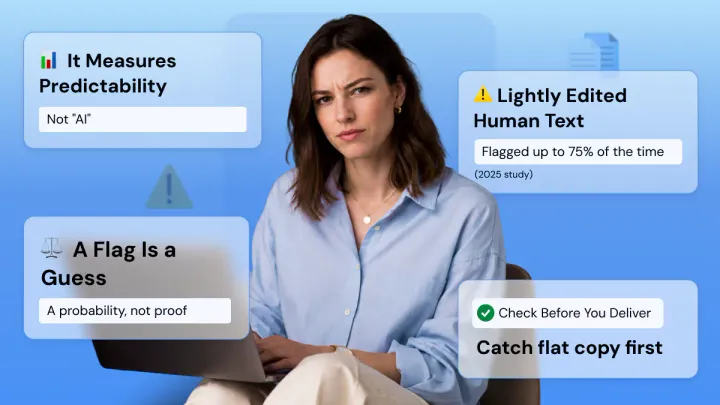
Copywriters get flagged by AI detectors because the tools score writing on statistical patterns like short sentences, common words, and smooth transitions, and clean, on-brand copy looks exactly like that. A study in Patterns found leading detectors misclassified an average of 61% of human-written essays by non-native English speakers as AI. A flag is a probability guess, not proof.
So if a detector flagged your writing, you did nothing wrong. You hit a known limit of the tools. Detectors measure how predictable text is, and good copywriting is deliberately predictable: easy to read, free of friction. That is the exact trait they penalize.
Here is what detectors actually measure, who gets flagged most, what to do if a client questions your work, and a five-minute check to run before you deliver.
Paste your draft and see what the detector flags. Free, no signup.
What AI Detectors Actually Measure (It Is Not "AI")
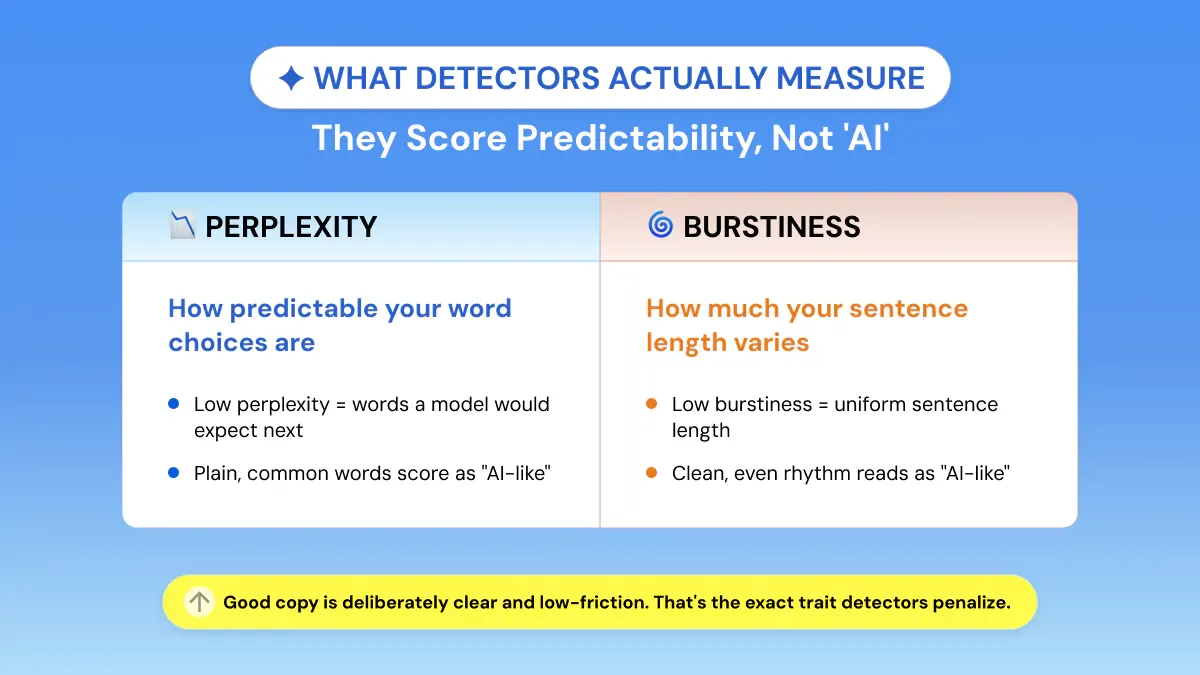
Why do AI detectors flag human writing? They cannot see who wrote a piece or watch how it was made. They classify text by comparing its statistical and linguistic patterns against patterns learned from large samples of human and AI-generated writing, then return an estimate of how AI-like it looks.
Two signals come up most in these discussions: perplexity and burstiness.
Perplexity measures how predictable your wording is to a language model. Low-perplexity writing uses the words a model would expect to see next, while higher-perplexity writing makes less expected choices. Burstiness describes how much predictability varies across a passage, including variation in rhythm, sentence structure, and length. Writing that stays uniform from line to line reads as less bursty.
Those two are not the whole story. Common signals include perplexity and burstiness, but a 2025 Computational Linguistics survey grouped modern detection methods into four families: statistical approaches, trained neural classifiers, watermarking, and human-assisted review. Some tools look at token likelihood, others lean on stylometric features or probability curvature, and many combine several at once.
Copywriters feel this most. Good conversion copy is built to be clear and low-friction. It leans on familiar words, short sentences, direct benefits, repeated brand terms, and smooth transitions. Those exact habits make human copy statistically regular, which can resemble the patterns a detector ties to AI. It is a fair explanation for why clean writing gets flagged, though it does not mean every short sentence or common word raises your score on its own.
So treat the output for what it is. A detector returns a probability, not a verdict. Score meanings even differ by product. Originality.ai frames its result as a likelihood estimate, and Turnitin reports the share of text its model marks as likely AI-generated while stating plainly that the report is one data point, not a final answer. Everything that follows in this guide rests on that.
How Often Detectors Get It Wrong (and on Whom)
Accuracy varies by detector, text length, writing style, subject, the AI model in question, and the threshold each tool uses to make its call. A detector can score well on one benchmark and then misread human writing the moment those conditions shift. They get it wrong often enough to matter, and the research shows exactly who pays for it.
Non-native English writers carry the clearest documented risk. Liang et al. (2023) tested seven detectors on 91 TOEFL essays from non-native English speakers and 88 US eighth-grade essays. The results:
- The tools wrongly flagged an average of 61% of the non-native essays as AI, against just 5% of the US essays.
- At least one detector flagged 89 of the 91 TOEFL essays.
- The authors tied the gap to lower linguistic variability and warned against using detector results to judge non-native writers at all.
Editing your own draft is the next trap, and it lands on copywriters directly. In their peer-reviewed ACL 2025 paper, Saha and Feizi evaluated 12 detectors on roughly 15,000 samples, each produced by applying varying levels of AI polishing to human-written text. Every detector flagged more lightly polished samples than untouched writing.
The rates swung hard by tool: with only the lightest edits, GPTZero flagged close to 65% of samples while Fast-DetectGPT sat near 10%. So, depending on the detector, even minimal AI editing pushed roughly 10% to 65% of genuinely human text into the "AI" column. That is the literal workflow of a writer who drafts something, then runs a grammar pass to smooth a few lines.
No single detector holds up reliably on its own. The peer-reviewed RAID benchmark (2024) tested 12 detectors across more than six million generations spanning many models, domains, and adversarial tweaks. Performance weakened on unfamiliar models, different generation settings, and even simple edits.
Tuned thresholds help some tools, but the floor is uneven. A 2025 University of Chicago working paper found that with thresholds tuned to its own test set:
- GPTZero and Originality.ai generally kept false positives at or below 1% on medium and long passages, with Pangram near zero.
- Those rates climbed on short samples.
- An open-source baseline misreads roughly 30% to 78% of human texts across genres.
Accuracy depends on the tool, the threshold, the length, and the dataset every single time.
So yes, an AI detector can be wrong. It can falsely flag human writing or let AI text slide straight through. The score is a model's pattern-based guess, not independent proof of who wrote the document. OpenAI's own classifier makes the point: the company pulled it in July 2023 due to low accuracy, after it caught only about 26% of AI-generated text and mislabeled 9% of human text as AI.
Hold onto the one idea this whole guide turns on. A detector score is a signal, not evidence.
Who Gets Flagged Most, and Why It Is Not Your Fault
Your copy can get flagged as AI when its language resembles patterns a detector learned to tie to machine writing, even when you wrote every word yourself. Three groups run into this most: non-native English writers, copywriters producing clean or short-form copy, and anyone who runs a draft through a rewriting tool. All three can create predictable, AI-associated patterns, though modern detectors weigh more than perplexity alone.
Non-Native English Writers
The clearest evidence here is multilingual writers. Liang et al. found that seven detectors misclassified an average of 61% of human-written TOEFL essays, against just 5% of essays by US eighth-grade students. The researchers linked the gap to lower lexical and structural variability, which made the text more predictable.
This hits agencies working with global freelancers. A writer using direct vocabulary and conventional sentence structures can produce excellent client copy while generating exactly the patterns some detectors treat as suspicious. Their cleanest, most professional work is often the most likely to trip a flag. The study did not test professional copywriters, so treat this as a practical inference rather than a measured copywriting false-positive rate.
Copywriters Producing Clean or Short Copy
Good conversion copy strips out the variation older detectors expect from humans. The habits that do it are the ones you were trained to use:
- Familiar words instead of unnecessary jargon
- Short, direct sentences
- Repeated product and brand terminology
- Parallel benefit statements
- Smooth, predictable transitions
- Standard structures like problem, benefit, proof, CTA
These make writing statistically regular. That said, short sentences do not automatically raise every score, since detectors mix neural, statistical, and stylistic signals. If you are weighing how this affects your search rankings, it helps to know that Google does not penalize AI content for being AI; it penalizes low-quality content, regardless of who produced it.
Length adds a second problem. Headlines, ads, CTAs, product descriptions, and subject lines are often too short to classify reliably. University of Chicago researchers found false-positive and false-negative rates generally rose on shorter passages, and Turnitin will not even generate an AI report unless a submission has at least 300 words of qualifying text. So a client running one headline or a 50-word ad through a detector and treating the result as proof is reading noise.
Writers Using AI-Assisted Editing Tools
Using Grammarly, QuillBot, or a similar editor can make your writing get flagged, especially when the feature rewrites or paraphrases sentences rather than just fixing spelling and punctuation. Saha and Feizi's ACL 2025 study applied varying levels of AI polishing to human-written text, and every detector flagged more lightly polished samples than untouched ones. Their "extremely minor" example mostly kept the author's ideas while cleaning up grammar and phrasing, yet some detectors still labeled large portions of it AI.
The effect depends entirely on what the tool actually does:
The study did not test Grammarly or QuillBot by brand, so neither product is guaranteed to raise a score. Grammarly itself separates traditional corrections from on-demand AI rephrasing in its Authorship records, and QuillBot openly describes its paraphraser as an AI tool that rewrites wording, syntax, and tone.
A high score on your own writing is a tooling artifact, not a confession. It can reflect your natural style, an unreliable short sample, or legitimate editing help. One honest caveat: if you did use generative rewriting, the fair label is AI-assisted human writing, not a pure false positive. Either way, the detector cannot see your intent, your contribution, or whether you followed the client's policy.
How to Check Your Copy Before You Deliver: A 5-Minute Workflow
Scan the complete final draft with an AI detector, read the highlighted passages in context, and revise only where the copy is genuinely generic, flat, or off-voice. Save the scan result and your drafting history as part of your QA record. That is the whole workflow, and it takes about five minutes.
Treat detection like spellcheck: a useful final review, not an authorship test. Results vary by tool, length, domain, and threshold, so never rewrite strong copy just to move a percentage.
Minute 1: Scan the complete deliverable
Run the full draft through a detector after you have fact-checked, proofread, and applied the client's style guide. The whole document gives the tool far more context than an isolated headline or sentence, which is too short to classify reliably.
One housekeeping step first: before uploading confidential client work to any external service, check the contract, NDA, and agency data policy. The client's rules come first, always.
Minutes 2 to 3: Review what gets flagged
Read each highlighted passage inside its paragraph, and do not assume every highlight is broken. Ask whether it has a real editorial weakness:
- Generic claims like "save time and improve results"
- Interchangeable benefits that could describe any competing product
- Repeated sentence structures or transitions
- Unsupported superlatives
- Placeholder-sounding wording
- Off-voice language that does not match the client
A flag points your attention. Your judgment decides whether to change anything. Treat it as an editing prompt, not a verdict.
Minute 4: Replace generic copy with specific copy
The flagged lines are usually your most templated ones. Swap them for detail that belongs only to this client:
Pull from verified product details, customer vocabulary, concrete actions, named features, and real outcomes. And never invent statistics, testimonials, or performance claims just to make a line look distinctive. For a deeper walkthrough, here is a full process on how to edit AI ad copy into hooks and landing pages that convert.
Minute 5: Keep the receipt
Record the date, the tool, the overall result, and any passages worth noting. Save a screenshot or short QA note with the project files.
Then keep the document's revision history, which is stronger proof than any score. Google Docs shows earlier versions and contributors, and Microsoft Word keeps version history for files stored on OneDrive or SharePoint.
The point of all this is to catch genuine copy problems and avoid being blindsided by a client's automated check. It is not to chase a number.
Catch the Flat Lines Before You Hit Send
Run your final draft through and see what reads as generic, then tighten it. Free, no signup.
What to Do If a Client Says Your Copy Looks AI-Generated
Do not panic, over-apologize, or rush to rewrite the whole deliverable. Ask for the exact report, explain calmly that detection is probabilistic, and show how the copy was actually made. You are not defending wrongdoing. You are correcting a tooling error, and you have the evidence to do it. This comes up more than most writers expect, and it helps to know in advance whether freelance clients check for AI and how they tend to do it.
The mindset matters before the mechanics. A detector score is not proof. Even Turnitin warns that its model can misclassify both human and AI writing and should not drive an adverse decision on its own, and Johns Hopkins disabled Turnitin's AI detection over false-positive concerns. Those are education policies, but the technical limit is identical the moment a client reads a score.
1. Preserve the original evidence
Before you change anything, save a clean copy of the record:
- The delivered file and submission timestamp
- The original brief and agreed AI policy
- Your outline, notes, and research sources
- Google Docs or Word version history
- Tracked revisions and client approvals
- Project messages discussing direction and feedback
Make a separate copy for any revisions. Editing the original after an accusation can weaken the very record that proves how it developed.
2. Ask for the complete detection report
You cannot answer a score you cannot see. Request:
- The detector's name and version
- The reported score
- The highlighted passages
- Whether they scanned the full document or just excerpts
- The threshold or policy they are applying
This matters because a score means different things across tools. One reports document-level confidence, another reports the proportion of qualifying text, and short excerpts are far less reliable than full documents.
3. Send a calm response
Here is wording you can adapt:
I created this copy using [accurately disclose your process and any permitted tools]. Could you send me the detector name, the full report, and the highlighted passages? I can provide the version history, outline, research notes, and revision trail. I am also glad to review the highlighted sections against the brief and revise any language that genuinely reads as generic or off-voice.
One rule on that script: only say you wrote it without AI if that is true. If you used permitted grammar, research, brainstorming, or rewriting help, disclose exactly where.
4. Provide an evidence package
Lead with process evidence, not with a second detector score. Running the copy through more tools until one comes back clean is just another automated guess. A concise, organized file set is what actually carries weight:
5. Offer a focused path forward
Review the flagged passages together and sort each one into three buckets:
- False flag: keep the sentence and document your authorship.
- Generic wording: replace it with verified product detail or real customer language.
- Policy mismatch: clarify whether the editing help you used was permitted.
Offer one revision pass within the original scope. Do not frame it as "removing AI." Frame it as strengthening specificity, brand voice, and alignment with the brief. If a section still reads flat after editing, you can tighten generic-sounding sections with more specific, on-brand phrasing.
Can a client refuse to pay because an AI detector flagged the work?
A client can delay approval, request revisions, ask for a refund, or open a platform dispute. But a detector score alone does not establish that you breached the contract. The outcome depends on the agreed deliverables, the AI-use policy, your evidence, the payment structure, and the platform's dispute process.
The specifics vary by platform:
- Upwork fixed-price: clients can request changes or refunds while a milestone is under review. You generally have seven days to dispute a refund request, and you should attach every supporting document when you file, because the submission cannot be edited afterward.
- Upwork hourly: the formal dispute process looks at billed hours and Work Diary compliance. Upwork states that dissatisfaction with quality is not itself grounds for an hourly dispute, though a client can separately request a refund.
- Fiverr: a client can request revisions while an order is active, and disputes run through the Resolution Center. Completed orders usually need Customer Support, since they cannot be canceled through the Resolution Center.
Platform teams decide each case individually. Your version history and documented scope support your position, but no one can promise the payment or the dispute outcome. Lead with evidence, stay professional, and let the record speak.
How to Prove You Wrote It Yourself (Authorship Evidence)
The strongest proof of human authorship is your process. A timestamped version history, backed by your outline, research notes, source list, and earlier drafts, is far stronger evidence than any single detector score. No single record proves authorship on its own. The case is built from several independent records that all tell the same story.
The logic is simple. A detector examines the finished text at one moment. Process evidence shows the work is developing over time. A false positive is a snapshot; your draft history is the movie, and that's what clients and platforms actually weigh.
Draft with version history on
Write in a system that records changes as you go:
- Google Docs: version history shows earlier versions, when changes happened, who made them, and what changed.
- Microsoft Word: save to OneDrive or SharePoint with AutoSave enabled, and keep earlier copies inspectable in Version History. Track Changes adds insertions, deletions, and comments by the contributor.
One discipline makes or breaks this: start in the tracked document and stay there through research, drafting, and editing. Pasting a nearly finished piece into a fresh file shows no natural drafting process, which is exactly what you need it to show.
Keep the messy middle
The working materials that exist before polished copy are the persuasive part, because they contain things a detector cannot evaluate: abandoned ideas, reordered sections, source decisions, and responses to client feedback.
Record tool use honestly
Document any assistance: spellcheck, grammar suggestions, AI brainstorming, generative rewriting, translation, or research tools. A transparent record only helps you when the assistance was permitted or accurately disclosed, so match it to the client's policy.
For high-stakes work, add a checkpoint trail
On sensitive or dispute-prone projects, mark named stages (outline approved, first draft, sources verified, final delivered) or use dated filenames if cloud versioning isn't available. A short screen recording made during production is worth far more than one made after a dispute starts. Keep it brief, and avoid exposing passwords, private messages, or unrelated client work.
One honest limit: documented process is strong supporting evidence, not a guarantee. Platforms weigh the contract, the AI policy, the delivered scope, and the full record case by case.
FAQs
Are AI Content Detectors Accurate?
AI detectors can identify some fully generated text, but accuracy changes across tools, writing styles, text lengths, and AI models. False positives and missed AI content remain possible. Even Turnitin warns that its score should not be used alone when making adverse decisions. You can run it through an AI detector yourself to see how much results vary.
Can I Get in Trouble If My Copy Is Flagged as AI?
A client may request revisions, delay approval, or open a payment dispute, especially if the contract prohibits AI assistance. However, a detector result does not independently prove a breach. The outcome depends on the agreed policy, your actual process, the delivered scope, and supporting evidence such as drafts and version history.
Do Non-Native English Writers Get Flagged More?
Yes, some detectors have shown substantial bias against non-native writers. Liang et al. found that seven detectors misclassified an average of 61.3% of human-written TOEFL essays. The researchers linked the disparity to lower linguistic variability and warned against using detector scores in high-stakes evaluations.
Will Running My Draft Through Grammarly Make It Look AI-Generated?
Basic spelling, punctuation, and grammar corrections are not the same as generative rewriting. However, Grammarly's generative features can meaningfully rewrite text, and ACL 2025 research found that detectors frequently flagged even minimally AI-polished human writing. Record which features you use and preserve the original draft. The same dynamic shows up elsewhere, like when hiring managers check for AI in cover letters.
What Should I Tell a Client Who Says My Copy Looks AI-Generated?
Acknowledge the concern and ask for the detector name, score, and highlighted passages. Explain that detection results are estimates, then provide your outline, drafts, research notes, and version history. Offer to revise wording that genuinely misses the brief, without treating the score itself as proof.


Keep reading

What Are Common Phrases That AI Uses? We Tested 50 Pieces to Find Out
We ran 50 pieces of content through Phrasly's AI Detector to find out what are the common phrases that AI uses.

The Content Strategist's Workflow for AI-Assisted Production
A sound AI content workflow puts humans at the brief and expertise stages, letting AI handle outlining and drafting, then routes every piece through fact-checking, plagiarism, and AI-flatness QA gates before it can be published.