
Do Freelance Clients Check for AI? What Upwork and Fiverr Writers Need to Know in 2026
Yes, a growing share of freelance clients checks deliverables for AI in 2026. Detection vendors market scanning straight to the people hiring writers, and one analysis of Upwork writers found 24% of sampled articles were flagged as AI-written. At the same time, Fiverr officially permits AI use when it is ethical, transparent, and tailored to the client, so the rules are not as simple as banned or allowed.
Freelance writing communities have documented clients running deliverables through a detector, seeing a high score, and refusing payment or ending the relationship. If that fear has crossed your mind, you are not paranoid. A single percentage is sometimes all it takes to put a paycheck at risk.
This guide is the freelancer's side of it: what Upwork and Fiverr actually allow, who gets checked, why polished human writing gets flagged, and a protection workflow that keeps you in control before a client's scan surprises you.
Do Clients Actually Check Freelance Work for AI?
Many freelance clients do check deliverables for AI, and the number is growing. Detection tools are marketed directly to businesses hiring writers, Fiverr publishes its own guides on how to spot AI-generated writing, and freelance communities document clients scanning work before they release payment. If you have ever wondered whether a client is quietly running your draft through a checker, the honest answer is that some of them are.
Part of what drives the checking is a worry about quality and rankings, not just honesty. Many clients have heard that AI content might hurt their SEO, even though the reality is more nuanced than whether Google penalizes AI content at all. The fear is enough to make some clients scan first and ask questions later.
The clearest Upwork-specific data comes from Originality.ai. It analyzed 647 articles and 100 cover letters from 100 Upwork writers, and the results break down like this:
- Its detector classified 24.11% of the sampled articles as AI-written, while the rest read as human.
- Among writers charging $60/hr or more, the AI-detected rate dropped sharply to around 5%, so the higher-paid end of the market showed far less detectable AI.
- At the proposal stage the numbers ran heavier: 60% of cover letters showed AI use, and 41% scored as fully AI.
That last point matters because clients are not only judging the finished article. They may also be sizing up whether your proposal, your sample, or your final draft reflects skill you actually have.
Every one of those numbers comes from a single detector, so they are best read as that tool's classification rather than proof. Both OpenAI and MIT Sloan have warned that AI detectors can wrongly flag human writing and should never be the only basis for a serious decision. This point becomes important later when we reach false positives.
For now the takeaway is simple. Assume some clients will check, and treat that as a reason to set expectations early rather than a reason to panic.
What the Platforms Actually Allow (Upwork and Fiverr AI Policies)
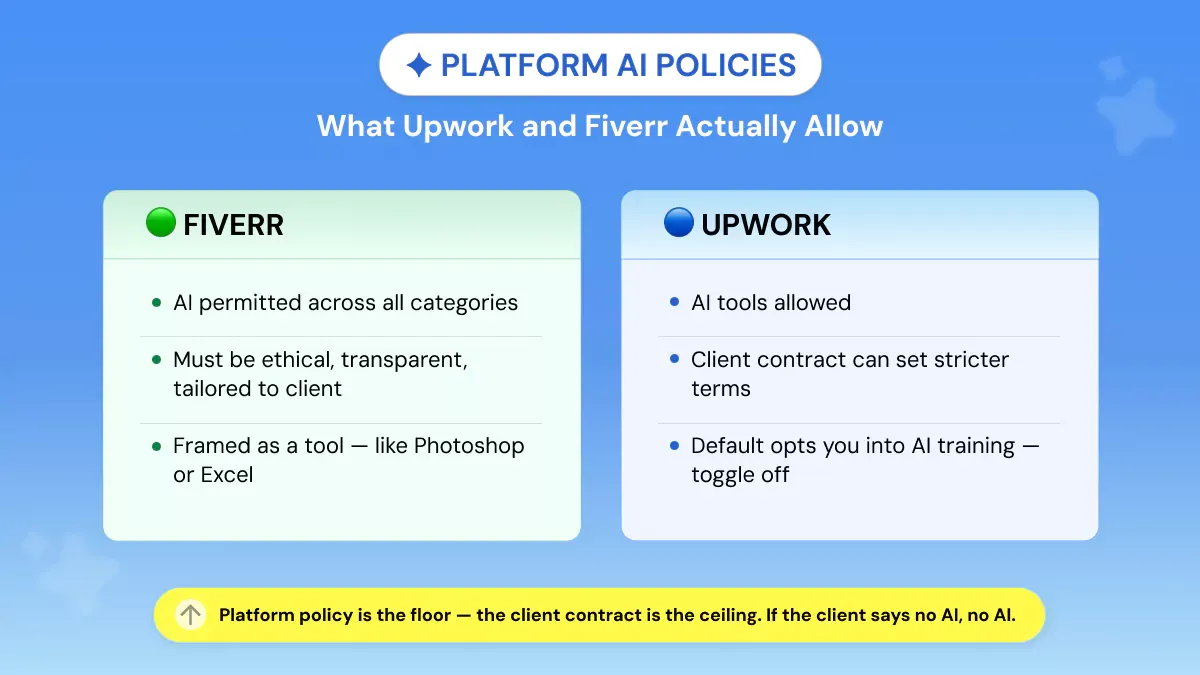
Fiverr allows freelancers to use AI across all service categories, but only when the work is ethical, transparent, customized, and shaped by human input. Upwork supports AI-assisted freelancing too, but individual client terms still matter, and if a client says the project must be AI-free, that instruction wins.
The two platforms agree on the big idea and differ on the details, so it helps to take them one at a time.
Fiverr: AI Is Allowed, but the Delivery Must Be Yours
Fiverr has the clearest official policy of the two. It frames AI as part of a freelancer's toolkit, similar to Photoshop, AutoCAD, or Excel, so a writer can lean on it for brainstorming, outlining, editing, or general workflow support. The catch is that the final delivery has to reflect the freelancer's own skill, judgment, and the client's specific needs. The line Fiverr draws is around effort and originality, not the tool itself. Freelancers should not mass-produce the same AI output for multiple buyers or hand over generic copy that does not fit the order, and if a client asks whether AI was involved, Fiverr expects a straight answer.
Upwork: AI Is Encouraged, but the Client Still Decides
Upwork's position is close but not identical. It openly encourages freelancers to use AI as a productivity tool for things like research, proofreading, and organizing work, while reminding everyone that AI is not a replacement for expertise and that some clients may request AI-free work. So a general "AI is allowed on Upwork" does not automatically mean AI is allowed for this client.
Upwork also carries a privacy angle worth knowing. Its AI preferences settings let freelancers and clients control whether communications and work product can be used to train Upwork's own AI models, and that data is only included when both sides are opted in. Anyone handling confidential client material should review those settings before starting sensitive work, and may want to ask the client to check theirs too. Upwork does say this data is not sold and is not used to train third-party models, so the concern is internal model training rather than resale.
The Rule That Covers Both Platforms
Platform policy is the floor, but the client contract is the ceiling. A general permission to use AI never overrides a project brief, NDA, statement of work, or order requirement that bans AI tools. If the client says no AI, then no AI. When the terms are unclear, ask before you start and keep the client's answer in writing.
The False Positive Problem: When Human Work Gets Flagged
AI detectors are probability tools, not proof, and they can flag fully human writing as AI-generated. That matters most in client work because a single score can put your payment at risk, even when you wrote every word yourself. This is the part of the conversation most guides skip, and it is the reason a detector result should never be treated as the final word.
It also is not just a student problem. Freelance writing communities have documented cases where clients ran a deliverable through a detector, saw a high score, and refused payment or ended the relationship, while the writer insisted the work was entirely their own. These are community reports rather than formal studies, but they describe a real and recurring fear.
Why Polished, Human Work Gets Flagged
The root of the problem is how detection actually works. Most detectors look for statistical patterns in the text, not your real writing process. Clean grammar, consistent structure, a formal tone, and smooth, predictable transitions can all make human writing look more machine-like to the tool.
The irony is hard to miss. The very qualities clients pay for, including clarity, structure, and a steady brand voice, are the same traits that can push a score upward. A strong landing page, a tight SaaS blog, or a formal B2B article can read as too smooth to a detector even when a person wrote it from scratch. Our full guide on how to protect yourself from AI detector false positives breaks down why this happens and what evidence to keep.
None of this means detectors are useless or that clients are wrong to check. It means a single score should never count as proof for either side. A high result is a reason to look at how the work was made, not a verdict on its own. That framing protects everyone, because the same tool that flags a freelancer unfairly can just as easily mislead the client relying on it.
What It Means for Your Payment
A client can dispute, delay, or challenge payment if they believe the delivery broke the brief, but the score alone does not settle it. On Upwork and Fiverr, payment outcomes run through each platform's dispute process, not through a percentage.
That is where your defense lives. Process evidence, including version history, early drafts, outlines, research notes, and the approved brief, is far stronger than arguing over whether one detector got it right. If your human work gets flagged, proof of how you built it is what carries the dispute.
The Freelancer Protection Workflow (4 Steps)
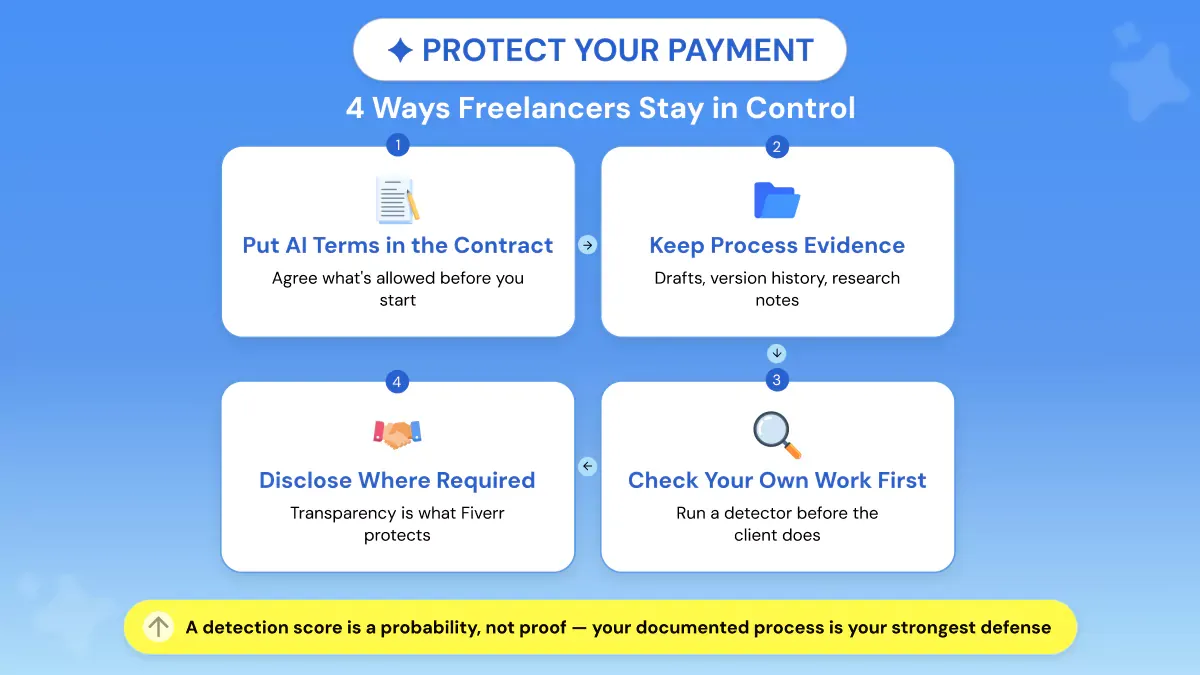
Freelancers protect themselves with four habits: agree on AI terms in writing before starting, keep process evidence, check their own work before delivery, and disclose AI assistance where the contract requires it. The goal is not to argue with a detector after a client complains. It is to remove the confusion before the work begins, so a score never catches you off guard.
1. Put AI Terms in the Contract
Add one clear line to your proposal, order chat, or statement of work before you start. State whether AI assistance is allowed, and if it is, what for: research, outlining, drafting, editing, or proofreading.
Something this simple works: "AI tools may be used for research and outlining only, with final drafting completed manually." Or the cleaner version when a client wants none of it: "No generative AI tools will be used for this deliverable." That single line removes the gray area that fuels most disputes. Platform rules are general, but the client's written terms control the job, so if they want human-only work, that is the rule for that project.
2. Keep Process Evidence
Write in a tool that keeps version history, like Google Docs, and store your outline, research notes, source list, draft versions, and client feedback in one place. If a false positive ever comes up, version history is far stronger than saying you promise you wrote it, because it shows the work developing over time from rough notes to final polish.
The platform specifics matter here too. On Upwork hourly jobs, keep clear Work Diary memos; on fixed-price jobs, make sure the milestone description matches what you deliver. The clearer your trail, the easier your process is to defend if payment is ever questioned.
3. Check Your Own Work Before Delivery
Run your final draft through an AI detector before the client does. This is not about hiding AI use or beating a detector. It is quality control that lets you catch risks on your own terms rather than be caught off guard by a client's scan.
If a section flags, read it closely. Sometimes the cause is AI-assisted phrasing, and sometimes it is a false positive triggered by stiff, generic, or overly polished writing. Either way, rewrite the flagged part in your natural voice, add specific examples, vary your sentence rhythm, and cut formulaic transitions.
4. Disclose Where Required
If the contract permits AI assistance, deliver with confidence. If a client asks whether AI was used, answer directly. If the contract requires disclosure, disclose. Transparency is what protects the working relationship, since a client may be perfectly fine with AI-assisted research but not AI-written copy. The safest habit is to clarify expectations before the order starts, not after a detector score has already put payment at risk.
What to Do If a Client Flags Your Work
Stay professional, ask which tool and score they used, and respond with process evidence rather than emotion. Detection scores are probabilities, not proof, and platforms resolve payment disputes through documented order, milestone, and communication records, which is exactly why a clear work trail is your strongest defense.
Start by clarifying the claim. Ask the client which detector they ran, what score it returned, and which passages were flagged, then check the original brief. It also helps to know whether they used an AI detector, a plagiarism scan, or both, since a tool's reliability varies and even Grammarly's plagiarism checker has real limits. Did the brief ban AI, allow it for research or outlining, or never mention it at all? That answer often settles the matter before it grows.
Next, share your evidence. Send the version history, draft versions, outline, research notes, and revision comments that show how the work developed. On Upwork, make sure your milestone submission, Work Diary memos, and client messages line up with what you delivered.
Then offer a practical revision without conceding the score is correct. A steady reply works well: "I understand the concern. This was written manually, and I'm sharing my draft history and notes for context. I'm happy to revise any sections that don't match the voice you wanted."
If payment is withheld, escalate through the platform with that evidence package, using Upwork's fixed-price or hourly dispute path or Fiverr's Resolution Center, as applicable. Outcomes are decided on a case-by-case basis, so the goal is never to argue with a percentage. It is to answer it with the work trail.
Frequently Asked Questions
Do Upwork Clients Check for AI?
Yes, some do, especially on writing, SEO, and editing jobs. An Originality.ai study found 24.11% of 647 sampled Upwork articles were detected as AI-written by its own detector, and the company markets scanning to people hiring writers.
Does Fiverr Allow AI-Generated Work?
Yes, Fiverr permits AI across all service categories, but the work must be ethical, transparent, customized, and shaped by human input. Freelancers are expected to disclose AI use when a client asks.
What Percentage of Freelance Writing Is AI-Generated?
There is no universal figure. The clearest Upwork-specific data point is Originality.ai's study, which found 24.11% of sampled articles were AI-written; it should be read as a single detector's classification rather than a proven industry rate.
Can a Client Refuse Payment Over an AI Detection Score?
A client can challenge work or open a dispute if they believe it broke the contract, but a score alone is not proof. Upwork and Fiverr handle payment issues through their dispute and resolution processes, where documentation carries the weight.
Why Was My Human-Written Work Flagged as AI?
Detectors look for statistical patterns, not your actual writing process. Polished, formal, highly structured, or non-native English writing is misclassified more often, which is why Phrasly's breakdown of why Turnitin flags human writing as AI is worth a read.
Should I Tell Clients I Use AI tools?
Disclose when the contract requires it, when a client asks, or when AI affects the workflow they are paying for. Fiverr specifically expects freelancers to confirm AI use on request, and 2026 research found unclear expectations are what create trust gaps.
How Do I Check My Work for AI Before Delivering It?
Run your final draft through an AI detector before the client does, then review any flagged sections for generic phrasing or stiff structure and rewrite them in your voice. Treat it as pre-delivery quality control, not a way to hide AI use.


Keep reading

What Are Common Phrases That AI Uses? We Tested 50 Pieces to Find Out
We ran 50 pieces of content through Phrasly's AI Detector to find out what are the common phrases that AI uses.

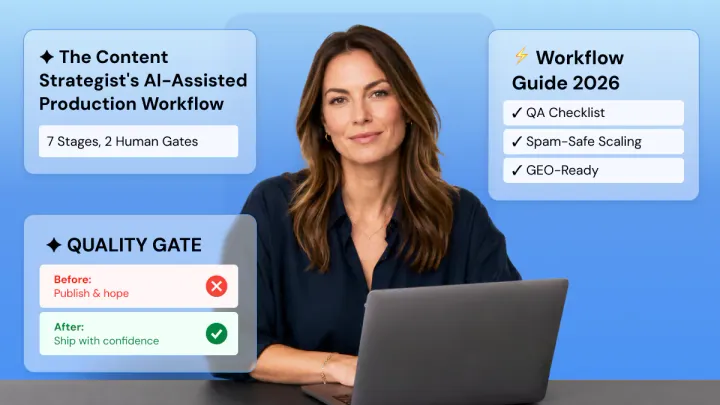
The Content Strategist's Workflow for AI-Assisted Production
A sound AI content workflow puts humans at the brief and expertise stages, letting AI handle outlining and drafting, then routes every piece through fact-checking, plagiarism, and AI-flatness QA gates before it can be published.