Viper Plagiarism Checker Review 2026: Is It Safe and Accurate?
15 min read
In this review, we ran the same three writing samples through Phrasly as well as Viper and are reporting back what each found.
Disclosure: Phrasly offers a competing plagiarism checker. We tested both tools with the same samples and report the strengths, limits, and changing product terms we found below.
The Viper plagiarism checker sold by ScanMyEssay is a browser-based similarity checking/AI detection software application.
Viper checks text that is pasted or uploaded against an extensive index of web pages, journals, and (if purchased) an internal repository of documents, and provides a report linking matched text with sources.
It's funded by pay-as-you-go credits instead of a subscription, and its public pages contradict each other regarding free limits, credit amounts, and terms for older publications.
This review is for the present-day, online Viper plagiarism checker application. Not the outdated Windows desktop app that Viper's own update history claims was discontinued way back in April of 2017.
Third-party sites advertising a download for a Viper .exe are NOT the current version officially offered.
The online utility is located at scanmyessay.com, and that's the only link we will provide to run an actual scan.
Want to check a passage right now? Run it through Phrasly's free plagiarism checker while you read the rest of this review.
Viper Plagiarism Checker at a Glance
Here are cliff notes on Viper plagiarism checker, pricing, and privacy. Dates checked apply to facts that may change.
Question | Short answer |
|---|---|
What is it? | A browser-based plagiarism and AI detector from ScanMyEssay, no install required. |
Is it free? | Public pages describe a limited free scan alongside a pay-as-you-go credit system. Confirm the live account offer before relying on it. |
Is it a download? | No! The current official product is online. Viper says it replaced its downloadable Windows app with a web app in April 2017. |
Does it detect AI? | Viper says yes, scanned alongside plagiarism. Treat the AI result and the similarity result as two separate outputs, not one score. The Viper AI detector runs as its own module and hands back a separate similarity report rather than folding both scores into one. |
Does it store papers? | Viper's current explainer says repository storage is optional and deletion is free. Older linked terms and privacy pages still contain conflicting language (see the safety section below). |
Best for | Occasional users who prefer buying credits over a subscription and don't mind an account-based workflow. |
How Does the Current Viper Plagiarism Scanner Work?
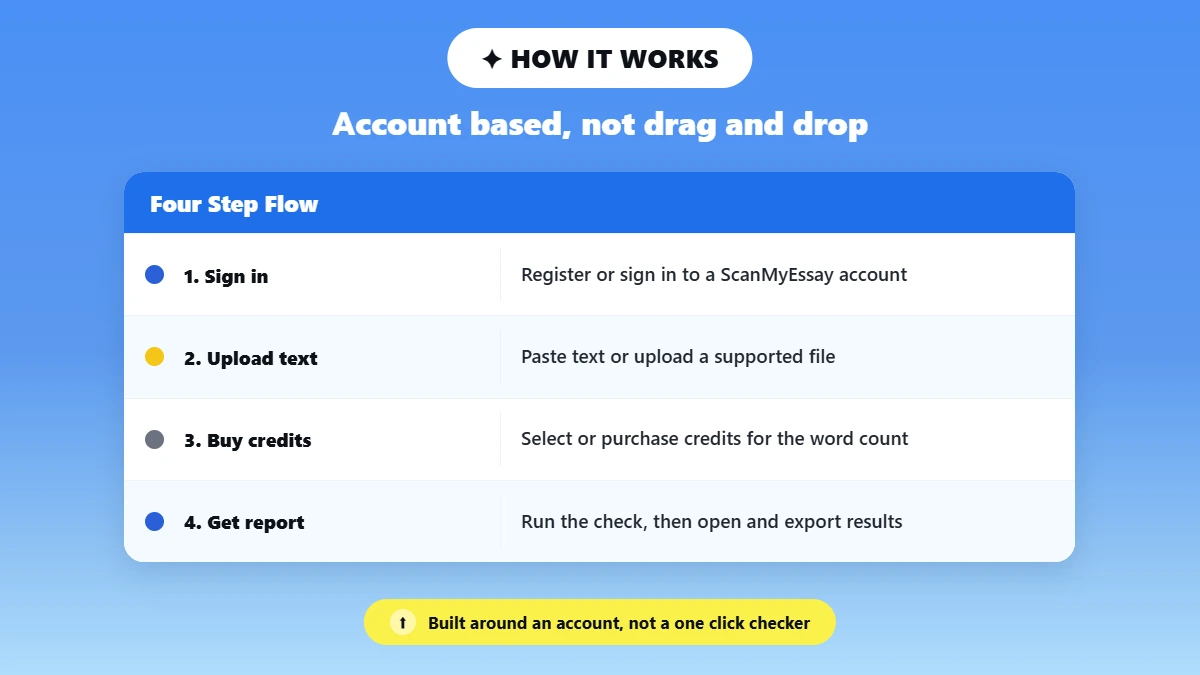
Viper plagiarism scanner does not work as a drag-and-drop tool. Instead, it uses an account-based flow that is simple to use. As plagiarism scanner software goes, it behaves more like an online plagiarism checker.
Built around an account rather than a one-click document plagiarism checker or essay plagiarism checker you paste text into and forget.
In practice, checking a document with Viper looks like this:
Register or sign in to a ScanMyEssay account.
Paste your text or upload a supported file. (See Viper's Features page for a list of supported files: PDF, DOCX, DOC, TXT, RTF, PPT/ PPTX, HTML, Markdown, EPUB, ODT, Spreadsheets).
If you're drafting in Google Docs, note that it isn't a native upload option here. See this guide on how to check for plagiarism in Google Docs for a workaround.
Read the repository and privacy statement. Keep in mind that this is where you specify whether if you want your document repository so McAfee can match it to other potential threats in the future.
Select or purchase enough credits to cover the word count.
Run the plagiarism check, the AI check, or both, depending on which boxes you select.
Open the report, click through highlights to review sources, then export/download results.
⚠️ Correction worth making up front: Viper is now a web app, not the old Windows download. Its own release notes describe the switch to an online tool in 2017. Don't assume a third-party .exe that ranks in search is the current official Viper product, and don't judge its privacy practices by an outdated installer page.
We Tested Viper: Results on Three Real Samples
Claims from marketing materials are one thing. What you actually get back from a Viper plagiarism scan is something else entirely.
So, we ran three targeted samples through Viper and Phrasly ourselves, side-by-side on the same day with default settings, then took note of account status.
Results include the document length, selections made, time to completion, score, recognized source, and report usefulness for each. This summarizes the findings for this review; all other columns refer back to it rather than listing another number.
Verbatim web copy: 180-250 words of text copied word for word from an indexed Phrasly article. Testing the ability of the tool to locate the original URL where the content came from.
See Google's guidance on helpful content for more detail.
Human paraphrase: A genuine paraphrase of that same source. Keeping the ideas but changing wording and structure, since this is the harder case for any similarity tool.
Catching paraphrased plagiarism depends on source matching that goes beyond exact wording. The same challenge shows up with cross-language plagiarism, where the words change but the original idea does not.
AI-written, source-original text: 300+ words generated on the test date from a named model. Used as a false-positive check for plagiarism detection.
Sample | Viper % | Viper source found? | Phrasly % | Phrasly source found? |
|---|---|---|---|---|
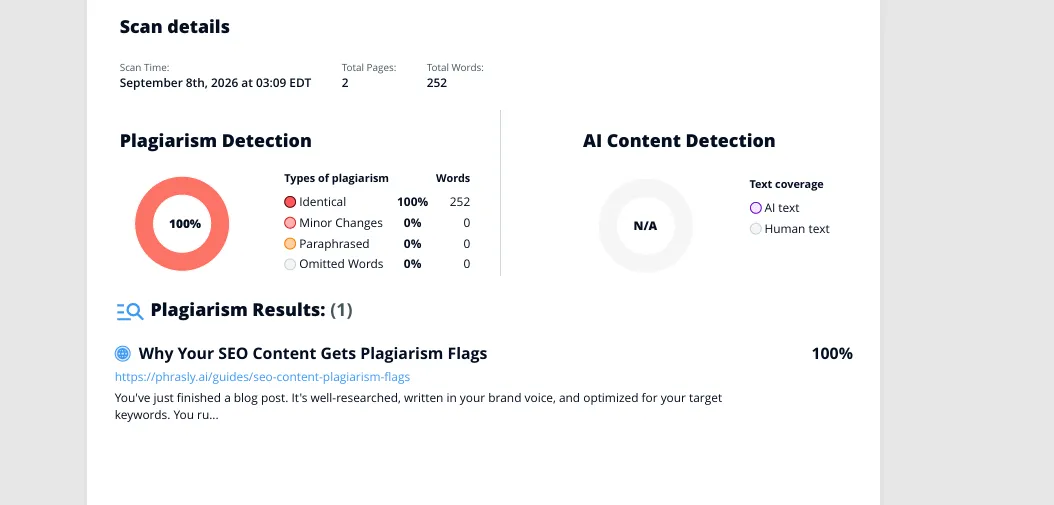
1. Verbatim web copy | 100% (Identical: 100%, 252/252 words) | Yes! phrasly.ai/guides/seo-content-plagiarism-flags | 100% (Full Match) | Yes! (Sources Used panel collapsed) |
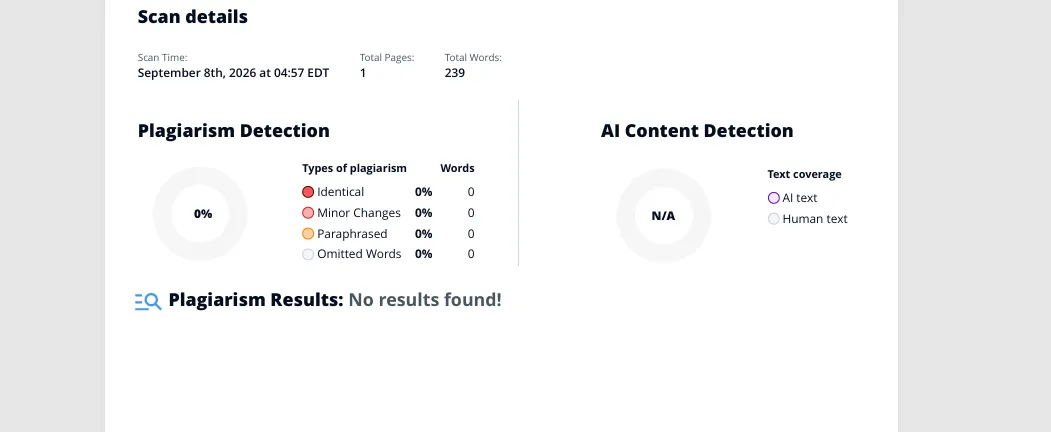
2. Human paraphrase | 0% (Identical/Minor Changes/Paraphrased/Omitted Words all 0%, 0/239 words) | No! “Plagiarism Results: No results found!” | 100% (“Original”) | No! Labeled Original; Sources Used panel shows no match |
3. AI-written, original | 100% (Identical: 100%, 320/320 words) | Yes! Matched an entry titled “Copyleaks Shared Data Hub,” attributed to a “Dell User” account, at 100% | 100% (“Original”) | No! Sources Used panel states: “No external sources were found for your submitted content.” |
Sample 1: Verbatim Web Copy
Viper returned a 100% score. Classifying all 252 words as “Identical” and correctly linked back to the exact source URL.
Phrasly returned the same 100% “Full Match” result on the same passage.
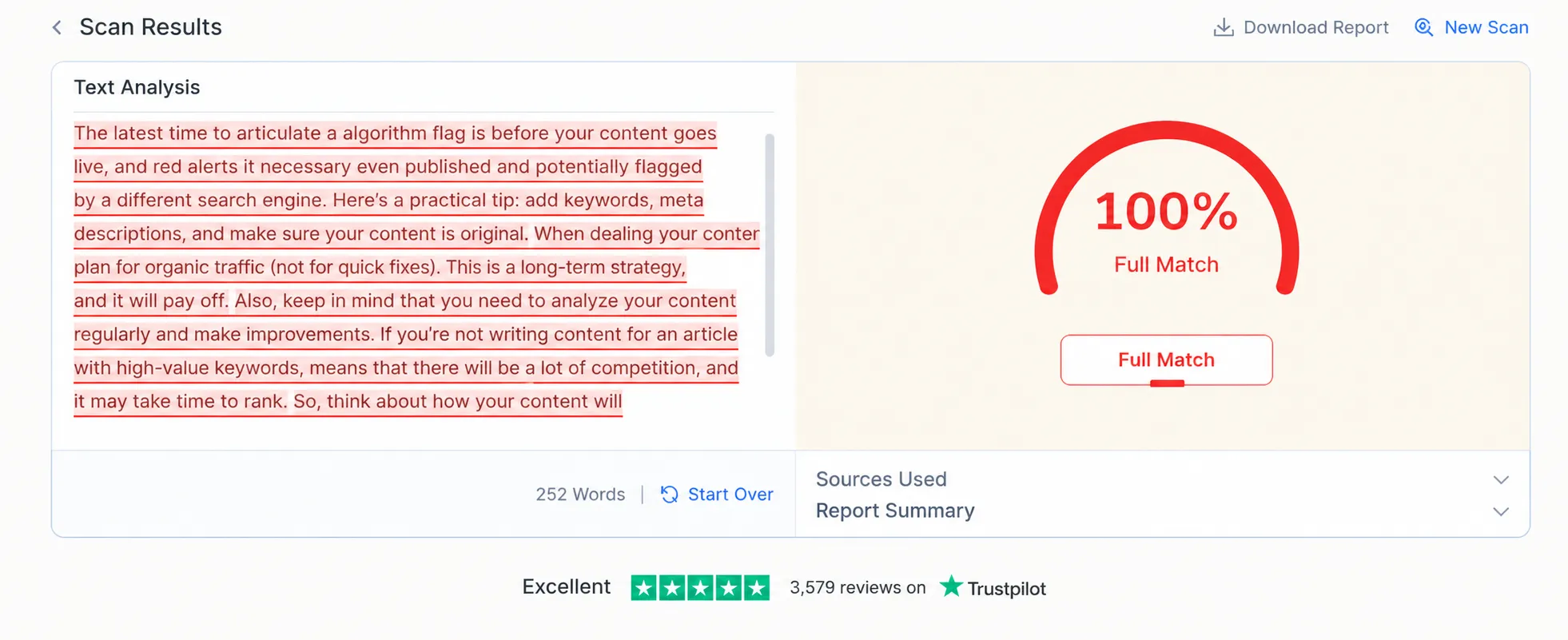
Both tools handled the easy case of word-for-word copying without any trouble. This is exactly what you'd expect from a similarity checker at its most basic function.
Sample 2: Human Paraphrase
Viper returned 0% across every category: Identical, Minor Changes, Paraphrased, and Omitted Words all read 0%, with “No results found!”
Phrasly mirrored that outcome. Scoring the passage 100% “Original” with no external source detected.
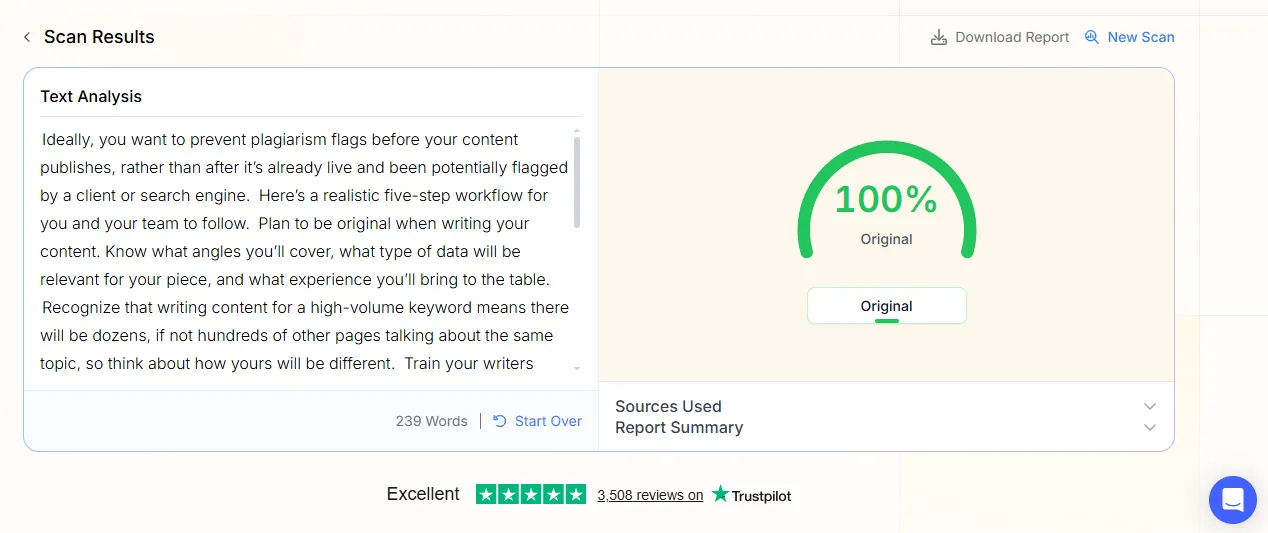
Both tools missed the fact that this text was a paraphrase of an already-indexed article. This is the harder case for any similarity tool. It's where both products showed their limits.
Sample 3: AI-Written, Source-Original Text
This sample produced the most interesting result of the whole test.
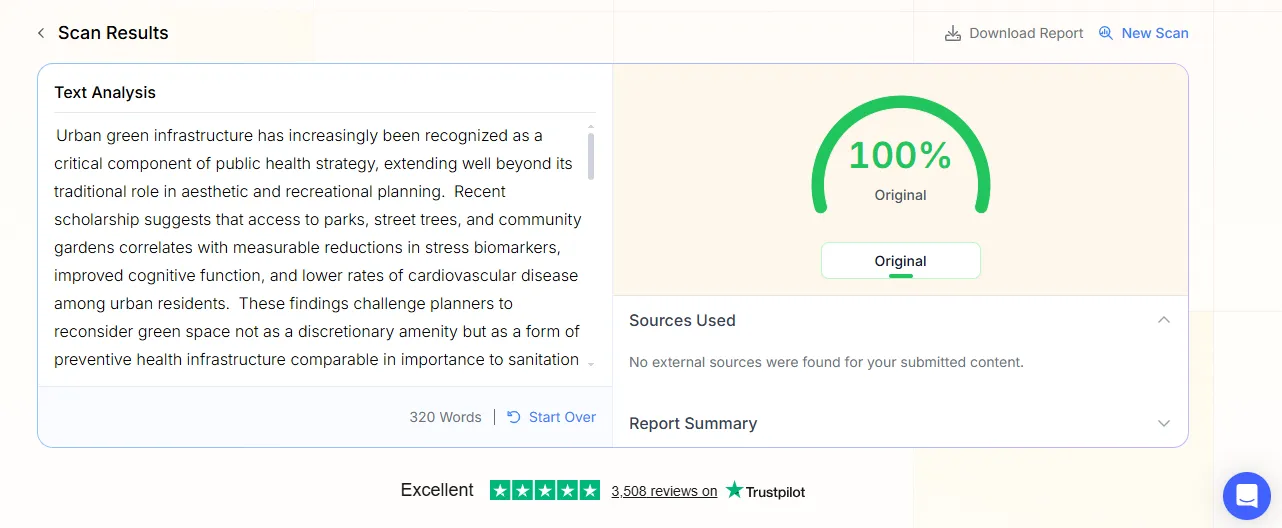
On Phrasly's plagiarism checker, the fresh AI-generated text scored 100% “Original” with no external source found. Correct, since the text had never been published anywhere.
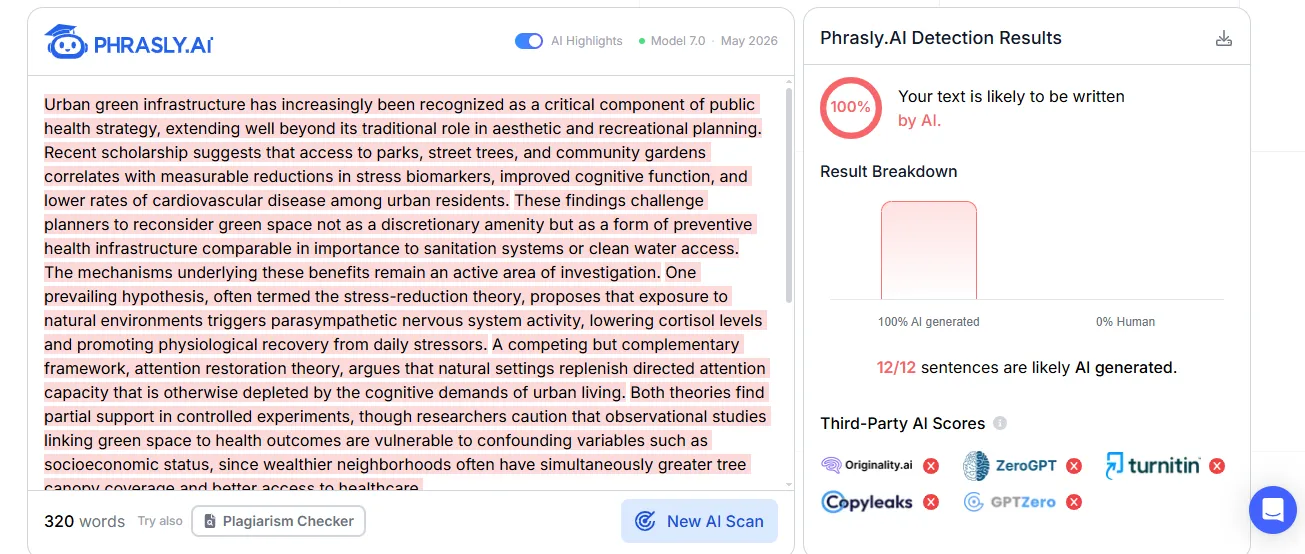
Phrasly's separate, dedicated AI Detector tool then correctly identified the same text as 100% AI-generated, flagging all 12 of 12 sentences.
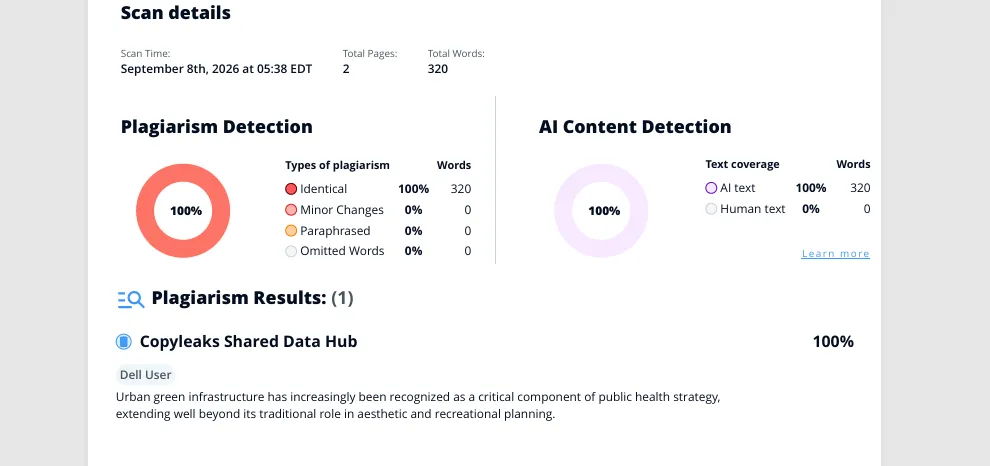
Viper scored the sample as 100% plagiarized, matched to a repository entry called “Copyleaks Shared Data Hub” attributed to a “Dell User” account. Its AI Content Detection returned 100% AI text.
The AI call is correct. The text was, in fact, 100% AI-generated.
The plagiarism match is the odd part. This passage was written specifically for this test and had never been published or scanned by anyone before. So a 100% match under someone else's account name is unexplained.
Across the three samples, both tools caught the easy case (100% on verbatim copying). Both missed the hard case (0% “Original” on a genuine paraphrase of an indexed source).
On AI detection, both correctly identified the AI-written sample once you used the right tool. Viper's built-in AI Content Detection and Phrasly's separate AI Detector.
But Viper's plagiarism match on that same AI-written sample, tied to an unrelated account, remains unexplained.
Is Viper Plagiarism Checker Accurate?
Accuracy for a Viper plagiarism detector (or any tool) is not one number. It varies by source coverage, document type, language, settings used, and type of overlap searched for.
Asking whether are plagiarism checkers accurate is really asking about all of those variables at once. No single plagiarism detection tool, Viper included, can promise a perfect score.
It should also not be confused with plagiarism detection overall, which also covers types of plagiarism (mosaic or patchwork copying, sometimes called mosaic or patchwork plagiarism) missed by a percentage score alone.
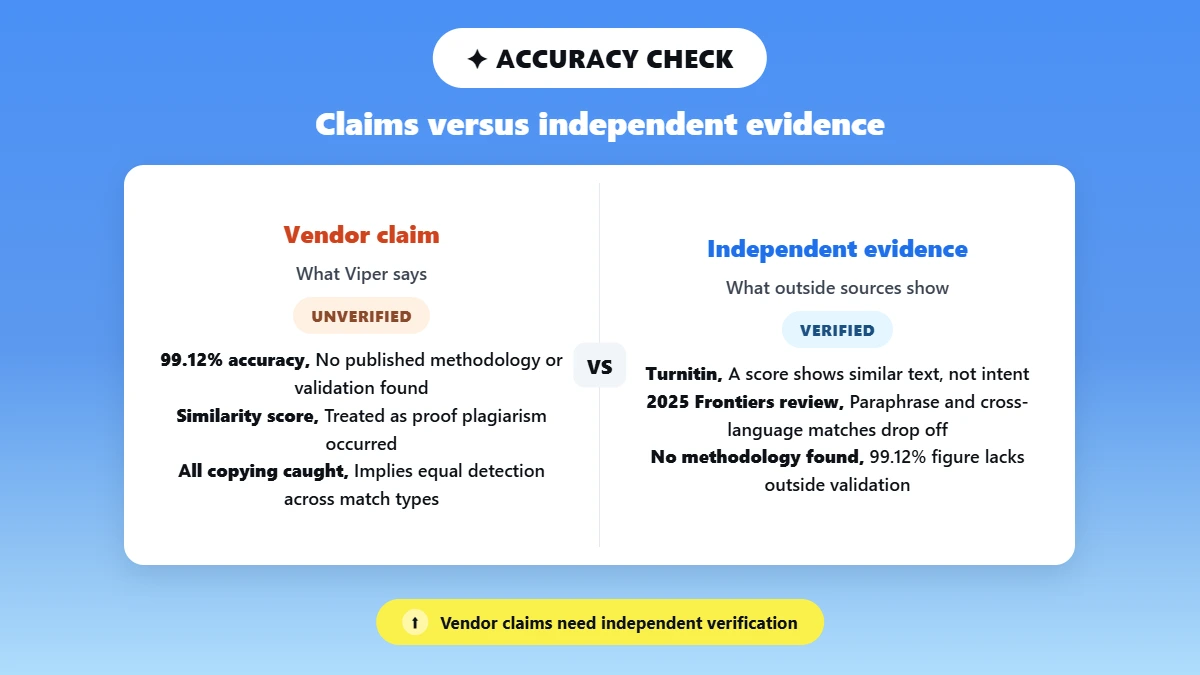
On its features page, Viper claims “99.12%” Accuracy.
Average 10 Second Scan. We did not discover any published methodology, test set, or independent validation for that statistic during our research.
Therefore, it should be listed as a vendor claim, not as an independent fact. A better angle would be to look at the broader research into how these tools function.
A 2025 systematic review published in Frontiers about plagiarism detection techniques observes that string- and lexical-matching techniques generally perform well against copied material.
But see a significant performance drop with paraphrased, cross-language, and idea-level plagiarism, which coincides with how most detectors (Viper included) operate.
But let's also crib Turnitin's phrasing on similarity scores.
A similarity score reflects similar text. It does not determine if plagiarism was committed.
Quotes, shared sources, templates, and even previous student work can all trigger legitimate matches.
Understanding this distinction matters because the consequences of plagiarism can be serious even when a match turns out to be a false flag, so it's worth verifying results carefully before drawing conclusions.
When we have live testing numbers to report, this page should report out our exact, paraphrase, and AI-detect results individually, rather than as an overall accuracy score.
Plagiarism detection and AI detection are separate tasks and should never be averaged.
Is Viper Plagiarism Checker Free? Pricing and Credit Limits
Not entirely! Viper's public pages describe a Viper plagiarism checker free option alongside its main pay-as-you-go model.
But the two live pages we checked don't agree on the details. A free Viper plagiarism checker online claim should be verified against your actual account before you rely on it.
As of our check on 03 Sep 2026, Viper shows bundles of credits priced in GBP on its pricing page. One credit appears to cover 250 words for plagiarism and AI checking together.
Bundle | Public price | Approx. rate per 250 words |
|---|---|---|
10 credits | £5.00 | £0.50 |
20 credits | £9.00 | £0.45 |
50 credits | £14.95 | £0.30 |
100 credits | £25.95 | £0.26 |
200 credits | £34.95 | £0.18 |
500 credits | £69.95 | £0.14 |
1,000 credits | £119.95 | £0.12 |
Prices are correct at the time of writing. The prices are subject to change. Check the tool's pricing page for the latest price before buying. Please buy from the official tool page and not via external links.
⚠️ Two pages, two different numbers: Viper's pricing page describes one credit as covering 250 words, while its terms and conditions (last revised August 11, 2023) separately describe one free scan of up to 5,000 words and one paid credit as covering roughly 5,000 words. Those figures are not close enough to be a rounding difference. Report what the live account and checkout actually show on your test date, note both sources, and don't silently pick the more convenient one.
Is Viper Safe for Essays and Unpublished Work?
“Safe” divides into three distinct questions when asked of Viper. The answer to each question is different. The official website is safe because it's legit. Downloading from a third party is not the current product (you shouldn't trust it).
And as for what happens to your uploaded essay. That depends on whether you're reading Viper's own explainer page or clicking the now-outdated legal terms link at the bottom of the page.
Because those two don't fully align. This is the crux of whether Viper’s plagiarism checker is safe. It's not enough to give a single-word response.
Is the Official Website Legitimate?
Yes! Viper has been around a while. It's a product owned and operated by ScanMyEssay Under. the Trading Name of Business Bliss Consultants FZE.
They have been selling academic support since 2007. Please use the real web app, not a mirror or download site aggregator.
Is a Viper Download Safe?
The official product went online-only in 2017, so there is no official Viper program available to download anyhow.
Running a malware scan on a third-party installer (even if it's clean) doesn't prove it's the latest official Viper product.
Nor does it prove that it abides by Viper's published privacy guidelines. If you find a site hosting a Viper .exe, consider that a warning sign instead of a convenience.
What happens to an uploaded essay?
Important privacy note: There is an outdated article circulating from 2013 about Viper's old free-scan system which claims that Viper publicly posts your essays to a repository after a set amount of time.
Here is Viper's current “How does Viper use my essay?” page claims that this practice is no longer followed, repository storage is optional, and deletion is always free.
However, Viper's linked 2023 terms and conditions and its privacy policy still contain older language describing archive storage and essay publication after three months, plus a removal fee.
Always read the consent screen that you will actually see within their live upload flow, not just the marketing landing page, before you upload anything confidential, embargoed, or owned by someone else.
If you're comparing this to something your school already does, see this Guide to Turnitin Alternatives for an explanation of how third-party pre-checkers like Viper differ from your school's native repository-based checker.
Viper Vs Phrasly Plagiarism Checker
Let’s see how a Viper checker stacks up against Phrasly's free plagiarism checker on the same samples, not just on paper.
Decision factor | Viper | Phrasly |
|---|---|---|
Access | Account-based web app; sign-up required before scanning | Product page states paste or upload with no signup required; confirm in the live flow |
Price | Pay-as-you-go credit bundles priced in GBP; free allowance needs live verification | Product page states free, no signup, no credit card, no word limit; confirm before publishing |
Stated source coverage | Public pages disagree: homepage cites 10B+ sources, features page separately lists 60T+ websites, 16,000+ journals, and optional internal documents | Product page states 10B+ web pages and academic papers |
Plagiarism results (this test) | [insert same-day result] | [insert same-day result] |
AI detection | Viper says plagiarism and AI are scanned together in one pass | Product page states a built-in AI detector covering ChatGPT, Claude, and Gemini output |
Privacy | Current explainer: optional repository storage, free deletion; older linked legal pages describe conflicting archive/publication terms | Product page states text is never stored, indexed, or shared, and is deleted immediately after scanning |
Report | Highlighted matches, source URLs, PDF export (verify live) | Similarity score, highlighted matches, source-by-source breakdown, downloadable report (verify live) |
Best fit | Users who prefer credits, account history, or the broader listed file support | Users who want a quick, no-signup pre-check with a stated no-storage workflow |
Run the same passage through Phrasly and compare the matched sources, not just the percentage.
Pros and Cons of Viper
Every point below is a fact to verify against the completed live test, not a final grade. As anti-plagiarism software, Viper's real value shows up in the details below, not in any single headline number.
Potential pros:
✅Pay-as-you-go credits instead of a recurring subscription.
✅ Source-linked, downloadable reports for record-keeping.
✅ Plagiarism and AI checking available in the same paid scan.
✅ Broad file support, including PDF, DOCX, PPTX, and EPUB.
✅ Quote and reference exclusions plus sensitivity controls, and optional cross-language comparison.
Potential cons:
❌ Account and credit friction for what is often meant to be a quick check.
❌ Public pages disagree on source counts, free allowance, credit size, refunds, and document handling.
❌ No public methodology found for the advertised 99.12% accuracy figure.
❌ The current web app still gets confused in search results with an old, discontinued desktop download.
❌ Cannot promise the same result as an institution's own Turnitin report.
Who Should Use Viper, and Who Should Choose an Alternative?
Select Viper if: Your completed assessment indicates you appreciate its pay-as-you-go pricing model, reporting capabilities, extensive file-format compatibility, or account/project tracking history.
Select Phrasly when: You desire a quick self-check with a declared no-storage process and layered plagiarism-AI signals.
Submit your assignment through your institution's checker if: The assignment will be submitted for grading to Turnitin (or other similar repository) run by your institution. Third-party pre-checkers cannot guarantee they will catch the same matches or provide you with the same score.
If your school uses Canvas, see this Canvas plagiarism checker guide for how that integration works.
Looking beyond these two options: Check out this best plagiarism checkers 2026 round-up. Or if Grammarly is on your short list, see this Grammarly plagiarism checker review.
If Paperpal is also on your list, see this Paperpal plagiarism checker review.
Final Verdict
👊 Viper is a legitimate, long-running plagiarism and AI checker. Not a scam and not the discontinued download some search results imply. Its biggest unresolved issue isn't accuracy so much as consistency.
Its own pricing, free-scan, refund, and document-handling terms don't agree with each other across pages. The smart move is to trust the live checkout and the live privacy consent screen over any single marketing claim.
Including this review's summary of them. It's a reasonable pick for someone who wants pay-as-you-go scans and doesn't mind creating an account.
If you'd rather check a passage first without signing up anywhere, run it through Phrasly and compare the matched sources for yourself.
FAQ
Is Viper plagiarism checker free in 2026?
No, not really! Viper lists a very limited free scan on its pages as well as its regular pay-as-you-go credit system.
The exact free allowance has conflicting descriptions across pages. Look at the live account offer when signing up to see what they will actually charge you.
Is Viper plagiarism checker safe to use?
Yes, the official website is real; it's been up since 2007. The third-party download is not the legitimate version of the product at this time.
File storage is determined by which repo you select when uploading. Viper's current explainer and its older linked legal pages describe that differently.
Does Viper publish or store your essay?
Viper's current page now states that publication is no longer performed, and repository storage is optional and can be permanently deleted at no cost.
Older linked terms and privacy pages still contain legacy publication language. Check the live consent screen before uploading sensitive or unpublished work.
Does Viper detect AI-generated text?
Indeed, Viper does offer an AI detector along with the plagiarism scan. Consider the AI probability and similarity percentage as two different pieces of data. One by itself does not confirm wrongdoing.
Is Viper the same as Turnitin?
No! Viper is available for anyone to use. Turnitin is typically accessed via institutions and uses Turnitin's own databases and preferences.
A Viper score will not match or predict a Turnitin score. See this guide on how to check plagiarism before submitting to Turnitin for more on that distinction.
Can you still download Viper plagiarism checker?
No! According to Viper's own release notes, the Windows application was replaced with a web app in 2017. Use the official web app; don't assume a third-party executable you find through Google is their current offering.

Written by
Muhammad Usman Ali
Pakistan
Muhammad Usman Ali is an experienced SEO content writer with 3+ years of professional writing experience. He specializes in AI tools, AI detection technologies, and search engine optimized content.