6 Best SafeAssign Plagiarism Checker Alternatives Students Can Actually Use (2026)
You can't run SafeAssign yourself; only your instructor can. Compare the 6 best alternatives students can actually use in 2026, with real pricing, AI detection, honest free-tier limits, and which checker fits your situation.
Your professor runs a SafeAssign plagiarism checker on every Blackboard assignment. You'd like to check your paper first. The catch: you can't open SafeAssign yourself.
That access gap sends thousands of students searching for safeassign plagiarism checker alternatives every month. Most of what ranks is either a software directory or a site pretending to be SafeAssign.
This guide compares the 6 alternatives you can actually run today, with real July 2026 pricing, honest limitations, and which tool fits which student.
Why You Need a SafeAssign Alternative (You Can't Run It Yourself)
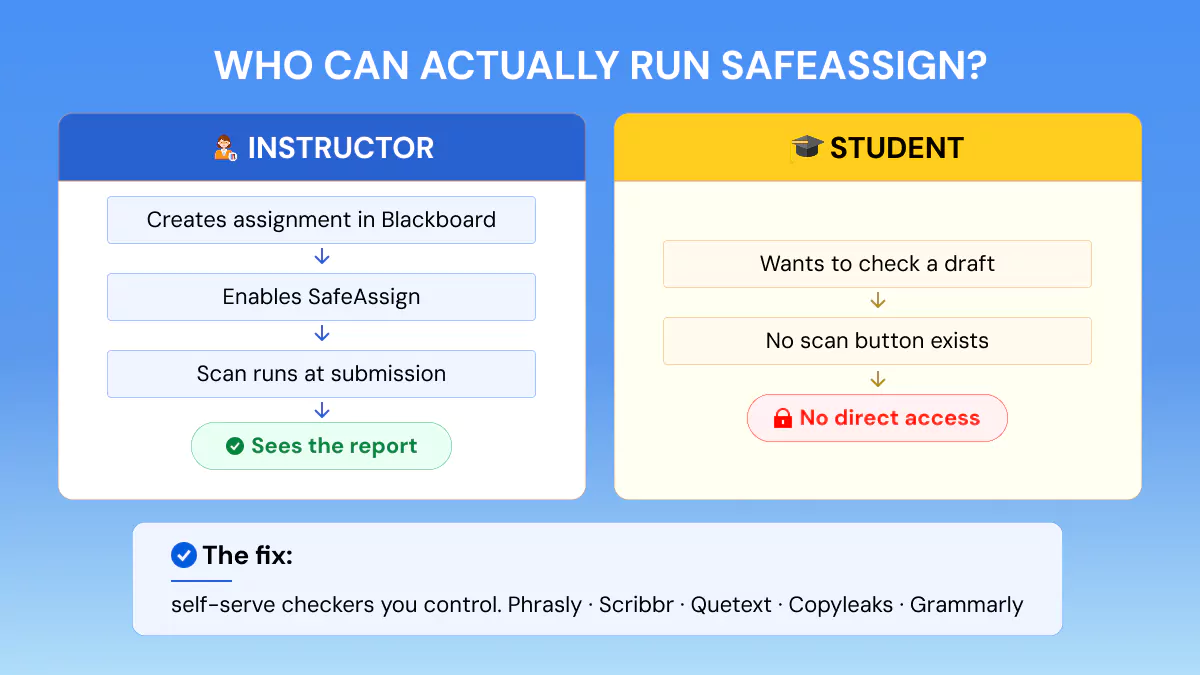
SafeAssign only runs when your instructor creates a SafeAssign assignment in Blackboard, so students can't scan a paper on their own. That's the whole reason alternatives exist.
Three things follow from that.
- First, access is instructor-controlled: Anthology's own student documentation confirms SafeAssign appears only where your instructor enabled it, and your instructor decides whether you see the report.
- Second, SafeAssign does not detect AI writing on its own; our guide to does SafeAssign detect AI covers that fully.
- Third, a warning. Sites claiming to be a standalone "SafeAssign checker" or safe assign tester are not SafeAssign: there is no official standalone version, so anything outside Blackboard wearing the name is a lookalike.
For how the real tool scans and scores, read how SafeAssign checks for plagiarism, including the safe assignment plagiarism check walkthrough.
• SafeAssign exists only inside Blackboard assignments your instructor creates
• Scans run at submission; there is no student-facing scan button
• Report visibility is an instructor setting, not a student right
Can Students Run SafeAssign Themselves?
No, not directly, as of July 2026. The only exception is when an instructor enables a draft assignment or allows report viewing after submission. If you want a score before the graded submission, you need a checker you control.
Check your paper with Phrasly before SafeAssign does
The 6 Best SafeAssign Plagiarism Checker Alternatives (2026)
The six safeassign checker alternatives students actually use are Phrasly, Scribbr, Quetext, Copyleaks, Grammarly, and Turnitin via a reseller. Each one is self-serve in a way SafeAssign is not: you run the scan, you see the report.
To make this list, a tool had to clear three bars:
- You can run it yourself today
- Its pricing is published
- It flags AI-generated writing
That filter removes every fake safe assign checker site and every institution-only system except Turnitin, which earns its place for context. These are the safeassign plagiarism checker alternatives for students that survive it.
Students say the same thing on Reddit: threads on r/AskAcademia recommend checking your draft outside Blackboard, then fixing citations before the real submission. Here's the full comparison, then each tool in detail.
| Tool | Price (July 2026) | Free tier | AI detection | What it scans | Self-serve | Best for |
|---|---|---|---|---|---|---|
| Phrasly | $5/scan or $20/mo (20K words) | Included as add-on with Humanizer plans | Separate AI Detector tool | 10B+ web + academic | Yes | Self-serve scans + AI Detector |
| Scribbr | $19.95–$39.95 per document | 125-word sample check | Yes (Turnitin-based) | Turnitin databases | Yes | Thesis-level checks |
| Quetext | From $9.99/mo | 1,000 words per plagiarism check | Paid module from $7.99/mo | Web + academic | Yes | Free draft checks |
| Copyleaks | From $13.99/mo annual; $16.99 monthly (100 credits = 25K words) | Separate: ~2,500 words AI, 500 plagiarism | Combined report on paid plans | Web, academic + AI patterns | Yes | AI-first courses |
| Grammarly | Pro from ~$12/mo annual ($30 monthly) | No plagiarism checks on free plan | Yes (lighter) | Web + academic | Yes | Writing help + originality |
| Turnitin | Not sold to individuals | None (institutional access only) | Yes | Largest student-paper repository | No | Understanding the institutional report |
Disclaimer: Pricing shown reflects standard listed rates as of July 2026 and may change with site promotions, seasonal discounts, or plan updates. Check each provider's live pricing page before purchasing.
1. Phrasly (best for plagiarism + AI detection in one self-serve scan)
Phrasly's plagiarism checker scans for plagiarism and returns highlights, a similarity percentage, and a downloadable source-by-source report. AI detection is deliberately a separate tool on the same Phrasly platform.
Price, as of July 2026: $5.00 per scan or $20.00/mo for 20,000 words per month, included as a free add-on for Phrasly Humanizer subscribers. It scans 10B+ web pages plus academic sources, and its AI detector sits one click away on the same platform; documents are deleted after scanning, never stored or indexed.
Uploads take PDF, DOCX, and TXT files, or pasted text, and results arrive in minutes. The report labels every match as full, partial, or original, so you can tell a properly quoted source from a real problem at a glance.
Best for: a student who wants a self-serve plagiarism scan they can run anytime, with an AI check available beside it and no subscription required.
Honest note: it is not the institutional tool your school submits to, so use it to find and fix issues, not to predict your exact SafeAssign score.
Is Phrasly's Plagiarism Checker Free?
Yes, it is a free add-on for Phrasly AI Humanizer subscribed users. For everyone else, as of July 2026, the report is paid: $5 per scan or $20.00/mo for 20,000 words per month.
2. Scribbr (best for a Turnitin-powered result without institutional access)
Scribbr's plagiarism checker runs on licensed Turnitin technology and its academic database, which makes its result the closest thing to what your examiner sees.
Price, as of July 2026: $19.95 per document up to 7,499 words, $29.95 to 49,999 words, $39.95 above that, pay per document with no subscription. AI detection is included via the Turnitin-based check, with a separate Scribbr AI detector too.
Scribbr also offers a self-plagiarism upload, so you can check a new chapter against your own earlier work, a common trap in thesis writing. Its database reaches 99B+ web pages and 8M+ academic publications across 20 languages.
Best for: a thesis or dissertation where one thorough check matters more than repeat scans.
Honest note: per-document pricing gets expensive fast if you check often; our Scribbr review tests how good it really is.
3. Quetext (best free-tier draft check)
Quetext uses its DeepSearch technology to catch paraphrased and reworded matches, not just word-for-word copying.
Price, as of July 2026: a free tier covers up to 1,000 words per plagiarism check, and paid plans start at $9.99/mo on the current Quetext pricing page, with an AI detector module from $7.99/mo and bundle discounts. The free cap applies to plagiarism checks; AI detection is limited on free and fuller on paid.
Paid plans add downloadable originality reports and a citation generator, which helps when a flag turns out to be a missing reference rather than copying. DeepSearch reads context, not just strings, so it catches reworded borrowing that basic matchers skip.
Best for: a quick, no-cost look at a short draft before a paid final scan.
Honest note: the 1,000-word free plagiarism cap won't cover a full essay, so treat it as a spot-check.
4. Copyleaks (best for AI-first classes)
On its paid plans, Copyleaks flags plagiarism and generative AI in one combined report, and it's the same company Anthology chose as Blackboard's AI-detection partner.
Price, as of July 2026, per Copyleaks’ own pricing page: individual plans start at $13.99/mo billed annually ($167.88 charged upfront) or $16.99/mo month-to-month, for 100 unified credits covering up to 25,000 words or 100 images. The free allowance checks the two things separately: about 2,500 words for AI detection and 500 words for plagiarism, with no combined report on the free tier.
It supports 100+ languages and can even scan source code, which makes it a natural pick for computer science courses. On privacy, it is GDPR and SOC 2 compliant with encrypted storage, worth knowing before you upload unpublished work.
Best for: courses where AI use is the main concern.
Honest note: it's subscription-first and credits don't roll over; our Copyleaks test shows how its detection held up.
5. Grammarly (best if you also want writing help)
Grammarly is a writing assistant whose paid plan bundles plagiarism and AI-writing checks with its grammar tools.
Price, as of July 2026, per Grammarly's own pricing support page: Pro for eligible individuals and teams runs from about $12/mo on annual billing ($30 month-to-month), with a 7-day free trial for new customers and student discounts available. Plagiarism checking is not on the free plan, and its AI detection (Authorship) is lighter than dedicated detectors.
The scan compares your text against web pages and ProQuest academic databases, and flags come with citation suggestions, so fixing a match takes one click instead of a hunt. It also runs inside Google Docs and Word through its extensions, which suits students who already draft there.
Best for: students who want grammar, clarity, and an originality check in one subscription.
Honest note: plagiarism depth trails dedicated academic tools, as Grammarly's plagiarism checker review shows.
6. Turnitin (the institutional standard, accessed via a reseller)
While there's no student signup on Turnitin, it stays on this list because it's the plagiarism + AI system most schools actually run, with the largest student-paper repository in the industry. knowing how it works helps you understand the report your teacher sees.
Price, as of July 2026: not sold to students or individuals. You reach it through your school, or through Scribbr, which licenses Turnitin's technology for individual checks.
Quick answer to the common SafeAssign vs Turnitin question: schools pick Turnitin for its bigger database and AI detection, while SafeAssign is the option built into Blackboard.
A bigger database means better odds of catching a match. Turnitin is used by more than 16,000 institutions worldwide, and its own materials cite 70+ billion web pages and over 1 billion student papers, figures it updates over time.
Your paper gets compared against other students' submissions too, not just websites. That's why matches can appear even when you never copied from the internet: a quoted line, a common phrase, or overlap with another student's paper all register on the report.
Best for: understanding what your school's report will look like.
Honest note: everything here still reaches you secondhand, through your school's settings or Scribbr's license, which is exactly why the five self-serve tools above matter; see Turnitin alternatives for the full list.
Free SafeAssign Alternatives: What You Actually Get
Genuinely free scans exist, but every one of them is capped. Here's the honest picture as of July 2026.
- Quetext free tier: up to 1,000 words per plagiarism check, enough for a short section, not a full essay.
- Copyleaks: separate free allowances (about 2,500 words for AI, 500 for plagiarism), then subscription.
- Grammarly free plan: no plagiarism checks at all; that starts on Pro.
- Scribbr: a free 125-word sample check plus a risk indication; the full document check is paid per document.
What free tiers are actually good for: a quoted section you are unsure about, an abstract, a discussion post, or a paragraph you paraphrased closely. What they cannot do is clear a full submission: even at the most generous cap, a 2,000-word essay needs two separate scans with no combined report, and a full thesis chapter needs several.
The workable pattern: use a free tier for a quick draft look, then pay for one thorough scan before a graded submission. A free plagiarism checker SafeAssign replacement that covers a full paper with AI detection does not currently exist.
How Plagiarism Checkers Work (So You Can Judge Any Alternative)
Plagiarism detection software (also called plagiarism software) compares your text against databases of web pages, academic papers, and past submissions, then flags overlap with a similarity score. Every tool in this list works on that base; the differences are in method and database size.
Three plagiarism detection methods matter:
- Text matching catches word-for-word copying.
- Fingerprinting hashes chunks of your document, so copied text still matches even if it is moved or split across paragraphs.
- Semantic and AI-based matching goes after paraphrased and machine-written text, which is where modern tools separate.
That last method matters because AI-generated text in student work is rising fast. 12% of students now include AI-generated text directly in assessed work, up from 8% in 2025 and 3% in 2024, per HEPI's 2026 Student Generative AI Survey. A checker without an AI layer cannot catch AI-written submissions.
Databases explain why two tools score the same paper differently. One checker indexes the open web, another licenses academic journals, and only institutional systems hold student-paper archives, so a safe assign checker alternative scanning a different corpus will print a different percentage.
A similarity score is also a signal to review, not a verdict. Properly quoted and cited passages still register as matches, so read the source list before you rewrite anything.
When you judge any alternative, four things separate them:
- database size
- AI detection
- self-serve access
- and, per-scan versus subscription pricing
The comparison table above scores all six on exactly those, so you can match a tool to what you actually need instead of picking the first name you recognize.
How to Choose the Right SafeAssign Alternative
Match the tool to your situation, not the other way around. With 4 in 5 university students now using generative AI, per Stanford's 2026 AI Index, AI detection belongs on your checklist by default.
- Closest to an institutional result: Scribbr, because it runs on Turnitin technology.
- Self-serve plagiarism checks: Phrasly, $5 per scan with no subscription needed.
- Quick free draft look: Quetext's 1,000-word free plagiarism tier.
- AI-first courses: Copyleaks, built around simultaneous AI + plagiarism scanning.
- Grammar help + originality in one subscription: Grammarly Pro.
Two spending patterns cover most students. If you check one big paper a term, per-scan pricing wins: a $5 Phrasly scan or a $19.95 Scribbr document costs less than any monthly plan. If you submit checked work weekly, a $20 monthly plan costs the same as four single scans, so the subscription comes out ahead from the fourth check on.
One line on integrity: use these tools to find missing citations and fix them, not to game a score. Self-checking done that way supports honest work.
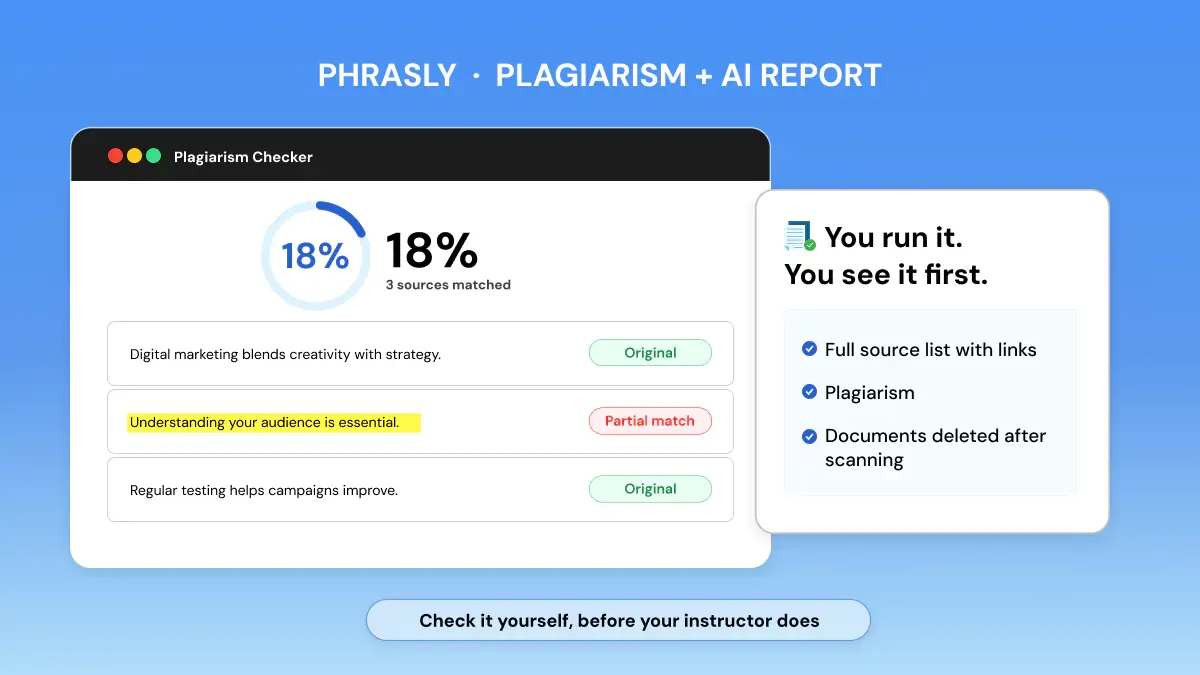
Scans are $5 each or $20/mo for 20,000 words, and the checker comes included with Humanizer plans.
FAQs
What is the best alternative to SafeAssign?
Phrasly. It's the strongest all-round self-serve option at $5 per scan or $20/mo, with a plagiarism checker you can run yourself anytime and an AI Detector on the same platform. Scribbr is the pick when you need a Turnitin-powered result.
Is there a completely free SafeAssign alternative?
Only with limits. Quetext's free tier checks up to 1,000 words per plagiarism scan, Scribbr's free check covers 125 words, and Copyleaks offers small separate allowances for AI and plagiarism. Every uncapped, full-document plagiarism scan is paid, whichever tool you pick.
Can I use Turnitin on my own instead of SafeAssign?
Not directly. Turnitin has no consumer signup; access comes through your institution. Scribbr licenses Turnitin's technology for individuals, which is the closest self-serve route. Our guide on how to check plagiarism in Turnitin covers the institutional path.
Will an alternative show the same score SafeAssign gives?
No. Every checker scans a different database, so percentages will differ between tools. Use an alternative to find and fix real issues, missing citations, heavy paraphrase, unquoted matches, rather than to predict the exact number SafeAssign will print.
Is it cheating to check my paper before submitting?
No. Self-checking a draft to catch missing citations and fix them supports academic integrity; it's the same reason instructors sometimes enable draft checks. What crosses the line is using tools to disguise copied or AI-written work instead of fixing it.
Is there a SafeAssign app or download I can install?
No. SafeAssign exists only inside Blackboard, with nothing to download or install. Any website or app offering a standalone "SafeAssign checker" is not SafeAssign and has no access to it; treat those as lookalikes and use a legitimate self-serve checker instead.


Keep reading

12 Types of Plagiarism Explained (With Real Examples)
Learn the 12 types of plagiarism with real examples, understand the consequences, and discover practical ways to avoid academic mistakes before you submit your work.
How Can You Prevent Plagiarism? 10 Proven Strategies for Students (2026)
Learn how to prevent plagiarism with 10 practical strategies, including proper citation, paraphrasing, note-taking, and plagiarism checking, to submit original work with confidence.